ECO mode HONDA RIDGELINE 2017 2.G Owners Manual
[x] Cancel search | Manufacturer: HONDA, Model Year: 2017, Model line: RIDGELINE, Model: HONDA RIDGELINE 2017 2.GPages: 606, PDF Size: 13.21 MB
Page 320 of 606
319
uuCustomized Features u
Continued
Features
*1:Default SettingSetup
Group Customizable Features Descri
ption Selectable Settings
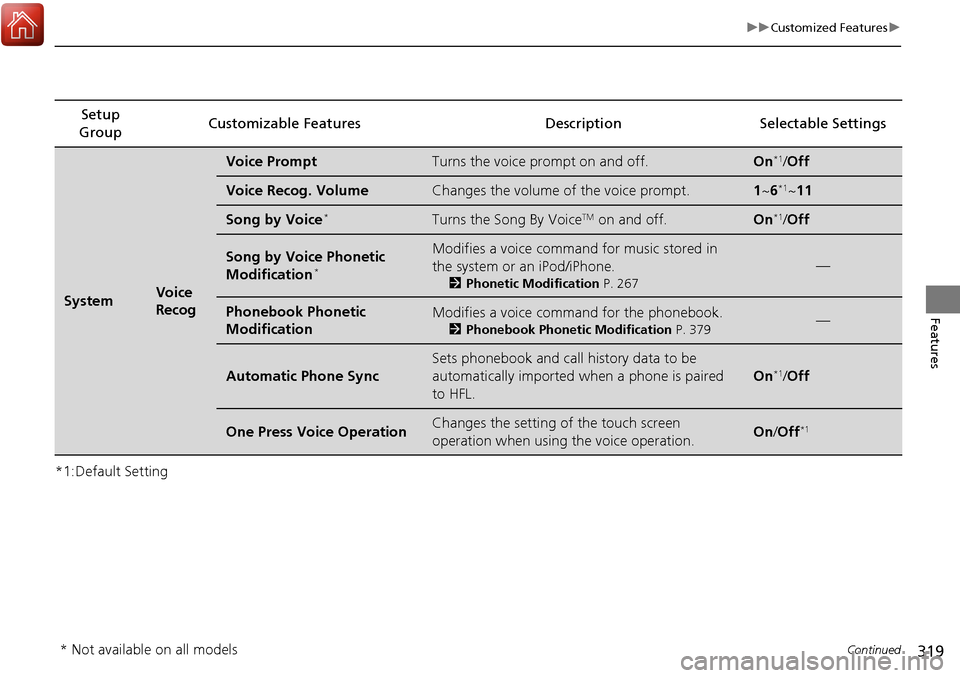
SystemVoice
Recog
Voice PromptTurns the voice prompt on and off.On*1/Off
Voice Recog. VolumeChanges the volume of the voice prompt.1 ~6*1~11
Song by Voice*Turns the Song By VoiceTM on and off.On*1/Off
Song by Voice Phonetic
Modification*
Modifies a voice command for music stored in
the system or an iPod/iPhone.
2 Phonetic Modification P. 267
—
Phonebook Phonetic
ModificationModifies a voice command for the phonebook.
2Phonebook Phonetic Modification P. 379—
Automatic Phone Sync
Sets phonebook and call history data to be
automatically imported when a phone is paired
to HFL.
On*1/Off
One Press Voice OperationChanges the setting of the touch screen
operation when using the voice operation.On/Off*1
* Not available on all models
Page 324 of 606
323
uuCustomized Features u
Continued
Features
*1:Default SettingSetup
Group Customizable Features Description Selectable Settings
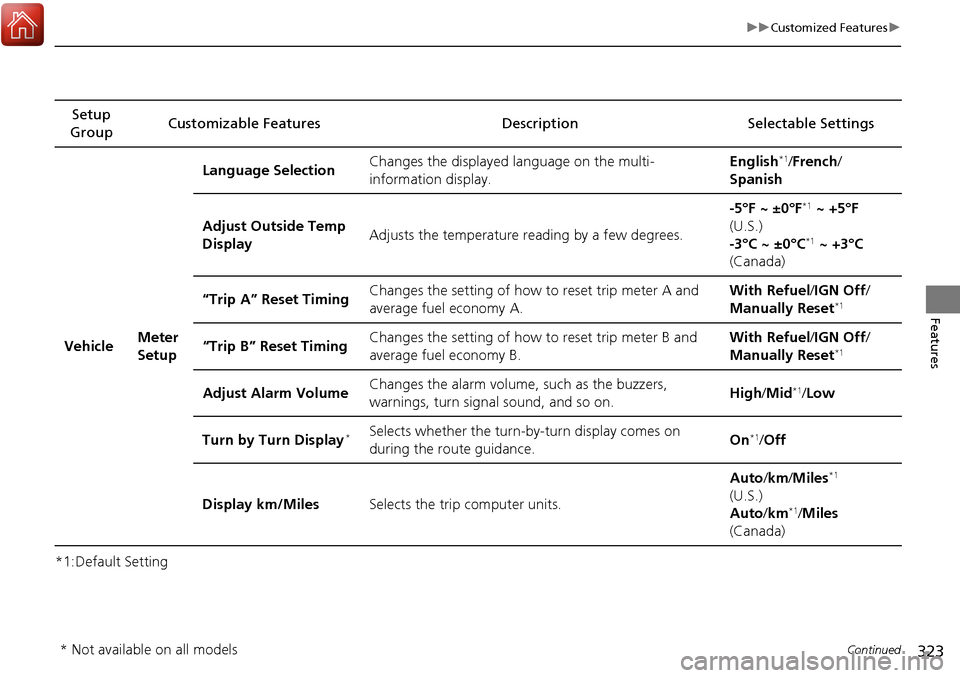
Vehicle Meter
SetupLanguage Selection
Changes the displayed language on the multi-
information display. English
*1/
French /
Spanish
Adjust Outside Temp
Display Adjusts the temperature reading by a few degrees. -5°F ~ ±0°F
*1
~ +5°F
(U.S.)
-3°C ~ ±0°C
*1 ~ +3°C
(Canada)
“Trip A” Reset Timing Changes the setting of how to reset trip meter A and
average fuel economy A. With Refuel
/IGN Off /
Manually Reset
*1
“Trip B” Reset Timing Changes the setting of how to reset trip meter B and
average fuel economy B. With Refuel
/IGN Off /
Manually Reset*1
Adjust Alarm Volume Changes the alarm volume, such as the buzzers,
warnings, turn signal sound, and so on. High
/Mid*1/Low
Turn by Turn Display
*Selects whether the turn-by-turn display comes on
during the route guidance. On*1/
Off
Display km/Miles Selects the trip computer units. Auto
/km /Miles
*1
(U.S.)
Auto /km*1/Miles
(Canada)
* Not available on all models
Page 332 of 606
331
uuCustomized Features u
Continued
Features
*1:Default SettingSetup
Group Customizable Featur
es Description Selectable Settings
Camera
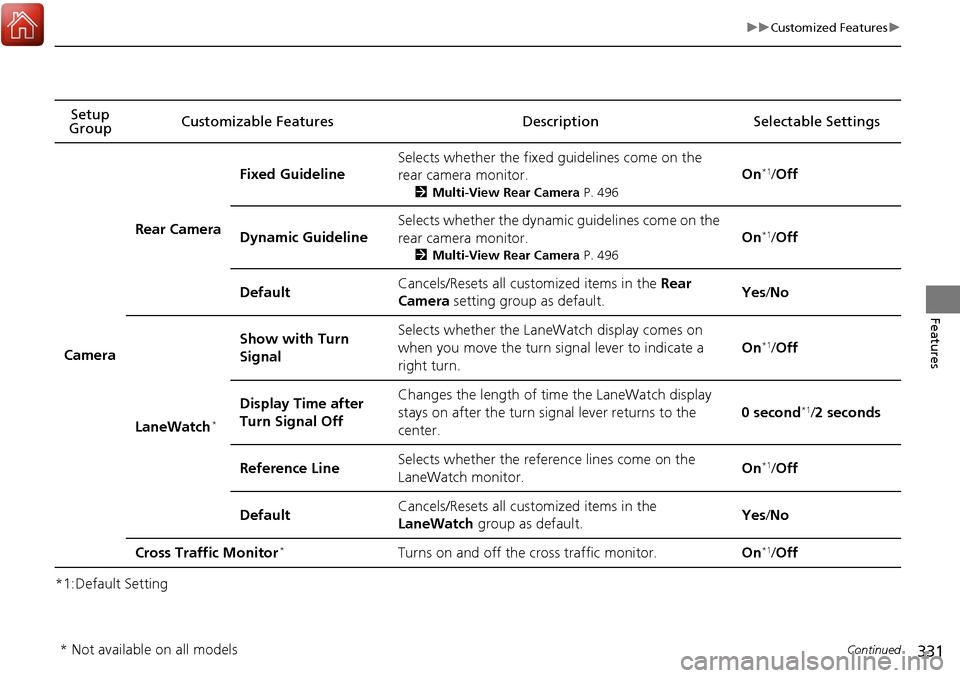
Rear Camera
Fixed Guideline
Selects whether the fixed guidelines come on the
rear camera monitor.
2Multi-View Rear Camera P. 496
On*1/Off
Dynamic Guideline
Selects whether the dynamic guidelines come on the
rear camera monitor.
2 Multi-View Rear Camera P. 496
On*1/Off
DefaultCancels/Resets all customized items in the Rear
Camera setting group as default.Yes /No
LaneWatch*
Show with Turn
SignalSelects whether the LaneWatch display comes on
when you move the turn signal lever to indicate a
right turn.
On*1/ Off
Display Time after
Turn Signal OffChanges the length of time the LaneWatch display
stays on after the turn signal lever returns to the
center.
0 second*1/2 seconds
Reference LineSelects whether the reference lines come on the
LaneWatch monitor.On*1/ Off
DefaultCancels/Resets all customized items in the
LaneWatch group as default.Yes/No
Cross Traffic Monitor*Turns on and off the cross traffic monitor.On*1/ Off
* Not available on all models
Page 334 of 606
333
uuCustomized Features uDefaulting All the Settings
Features
Defaulting All the Settings
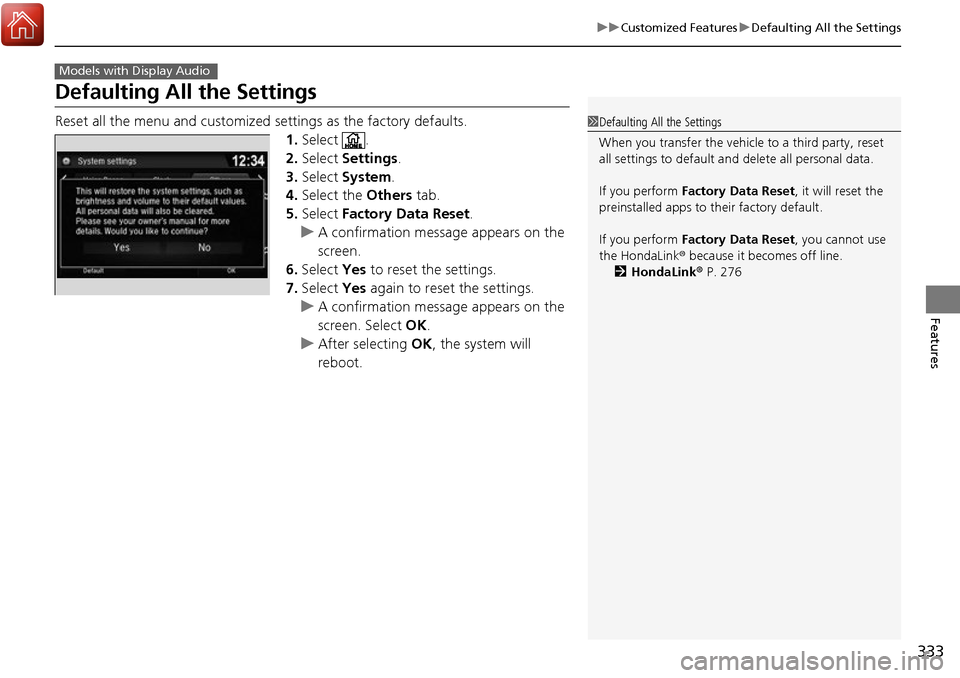
Reset all the menu and customized settings as the factory defaults.
1.Select .
2. Select Settings .
3. Select System.
4. Select the Others tab.
5. Select Factory Data Reset .
u A confirmation message appears on the
screen.
6. Select Yes to reset the settings.
7. Select Yes again to reset the settings.
u A confirmation message appears on the
screen. Select OK.
u After selecting OK, the system will
reboot.
Models with Display Audio
1 Defaulting All the Settings
When you transfer the vehicle to a third party, reset
all settings to default a nd delete all personal data.
If you perform Factory Data Reset , it will reset the
preinstalled apps to their factory default.
If you perform Factory Data Reset , you cannot use
the HondaLink ® because it becomes off line.
2 HondaLink® P. 276
Page 336 of 606
335
uuHomeLink ® Universal Transceiver*u Training HomeLink
Continued
Features
Training HomeLink
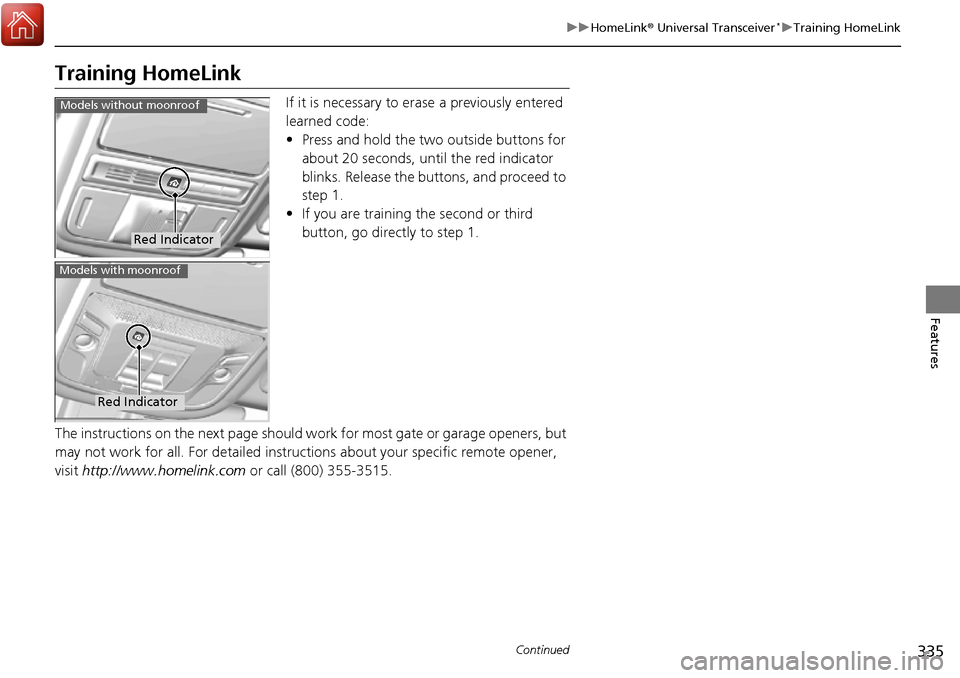
If it is necessary to er ase a previously entered
learned code:
• Press and hold the two outside buttons for
about 20 seconds, until the red indicator
blinks. Release the bu ttons, and proceed to
step 1.
• If you are training the second or third
button, go directly to step 1.
The instructions on the next page should work for most gate or garage openers, but
may not work for all. For detailed instructions about your specific remote opener,
visit http://www.homelink.com or call (800) 355-3515.
Red Indicator
Models without moonroof
Red Indicator
Models with moonroof
Page 366 of 606
365
uuBluetooth ® HandsFreeLink ®u HFL Menus
Continued
Features
HFL Menus
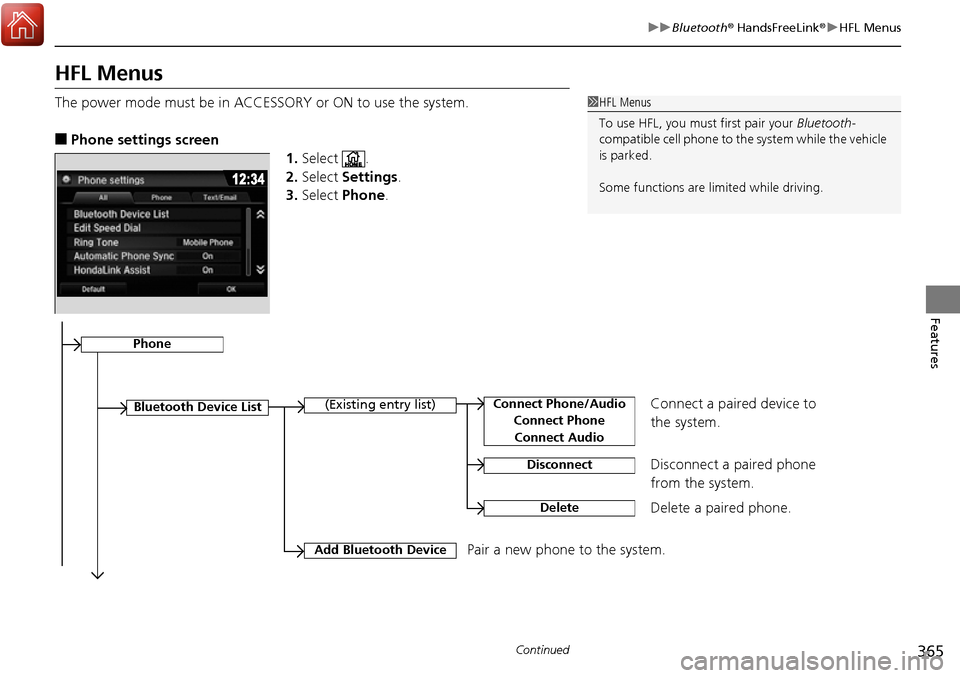
The power mode must be in ACCESSO RY or ON to use the system.
■Phone settings screen
1.Select .
2. Select Settings .
3. Select Phone .
1HFL Menus
To use HFL, you must first pair your Bluetooth-
compatible cell phone to th e system while the vehicle
is parked.
Some functions are li mited while driving.
Disconnect a paired phone
from the system.
Bluetooth Device List(Existing entry list)
Disconnect
DeleteDelete a paired phone.
Add Bluetooth DevicePair a new phone to the system.
Phone
Connect a paired device to
the system.Connect Phone/Audio
Connect PhoneConnect Audio
Page 396 of 606
395
Driving
This chapter discusses driving, refueling, and information on items such as accessories.
Before Driving................................... 396
Towing a Trailer ................................ 404
Off-Highway Driving Guidelines ..... 416
When Driving Starting the Engine .......................... 418
Precautions While Driving................. 424
Automatic Transmission ................... 425
Shifting ............................................ 426
ECON Button ................................... 428
Intelligent Traction Management...... 429
Cruise Control
*................................ 431
Front Sensor Camera*...................... 434Road Departure Mi tigation (RDM)
System*...................................... 436
Adaptive Cruise Control (ACC)*....... 441
Lane Keeping Assist System (LKAS)*.... 454Vehicle Stability Assist (VSA ®), aka Electronic
Stability Control (ESC), System ............. 462
Agile Handling Assist System............ 464
i-VTM4 (Intelligent Variable Torque
Management)-4 ® System
*.............. 465
TPMS with Tire Fill Assist .................. 466
Tire Pressure Monitoring System (TPMS) -
Required Federal Explanation ......... 468
Blind spot inform ation (BSI) System
*.... 470
LaneWatchTM*.................................. 472 Braking
Brake System ................................... 474
Anti-lock Brake System (ABS) ........... 476
Brake Assist System ......................... 477
Collision Mitigation Braking System
TM
(CMBSTM)*..................................... 478
Parking Your Vehicle When Stopped ................................ 487
Parking Sensor System
*................... 488
Cross Traffic Monitor*..................... 492
Multi-View Rear Camera .................. 496
Refueling Fuel Information .............................. 498
How to Refuel ................................. 499
Fuel Economy and CO
2 Emissions .... 501
* Not available on all models
Page 407 of 606
406
uuTowing a Trailer uTowing Preparation
Driving
■To estimate the tongue load
Excessive tongue load reduces front tire traction and steering control. Too little
tongue load can make the trailer unstable and cause it to sway.
You can estimate the tongue load by meas uring the trailer hitch height from the
ground in the following steps:
1. Park the vehicle on level ground.
2. Measure the distance between the ground and the bottom of the trailer hitch.
3. Connect the fully loaded trailer to the hitch.
4. Measure the distance between the ground and the bottom of the trailer hitch
again.
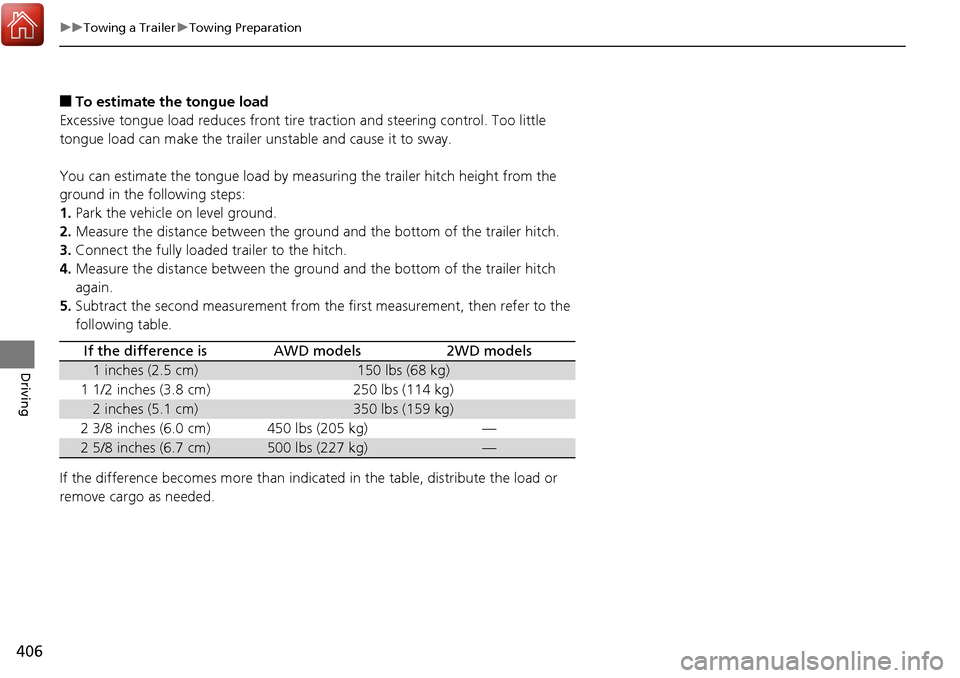
5. Subtract the second measurement from th e first measurement, then refer to the
following table.
If the difference becomes more than indicated in the table, distribute the load or
remove cargo as needed.
If the difference isAWD models2WD models
1 inches (2.5 cm)150 lbs (68 kg)
1 1/2 inches (3.8 cm)250 lbs (114 kg)
2 inches (5.1 cm)350 lbs (159 kg)
2 3/8 inches (6.0 cm)450 lbs (205 kg)—
2 5/8 inches (6.7 cm)500 lbs (227 kg)—
Page 409 of 606
uuTowing a Trailer uTowing Preparation
408
Driving
Towing generally requires a variety of supplemental equipment.
To ensure the best quality, we recommend that you purchase Honda equipment
whenever possible.
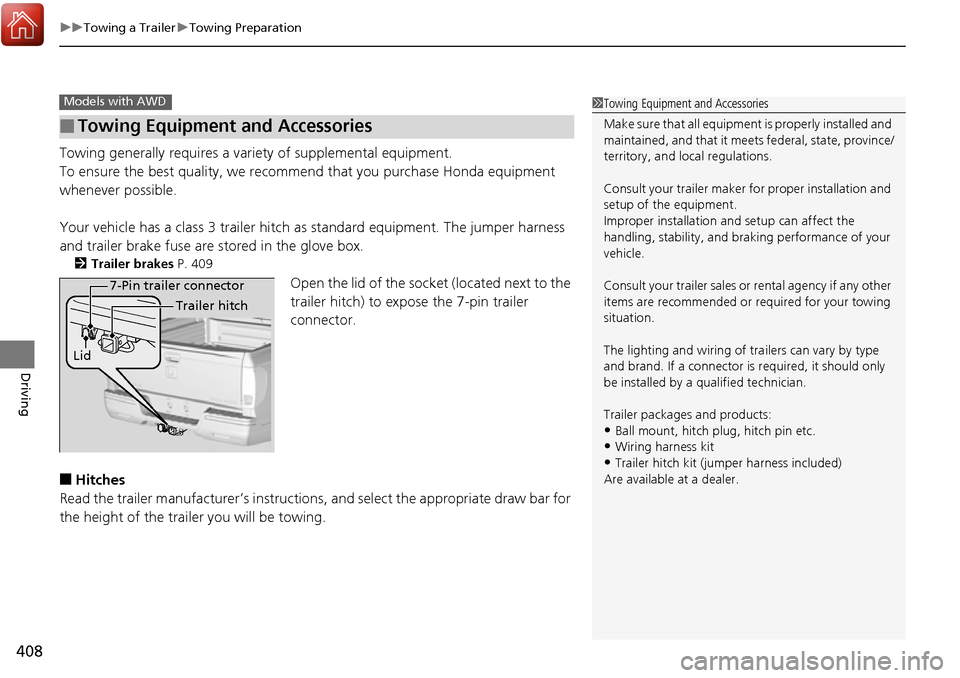
Your vehicle has a class 3 trailer hitch as standard equipment. The jumper harness
and trailer brake fuse are stored in the glove box.
2 Trailer brakes P. 409
Open the lid of the socket (located next to the
trailer hitch) to expose the 7-pin trailer
connector.
■Hitches
Read the trailer manufacturer’s instructions , and select the appropriate draw bar for
the height of the trailer you will be towing.
■Towing Equipment and Accessories
Models with AWD1 Towing Equipment and Accessories
Make sure that all equipment is properly installed and
maintained, and that it meets federal, state, province/
territory, and lo cal regulations.
Consult your trai ler maker for prope r installation and
setup of the equipment.
Improper installation and setup can affect the
handling, stability, and br aking performance of your
vehicle.
Consult your traile r sales or rental agency if any other
items are recommended or required for your towing
situation.
The lighting and wiring of tra ilers can vary by type
and brand. If a connector is required, it should only
be installed by a qua lified technician.
Trailer packages and products:
•Ball mount, hitch plug, hitch pin etc.•Wiring harness kit
•Trailer hitch kit (jum per harness included)
Are available at a dealer.
7-Pin trailer connector
Lid Trailer hitch
Page 419 of 606
418
Driving
When Driving
Starting the Engine
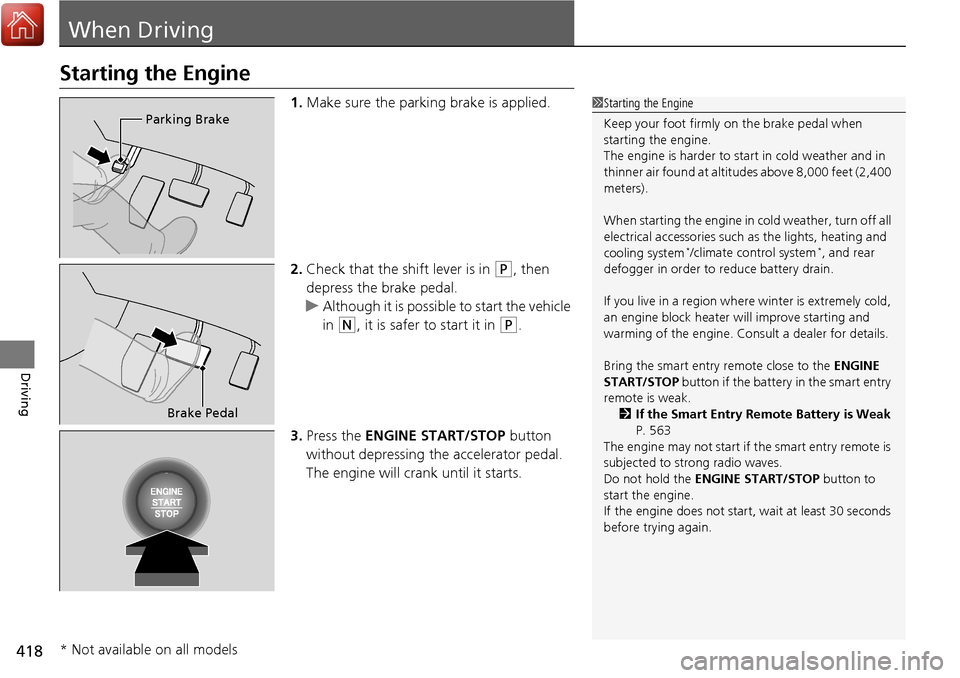
1.Make sure the parking brake is applied.
2. Check that the shift lever is in
(P, then
depress the brake pedal.
u Although it is possible to start the vehicle
in
(N, it is safer to start it in (P.
3. Press the ENGINE START/STOP button
without depressing the accelerator pedal.
The engine will crank until it starts.
1 Starting the Engine
Keep your foot firmly on the brake pedal when
starting the engine.
The engine is harder to st art in cold weather and in
thinner air found at altitudes above 8,000 feet (2,400
meters).
When starting the engine in cold weather, turn off all
electrical accessories such as the lights, heating and
cooling system
*/climate control system*, and rear
defogger in order to reduce battery drain.
If you live in a region where winter is extremely cold,
an engine block heater will improve starting and
warming of the engine. Cons ult a dealer for details.
Bring the smart entry remote close to the ENGINE
START/STOP button if the battery in the smart entry
remote is weak.
2 If the Smart Entry Remote Battery is Weak
P. 563
The engine may not start if the smart entry remote is
subjected to strong radio waves.
Do not hold the ENGINE START/STOP button to
start the engine.
If the engine does not start, wait at least 30 seconds
before trying again.
Parking Brake
Brake Pedal
* Not available on all models