Navigation HONDA RIDGELINE 2017 2.G User Guide
[x] Cancel search | Manufacturer: HONDA, Model Year: 2017, Model line: RIDGELINE, Model: HONDA RIDGELINE 2017 2.GPages: 606, PDF Size: 13.21 MB
Page 236 of 606
Continued235
uuAudio System Basic Operation uAudio/Information Screen
Features
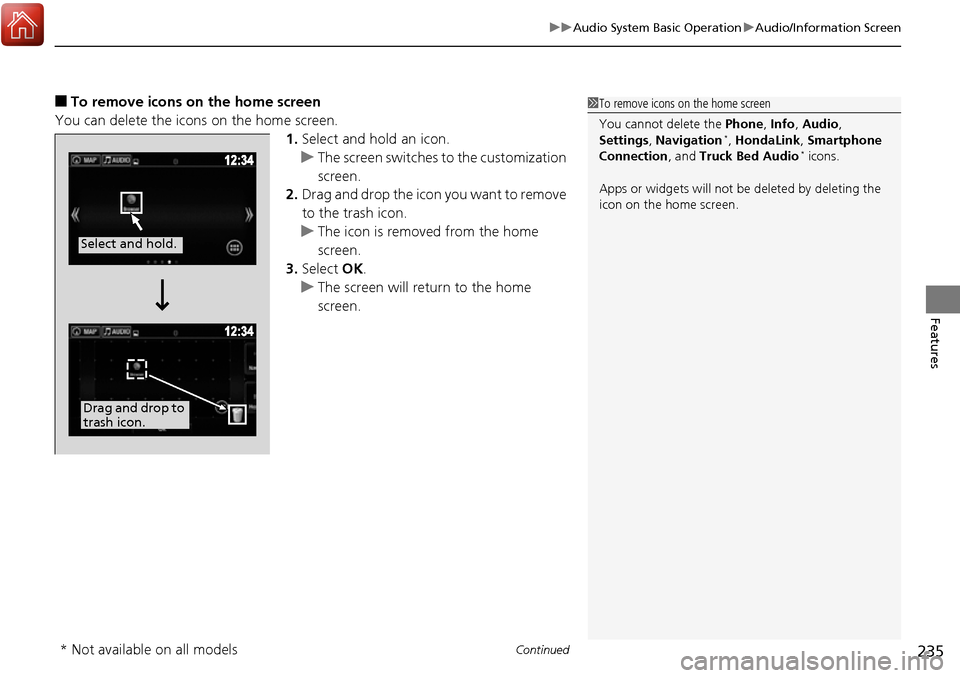
■To remove icons on the home screen
You can delete the icons on the home screen. 1.Select and hold an icon.
u The screen switches to the customization
screen.
2. Drag and drop the icon you want to remove
to the trash icon.
u The icon is removed from the home
screen.
3. Select OK.
u The screen will return to the home
screen.1To remove icons on the home screen
You cannot delete the Phone, Info, Audio ,
Settings , Navigation
*, HondaLink, Smartphone
Connection , and Truck Bed Audio* icons.
Apps or widgets will not be deleted by deleting the
icon on the home screen.
Select and hold.
Drag and drop to
trash icon.
* Not available on all models
Page 245 of 606
244
uuAudio System Basic Operation uVoice Control Operation
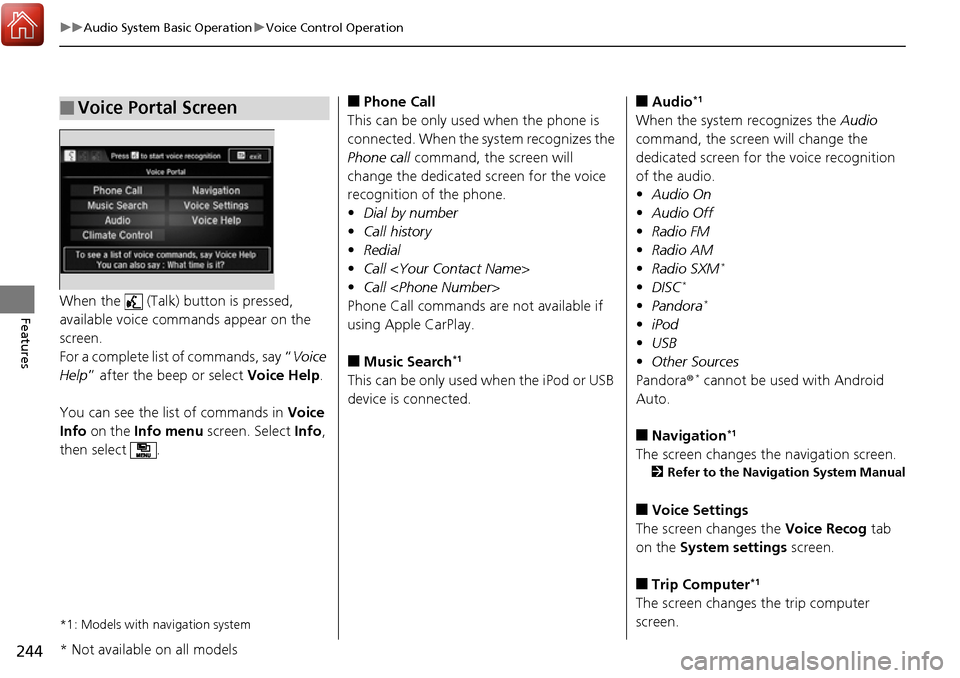
FeaturesWhen the (Talk) button is pressed,
available voice commands appear on the
screen.
For a complete list of commands, say “ Voice
Help ” after the beep or select Voice Help.
You can see the list of commands in Voice
Info on the Info menu screen. Select Info,
then select .
*1: Models with navigation system
■Voice Portal Screen■Phone Call
This can be only used when the phone is
connected. When the sy stem recognizes the
Phone call command, the screen will
change the dedicated screen for the voice
recognition of the phone.
• Dial by number
• Call history
• Redial
• Call
• Call
Phone Call commands are not available if
using Apple CarPlay.
■Music Search*1
This can be only used when the iPod or USB
device is connected.
■Audio*1
When the system recognizes the Audio
command, the screen will change the
dedicated screen for the voice recognition
of the audio.
• Audio On
• Audio Off
• Radio FM
• Radio AM
• Radio SXM
*
•DISC*
•Pandora*
•iPod
• USB
• Other Sources
Pandora ®
* cannot be used with Android
Auto.
■Navigation*1
The screen changes the navigation screen.
2 Refer to the Navigation System Manual
■Voice Settings
The screen changes the Voice Recog tab
on the System settings screen.
■Trip Computer*1
The screen changes the trip computer
screen.
* Not available on all models
Page 247 of 606
246
uuAudio System Basic Operation uVoice Control Operation
Features
■AUX-Audio commands
• AUX audio play
When On Screen Commands is selected,
the explanation screen is displayed.
The system accepts these commands on the
Music Search screen.
■Using Song By Voice
Song By VoiceTM is a feature that allows you
to select music from your iPod or USB device
using Voice Commands. To activate this
mode, you must push the talk switch and
say: “ Music search ”.
■Song By Voice Commands
• What am I listening to?
• Who am I listening to?
• Who is this?
• What’s playing?
• Who’s playing?
• What album is this?
*1: Models with navigation system
■On Screen Commands
■Music Search Commands*1
■Play Commands
• Play artist
• Play track/song
• Play album
• Play genre/category
• Play playlist
• Play composer
■List Commands
• List artist
• List album
• List genre/category
• List playlist
• List composer
• What time is it?
• What is today’s date?
■General Commands
•Climate Control on
• Climate Control off
• Fan Speed <1-7>
• Temperature max heat
• Temperature max cool
• Temperature <57-87> degrees
• Defrost on
• Defrost off
• Air conditioner on
• Air conditioner off
• More
• Climate control automatic
• Vent
• Dash and floor
• Fan speed up
• Fan speed down
• Floor vents
• Floor and defrost
• Temperature up
• Temperature down
■Climate Control Commands*1
Page 266 of 606
265
uuAudio System Basic Operation uSong By VoiceTM (SBV)
Continued
Features
Song By VoiceTM (SBV)
Use SBV to search for and play music from your USB flash drive or iPod using voice
commands.
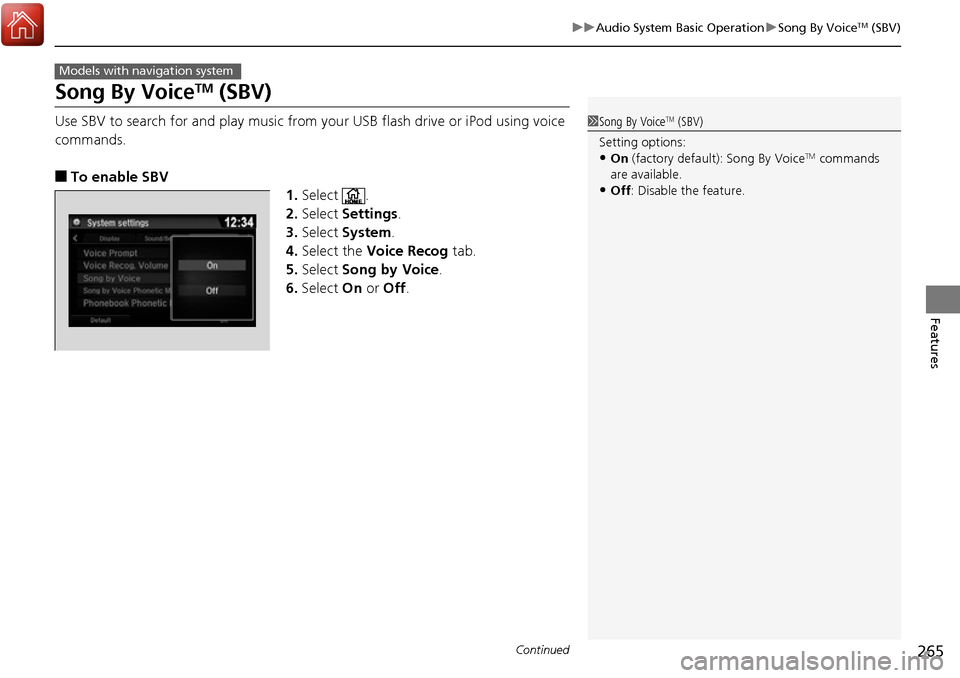
■To enable SBV
1.Select .
2. Select Settings .
3. Select System.
4. Select the Voice Recog tab.
5. Select Song by Voice .
6. Select On or Off .
Models with navigation system
1Song By VoiceTM (SBV)
Setting options:
•On (factory default): Song By VoiceTM commands
are available.
•Off : Disable the feature.
Page 277 of 606
276
uuAudio System Basic Operation uHondaLink ®
Features
HondaLink ®
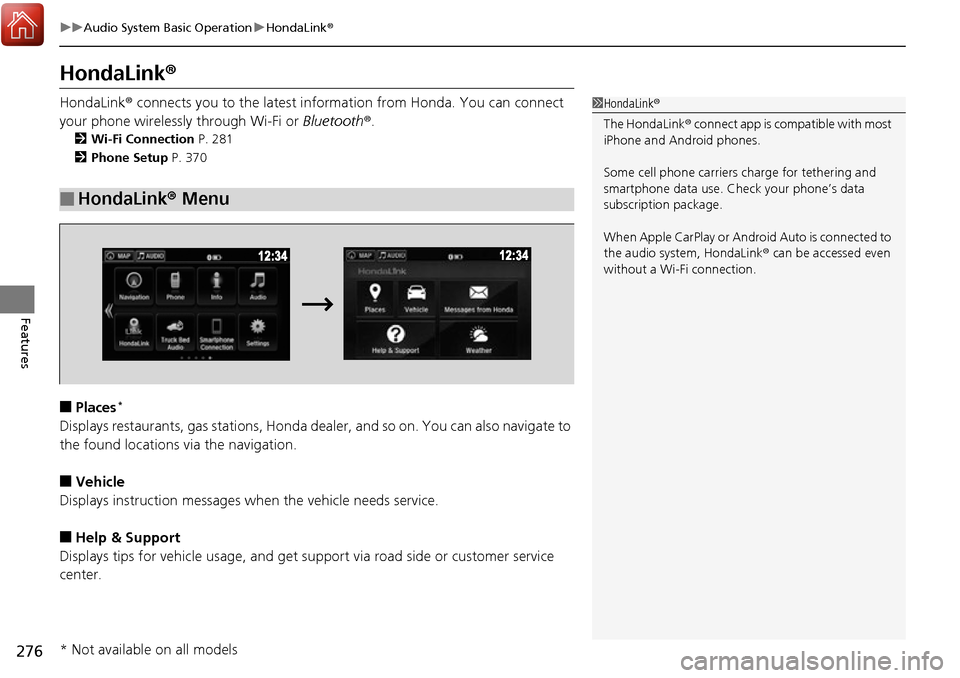
HondaLink® connects you to the latest information from Honda. You can connect
your phone wirelessly through Wi-Fi or Bluetooth®.
2Wi-Fi Connection P. 281
2 Phone Setup P. 370
■Places*
Displays restaurants, gas stations, Honda dealer, and so on. You can also navigate to
the found locations via the navigation.
■Vehicle
Displays instruction messages wh en the vehicle needs service.
■Help & Support
Displays tips for vehicle usage, and get support via road side or customer service
center.
■HondaLink® Menu
1HondaLink ®
The HondaLink ® connect app is compatible with most
iPhone and Android phones.
Some cell phone carriers charge for tethering and
smartphone data use. Check your phone’s data
subscription package.
When Apple CarPlay or Android Auto is connected to
the audio system, HondaLink® can be accessed even
without a Wi-Fi connection.
* Not available on all models
Page 285 of 606
284
uuAudio System Basic Operation uApple CarPlay
Features
Apple CarPlay
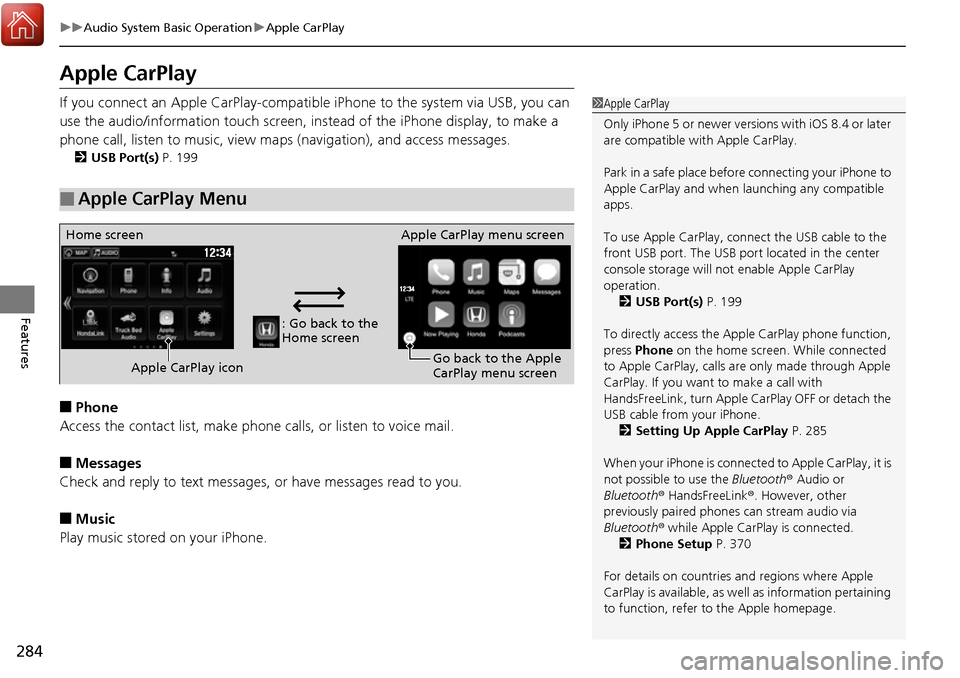
If you connect an Apple CarPlay-compatible iPhone to the system via USB, you can
use the audio/information t ouch screen, instead of the iPhone display, to make a
phone call, listen to music, view ma ps (navigation), and access messages.
2USB Port(s) P. 199
■Phone
Access the contact list, make phon e calls, or listen to voice mail.
■Messages
Check and reply to text messages, or have messages read to you.
■Music
Play music stored on your iPhone.
■Apple CarPlay Menu
1 Apple CarPlay
Only iPhone 5 or newer versions with iOS 8.4 or later
are compatible with Apple CarPlay.
Park in a safe place before connecting your iPhone to
Apple CarPlay and when launching any compatible
apps.
To use Apple CarPlay, connect the USB cable to the
front USB port. The USB por t located in the center
console storage will not enable Apple CarPlay
operation.
2 USB Port(s) P. 199
To directly access the Apple CarPlay phone function,
press Phone on the home screen. While connected
to Apple CarPlay, calls are only made through Apple
CarPlay. If you want to make a call with
HandsFreeLink, turn Apple CarPlay OFF or detach the
USB cable from your iPhone. 2 Setting Up Apple CarPlay P. 285
When your iPhone is connected to Apple CarPlay, it is
not possible to use the Bluetooth ® Audio or
Bluetooth ® HandsFreeLink ®. However, other
previously paired phones can stream audio via
Bluetooth ® while Apple CarPlay is connected.
2 Phone Setup P. 370
For details on c ountries and regions where Apple
CarPlay is available, as well as information pertaining
to function, refer to the Apple homepage.
: Go back to the
Home screen
Home screen
Apple CarPlay icon Apple CarPlay menu screen
Go back to the Apple
CarPlay menu screen
Page 286 of 606
Continued285
uuAudio System Basic Operation uApple CarPlay
Features
■Maps
Display Apple CarPlay map and use the navigation function just as you would on
your iPhone.
Only one navigation system (pre-installed navigation or Apple CarPlay) can give
directions at a time. When you are using one system, directions to any prior
destination set on the other system will be canceled, and the system you are
currently using will direct you to your destination.
After you have connected your iPhone to the system via USB, use the following
procedure to set up Apple CarPlay. Us e of Apple CarPlay will result in the
transmission of certain user and vehicle in formation (such as vehicle location, speed,
and status) to your iPhone to enhance th e Apple CarPlay experience. You will need
to consent to the sharing of this in formation on the Display Audio Screen.
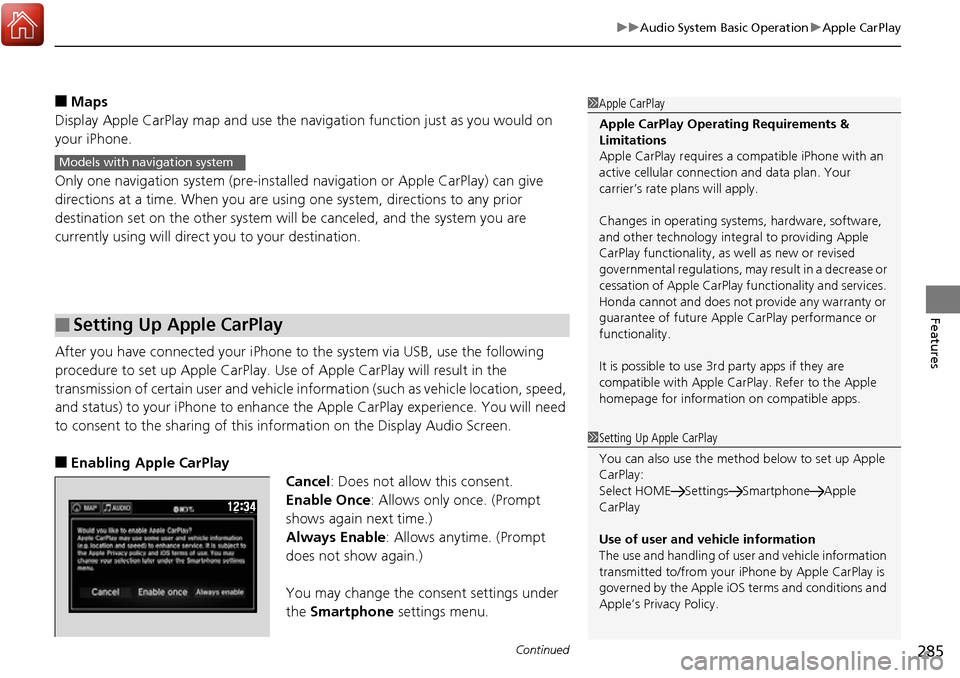
■Enabling Apple CarPlay
Cancel: Does not allow this consent.
Enable Once: Allows only once. (Prompt
shows again next time.)
Always Enable: Allows anytime. (Prompt
does not show again.)
You may change the consent settings under
the Smartphone settings menu.
■Setting Up Apple CarPlay
1Apple CarPlay
Apple CarPlay Operating Requirements &
Limitations
Apple CarPlay requires a co mpatible iPhone with an
active cellular connecti on and data plan. Your
carrier’s rate plans will apply.
Changes in operating system s, hardware, software,
and other technology integr al to providing Apple
CarPlay functionality, as well as new or revised
governmental regulations, may result in a decrease or
cessation of Apple CarPlay functionality and services.
Honda cannot and does not provide any warranty or
guarantee of future Appl e CarPlay performance or
functionality.
It is possible to use 3r d party apps if they are
compatible with Apple CarPlay. Refer to the Apple
homepage for information on compatible apps.
Models with navigation system
1 Setting Up Apple CarPlay
You can also use the method below to set up Apple
CarPlay:
Select HOME Settings Smartphone Apple
CarPlay
Use of user and vehicle information
The use and handling of user and vehicle information
transmitted to/from your iP hone by Apple CarPlay is
governed by the Apple iOS terms and conditions and
Apple’s Privacy Policy.
Page 288 of 606
287
uuAudio System Basic Operation uAndroid Auto
Continued
Features
Android Auto
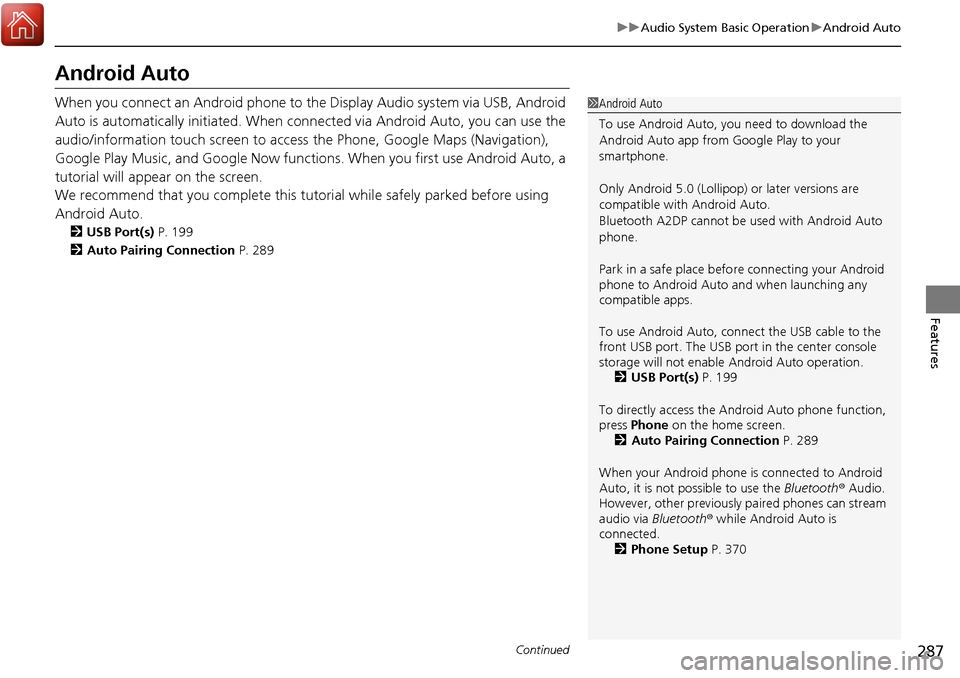
When you connect an Android phone to the Display Audio system via USB, Android
Auto is automatically initiated. When connected via Android Auto, you can use the
audio/information touch screen to access the Phone, Google Maps (Navigation),
Google Play Music, and Google Now functions. When you first use Android Auto, a
tutorial will appear on the screen.
We recommend that you complete this tuto rial while safely parked before using
Android Auto.
2 USB Port(s) P. 199
2 Auto Pairing Connection P. 289
1Android Auto
To use Android Auto, you need to download the
Android Auto app from Google Play to your
smartphone.
Only Android 5.0 (Lollipop) or later versions are
compatible with Android Auto.
Bluetooth A2DP cannot be used with Android Auto
phone.
Park in a safe place befo re connecting your Android
phone to Android Auto and when launching any
compatible apps.
To use Android Auto, connect the USB cable to the
front USB port. The USB port in the center console
storage will not enable Android Auto operation.
2 USB Port(s) P. 199
To directly access the Android Auto phone function,
press Phone on the home screen.
2 Auto Pairing Connection P. 289
When your Android phone is connected to Android
Auto, it is not possible to use the Bluetooth® Audio.
However, other previously paired phones can stream
audio via Bluetooth ® while Android Auto is
connected. 2 Phone Setup P. 370
Page 289 of 606
uuAudio System Basic Operation uAndroid Auto
288
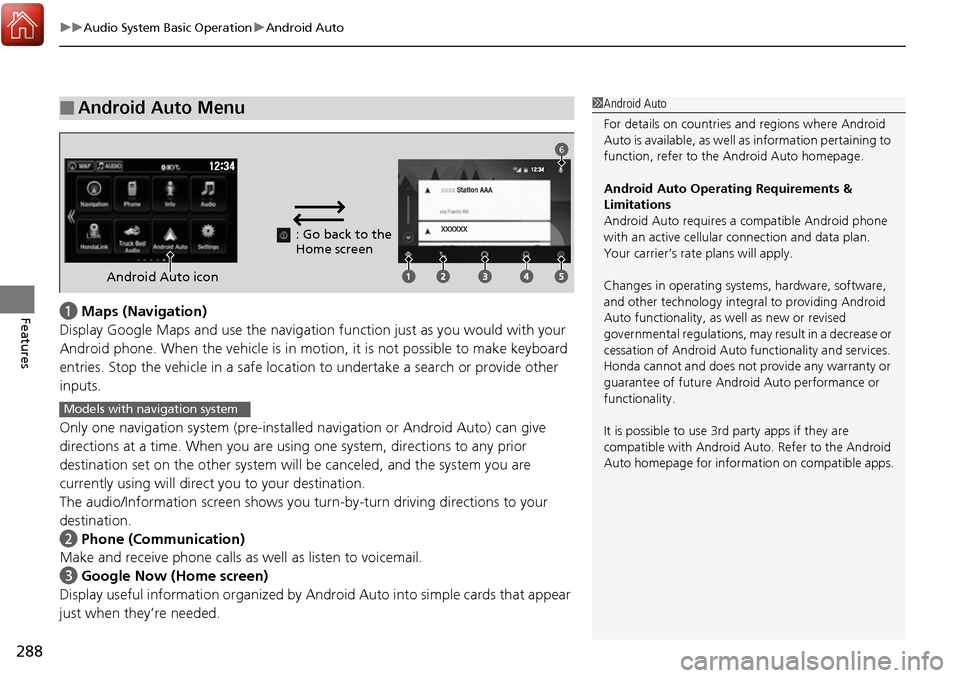
Featuresa Maps (Navigation)
Display Google Maps and use the navigation function just as you would with your
Android phone. When the vehicle is in motion, it is not possi ble to make keyboard
entries. Stop the vehicle in a safe location to undertake a search or provide other
inputs.
Only one navigation system (pre-installe d navigation or Android Auto) can give
directions at a time. When you are using one system, directions to any prior
destination set on the other system will be canceled, and the system you are
currently using will direct you to your destination.
The audio/Information screen shows you tu rn-by-turn driving directions to your
destination.
b Phone (Communication)
Make and receive phone calls as well as listen to voicemail.
c Google Now (Home screen)
Display useful information organized by Andr oid Auto into simple cards that appear
just when they’re needed.
■Android Auto Menu1 Android Auto
For details on c ountries and regions where Android
Auto is available, as well as information pertaining to
function, refer to the Android Auto homepage.
Android Auto Operating Requirements &
Limitations
Android Auto requires a compatible Android phone
with an active cellular connection and data plan.
Your carrier’s rate plans will apply.
Changes in operating system s, hardware, software,
and other technology integr al to providing Android
Auto functionality, as we ll as new or revised
governmental regulations, may result in a decrease or
cessation of Android Auto functionality and services.
Honda cannot and does not provide any warranty or
guarantee of future Android Auto performance or
functionality.
It is possible to use 3r d party apps if they are
compatible with Android Auto. Refer to the Android
Auto homepage for information on compatible apps.
: Go back to the
Home screen
Android Auto icon
6
Models with navigation system
Page 319 of 606
318
uuCustomized Features u
Features
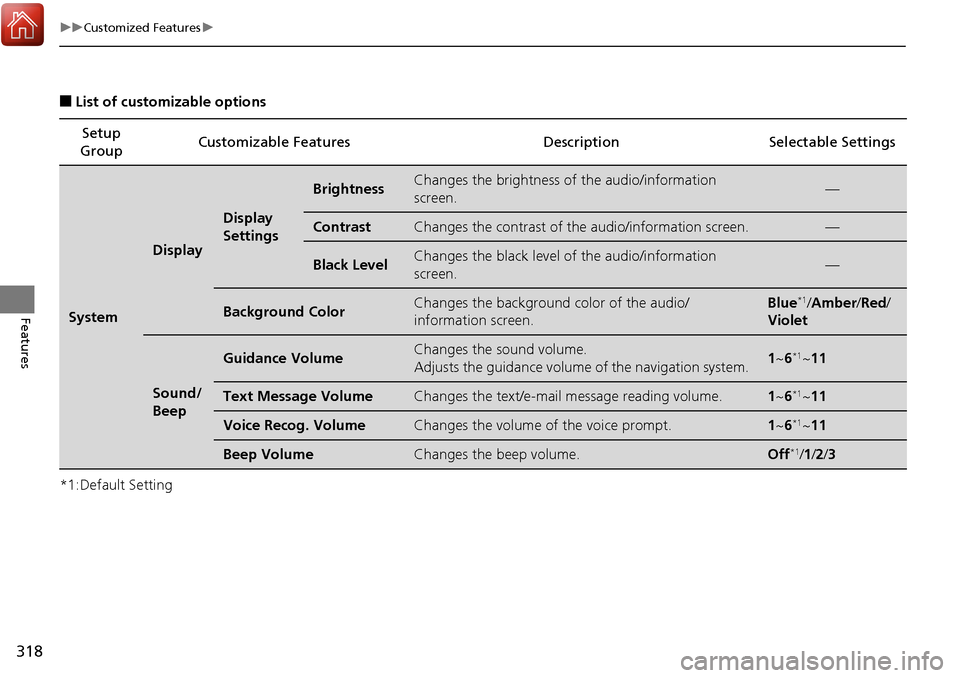
■List of customizable options
*1:Default Setting Setup
Group Customizable Features Description Selectable Settings
System
Display
Display
Settings
BrightnessChanges the brightness of
the audio/information
screen.—
ContrastChanges the contrast of th e audio/information screen.—
Black LevelChanges the black level of the audio/information
screen.—
Background ColorChanges the background color of the audio/
information screen.Blue*1/Amber /Red /
Violet
Sound/
Beep
Guidance VolumeChanges the sound volume.
Adjusts the guidance volume of the navigation system.1 ~6*1~11
Text Message VolumeChanges the text/e-mail message reading volume.1~6*1~11
Voice Recog. VolumeChanges the volume of the voice prompt.1~6*1~11
Beep VolumeChanges the beep volume.Off*1/1 /2 /3