check engine light HONDA RIDGELINE 2017 2.G User Guide
[x] Cancel search | Manufacturer: HONDA, Model Year: 2017, Model line: RIDGELINE, Model: HONDA RIDGELINE 2017 2.GPages: 606, PDF Size: 13.21 MB
Page 477 of 606
476
uuBraking uAnti-lock Brake System (ABS)
Driving
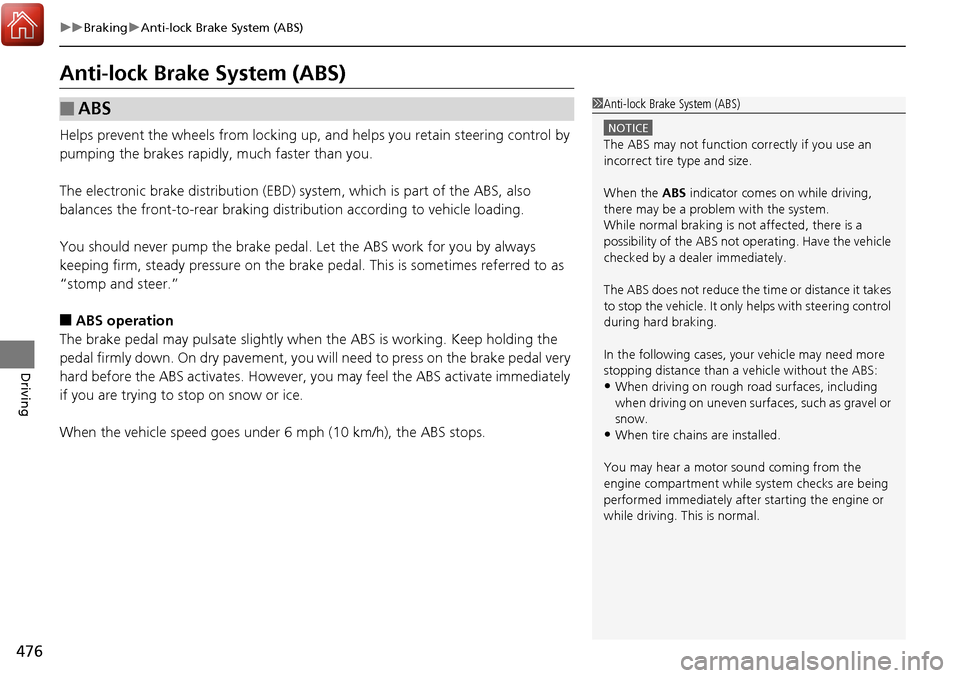
Anti-lock Brake System (ABS)
Helps prevent the wheels from locking up, and helps you retain steering control by
pumping the brakes rapidly, much faster than you.
The electronic brake distribution (EBD) system, which is part of the ABS, also
balances the front-to-rear braking distri bution according to vehicle loading.
You should never pump the brake pedal. Let the ABS work for you by always
keeping firm, steady pressure on the brake pe dal. This is sometimes referred to as
“stomp and steer.”
■ABS operation
The brake pedal may pulsate slightly when the ABS is working. Keep holding the
pedal firmly down. On dry pavement, you w ill need to press on the brake pedal very
hard before the ABS activates. However, you may feel the ABS activate immediately
if you are trying to stop on snow or ice.
When the vehicle speed goes unde r 6 mph (10 km/h), the ABS stops.
■ABS1Anti-lock Brake System (ABS)
NOTICE
The ABS may not function correctly if you use an
incorrect tire type and size.
When the ABS indicator comes on while driving,
there may be a problem with the system.
While normal braking is not affected, there is a
possibility of the ABS not operating. Have the vehicle
checked by a dealer immediately.
The ABS does not reduce the ti me or distance it takes
to stop the vehicle. It only helps with steering control
during hard braking.
In the following cases, yo ur vehicle may need more
stopping distance than a vehicle without the ABS:
•When driving on rough road surfaces, including
when driving on uneven surf aces, such as gravel or
snow.
•When tire chains are installed.
You may hear a motor sound coming from the
engine compartment while system checks are being
performed immediately after starting the engine or
while driving. This is normal.
Page 504 of 606
503
Maintenance
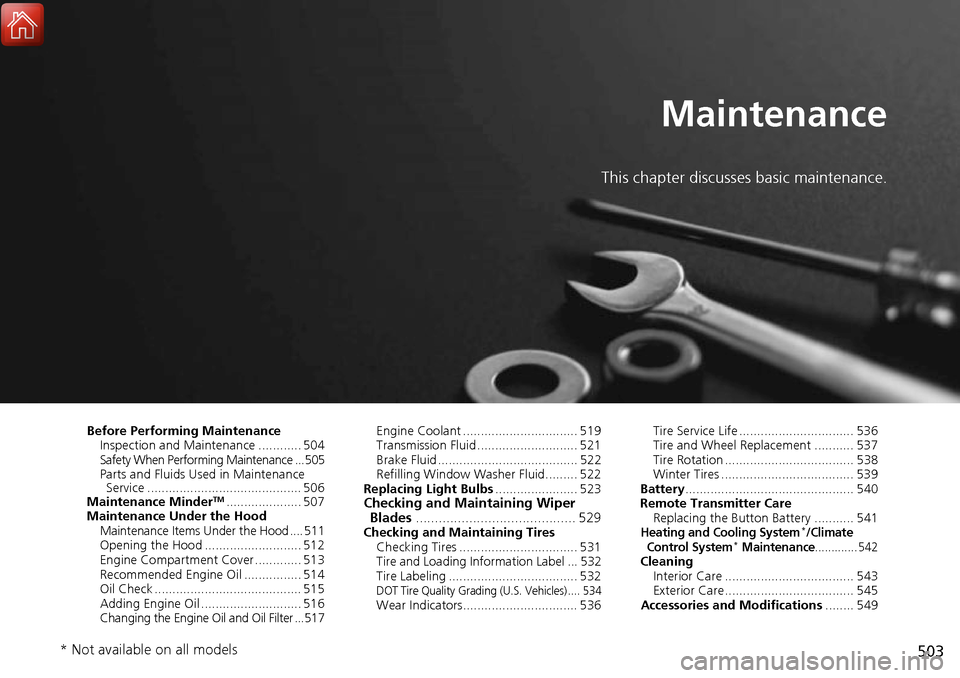
This chapter discusses basic maintenance.
Before Performing MaintenanceInspection and Maintenance ............ 504
Safety When Performing Maintenance ... 505
Parts and Fluids Used in Maintenance Service ........................................... 506
Maintenance Minder
TM..................... 507
Maintenance Under the Hood Maintenance Items Under the Hood .... 511
Opening the Hood ........................... 512
Engine Compartment Cover ............. 513
Recommended Engine Oil ................ 514
Oil Check ......................................... 515
Adding Engine Oil ............................ 516
Changing the Engine Oil and Oil Filter ...517 Engine Coolant ................................ 519
Transmission Fluid ............................ 521
Brake Fluid ....................................... 522
Refilling Window Washer Fluid......... 522
Replacing Light Bulbs ....................... 523Checking and Maintaining Wiper
Blades .......................................... 529
Checking and Maintaining Tires
Checking Tires ................................. 531
Tire and Loading Information Label ... 532
Tire Labeling .................................... 532
DOT Tire Quality Grading (U.S. Vehicles) .... 534Wear Indicators................................ 536 Tire Service Life ................................ 536
Tire and Wheel Replacement ........... 537
Tire Rotation .................................... 538
Winter Tires ..................................... 539
Battery ............................................... 540
Remote Transmitter Care Replacing the Button Battery ........... 541
Heating and Cooling System*/Climate
Control System* Maintenance............. 542Cleaning Interior Care .................................... 543
Exterior Care.................................... 545
Accessories and Modifications ........ 549
* Not available on all models
Page 519 of 606
uuMaintenance Under the Hood uChanging the Engine Oil and Oil Filter
518
Maintenance
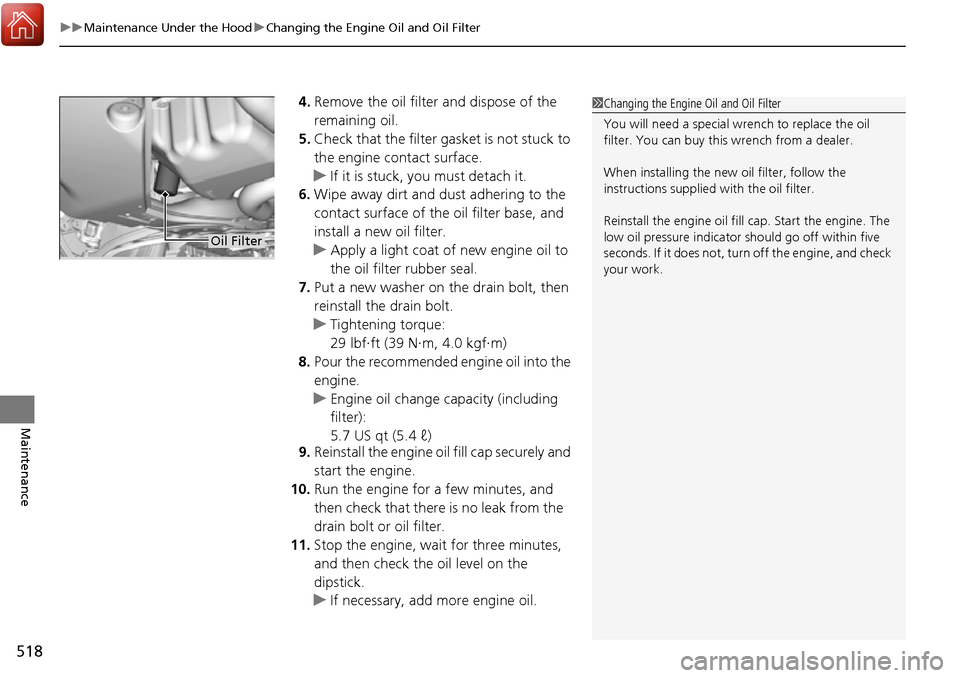
4. Remove the oil filter and dispose of the
remaining oil.
5. Check that the filter ga sket is not stuck to
the engine contact surface.
u If it is stuck, you must detach it.
6. Wipe away dirt and dust adhering to the
contact surface of the oil filter base, and
install a new oil filter.
u Apply a light coat of new engine oil to
the oil filter rubber seal.
7. Put a new washer on the drain bolt, then
reinstall the drain bolt.
u Tightening torque:
29 lbf∙ft (39 N∙m, 4.0 kgf∙m)
8. Pour the recommended engine oil into the
engine.
u Engine oil change capacity (including
filter):
5.7 US qt (5.4 ℓ)
9. Reinstall the engine oil fill cap securely and
start the engine.
10. Run the engine for a few minutes, and
then check that there is no leak from the
drain bolt or oil filter.
11. Stop the engine, wait for three minutes,
and then check the oil level on the
dipstick.
u If necessary, add more engine oil.1Changing the Engine Oil and Oil Filter
You will need a special wrench to replace the oil
filter. You can buy this wrench from a dealer.
When installing the new oil filter, follow the
instructions supplied with the oil filter.
Reinstall the engine oil fill cap. Start the engine. The
low oil pressure indicator should go off within five
seconds. If it does not, turn off the engine, and check
your work.
Oil Filter
Page 563 of 606
562
Handling the Unexpected
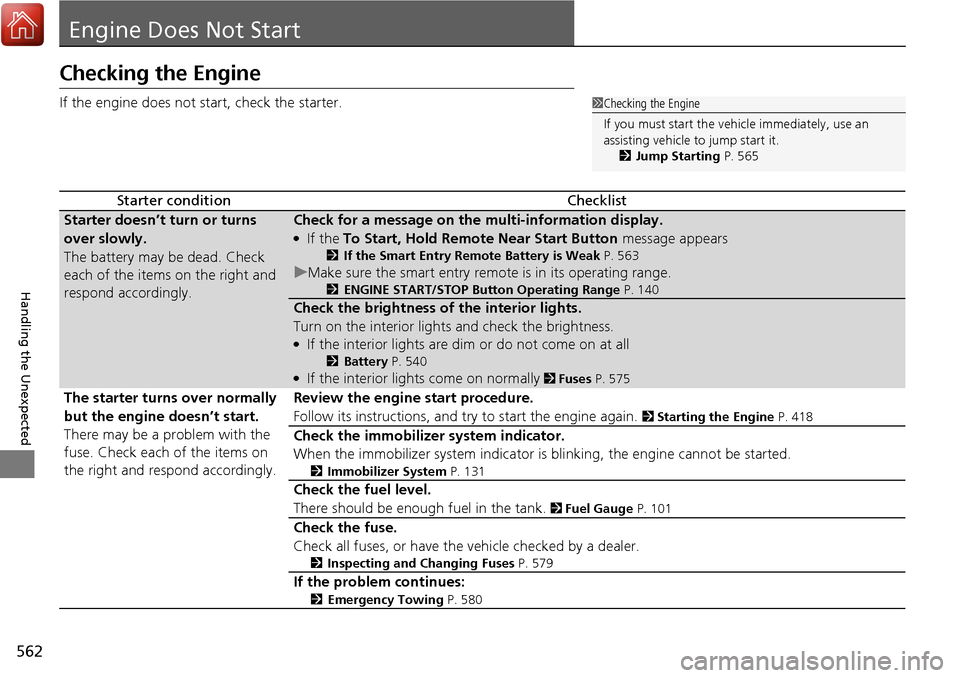
Engine Does Not Start
Checking the Engine
If the engine does not start, check the starter.
Starter conditionChecklist
Starter doesn’t turn or turns
over slowly.
The battery may be dead. Check
each of the items on the right and
respond accordingly.Check for a message on the multi-information display.
●If the To Start, Hold Remote Near Start Button message appears
2If the Smart Entry Remote Battery is Weak P. 563
uMake sure the smart entry remote is in its operating range.
2ENGINE START/STOP Button Operating Range P. 140
Check the brightness of the interior lights.
Turn on the interior lights and check the brightness.
●If the interior lights are dim or do not come on at all
2Battery P. 540●If the interior lights come on normally 2 Fuses P. 575
The starter turns over normally
but the engine doesn’t start.
There may be a problem with the
fuse. Check each of the items on
the right and respond accordingly. Review the engine start procedure.
Follow its instructions, and try to start the engine again.
2
Starting the Engine P. 418
Check the immobilizer system indicator.
When the immobilizer system indicator is blinking, the engine cannot be started.
2Immobilizer System P. 131
Check the fuel level.
There should be enough fuel in the tank.
2 Fuel Gauge P. 101
Check the fuse.
Check all fuses, or have the vehicle checked by a dealer.
2Inspecting and Changing Fuses P. 579
If the problem continues:
2Emergency Towing P. 580
1Checking the Engine
If you must start the vehi cle immediately, use an
assisting vehicle to jump start it.
2 Jump Starting P. 565
Page 566 of 606
565Continued
Handling the Unexpected
Jump Starting
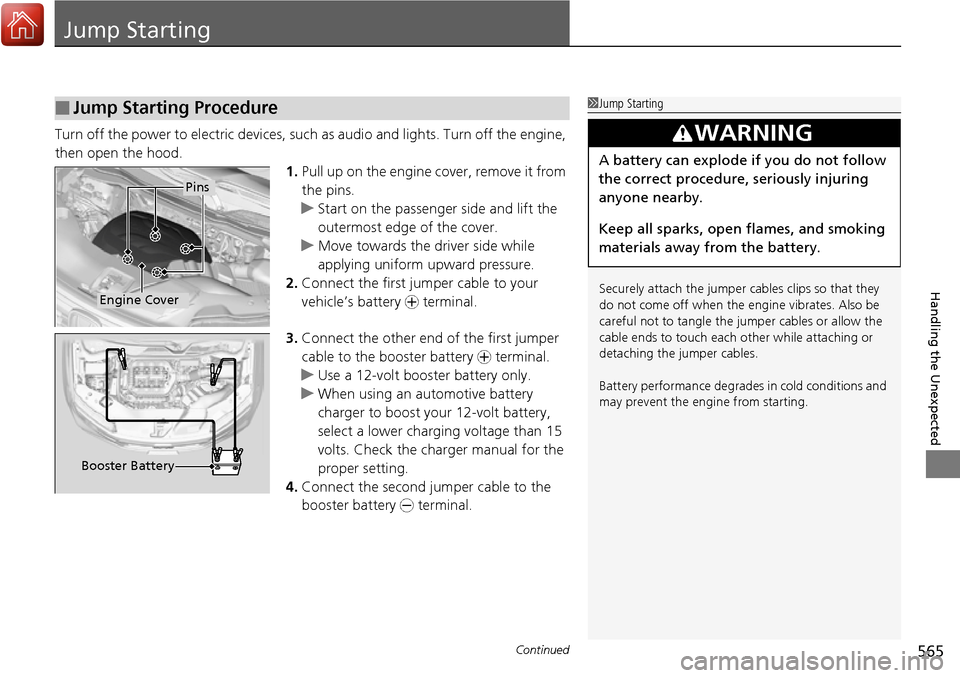
Turn off the power to electric devices, such as audio and lights. Turn off the engine,
then open the hood. 1.Pull up on the engine cover, remove it from
the pins.
u Start on the passenger side and lift the
outermost edge of the cover.
u Move towards the driver side while
applying uniform upward pressure.
2. Connect the first jumper cable to your
vehicle’s battery + terminal.
3. Connect the other end of the first jumper
cable to the booster battery + terminal.
u Use a 12-volt booster battery only.
u When using an automotive battery
charger to boost your 12-volt battery,
select a lower charging voltage than 15
volts. Check the ch arger manual for the
proper setting.
4. Connect the second ju mper cable to the
booster battery - terminal.
■Jump Starting Procedure1Jump Starting
Securely attach the jumper cables clips so that they
do not come off when the e ngine vibrates. Also be
careful not to tangle the ju mper cables or allow the
cable ends to touch each other while attaching or
detaching the jumper cables.
Battery performance degrades in cold conditions and
may prevent the engi ne from starting.
3WARNING
A battery can explode if you do not follow
the correct procedure, seriously injuring
anyone nearby.
Keep all sparks, open flames, and smoking
materials away from the battery.
Pins
Engine Cover
Booster Battery
Page 567 of 606
566
uuJump Starting u
Handling the Unexpected
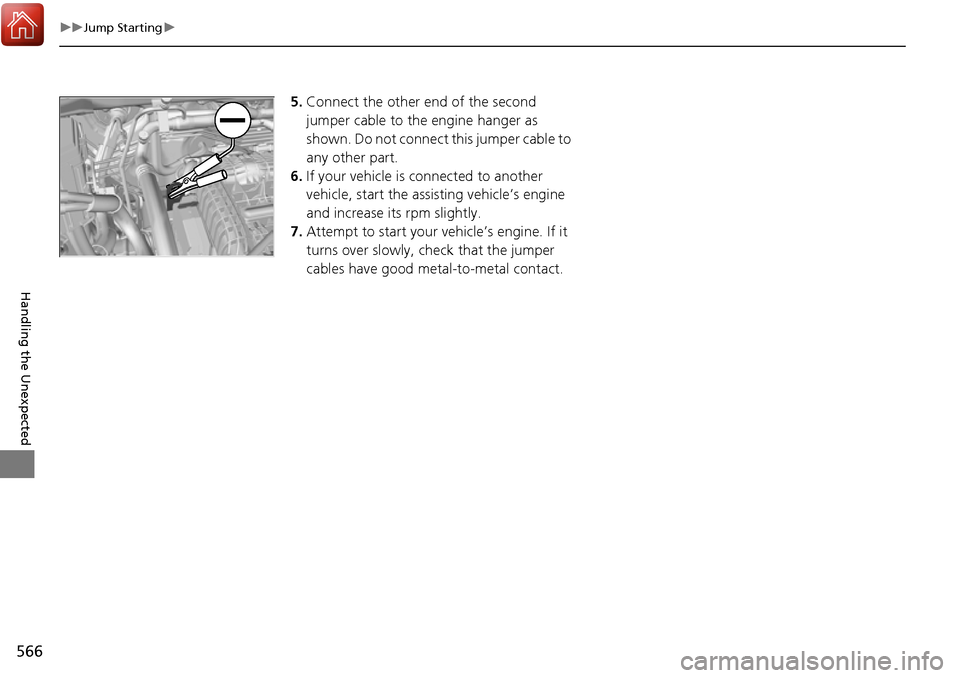
5.Connect the other end of the second
jumper cable to the engine hanger as
shown. Do not connect this jumper cable to
any other part.
6. If your vehicle is connected to another
vehicle, start the assi sting vehicle’s engine
and increase its rpm slightly.
7. Attempt to start your vehicle’s engine. If it
turns over slowly, check that the jumper
cables have good metal-to-metal contact.
Page 572 of 606
571
Handling the Unexpected
Indicator, Coming On/Blinking
If the Low Oil Pressure Indicator Comes On
■Reasons for the indicator to come on
Comes on when the engine oil pressure is low.
■What to do as soon as the indicator comes on
1. Immediately park the vehicle on level ground in a safe place.
2. If necessary, turn the hazard warning lights on.
■What to do after parking the vehicle
1. Stop the engine and let it sit for about three minutes.
2. Open the hood and check the oil level.
u Add oil as necessary.
2 Oil Check P. 515
3.Start the engine and check th e low oil pressure indicator.
u The indicator goes off: Start driving again.
u The indicator does not go out within 10 seconds: Stop the engine
and contact a dealer for repairs immediately.
If the Charging System Indicator Comes On
■Reasons for the indicator to come on
Comes on when the battery is not being charged.
■What to do when th e indicator comes on
Turn off the climate control system*/heating and cooling system*, rear
defogger, and other electrical system s, and immediately contact a dealer
for repairs.
1 If the Low Oil Pressure Indicator Comes On
NOTICE
Running the engine with low oil pressure can cause
serious mechanical damage almost immediately.
1If the Charging System Indicator Comes On
If you need to stop temporarily, do not turn off the
engine. Restarting the engi ne may rapidly discharge
the battery.
* Not available on all models
Page 574 of 606
573
uuIndicator, Comin g On/BlinkinguIf the Brake System Indicator (Red) Comes On
Handling the Unexpected
If the Brake System Indicator (Red) Comes On
■Reasons for the indicator to come on
• The brake fluid is low.
• There is a malfunction in the brake system.
■What to do when the indicator comes on while driving
Depress the brake pedal lightly to check pedal pressure.
• If normal, check the brake fluid level the next time you stop.
• If abnormal, take immediate acti on. If necessary, downshift the
transmission to slow the vehicle using engine braking.
If the Electric Power Steeri ng (EPS) System Indicator
Comes On
■Reasons for the indicator to come on
• Comes on when there is a problem with the EPS system.
• If you depress the accelerator pedal repeatedly to increase the engine
speed while the engine is idling, the indicator comes on, and
sometimes the steering wheel becomes harder to operate.
■What to do when th e indicator comes on
Stop the vehicle in a safe place and restart the engine.
If the indicator comes on and stays on, immediately have your vehicle
inspected by a dealer.
1 If the Brake System Indicator (Red) Comes On
Have your vehicle re paired immediately.
It is dangerous to drive with low brake fluid. If there
is no resistance from the brake pedal, stop
immediately in a safe plac e. If necessary downshift
the gears.
If the brake system indicator and ABS indicator come
on simultaneously, the elec tronic brake distribution
system is not working. Th is can result in vehicle
instability under sudden braking.
Have your vehicle inspecte d by a dealer immediately.
If both red and amber brake system indicators come
on, stop the vehicle in a safe place and have it
inspected by a dealer immediately.U.S.
Canada
Page 580 of 606
579
uuFuses uInspecting and Changing Fuses
Handling the Unexpected
Inspecting and Changing Fuses
1. Set the power mode to VEHICLE OFF
(LOCK). Turn headlights and all accessories
off.
2. Remove the fuse box cover.
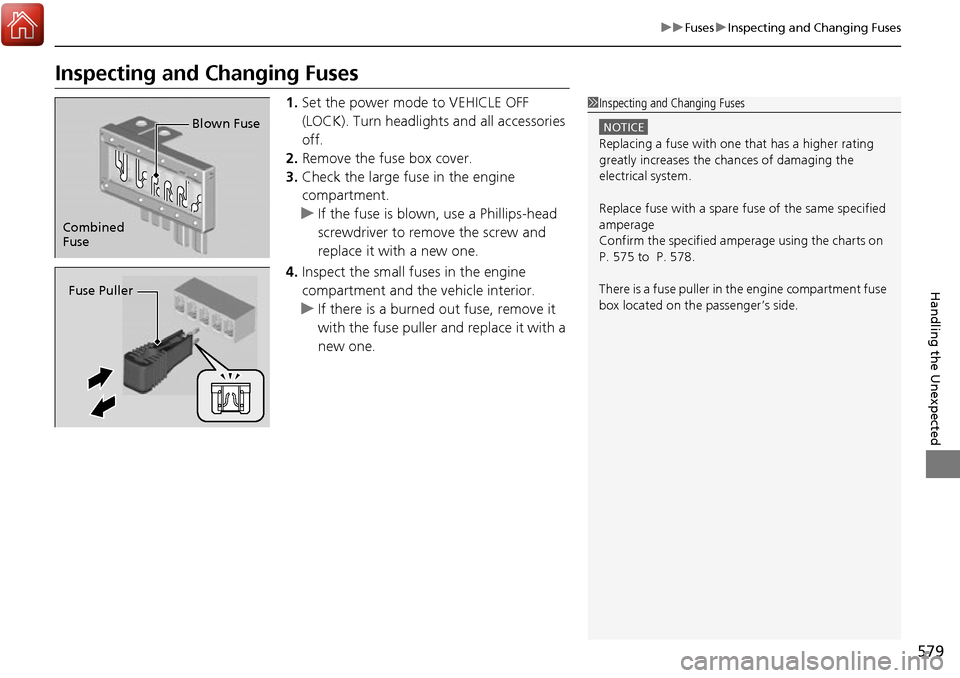
3. Check the large fuse in the engine
compartment.
u If the fuse is blown, use a Phillips-head
screwdriver to remove the screw and
replace it with a new one.
4. Inspect the small fuses in the engine
compartment and the vehicle interior.
u If there is a burned out fuse, remove it
with the fuse puller and replace it with a
new one.1 Inspecting and Changing Fuses
NOTICE
Replacing a fuse with on e that has a higher rating
greatly increases the chances of damaging the
electrical system.
Replace fuse with a spare fuse of the same specified
amperage
Confirm the specified amperage using the charts on
P. 575 to P. 578.
There is a fuse puller in the engine compartment fuse
box located on the passenger’s side.
Combined
Fuse Blown Fuse
Fuse Puller
Page 600 of 606
599
Index
Collision Mitigation Braking SystemTM
(CMBSTM) ................................................. 478
Indicator ............................................. 86, 87
Compact Spare Tire .......................... 553, 587
Console Compartment ............................. 172
Controls .................................................... 107
Conversation Mirror ................................ 177
Coolant (Engine) ...................................... 519
Adding to the Radiator ........................... 520
Adding to the Reserve Tank .................... 519
Overheating ............................................ 569
Creeping (Automatic Transmission) ........ 425
Cross Traffic Monitor ............................... 492
Cruise Control .......................................... 431
Indicator ................................................... 80
Cup Holders .............................................. 173
Customer Service Information ................ 596
Customized Features ............................... 303
D
Daytime Running Lights .......................... 148
Dead Battery ............................................ 565
Defaulting All the Settings ...................... 333
Defogger/Heated Door Mirror ................ 154
Defrosting the Windshield and Windows ......................................... 187, 196
Devices that Emit Radio Waves ............... 589
Dimming Headlights .............................................. 144
Rearview Mirror ...................................... 159 Dipstick (Engine Oil)
................................. 515
Directional Signals (Turn Signal) ............. 143
Display Button .......................................... 223
Door Mirrors ............................................. 160
Doors ......................................................... 109
Auto Door Locking .................................. 122
Auto Door Unlocking ............................... 122
Door Open Message ............................ 32, 89
Keys ........................................................ 109
Locking/Unlocking the Doors from the Inside ................................ 14, 119
Locking/Unlocking the Doors from the Outside ................................... 112
Lockout Prevention System ...................... 118
DOT Tire Quality Grading ........................ 534
Driving ....................................................... 395
Adaptive Cruise Control (ACC) ................ 441
Automatic Transmission ........................... 425
Braking .................................................... 474
Cruise Control ......................................... 431
Off-Highway Driving Guidelines ............... 416
Starting the Engine .................................. 418
Driving Guidelines for Your Utility Vehicle ..................................................... 424
Driving Position Memory System ............. 156
Dust and Pollen Filter ............................... 542
E
ECON Button............................................. 428
ECON Mode Indicator ................................ 85 Electric Power Steering (EPS) System
Indicator............................................ 78, 573
Electronic Stability Control (ESC) ............. 462
Emergency ................................................ 580
Emergency Trunk Opener ........................ 130
Emissions Testing (Readiness Codes) ....... 591
Engine ....................................................... 588
Coolant ................................................... 519
Jump Starting .......................................... 565
Oil ........................................................... 514
Remote Engine Start................................ 420
Starting ................................................... 418
Engine Compartment Cover .................... 513
Engine Coolant ......................................... 519
Adding to the Radiator ............................ 520
Adding to the Reserve Tank..................... 519
Overheating ............................................ 569
Temperature Gauge ................................ 101
Engine Oil ................................................. 514
Adding .................................................... 516
Checking................................................. 515
Displaying Oil Life .................................... 507
Low Oil Pressure Indicator ................. 73, 571
Recommended Engine Oil ....................... 514
ENGINE START/STOP Button .................... 140
EPS (Electric Power Steering) System ............................................... 78, 573
Exhaust Gas Hazard
(Carbon Monoxide) .................................. 68
Exterior Care (Cleaning) ........................... 545
Exterior Mirrors ........................................ 160