cooling HONDA RIDGELINE 2017 2.G User Guide
[x] Cancel search | Manufacturer: HONDA, Model Year: 2017, Model line: RIDGELINE, Model: HONDA RIDGELINE 2017 2.GPages: 606, PDF Size: 13.21 MB
Page 100 of 606
99
uuIndicators uMulti-Information Display Warning and Information Messages
Continued
Instrument Panel
MessageConditionExplanation
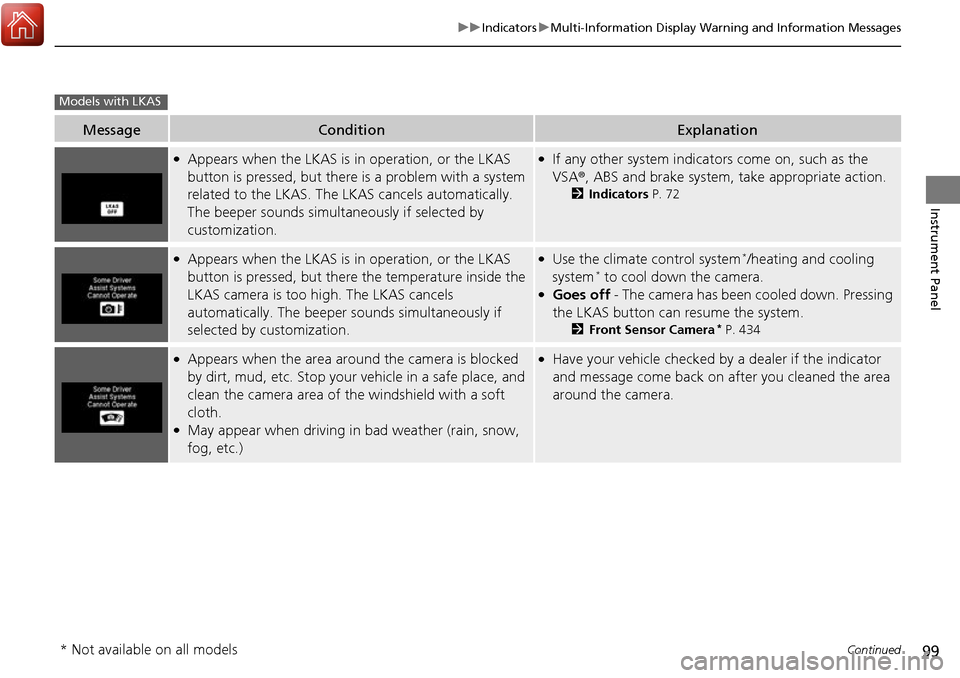
●Appears when the LKAS is in operation, or the LKAS
button is pressed, but there is a problem with a system
related to the LKAS. The LKAS cancels automatically.
The beeper sounds simultaneously if selected by
customization.●If any other system indicators come on, such as the
VSA ®, ABS and brake system, take appropriate action.
2Indicators P. 72
●Appears when the LKAS is in operation, or the LKAS
button is pressed, but there the temperature inside the
LKAS camera is too high. The LKAS cancels
automatically. The beeper sounds simultaneously if
selected by customization.●Use the climate control system*/heating and cooling
system* to cool down the camera.●Goes off - The camera has been cooled down. Pressing
the LKAS button can resume the system.
2 Front Sensor Camera* P. 434
●Appears when the area arou nd the camera is blocked
by dirt, mud, etc. Stop your vehicle in a safe place, and
clean the camera area of the windshield with a soft
cloth.
●May appear when driving in bad weather (rain, snow,
fog, etc.)
●Have your vehicle checked by a dealer if the indicator
and message come back on after you cleaned the area
around the camera.
Models with LKAS
* Not available on all models
Page 108 of 606
107
Controls
This chapter explains how to operate the various controls necessary for driving.
Clock.................................................. 108
Locking and Unlocking the Doors Key Types and Functions .................. 109
Low Smart Entry Remote Signal Strength... 111
Locking/Unlocking the Doors from the Outside .......................................... 112
Locking/Unlocking the Doors from the
Inside ............................................. 119
Childproof Door Locks ..................... 121
Auto Door Locking/Unlocking .......... 122
Opening and Closing the Tailgate ... 126
Opening and Closing the Trunk ....... 128
Security System
Immobilizer System .......................... 131
Security System Alarm ...................... 131
Opening and Closing the Windows .... 134
Opening and Closing the Moonroof*... 138Operating the Switches Around the Steering Wheel ENGINE START/STOP Button............. 140
Turn Signals ..................................... 143
Light Switches.................................. 144
Fog Lights
*...................................... 147
Daytime Running Lights ................... 148
Auto High-Beam (H igh Beam Support
System)
*........................................ 149
Wipers and Washers ........................ 152
Rear Defogger/Heat ed Door Mirror
*
Button ........................................... 154 Heated Windshield Button ............... 154
Brightness Control ........................... 155
Driving Position Memory System
*.... 156
Adjusting the Steering Wheel .......... 158
Adjusting the Mirrors Interior Rearview Mirror ................... 159
Power Door Mirrors ......................... 160
Adjusting the Seats .......................... 161
Interior Lights/Convenience Items
Interior Lights .................................. 169
Interior Convenience Items .............. 171
In-Bed Convenience Items................ 182
Climate Control System
*.................. 186
Heating and Cooling System*......... 193
Canadian models
* Not available on all models
Page 194 of 606
193Continued
Controls
Heating and Cooling System*
Using Vents, Heating and A/C
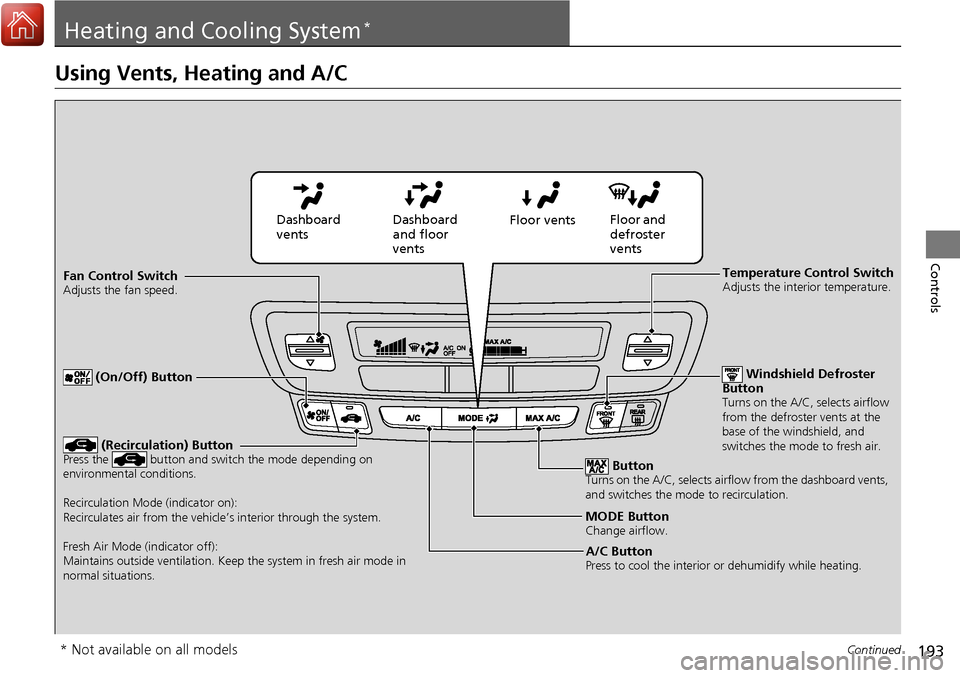
MODE ButtonChange airflow.
Floor and
defroster
vents
Floor vents
Dashboard
and floor
vents
Dashboard
vents
Fan Control Switch
Adjusts the fan speed.
ButtonTurns on the A/C, selects airflow from the dashboard vents,
and switches the mode to recirculation.
A/C ButtonPress to cool the interior or dehumidify while heating.
Windshield Defroster
Button
Turns on the A/C, selects airflow
from the defroster vents at the
base of the windshield, and
switches the mode to fresh air.
Temperature Control SwitchAdjusts the interior temperature.
(Recirculation) ButtonPress the button and switch the mode depending on
environmental conditions.
Recirculation Mode (indicator on):
Recirculates air from the vehicle’s interior through the system.
Fresh Air Mode (indicator off):
Maintains outside ventilation. Keep the system in fresh air mode in
normal situations.
(On/Off) Button
* Not available on all models
Page 195 of 606
uuHeating and Cooling System*uUsing Vents, Heating and A/C
194
Controls
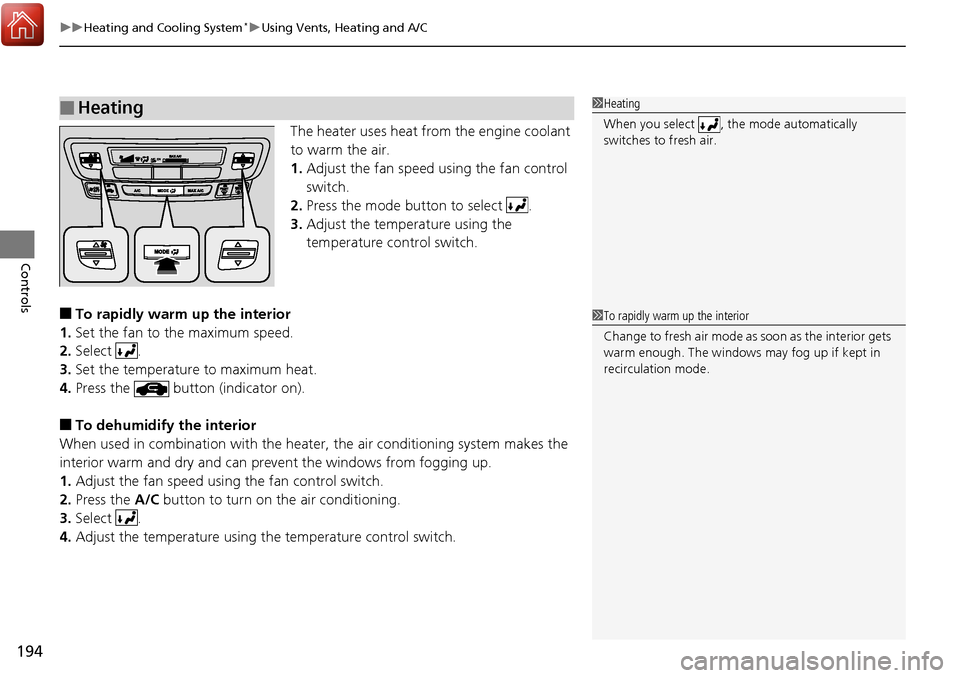
The heater uses heat from the engine coolant
to warm the air.
1. Adjust the fan speed using the fan control
switch.
2. Press the mode button to select .
3. Adjust the temperature using the
temperature control switch.
■To rapidly warm up the interior
1. Set the fan to the maximum speed.
2. Select .
3. Set the temperature to maximum heat.
4. Press the button (indicator on).
■To dehumidify the interior
When used in combination with the heater , the air conditioning system makes the
interior warm and dry and can prevent the windows from fogging up.
1. Adjust the fan speed using the fan control switch.
2. Press the A/C button to turn on the air conditioning.
3. Select .
4. Adjust the temperature using the temperature control switch.
■Heating1Heating
When you select , th e mode automatically
switches to fresh air.
1 To rapidly warm up the interior
Change to fresh air mode as soon as the interior gets
warm enough. The windows may fog up if kept in
recirculation mode.
Page 196 of 606
Continued195
uuHeating and Cooling System*uUsing Vents, Heating and A/C
Controls
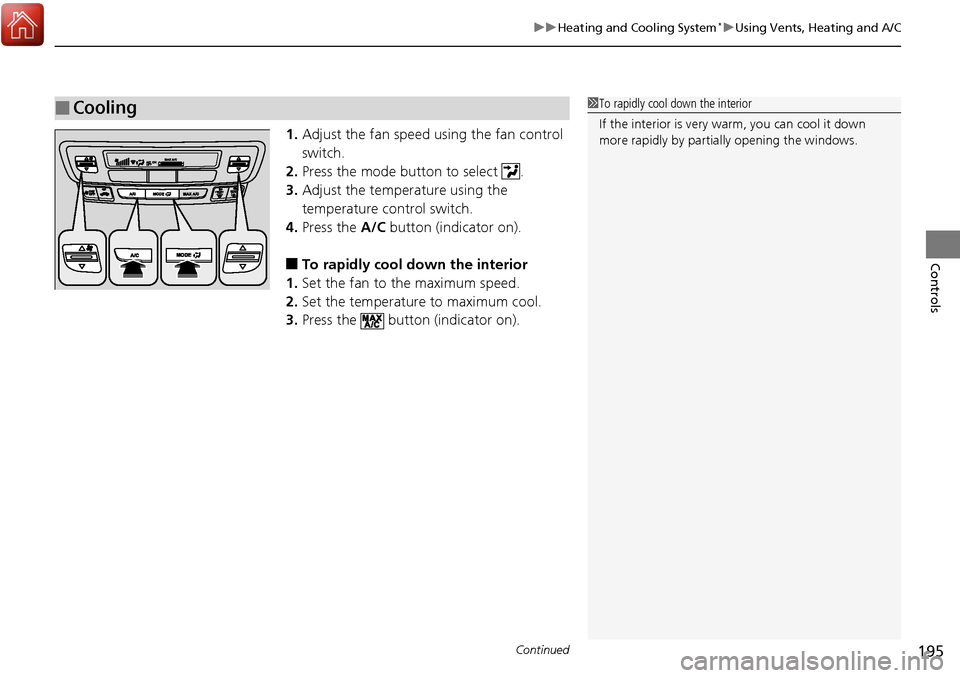
1. Adjust the fan speed using the fan control
switch.
2. Press the mode button to select .
3. Adjust the temperature using the
temperature control switch.
4. Press the A/C button (indicator on).
■To rapidly cool down the interior
1. Set the fan to the maximum speed.
2. Set the temperature to maximum cool.
3. Press the button (indicator on).
■Cooling1To rapidly cool down the interior
If the interior is very warm, you can cool it down
more rapidly by parti ally opening the windows.
Page 197 of 606
uuHeating and Cooling System*uUsing Vents, Heating and A/C
196
Controls
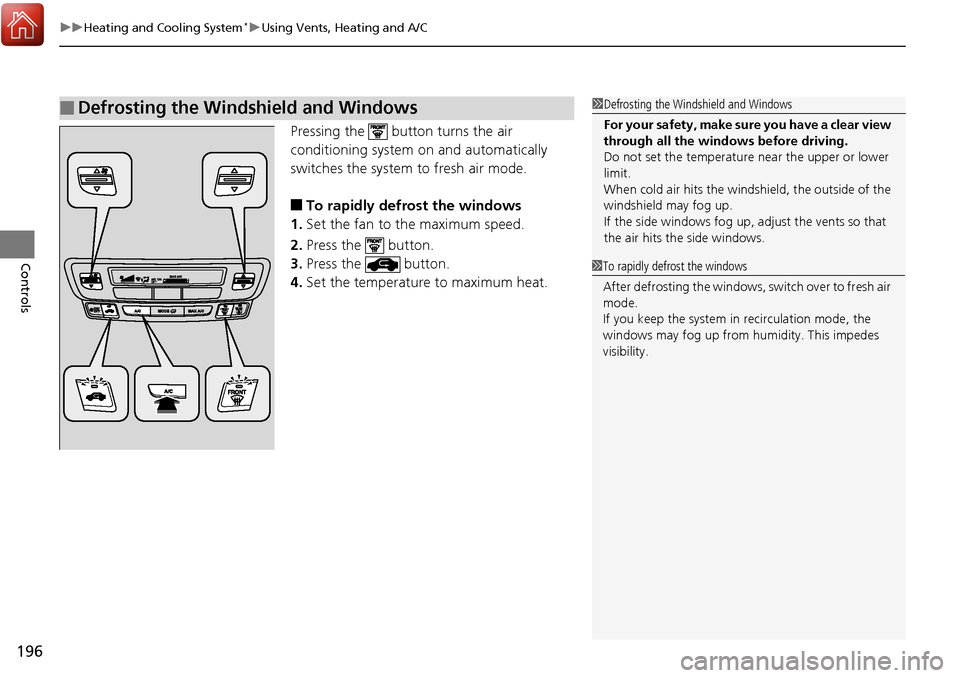
Pressing the button turns the air
conditioning system on and automatically
switches the system to fresh air mode.
■To rapidly defrost the windows
1. Set the fan to the maximum speed.
2. Press the button.
3. Press the button.
4. Set the temperature to maximum heat.
■Defrosting the Windshield and Windows1Defrosting the Windshield and Windows
For your safety, make sure you have a clear view
through all the windows before driving.
Do not set the temperatur e near the upper or lower
limit.
When cold air hits the windshield, the outside of the
windshield may fog up.
If the side windows fog up, adjust the vents so that
the air hits th e side windows.
1To rapidly defrost the windows
After defrosting the windows, switch over to fresh air
mode.
If you keep the system in recirculation mode, the
windows may fog up from humidity. This impedes
visibility.
Page 416 of 606
415
uuTowing a Trailer uTowing Your Vehicle
Driving
• Monitor your temperature gauge. If it nears the mark, turn off the heating
and cooling system*/climate control system* and reduce speed. Pull to the side of
the road safely to cool down the engine if necessary.
• Shift to the position if the transmission shifts frequently.
If the vehicle tires slip when retrieving a boat from the water, keep the transmission
in
(D. This prevents damage to the transmission.
Towing Your Vehicle
Your vehicle is not designed to be towed behind a motorhome. If your vehicle needs
to be towed in an emergency, refer to the emergency towing information.
2Emergency Towing P. 580
■Driving in Hilly Terrain
■Retrieving a Boat
H
D4
* Not available on all models
Page 419 of 606
418
Driving
When Driving
Starting the Engine
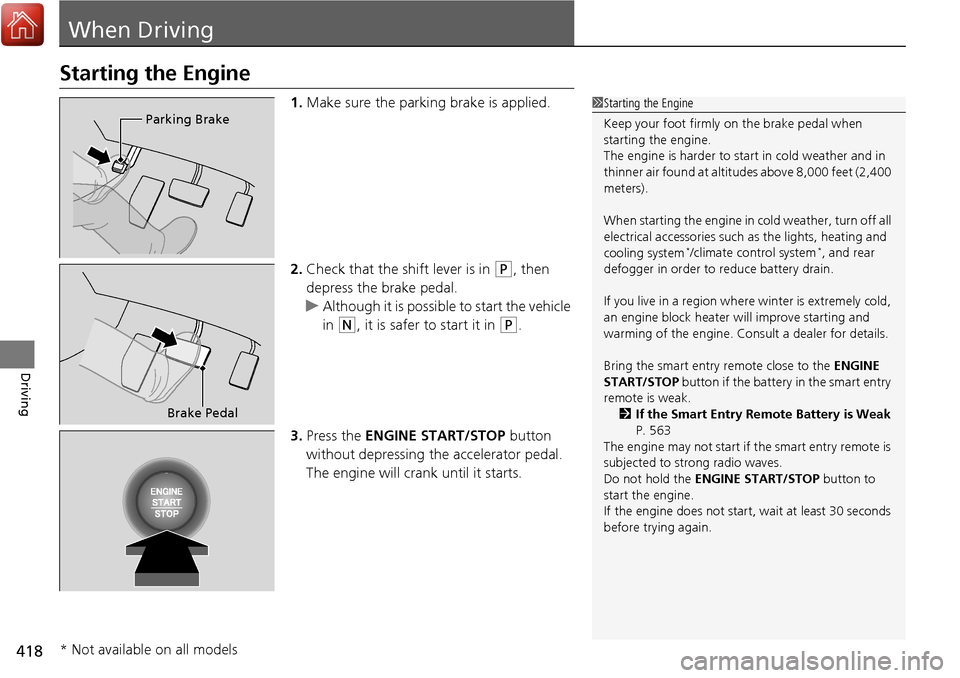
1.Make sure the parking brake is applied.
2. Check that the shift lever is in
(P, then
depress the brake pedal.
u Although it is possible to start the vehicle
in
(N, it is safer to start it in (P.
3. Press the ENGINE START/STOP button
without depressing the accelerator pedal.
The engine will crank until it starts.
1 Starting the Engine
Keep your foot firmly on the brake pedal when
starting the engine.
The engine is harder to st art in cold weather and in
thinner air found at altitudes above 8,000 feet (2,400
meters).
When starting the engine in cold weather, turn off all
electrical accessories such as the lights, heating and
cooling system
*/climate control system*, and rear
defogger in order to reduce battery drain.
If you live in a region where winter is extremely cold,
an engine block heater will improve starting and
warming of the engine. Cons ult a dealer for details.
Bring the smart entry remote close to the ENGINE
START/STOP button if the battery in the smart entry
remote is weak.
2 If the Smart Entry Remote Battery is Weak
P. 563
The engine may not start if the smart entry remote is
subjected to strong radio waves.
Do not hold the ENGINE START/STOP button to
start the engine.
If the engine does not start, wait at least 30 seconds
before trying again.
Parking Brake
Brake Pedal
* Not available on all models
Page 423 of 606
uuWhen Driving uStarting the Engine
422
Driving
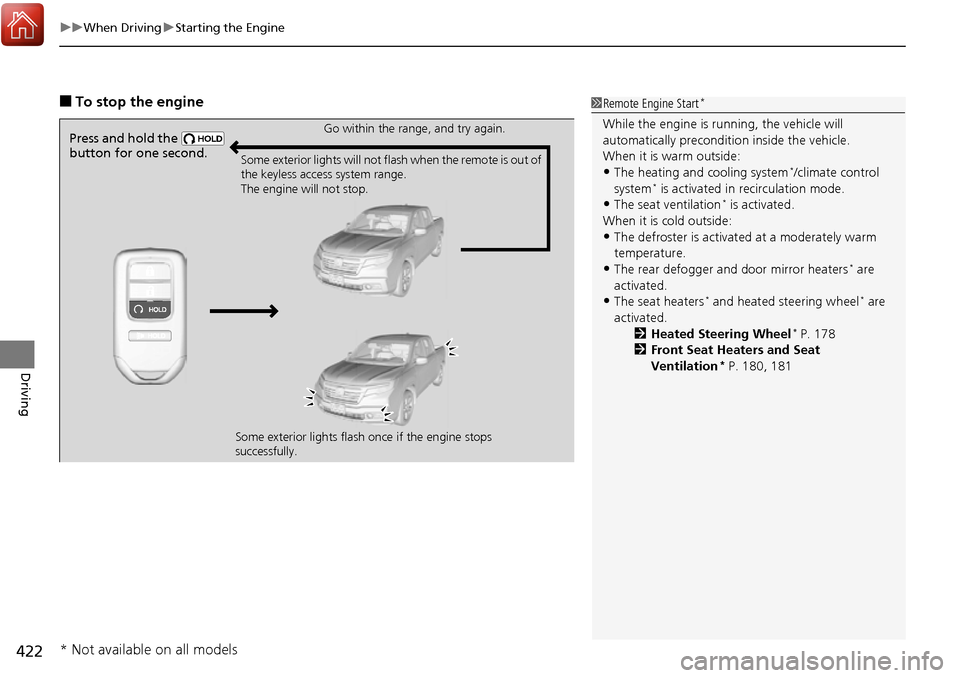
■To stop the engine1Remote Engine Start*
While the engine is running, the vehicle will
automatically preconditi on inside the vehicle.
When it is warm outside:
•The heating and cooling system*/climate control
system* is activated in recirculation mode.
•The seat ventilation* is activated.
When it is cold outside:
•The defroster is activated at a moderately warm
temperature.
•The rear defogger and door mirror heaters* are
activated.
•The seat heaters* and heated steering wheel* are
activated. 2Heated Steering Wheel
* P. 178
2 Front Seat Heaters and Seat
Ventilation
* P. 180, 181
Press and hold the
button for one second.Go within the range, and try again.
Some exterior lights will not flash when the remote is out of
the keyless access system range.
The engine will not stop.
Some exterior lights flash once if the engine stops
successfully.
* Not available on all models
Page 436 of 606
435
uuWhen Driving uFront Sensor Camera*
Driving
1Front Sensor Camera*
If the Some Driver Assist Systems Cannot
Operate: message appears:
•Use the heating and cooling system*/climate
control system* to cool down the interior and, if
necessary, also use defr oster mode with the air
flow directed towards the camera.
•Start driving the vehicle to lower the windshield
temperature, which cool s down the area around
the camera.
If the Some Driver Assist Systems Cannot
Operate: message appears:
•Park your vehicle in a sa fe place, and clean the
windshield. If the message does not disappear after
you have cleaned the winds hield and driven for a
while, have your vehicle checked by a dealer.
* Not available on all models