hood open HONDA RIDGELINE 2017 2.G User Guide
[x] Cancel search | Manufacturer: HONDA, Model Year: 2017, Model line: RIDGELINE, Model: HONDA RIDGELINE 2017 2.GPages: 606, PDF Size: 13.21 MB
Page 513 of 606
512
uuMaintenance Under the Hood uOpening the Hood
Maintenance
Opening the Hood
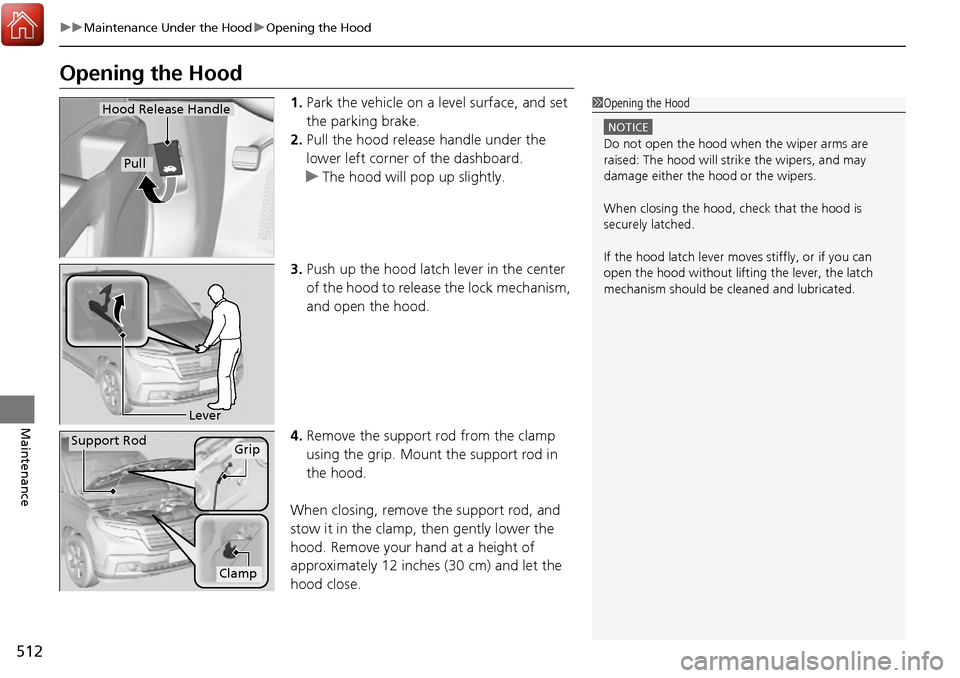
1. Park the vehicle on a level surface, and set
the parking brake.
2. Pull the hood release handle under the
lower left corner of the dashboard.
u The hood will pop up slightly.
3. Push up the hood latch lever in the center
of the hood to release the lock mechanism,
and open the hood.
4. Remove the support rod from the clamp
using the grip. Mount the support rod in
the hood.
When closing, remove the support rod, and
stow it in the clamp, then gently lower the
hood. Remove your hand at a height of
approximately 12 inches (30 cm) and let the
hood close.1 Opening the Hood
NOTICE
Do not open the hood when the wiper arms are
raised: The hood will stri ke the wipers, and may
damage either the hood or the wipers.
When closing the hood, check that the hood is
securely latched.
If the hood latch lever moves stiffly, or if you can
open the hood without lifti ng the lever, the latch
mechanism should be cleaned and lubricated.
Hood Release Handle
Pull
Lever
Support RodGrip
Clamp
Page 518 of 606
517
uuMaintenance Under the Hood uChanging the Engine Oil and Oil Filter
Continued
Maintenance
Changing the Engine Oil and Oil Filter
You must change the engine oil and oil fi lter regularly in order to maintain the
engine’s lubrication. The engine may be damaged if they are not changed regularly.
Change the oil and filter in accordance with the maintenance message on the multi-
information display. 1.Run the engine until it reaches normal
operating temperature, and then turn the
engine off.
2. Open the hood and remove the engine oil
fill cap.
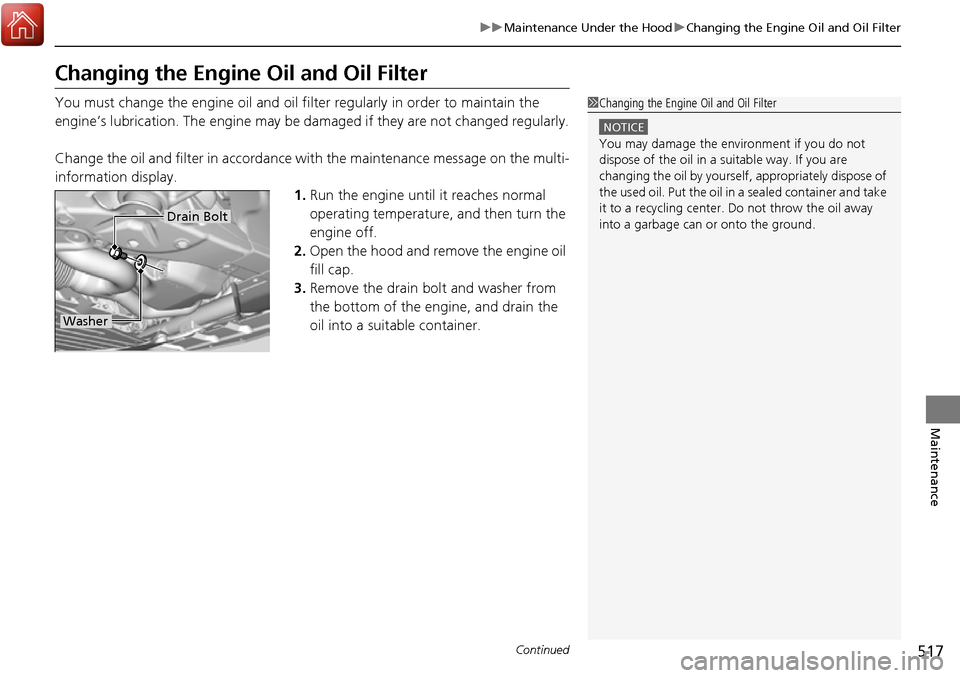
3. Remove the drain bolt and washer from
the bottom of the engine, and drain the
oil into a suitable container.1Changing the Engine Oil and Oil Filter
NOTICE
You may damage the environment if you do not
dispose of the oil in a suitable way. If you are
changing the oil by yourself , appropriately dispose of
the used oil. Put the oil in a sealed container and take
it to a recycling center. Do not throw the oil away
into a garbage can or onto the ground.
Drain Bolt
Washer
Page 566 of 606
565Continued
Handling the Unexpected
Jump Starting
Turn off the power to electric devices, such as audio and lights. Turn off the engine,
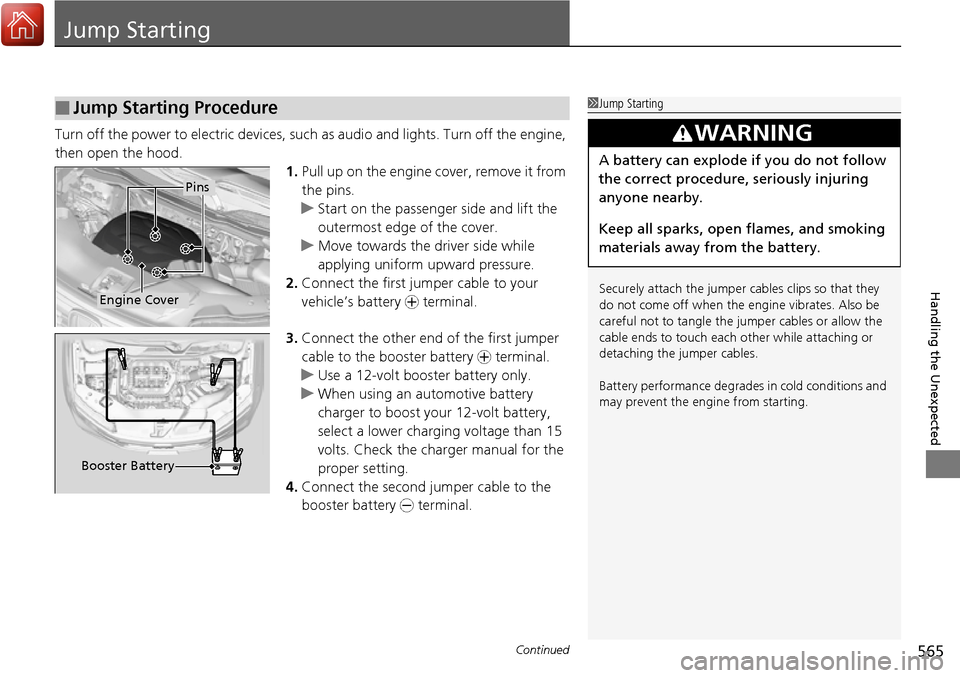
then open the hood. 1.Pull up on the engine cover, remove it from
the pins.
u Start on the passenger side and lift the
outermost edge of the cover.
u Move towards the driver side while
applying uniform upward pressure.
2. Connect the first jumper cable to your
vehicle’s battery + terminal.
3. Connect the other end of the first jumper
cable to the booster battery + terminal.
u Use a 12-volt booster battery only.
u When using an automotive battery
charger to boost your 12-volt battery,
select a lower charging voltage than 15
volts. Check the ch arger manual for the
proper setting.
4. Connect the second ju mper cable to the
booster battery - terminal.
■Jump Starting Procedure1Jump Starting
Securely attach the jumper cables clips so that they
do not come off when the e ngine vibrates. Also be
careful not to tangle the ju mper cables or allow the
cable ends to touch each other while attaching or
detaching the jumper cables.
Battery performance degrades in cold conditions and
may prevent the engi ne from starting.
3WARNING
A battery can explode if you do not follow
the correct procedure, seriously injuring
anyone nearby.
Keep all sparks, open flames, and smoking
materials away from the battery.
Pins
Engine Cover
Booster Battery
Page 570 of 606
569Continued
Handling the Unexpected
Overheating
How to Handle Overheating
Overheating symptoms are as follows:
•The temperature gauge needle is at the mark or the engine suddenly loses
power.
• Steam or spray comes out of the engine compartment.
■First thing to do
1. Immediately park the vehicle in a safe place.
2. Turn off all accessories and turn on the hazard warning lights.
u No steam or spray present: Keep the engine running and open the hood.
u Steam or spray is present: Turn off the engine and wait until it subsides.
Then, open the hood.
1 How to Handle Overheating
NOTICE
Continuing to drive with the temperature gauge
needle at the mark may damage the engine.
3WARNING
Steam and spray from an overheated
engine can seriously scald you.
Do not open the hood if steam is coming
out.
H
H
Page 572 of 606
571
Handling the Unexpected
Indicator, Coming On/Blinking
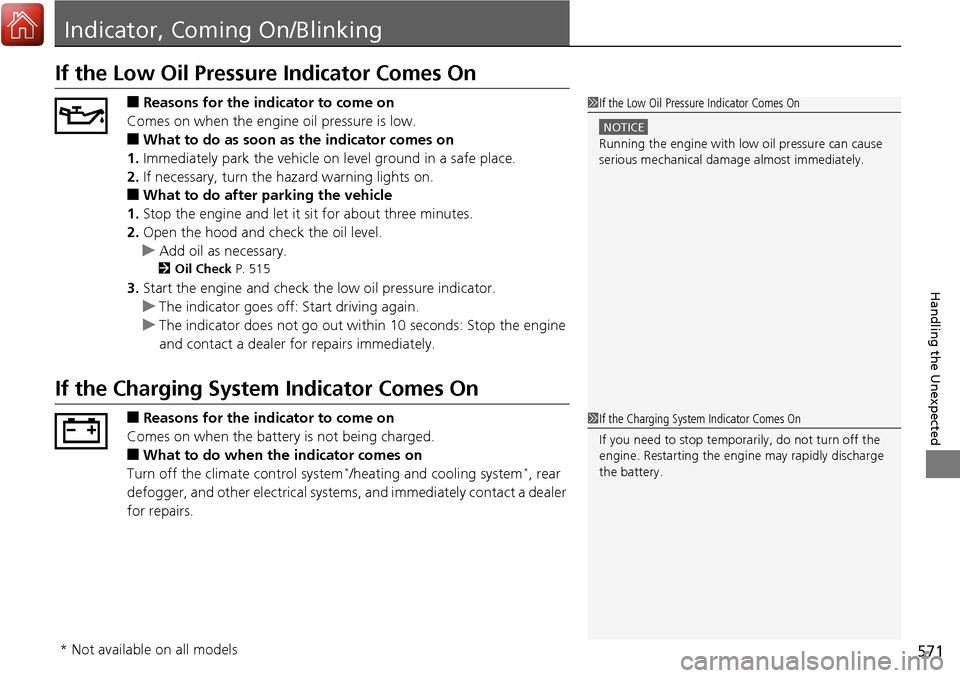
If the Low Oil Pressure Indicator Comes On
■Reasons for the indicator to come on
Comes on when the engine oil pressure is low.
■What to do as soon as the indicator comes on
1. Immediately park the vehicle on level ground in a safe place.
2. If necessary, turn the hazard warning lights on.
■What to do after parking the vehicle
1. Stop the engine and let it sit for about three minutes.
2. Open the hood and check the oil level.
u Add oil as necessary.
2 Oil Check P. 515
3.Start the engine and check th e low oil pressure indicator.
u The indicator goes off: Start driving again.
u The indicator does not go out within 10 seconds: Stop the engine
and contact a dealer for repairs immediately.
If the Charging System Indicator Comes On
■Reasons for the indicator to come on
Comes on when the battery is not being charged.
■What to do when th e indicator comes on
Turn off the climate control system*/heating and cooling system*, rear
defogger, and other electrical system s, and immediately contact a dealer
for repairs.
1 If the Low Oil Pressure Indicator Comes On
NOTICE
Running the engine with low oil pressure can cause
serious mechanical damage almost immediately.
1If the Charging System Indicator Comes On
If you need to stop temporarily, do not turn off the
engine. Restarting the engi ne may rapidly discharge
the battery.
* Not available on all models
Page 603 of 606
602
Index
L
Lane Keeping Assist System (LKAS)......... 454
Indicator .................................................... 84
LaneWatch
TM............................................. 472
Language (HFL) ................................. 338, 364
LATCH (Child Seats) .............................. 58, 63
Lights ................................................. 144, 523
Automatic ............................................... 145
Bed.......................................................... 184
Bulb Replacement .................................... 523
Daytime Running Lights ........................... 148
High Beam Indicator .................................. 78
Interior .................................................... 169
Light Switches ......................................... 144
Lights On Indicator .................................... 79
Turn Signals ............................................. 143
Load Limits ................................................ 399
Locking/Unlocking .................................... 109
Auto Door Locking/Unlocking .................. 122
Childproof Door Locks ............................. 121
From Inside .............................................. 119
From Outside ........................................... 112
Keys ........................................................ 109
Using a Key ............................................. 118
Lockout Prevention System ...................... 118
Low Battery Charge .................................. 571
Low Fuel Indicator ...................................... 75
Low Oil Pressure Indicator ................. 73, 571
Low Tire Pressure Indicator ........................ 78
Lower Anchors ...................................... 58, 63
Lubricant Specifications Chart ................. 587Luggage (Maximum Load Limit)
............. 399
Lumbar Support ....................................... 161M
Maintenance............................................. 503
Battery .................................................... 540
Brake Fluid .............................................. 522
Cleaning ................................................. 543
Climate Control System ........................... 542
Coolant ................................................... 519
Heating and Cooling System ................... 542
Maintenance Minder
TM............................ 507
Oil ........................................................... 515
Precautions ............................................. 504
Radiator .................................................. 520
Remote Transmitter ................................. 541
Replacing Light Bulbs .............................. 523
Safety...................................................... 505
Service Items ........................................... 509
Tires ........................................................ 531
Transmission Fluid ................................... 521
Under the Hood ...................................... 511
Malfunction Indicator Lamp .............. 73, 572
Map Lights ................................................ 170
Maximum Load Limit ............................... 399
Meters, Gauges ......................................... 101
Mirrors ...................................................... 159
Adjusting ................................................ 159
Door ....................................................... 160
Exterior ................................................... 160 Interior Rearview ..................................... 159
Modifications (and Accessories) .............. 549
Moonroof ................................................. 138
MP3 ........................................... 216, 259, 271
MP3/WMA/AAC ........................ 216, 259, 271
Multi-Information Display ....................... 102
Multi-View Rear Camera ......................... 496
N
Numbers (Identification)......................... 588
O
Odometer................................................. 103
Off-Highway Driving Guidelines ............. 416
Oil (Engine) .............................................. 514
Adding ................................................... 516
Checking ................................................ 515
Displaying Oil Life ................................... 507
Low Oil Pressure Indicator ................. 73, 571
Recommended Engine Oil ....................... 514
Viscosity.................................................. 514
Open Source Licenses .............................. 302
Opening/Closing Hood ...................................................... 512
Moonroof ............................................... 138
Power Windows...................................... 134
Tailgate................................................... 126
Trunk ...................................................... 128
Outside Temperature Display ................. 104