ECO mode HONDA RIDGELINE 2017 2.G Owner's Manual
[x] Cancel search | Manufacturer: HONDA, Model Year: 2017, Model line: RIDGELINE, Model: HONDA RIDGELINE 2017 2.GPages: 606, PDF Size: 13.21 MB
Page 81 of 606
80
uuIndicators u
Instrument Panel
IndicatorNameOn/BlinkingExplanationMessage
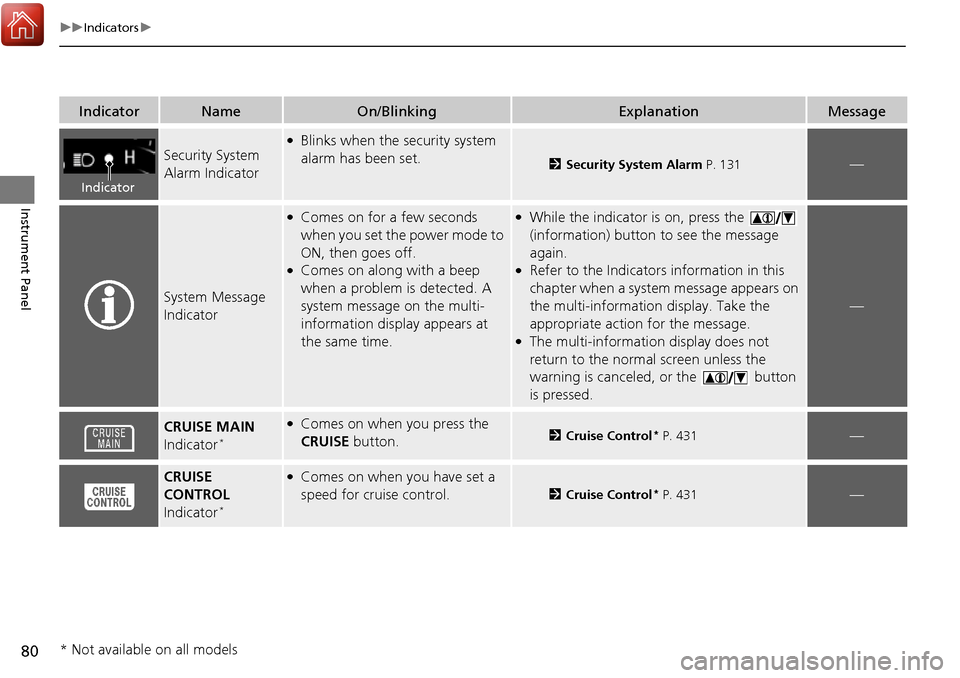
Security System
Alarm Indicator
●Blinks when the security system
alarm has been set.
2Security System Alarm P. 131—
System Message
Indicator
●Comes on for a few seconds
when you set the power mode to
ON, then goes off.
●Comes on along with a beep
when a problem is detected. A
system message on the multi-
information display appears at
the same time.
●While the indicator is on, press the
(information) button to see the message
again.
●Refer to the Indicators information in this
chapter when a system message appears on
the multi-information display. Take the
appropriate action for the message.
●The multi-information display does not
return to the normal screen unless the
warning is canceled, or the button
is pressed.
—
CRUISE MAIN
Indicator*
●Comes on when you press the
CRUISE button.2Cruise Control* P. 431—
CRUISE
CONTROL
Indicator
*
●Comes on when you have set a
speed for crui se control.
2Cruise Control* P. 431—
Indicator
* Not available on all models
Page 82 of 606
81
uuIndicators u
Continued
Instrument Panel
IndicatorNameOn/BlinkingExplanationMessage
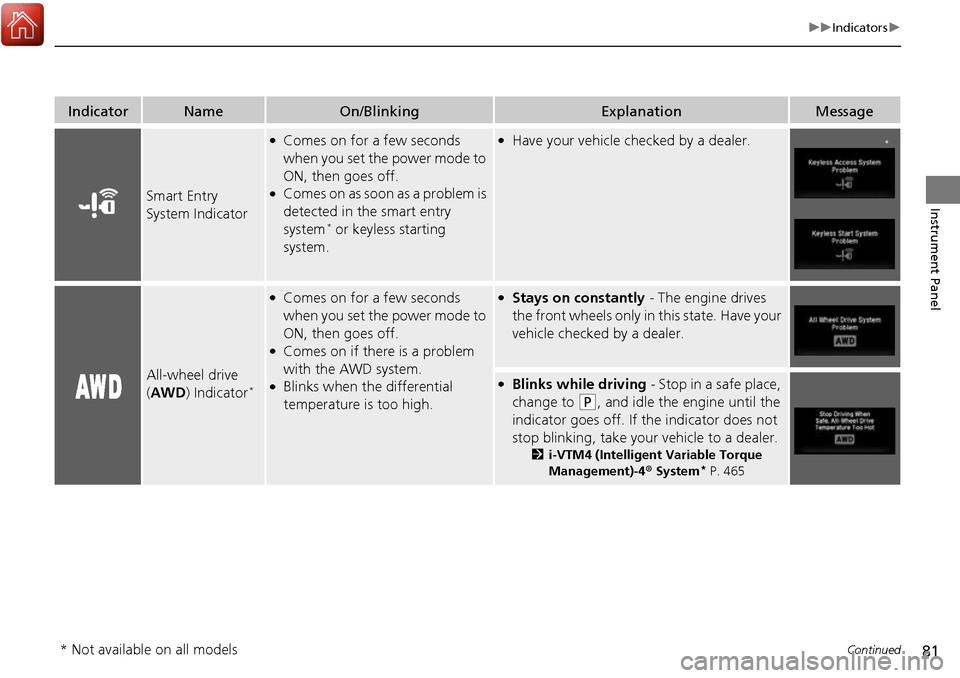
Smart Entry
System Indicator
●Comes on for a few seconds
when you set the power mode to
ON, then goes off.
●Comes on as soon as a problem is
detected in the smart entry
system
* or keyless starting
system.
●Have your vehicle checked by a dealer.
All-wheel drive
( AWD ) Indicator*
●Comes on for a few seconds
when you set the power mode to
ON, then goes off.
●Comes on if there is a problem
with the AWD system.
●Blinks when the differential
temperature is too high.
●Stays on constantly - The engine drives
the front wheels only in this state. Have your
vehicle checked by a dealer.
●Blinks while driving - Stop in a safe place,
change to
(P, and idle the engine until the
indicator goes off. If the indicator does not
stop blinking, take your vehicle to a dealer.
2 i-VTM4 (Intelligent Variable Torque
Management)-4 ® System* P. 465
*
* Not available on all models
Page 83 of 606
82
uuIndicators u
Instrument Panel
IndicatorNameOn/BlinkingExplanationMessage
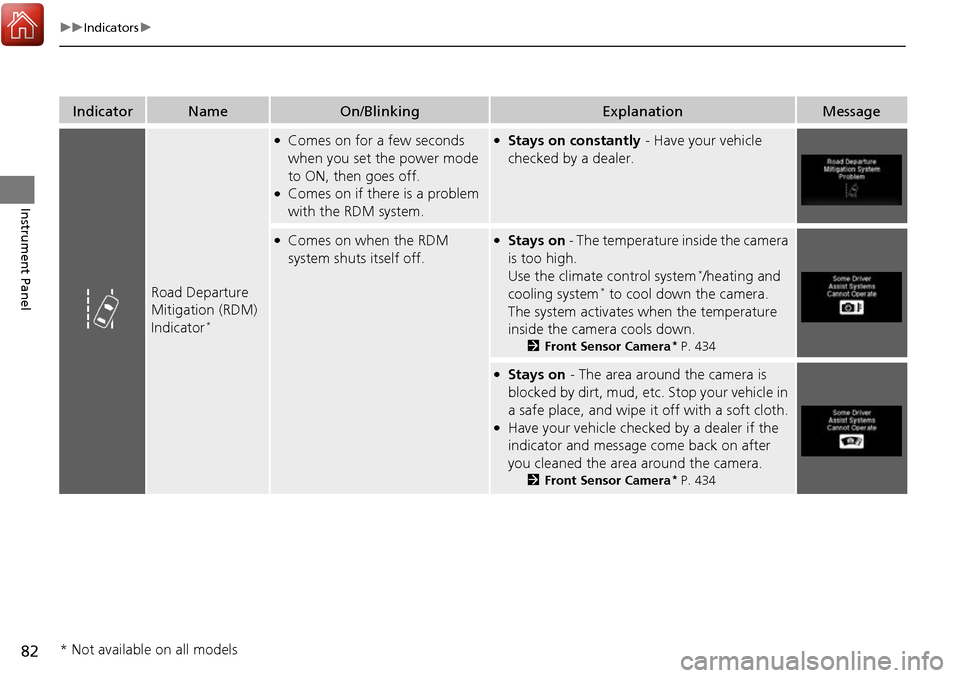
Road Departure
Mitigation (RDM)
Indicator
*
●Comes on for a few seconds
when you set the power mode
to ON, then goes off.
●Comes on if there is a problem
with the RDM system.
●Stays on constantly - Have your vehicle
checked by a dealer.
●Comes on when the RDM
system shuts itself off.●Stays on - The temperature inside the camera
is too high.
Use the climate control system
*/heating and
cooling system* to cool down the camera.
The system activates when the temperature
inside the camera cools down.
2 Front Sensor Camera* P. 434
●Stays on - The area around the camera is
blocked by dirt, mud, etc. Stop your vehicle in
a safe place, and wipe it off with a soft cloth.
●Have your vehicle checked by a dealer if the
indicator and message come back on after
you cleaned the area around the camera.
2 Front Sensor Camera* P. 434
* Not available on all models
Page 84 of 606
83
uuIndicators u
Continued
Instrument Panel
IndicatorNameOn/BlinkingExplanationMessage
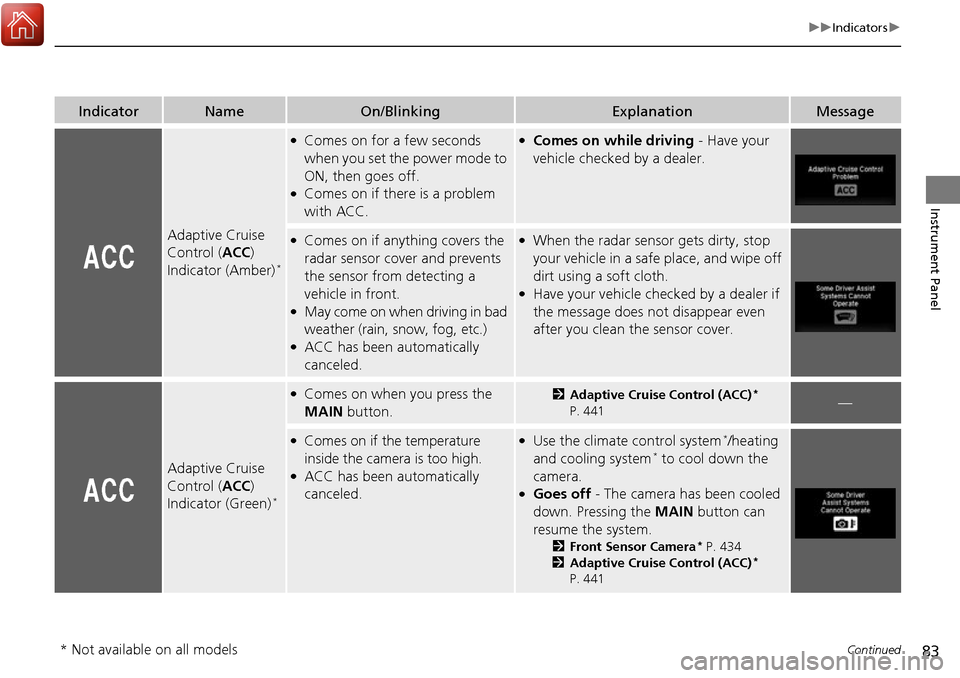
Adaptive Cruise
Control (ACC)
Indicator (Amber)
*
●Comes on for a few seconds
when you set the power mode to
ON, then goes off.
●Comes on if there is a problem
with ACC.
●Comes on while driving - Have your
vehicle checked by a dealer.
●Comes on if anything covers the
radar sensor cover and prevents
the sensor from detecting a
vehicle in front.
●May come on when driving in bad
weather (rain, snow, fog, etc.)
●ACC has been automatically
canceled.
●When the radar sensor gets dirty, stop
your vehicle in a safe place, and wipe off
dirt using a soft cloth.
●Have your vehicle checked by a dealer if
the message does not disappear even
after you clean the sensor cover.
Adaptive Cruise
Control ( ACC)
Indicator (Green)
*
●Comes on when you press the
MAIN button.2Adaptive Cruise Control (ACC)*
P. 441—
●Comes on if the temperature
inside the camera is too high.
●ACC has been automatically
canceled.
●Use the climate control system*/heating
and cooling system* to cool down the
camera.
●Goes off - The camera has been cooled
down. Pressing the MAIN button can
resume the system.
2 Front Sensor Camera* P. 434
2 Adaptive Cruise Control (ACC)*
P. 441
* Not available on all models
Page 85 of 606
84
uuIndicators u
Instrument Panel
IndicatorNameOn/BlinkingExplanationMessage
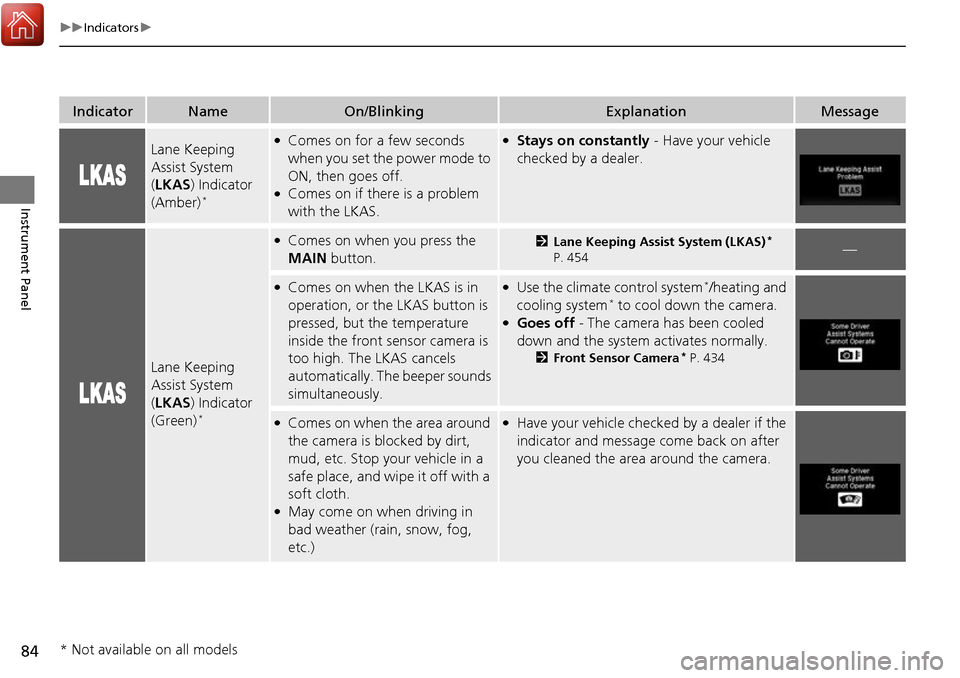
Lane Keeping
Assist System
(LKAS ) Indicator
(Amber)
*
●Comes on for a few seconds
when you set the power mode to
ON, then goes off.
●Comes on if there is a problem
with the LKAS.
●Stays on constantly - Have your vehicle
checked by a dealer.
Lane Keeping
Assist System
( LKAS ) Indicator
(Green)
*
●Comes on when you press the
MAIN button.2Lane Keeping Assist System (LKAS)*
P. 454—
●Comes on when the LKAS is in
operation, or the LKAS button is
pressed, but the temperature
inside the front sensor camera is
too high. The LKAS cancels
automatically. Th e beeper sounds
simultaneously.●Use the climate control system*/heating and
cooling system* to cool down the camera.●Goes off - The camera has been cooled
down and the system activates normally.
2 Front Sensor Camera* P. 434
●Comes on when the area around
the camera is blocked by dirt,
mud, etc. Stop your vehicle in a
safe place, and wipe it off with a
soft cloth.
●May come on when driving in
bad weather (rain, snow, fog,
etc.)
●Have your vehicle checked by a dealer if the
indicator and message come back on after
you cleaned the area around the camera.
* Not available on all models
Page 86 of 606
85
uuIndicators u
Continued
Instrument Panel
IndicatorNameOn/BlinkingExplanationMessage
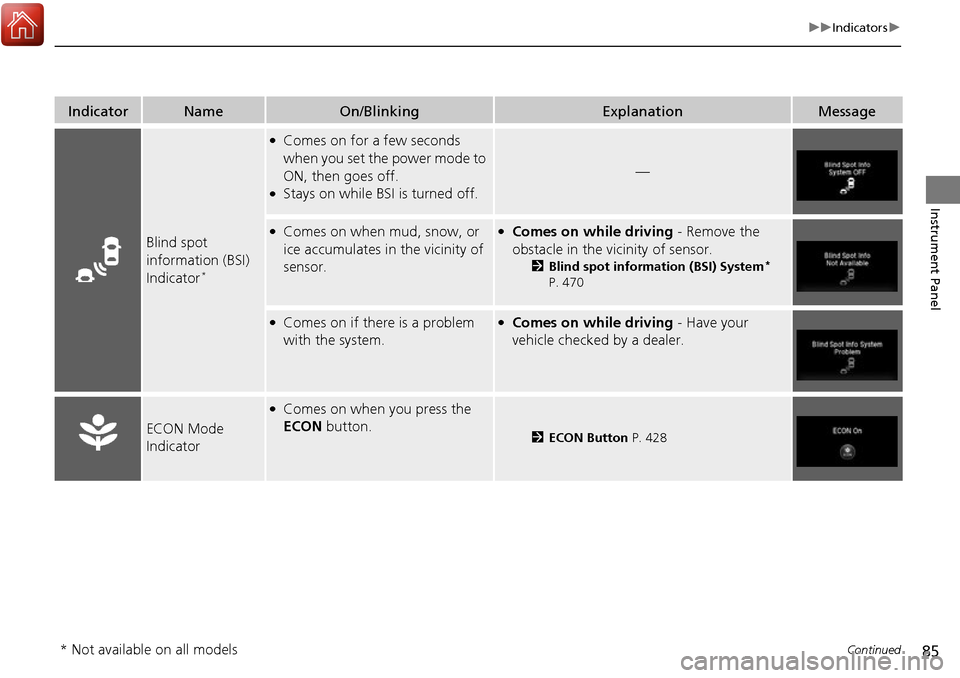
Blind spot
information (BSI)
Indicator
*
●Comes on for a few seconds
when you set the power mode to
ON, then goes off.
●Stays on while BSI is turned off.
—
●Comes on when mud, snow, or
ice accumulates in the vicinity of
sensor.●Comes on while driving - Remove the
obstacle in the vicinity of sensor.
2 Blind spot information (BSI) System*
P. 470
●Comes on if there is a problem
with the system.●Comes on while driving - Have your
vehicle checked by a dealer.
ECON Mode
Indicator
●Comes on when you press the
ECON button.
2ECON Button P. 428
* Not available on all models
Page 87 of 606
86
uuIndicators u
Instrument Panel
IndicatorNameOn/BlinkingExplanationMessage
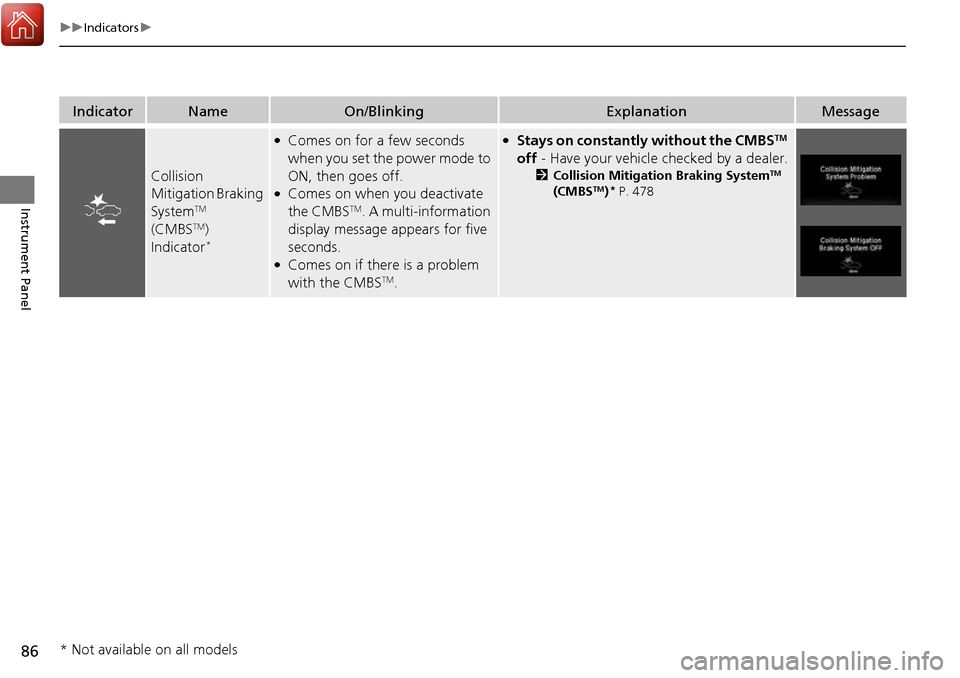
Collision
Mitigation Braking
System
TM
(CMBSTM)
Indicator*
●Comes on for a few seconds
when you set the power mode to
ON, then goes off.
●Comes on when you deactivate
the CMBSTM. A multi-information
display message appears for five
seconds.
●Comes on if there is a problem
with the CMBSTM.
●Stays on constantly without the CMBSTM
off - Have your vehicle checked by a dealer.
2Collision Mitigation Braking SystemTM
(CMBSTM)* P. 478
* Not available on all models
Page 91 of 606
90
uuIndicators uMulti-Information Display Warn ing and Information Messages
Instrument Panel
MessageConditionExplanation
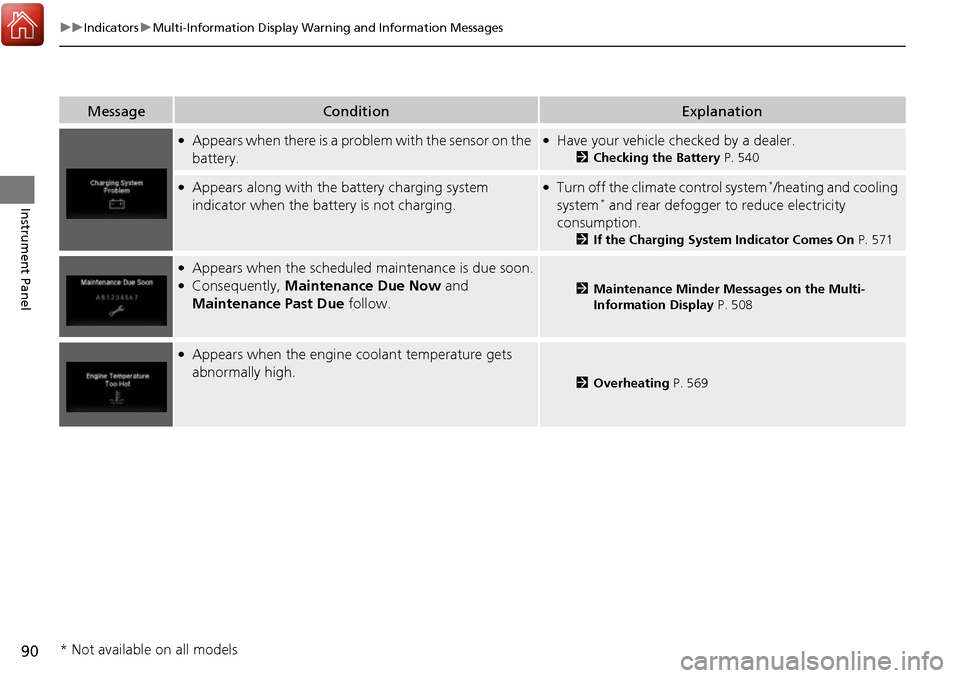
●Appears when there is a problem with the sensor on the
battery.●Have your vehicle checked by a dealer.
2Checking the Battery P. 540
●Appears along with the battery charging system
indicator when the battery is not charging.●Turn off the climate control system*/heating and cooling
system* and rear defogger to reduce electricity
consumption.
2 If the Charging System Indicator Comes On P. 571
●Appears when the scheduled maintenance is due soon.●Consequently, Maintenance Due Now and
Maintenance Past Due follow.2Maintenance Minder Messages on the Multi-
Information Display P. 508
●Appears when the engine coolant temperature gets
abnormally high.
2Overheating P. 569
* Not available on all models
Page 92 of 606
91
uuIndicators uMulti-Information Display Warning and Information Messages
Continued
Instrument Panel
MessageConditionExplanation
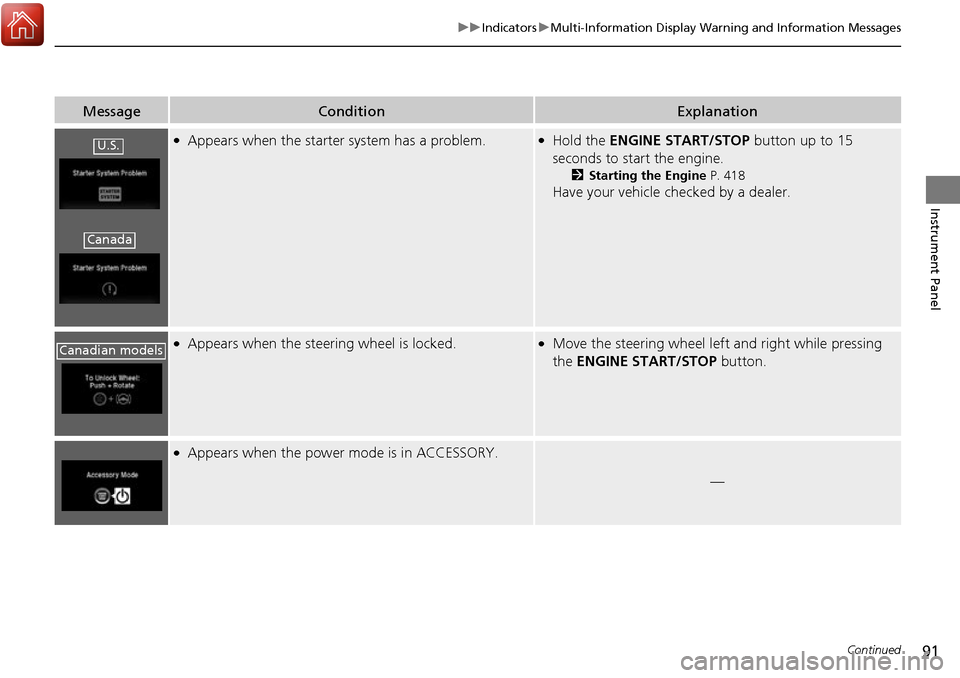
●Appears when the starter system has a problem.●Hold the ENGINE START/STOP button up to 15
seconds to start the engine.
2 Starting the Engine P. 418
Have your vehicle checked by a dealer.
●Appears when the steering wheel is locked.●Move the steering wheel left and right while pressing
the ENGINE START/STOP button.
●Appears when the power mode is in ACCESSORY.
—
U.S.
Canada
Canadian models
Page 93 of 606
92
uuIndicators uMulti-Information Display Warn ing and Information Messages
Instrument Panel
MessageConditionExplanation
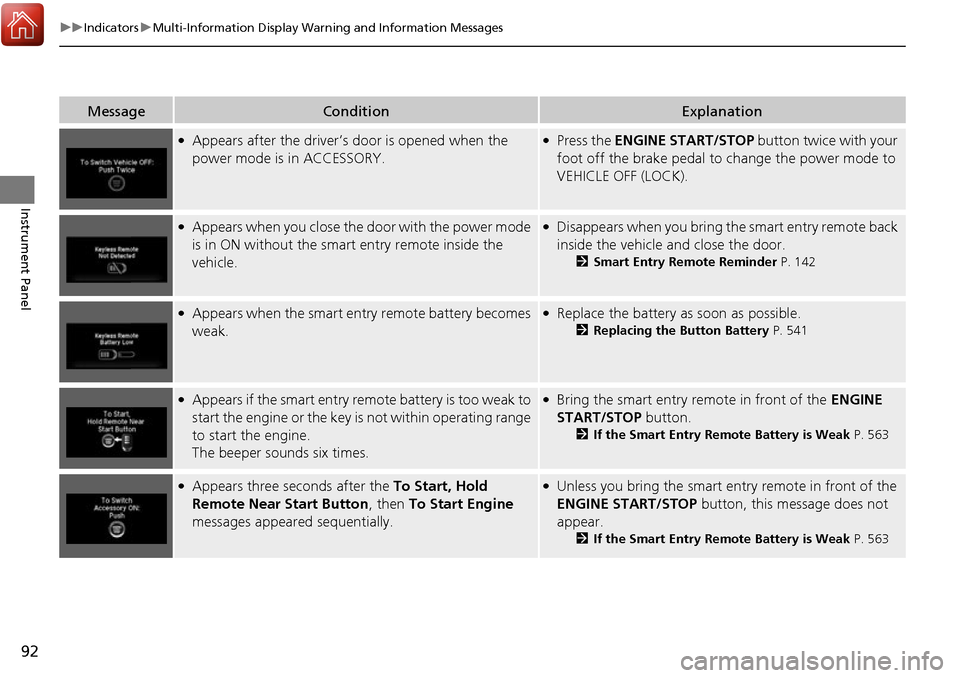
●Appears after the driver’s door is opened when the
power mode is in ACCESSORY.●Press the ENGINE START/STOP button twice with your
foot off the brake pedal to change the power mode to
VEHICLE OFF (LOCK).
●Appears when you close the door with the power mode
is in ON without the smar t entry remote inside the
vehicle.●Disappears when you bring the smart entry remote back
inside the vehicle and close the door.
2 Smart Entry Remote Reminder P. 142
●Appears when the smart entry remote battery becomes
weak.●Replace the battery as soon as possible.
2Replacing the Button Battery P. 541
●Appears if the smart entry remote battery is too weak to
start the engine or the key is not within operating range
to start the engine.
The beeper sounds six times.●Bring the smart entry remote in front of the ENGINE
START/STOP button.
2 If the Smart Entry Remote Battery is Weak P. 563
●Appears three seconds after the To Start, Hold
Remote Near Start Button , then To Start Engine
messages appeared sequentially.●Unless you bring the smart en try remote in front of the
ENGINE START/STOP button, this message does not
appear.
2 If the Smart Entry Remote Battery is Weak P. 563