set clock HONDA RIDGELINE 2017 2.G Owner's Manual
[x] Cancel search | Manufacturer: HONDA, Model Year: 2017, Model line: RIDGELINE, Model: HONDA RIDGELINE 2017 2.GPages: 606, PDF Size: 13.21 MB
Page 307 of 606
306
uuCustomized Features u
Features
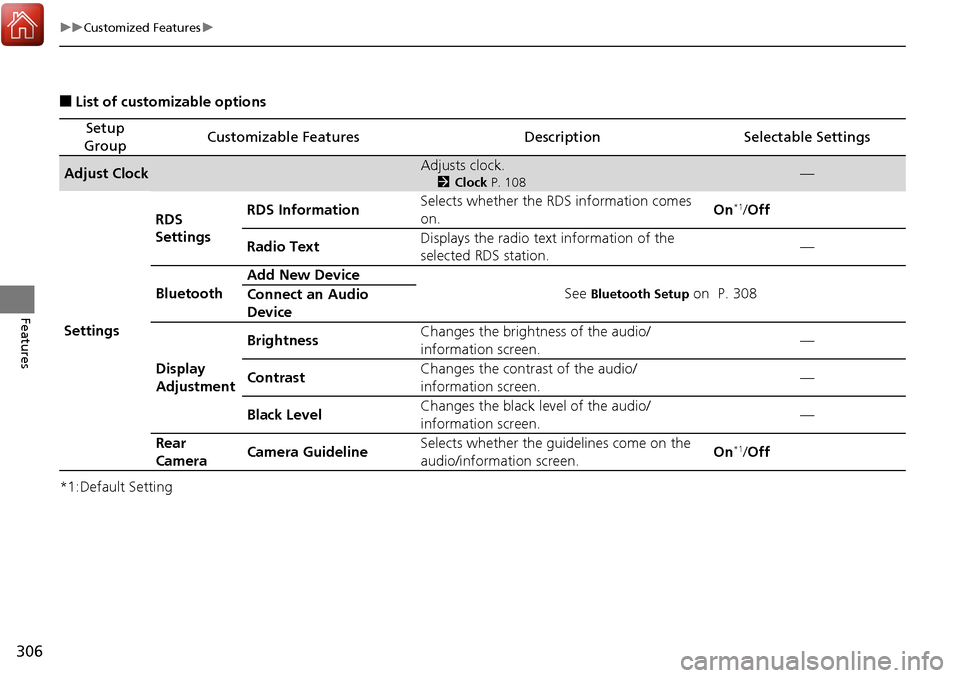
■List of customizable options
*1:Default Setting
Setup
GroupCustomizable FeaturesDescriptionSelectable Settings
Adjust ClockAdjusts clock.
2 Clock P. 108—
Settings RDS
Settings
RDS Information
Selects whether the RDS information comes
on. On
*1/
Off
Radio Text Displays the radio text information of the
selected RDS station. —
Bluetooth Add New Device
See
Bluetooth Setup on P. 308
Connect an Audio
Device
Display
Adjustment Brightness
Changes the brightness of the audio/
information screen. —
Contrast Changes the contrast of the audio/
information screen. —
Black Level Changes the black level of the audio/
information screen.
—
Rear
Camera Camera Guideline Selects whether the guidelines come on the
audio/information screen. On
*1/
Off
Page 308 of 606
307
uuCustomized Features u
Continued
Features
*1:Default Setting
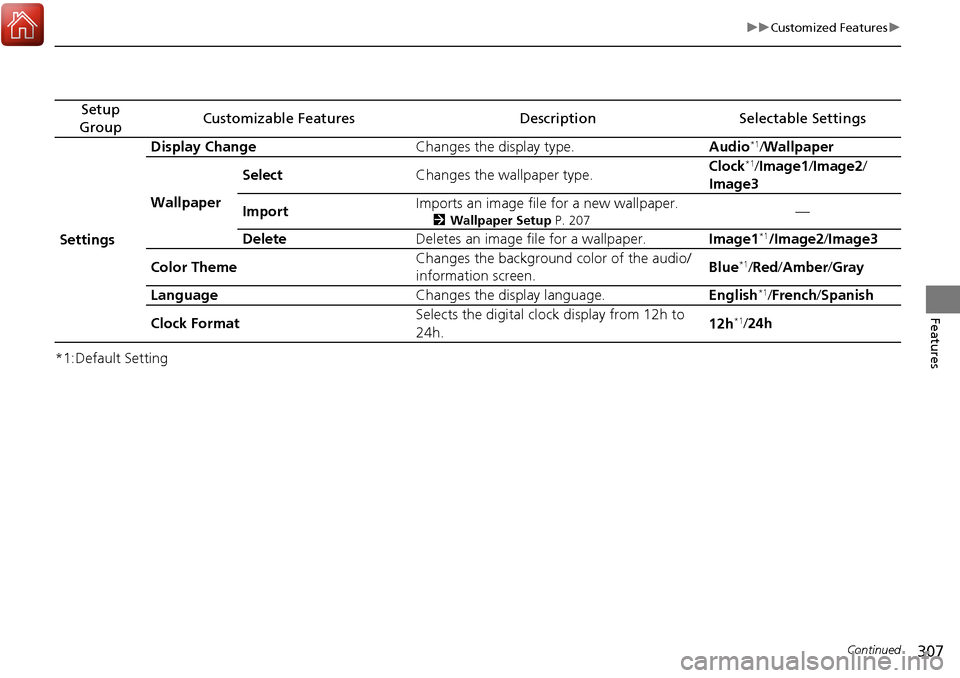
Setup
GroupCustomizable FeaturesDescriptionSelectable Settings
Settings Display Change
Changes the display type. Audio
*1/Wallpaper
Wallpaper Select
Changes the wallpaper type. Clock*1/
Image1/ Image2/
Image3
Import Imports an image file for a new wallpaper.
2
Wallpaper Setup P. 207—
Delete Deletes an image file for a wallpaper. Image1
*1/Image2/Image3
Color Theme Changes the background color of the audio/
information screen.
Blue
*1/
Red /Amber /Gray
Language Changes the display language. English
*1/French /Spanish
Clock Format Selects the digital clock display from 12h to
24h. 12h
*1/
24h
Page 312 of 606
311
uuCustomized Features u
Continued
Features
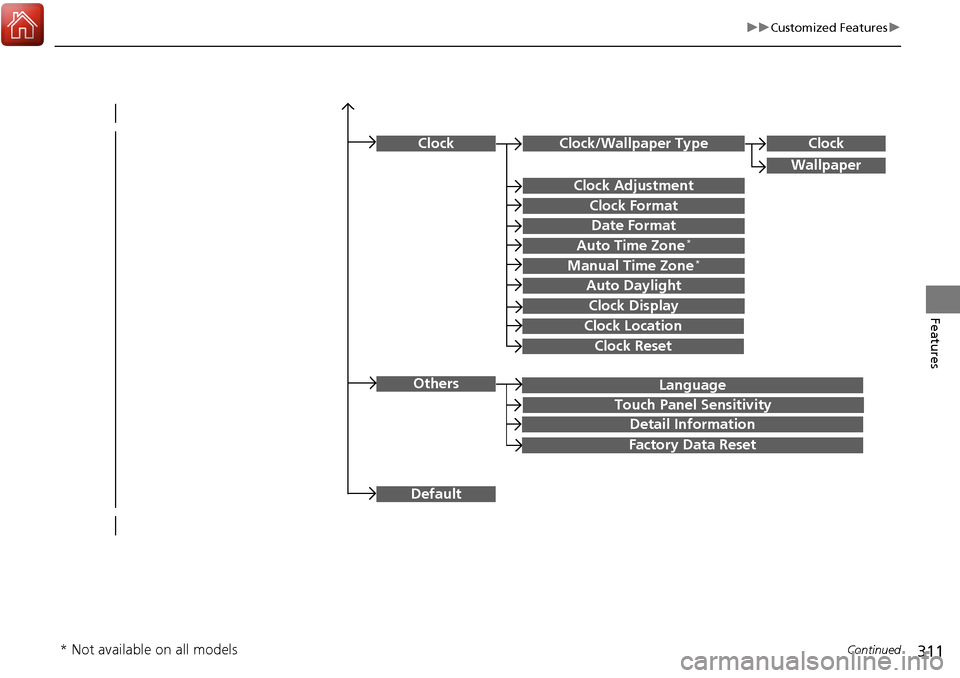
Language
Default
Others
Clock/Wallpaper Type
Date Format
Clock Adjustment
ClockClock
Wallpaper
Manual Time Zone*
Auto Daylight
Clock Display
Touch Panel Sensitivity
Clock Format
Auto Time Zone*
Detail Information
Factory Data Reset
Clock Reset
Clock Location
* Not available on all models
Page 316 of 606
315
uuCustomized Features u
Continued
Features
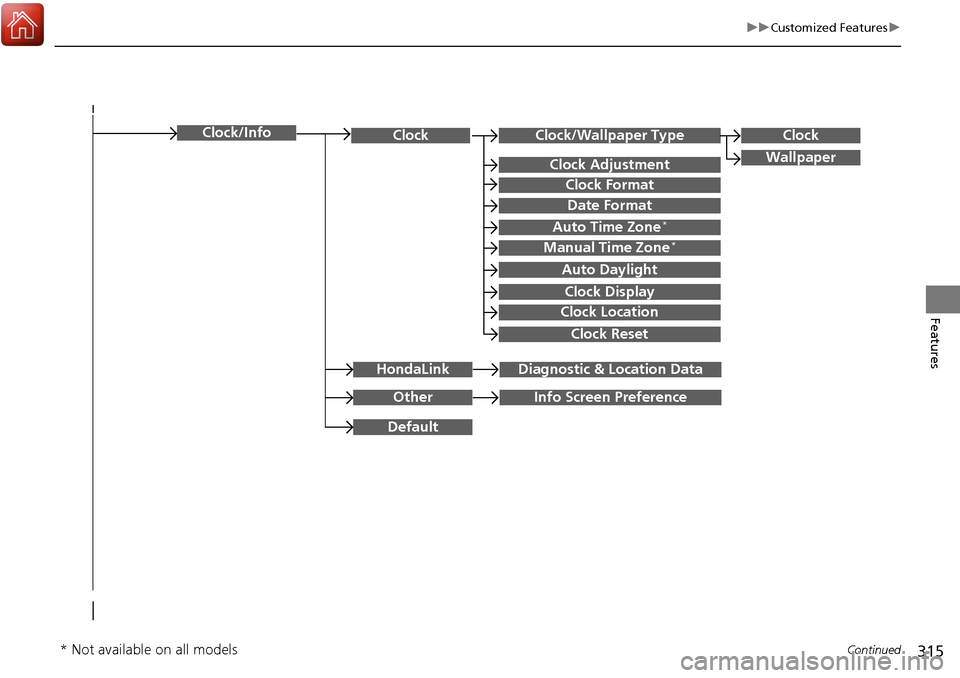
Clock/Wallpaper TypeClockClock
WallpaperClock Adjustment
Clock Format
Date Format
Auto Time Zone*
Manual Time Zone*
Auto Daylight
Clock Display
Clock Location
Clock Reset
OtherInfo Screen Preference
Default
Clock/Info
HondaLinkDiagnostic & Location Data
* Not available on all models
Page 321 of 606
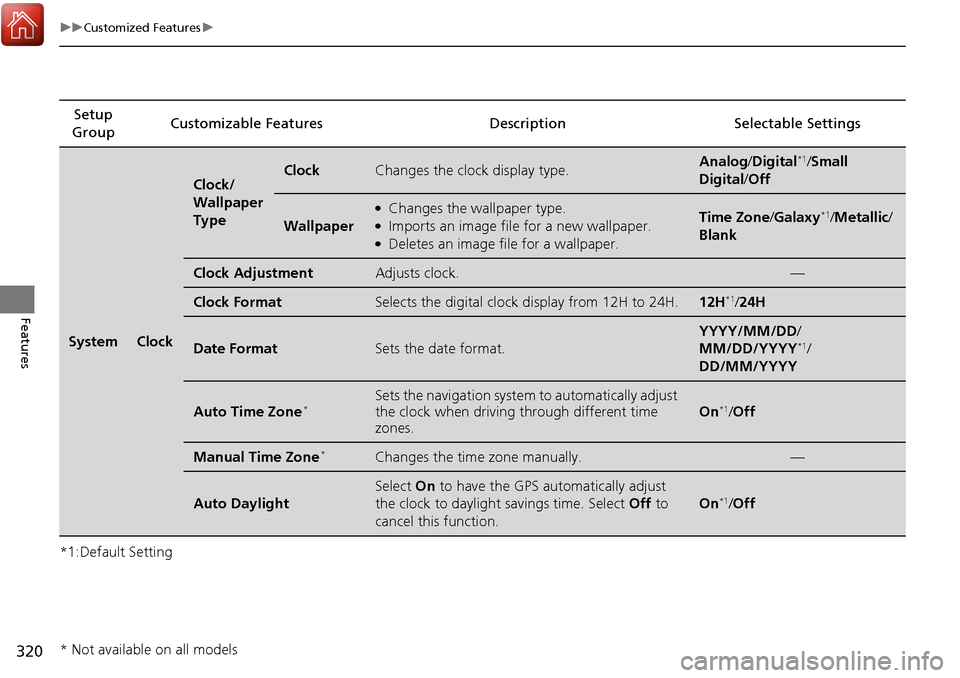
320
uuCustomized Features u
Features
*1:Default SettingSetup
Group Customizable Features Descri
ption Selectable Settings
SystemClock
Clock/
Wallpaper
TypeClockChanges the clock display type.Analog/Digital*1/Small
Digital /Off
Wallpaper
●Changes the wallpaper type.●Imports an image file for a new wallpaper.●Deletes an image file for a wallpaper.
Time Zone /Galaxy*1/Metallic /
Blank
Clock AdjustmentAdjusts clock.—
Clock FormatSelects the digital clock display from 12H to 24H.12H*1/ 24H
Date FormatSets the date format.
YYYY/MM/DD/
MM/DD/YYYY*1/
DD/MM/YYYY
Auto Time Zone*Sets the navigation system to automatically adjust
the clock when driving through different time
zones.
On*1/ Off
Manual Time Zone*Changes the time zone manually.—
Auto Daylight
Select On to have the GPS automatically adjust
the clock to daylight savings time. Select Off to
cancel this function.
On*1/ Off
* Not available on all models
Page 322 of 606
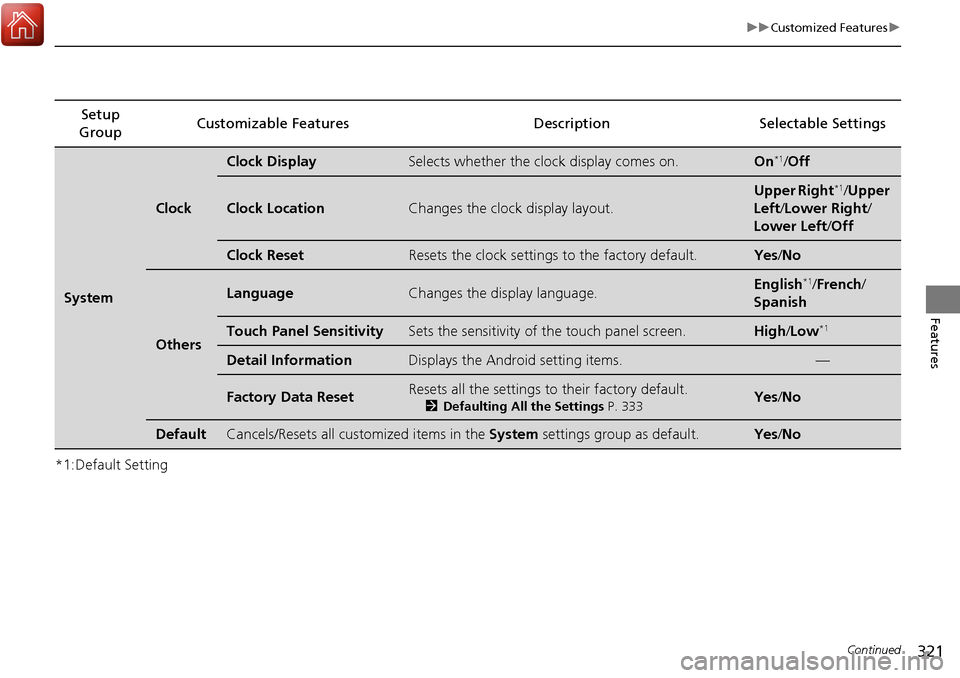
321
uuCustomized Features u
Continued
Features
*1:Default SettingSetup
Group Customizable Features Description Selectable Settings
System
Clock
Clock DisplaySelects whether the clock display comes on.On*1/
Off
Clock LocationChanges the clock display layout.
Upper Right*1/Upper
Left/ Lower Right/
Lower Left /Off
Clock ResetResets the clock settings to the factory default.Yes /No
Others
LanguageChanges the display language.English*1/French /
Spanish
Touch Panel SensitivitySets the sensitivity of the touch panel screen.High/Low*1
Detail InformationDisplays the Android setting items.—
Factory Data ResetResets all the settings to their factory default.
2 Defaulting All the Settings P. 333Yes /No
DefaultCancels/Resets all customized items in the System settings group as default.Yes/No
Page 330 of 606
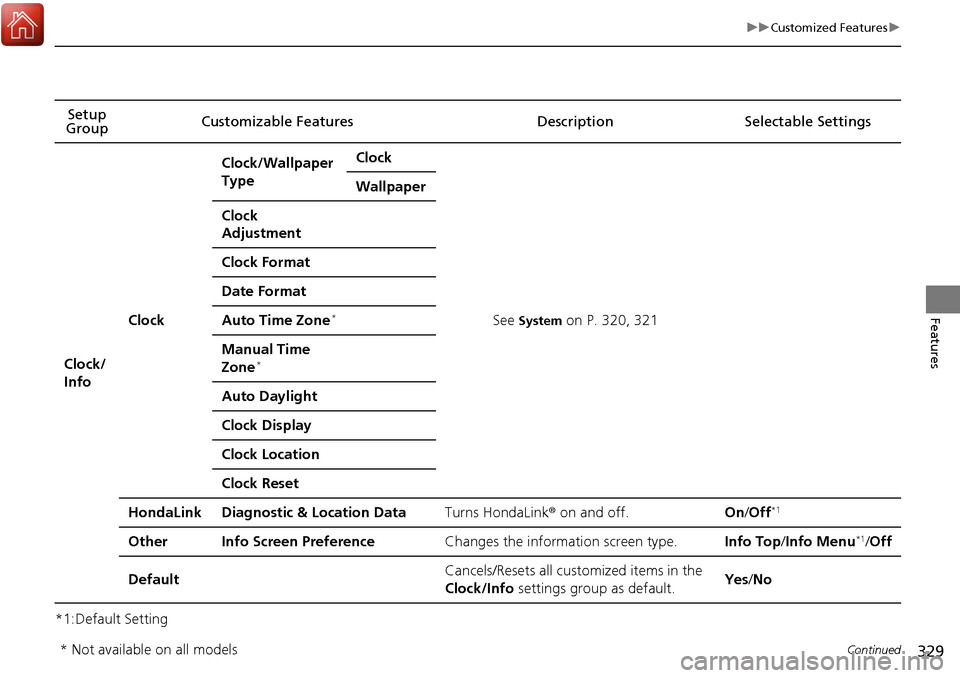
329
uuCustomized Features u
Continued
Features
*1:Default SettingSetup
Group Customizable Features Description Selectable Settings
Clock/
Info
Clock
Clock/Wallpaper
TypeClock
See System on P. 320, 321
Wallpaper
Clock
Adjustment
Clock Format
Date Format
Auto Time Zone*
Manual Time
Zone*
Auto Daylight
Clock Display
Clock Location
Clock Reset
HondaLinkDiagnostic & Location DataTurns HondaLink
® on and off.On/Off*1
OtherInfo Screen PreferenceChanges the information screen type.Info Top /Info Menu*1/Off
DefaultCancels/Resets all customized items in the
Clock/Info settings group as default.Yes/No
* Not available on all models
Page 541 of 606
540
Maintenance
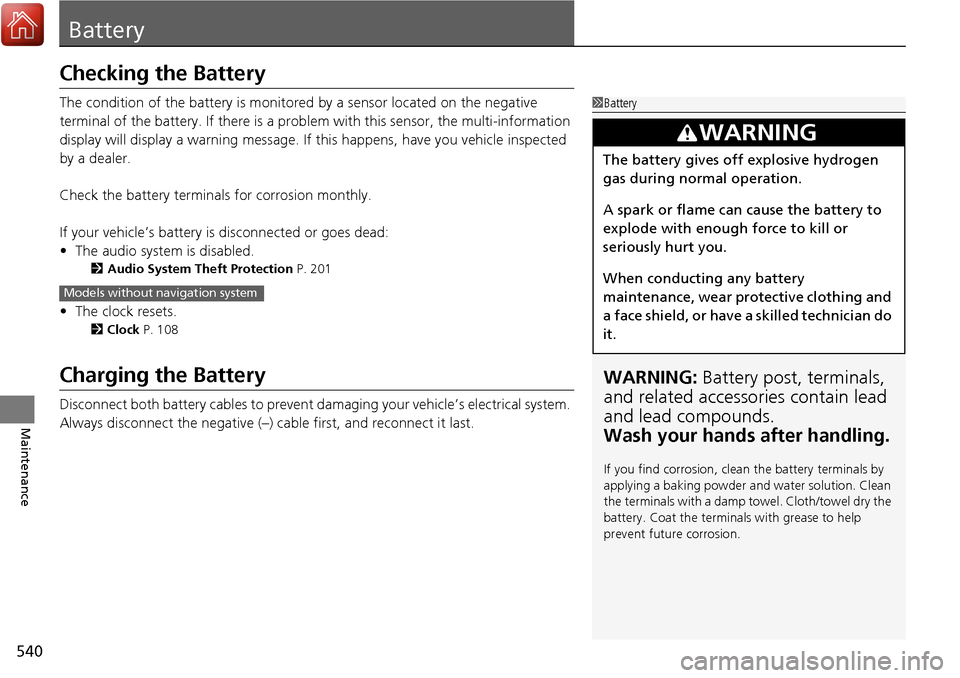
Battery
Checking the Battery
The condition of the battery is monitored by a sensor located on the negative
terminal of the battery. If there is a prob lem with this sensor, the multi-information
display will display a warning message. If this happens, have you vehicle inspected
by a dealer.
Check the battery termin als for corrosion monthly.
If your vehicle’s battery is disconnected or goes dead:
• The audio system is disabled.
2 Audio System Theft Protection P. 201
•The clock resets.
2 Clock P. 108
Charging the Battery
Disconnect both battery cables to prevent da maging your vehicle’s electrical system.
Always disconnect the negative (–) cable first, and reconnect it last.
1 Battery
WARNING: Battery post, terminals,
and related accessories contain lead
and lead compounds.
Wash your hands after handling.
If you find corrosion, clea n the battery terminals by
applying a baking powder a nd water solution. Clean
the terminals with a damp towel. Cloth/towel dry the
battery. Coat the terminals with grease to help
prevent future corrosion.
3WARNING
The battery gives off explosive hydrogen
gas during normal operation.
A spark or flame can cause the battery to
explode with enough force to kill or
seriously hurt you.
When conducting any battery
maintenance, wear prot ective clothing and
a face shield, or have a skilled technician do
it.
Models without navigation system
Page 604 of 606
603
Index
Overheating............................................. 569
P
Pandora®.................................................. 269
Panic Mode ............................................... 133
Parking ..................................................... 487
Parking Brake ........................................... 474
Parking Brake and Brake System Indicator ........................................... 72, 573
Parking Sensor System ............................. 488
Passenger Airbag Off Indicator ................. 51
Passing Indicators ..................................... 144
Playing Bluetooth ® Audio ............... 219, 274
Power Windows ....................................... 134
Precautions While Driving ....................... 424
Driving Guidelines for Your Utility Vehicle .................................................. 424
Rain ........................................................ 424
Pregnant Women ....................................... 38
Puncture (Tire) ......................................... 553
R
Radiator.................................................... 520
Radio (FM/AM) ................................. 211, 247
Radio (SiriusXM ®)..................................... 251
Radio Data System (RDS) ................. 212, 249
Range ........................................................ 105
RDS (Radio Data System) ................. 212, 249
Readiness Codes (Emissions Testing) ...... 591Rear Climate Control System
From the Rear Panel ................................ 191
Rear Defogger/Heated Door Mirror Button ..................................................... 154
Rear Outer Seat Heaters .......................... 181
Rear Seats .................................................. 164
Rearview Mirror ........................................ 159
Refueling ................................................... 498
Fuel Gauge .............................................. 101
Gasoline .......................................... 498, 586
Low Fuel Indicator ..................................... 75
Regulations ............................... 468, 534, 589
Remote Engine Start ................................ 420
Remote Transmitter ................................. 117
Replacement Battery .................................................... 541
Bulbs ....................................................... 523
Fuses ....................................... 575, 577, 578
Tires ........................................................ 537
Wiper Blade Rubber ................................. 529
Reporting Safety Defects ......................... 590
RESET Button ............................................ 102
Resetting a Trip Meter ............................. 104
Reverse Tilt Door Mirror .......................... 160
Road Departure Mitigation (RDM) .......... 436
Indicator .................................................... 82
On and Off .............................................. 438
S
Safe Driving ................................................ 27
Safety Check ............................................... 32
Safety Labels ............................................... 69
Safety Message ............................................. 1
Seat Belts .................................................... 33
Adjusting the Shoulder Anchor.................. 37
Automatic Seat Belt Tensioners ................. 35
Checking................................................... 39
Fastening .................................................. 36
Installing a Child Seat wi th a Lap/Shoulder Seat
Belt ......................................................... 61
Pregnant Women ...................................... 38
Reminder .................................................. 34
Warning Indicator ............................... 34, 74
Seat Heaters .............................. 179, 180, 181
Seat Ventilation ........................................ 180
Seats .......................................................... 161
Adjusting ................................................ 161
Driver’s Seat Lumbar Support .................. 161
Front Seats .............................................. 161
Rear Seats ............................................... 164
Seat Heaters ............................ 179, 180, 181
Seat Ventilation ....................................... 180
Security System ......................................... 131
Immobilizer System Indicator ..................... 79
Security System Alarm Indicator................. 80
Selecting a Child Seat ................................. 57
Selector Knob (Audio) .............................. 204
Setting the Clock ...................................... 108