brake sensor HONDA RIDGELINE 2017 2.G Owners Manual
[x] Cancel search | Manufacturer: HONDA, Model Year: 2017, Model line: RIDGELINE, Model: HONDA RIDGELINE 2017 2.GPages: 606, PDF Size: 13.21 MB
Page 97 of 606
96
uuIndicators uMulti-Information Display Warn ing and Information Messages
Instrument Panel
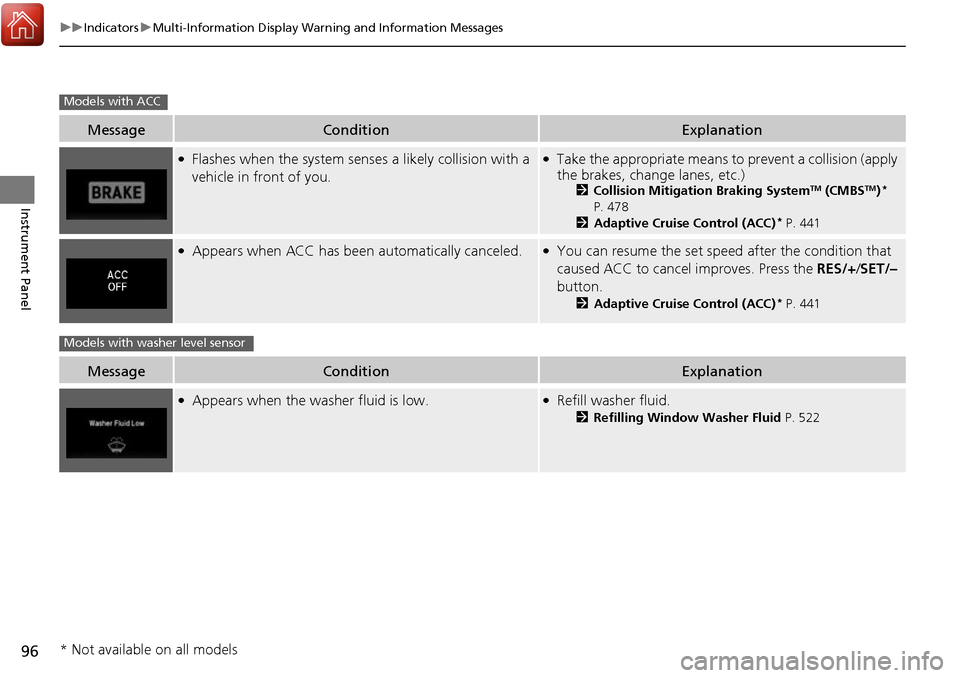
MessageConditionExplanation
●Flashes when the system senses a likely collision with a
vehicle in front of you.●Take the appropriate means to prevent a collision (apply
the brakes, change lanes, etc.)
2 Collision Mitigation Braking SystemTM (CMBSTM)*
P. 478
2 Adaptive Cruise Control (ACC)
* P. 441
●Appears when ACC has been automatically canceled.●You can resume the set speed after the condition that
caused ACC to cancel improves. Press the RES/+/SET/–
button.
2 Adaptive Cruise Control (ACC)* P. 441
MessageConditionExplanation
●Appears when the washer fluid is low.●Refill washer fluid.
2Refilling Window Washer Fluid P. 522
Models with ACC
Models with washer level sensor
* Not available on all models
Page 100 of 606
99
uuIndicators uMulti-Information Display Warning and Information Messages
Continued
Instrument Panel
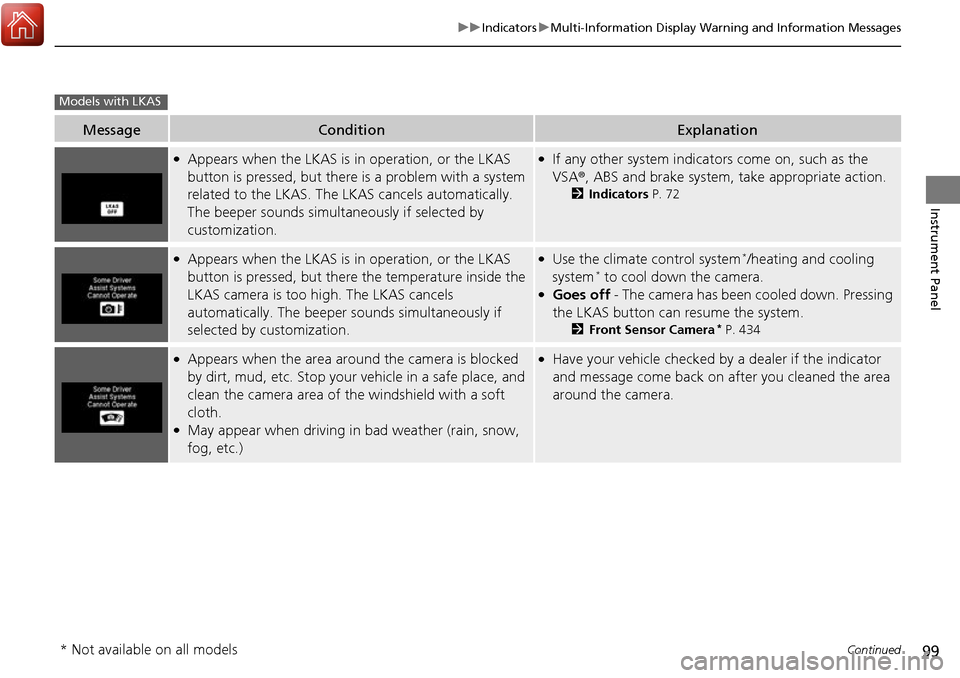
MessageConditionExplanation
●Appears when the LKAS is in operation, or the LKAS
button is pressed, but there is a problem with a system
related to the LKAS. The LKAS cancels automatically.
The beeper sounds simultaneously if selected by
customization.●If any other system indicators come on, such as the
VSA ®, ABS and brake system, take appropriate action.
2Indicators P. 72
●Appears when the LKAS is in operation, or the LKAS
button is pressed, but there the temperature inside the
LKAS camera is too high. The LKAS cancels
automatically. The beeper sounds simultaneously if
selected by customization.●Use the climate control system*/heating and cooling
system* to cool down the camera.●Goes off - The camera has been cooled down. Pressing
the LKAS button can resume the system.
2 Front Sensor Camera* P. 434
●Appears when the area arou nd the camera is blocked
by dirt, mud, etc. Stop your vehicle in a safe place, and
clean the camera area of the windshield with a soft
cloth.
●May appear when driving in bad weather (rain, snow,
fog, etc.)
●Have your vehicle checked by a dealer if the indicator
and message come back on after you cleaned the area
around the camera.
Models with LKAS
* Not available on all models
Page 396 of 606
395
Driving
This chapter discusses driving, refueling, and information on items such as accessories.
Before Driving................................... 396
Towing a Trailer ................................ 404
Off-Highway Driving Guidelines ..... 416
When Driving Starting the Engine .......................... 418
Precautions While Driving................. 424
Automatic Transmission ................... 425
Shifting ............................................ 426
ECON Button ................................... 428
Intelligent Traction Management...... 429
Cruise Control
*................................ 431
Front Sensor Camera*...................... 434Road Departure Mi tigation (RDM)
System*...................................... 436
Adaptive Cruise Control (ACC)*....... 441
Lane Keeping Assist System (LKAS)*.... 454Vehicle Stability Assist (VSA ®), aka Electronic
Stability Control (ESC), System ............. 462
Agile Handling Assist System............ 464
i-VTM4 (Intelligent Variable Torque
Management)-4 ® System
*.............. 465
TPMS with Tire Fill Assist .................. 466
Tire Pressure Monitoring System (TPMS) -
Required Federal Explanation ......... 468
Blind spot inform ation (BSI) System
*.... 470
LaneWatchTM*.................................. 472 Braking
Brake System ................................... 474
Anti-lock Brake System (ABS) ........... 476
Brake Assist System ......................... 477
Collision Mitigation Braking System
TM
(CMBSTM)*..................................... 478
Parking Your Vehicle When Stopped ................................ 487
Parking Sensor System
*................... 488
Cross Traffic Monitor*..................... 492
Multi-View Rear Camera .................. 496
Refueling Fuel Information .............................. 498
How to Refuel ................................. 499
Fuel Economy and CO
2 Emissions .... 501
* Not available on all models
Page 442 of 606
441
uuWhen Driving uAdaptive Cruise Control (ACC)*
Continued
Driving
Adaptive Cruise Control (ACC)*
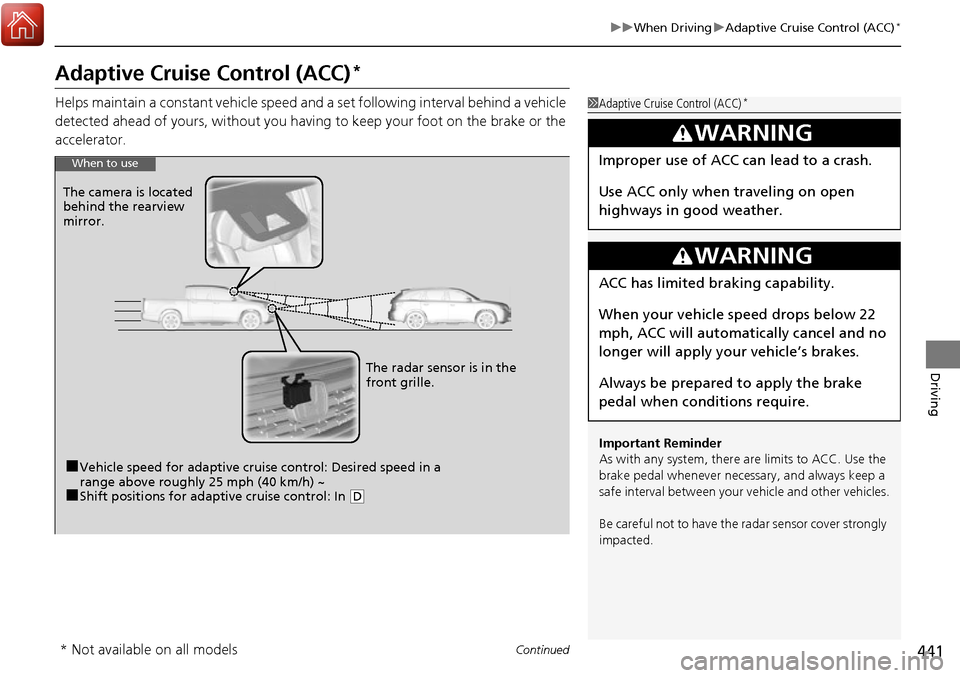
Helps maintain a constant vehicle speed and a set following interval behind a vehicle
detected ahead of yours, without you having to keep your foot on the brake or the
accelerator.1Adaptive Cruise Control (ACC)*
Important Reminder
As with any system, there are limits to ACC. Use the
brake pedal whenever necessary, and always keep a
safe interval betw een your vehicle and other vehicles.
Be careful not to have the radar sensor cover strongly
impacted.
3WARNING
Improper use of ACC can lead to a crash.
Use ACC only when traveling on open
highways in good weather.
3WARNING
ACC has limited braking capability.
When your vehicle speed drops below 22
mph, ACC will automatically cancel and no
longer will apply your vehicle’s brakes.
Always be prepared to apply the brake
pedal when conditions require.
When to use
■Vehicle speed for adaptive crui se control: Desired speed in a
range above roughly 25 mph (40 km/h) ~
■Shift positions for adaptive cruise control: In ( D
The radar sensor is in the
front grille.
The camera is located
behind the rearview
mirror.
* Not available on all models
Page 447 of 606
uuWhen Driving uAdaptive Cruise Control (ACC)*
446
Driving
The system may automatically shut off and the ACC indicator will come on under
certain conditions. Some examples of th ese conditions are listed below. Other
conditions may reduce some of the ACC functions.
2 Front Sensor Camera* P. 434
■Environmental conditions
Driving in bad weather (r ain, fog, snow, etc.).
■Roadway conditions
Driving on a snowy or wet roadway (obscure d lane marking, vehicle tracks, reflected
lights, road spray, high contrast).
■Vehicle conditions
• The outside of the windshie ld is blocked by dirt, mud, leaves, wet snow, etc.
• An abnormal tire or wheel condition (wro ng sized, varied size or construction,
improperly inflated, comp act spare tire, etc.).
• The camera temperature gets too high.
• The parking brake is applied.
• When the radar sensor cover is dirty.
• When the front of the vehicle tilts up due to heavy cargo in the trunk or rear seats.
• When tire chains are installed.
■ACC Conditions and Limitations1ACC Conditions and Limitations
The radar sensor for ACC is shared with the collision
mitigation braking system
TM (CMBSTM).
2 Collision Mitigation Braking SystemTM
(CMBSTM)* P. 478
Do not put a sticker on the radar sensor cover or
replace the radar sensor cover.
Have your vehicle checked by a dealer if you find any
unusual behavior of the system (e.g., the warning
message appears too frequently).
If the front of the vehicle is impacted in any of the
following situations, the ra dar sensor may not work
properly. Have your vehi cle checked by a dealer:
•The vehicle mounted onto a bump, curb, chock,
embankment, etc.
•You drive the vehicle where the water is deep.
•Your vehicle has a frontal collision.
You can read about handling information for the
camera equipped with this system. 2 Front Sensor Camera
* P. 434
* Not available on all models
Page 448 of 606
447
uuWhen Driving uAdaptive Cruise Control (ACC)*
Continued
Driving
■Detection limitations
• A vehicle or pedestrian suddenly crosses in front of you.
• The interval between your vehicle and the vehicle or pedestrian ahead of you is
too short.
• A vehicle cuts in front of you at a slow speed, and it brakes suddenly.
• When you accelerate rapidly and approach the vehicle or pedestrian ahead of you
at high speed.
• The vehicle ahead of you is a motorcycle, bicycle, mobilit y scooter, or other small
vehicle.
• When there are animals in front of your vehicle.
• When you drive on a curved or winding or undulating road that makes it difficult
for the sensor to properly detect a vehicle or a pedestrian in front of you.
• The speed difference between your vehicle an d a vehicle or pedestrian in front of
you is significantly large.
• An oncoming vehicle suddenly comes in front of you.
• Your vehicle abruptly crosses over in front of an oncoming vehicle.
• When driving through a narrow iron bridge.
• When the vehicle ahead of you brakes suddenly.
• When the vehicle ahead of you has a unique shape.
• When your vehicle or the vehicle ahead of you is driving on one edge of the lane.
Page 452 of 606
Continued451
uuWhen Driving uAdaptive Cruise Control (ACC)*
Driving
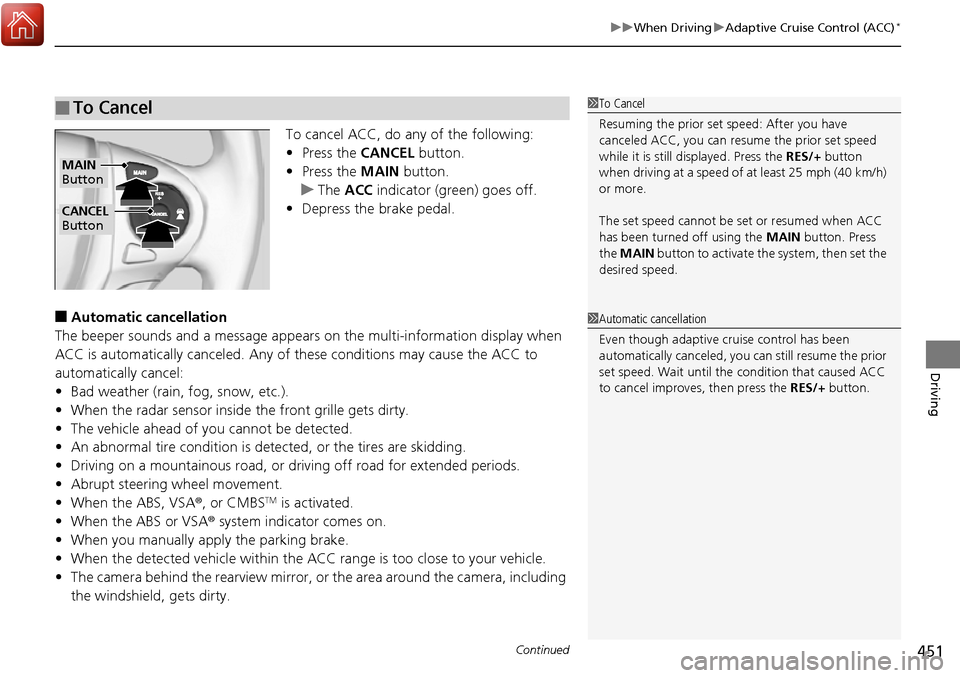
To cancel ACC, do any of the following:
• Press the CANCEL button.
• Press the MAIN button.
u The ACC indicator (gr een) goes off.
• Depress the brake pedal.
■Automatic ca ncellation
The beeper sounds and a message appears on the multi-information display when
ACC is automatically cancel ed. Any of these conditions may cause the ACC to
automatically cancel:
• Bad weather (rain, fog, snow, etc.).
• When the radar sensor inside the front grille gets dirty.
• The vehicle ahead of yo u cannot be detected.
• An abnormal tire condition is de tected, or the tires are skidding.
• Driving on a mountainous road, or driving off road for extended periods.
• Abrupt steering wheel movement.
• When the ABS, VSA ®, or CMBS
TM is activated.
• When the ABS or VSA ® system indicator comes on.
• When you manually apply the parking brake.
• When the detected vehicle within the AC C range is too close to your vehicle.
• The camera behind the rearview mirror, or the area around the camera, including
the windshield, gets dirty.
■To Cancel1 To Cancel
Resuming the prior set speed: After you have
canceled ACC, you can resume the prior set speed
while it is still displayed. Press the RES/+ button
when driving at a speed of at least 25 mph (40 km/h)
or more.
The set speed cannot be set or resumed when ACC
has been turned off using the MAIN button. Press
the MAIN button to activate the system, then set the
desired speed.
CANCEL
Button
MAIN
Button
1 Automatic cancellation
Even though adaptive crui se control has been
automatically canceled, you can still resume the prior
set speed. Wait until the condition that caused ACC
to cancel improves, then press the RES/+ button.
Page 457 of 606
uuWhen Driving uLane Keeping Assist System (LKAS)*
456
Driving
The system can be used when the following conditions are met.
• The lane in which you are driving has detectable lane markers on both sides, and
your vehicle is in the center of the lane.
• The vehicle speed is be tween about 45 and 90 mph (72 and 145 km/h).
• You are driving on a straight or slightly curved road.
• The turn signals are off.
• The brake pedal is not depressed.
• The wipers are not in continuous operation.
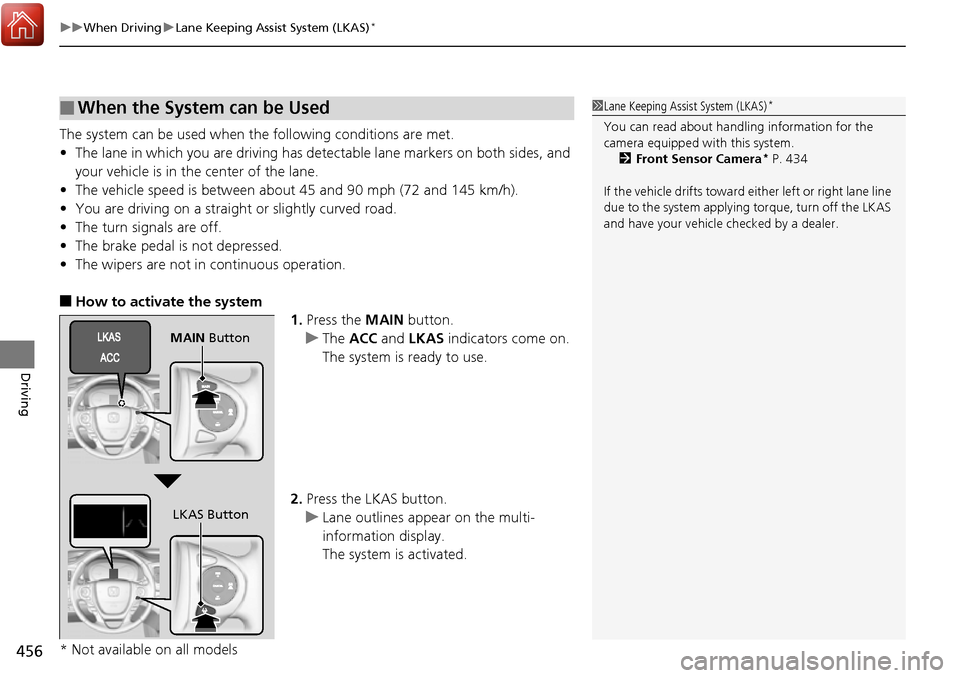
■How to activate the system
1.Press the MAIN button.
u The ACC and LKAS indicators come on.
The system is ready to use.
2. Press the LKAS button.
u Lane outlines appear on the multi-
information display.
The system is activated.
■When the System can be Used1Lane Keeping Assist System (LKAS)*
You can read about handling information for the
camera equipped with this system.
2 Front Sensor Camera
* P. 434
If the vehicle drifts toward ei ther left or right lane line
due to the system applying torque, turn off the LKAS
and have your vehicle checked by a dealer.
MAIN Button
LKAS Button
* Not available on all models
Page 479 of 606
478
uuBraking uCollision Mitigation Braking SystemTM (CMBSTM)*
Driving
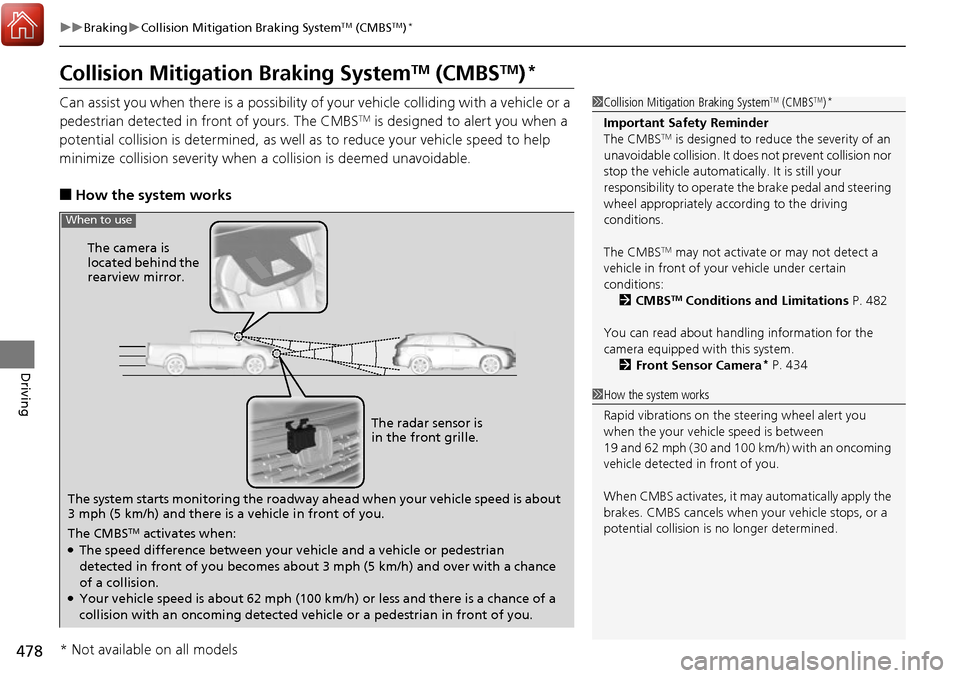
Collision Mitigati on Braking SystemTM (CMBSTM)*
Can assist you when there is a possibility of your vehicle colliding with a vehicle or a
pedestrian detected in front of yours. The CMBSTM is designed to alert you when a
potential collision is determined, as well as to reduce your vehicle speed to help
minimize collision severity when a collision is deemed unavoidable.
■How the system works
1 Collision Mitigation Braking SystemTM (CMBSTM)*
Important Safety Reminder
The CMBSTM is designed to reduce the severity of an
unavoidable collision. It does not prevent collision nor
stop the vehicle automatically. It is still your
responsibility to operate the brake pedal and steering
wheel appropriately acco rding to the driving
conditions.
The CMBS
TM may not activate or may not detect a
vehicle in front of y our vehicle under certain
conditions:
2 CMBS
TM Conditions and Limitations P. 482
You can read about handling information for the
camera equipped with this system. 2 Front Sensor Camera
* P. 434
1How the system works
Rapid vibrations on the st eering wheel alert you
when the your vehicle speed is between
19 and 62 mph (30 and 100 km/h) with an oncoming
vehicle detected in front of you.
When CMBS activates, it may automatically apply the
brakes. CMBS cancels when your vehicle stops, or a
potential collision is no longer determined.
The system starts monitoring the roadway ah ead when your vehicle speed is about
3 mph (5 km/h) and there is a vehicle in front of you. The radar sensor is
in the front grille.
The CMBS
TM activates when:●The speed difference between your vehicle and a vehicle or pedestrian
detected in front of you becomes about 3 mph (5 km/h) and over with a chance
of a collision.
●Your vehicle speed is about 62 mph (100 km/h) or less and there is a chance of a
collision with an oncoming detected vehicle or a pedestrian in front of you. The camera is
located behind the
rearview mirror.
When to use
* Not available on all models
Page 484 of 606
483
uuBraking uCollision Mitigation Braking SystemTM (CMBSTM)*
Continued
Driving
■Vehicle conditions
• Headlight lenses are dirty or the h eadlights are not properly adjusted.
• The outside of the windshield is blocked by dirt, mud, leaves, wet snow, etc.
• The inside of the windshield is fogged.
• An abnormal tire or wheel condition (wro ng sized, varied size or construction,
improperly inflated, co mpact spare tire, etc.).
• When tire chains are installed.
• The vehicle is tilted due to a heavy load or suspension modifications.
• The camera temperature gets too hot.
• Driving with the parking brake applied.
• When the radar sensor in the front grille gets dirty.