fog light HONDA RIDGELINE 2017 2.G Owners Manual
[x] Cancel search | Manufacturer: HONDA, Model Year: 2017, Model line: RIDGELINE, Model: HONDA RIDGELINE 2017 2.GPages: 606, PDF Size: 13.21 MB
Page 5 of 606
4
Quick Reference Guide
Quick Reference Guide
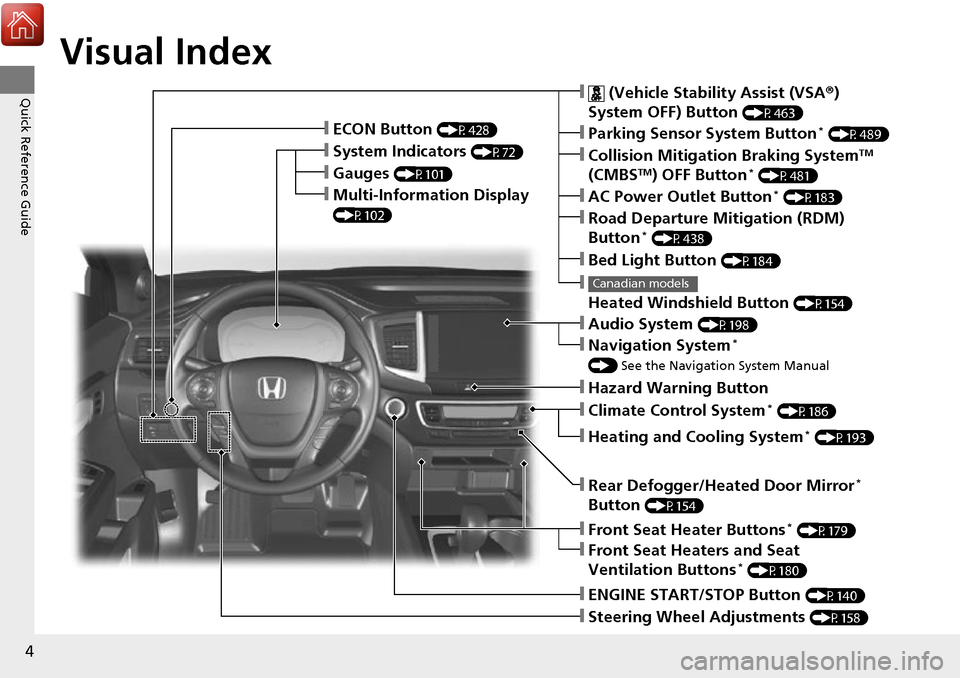
Visual Index
❙Gauges (P101)
❙Multi-Information Display
(P102)
❙System Indicators (P72)
❙ECON Button (P428)
❙Collision Mitigation Braking SystemTM
(CMBSTM) OFF Button* (P481)
❙
Heated Windshield Button (P154)
Canadian models
❙Parking Sensor System Button* (P489)
❙Steering Wheel Adjustments (P158)
❙ENGINE START/STOP Button (P140)
❙AC Power Outlet Button* (P183)
❙Road Departure Mitigation (RDM)
Button* (P438)
❙ (Vehicle Stability Assist (VSA ®)
System OFF) Button
(P463)
❙Bed Light Button (P184)
❙Audio System (P198)
❙Navigation System*
() See the Navigation System Manual
❙Front Seat Heater Buttons* (P179)
❙Front Seat Heaters and Seat
Ventilation Buttons* (P180)
❙Rear Defogger/Heated Door Mirror*
Button
(P154)
❙Heating and Cooling System* (P193)
❙Climate Control System* (P186)
❙Hazard Warning Button
Page 6 of 606
5
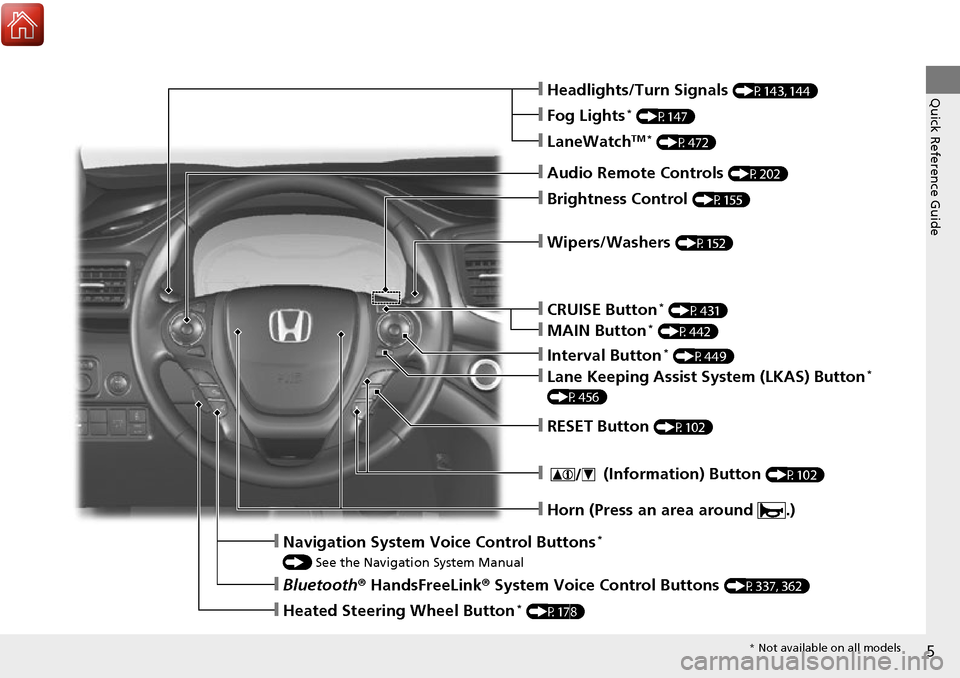
Quick Reference Guide❙Headlights/Turn Signals (P143, 144)
❙Fog Lights* (P147)
❙Audio Remote Controls (P202)
❙Brightness Control (P155)
❙Navigation System Voice Control Buttons*
() See the Navigation System Manual
❙Bluetooth ® HandsFreeLink ® System Voice Control Buttons (P337, 362)
❙Heated Steering Wheel Button* (P178)
❙LaneWatchTM * (P472)
❙Wipers/Washers (P152)
❙CRUISE Button* (P431)
❙Interval Button* (P449)
❙Lane Keeping Assist System (LKAS) Button*
(P456)
❙MAIN Button* (P442)
❙RESET Button (P102)
❙ (Information) Button (P102)
❙Horn (Press an area around .)
* Not available on all models
Page 9 of 606
Visual Index
8
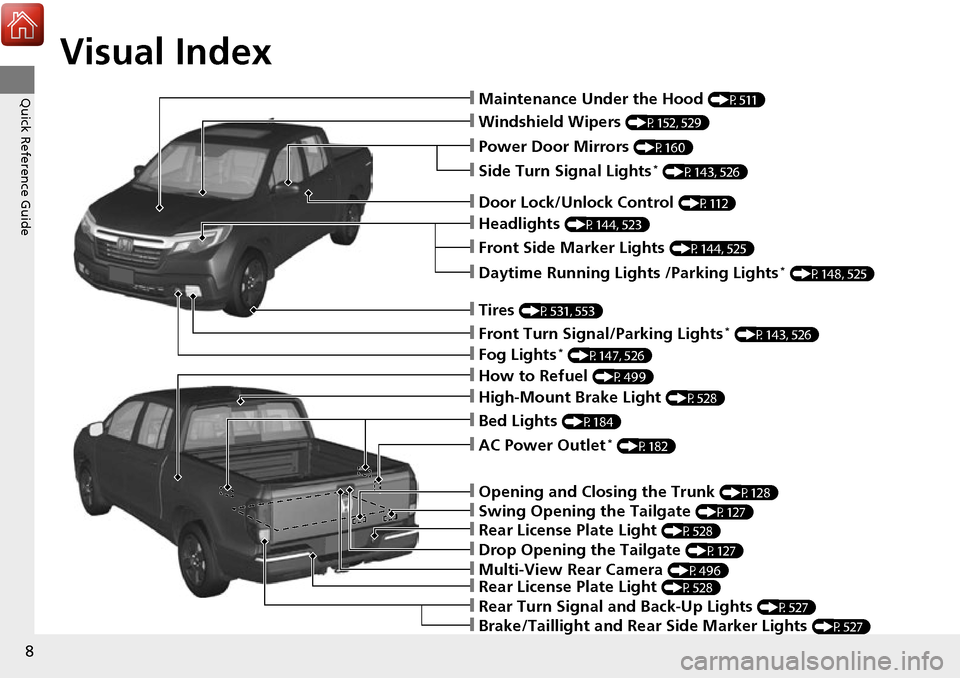
Quick Reference Guide❙Maintenance Under the Hood (P511)
❙Windshield Wipers (P152, 529)
❙Power Door Mirrors (P160)
❙Headlights (P144, 523)
❙Front Side Marker Lights (P144, 525)
❙Fog Lights* (P147, 526)
❙Side Turn Signal Lights* (P143, 526)
❙Daytime Running Lights /Parking Lights* (P148, 525)
❙How to Refuel (P499)
❙Rear Turn Signal and Back-Up Lights (P527)
❙Door Lock/Unlock Control (P112)
❙Tires (P531, 553)
❙Front Turn Signal/Parking Lights* (P143, 526)
❙Brake/Taillight and Rear Side Marker Lights (P527)
❙Rear License Plate Light (P528)
❙Multi-View Rear Camera (P496)
❙Drop Opening the Tailgate (P127)
❙Rear License Plate Light (P528)
❙Swing Opening the Tailgate (P127)
❙Opening and Closing the Trunk (P128)
❙AC Power Outlet* (P182)
❙High-Mount Brake Light (P528)
❙Bed Lights (P184)
Page 12 of 606
11
Quick Reference Guide
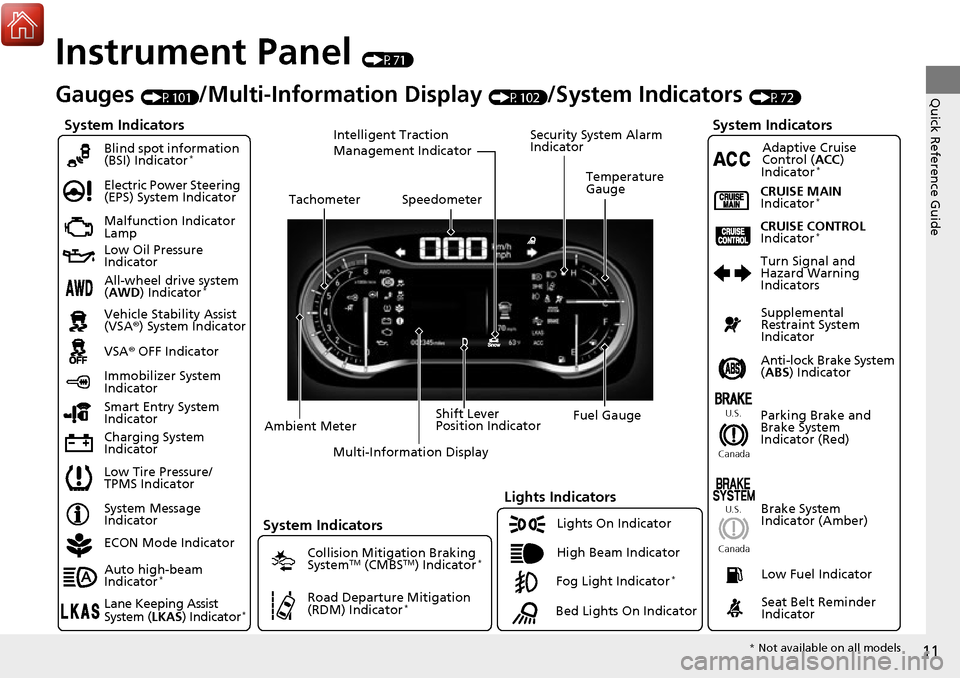
Instrument Panel (P71)
System Indicators
Malfunction Indicator
Lamp
Low Oil Pressure
Indicator
Charging System
IndicatorAnti-lock Brake System
(
ABS ) Indicator
Vehicle Stability Assist
(VSA®
) System Indicator
VSA ® OFF Indicator
Electric Power Steering
(EPS) System Indicator
Lights Indicators
Lights On Indicator
High Beam Indicator
Immobilizer System
Indicator
Seat Belt Reminder
Indicator
System Indicators
System Message
IndicatorParking Brake and
Brake System
Indicator (Red)Supplemental
Restraint System
Indicator
Low Fuel Indicator
Gauges (P101)/Multi-Information Display (P102)/System Indicators (P72)
Low Tire Pressure/
TPMS Indicator Turn Signal and
Hazard Warning
Indicators
Smart Entry System
Indicator Ambient Meter Shift Lever
Position Indicator
Fuel Gauge
Tachometer
Temperature
Gauge
Speedometer
Multi-Information Display
Brake System
Indicator (Amber)
All-wheel drive system
(AWD ) Indicator*
Blind spot information
(BSI) Indicator*
System Indicators
Collision Mitigation Braking
SystemTM (CMBSTM) Indicator*
Road Departure Mitigation
(RDM) Indicator*
Security System Alarm
Indicator
U.S.
Canada U.S.
Canada
Fog Light Indicator*
ECON Mode Indicator
Auto high-beam
Indicator
*
Lane Keeping Assist
System ( LKAS) Indicator*
CRUISE MAIN
Indicator*
CRUISE CONTROL
Indicator*
Adaptive Cruise
Control (ACC )
Indicator
*
Intelligent Traction
Management Indicator
Bed Lights On Indicator
* Not available on all models
Page 80 of 606
79
uuIndicators u
Continued
Instrument Panel
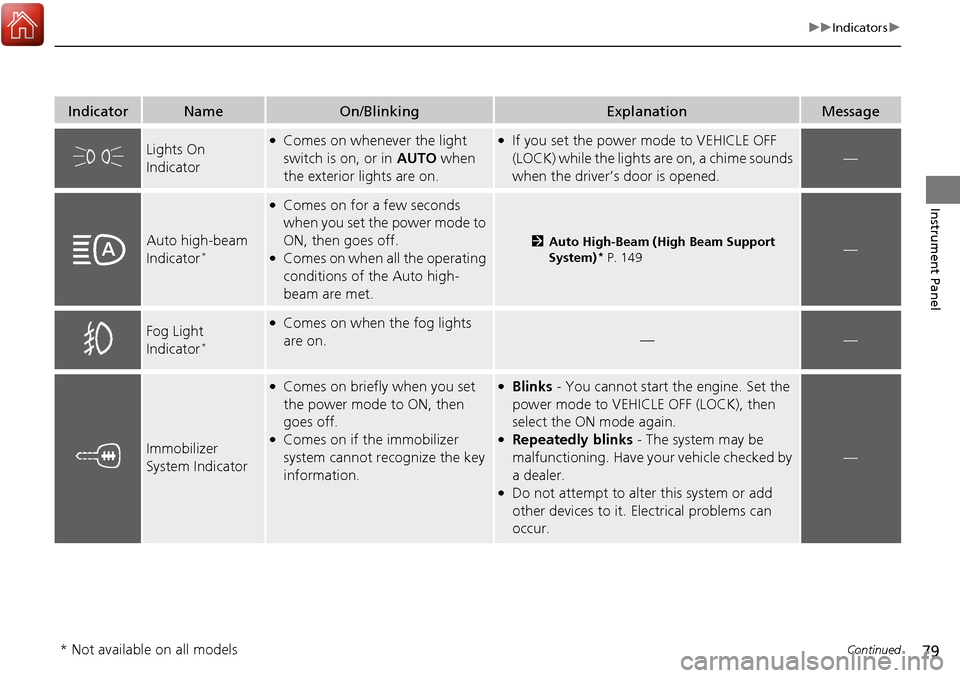
IndicatorNameOn/BlinkingExplanationMessage
Lights On
Indicator●Comes on whenever the light
switch is on, or in AUTO when
the exterior lights are on.●If you set the power mode to VEHICLE OFF
(LOCK) while the lights are on, a chime sounds
when the driver’s door is opened.
—
Auto high-beam
Indicator*
●Comes on for a few seconds
when you set the power mode to
ON, then goes off.
●Comes on when all the operating
conditions of the Auto high-
beam are met.
2Auto High-Beam (High Beam Support
System)* P. 149—
Fog Light
Indicator*
●Comes on when the fog lights
are on.
——
Immobilizer
System Indicator
●Comes on briefly when you set
the power mode to ON, then
goes off.
●Comes on if the immobilizer
system cannot recognize the key
information.
●Blinks - You cannot start the engine. Set the
power mode to VEHICL E OFF (LOCK), then
select the ON mode again.
●Repeatedly blinks - The system may be
malfunctioning. Have your vehicle checked by
a dealer.
●Do not attempt to alter this system or add
other devices to it. Electrical problems can
occur.
—
* Not available on all models
Page 108 of 606
107
Controls
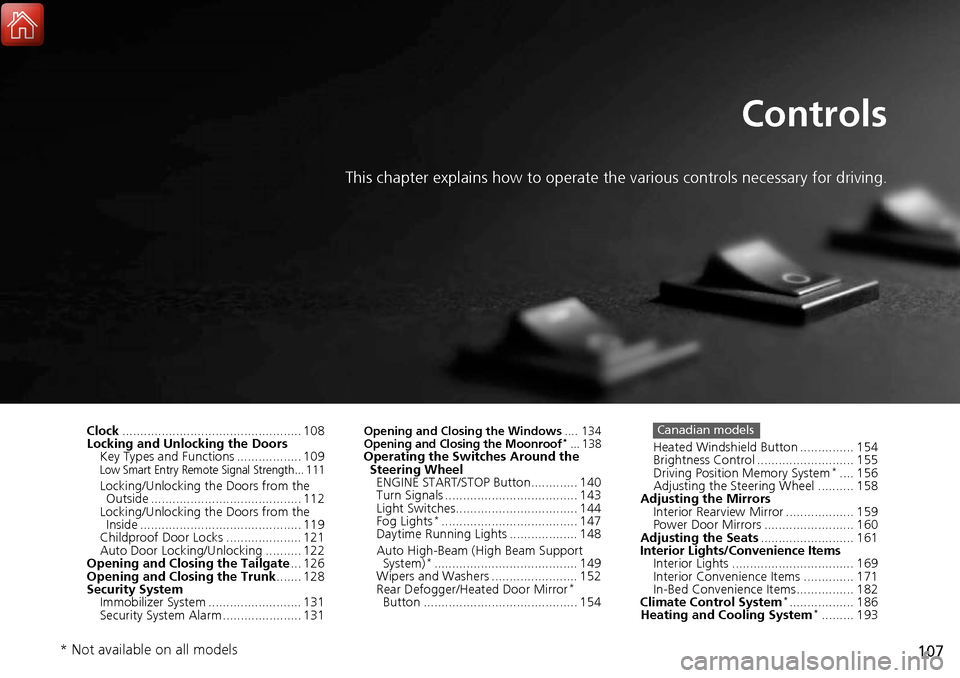
This chapter explains how to operate the various controls necessary for driving.
Clock.................................................. 108
Locking and Unlocking the Doors Key Types and Functions .................. 109
Low Smart Entry Remote Signal Strength... 111
Locking/Unlocking the Doors from the Outside .......................................... 112
Locking/Unlocking the Doors from the
Inside ............................................. 119
Childproof Door Locks ..................... 121
Auto Door Locking/Unlocking .......... 122
Opening and Closing the Tailgate ... 126
Opening and Closing the Trunk ....... 128
Security System
Immobilizer System .......................... 131
Security System Alarm ...................... 131
Opening and Closing the Windows .... 134
Opening and Closing the Moonroof*... 138Operating the Switches Around the Steering Wheel ENGINE START/STOP Button............. 140
Turn Signals ..................................... 143
Light Switches.................................. 144
Fog Lights
*...................................... 147
Daytime Running Lights ................... 148
Auto High-Beam (H igh Beam Support
System)
*........................................ 149
Wipers and Washers ........................ 152
Rear Defogger/Heat ed Door Mirror
*
Button ........................................... 154 Heated Windshield Button ............... 154
Brightness Control ........................... 155
Driving Position Memory System
*.... 156
Adjusting the Steering Wheel .......... 158
Adjusting the Mirrors Interior Rearview Mirror ................... 159
Power Door Mirrors ......................... 160
Adjusting the Seats .......................... 161
Interior Lights/Convenience Items
Interior Lights .................................. 169
Interior Convenience Items .............. 171
In-Bed Convenience Items................ 182
Climate Control System
*.................. 186
Heating and Cooling System*......... 193
Canadian models
* Not available on all models
Page 146 of 606
Continued145
uuOperating the Switches Around the Steering Wheel uLight Switches
Controls
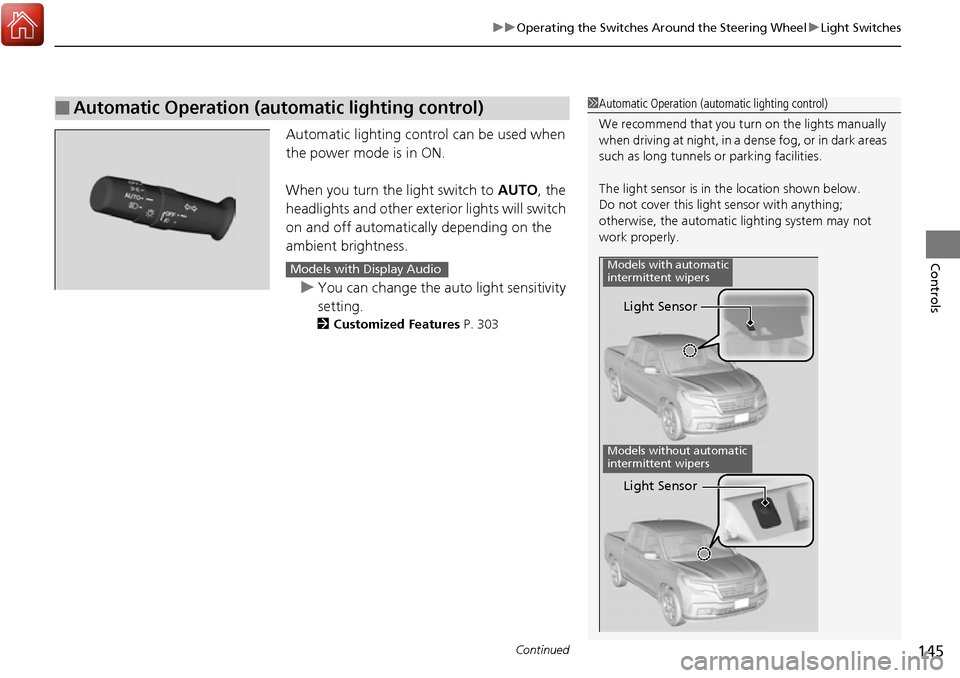
Automatic lighting contro l can be used when
the power mode is in ON.
When you turn the light switch to AUTO, the
headlights and other exterior lights will switch
on and off automatically depending on the
ambient brightness.
u You can change the auto light sensitivity
setting.
2 Customized Features P. 303
■Automatic Operation (automatic lighting control)1Automatic Operation (aut omatic lighting control)
We recommend that you tu rn on the lights manually
when driving at night, in a dense fog, or in dark areas
such as long tunnels or parking facilities.
The light sensor is in the location shown below.
Do not cover this light sensor with anything;
otherwise, the automatic lighting system may not
work properly.
Light Sensor
Models with automatic
intermittent wipers
Models without automatic
intermittent wipers
Light Sensor
Models with Display Audio
Page 148 of 606
147
uuOperating the Switches Around the Steering Wheel uFog Lights*
Controls
Fog Lights*
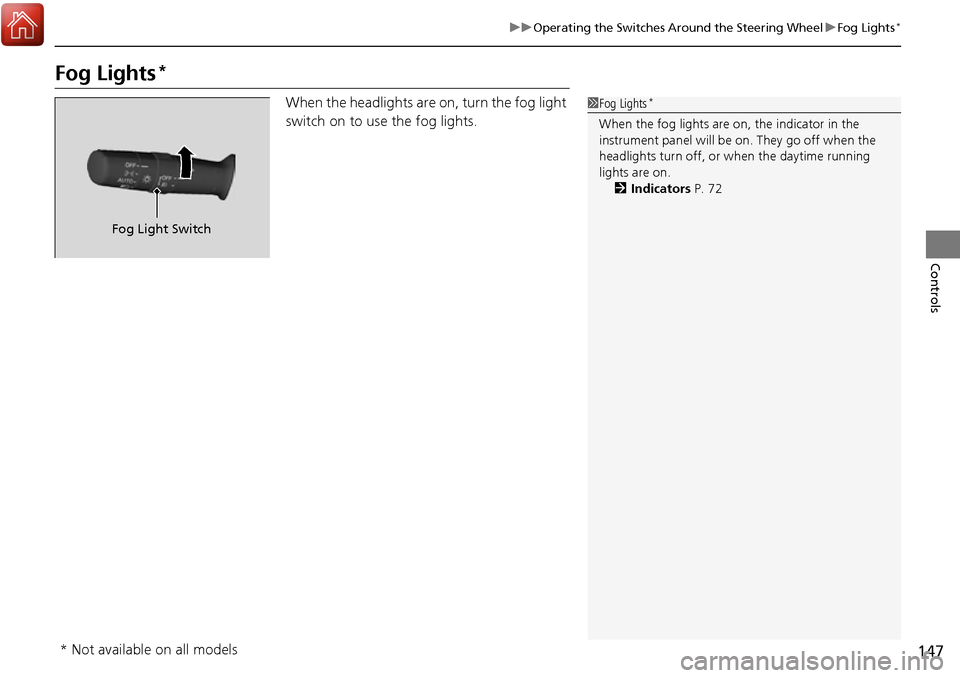
When the headlights are on, turn the fog light
switch on to use the fog lights.1Fog Lights*
When the fog lights are on, the indicator in the
instrument panel will be on. They go off when the
headlights turn off, or when the daytime running
lights are on. 2 Indicators P. 72
Fog Light Switch
* Not available on all models
Page 150 of 606
149
uuOperating the Switches Around the Steering Wheel uAuto High-Beam (High Beam Support System)*
Continued
Controls
Auto High-Beam (High Beam Support System)*
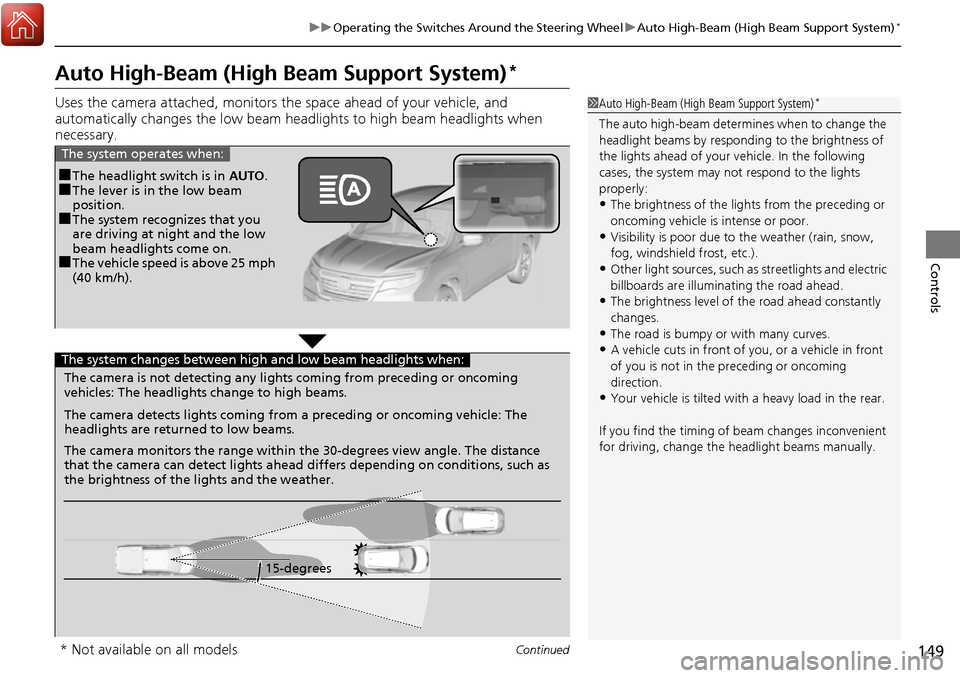
Uses the camera attached, monitors th e space ahead of your vehicle, and
automatically changes the low beam h eadlights to high beam headlights when
necessary.1 Auto High-Beam (High Beam Support System)*
The auto high-beam determines when to change the
headlight beams by responding to the brightness of
the lights ahead of your vehicle. In the following
cases, the system may not respond to the lights
properly:
•The brightness of the lights from the preceding or
oncoming vehicle is intense or poor.
•Visibility is poor due to the weather (rain, snow,
fog, windshield frost, etc.).
•Other light sources, such as streetlights and electric
billboards are illumina ting the road ahead.
•The brightness level of th e road ahead constantly
changes.
•The road is bumpy or with many curves.
•A vehicle cuts in front of you, or a vehicle in front
of you is not in the preceding or oncoming
direction.
•Your vehicle is tilted with a heavy load in the rear.
If you find the timing of beam changes inconvenient
for driving, change the headlight beams manually.
■The headlight switch is in AUTO.■The lever is in the low beam
position.
■The system recognizes that you
are driving at night and the low
beam headlights come on.
■The vehicle speed is above 25 mph
(40 km/h).
The system operates when:
The camera is not detecting any lights coming from preceding or oncoming
vehicles: The headlights change to high beams.
15-degrees
The camera detects lights coming from a preceding or oncoming vehicle: The
headlights are return
ed to low beams.
The camera monitors the range within the 30-degrees view angle. The distance
that the camera can detect lights ahead differs depending on conditions, such as
the brightness of the lights and the weather.
The system changes between high and low beam headlights when:
* Not available on all models
Page 419 of 606
418
Driving
When Driving
Starting the Engine
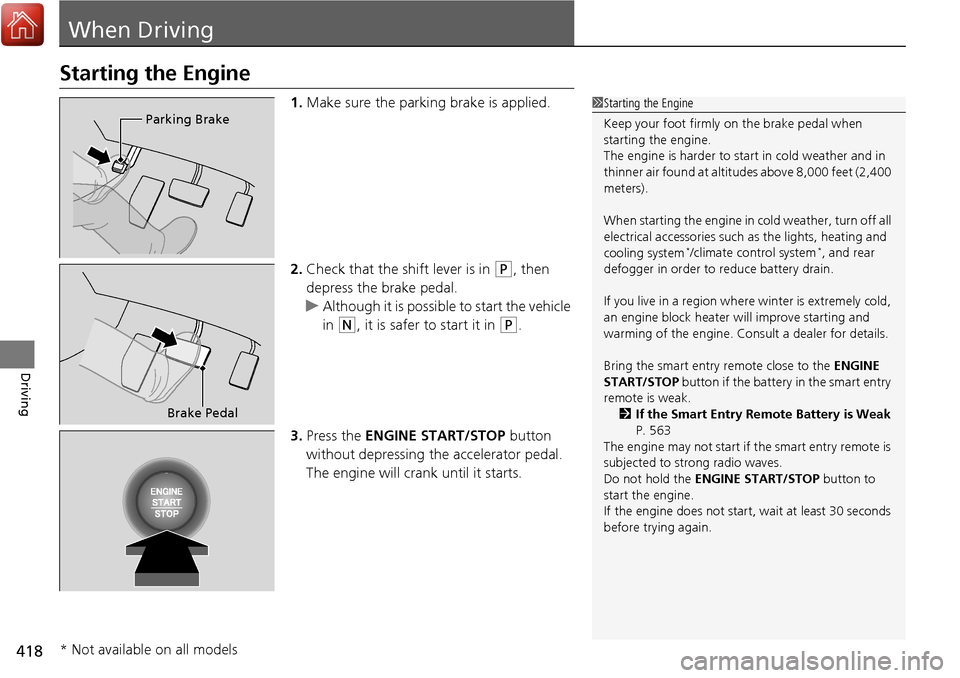
1.Make sure the parking brake is applied.
2. Check that the shift lever is in
(P, then
depress the brake pedal.
u Although it is possible to start the vehicle
in
(N, it is safer to start it in (P.
3. Press the ENGINE START/STOP button
without depressing the accelerator pedal.
The engine will crank until it starts.
1 Starting the Engine
Keep your foot firmly on the brake pedal when
starting the engine.
The engine is harder to st art in cold weather and in
thinner air found at altitudes above 8,000 feet (2,400
meters).
When starting the engine in cold weather, turn off all
electrical accessories such as the lights, heating and
cooling system
*/climate control system*, and rear
defogger in order to reduce battery drain.
If you live in a region where winter is extremely cold,
an engine block heater will improve starting and
warming of the engine. Cons ult a dealer for details.
Bring the smart entry remote close to the ENGINE
START/STOP button if the battery in the smart entry
remote is weak.
2 If the Smart Entry Remote Battery is Weak
P. 563
The engine may not start if the smart entry remote is
subjected to strong radio waves.
Do not hold the ENGINE START/STOP button to
start the engine.
If the engine does not start, wait at least 30 seconds
before trying again.
Parking Brake
Brake Pedal
* Not available on all models