belt HONDA RIDGELINE 2017 2.G Quick Guide
[x] Cancel search | Manufacturer: HONDA, Model Year: 2017, Model line: RIDGELINE, Model: HONDA RIDGELINE 2017 2.GPages: 85, PDF Size: 8.35 MB
Page 15 of 85
SAFETY
22 || 23
S
AFETY
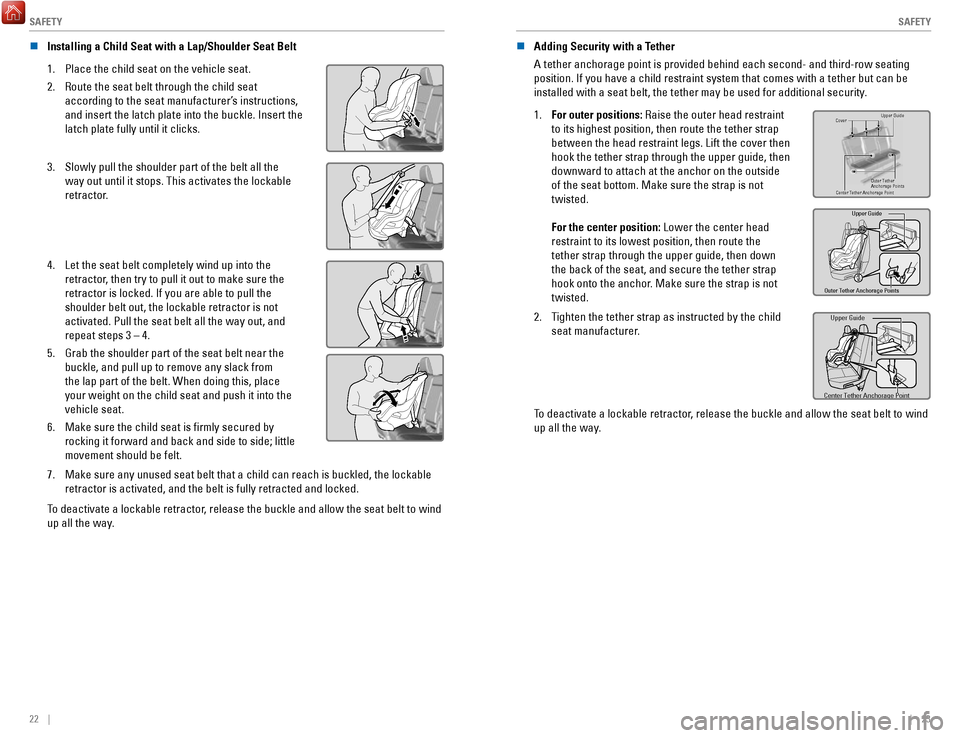
n Installing a Child Seat with a Lap/Shoulder Seat Belt
1.
Place the child seat on the vehicle seat.
2.
Route the seat belt through the child seat
according to the seat manufacturer’s instructions,
and insert the latch plate into the buckle. Insert the
latch plate fully until it clicks.
3. Slowly pull the shoulder part of the belt all the
way out until it stops. This activates the lockable
retractor.
4. Let the seat belt completely wind up into the
retractor, then try to pull it out to make sure the
retractor is locked. If you are able to pull the
shoulder belt out, the lockable retractor is not
activated. Pull the seat belt all the way out, and
repeat steps 3 – 4.
5.
Grab the shoulder part of the seat belt near the
buckle, and pull up to remove any slack from
the lap part of the belt. When doing this, place
your weight on the child seat and push it into the
vehicle seat.
6.
Make sure the child seat is firmly secured by
rocking it forward and back and side to side; little
movement should be felt.
7. Make sure any unused seat belt that a child can reach is buckled, the lo\
ckable
retractor is activated, and the belt is fully retracted and locked.
To deactivate a lockable retractor, release the buckle and allow the seat belt to wind
up all the way. n
Adding Security with a Tether
A tether anchorage point is provided behind each second- and third-row s\
eating
position. If you have a child restraint system that comes with a tether \
but can be
installed with a seat belt, the tether may be used for additional securi\
ty.
1.
For outer positions: Raise the outer head restraint
to its highest position, then route the tether strap
between the head restraint legs. Lift the cover then
hook the tether strap through the upper guide, then
downward to attach at the anchor on the outside
of the seat bottom. Make sure the strap is not
twisted.
For the center position: Lower the center head
restraint to its lowest position, then route the
tether strap through the upper guide, then down
the back of the seat, and secure the tether strap
hook onto the anchor. Make sure the strap is not
twisted.Cove r
Outer Tether
Anchorage Points Upper Guide
Center Tether Anchorage Point
Outer Tether Anchorage Points Upper Guide
2. Tighten the tether strap as instructed by the child
seat manufacturer.Upper Guide
Center Tether Anchorage Point
To deactivate a lockable retractor, release the buckle and allow the seat belt to wind
up all the way.
Page 16 of 85

SAFETY
24 || 25
S
AFETY
n Protecting Larger Children
When a child is too big for a child seat, secure the child in a rear sea\
t using the lap/
shoulder seat belt.
Have the child sit upright and all the way back, then ensure the followi\
ng:
•
The child’s knees bend comfortably over the edge
of the seat.
•
The shoulder belt crosses between the child’s
neck and arm.
•
The lap part of the seat belt is as low as possible,
touching the child’s thighs.
•
The child can stay seated for the whole trip.
If a lap/shoulder belt cannot be used properly, position the child in a booster seat in
a rear seating position. For the child’s safety, check that the child meets the booster
seat manufacturer’s recommendations.
Some U.S. states and Canadian provinces/territories require children to \
use a
booster seat until they reach a given age or weight (e.g., 6 years or 6\
0 lbs). Be sure
to check current laws in the state or province/territory where you inten\
d to drive.
WARNING
Allowing a child age 12 or under to sit in the front can result in injur\
y or
death if the passenger’s front airbag inflates.
If a larger child must ride in front, move the vehicle seat as far to th\
e rear
as possible, then have the child sit up properly and wear the seat belt \
properly, using a booster seat if needed.
Safety Label Locations
Safety labels are in the locations shown. They warn you of potential haz\
ards that can
cause serious injury or death. Read these labels carefully.To reduce the number of child
deaths and injuries, every state, Canadian province and territory requir\
es that infants
and children be properly restrained when they ride in a vehicle.
Sun Visor
U.S. models Canadian models
Radiator Cap U.S. models
U.S. models only
Dashboard
Canadian models
Air Conditioner System
Sun Visor
U.S. models only
Reporting Safety Defects
In the U.S.
If you believe that your vehicle has a defect which could cause a crash \
or could cause
injury or death, you should immediately inform the National Highway Traffic Safety
Administration (NHTSA) in addition to notifying American Honda Motor C\
o.,Inc.
If NHTSA receives similar complaints, it may open an investigation, and \
if it finds that a
safety defect exists in a group of vehicles, it may order a recall and r\
emedy campaign.
However, NHTSA cannot become involved in individual problems between you, your \
dealer, or American Honda Motor Co., Inc.
To contact NHTSA, you may call the Vehicle Safety Hotline toll-free at 1-888-327-4236
(TTY: 1-800-424-9153); go to http://www.safercar.gov; or write to: Administrator, NHTSA,
1200 New Jersey Avenue, SE., Washington, DC 20590. You can also obtain other
information about motor vehicle safety from http://www.safercar.gov.
In Canada
If you believe that your vehicle has a defect which could cause a crash \
or could cause
injury or death, you should immediately inform Honda Canada, Inc., and you may also
inform Transport Canada.
If Transport Canada receives similar complaints, it may open an investigation, and if it
finds that a safety defect exists in a group of vehicles, it may lead \
to a recall and remedy
campaign. However, Transport Canada cannot become involved in individual problems
between you, your dealer, or Honda Canada, Inc.
To contact Transport Canada’s Defect Investigations and Recalls Division, you may call
1-800-333-0510. For more information on reporting safety defects or abou\
t motor vehicle
safety, go to http://www.tc.gc.ca/roadsafety.
Page 17 of 85
INSTRUMENT PANEL
26 || 27
I
NSTRUMENT PANEL
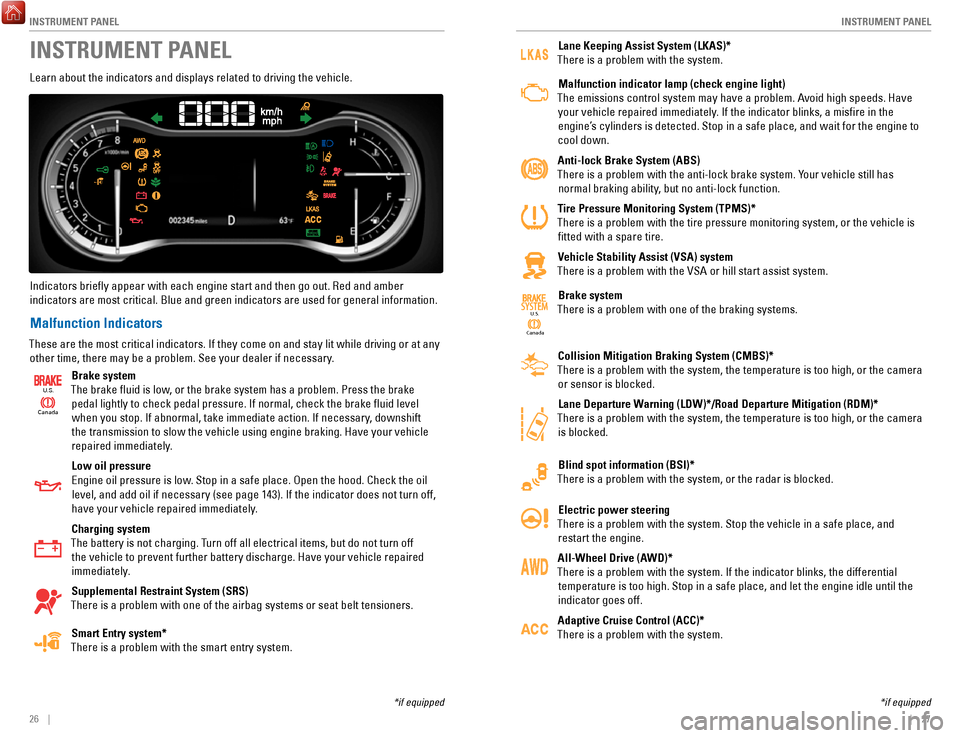
INSTRUMENT PANEL
Learn about the indicators and displays related to driving the vehicle.
Indicators briefly appear with each engine start and then go out. Red \
and amber indicators are most critical. Blue and green indicators are used for gen\
eral information.
Malfunction Indicators
These are the most critical indicators. If they come on and stay lit whi\
le driving or at any other time, there may be a problem. See your dealer if necessary.
Ca nada
U.S.
Brake system
The brake fluid is low, or the brake system has a problem. Press the brake pedal lightly to check pedal pressure. If normal, check the brake flui\
d level when you stop. If abnormal, take immediate action. If necessary, downshift
the transmission to slow the vehicle using engine braking. Have your vehicle
repaired immediately.
Low oil pressure
Engine oil pressure is low. Stop in a safe place. Open the hood. Check the oil level, and add oil if necessary (see page 143). If the indicator does not turn off,
have your vehicle repaired immediately.
Charging system
The battery is not charging. Turn off all electrical items, but do not turn off the vehicle to prevent further battery discharge. Have your vehicle repa\
ired
immediately.
Supplemental Restraint System (SRS)
There is a problem with one of the airbag systems or seat belt tensioner\
s.
Smart Entry system*
There is a problem with the smart entry system.
*if equipped
Lane Keeping Assist System (LKAS)*
There is a problem with the system.
Malfunction indicator lamp (check engine light)
The emissions control system may have a problem. Avoid high speeds. Have your vehicle repaired immediately. If the indicator blinks, a misfire in the
engine’s cylinders is detected. Stop in a safe place, and wait for the engine to
cool down.
Anti-lock Brake System (ABS)
There is a problem with the anti-lock brake system. Your vehicle still has normal braking ability, but no anti-lock function.
Tire Pressure Monitoring System (TPMS)*
There is a problem with the tire pressure monitoring system, or the vehi\
cle is fitted with a spare tire.
Vehicle Stability Assist (VSA) system
There is a problem with the VSA or hill start assist system.
Canada U.S.
SYSTEMBrake system
There is a problem with one of the braking systems.
Collision Mitigation Braking System (CMBS)*
There is a problem with the system, the temperature is too high, or the \
camera or sensor is blocked.
Lane Departure Warning (LDW)*/Road Departure Mitigation (RDM)*
There is a problem with the system, the temperature is too high, or the \
camera is blocked.
Blind spot information (BSI)*
There is a problem with the system, or the radar is blocked.
Electric power steering
There is a problem with the system. Stop the vehicle in a safe place, an\
d restart the engine.
All-Wheel Drive (AWD)*
There is a problem with the system. If the indicator blinks, the differe\
ntial temperature is too high. Stop in a safe place, and let the engine idle u\
ntil the
indicator goes off.
Adaptive Cruise Control (ACC)*
There is a problem with the system.
*if equipped
Page 18 of 85
INSTRUMENT PANEL
28 || 29
I
NSTRUMENT PANEL
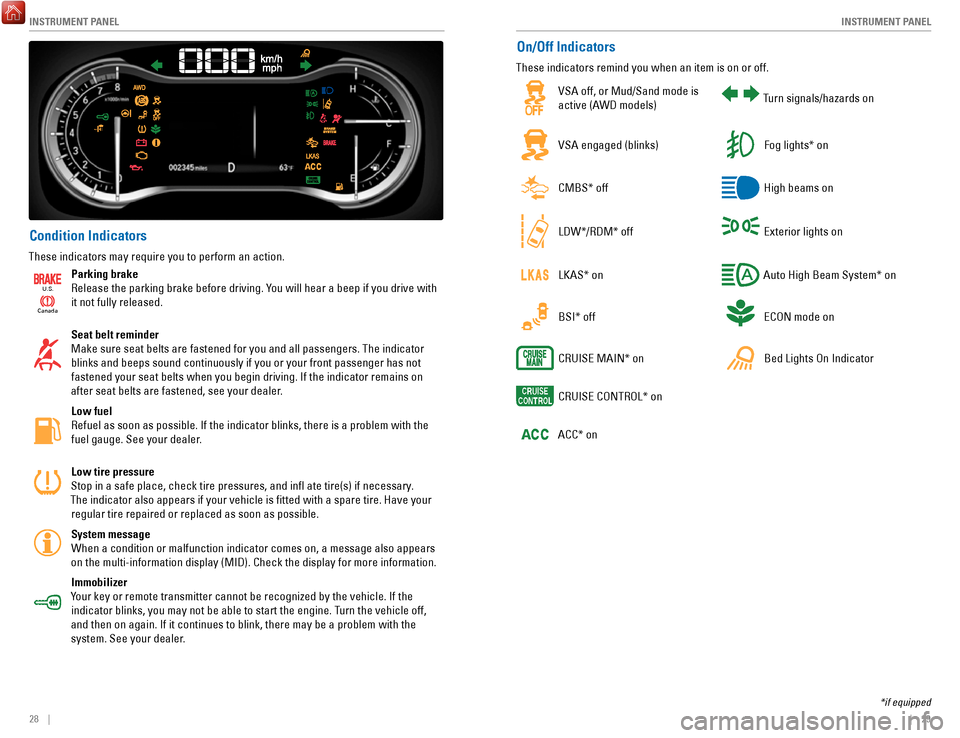
Condition Indicators
These indicators may require you to perform an action.
Ca
nada
U.S.
Parking brake
Release the parking brake before driving. You will hear a beep if you drive with
it not fully released.
Seat belt reminder
Make sure seat belts are fastened for you and all passengers. The indicator blinks and beeps sound continuously if you or your front passenger has not fastened your seat belts when you begin driving. If the indicator remain\
s on
after seat belts are fastened, see your dealer.
Low fuel
Refuel as soon as possible. If the indicator blinks, there is a problem \
with the fuel gauge. See your dealer.
Low tire pressure
Stop in a safe place, check tire pressures, and infl ate tire(s) if \
necessary.
The indicator also appears if your vehicle is fitted with a spare tire\
. Have your regular tire repaired or replaced as soon as possible.
System message When a condition or malfunction indicator comes on, a message also appea\
rs
on the multi-information display (MID). Check the display for more inf\
ormation.
Immobilizer
Your key or remote transmitter cannot be recognized by the vehicle. If th\
e indicator blinks, you may not be able to start the engine. Turn the vehicle off,
and then on again. If it continues to blink, there may be a problem with\
the system. See your dealer.
On/Off Indicators
These indicators remind you when an item is on or off.
VSA off, or Mud/Sand mode is
active (AWD models)Turn signals/hazards on
VSA engaged (blinks)Fog lights* on
CMBS* offHigh beams on
LDW*/RDM* offExterior lights on
LKAS* onAuto High Beam System* on
BSI* offECON mode on
CRUISE MAIN* onBed Lights On Indicator
CRUISE CONTROL* on
ACC* on
*if equipped
Page 21 of 85

VEHICLE CONTROLS
34 || 35
V
EHICLE CONTROLS
WARNING
Opening or closing a tailgate while anyone is in the path of the tailgat\
e can
cause serious injury.
Make sure everyone is clear before opening or closing the tailgate.
WARNING
Allowing passengers to ride in the pickup bed or on the tailgate can res\
ult in
death or serious injury. Make sure all passengers ride in a seat and wear a
seatbelt properly.
In-Bed Conveniences
n In-Bed Box
Turn the knobs to the left to open the lid
Knob
n AC Power Outlet* Open the in-bed box. Open the plug cover, insert a powercord slightly, rotate it 90° clockwise, then push
it in all the way.
Push the AC power button to turn the system on or off. The maximum power is 400 watts when the engine is running and the vehicle is in Park. Otherwise, the maximum power is 150 watts.
The battery charge may be affected by using AC power with truck bed audi\
o* or by heavy power outlet use while the vehicle is idling in Park (P). If thi\
s happens, engine-
idle speed will increase until the battery again has a normal charge.
Door Operation
Use several methods to lock or unlock the doors.
n
Using the Lock Tab To unlock: When you unlock either front door using the lock tab, the specific door (driver’s or passenger’
s)
unlocks.
To lock: When you lock the door using the lock tab on the driver’s door, all the other doors and the trunk lock
at the same time. When you lock the door using the lock tab on the front passenger’s door, only that
door locks.
Lo ck tab
To lock
To unlock
n Using the Front Door Inner Handle When you pull either front door inner handle, the door
unlocks and opens.
Unlocking and opening the driver’s door from the inner handle unlocks all the other doors and the trunk.
n Using the Master Door Lock Switch
To unlock: Press the unlock side of the switch to unlock all doors and the trunk.
To lock: Press the lock side of the switch to lock all doors and the trunk.Master door lock switch
To lock
To unlock
n Childproof Door Locks
The childproof door locks prevent the rear doors from being opened from the inside regardless of the
position of the lock tab.
Slide the lever in the rear door to the lock position,
and close the door.
Open the door using the outer door handle.
Lock Unlock
*if equipped
The AC-power system is not designed for devices needing precise power re\
gulation,
nor for devices requiring high initial peak wattage.
NOTICE
Page 52 of 85
NAVIGATION
96 || 97
D
RIVING
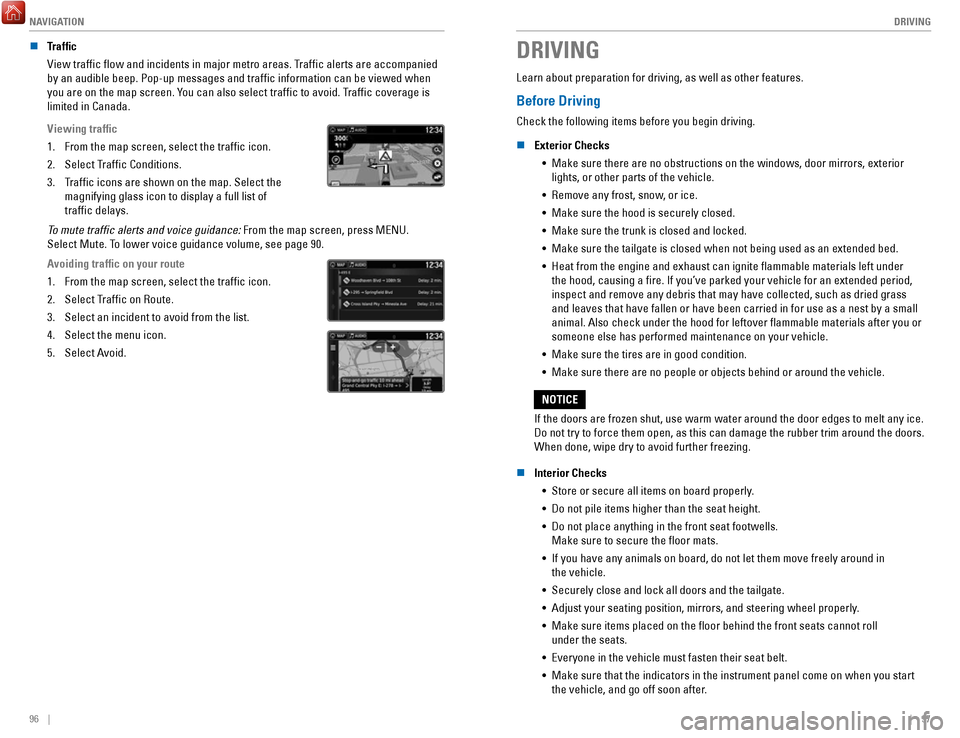
n Traffic
View traffic flow and incidents in major metro areas. Traffic alerts are accompanied
by an audible beep. Pop-up messages and traffic information can be vie\
wed when
you are on the map screen. You can also select traffic to avoid. Traffic coverage is
limited in Canada.
Viewing traffic
1.
From the map screen, select the traffic icon.
2.
Select Traffic Conditions.
3.
Traffic icons are shown on the map. Select the
magnifying glass icon to display a full list of
traffic delays.
To mute traffic alerts and voice guidance: From the map screen, press MENU.
Select Mute. To lower voice guidance volume, see page 90.
Avoiding traffic on your route
1.
From the map screen, select the traffic icon.
2.
Select Traffic on Route.
3.
Select an incident to avoid from the list.
4.
Select the menu icon.
5.
Select Avoid.
DRIVING
Learn about preparation for driving, as well as other features.
Before Driving
Check the following items before you begin driving.
n
Exterior Checks •
Make sure there are no obstructions on the windows, door mirrors, exteri\
or lights, or other parts of the vehicle.
•
Remove any frost, snow, or ice.
•
Make sure the hood is securely closed.
•
Make sure the trunk is closed and locked.
•
Make sure the tailgate is closed when not being used as an extended bed.\
•
Heat from the engine and exhaust can ignite flammable materials left u\
nder
the hood, causing a fire. If you’ve parked your vehicle for an exte\
nded period,
inspect and remove any debris that may have collected, such as dried gra\
ss
and leaves that have fallen or have been carried in for use as a nest by\
a small
animal. Also check under the hood for leftover flammable materials aft\
er you or
someone else has performed maintenance on your vehicle.
•
Make sure the tires are in good condition.
•
Make sure there are no people or objects behind or around the vehicle.
If the doors are frozen shut, use warm water around the door edges to me\
lt any ice.
Do not try to force them open, as this can damage the rubber trim around\
the doors.
When done, wipe dry to avoid further freezing.
NOTICE
n
Interior Checks •
Store or secure all items on board properly.
•
Do not pile items higher than the seat height.
•
Do not place anything in the front seat footwells.
Make sure to secure the floor mats.
•
If you have any animals on board, do not let them move freely around in \
the vehicle.
•
Securely close and lock all doors and the tailgate.
•
Adjust your seating position, mirrors, and steering wheel properly.
•
Make sure items placed on the floor behind the front seats cannot roll\
under the seats.
•
Everyone in the vehicle must fasten their seat belt.
•
Make sure that the indicators in the instrument panel come on when you s\
tart
the vehicle, and go off soon after.
Page 53 of 85
 of operation, avoid sudden acc\
eleration or full throttle operation so as to not damage the engine or powertrai")
DRIVING
98 || 99
D
RIVING
In addition:
•
During the first 600 miles (1,000 km) of operation, avoid sudden acc\
eleration or full throttle operation so as to not damage the engine or powertrain.
•
Avoid hard braking for the first 200 miles (300 km). You should also follow this
when the brake pads are replaced.
Improper accessories or modifications can affect your vehicle’s handling,
and stability, and performance, and cause a crash in which you can be
seriously hurt or killed.
Follow all instructions in the vehicle owner’s manual regarding
accessories and modifications.
WARNING
n Driving Guidelines for Your Utility Vehicle
Utility vehicles have a significantly higher rollover rate than other \
types of vehicles. •
To prevent rollovers or loss of control:
•
Take corners at slower speeds than you would with a passenger vehicle.
•
Avoid sharp turns and abrupt maneuvers whenever possible.
•
Do not modify your vehicle in any way that you would raise the center of\
gravity.
•
Do not carry heavy cargo on the roof.
•
Never carry more than 165 lbs (75 kg) of cargo on the roof rack (Hond\
a
accessory).
Your vehicle has been designed primarily for use on pavement, however, its higher
ground clearance allows you to occasionally travel on unpaved roads. It \
is not
designed for trail-blazing, or other challenging off-road activities.
If you decide to drive on unpaved roads, you will find that it require\
s somewhat
different driving skills and that your vehicle will handle somewhat diff\
erently than it
does on pavement. Pay attention to the precautions and tips in this sect\
ion, and get
acquainted with your vehicle before leaving the pavement.
Improperly operating this vehicle on or off pavement can cause a crash
or rollover in which you and your passengers can be seriously injured or\
killed.
• Follow all instructions and guidelines in this owner’s guide.
• Keep your speed low, and don’t drive faster than conditions permit.
WARNING
Maximum Load Limit
Carrying too much cargo or improperly storing it can affect your vehicle\
’s handling,
stability, stopping distance, and tires, and make it unsafe.
n
Maximum Load for Your Vehicle
The maximum load for your vehicle is 1,323 lbs (600 kg).
Label example
Overloading or improper loading can affect handling and stability and
cause a crash in which you can be hurt or killed.
Follow all load limits and other loading guidelines in this guide.
WARNING
Never let passengers ride in the pickup bed, in the trunk, or on the bed\
rails. This could vause very serious injuries or death. No one should ri\
de in
any position that is not equipped with seats and seat belts.
WARNING
The headlight aim on your vehicle was set by the factory and does not ne\
ed to be
adjusted. However, if you regularly carry heavy items in the cargo area or tow a
trailer, have the aiming readjusted at your dealer or by a qualified technici\
an.
Page 73 of 85

MAINTENANCE
138 || 139
M
AINTENANCE
Maintenance Minder™
When maintenance is due, the system message indicator comes on and a mes\
sage
appears on the display every time you turn the vehicle on. See page 139 to check what
maintenance is due indicated by the codes that appear.
Press the Info (
/) button on the steering wheel to change displays.
System message
indicator
Maintenance Minder message
Main
items Sub items
• Independent of the Maintenance Minder information, replace the brake fl\
uid every
3 years.
•
Inspect idle speed every 160,000 miles (256,000 km).
•
Adjust the valves during services A, B, 1, 2, or 3 if they are noisy.
U.S. models
Maintenance, replacement, or repair of emissions control devices and sys\
tems may
be done by any automotive repair establishment or individuals using part\
s that are
certified to EPA standards.
According to state and federal regulations, failure to perform maintenan\
ce on the
maintenance main items marked with # will not void your emissions warranties.
However
, all maintenance services should be performed in accordance with the
intervals indicated by the multi-information display. n
Maintenance Minder Service Codes
These codes indicate what services are due on your vehicle.
*1: If the message Maintenance Due Now does not appear more than 12 months after the display
is reset, change the engine oil every year.
#: See information on maintenance and emissions warranty.
*2: If you drive in dusty conditions, replace the air cleaner element every \
15,000 miles (24,000 km).
*3: If you drive primarily in urban areas that have high concentrations of s\
oot in the air from industry and diesel-powered vehicles, replace every 15,000 miles (24,000 km).
CODEMaintenance Main Items
A
Replace engine oi l*1
BReplace engine oil*1 and oil lter
Inspect front and rear brakes
Check parking brake adjustment
Inspect tie rod ends, steering gearbox, and boots
Inspect suspension components
Inspect driveshaft boots
Inspect brake hoses and lines (Including ABS/VSA)
Inspect all uid levels and condition of uids
Inspect exhaust system#
Inspect fuel lines and connection s#
*4: If you drive regularly in very high temperatures (over 110°F, 43°\
C), in very low temperatures
(under -20°F, -29°C), or towing a trailer, replace every 60,000 \
miles/100,000 km.
*5: Driving in mountainous areas at very low vehicle speeds or trailer towin\
g results in higher level
of mechanical (Shear) stress to uid. This requires differential \
uid changes more frequently
than recommended by the Maintenance Minder. If you regularly drive your \
vehicle under these
conditions, have the differential uid changed at 7,500 miles (12,00\
0 km), then every 15,000 miles
(24,000 km).
CODEMaintenance Sub Item s
1
Rotate tires
2Replace air cleaner element*2
Replace dust and pollen lte r*3
Inspect drive belt
3
Replace transfer-case uid and transmission ui d
4Replace spark plugs
Replace timing belt and inspect water pump*4
Inspect valve clearance
5
Replace engine coolant
6Replace rear differential ui d*, *5
*
*if equipped
Page 83 of 85

CUSTOMER INFORMATION
158 || 159
V
OICE COMMAND INDEX
Honda Roadside Assistance
24-hour emergency road service is available to you in the United States \
and Canada
throughout your 3-year/36,000-mile warranty term. Services include jump starting, flat
tire and lockout assistance, towing, and more (limitations apply).
Call (866) 864-5211 (U.S.) or (800) 465-7587 (Canada).
Warranty Coverages
Below is a brief summary of the warranties covering your new vehicle.
New Vehicle Limited Warranty: Covers your new vehicle, except for the emissions
control system and accessories, against defects in materials and workman\
ship.
Emissions Control Systems Defects Warranty and Emissions Performance Warranty:
Covers your vehicle’s emissions control systems. Time, mileage, and coverage are
conditional.
Seat Belt Limited Warranty: Covers seat belts that fail to function properly.
Rust Perforation Limited Warranty: Covers all exterior body panels that rust through
from the inside.
Accessory Limited Warranty: Covers Honda accessories.
Replacement Parts Limited Warranty: Covers all Honda replacement parts against
defects in materials and workmanship.
Replacement Battery Limited Warranty: Provides prorated coverage for a replacement
battery purchased from a Honda dealer.
Replacement Muffler Lifetime Limited Warranty: Covers a replacement muffler for the
duration of the ownership.
Restrictions and exclusions apply to all these warranties. See the Warranty Manual
on the Owner Information CD or at owners.honda.com (U.S.) or www.myhonda.ca
(Canada) for complete descriptions of each warranty, including time, mileage, and other
conditional limitations.
Your vehicle’s original tires are covered by their manufacturer. Tire warranty information
can be found on the Owner Information CD or at owners.honda.com (U.S.) or
www.myhonda.ca (Canada).
VOICE COMMAND INDEX
Learn about all available voice commands to help you operate the vehicle\
. Available on
vehicles with touchscreen.
Press the Talk button before you say a command.
•
Phone call
•
Music search
•
Audio
•
Climate control
•
Navigation* •
Voice setting
•
Voice help
•
What is today’s date?
•
What time is it?
•
View map
•
Find place
•
Find category
•
Find intersection
•
Recently found •
Go home
•
Find address
•
Find city
•
Find saved places
*models with navigation
**These commands toggle the function on and off, so the command may not match your intended action.
• Climate control on**
•
Climate control off**
•
Air conditioner on**
•
Air conditioner off**
•
Defrost on**
•
Defrost off** •
Fan speed # (#: 1 to 7)
•
Temperature # degrees
(#: 57 to 87°F)
•
Temperature max heat
•
Temperature max cool
•
Call by number
•
Call by name •
Call (number)
•
Call (name)
n
Voice Portal Commands
When you press the Talk button, the Voice Portal screen appears. Say one of the
options, and follow the system prompts.
n
Navigation Commands*
The system accepts these commands on most screens. You only need to press the
Talk button once for navigation commands.
n
Climate Control Commands
The system accepts these commands on most screens.
n
Phone Commands
The system accepts these commands on most screens.
EPA Contact Information
An owner may obtain further information
concerning emission warranties or report
violations of the terms of the emission
warranties by contacting: U.S. Environmental Protection Agency
Office of Transportation and Air Quality
Compliance Division,
Light-Duty Vehicles Group
Attn: Warranty Complaints
2000 Traverwood Drive
Ann Arbor, MI 48105
Email: [email protected]
Page 84 of 85

VOICE COMMAND INDEX
160 || 161
INDEX
n Audio Commands*
The system accepts these commands on most screens. Audio volume levels c\
annot
be controlled using voice commands.
FM/AM Radio Commands •
Audio on**
•
Audio off**
•
Radio FM
•
Radio AM
•
Radio tune to # FM (#: frequency,
e.g., 95.5)
•
Radio tune to # AM (#: frequency,
e.g., 1020)
•
Radio FM preset # (#: 1 to 12)
•
Radio AM preset # (#: 1 to 6)
SiriusXM Radio Commands •
Radio SXM
•
SXM channel # (#: 0 to 255)
•
SXM channel (channel name)
•
Radio SXM preset # (#: 1 to 12)
Pandora Commands (U.S. only) •
Pandora
•
Pandora play Disc (CD) Commands
*1
• Disc
•
Disc play
•
Disc play track # (#: 1 to 30)
USB Commands •
USB
•
USB play
•
USB play track # (#: 1 to 30)
iPod Commands •
iPod
•
iPod play
•
iPod play track # (#: 1-30)
Bluetooth Audio Commands •
Bluetooth audio play (may not
work on all phones)
AUX Commands •
Aux audio play
•
Music search
•
List album (specify album)
•
List artist (specify artist)
•
List composer (specify composer)
•
List genre (specify genre)
•
List playlist (specify playlist)
•
Play album (specify album)
•
Play artist (specify artist)
•
Play composer (specify composer) •
Play genre (specify genre)
•
Play playlist (specify playlist)
•
Play song (specify song)
•
What/Who am I listening to?
•
Who is this?
•
What’s playing?
•
Who’s playing?
•
What album is this?
Song By Voice
™ Commands
Available for tracks stored on an iPod or USB device.
*models with navigation *1 if equipped
**These commands toggle the function on and off, so the command may not match your intended action.
INDEX
Airbags................................................................ 12–17Advanced airbags ................................................ 12
Airbag care ............................................................ 17
Airbag system components ................................ 16
Airbag System Indicators ................................... 14
Front Airbags ......................................................... 12
Side airbags .......................................................... 13
Side-curtain airbags ............................................ 13
Android Auto ............................................................ 70
Apple CarPlay .......................................................... 69
Audio operation ................................................. 56–77
Android Auto ......................................................... 70
Apple CarPlay ....................................................... 69
Auxiliary input jack (AUX) ................................... 57
Bluetooth audio .............................................. 64, 77
Compact Disc ........................................................ 74
FM/AM radio ................................................... 61, 72
iPod ................................................................... 62, 75
MENU button ................................................... 74–79
Pandora .................................................................. 78
SiriusXM Radio ..................................................... 73
Song by Voice ..................................................... 160
Sound ..................................................................... 59
SOURCE ............................................................ 72–79
Steering-wheel controls ..................................... 58
Truck Bed Audio ................................................... 79
USB flash drive ............................................... 63, 76
USB port ................................................................. 56
Braking Anti-Lock Brake System (ABS)
........................ 108
Brake Assist System .......................................... 108
Collision Mitigation Braking System (CMBS) 117
Foot brake ............................................................ 108
Parking brake ...................................................... 108
Brightness control .................................................. 38
Carbon monoxide ...................................................... 8
Cargo lights .............................................................. 39
Child safety......................................................... 18–24 Childproof door locks
........................................... 35
Child seat Child seat with lap/shoulder belt
.................... 22
Child seat with tether ........................................ 23
LATCH-compatible ............................................. 21
Selecting a child seat ....................................... 20
Climate control .................................................. 50–53
Heated seats ......................................................... 53
Heated steering wheel ........................................ 52
Heated windshield ............................................... 52
Clock........................................................................\
.. 55 Contact us
.............................................................. 157
Cruise control ................................................ 111–113
Adaptive Cruise Control .................................... 112
Customized features ............................................... 54
Doors ........................................................................\
. 35Front-door inner handle
......................................
35
Lock tab .................................................................. 35
Master door-lock switch ..................................... 35
Engine Emergency engine stop
..................................... 128
Engine compartment cover .............................. 141
ENGINE START/STOP ................................ 106, 128
Floor mats ................................................................. 46
Forward Collision Warning (FCW) ...................... 117
Frequently-asked questions ................................ 156
Fuel Fuel information
.................................................. 122
Refueling ...................................................... 123–124
Fuses ............................................................... 134–136
Changing .............................................................. 136
Location ............................................................... 134
Gear selection ............................................... 107–109
Shifting ................................................................. 107
HandsFreeLink ................................................... 80–89
Dialing .............................................................. 82, 86
E-mail ...................................................................... 88
Making a call ................................................... 82, 86
Pairing a phone ............................................... 81, 85
Phonebook ....................................................... 82, 86
Siri Eyes-Free ........................................................ 89
SMS text messaging ............................................ 88
Speed dial ........................................................ 82, 87
Steering-wheel controls ............................... 80, 83
TALK button ........................................................... 84
Voice prompt ................................................... 86, 87
Headlights .......................................................... 39–40
Headlight-wiper integration ............................... 41
High beams ...................................................... 39–40
HomeLink .................................................................. 49
HondaLink................................................................. 67 Assist
...................................................................... 87
Immobilizer ............................................................... 28
INFO button .............................................................. 30
Instrument panel indicators ............................ 26–29
Jump starting ......................................................... 126
Keyless Access System ......................................... 32
Lane Keeping Assist System (LKAS).................. 115
LaneWatch
............................................................. 114
Lights ................................................................... 38–39
Cargo area lights .................................................. 39
Exterior lights ........................................................ 39
Fog lights ................................................................ 39
Interior lights ......................................................... 38
Light bulbs ........................................................... 154
Maintenance.................................................. 137–152 Battery
.................................................................. 145
Brake fluid ........................................................... 145
Engine oil ..................................................... 142–143
Maintenance Minder ................................. 138–139