tow HONDA RIDGELINE 2017 2.G Quick Guide
[x] Cancel search | Manufacturer: HONDA, Model Year: 2017, Model line: RIDGELINE, Model: HONDA RIDGELINE 2017 2.GPages: 85, PDF Size: 8.35 MB
Page 72 of 85
HANDLING THE UNEXPECTED
136 || 137
M
AINTENANCE
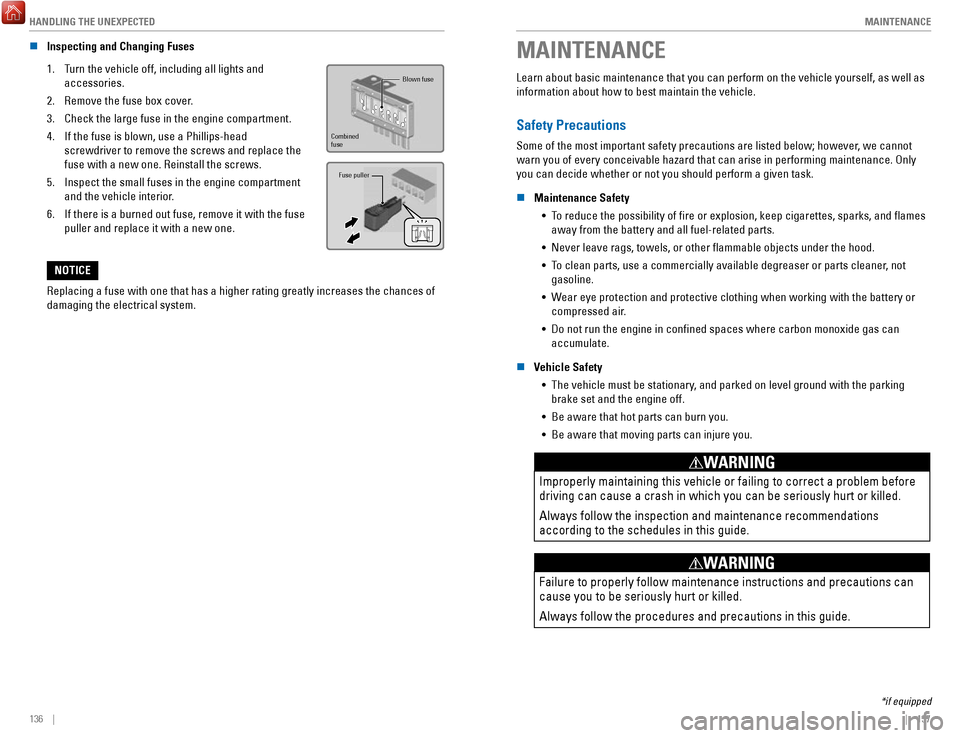
n Inspecting and Changing Fuses
1.
Turn the vehicle off, including all lights and
accessories.
2.
Remove the fuse box cover.
3.
Check the large fuse in the engine compartment.
4.
If the fuse is blown, use a Phillips-head
screwdriver to remove the screws and replace the
fuse with a new one. Reinstall the screws.
5.
Inspect the small fuses in the engine compartment
and the vehicle interior.
6.
If there is a burned out fuse, remove it with the fuse
puller and replace it with a new one.
Fuse puller
Blown fuse
Combined
fuse
Replacing a fuse with one that has a higher rating greatly increases the\
chances of
damaging the electrical system.
NOTICE
MAINTENANCE
Learn about basic maintenance that you can perform on the vehicle yourse\
lf, as well as
information about how to best maintain the vehicle.
Safety Precautions
Some of the most important safety precautions are listed below; however, we cannot
warn you of every conceivable hazard that can arise in performing mainte\
nance. Only
you can decide whether or not you should perform a given task.
n
Maintenance Safety •
To reduce the possibility of fire or explosion, keep cigarettes, sparks\
, and flames away from the battery and all fuel-related parts.
•
Never leave rags, towels, or other flammable objects under the hood.
•
To clean parts, use a commercially available degreaser or parts cleaner, not gasoline.
•
Wear eye protection and protective clothing when working with the battery\
or
compressed air.
•
Do not run the engine in confined spaces where carbon monoxide gas can\
accumulate.
n
Vehicle Safety •
The vehicle must be stationary, and parked on level ground with the parking
brake set and the engine off.
•
Be aware that hot parts can burn you.
•
Be aware that moving parts can injure you.
Improperly maintaining this vehicle or failing to correct a problem befo\
re
driving can cause a crash in which you can be seriously hurt or killed. \
Always follow the inspection and maintenance recommendations
according to the schedules in this guide.
WARNING
Failure to properly follow maintenance instructions and precautions can \
cause you to be seriously hurt or killed.
Always follow the procedures and precautions in this guide.
WARNING
*if equipped
Page 73 of 85

MAINTENANCE
138 || 139
M
AINTENANCE
Maintenance Minder™
When maintenance is due, the system message indicator comes on and a mes\
sage
appears on the display every time you turn the vehicle on. See page 139 to check what
maintenance is due indicated by the codes that appear.
Press the Info (
/) button on the steering wheel to change displays.
System message
indicator
Maintenance Minder message
Main
items Sub items
• Independent of the Maintenance Minder information, replace the brake fl\
uid every
3 years.
•
Inspect idle speed every 160,000 miles (256,000 km).
•
Adjust the valves during services A, B, 1, 2, or 3 if they are noisy.
U.S. models
Maintenance, replacement, or repair of emissions control devices and sys\
tems may
be done by any automotive repair establishment or individuals using part\
s that are
certified to EPA standards.
According to state and federal regulations, failure to perform maintenan\
ce on the
maintenance main items marked with # will not void your emissions warranties.
However
, all maintenance services should be performed in accordance with the
intervals indicated by the multi-information display. n
Maintenance Minder Service Codes
These codes indicate what services are due on your vehicle.
*1: If the message Maintenance Due Now does not appear more than 12 months after the display
is reset, change the engine oil every year.
#: See information on maintenance and emissions warranty.
*2: If you drive in dusty conditions, replace the air cleaner element every \
15,000 miles (24,000 km).
*3: If you drive primarily in urban areas that have high concentrations of s\
oot in the air from industry and diesel-powered vehicles, replace every 15,000 miles (24,000 km).
CODEMaintenance Main Items
A
Replace engine oi l*1
BReplace engine oil*1 and oil lter
Inspect front and rear brakes
Check parking brake adjustment
Inspect tie rod ends, steering gearbox, and boots
Inspect suspension components
Inspect driveshaft boots
Inspect brake hoses and lines (Including ABS/VSA)
Inspect all uid levels and condition of uids
Inspect exhaust system#
Inspect fuel lines and connection s#
*4: If you drive regularly in very high temperatures (over 110°F, 43°\
C), in very low temperatures
(under -20°F, -29°C), or towing a trailer, replace every 60,000 \
miles/100,000 km.
*5: Driving in mountainous areas at very low vehicle speeds or trailer towin\
g results in higher level
of mechanical (Shear) stress to uid. This requires differential \
uid changes more frequently
than recommended by the Maintenance Minder. If you regularly drive your \
vehicle under these
conditions, have the differential uid changed at 7,500 miles (12,00\
0 km), then every 15,000 miles
(24,000 km).
CODEMaintenance Sub Item s
1
Rotate tires
2Replace air cleaner element*2
Replace dust and pollen lte r*3
Inspect drive belt
3
Replace transfer-case uid and transmission ui d
4Replace spark plugs
Replace timing belt and inspect water pump*4
Inspect valve clearance
5
Replace engine coolant
6Replace rear differential ui d*, *5
*
*if equipped
Page 74 of 85
MAINTENANCE
140 || 141
M
AINTENANCE
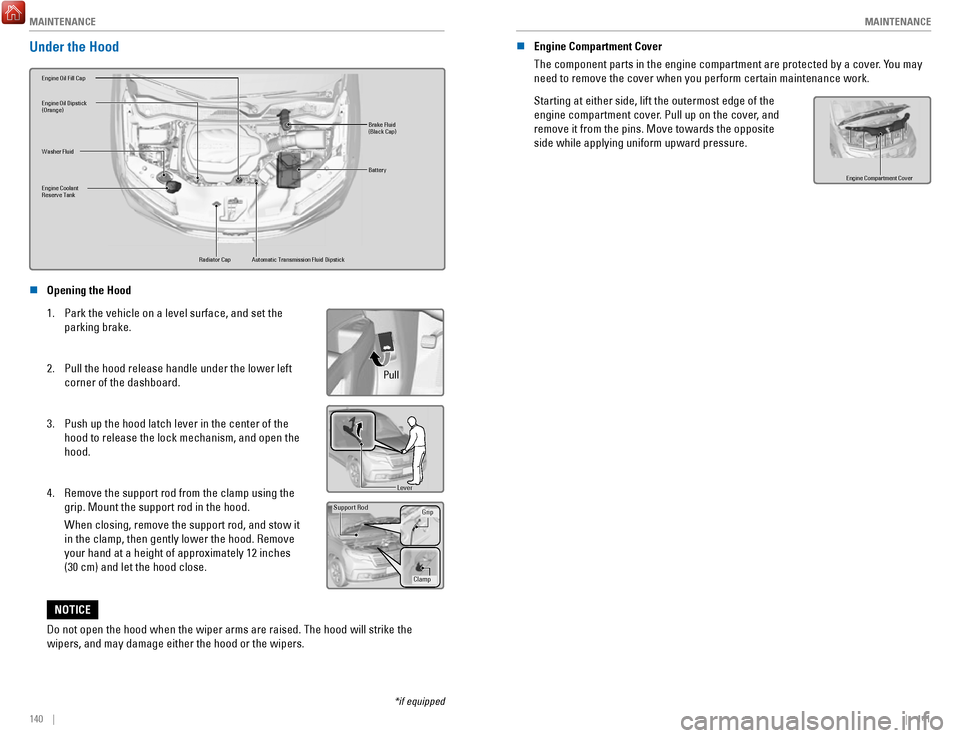
Under the Hood
Brake Fluid
(Black Cap)
Washer Fluid
Radiator Cap
Engine Coolant
Reserve Tan
k
Engine Oil Dipstick
(Orange)
Battery
Engine Oil Fill Ca p
Automatic Transmission Fluid Dipstick
n Opening the Hood
1.
Park the vehicle on a level surface, and set the
parking brake.
2.
Pull the hood release handle under the lower left
corner of the dashboard.
3.
Push up the hood latch lever in the center of the
hood to release the lock mechanism, and open the
hood.
4.
Remove the support rod from the clamp using the
grip. Mount the support rod in the hood.
When closing, remove the support rod, and stow it
in the clamp, then gently lower the hood. Remove
your hand at a height of approximately 12 inches
(30 cm) and let the hood close.
Pull
Lever
Support Ro d
Grip
Clamp
Do not open the hood when the wiper arms are raised. The hood will strik\
e the
wipers, and may damage either the hood or the wipers.
NOTICE
*if equipped
n Engine Compartment Cover
The component parts in the engine compartment are protected by a cover. You may
need to remove the cover when you perform certain maintenance work.
Starting at either side, lift the outermost edge of the
engine compartment cover. Pull up on the cover, and
remove it from the pins. Move towards the opposite
side while applying uniform upward pressure.
Engine Compartment Cove r
Page 75 of 85
MAINTENANCE
142 || 143
M
AINTENANCE
Engine Oil
Park the vehicle on level ground, and wait approximately three minutes after turning the
engine off before you check the oil.
n
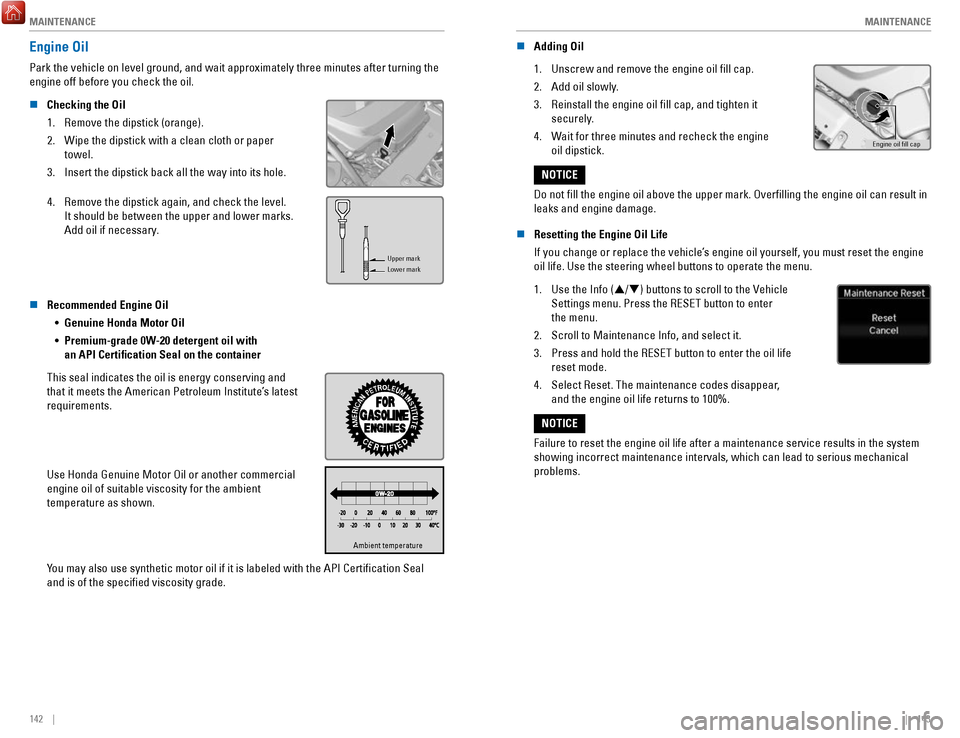
Checking the Oil
1.
Remove the dipstick (orange).
2.
Wipe the dipstick with a clean cloth or paper
towel.
3.
Insert the dipstick back all the way into its hole.
4.
Remove the dipstick again, and check the level.
It should be between the upper and lower marks.
Add oil if necessary.
Upper mark
Lower mark
n Recommended Engine Oil •
Genuine Honda Motor Oil
•
Premium-grade 0W-20 detergent oil with
an API Certification Seal on the container
This seal indicates the oil is energy conserving and
that it meets the American Petroleum Institute’s latest
requirements.
Use Honda Genuine Motor Oil or another commercial
engine oil of suitable viscosity for the ambient
temperature as shown.
Ambient temperatureAmbient temperature
You may also use synthetic motor oil if it is labeled with the API Certifi\
cation Seal
and is of the specified viscosity grade. n
Adding Oil
1.
Unscrew and remove the engine oil fill cap.
2.
Add oil slowly.
3.
Reinstall the engine oil fill cap, and tighten it
securely.
4.
Wait for three minutes and recheck the engine
oil dipstick.Engine oil ll cap
Do not fill the engine oil above the upper mark. Overfilling the eng\
ine oil can result in
leaks and engine damage.
NOTICE
n
Resetting the Engine Oil Life
If you change or replace the vehicle’s engine oil yourself, you must reset the engine
oil life. Use the steering wheel buttons to operate the menu.
1.
Use the Info (/) buttons to scroll to the Vehicle
Settings menu. Press the RESET button to enter
the menu.
2.
Scroll to Maintenance Info, and select it.
3.
Press and hold the RESET button to enter the oil life
reset mode.
4.
Select Reset. The maintenance codes disappear,
and the engine oil life returns to 100%.
Failure to reset the engine oil life after a maintenance service results\
in the system
showing incorrect maintenance intervals, which can lead to serious mecha\
nical
problems.
NOTICE
Page 77 of 85

MAINTENANCE
146 || 147
M
AINTENANCE
Changing Wiper Blades
If the wiper blades leave streaks across the windshield, try cleaning th\
em first with a
paper towel or soft cloth and wiper fluid. If the wiper blade rubber h\
as deteriorated, you
should change the wiper blades.
n
Changing the Front Wiper Blade Rubber
1.
Lift the driver side wiper arm first, then the
passenger side.
2. Place a cloth on the edge of the lock tab. Push the
lock tab up using a flat-tip screwdriver.Lock tab
3. Slide the blade from the wiper arm.
4.
Slide the wiper blade out from its holder by pulling
the tabbed end out.
Blade
5. Remove the retainers from the rubber blade that
has been removed, and mount to a new rubber
blade. Correctly align the rubber protrusion and the
retainer grooves.
Retainer
Blade
6. Slide the new wiper blade onto the holder from the
bottom end. The tab on the holder should fit in the
indent of the wiper blade. Slide the wiper blade
onto the wiper arm until it locks
7. Slide the wiper blade onto the wiper arm, then
push down the lock tab.
8.
Lower the passenger side wiper arm first, then the driver side.
Avoid dropping the wiper arm, as it may damage the windshield.
NOTICE
Tire Information
To safely operate your vehicle, your tires must be of the proper type and\
size, in good
condition with adequate tread, and properly inflated.
n
Inflation Guidelines •
Properly inflated tires provide the best combination of handling, trea\
d life, and
comfort. Refer to the driver’s doorjamb label or the specifications (see page 154)
for the specified pressure.
•
Underinflated tires wear unevenly, adversely affect handling and fuel economy,
and are more likely to fail from overheating.
•
Overinflated tires make your vehicle ride harshly, are more prone to road
hazards, and wear unevenly.
•
Every day before you drive, look at each of the tires. If one looks lowe\
r than the
others, check the pressure with a tire gauge.
•
Measure the air pressure when tires are cold. This means the vehicle has been
parked for at least 3 hours, or driven less than 1 mile (1.6 km). If n\
ecessary, add
or release air until the specified pressure is reached. If checked whe\
n hot, tire
pressure can be as much as 4-6 psi (30-40 kPa, 0.3-0.5 kgf/cm2) higher\
than
checked when cold.
•
At least once a month or before long trips, use a gauge to measure the p\
ressure
in all tires, including the spare. Even tires in good condition can lose\
1-2 psi
(10-20 kPa, 0.1-0.2 kgf/cm2) per month.
n
Inspection Guidelines
Every time you inflate the tires, check for the following: •
Any damage to tires, including bumps, bulges, cuts, splits, or cracks in\
the side
or tread. Remove any foreign objects and inspect for air leaks. Replace \
tires if
you see fabric or cord.
•
Uneven or excessive tread wear. Have a dealer check the wheel alignment.
•
Cracks or other damage around the valve stems.
n
Wear Indicators
The groove where the wear indicator is located is
1/16 inch (1.6 mm) shallower than elsewhere on the
tire. If the tread has worn so low that the indicator is
exposed, replace the tire. Worn out tires have poor
traction on wet roads.Example of a wear
indicator mark
Page 83 of 85

CUSTOMER INFORMATION
158 || 159
V
OICE COMMAND INDEX
Honda Roadside Assistance
24-hour emergency road service is available to you in the United States \
and Canada
throughout your 3-year/36,000-mile warranty term. Services include jump starting, flat
tire and lockout assistance, towing, and more (limitations apply).
Call (866) 864-5211 (U.S.) or (800) 465-7587 (Canada).
Warranty Coverages
Below is a brief summary of the warranties covering your new vehicle.
New Vehicle Limited Warranty: Covers your new vehicle, except for the emissions
control system and accessories, against defects in materials and workman\
ship.
Emissions Control Systems Defects Warranty and Emissions Performance Warranty:
Covers your vehicle’s emissions control systems. Time, mileage, and coverage are
conditional.
Seat Belt Limited Warranty: Covers seat belts that fail to function properly.
Rust Perforation Limited Warranty: Covers all exterior body panels that rust through
from the inside.
Accessory Limited Warranty: Covers Honda accessories.
Replacement Parts Limited Warranty: Covers all Honda replacement parts against
defects in materials and workmanship.
Replacement Battery Limited Warranty: Provides prorated coverage for a replacement
battery purchased from a Honda dealer.
Replacement Muffler Lifetime Limited Warranty: Covers a replacement muffler for the
duration of the ownership.
Restrictions and exclusions apply to all these warranties. See the Warranty Manual
on the Owner Information CD or at owners.honda.com (U.S.) or www.myhonda.ca
(Canada) for complete descriptions of each warranty, including time, mileage, and other
conditional limitations.
Your vehicle’s original tires are covered by their manufacturer. Tire warranty information
can be found on the Owner Information CD or at owners.honda.com (U.S.) or
www.myhonda.ca (Canada).
VOICE COMMAND INDEX
Learn about all available voice commands to help you operate the vehicle\
. Available on
vehicles with touchscreen.
Press the Talk button before you say a command.
•
Phone call
•
Music search
•
Audio
•
Climate control
•
Navigation* •
Voice setting
•
Voice help
•
What is today’s date?
•
What time is it?
•
View map
•
Find place
•
Find category
•
Find intersection
•
Recently found •
Go home
•
Find address
•
Find city
•
Find saved places
*models with navigation
**These commands toggle the function on and off, so the command may not match your intended action.
• Climate control on**
•
Climate control off**
•
Air conditioner on**
•
Air conditioner off**
•
Defrost on**
•
Defrost off** •
Fan speed # (#: 1 to 7)
•
Temperature # degrees
(#: 57 to 87°F)
•
Temperature max heat
•
Temperature max cool
•
Call by number
•
Call by name •
Call (number)
•
Call (name)
n
Voice Portal Commands
When you press the Talk button, the Voice Portal screen appears. Say one of the
options, and follow the system prompts.
n
Navigation Commands*
The system accepts these commands on most screens. You only need to press the
Talk button once for navigation commands.
n
Climate Control Commands
The system accepts these commands on most screens.
n
Phone Commands
The system accepts these commands on most screens.
EPA Contact Information
An owner may obtain further information
concerning emission warranties or report
violations of the terms of the emission
warranties by contacting: U.S. Environmental Protection Agency
Office of Transportation and Air Quality
Compliance Division,
Light-Duty Vehicles Group
Attn: Warranty Complaints
2000 Traverwood Drive
Ann Arbor, MI 48105
Email: [email protected]
Page 85 of 85
INDEX
162 |
Opening the hood ............................................... 140
Service codes ..................................................... 139
Transmission fluid .............................................. 140
Under the hood ................................................... 140
Window washer fluid ......................................... 145
Wiper blades ....................................................... 146
Mirrors Door mirrors
.......................................................... 48
Rearview mirror .................................................... 48
Reverse tilt-down mirrors ................................... 48
Moonroof .................................................................. 37
Multi-Information Display (MID)........................... 30
Multi-View Rear Camera
..................................... 121
Navigation .......................................................... 90–96
Address .................................................................. 92
Destination ............................................................ 92
Home address ....................................................... 92
Legend .................................................................... 95
Place Category ..................................................... 93
Recent places ....................................................... 93
Routing ................................................................... 95
Saved places ......................................................... 94
Steering-wheel controls ..................................... 90
Traffic ..................................................................... 96
Turn-by-turn directions ....................................... 95
Overheating............................................................ 127 Parking sensor.......................................................
118
Power Mode
.......................................................... 106
Power outlets 12-volt
..................................................................... 57
Readiness codes ................................................... 153
Remote engine start ....................................... 31, 105
Road Departure Mitigation (RDM) ..................... 116
Safety Reporting safety defects
..................................... 25
Safety information .................................................. 7
Safety label locations .......................................... 25
Seat belts.............................................................. 9–11 Fastening
............................................................... 11
Lap/Shoulder belts ................................................. 9
Proper use ............................................................... 9
Seat belt inspection ............................................. 10
Shoulder anchor ................................................... 11
Seating ................................................................ 43–47Driver seat
.............................................................
43
Driving Position Memory System ...................... 47
Head restraints ..................................................... 45
Rear seats .............................................................. 46
Specifications ........................................................ 154
Steering wheel Adjusting
................................................................ 47
Tailgate ............................................................... 31, 33
Tires ................................................. 129–133, 147–152
Flat tire ......................................................... 131–133
Low tire pressure ............................................... 147
Tire and loading information label ................... 148
Tire and wheel replacement ............................. 148
Tire chains ........................................................... 149
Tire identification number ................................. 150
Tire information ................................................... 147
Tire labeling ......................................................... 150
Tire Pressure Monitor System (TPMS) ........... 129
Tire quality grading ............................................ 151
Tire service life ................................................... 149
Tire terminology .................................................. 150
Wear indicators .................................................. 147
Winter tires .......................................................... 149
Towing ............................................................. 101–104
Emergency towing ....................................... C6, 128
Load limits ............................................................ 101
Tongue load ......................................................... 102
Trailer weight ...................................................... 101
Truck Bed Audio ...................................................... 79
Turn signals .............................................................. 39
Vehicle Stability Assist (VSA) ............................. 110
Voice command index .......................................... 159
Warranty ................................................................. 158
Window Power windows
.................................................... 36
Wipers................................................................. 41–42 Intermittent wipers
............................................... 41
Rain-sensing wipers ............................................ 42