warning light HONDA RIDGELINE 2017 2.G Quick Guide
[x] Cancel search | Manufacturer: HONDA, Model Year: 2017, Model line: RIDGELINE, Model: HONDA RIDGELINE 2017 2.GPages: 85, PDF Size: 8.35 MB
Page 69 of 85
 – Required Federal Explanatio\
n
Each tire, including the spare (if provided), should be ch")
HANDLING THE UNEXPECTED
130 || 131
H
ANDLING THE UNEXPECTED
n Tire Pressure Monitoring System (TPMS) – Required Federal Explanatio\
n
Each tire, including the spare (if provided), should be checked monthl\
y when
cold and inflated to the inflation pressure recommended by the vehic\
le
manufacturer on the vehicle placard or tire inflation pressure label.
(If your vehicle has tires of a different size than the size indicated \
on the
vehicle placard or tire inflation pressure label, you should determine\
the
proper tire inflation pressure for those tires.)
As an added safety feature, your vehicle has been equipped with
a tire pressure monitoring system (TPMS) that illuminates a low
tire pressure telltale when one or more of your tires is significantly\
under-inflated.
Accordingly, when the low tire pressure telltale illuminates, you should stop
and check your tires as soon as possible, and inflate them to the prop\
er
pressure.
Driving on a significantly under-inflated tire causes the tire to overheat and
can lead to tire failure. Under-inflation also reduces fuel efficiency and tire
tread life, and may affect the vehicle’s handling and stopping ability.
Please note that the TPMS is not a substitute for proper tire maintenanc\
e,
and it is the driver’s responsibility to maintain correct tire pressure, even if
under-inflation has not reached the level to trigger illumination of the TP\
MS
low tire pressure telltale.
Your vehicle has also been equipped with a TPMS malfunction indicator to \
indicate when the system is not operating properly. The TPMS malfunction
indicator is combined with the low tire pressure telltale. When the syst\
em
detects a malfunction, the telltale will flash for approximately one m\
inute
and then remain continuously illuminated. This sequence will continue up\
on
subsequent vehicle start-ups as long as the malfunction exists.
When the malfunction indicator is illuminated, the system may not be abl\
e to
detect or signal low tire pressure as intended.
TPMS malfunctions may occur for a variety of reasons, including the
installation of replacement or alternate tires or wheels on the vehicle \
that
prevent the TPMS from functioning properly.
Always check the TPMS malfunction telltale after replacing one or more
tires or wheels on your vehicle to ensure that the replacement or altern\
ate
tires and wheels allow the TPMS to continue to function properly.
Changing a Flat Tire
If a tire goes flat while driving, grasp the steering wheel firmly, and brake gradually to
reduce speed. Then, stop in a safe place. Replace the flat tire with t\
he compact spare
tire. Go to a dealer as soon as possible to have the full-size tire repa\
ired or replaced.
n
Getting Ready to Change the Tire
Park the vehicle on a firm, level, non-slippery surface. Apply the par\
king brake, shift
to Park (P), and turn the vehicle off. Turn on the hazard warning lights.
1.
Open the trunk and remove the two tray-holding
bolts.
Tire Tray
Tire Tray Holding Bolts
2. Pull out the tire tray. Hook the rear of the tray to the
guides on the back edge of the trunk.
Handle s
3. Loosen the strap, then take the jack out.
StrapJack
4. Remove the wing bolt, tool box and spacer cone,
then the compact spare tire.Wing Bol t
Spacer ConeTool Box
5. Place the compact spare tire wheel-side up under
the vehicle body, near the tire that needs to be
replaced.
6.
Loosen each wheel nut about one turn using
the wheel nut wrench.
Page 70 of 85
HANDLING THE UNEXPECTED
132 || 133
H
ANDLING THE UNEXPECTED
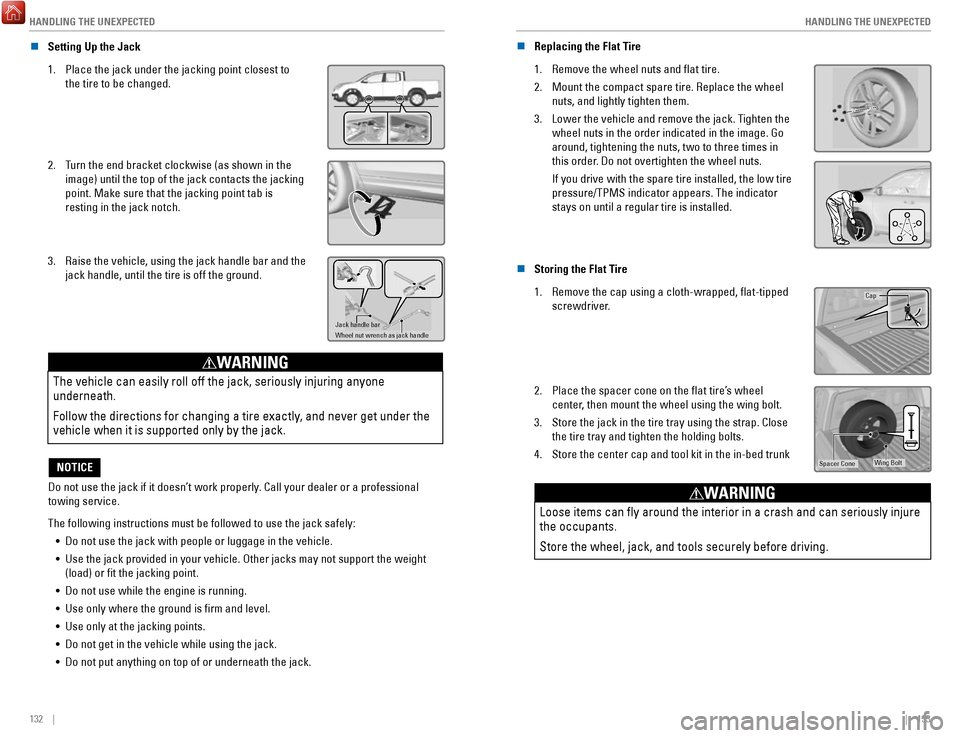
n Setting Up the Jack
1.
Place the jack under the jacking point closest to
the tire to be changed.
2. Turn the end bracket clockwise (as shown in the
image) until the top of the jack contacts the jacking
point. Make sure that the jacking point tab is
resting in the jack notch.
3. Raise the vehicle, using the jack handle bar and the
jack handle, until the tire is off the ground.
Jack handle bar
Wheel nut wrench as jack handle
The vehicle can easily roll off the jack, seriously injuring anyone
underneath.
Follow the directions for changing a tire exactly, and never get under the
vehicle when it is supported only by the jack.
WARNING
Do not use the jack if it doesn’t work properly. Call your dealer or a professional
towing service.
NOTICE
The following instructions must be followed to use the jack safely: •
Do not use the jack with people or luggage in the vehicle.
•
Use the jack provided in your vehicle. Other jacks may not support the w\
eight (load) or fit the jacking point.
•
Do not use while the engine is running.
•
Use only where the ground is firm and level.
•
Use only at the jacking points.
•
Do not get in the vehicle while using the jack.
•
Do not put anything on top of or underneath the jack. n
Replacing the Flat Tire
1.
Remove the wheel nuts and flat tire.
2.
Mount the compact spare tire. Replace the wheel
nuts, and lightly tighten them.
3.
Lower the vehicle and remove the jack. Tighten the
wheel nuts in the order indicated in the image. Go
around, tightening the nuts, two to three times in
this order. Do not overtighten the wheel nuts.
If you drive with the spare tire installed, the low tire
pressure/TPMS indicator appears. The indicator
stays on until a regular tire is installed.
n Storing the Flat Tire
1.
Remove the cap using a cloth-wrapped, flat-tipped
screwdriver.Cap
2. Place the spacer cone on the flat tire’s wheel
center, then mount the wheel using the wing bolt.
3.
Store the jack in the tire tray using the strap. Close
the tire tray and tighten the holding bolts.
4.
Store the center cap and tool kit in the in-bed trunkWing BoltSpacer Cone
Loose items can fly around the interior in a crash and can seriously i\
njure
the occupants.
Store the wheel, jack, and tools securely before driving.
WARNING
Page 72 of 85
HANDLING THE UNEXPECTED
136 || 137
M
AINTENANCE
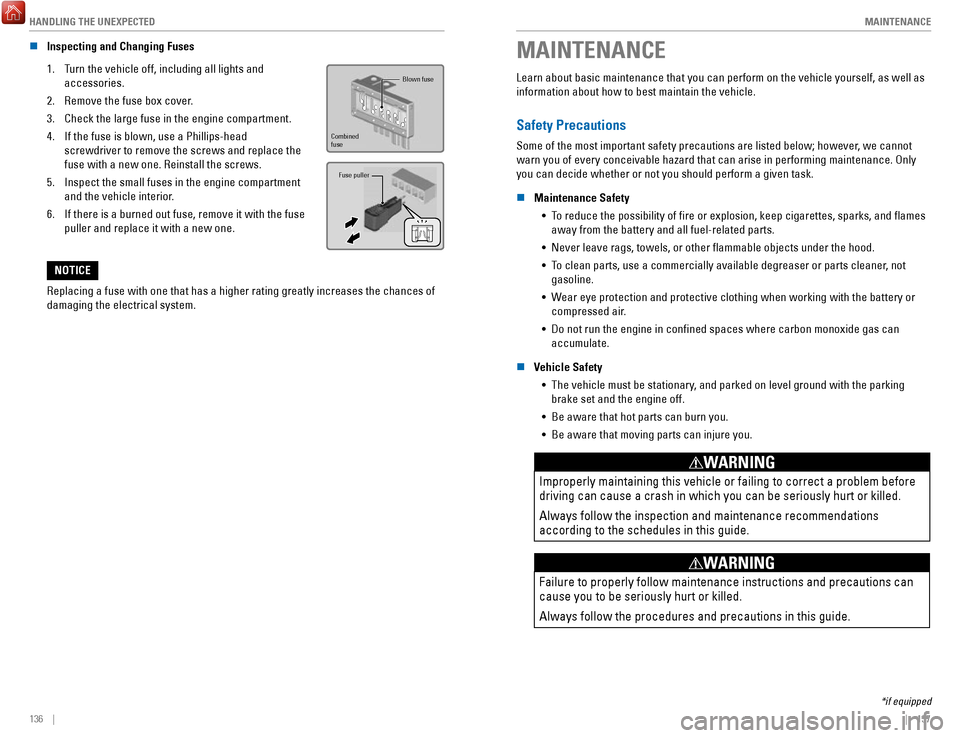
n Inspecting and Changing Fuses
1.
Turn the vehicle off, including all lights and
accessories.
2.
Remove the fuse box cover.
3.
Check the large fuse in the engine compartment.
4.
If the fuse is blown, use a Phillips-head
screwdriver to remove the screws and replace the
fuse with a new one. Reinstall the screws.
5.
Inspect the small fuses in the engine compartment
and the vehicle interior.
6.
If there is a burned out fuse, remove it with the fuse
puller and replace it with a new one.
Fuse puller
Blown fuse
Combined
fuse
Replacing a fuse with one that has a higher rating greatly increases the\
chances of
damaging the electrical system.
NOTICE
MAINTENANCE
Learn about basic maintenance that you can perform on the vehicle yourse\
lf, as well as
information about how to best maintain the vehicle.
Safety Precautions
Some of the most important safety precautions are listed below; however, we cannot
warn you of every conceivable hazard that can arise in performing mainte\
nance. Only
you can decide whether or not you should perform a given task.
n
Maintenance Safety •
To reduce the possibility of fire or explosion, keep cigarettes, sparks\
, and flames away from the battery and all fuel-related parts.
•
Never leave rags, towels, or other flammable objects under the hood.
•
To clean parts, use a commercially available degreaser or parts cleaner, not gasoline.
•
Wear eye protection and protective clothing when working with the battery\
or
compressed air.
•
Do not run the engine in confined spaces where carbon monoxide gas can\
accumulate.
n
Vehicle Safety •
The vehicle must be stationary, and parked on level ground with the parking
brake set and the engine off.
•
Be aware that hot parts can burn you.
•
Be aware that moving parts can injure you.
Improperly maintaining this vehicle or failing to correct a problem befo\
re
driving can cause a crash in which you can be seriously hurt or killed. \
Always follow the inspection and maintenance recommendations
according to the schedules in this guide.
WARNING
Failure to properly follow maintenance instructions and precautions can \
cause you to be seriously hurt or killed.
Always follow the procedures and precautions in this guide.
WARNING
*if equipped
Page 84 of 85

VOICE COMMAND INDEX
160 || 161
INDEX
n Audio Commands*
The system accepts these commands on most screens. Audio volume levels c\
annot
be controlled using voice commands.
FM/AM Radio Commands •
Audio on**
•
Audio off**
•
Radio FM
•
Radio AM
•
Radio tune to # FM (#: frequency,
e.g., 95.5)
•
Radio tune to # AM (#: frequency,
e.g., 1020)
•
Radio FM preset # (#: 1 to 12)
•
Radio AM preset # (#: 1 to 6)
SiriusXM Radio Commands •
Radio SXM
•
SXM channel # (#: 0 to 255)
•
SXM channel (channel name)
•
Radio SXM preset # (#: 1 to 12)
Pandora Commands (U.S. only) •
Pandora
•
Pandora play Disc (CD) Commands
*1
• Disc
•
Disc play
•
Disc play track # (#: 1 to 30)
USB Commands •
USB
•
USB play
•
USB play track # (#: 1 to 30)
iPod Commands •
iPod
•
iPod play
•
iPod play track # (#: 1-30)
Bluetooth Audio Commands •
Bluetooth audio play (may not
work on all phones)
AUX Commands •
Aux audio play
•
Music search
•
List album (specify album)
•
List artist (specify artist)
•
List composer (specify composer)
•
List genre (specify genre)
•
List playlist (specify playlist)
•
Play album (specify album)
•
Play artist (specify artist)
•
Play composer (specify composer) •
Play genre (specify genre)
•
Play playlist (specify playlist)
•
Play song (specify song)
•
What/Who am I listening to?
•
Who is this?
•
What’s playing?
•
Who’s playing?
•
What album is this?
Song By Voice
™ Commands
Available for tracks stored on an iPod or USB device.
*models with navigation *1 if equipped
**These commands toggle the function on and off, so the command may not match your intended action.
INDEX
Airbags................................................................ 12–17Advanced airbags ................................................ 12
Airbag care ............................................................ 17
Airbag system components ................................ 16
Airbag System Indicators ................................... 14
Front Airbags ......................................................... 12
Side airbags .......................................................... 13
Side-curtain airbags ............................................ 13
Android Auto ............................................................ 70
Apple CarPlay .......................................................... 69
Audio operation ................................................. 56–77
Android Auto ......................................................... 70
Apple CarPlay ....................................................... 69
Auxiliary input jack (AUX) ................................... 57
Bluetooth audio .............................................. 64, 77
Compact Disc ........................................................ 74
FM/AM radio ................................................... 61, 72
iPod ................................................................... 62, 75
MENU button ................................................... 74–79
Pandora .................................................................. 78
SiriusXM Radio ..................................................... 73
Song by Voice ..................................................... 160
Sound ..................................................................... 59
SOURCE ............................................................ 72–79
Steering-wheel controls ..................................... 58
Truck Bed Audio ................................................... 79
USB flash drive ............................................... 63, 76
USB port ................................................................. 56
Braking Anti-Lock Brake System (ABS)
........................ 108
Brake Assist System .......................................... 108
Collision Mitigation Braking System (CMBS) 117
Foot brake ............................................................ 108
Parking brake ...................................................... 108
Brightness control .................................................. 38
Carbon monoxide ...................................................... 8
Cargo lights .............................................................. 39
Child safety......................................................... 18–24 Childproof door locks
........................................... 35
Child seat Child seat with lap/shoulder belt
.................... 22
Child seat with tether ........................................ 23
LATCH-compatible ............................................. 21
Selecting a child seat ....................................... 20
Climate control .................................................. 50–53
Heated seats ......................................................... 53
Heated steering wheel ........................................ 52
Heated windshield ............................................... 52
Clock........................................................................\
.. 55 Contact us
.............................................................. 157
Cruise control ................................................ 111–113
Adaptive Cruise Control .................................... 112
Customized features ............................................... 54
Doors ........................................................................\
. 35Front-door inner handle
......................................
35
Lock tab .................................................................. 35
Master door-lock switch ..................................... 35
Engine Emergency engine stop
..................................... 128
Engine compartment cover .............................. 141
ENGINE START/STOP ................................ 106, 128
Floor mats ................................................................. 46
Forward Collision Warning (FCW) ...................... 117
Frequently-asked questions ................................ 156
Fuel Fuel information
.................................................. 122
Refueling ...................................................... 123–124
Fuses ............................................................... 134–136
Changing .............................................................. 136
Location ............................................................... 134
Gear selection ............................................... 107–109
Shifting ................................................................. 107
HandsFreeLink ................................................... 80–89
Dialing .............................................................. 82, 86
E-mail ...................................................................... 88
Making a call ................................................... 82, 86
Pairing a phone ............................................... 81, 85
Phonebook ....................................................... 82, 86
Siri Eyes-Free ........................................................ 89
SMS text messaging ............................................ 88
Speed dial ........................................................ 82, 87
Steering-wheel controls ............................... 80, 83
TALK button ........................................................... 84
Voice prompt ................................................... 86, 87
Headlights .......................................................... 39–40
Headlight-wiper integration ............................... 41
High beams ...................................................... 39–40
HomeLink .................................................................. 49
HondaLink................................................................. 67 Assist
...................................................................... 87
Immobilizer ............................................................... 28
INFO button .............................................................. 30
Instrument panel indicators ............................ 26–29
Jump starting ......................................................... 126
Keyless Access System ......................................... 32
Lane Keeping Assist System (LKAS).................. 115
LaneWatch
............................................................. 114
Lights ................................................................... 38–39
Cargo area lights .................................................. 39
Exterior lights ........................................................ 39
Fog lights ................................................................ 39
Interior lights ......................................................... 38
Light bulbs ........................................................... 154
Maintenance.................................................. 137–152 Battery
.................................................................. 145
Brake fluid ........................................................... 145
Engine oil ..................................................... 142–143
Maintenance Minder ................................. 138–139