change wheel HONDA RIDGELINE 2017 2.G Quick Guide
[x] Cancel search | Manufacturer: HONDA, Model Year: 2017, Model line: RIDGELINE, Model: HONDA RIDGELINE 2017 2.GPages: 85, PDF Size: 8.35 MB
Page 19 of 85
INSTRUMENT PANEL
30 || 31
V
EHICLE CONTROLS
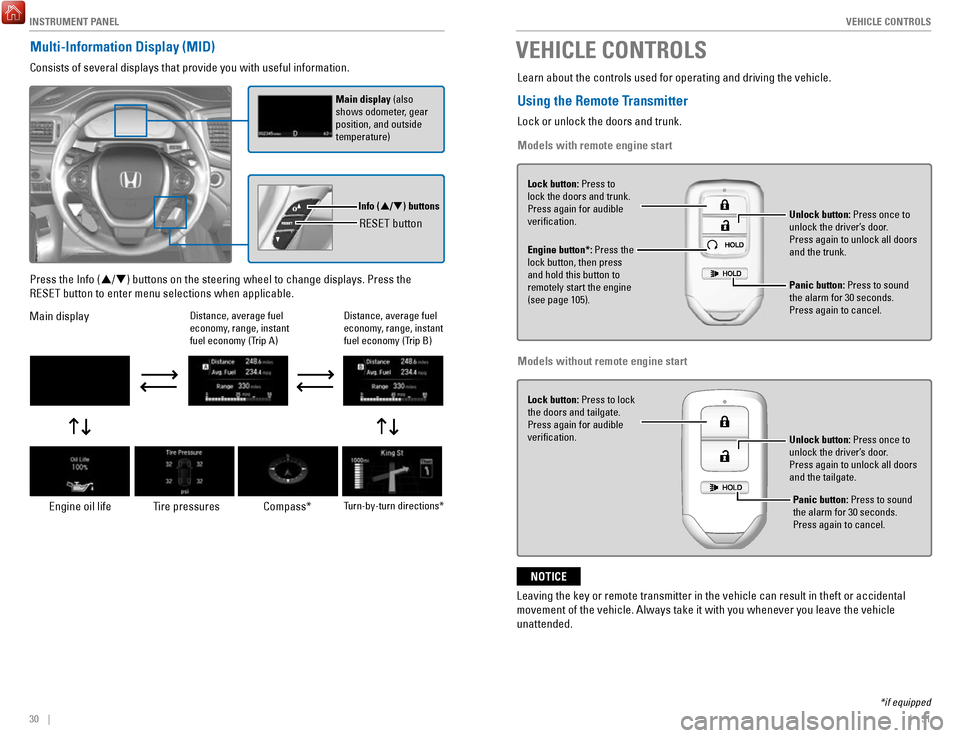
Multi-Information Display (MID)
Consists of several displays that provide you with useful information.
RESET button
Info (/) buttons
Main display (also
shows odometer, gear
position, and outside
temperature)
Press the Info (/) buttons on the steering wheel to change displays. Press the
RESET button to enter menu selections when applicable.
Main display
Engine oil life Tire pressures Compass*
Turn-by-turn directions*
Distance, average fuel
economy, range, instant
fuel economy (Trip A)
Distance, average fuel
economy, range, instant
fuel economy (Trip B)
VEHICLE CONTROLS
Learn about the controls used for operating and driving the vehicle.
Using the Remote Transmitter
Lock or unlock the doors and trunk.
Models with remote engine start
Lock button: Press to
lock the doors and trunk.
Press again for audible
verification.
Engine button*: Press the
lock button, then press
and hold this button to
remotely start the engine
(see page 105). Unlock button: Press once to
unlock the driver’s door.
Press again to unlock all doors
and the trunk.
Panic button: Press to sound
the alarm for 30 seconds.
Press again to cancel.
Models without remote engine start
Lock button: Press to lock
the doors and tailgate.
Press again for audible
verification.
Unlock button: Press once to
unlock the driver’s door.
Press again to unlock all doors
and the tailgate.
Leaving the key or remote transmitter in the vehicle can result in theft\
or accidental
movement of the vehicle. Always take it with you whenever you leave the vehicle
unattended.
NOTICE
*if equipped
Panic button: Press to sound
the alarm for 30 seconds.
Press again to cancel.
Page 33 of 85
AUDIO AND CONNECTIVITY
58 || 59
A
UDIO AND CONNECTIVITY
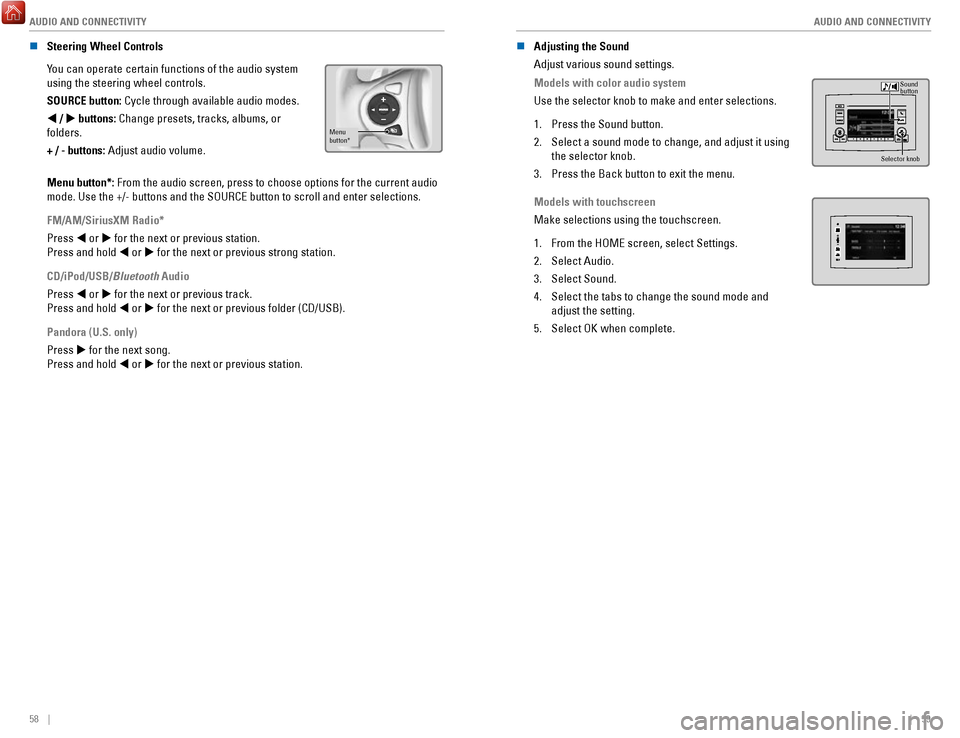
n Steering Wheel Controls
You can operate certain functions of the audio system
using the steering wheel controls.
SOURCE button: Cycle through available audio modes.
t / u
buttons: Change presets, tracks, albums, or
folders.
+ / - buttons: Adjust audio volume.
Menu
button*
Menu button*: From the audio screen, press to choose options for the current audio
mode. Use the +/- buttons and the SOURCE button to scroll and enter sele\
ctions.
FM/AM/SiriusXM Radio*
Press t or u for the next or previous station.
Press and hold t or u for the next or previous strong station.
CD/iPod/USB/Bluetooth Audio
Press t or u for the next or previous track.
Press and hold t or u for the next or previous folder (CD/USB).
Pandora (U.S. only)
Press u for the next song.
Press and hold t or u for the next or previous station. n
Adjusting the Sound
Adjust various sound settings.
Models with color audio system
Use the selector knob to make and enter selections.
1.
Press the Sound button.
2.
Select a sound mode to change, and adjust it using
the selector knob.
3.
Press the Back button to exit the menu.
Sound
button
Selector knob
Models with touchscreen
Make selections using the touchscreen.
1.
From the HOME screen, select Settings.
2.
Select Audio.
3.
Select Sound.
4.
Select the tabs to change the sound mode and
adjust the setting.
5.
Select OK when complete.
Page 38 of 85

AUDIO AND CONNECTIVITY
68 || 69
A
UDIO AND CONNECTIVITY
Models with touchscreen
Wi-Fi Connection
You can connect the audio system to the internet using Wi-Fi and use onli\
ne services
through the touchscreen. If your compatible phone has hotspot capabiliti\
es, the system
can be tethered to the phone. Follow the steps below to set up Wi-Fi whe\
n the vehicle is
stopped. Standard data rates apply with your phone service provider.
1.
From the Home screen, select Settings.
2.
Select Bluetooth/Wi-Fi. Select the Wi-Fi tab.
3.
Select Wi-Fi On/Off Status, and select On.
4.
Select Wi-Fi Network List. Make sure your phone’s
Wi-Fi setting is in access point (tethering) mode.
5.
Select the network you want to connect to the system.
If the phone you want to connect does not appear,
select Scan.
6.
Select Connect.
7.
Enter a password for your phone. Select OK.
The Wi-Fi symbol is displayed on the list when
connection is successful.
Models with touchscreen
Apple CarPlay®
Connect an Apple CarPlay-compatible iPhone to the system. You can use the
touchscreen to make a phone call, listen to music, and more. Visit the A\
pple CarPlay
website for more information.
Park in a safe place before connecting your iPhone and launching any com\
patible apps.
1.
Connect the iPhone to the USB port (see page
56).
2.
Apple CarPlay requires you to send vehicle
information to Honda. Select Enable Once, Always
Enable, or Cancel. Your phone may prompt you to
allow access for CarPlay to be launched.
3.
From the HOME screen, select Apple CarPlay.
HOME screen
Apple CarPlay
4. Select a menu option.
Phone: Access your contacts, make phone calls,
or listen to voicemail. While connected to Apple
CarPlay, calls can only be made through Apple
CarPlay, not through Bluetooth
HandsFreeLink.
Music: Play music stored on your iPhone.
Maps: View a map and operate navigation. You
can only use Apple CarPlay or the pre-installed
navigation system to set a destination with routing
guidance.
Messages: View and reply to text messages, or
have messages read to you aloud by the system. Apple CarPlay menu
Return
to HOME
screen
Return to Apple CarPlay menu screen
Once connected, press and hold the Talk button on the steering wheel to operate the
system using voice commands with Siri® Eyes Free (see page 89).
Depending on use, Apple CarPlay can share certain vehicle information (\
e.g., vehicle location,
speed, and other operating conditions) with the connected iPhone. See A\
pple’s privacy policy for
details regarding Apple’s use and handling of data uploaded by CarPlay. Use of CarPlay is at user’s
own risk, and is subject to agreement to the CarPlay terms of use, which\
are included as part of
the Apple iOS terms of use. CarPlay vehicle integration is provided “\
as is,” and Honda cannot
guarantee CarPlay operability or functionality now or in the future due \
to, among other conditions,
changes in CarPlay software/Apple iOS, service interruptions, or incompa\
tibility or obsolesce of
vehicle-integrated hardware or software. See dealer for details. Only us\
e CarPlay when conditions
allow you to do so safely. See your Owner’s Manual on the Owner Information CD or at owners.
honda.com (U.S.) or myhonda.ca (Canada) for further license and warr\
anty terms.
Page 39 of 85
AUDIO AND CONNECTIVITY
70 || 71
A
UDIO AND CONNECTIVITY
Models with touchcreen
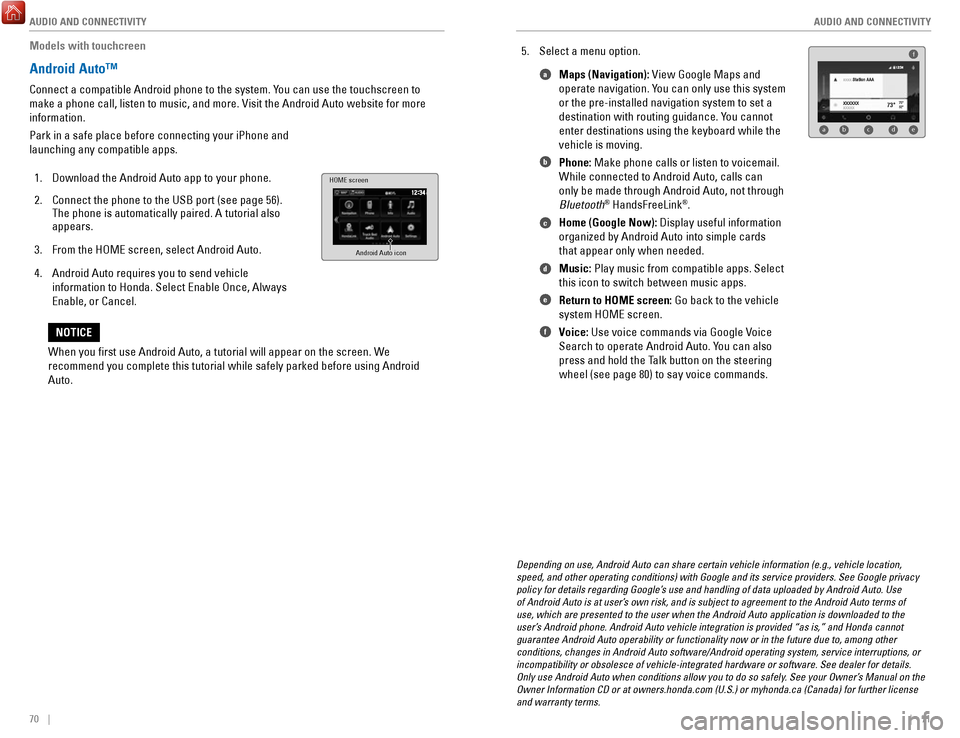
Android Auto™
Connect a compatible Android phone to the system. You can use the touchscreen to
make a phone call, listen to music, and more. Visit the Android Auto web\
site for more
information.
Park in a safe place before connecting your iPhone and
launching any compatible apps.
1.
Download the Android Auto app to your phone.
2.
Connect the phone to the USB port (see page 56).
The phone is automatically paired. A tutorial also
appears.
3.
From the HOME screen, select Android Auto.
4.
Android Auto requires you to send vehicle
information to Honda. Select Enable Once, Always
Enable, or Cancel.
HOME screen
Android Auto icon
5. Select a menu option. Maps (Navigation): View Google Maps and
operate navigation. You can only use this system
or the pre-installed navigation system to set a
destination with routing guidance. You cannot
enter destinations using the keyboard while the
vehicle is moving.
Phone: Make phone calls or listen to voicemail.
While connected to Android Auto, calls can
only be made through Android Auto, not through
Bluetooth
® HandsFreeLink®.
Home (Google Now): Display useful information
organized by Android Auto into simple cards
that appear only when needed.
Music: Play music from compatible apps. Select
this icon to switch between music apps.
Return to HOME screen: Go back to the vehicle
system HOME screen.
Voice: Use voice commands via Google Voice
Search to operate Android Auto. You can also
press and hold the Talk button on the steering
wheel (see page 80) to say voice commands.
f
ab cde
a
b
c
d
e
f
Depending on use, Android Auto can share certain vehicle information (e\
.g., vehicle location,
speed, and other operating conditions) with Google and its service prov\
iders. See Google privacy
policy for details regarding Google’s use and handling of data uploaded by Android Auto. Use
of Android Auto is at user’s own risk, and is subject to agreement to the Android Auto terms of
use, which are presented to the user when the Android Auto application i\
s downloaded to the
user’s Android phone. Android Auto vehicle integration is provided “as is,\
” and Honda cannot
guarantee Android Auto operability or functionality now or in the future\
due to, among other
conditions, changes in Android Auto software/Android operating system, s\
ervice interruptions, or
incompatibility or obsolesce of vehicle-integrated hardware or software.\
See dealer for details.
Only use Android Auto when conditions allow you to do so safely. See your Owner’s Manual on the
Owner Information CD or at owners.honda.com (U.S.) or myhonda.ca (Can\
ada) for further license
and warranty terms.
When you first use Android Auto, a tutorial will appear on the screen.\
We
recommend you complete this tutorial while safely parked before using An\
droid
Auto.
NOTICE
Page 61 of 85
DRIVING
114 || 115
D
RIVING
*if equipped
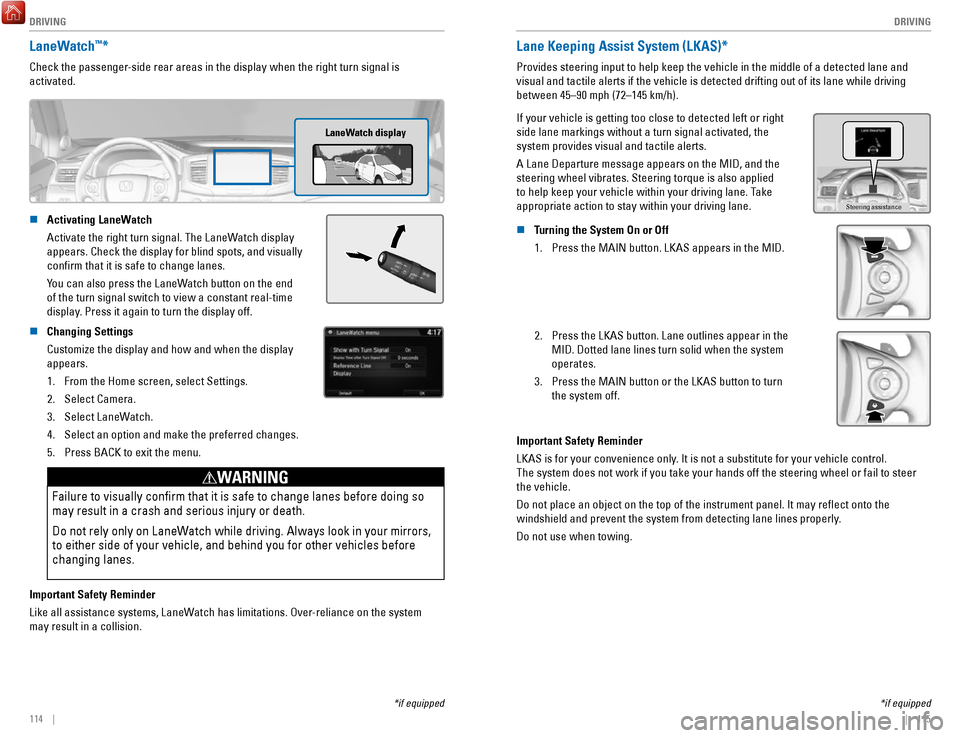
LaneWatch™*
Check the passenger-side rear areas in the display when the right turn signal is
activated.
LaneWatch display
n Activating LaneWatch
Activate the right turn signal. The LaneWatch display
appears. Check the display for blind spots, and visually
confirm that it is safe to change lanes.
You can also press the LaneWatch button on the end
of the turn signal switch to view a constant real-time
display
. Press it again to turn the display off.
n Changing Settings
Customize the display and how and when the display
appears.1.
From the Home screen, select Settings.
2.
Select Camera.
3.
Select LaneWatch.
4.
Select an option and make the preferred changes.
5.
Press BACK to exit the menu.
Failure to visually confirm that it is safe to change lanes before doi\
ng so
may result in a crash and serious injury or death.
Do not rely only on LaneWatch while driving. Always look in your mirrors,
to either side of your vehicle, and behind you for other vehicles before\
changing lanes.
WARNING
Important Safety Reminder
Like all assistance systems, LaneWatch has limitations. Over-reliance on the system
may result in a collision.
*if equipped
Lane Keeping Assist System (LKAS)*
Provides steering input to help keep the vehicle in the middle of a dete\
cted lane and
visual and tactile alerts if the vehicle is detected drifting out of its\
lane while driving
between 45–90 mph (72–145 km/h).
If your vehicle is getting too close to detected left or right
side lane markings without a turn signal activated, the
system provides visual and tactile alerts.
A Lane Departure message appears on the MID, and the
steering wheel vibrates. Steering torque is also applied
to help keep your vehicle within your driving lane. Take
appropriate action to stay within your driving lane.
Steering assistance
n Turning the System On or Off 1.
Press the MAIN button. LKAS appears in the MID.
2. Press the LKAS button. Lane outlines appear in the
MID. Dotted lane lines turn solid when the system
operates.
3.
Press the MAIN button or the LKAS button to turn
the system off.
Important Safety Reminder
LKAS is for your convenience only. It is not a substitute for your vehicle control.
The system does not work if you take your hands off the steering wheel or fail to steer
the vehicle.
Do not place an object on the top of the instrument panel. It may refl\
ect onto the
windshield and prevent the system from detecting lane lines properly.
Do not use when towing.
Page 63 of 85
DRIVING
118 || 119
D
RIVING
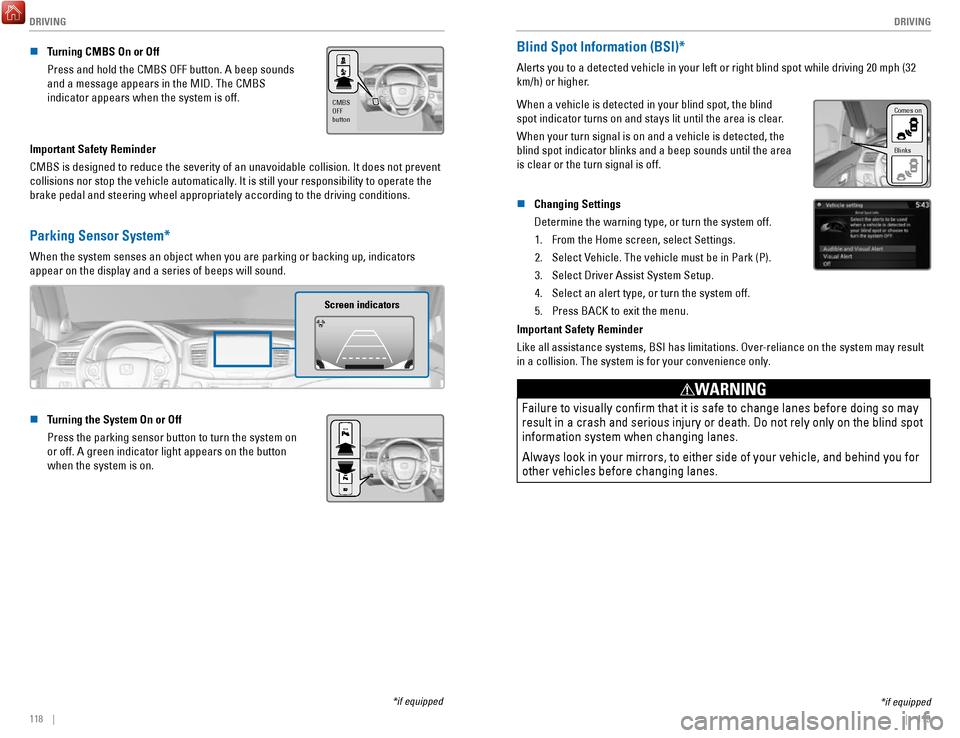
n Turning CMBS On or Off
Press and hold the CMBS OFF button. A beep sounds
and a message appears in the MID. The CMBS
indicator appears when the system is off.
CMBS
OFF
button
Important Safety Reminder
CMBS is designed to reduce the severity of an unavoidable collision. It \
does not prevent
collisions nor stop the vehicle automatically. It is still your responsibility to operate the
brake pedal and steering wheel appropriately according to the driving co\
nditions.
Parking Sensor System*
When the system senses an object when you are parking or backing up, ind\
icators
appear on the display and a series of beeps will sound.
Screen indicators
n Turning the System On or Off
Press the parking sensor button to turn the system on
or off. A green indicator light appears on the button
when the system is on.
*if equipped
*if equipped
Blind Spot Information (BSI)*
Alerts you to a detected vehicle in your left or right blind spot while \
driving 20 mph (32
km/h) or higher.
When a vehicle is detected in your blind spot, the blind
spot indicator turns on and stays lit until the area is clear.
When your turn signal is on and a vehicle is detected, the
blind spot indicator blinks and a beep sounds until the area
is clear or the turn signal is off.
Comes on
Blinks
n Changing Settings
Determine the warning type, or turn the system off.
1.
From the Home screen, select Settings.
2.
Select Vehicle. The vehicle must be in Park (P).
3.
Select Driver Assist System Setup.
4.
Select an alert type, or turn the system off.
5.
Press BACK to exit the menu.
Important Safety Reminder
Like all assistance systems, BSI has limitations. Over-reliance on the system may result
in a collision. The system is for your convenience only.
Failure to visually confirm that it is safe to change lanes before doi\
ng so may
result in a crash and serious injury or death. Do not rely only on the b\
lind spot
information system when changing lanes.
Always look in your mirrors, to either side of your vehicle, and behind \
you for
other vehicles before changing lanes.
WARNING
Page 65 of 85
DRIVING
122 || 123
D
RIVING
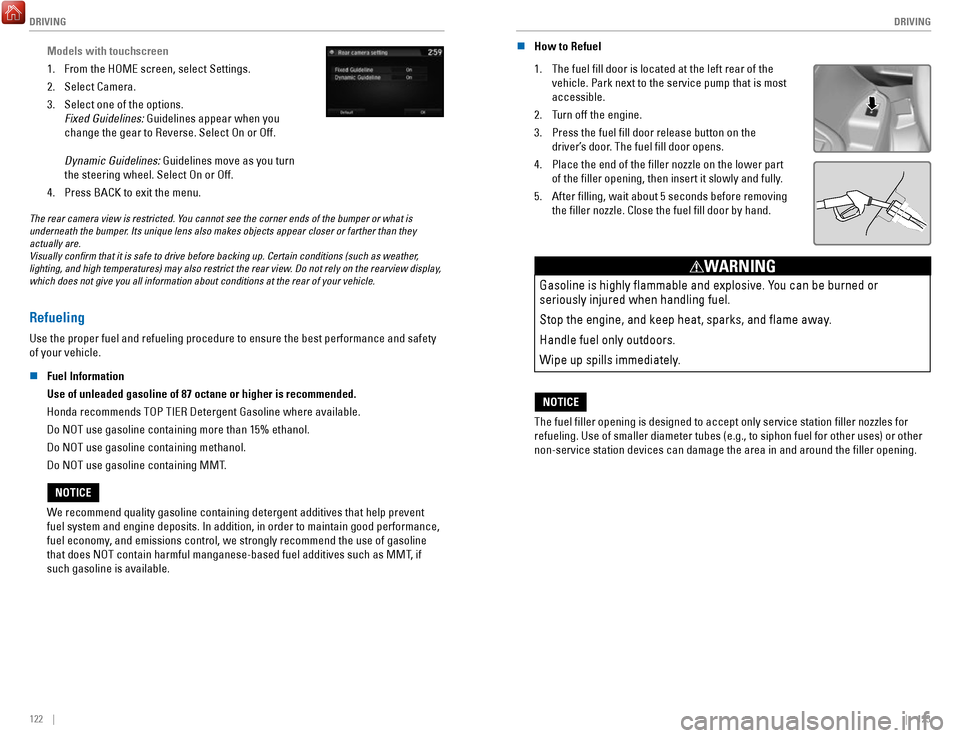
Models with touchscreen
1.
From the HOME screen, select Settings.
2.
Select Camera.
3.
Select one of the options.
Fixed Guidelines: Guidelines appear when you
change the gear to Reverse. Select On or Off.
Dynamic Guidelines: Guidelines move as you turn
the steering wheel. Select On or Off.
4.
Press BACK to exit the menu.
The rear camera view is restricted. You cannot see the corner ends of the bumper or what is
underneath the bumper. Its unique lens also makes objects appear closer or farther than they \
actually are.
Visually confirm that it is safe to drive before backing up. Certain c\
onditions (such as weather,
lighting, and high temperatures) may also restrict the rear view. Do not rely on the rearview display,
which does not give you all information about conditions at the rear of \
your vehicle.
Refueling
Use the proper fuel and refueling procedure to ensure the best performan\
ce and safety
of your vehicle.
n
Fuel Information
Use of unleaded gasoline of 87 octane or higher is recommended.
Honda recommends TOP TIER Detergent Gasoline where available.
Do NOT use gasoline containing more than 15% ethanol.
Do NOT use gasoline containing methanol.
Do NOT use gasoline containing MMT.
We recommend quality gasoline containing detergent additives that help pr\
event
fuel system and engine deposits. In addition, in order to maintain good \
performance,
fuel economy, and emissions control, we strongly recommend the use of
gasoline
that does NOT contain harmful manganese-based fuel additives such as MMT\
, if
such gasoline is available.
NOTICE n
How to Refuel
1.
The fuel fill door is located at the left rear of the
vehicle. Park next to the service pump that is most
accessible.
2.
Turn off the engine.
3.
Press the fuel fill door release button on the
driver’s door. The fuel fill door opens.
4.
Place the end of the filler nozzle on the lower part
of the filler opening, then insert it slowly and fully.
5.
After filling, wait about 5 seconds before removing
the filler nozzle. Close the fuel fill door by hand.
Gasoline is highly flammable and explosive. You can be burned or
seriously injured when handling fuel.
Stop the engine, and keep heat, sparks, and flame away.
Handle fuel only outdoors.
Wipe up spills immediately.
WARNING
NOTICE
The fuel filler opening is designed to accept only service station fi\
ller nozzles for
refueling. Use of smaller diameter tubes (e.g., to siphon fuel for othe\
r uses) or other
non-service station devices can damage the area in and around the fill\
er opening.
NOTICE
Page 68 of 85
HANDLING THE UNEXPECTED
128 || 129
H
ANDLING THE UNEXPECTED
Emergency Engine Stop
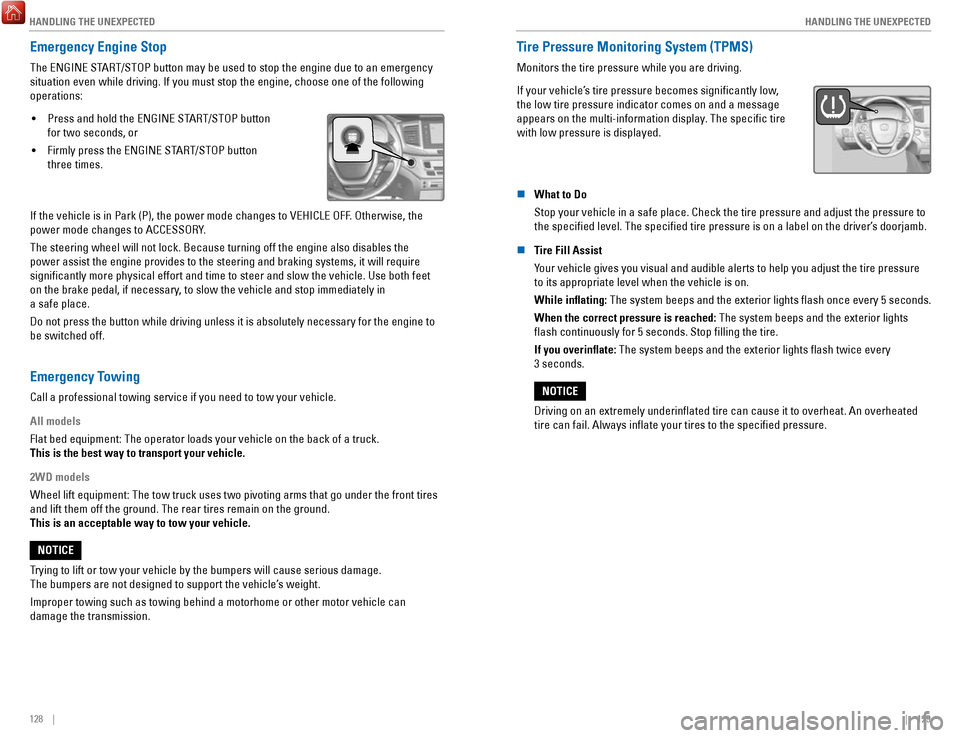
The ENGINE START/STOP button may be used to stop the engine due to an emergency
situation even while driving. If you must stop the engine, choose one of\
the following
operations:
•
Press and hold the ENGINE START/STOP button
for two seconds, or
•
Firmly press the ENGINE START/STOP button
three times.
If the vehicle is in Park (P), the power mode changes to VEHICLE OFF. Otherwise, the
power mode changes to ACCESSORY.
The steering wheel will not lock. Because turning off the engine also di\
sables the
power assist the engine provides to the steering and braking systems, it\
will require
significantly more physical effort and time to steer and slow the vehi\
cle. Use both feet
on the brake pedal, if necessary, to slow the vehicle and stop immediately in
a safe place.
Do not press the button while driving unless it is absolutely necessary \
for the engine to
be switched off.
Emergency Towing
Call a professional towing service if you need to tow your vehicle.
All models
Flat bed equipment: The operator loads your vehicle on the back of a tru\
ck.
This is the best way to transport your vehicle.
2WD models
Wheel lift equipment: The tow truck uses two pivoting arms that go under the front tires
and lift them off the ground. The rear tires remain on the ground.
This is an acceptable way to tow your vehicle.
Trying to lift or tow your vehicle by the bumpers will cause serious dama\
ge.
The bumpers are not designed to support the vehicle’s weight.
Improper towing such as towing behind a motorhome or other motor vehicle\
can
damage the transmission.
NOTICE
Tire Pressure Monitoring System (TPMS)
Monitors the tire pressure while you are driving.
If your vehicle’s tire pressure becomes significantly low,
the low tire pressure indicator comes on and a message
appears on the multi-information display. The specific tire
with low pressure is displayed.
n What to Do
Stop your vehicle in a safe place. Check the tire pressure and adjust th\
e pressure to
the specified level. The specified tire pressure is on a label on th\
e driver’s doorjamb.
n
Tire Fill Assist
Your vehicle gives you visual and audible alerts to help you adjust the t\
ire pressure to its appropriate level when the vehicle is on.
While inflating: The system beeps and the exterior lights flash once every 5 seconds.
When the correct pressure is reached:
The system beeps and the exterior lights
flash continuously for 5 seconds. Stop filling the tire.
If you overinflate: The system beeps and the exterior lights flash twice every
3 seconds.
Driving on an extremely underinflated tire can cause it to overheat. A\
n overheated
tire can fail. Always inflate your tires to the specified pressure.
NOTICE
Page 69 of 85
 – Required Federal Explanatio\
n
Each tire, including the spare (if provided), should be ch")
HANDLING THE UNEXPECTED
130 || 131
H
ANDLING THE UNEXPECTED
n Tire Pressure Monitoring System (TPMS) – Required Federal Explanatio\
n
Each tire, including the spare (if provided), should be checked monthl\
y when
cold and inflated to the inflation pressure recommended by the vehic\
le
manufacturer on the vehicle placard or tire inflation pressure label.
(If your vehicle has tires of a different size than the size indicated \
on the
vehicle placard or tire inflation pressure label, you should determine\
the
proper tire inflation pressure for those tires.)
As an added safety feature, your vehicle has been equipped with
a tire pressure monitoring system (TPMS) that illuminates a low
tire pressure telltale when one or more of your tires is significantly\
under-inflated.
Accordingly, when the low tire pressure telltale illuminates, you should stop
and check your tires as soon as possible, and inflate them to the prop\
er
pressure.
Driving on a significantly under-inflated tire causes the tire to overheat and
can lead to tire failure. Under-inflation also reduces fuel efficiency and tire
tread life, and may affect the vehicle’s handling and stopping ability.
Please note that the TPMS is not a substitute for proper tire maintenanc\
e,
and it is the driver’s responsibility to maintain correct tire pressure, even if
under-inflation has not reached the level to trigger illumination of the TP\
MS
low tire pressure telltale.
Your vehicle has also been equipped with a TPMS malfunction indicator to \
indicate when the system is not operating properly. The TPMS malfunction
indicator is combined with the low tire pressure telltale. When the syst\
em
detects a malfunction, the telltale will flash for approximately one m\
inute
and then remain continuously illuminated. This sequence will continue up\
on
subsequent vehicle start-ups as long as the malfunction exists.
When the malfunction indicator is illuminated, the system may not be abl\
e to
detect or signal low tire pressure as intended.
TPMS malfunctions may occur for a variety of reasons, including the
installation of replacement or alternate tires or wheels on the vehicle \
that
prevent the TPMS from functioning properly.
Always check the TPMS malfunction telltale after replacing one or more
tires or wheels on your vehicle to ensure that the replacement or altern\
ate
tires and wheels allow the TPMS to continue to function properly.
Changing a Flat Tire
If a tire goes flat while driving, grasp the steering wheel firmly, and brake gradually to
reduce speed. Then, stop in a safe place. Replace the flat tire with t\
he compact spare
tire. Go to a dealer as soon as possible to have the full-size tire repa\
ired or replaced.
n
Getting Ready to Change the Tire
Park the vehicle on a firm, level, non-slippery surface. Apply the par\
king brake, shift
to Park (P), and turn the vehicle off. Turn on the hazard warning lights.
1.
Open the trunk and remove the two tray-holding
bolts.
Tire Tray
Tire Tray Holding Bolts
2. Pull out the tire tray. Hook the rear of the tray to the
guides on the back edge of the trunk.
Handle s
3. Loosen the strap, then take the jack out.
StrapJack
4. Remove the wing bolt, tool box and spacer cone,
then the compact spare tire.Wing Bol t
Spacer ConeTool Box
5. Place the compact spare tire wheel-side up under
the vehicle body, near the tire that needs to be
replaced.
6.
Loosen each wheel nut about one turn using
the wheel nut wrench.
Page 70 of 85
HANDLING THE UNEXPECTED
132 || 133
H
ANDLING THE UNEXPECTED
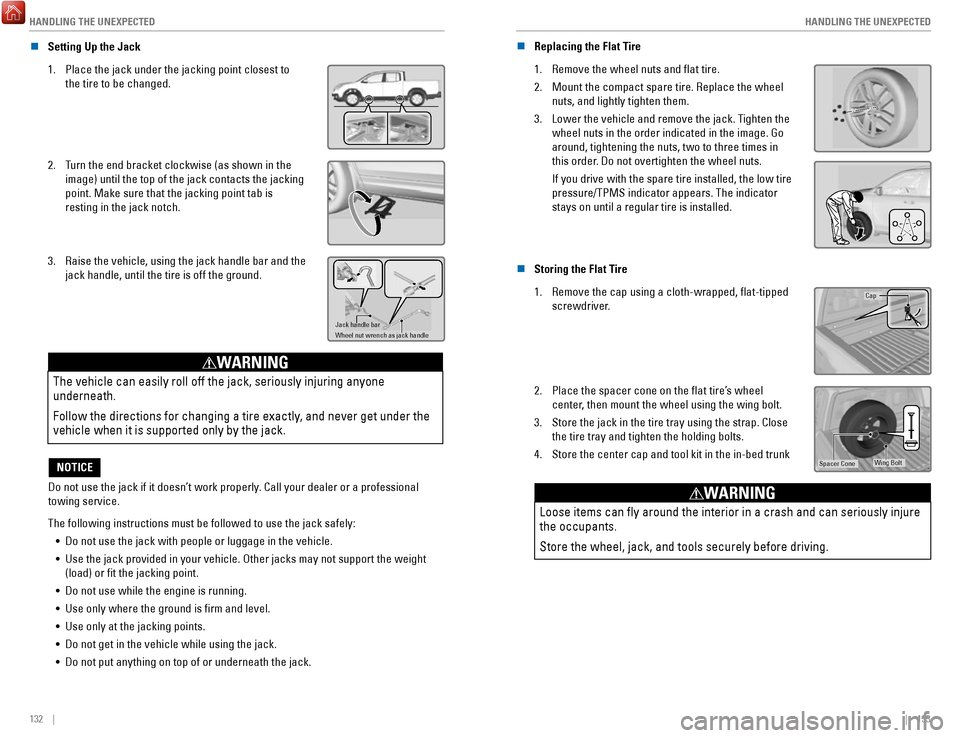
n Setting Up the Jack
1.
Place the jack under the jacking point closest to
the tire to be changed.
2. Turn the end bracket clockwise (as shown in the
image) until the top of the jack contacts the jacking
point. Make sure that the jacking point tab is
resting in the jack notch.
3. Raise the vehicle, using the jack handle bar and the
jack handle, until the tire is off the ground.
Jack handle bar
Wheel nut wrench as jack handle
The vehicle can easily roll off the jack, seriously injuring anyone
underneath.
Follow the directions for changing a tire exactly, and never get under the
vehicle when it is supported only by the jack.
WARNING
Do not use the jack if it doesn’t work properly. Call your dealer or a professional
towing service.
NOTICE
The following instructions must be followed to use the jack safely: •
Do not use the jack with people or luggage in the vehicle.
•
Use the jack provided in your vehicle. Other jacks may not support the w\
eight (load) or fit the jacking point.
•
Do not use while the engine is running.
•
Use only where the ground is firm and level.
•
Use only at the jacking points.
•
Do not get in the vehicle while using the jack.
•
Do not put anything on top of or underneath the jack. n
Replacing the Flat Tire
1.
Remove the wheel nuts and flat tire.
2.
Mount the compact spare tire. Replace the wheel
nuts, and lightly tighten them.
3.
Lower the vehicle and remove the jack. Tighten the
wheel nuts in the order indicated in the image. Go
around, tightening the nuts, two to three times in
this order. Do not overtighten the wheel nuts.
If you drive with the spare tire installed, the low tire
pressure/TPMS indicator appears. The indicator
stays on until a regular tire is installed.
n Storing the Flat Tire
1.
Remove the cap using a cloth-wrapped, flat-tipped
screwdriver.Cap
2. Place the spacer cone on the flat tire’s wheel
center, then mount the wheel using the wing bolt.
3.
Store the jack in the tire tray using the strap. Close
the tire tray and tighten the holding bolts.
4.
Store the center cap and tool kit in the in-bed trunkWing BoltSpacer Cone
Loose items can fly around the interior in a crash and can seriously i\
njure
the occupants.
Store the wheel, jack, and tools securely before driving.
WARNING