trunk HONDA RIDGELINE 2017 2.G Quick Guide
[x] Cancel search | Manufacturer: HONDA, Model Year: 2017, Model line: RIDGELINE, Model: HONDA RIDGELINE 2017 2.GPages: 85, PDF Size: 8.35 MB
Page 3 of 85
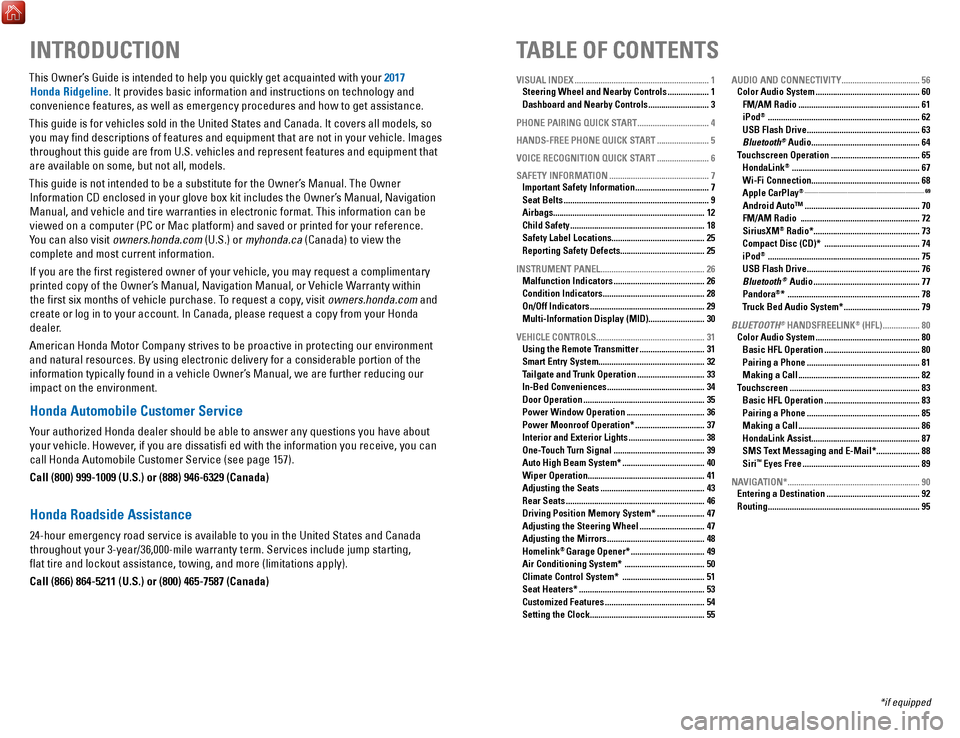
TABLE OF CONTENTS
INTRODUCTION
This Owner’s Guide is intended to help you quickly get acquainted with your 2017
Honda Ridgeline. It provides basic information and instructions on technology and
convenience features, as well as emergency procedures and how to get ass\
istance.
This guide is for vehicles sold in the United States and Canada. It cove\
rs all models, so you may find descriptions of features and equipment that are not in yo\
ur vehicle. Images throughout this guide are from U.S. vehicles and represent features and \
equipment that
are available on some, but not all, models.
This guide is not intended to be a substitute for the Owner’s Manual. The Owner Information CD enclosed in your glove box kit includes the Owner’s Manual, Navigation Manual, and vehicle and tire warranties in electronic format. This infor\
mation can be
viewed on a computer (PC or Mac platform) and saved or printed for you\
r reference.
You can also visit owners.honda.com (U.S.) or myhonda.ca (Canada) to view the complete and most current information.
If you are the first registered owner of your vehicle, you may request\
a complimentary printed copy of the Owner’s Manual, Navigation Manual, or Vehicle Warranty within the first six months of vehicle purchase. To request a copy, visit owners.honda.com and
create or log in to your account. In Canada, please request a copy from \
your Honda dealer.
American Honda Motor Company strives to be proactive in protecting our e\
nvironment and natural resources. By using electronic delivery for a considerable p\
ortion of the information typically found in a vehicle Owner’s Manual, we are further reducing our
impact on the environment.
Honda Automobile Customer Service
Your authorized Honda dealer should be able to answer any questions you h\
ave about your vehicle. However, if you are dissatisfi ed with the information you receive, you can
call Honda Automobile Customer Service (see page 157).
Call (800) 999-1009 (U.S.) or (888) 946-6329 (Canada)
Honda Roadside Assistance
24-hour emergency road service is available to you in the United States \
and Canada throughout your 3-year/36,000-mile warranty term. Services include jump starting,
flat tire and lockout assistance, towing, and more (limitations apply\
).
Call (866) 864-5211 (U.S.) or (800) 465-7587 (Canada)
VISUAL INDEX .............................................................. 1
Steering Wheel and Nearby Controls ................... 1
Dashboard and Nearby Controls ............................ 3
PHONE PAIRING QUICK START
................................. 4
HANDS-FREE PHONE QUICK START
........................ 5
VOICE RECOGNITION QUICK START
........................ 6
SAFETY INFORMATION
.............................................. 7
Important Safety Information .................................. 7
Seat Belts ................................................................... 9
Airbags ...................................................................... 12
Child Safety .............................................................. 18
Safety Label Locations ........................................... 25
Reporting Safety Defects....................................... 25
INSTRUMENT PANEL
................................................ 26
Malfunction Indicators .......................................... 26
Condition Indicators ............................................... 28
On/Off Indicators ..................................................... 29
Multi-Information Display (MID).......................... 30
VEHICLE CONTROLS
.................................................. 31
Using the Remote Transmitter .............................. 31
Smart Entry System ................................................. 32
Tailgate and Trunk Operation ............................... 33
In-Bed Conveniences ............................................. 34
Door Operation ........................................................ 35
Power Window Operation .................................... 36
Power Moonroof Operation* ................................ 37
Interior and Exterior Lights ................................... 38
One-Touch Turn Signal .......................................... 39
Auto High Beam System* ...................................... 40
Wiper Operation ...................................................... 41
Adjusting the Seats ................................................ 43
Rear Seats ................................................................ 46
Driving Position Memory System* ...................... 47
Adjusting the Steering Wheel .............................. 47
Adjusting the Mirrors ............................................. 48
Homelink® Garage Opener* .................................. 49
Air Conditioning System* ..................................... 50
Climate Control System* ...................................... 51
Seat Heaters* .......................................................... 53
Customized Features .............................................. 54
Setting the Clock. .................................................... 55AUDIO AND CONNECTIVITY
....................................
56
Color Audio System ................................................ 60
FM/AM Radio ........................................................ 61
iPod® ...................................................................... 62
USB Flash Drive .................................................... 63
Bluetooth® Audio .................................................. 64
Touchscreen Operation ......................................... 65
HondaLink® ........................................................... 67
Wi-Fi Connection .................................................. 68
Apple CarPlay® ........................................................................\
....................... 69
Android Auto™ .....................................................70
FM/AM Radio ....................................................... 72
SiriusXM® Radio* ................................................. 73
Compact Disc (CD)* ............................................ 74
iPod® ...................................................................... 75
USB Flash Drive .................................................... 76
Bluetooth® Audio ................................................. 77
Pandora®* ............................................................. 78
Truck Bed Audio System* ................................... 79
BLUETOOTH
® HANDSFREELINK® (HFL) ................. 80
Color Audio System ................................................ 80
Basic HFL Operation ............................................ 80
Pairing a Phone .................................................... 81
Making a Call ........................................................ 82
Touchscreen ............................................................ 83
Basic HFL Operation ............................................ 83
Pairing a Phone .................................................... 85
Making a Call ........................................................ 86
HondaLink Assist .................................................. 87
SMS Text Messaging and E-Mail* .................... 88
Siri™ Eyes Free ...................................................... 89
NAVIGATION*
............................................................. 90
Entering a Destination ........................................... 92
Routing ...................................................................... 95
*if equipped
Page 19 of 85
INSTRUMENT PANEL
30 || 31
V
EHICLE CONTROLS
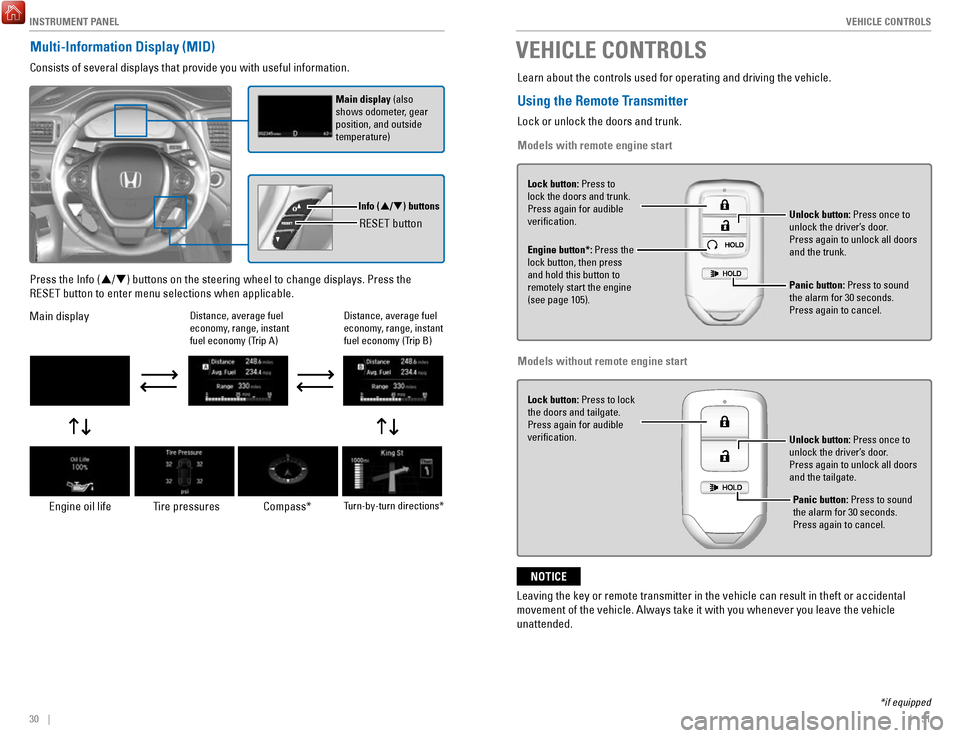
Multi-Information Display (MID)
Consists of several displays that provide you with useful information.
RESET button
Info (/) buttons
Main display (also
shows odometer, gear
position, and outside
temperature)
Press the Info (/) buttons on the steering wheel to change displays. Press the
RESET button to enter menu selections when applicable.
Main display
Engine oil life Tire pressures Compass*
Turn-by-turn directions*
Distance, average fuel
economy, range, instant
fuel economy (Trip A)
Distance, average fuel
economy, range, instant
fuel economy (Trip B)
VEHICLE CONTROLS
Learn about the controls used for operating and driving the vehicle.
Using the Remote Transmitter
Lock or unlock the doors and trunk.
Models with remote engine start
Lock button: Press to
lock the doors and trunk.
Press again for audible
verification.
Engine button*: Press the
lock button, then press
and hold this button to
remotely start the engine
(see page 105). Unlock button: Press once to
unlock the driver’s door.
Press again to unlock all doors
and the trunk.
Panic button: Press to sound
the alarm for 30 seconds.
Press again to cancel.
Models without remote engine start
Lock button: Press to lock
the doors and tailgate.
Press again for audible
verification.
Unlock button: Press once to
unlock the driver’s door.
Press again to unlock all doors
and the tailgate.
Leaving the key or remote transmitter in the vehicle can result in theft\
or accidental
movement of the vehicle. Always take it with you whenever you leave the vehicle
unattended.
NOTICE
*if equipped
Panic button: Press to sound
the alarm for 30 seconds.
Press again to cancel.
Page 20 of 85
 and it is
outside the vehicle and within range (about")
VEHICLE CONTROLS
32 || 33
V
EHICLE CONTROLS
Smart Entry System
When you carry the remote transmitter (for example, in a pocket or purs\
e) and it is
outside the vehicle and within range (about 32 inches or 80 cm), you c\
an lock or unlock the doors and trunk without handling the transmitter.
n
Unlocking / Locking the Doors and Trunk To unlock: Grab the driver’s door handle when the vehicle is off to unlock the driver’
s door. Grab the front
passenger’s door handle to unlock all the doors and the trunk. You can customize this feature’s behavior
(see page 54).
To lock: Press the door lock button on either front door handle. If the remote transmitter is inside the vehicle, neither the doors nor trunk will lock.Door Lock Button
n Walk Away Auto Lock
When you walk away from the vehicle while carrying the remote transmitter, the
doors and trunk can automatically lock if the following conditions are m\
et:
•
The remote transmitter is within a range of 6 feet (2 m).
•
All doors and the trunk are closed.
•
There is not an additional remote transmitter inside the vehicle.
When you are within the range, the system is activated and a beep sounds\
.
When you go outside the range, the lights flash and a beep sounds agai\
n.
The doors and trunk automatically lock.
To turn on this feature, follow the steps below:
1.
From the HOME screen, select Settings.
2.
Select Vehicle.
3.
Select Keyless Access Setup.
4.
Select Walk Away Auto Lock.
5.
Select Enable.
Tailgate and Trunk Operation
To drop open the tailgate, pull up in the upper handle. Support the tailgate until it is fully open.Upper handle
To swing open the tailgate, pull up on the lower handle.
Lower handl e
To open the trunk, unlock the doors, then pull up on the
trunk release button. Trunk Release Button
Or, insert the key into the trunk lock cylinder.
The main switch in the glove box disables the trunk release button.
ON
OF F
Main Switch
*if equipped
Page 21 of 85

VEHICLE CONTROLS
34 || 35
V
EHICLE CONTROLS
WARNING
Opening or closing a tailgate while anyone is in the path of the tailgat\
e can
cause serious injury.
Make sure everyone is clear before opening or closing the tailgate.
WARNING
Allowing passengers to ride in the pickup bed or on the tailgate can res\
ult in
death or serious injury. Make sure all passengers ride in a seat and wear a
seatbelt properly.
In-Bed Conveniences
n In-Bed Box
Turn the knobs to the left to open the lid
Knob
n AC Power Outlet* Open the in-bed box. Open the plug cover, insert a powercord slightly, rotate it 90° clockwise, then push
it in all the way.
Push the AC power button to turn the system on or off. The maximum power is 400 watts when the engine is running and the vehicle is in Park. Otherwise, the maximum power is 150 watts.
The battery charge may be affected by using AC power with truck bed audi\
o* or by heavy power outlet use while the vehicle is idling in Park (P). If thi\
s happens, engine-
idle speed will increase until the battery again has a normal charge.
Door Operation
Use several methods to lock or unlock the doors.
n
Using the Lock Tab To unlock: When you unlock either front door using the lock tab, the specific door (driver’s or passenger’
s)
unlocks.
To lock: When you lock the door using the lock tab on the driver’s door, all the other doors and the trunk lock
at the same time. When you lock the door using the lock tab on the front passenger’s door, only that
door locks.
Lo ck tab
To lock
To unlock
n Using the Front Door Inner Handle When you pull either front door inner handle, the door
unlocks and opens.
Unlocking and opening the driver’s door from the inner handle unlocks all the other doors and the trunk.
n Using the Master Door Lock Switch
To unlock: Press the unlock side of the switch to unlock all doors and the trunk.
To lock: Press the lock side of the switch to lock all doors and the trunk.Master door lock switch
To lock
To unlock
n Childproof Door Locks
The childproof door locks prevent the rear doors from being opened from the inside regardless of the
position of the lock tab.
Slide the lever in the rear door to the lock position,
and close the door.
Open the door using the outer door handle.
Lock Unlock
*if equipped
The AC-power system is not designed for devices needing precise power re\
gulation,
nor for devices requiring high initial peak wattage.
NOTICE
Page 23 of 85
VEHICLE CONTROLS
38 || 39
V
EHICLE CONTROLS
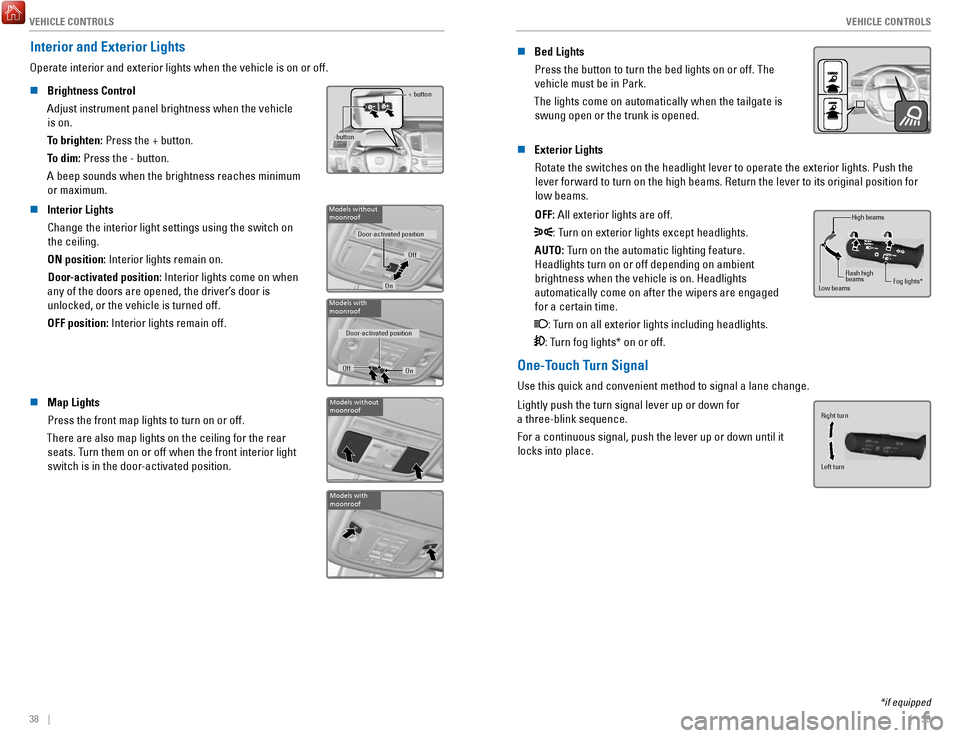
Interior and Exterior Lights
Operate interior and exterior lights when the vehicle is on or off.
n
Brightness Control
Adjust instrument panel brightness when the vehicle is on.
To brighten: Press the + button.
To dim: Press the - button.
A beep sounds when the brightness reaches minimum or maximum.+ button
-button
n Interior Lights Change the interior light settings using the switch on the ceiling.
ON position: Interior lights remain on. Door-activated position: Interior lights come on when
any of the doors are opened, the driver’s door is unlocked, or the vehicle is turned off.
OFF position:
Interior lights remain off.Models without moonroof
Door-activated position
Off
On
Models with
moonroof
Door-activated position
Off On
n Map Lights
Press the front map lights to turn on or off.
There are also map lights on the ceiling for the rear seats. Turn them on or off when the front interior light
switch is in the door-activated position.Models without
moonroof
Models with
moonroof
n Bed Lights
Press the button to turn the bed lights on or off. The vehicle must be in Park.
The lights come on automatically when the tailgate is swung open or the trunk is opened.
n Exterior Lights
Rotate the switches on the headlight lever to operate the exterior light\
s. Push the lever forward to turn on the high beams. Return the lever to its origina\
l position for low beams.
OFF: All exterior lights are off.
: Turn on exterior lights except headlights.
AUTO: Turn on the automatic lighting feature. Headlights turn on or off depending on ambient brightness when the vehicle is on. Headlights
automatically come on after the wipers are engaged for a certain time.
: Turn on all exterior lights including headlights.
: Turn fog lights* on or off.
High beams
Low beams Flash high
beams
Fog lights*
One-Touch Turn Signal
Use this quick and convenient method to signal a lane change.
Lightly push the turn signal lever up or down for
a three-blink sequence.
For a continuous signal, push the lever up or down until it locks into place.
Right turn
Left turn
*if equipped
Page 52 of 85
NAVIGATION
96 || 97
D
RIVING
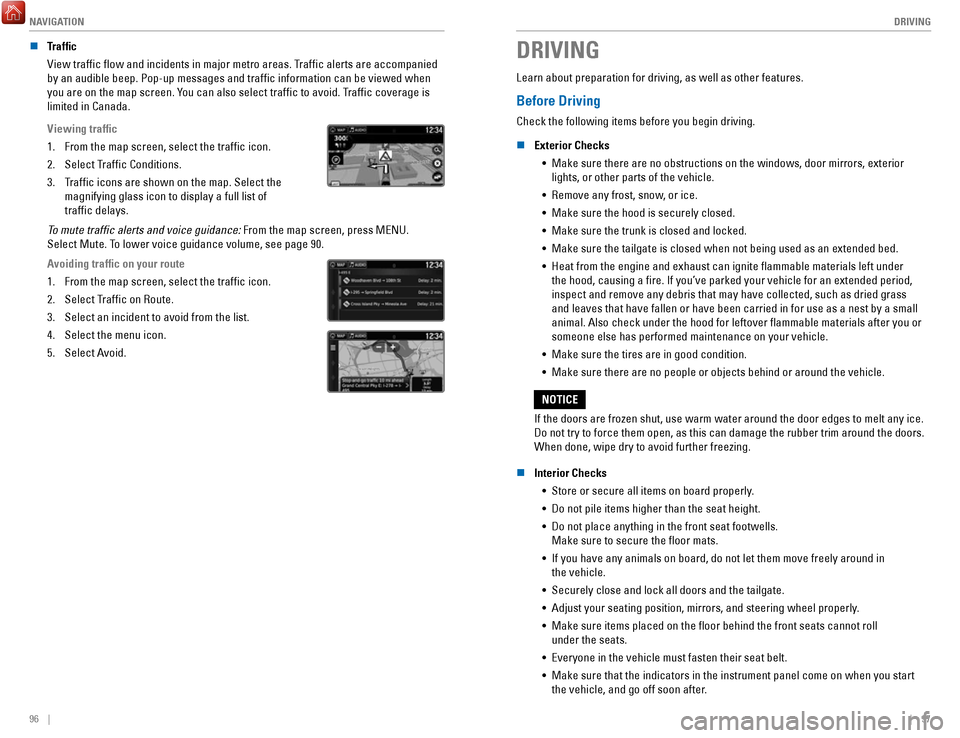
n Traffic
View traffic flow and incidents in major metro areas. Traffic alerts are accompanied
by an audible beep. Pop-up messages and traffic information can be vie\
wed when
you are on the map screen. You can also select traffic to avoid. Traffic coverage is
limited in Canada.
Viewing traffic
1.
From the map screen, select the traffic icon.
2.
Select Traffic Conditions.
3.
Traffic icons are shown on the map. Select the
magnifying glass icon to display a full list of
traffic delays.
To mute traffic alerts and voice guidance: From the map screen, press MENU.
Select Mute. To lower voice guidance volume, see page 90.
Avoiding traffic on your route
1.
From the map screen, select the traffic icon.
2.
Select Traffic on Route.
3.
Select an incident to avoid from the list.
4.
Select the menu icon.
5.
Select Avoid.
DRIVING
Learn about preparation for driving, as well as other features.
Before Driving
Check the following items before you begin driving.
n
Exterior Checks •
Make sure there are no obstructions on the windows, door mirrors, exteri\
or lights, or other parts of the vehicle.
•
Remove any frost, snow, or ice.
•
Make sure the hood is securely closed.
•
Make sure the trunk is closed and locked.
•
Make sure the tailgate is closed when not being used as an extended bed.\
•
Heat from the engine and exhaust can ignite flammable materials left u\
nder
the hood, causing a fire. If you’ve parked your vehicle for an exte\
nded period,
inspect and remove any debris that may have collected, such as dried gra\
ss
and leaves that have fallen or have been carried in for use as a nest by\
a small
animal. Also check under the hood for leftover flammable materials aft\
er you or
someone else has performed maintenance on your vehicle.
•
Make sure the tires are in good condition.
•
Make sure there are no people or objects behind or around the vehicle.
If the doors are frozen shut, use warm water around the door edges to me\
lt any ice.
Do not try to force them open, as this can damage the rubber trim around\
the doors.
When done, wipe dry to avoid further freezing.
NOTICE
n
Interior Checks •
Store or secure all items on board properly.
•
Do not pile items higher than the seat height.
•
Do not place anything in the front seat footwells.
Make sure to secure the floor mats.
•
If you have any animals on board, do not let them move freely around in \
the vehicle.
•
Securely close and lock all doors and the tailgate.
•
Adjust your seating position, mirrors, and steering wheel properly.
•
Make sure items placed on the floor behind the front seats cannot roll\
under the seats.
•
Everyone in the vehicle must fasten their seat belt.
•
Make sure that the indicators in the instrument panel come on when you s\
tart
the vehicle, and go off soon after.
Page 53 of 85
 of operation, avoid sudden acc\
eleration or full throttle operation so as to not damage the engine or powertrai")
DRIVING
98 || 99
D
RIVING
In addition:
•
During the first 600 miles (1,000 km) of operation, avoid sudden acc\
eleration or full throttle operation so as to not damage the engine or powertrain.
•
Avoid hard braking for the first 200 miles (300 km). You should also follow this
when the brake pads are replaced.
Improper accessories or modifications can affect your vehicle’s handling,
and stability, and performance, and cause a crash in which you can be
seriously hurt or killed.
Follow all instructions in the vehicle owner’s manual regarding
accessories and modifications.
WARNING
n Driving Guidelines for Your Utility Vehicle
Utility vehicles have a significantly higher rollover rate than other \
types of vehicles. •
To prevent rollovers or loss of control:
•
Take corners at slower speeds than you would with a passenger vehicle.
•
Avoid sharp turns and abrupt maneuvers whenever possible.
•
Do not modify your vehicle in any way that you would raise the center of\
gravity.
•
Do not carry heavy cargo on the roof.
•
Never carry more than 165 lbs (75 kg) of cargo on the roof rack (Hond\
a
accessory).
Your vehicle has been designed primarily for use on pavement, however, its higher
ground clearance allows you to occasionally travel on unpaved roads. It \
is not
designed for trail-blazing, or other challenging off-road activities.
If you decide to drive on unpaved roads, you will find that it require\
s somewhat
different driving skills and that your vehicle will handle somewhat diff\
erently than it
does on pavement. Pay attention to the precautions and tips in this sect\
ion, and get
acquainted with your vehicle before leaving the pavement.
Improperly operating this vehicle on or off pavement can cause a crash
or rollover in which you and your passengers can be seriously injured or\
killed.
• Follow all instructions and guidelines in this owner’s guide.
• Keep your speed low, and don’t drive faster than conditions permit.
WARNING
Maximum Load Limit
Carrying too much cargo or improperly storing it can affect your vehicle\
’s handling,
stability, stopping distance, and tires, and make it unsafe.
n
Maximum Load for Your Vehicle
The maximum load for your vehicle is 1,323 lbs (600 kg).
Label example
Overloading or improper loading can affect handling and stability and
cause a crash in which you can be hurt or killed.
Follow all load limits and other loading guidelines in this guide.
WARNING
Never let passengers ride in the pickup bed, in the trunk, or on the bed\
rails. This could vause very serious injuries or death. No one should ri\
de in
any position that is not equipped with seats and seat belts.
WARNING
The headlight aim on your vehicle was set by the factory and does not ne\
ed to be
adjusted. However, if you regularly carry heavy items in the cargo area or tow a
trailer, have the aiming readjusted at your dealer or by a qualified technici\
an.
Page 66 of 85
DRIVING
124 || 125
H
ANDLING THE UNEXPECTED
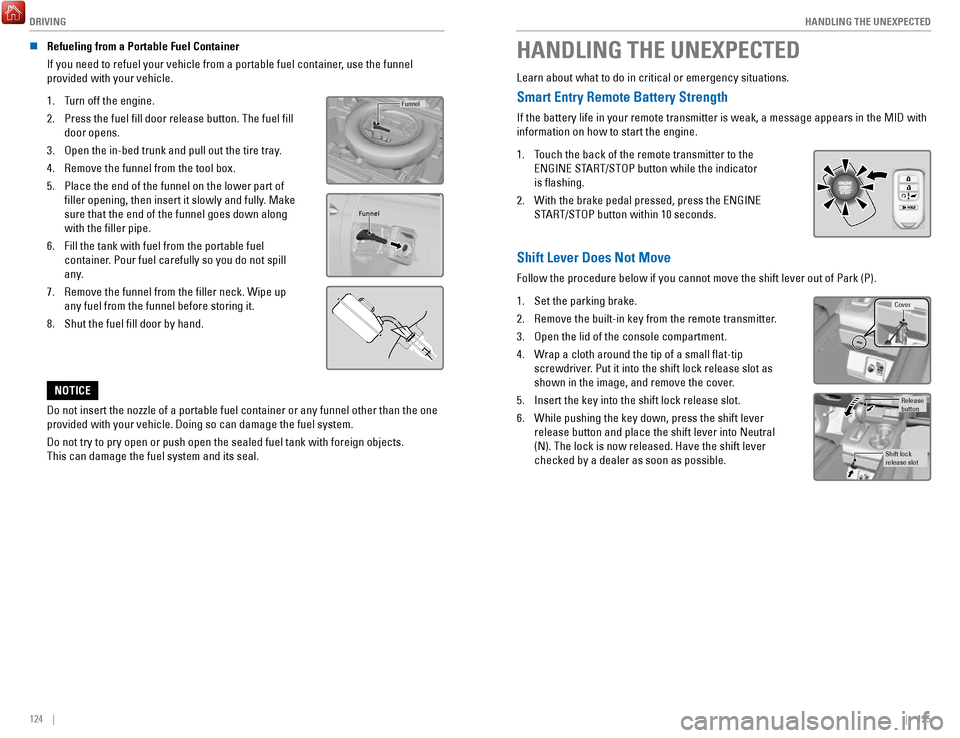
n Refueling from a Portable Fuel Container
If you need to refuel your vehicle from a portable fuel container, use the funnel
provided with your vehicle.
1.
Turn off the engine.
2.
Press the fuel fill door release button. The fuel fill
door opens.
3.
Open the in-bed trunk and pull out the tire tray.
4.
Remove the funnel from the tool box.
5.
Place the end of the funnel on the lower part of
filler opening, then insert it slowly and fully. Make
sure that the end of the funnel goes down along
with the filler pipe.
6.
Fill the tank with fuel from the portable fuel
container. Pour fuel carefully so you do not spill
any.
7.
Remove the funnel from the filler neck. Wipe up
any fuel from the funnel before storing it.
8.
Shut the fuel fill door by hand.
Funnel
Funnel
Do not insert the nozzle of a portable fuel container or any funnel othe\
r than the one
provided with your vehicle. Doing so can damage the fuel system.
Do not try to pry open or push open the sealed fuel tank with foreign ob\
jects.
This can damage the fuel system and its seal.
NOTICE
HANDLING THE UNEXPECTED
Learn about what to do in critical or emergency situations.
Smart Entry Remote Battery Strength
If the battery life in your remote transmitter is weak, a message appear\
s in the MID with
information on how to start the engine.
1.
Touch the back of the remote transmitter to the
ENGINE START/STOP button while the indicator
is flashing.
2.
With the brake pedal pressed, press the ENGINE
START/STOP button within 10 seconds.
Shift Lever Does Not Move
Follow the procedure below if you cannot move the shift lever out of Par\
k (P).
1.
Set the parking brake.
2.
Remove the built-in key from the remote transmitter.
3.
Open the lid of the console compartment.
4.
Wrap a cloth around the tip of a small flat-tip
screwdriver. Put it into the shift lock release slot as
shown in the image, and remove the cover.
5.
Insert the key into the shift lock release slot.
6.
While pushing the key down, press the shift lever
release button and place the shift lever into Neutral
(N). The lock is now released. Have the shift lever
checked by a dealer as soon as possible.
Cover
Release
button
Shift lock
release slot
Page 69 of 85
 – Required Federal Explanatio\
n
Each tire, including the spare (if provided), should be ch")
HANDLING THE UNEXPECTED
130 || 131
H
ANDLING THE UNEXPECTED
n Tire Pressure Monitoring System (TPMS) – Required Federal Explanatio\
n
Each tire, including the spare (if provided), should be checked monthl\
y when
cold and inflated to the inflation pressure recommended by the vehic\
le
manufacturer on the vehicle placard or tire inflation pressure label.
(If your vehicle has tires of a different size than the size indicated \
on the
vehicle placard or tire inflation pressure label, you should determine\
the
proper tire inflation pressure for those tires.)
As an added safety feature, your vehicle has been equipped with
a tire pressure monitoring system (TPMS) that illuminates a low
tire pressure telltale when one or more of your tires is significantly\
under-inflated.
Accordingly, when the low tire pressure telltale illuminates, you should stop
and check your tires as soon as possible, and inflate them to the prop\
er
pressure.
Driving on a significantly under-inflated tire causes the tire to overheat and
can lead to tire failure. Under-inflation also reduces fuel efficiency and tire
tread life, and may affect the vehicle’s handling and stopping ability.
Please note that the TPMS is not a substitute for proper tire maintenanc\
e,
and it is the driver’s responsibility to maintain correct tire pressure, even if
under-inflation has not reached the level to trigger illumination of the TP\
MS
low tire pressure telltale.
Your vehicle has also been equipped with a TPMS malfunction indicator to \
indicate when the system is not operating properly. The TPMS malfunction
indicator is combined with the low tire pressure telltale. When the syst\
em
detects a malfunction, the telltale will flash for approximately one m\
inute
and then remain continuously illuminated. This sequence will continue up\
on
subsequent vehicle start-ups as long as the malfunction exists.
When the malfunction indicator is illuminated, the system may not be abl\
e to
detect or signal low tire pressure as intended.
TPMS malfunctions may occur for a variety of reasons, including the
installation of replacement or alternate tires or wheels on the vehicle \
that
prevent the TPMS from functioning properly.
Always check the TPMS malfunction telltale after replacing one or more
tires or wheels on your vehicle to ensure that the replacement or altern\
ate
tires and wheels allow the TPMS to continue to function properly.
Changing a Flat Tire
If a tire goes flat while driving, grasp the steering wheel firmly, and brake gradually to
reduce speed. Then, stop in a safe place. Replace the flat tire with t\
he compact spare
tire. Go to a dealer as soon as possible to have the full-size tire repa\
ired or replaced.
n
Getting Ready to Change the Tire
Park the vehicle on a firm, level, non-slippery surface. Apply the par\
king brake, shift
to Park (P), and turn the vehicle off. Turn on the hazard warning lights.
1.
Open the trunk and remove the two tray-holding
bolts.
Tire Tray
Tire Tray Holding Bolts
2. Pull out the tire tray. Hook the rear of the tray to the
guides on the back edge of the trunk.
Handle s
3. Loosen the strap, then take the jack out.
StrapJack
4. Remove the wing bolt, tool box and spacer cone,
then the compact spare tire.Wing Bol t
Spacer ConeTool Box
5. Place the compact spare tire wheel-side up under
the vehicle body, near the tire that needs to be
replaced.
6.
Loosen each wheel nut about one turn using
the wheel nut wrench.
Page 70 of 85
HANDLING THE UNEXPECTED
132 || 133
H
ANDLING THE UNEXPECTED
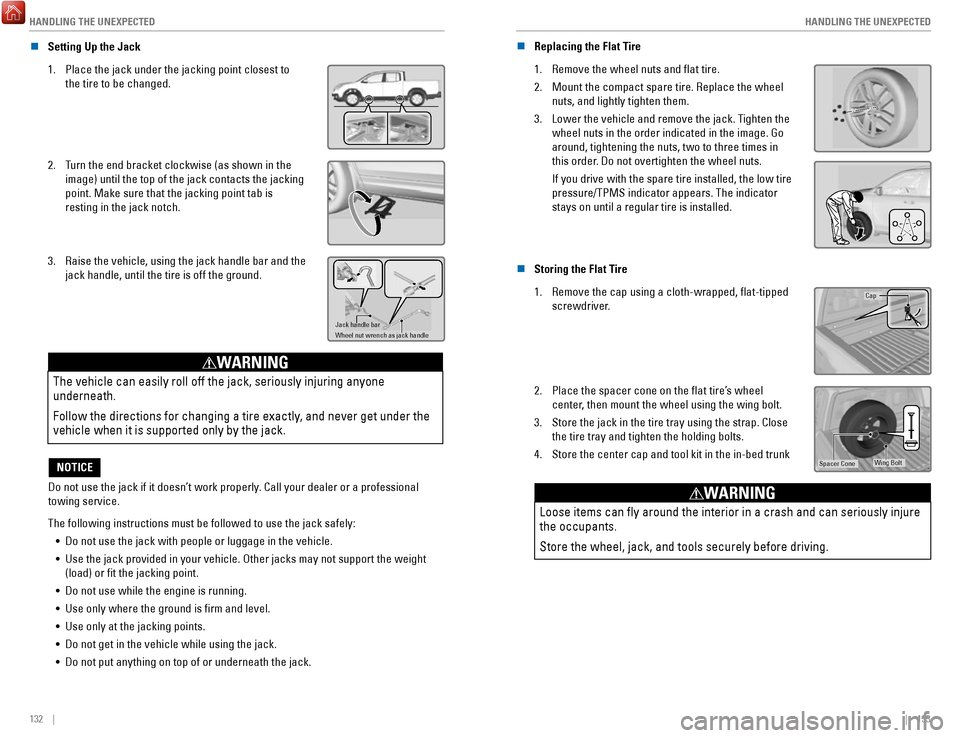
n Setting Up the Jack
1.
Place the jack under the jacking point closest to
the tire to be changed.
2. Turn the end bracket clockwise (as shown in the
image) until the top of the jack contacts the jacking
point. Make sure that the jacking point tab is
resting in the jack notch.
3. Raise the vehicle, using the jack handle bar and the
jack handle, until the tire is off the ground.
Jack handle bar
Wheel nut wrench as jack handle
The vehicle can easily roll off the jack, seriously injuring anyone
underneath.
Follow the directions for changing a tire exactly, and never get under the
vehicle when it is supported only by the jack.
WARNING
Do not use the jack if it doesn’t work properly. Call your dealer or a professional
towing service.
NOTICE
The following instructions must be followed to use the jack safely: •
Do not use the jack with people or luggage in the vehicle.
•
Use the jack provided in your vehicle. Other jacks may not support the w\
eight (load) or fit the jacking point.
•
Do not use while the engine is running.
•
Use only where the ground is firm and level.
•
Use only at the jacking points.
•
Do not get in the vehicle while using the jack.
•
Do not put anything on top of or underneath the jack. n
Replacing the Flat Tire
1.
Remove the wheel nuts and flat tire.
2.
Mount the compact spare tire. Replace the wheel
nuts, and lightly tighten them.
3.
Lower the vehicle and remove the jack. Tighten the
wheel nuts in the order indicated in the image. Go
around, tightening the nuts, two to three times in
this order. Do not overtighten the wheel nuts.
If you drive with the spare tire installed, the low tire
pressure/TPMS indicator appears. The indicator
stays on until a regular tire is installed.
n Storing the Flat Tire
1.
Remove the cap using a cloth-wrapped, flat-tipped
screwdriver.Cap
2. Place the spacer cone on the flat tire’s wheel
center, then mount the wheel using the wing bolt.
3.
Store the jack in the tire tray using the strap. Close
the tire tray and tighten the holding bolts.
4.
Store the center cap and tool kit in the in-bed trunkWing BoltSpacer Cone
Loose items can fly around the interior in a crash and can seriously i\
njure
the occupants.
Store the wheel, jack, and tools securely before driving.
WARNING