collision mitigation HONDA RIDGELINE 2018 Owner's Manual (in English)
[x] Cancel search | Manufacturer: HONDA, Model Year: 2018, Model line: RIDGELINE, Model: HONDA RIDGELINE 2018Pages: 623, PDF Size: 25.85 MB
Page 6 of 623
4
Quick Reference Guide
Quick Reference Guide
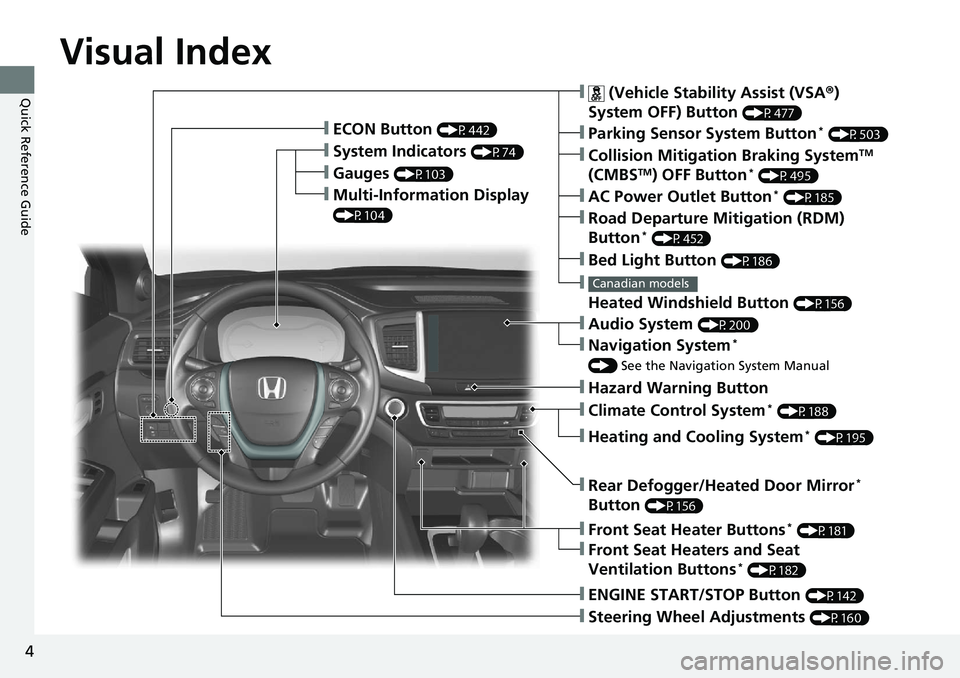
Visual Index
❙Gauges (P103)
❙Multi-Information Display
(P104)
❙System Indicators (P74)
❙ECON Button (P442)
❙Collision Mitigation Braking SystemTM
(CMBSTM) OFF Button* (P495)
❙
Heated Windshield Button (P156)
Canadian models
❙Parking Sensor System Button* (P503)
❙Steering Wheel Adjustments (P160)
❙ENGINE START/STOP Button (P142)
❙AC Power Outlet Button* (P185)
❙Road Departure Mitigation (RDM)
Button* (P452)
❙ (Vehicle Stability Assist (VSA ®)
System OFF) Button
(P477)
❙Bed Light Button (P186)
❙Audio System (P200)
❙Navigation System*
() See the Navigation System Manual
❙Front Seat Heater Buttons* (P181)
❙Front Seat Heaters and Seat
Ventilation Buttons* (P182)
❙Rear Defogger/Heated Door Mirror*
Button
(P156)
❙Heating and Cooling System* (P195)
❙Climate Control System* (P188)
❙Hazard Warning Button
Page 13 of 623
11
Quick Reference Guide
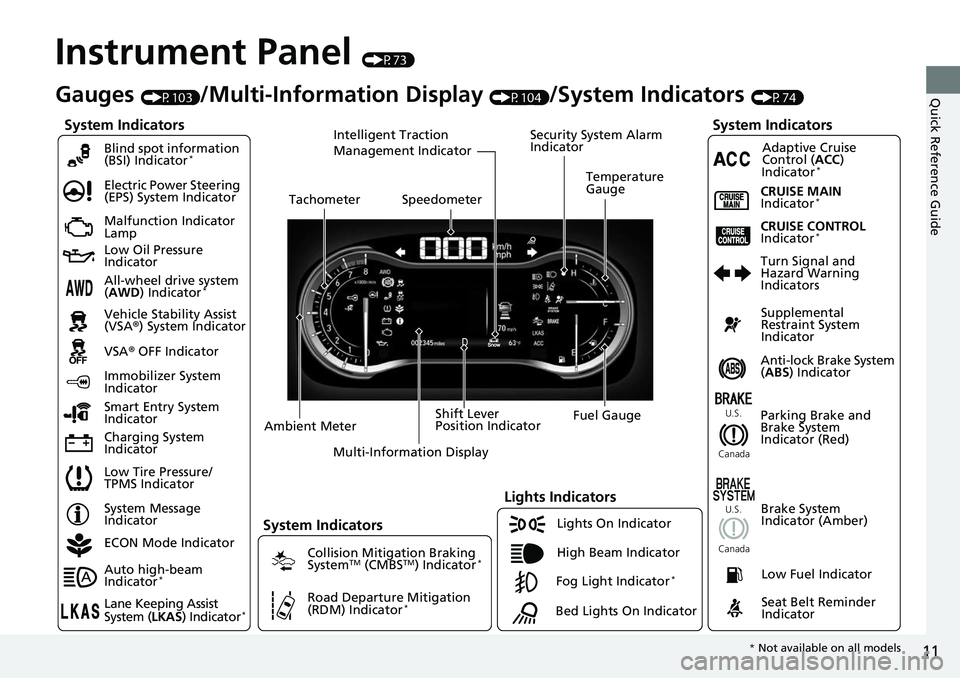
Instrument Panel (P73)
System Indicators
Malfunction Indicator
Lamp
Low Oil Pressure
Indicator
Charging System
IndicatorAnti-lock Brake System
(
ABS ) Indicator
Vehicle Stability Assist
(VSA®
) System Indicator
VSA ® OFF Indicator
Electric Power Steering
(EPS) System Indicator
Lights Indicators
Lights On Indicator
High Beam Indicator
Immobilizer System
Indicator
Seat Belt Reminder
Indicator
System Indicators
System Message
IndicatorParking Brake and
Brake System
Indicator (Red)Supplemental
Restraint System
Indicator
Low Fuel Indicator
Gauges (P103)/Multi-Information Display (P104)/System Indicators (P74)
Low Tire Pressure/
TPMS Indicator Turn Signal and
Hazard Warning
Indicators
Smart Entry System
Indicator Ambient Meter Shift Lever
Position Indicator
Fuel Gauge
Tachometer
Temperature
Gauge
Speedometer
Multi-Information Display
Brake System
Indicator (Amber)
All-wheel drive system
(AWD ) Indicator*
Blind spot information
(BSI) Indicator*
System Indicators
Collision Mitigation Braking
SystemTM (CMBSTM) Indicator*
Road Departure Mitigation
(RDM) Indicator*
Security System Alarm
Indicator
U.S.
Canada U.S.
Canada
Fog Light Indicator*
ECON Mode Indicator
Auto high-beam
Indicator
*
Lane Keeping Assist
System ( LKAS) Indicator*
CRUISE MAIN
Indicator*
CRUISE CONTROL
Indicator*
Adaptive Cruise
Control (ACC )
Indicator
*
Intelligent Traction
Management Indicator
Bed Lights On Indicator
* Not available on all models
Page 23 of 623
21
Quick Reference Guide
VSA® OFF Button (P477)
● The vehicle stability assist (VSA® ) system
helps stabilize the vehicle during
cornering, and helps maintain traction
while accelerating on loose or slippery
road surfaces.
● VSA ® comes on automatically every time
you start the engine.
● To partially disable or fully restore VSA ®
function, press and ho ld the button until
you hear a beep.
Cruise Control* (P445)
● Cruise control allows you to maintain a
set speed without keeping your foot on
the accelerator pedal.
● To use cruise control, press the CRUISE
button, then press the – /SET button once
you have achieved the desired speed
(above 25 mph or 40 km/h).
Collision Mitigation
Braking System
TM
(CMBS
TM) OFF Button*
(P495)
● When a possible collision is likely
unavoidable, the CMBS
TM can help you to
reduce the vehicle speed and the severity
of the collision.
● To turn the CMBS
TM on or off, press and
hold the button until you hear a beep.
Tire Pressure Monitoring System (TPMS) (P480, 588)
● TPMS monitors tire pressure.
● TPMS is turned on automatically every time you start the engine.
● TPMS fill assist provides audible and visual guidance during tire pressure adjustment.
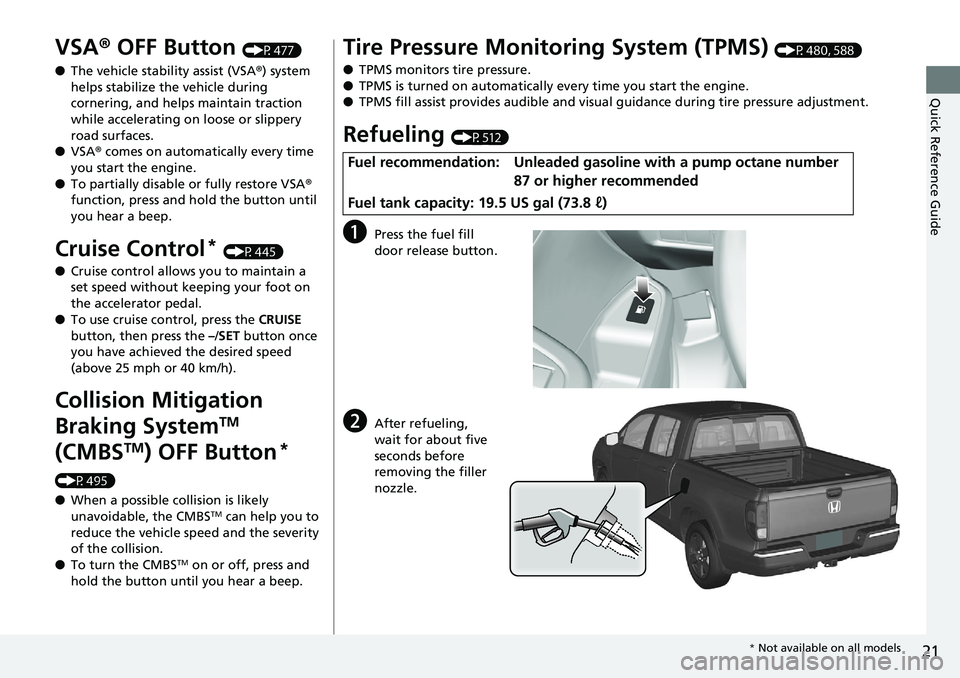
Refueling (P512)
aPress the fuel fill
door release button.
bAfter refueling,
wait for about five
seconds before
removing the filler
nozzle.
Fuel recommendation: Unleaded gasoline with a pump octane number
87 or higher recommended
Fuel tank capacity: 19.5 US gal (73.8 ℓ)
* Not available on all models
Page 24 of 623
22
Quick Reference Guide
Honda SensingTM *
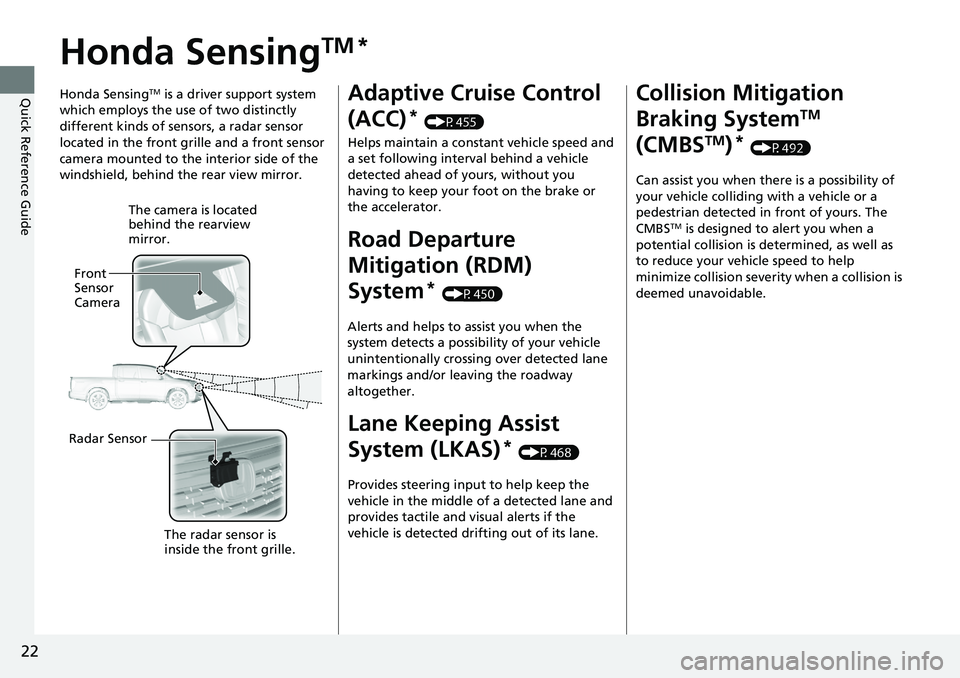
Honda SensingTM is a driver support system
which employs the use of two distinctly
different kinds of sensors, a radar sensor
located in the front grille and a front sensor
camera mounted to the interior side of the
windshield, behind the rear view mirror.
The camera is located
behind the rearview
mirror.
Front
Sensor
Camera
Radar Sensor The radar sensor is
inside the front grille.
Adaptive Cruise Control
(ACC)
* (P455)
Helps maintain a constant vehicle speed and
a set following interval behind a vehicle
detected ahead of yours, without you
having to keep your foot on the brake or
the accelerator.
Road Departure
Mitigation (RDM)
System
* (P450)
Alerts and helps to assist you when the
system detects a possibility of your vehicle
unintentionally crossing over detected lane
markings and/or leaving the roadway
altogether.
Lane Keeping Assist
System (LKAS)
* (P468)
Provides steering input to help keep the
vehicle in the middle of a detected lane and
provides tactile and visual alerts if the
vehicle is detected drifting out of its lane.
Collision Mitigation
Braking System
TM
(CMBS
TM)* (P492)
Can assist you when there is a possibility of
your vehicle colliding with a vehicle or a
pedestrian detected in front of yours. The
CMBS
TM is designed to alert you when a
potential collision is determined, as well as
to reduce your vehicle speed to help
minimize collision severity when a collision is
deemed unavoidable.
Page 90 of 623
88
uuIndicators u
Instrument Panel
IndicatorNameOn/BlinkingExplanationMessage
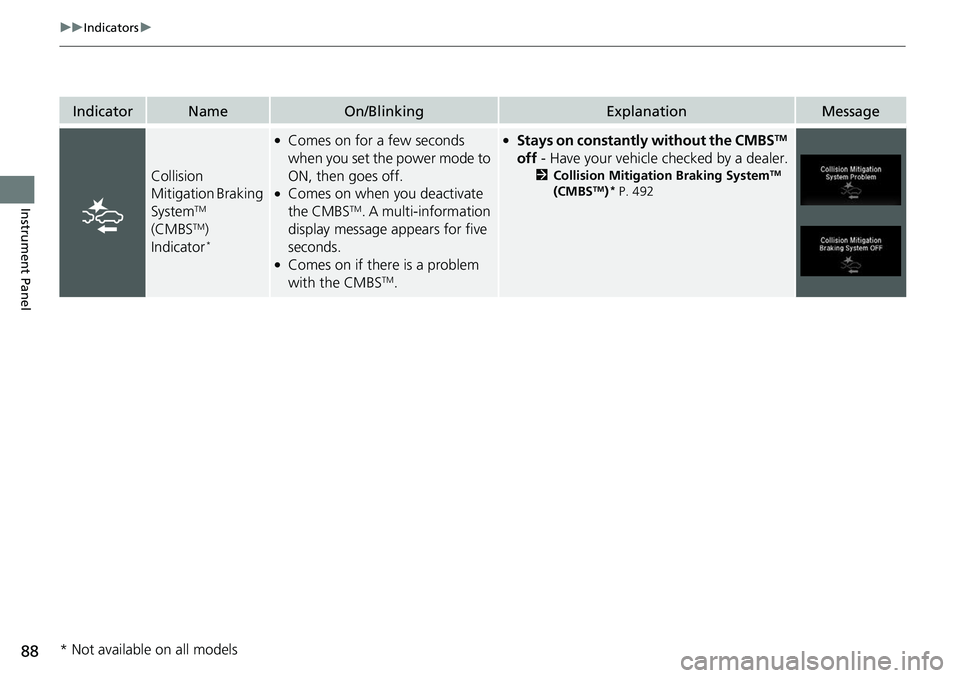
Collision
Mitigation Braking
System
TM
(CMBSTM)
Indicator*
●Comes on for a few seconds
when you set the power mode to
ON, then goes off.
●Comes on when you deactivate
the CMBSTM. A multi-information
display message appears for five
seconds.
●Comes on if there is a problem
with the CMBSTM.
●Stays on constantly without the CMBSTM
off - Have your vehicle checked by a dealer.
2Collision Mitigation Braking SystemTM
(CMBSTM)* P. 492
* Not available on all models
Page 91 of 623
89
uuIndicators u
Continued
Instrument Panel
IndicatorNameOn/BlinkingExplanationMessage
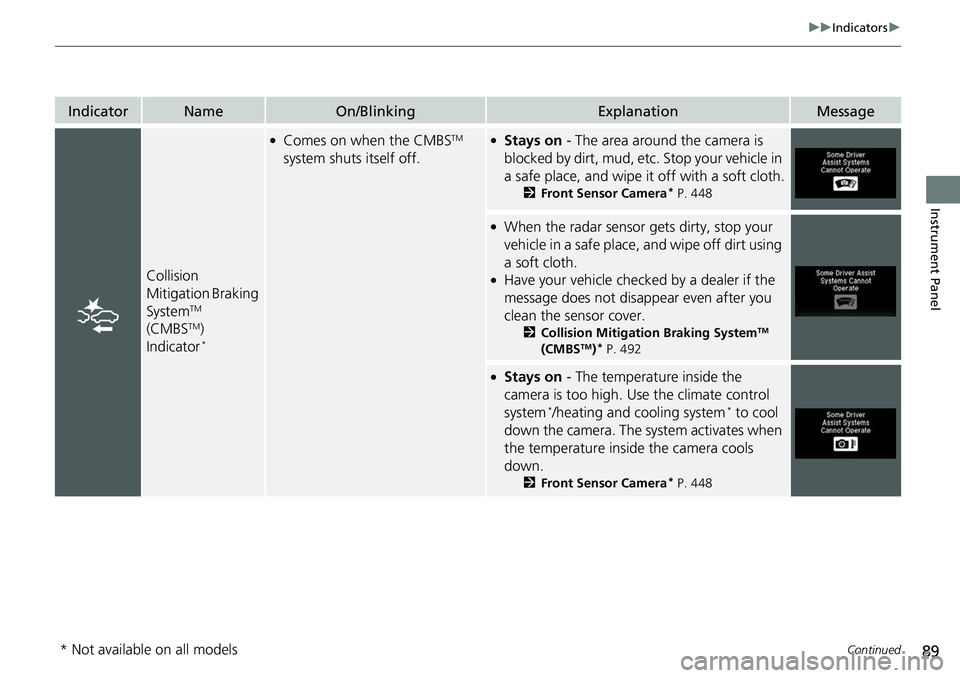
Collision
Mitigation Braking
System
TM
(CMBSTM)
Indicator*
●Comes on when the CMBSTM
system shuts itself off.●Stays on - The area around the camera is
blocked by dirt, mud, etc. Stop your vehicle in
a safe place, and wipe it off with a soft cloth.
2 Front Sensor Camera* P. 448
●When the radar sensor gets dirty, stop your
vehicle in a safe place, and wipe off dirt using
a soft cloth.
●Have your vehicle checked by a dealer if the
message does not disappear even after you
clean the sensor cover.
2Collision Mitigation Braking SystemTM
(CMBSTM)* P. 492
●Stays on - The temperature inside the
camera is too high. Use the climate control
system
*/heating and cooling system* to cool
down the camera. The system activates when
the temperature inside the camera cools
down.
2 Front Sensor Camera* P. 448
* Not available on all models
Page 100 of 623
98
uuIndicators uMulti-Information Display Warn ing and Information Messages
Instrument Panel
MessageConditionExplanation
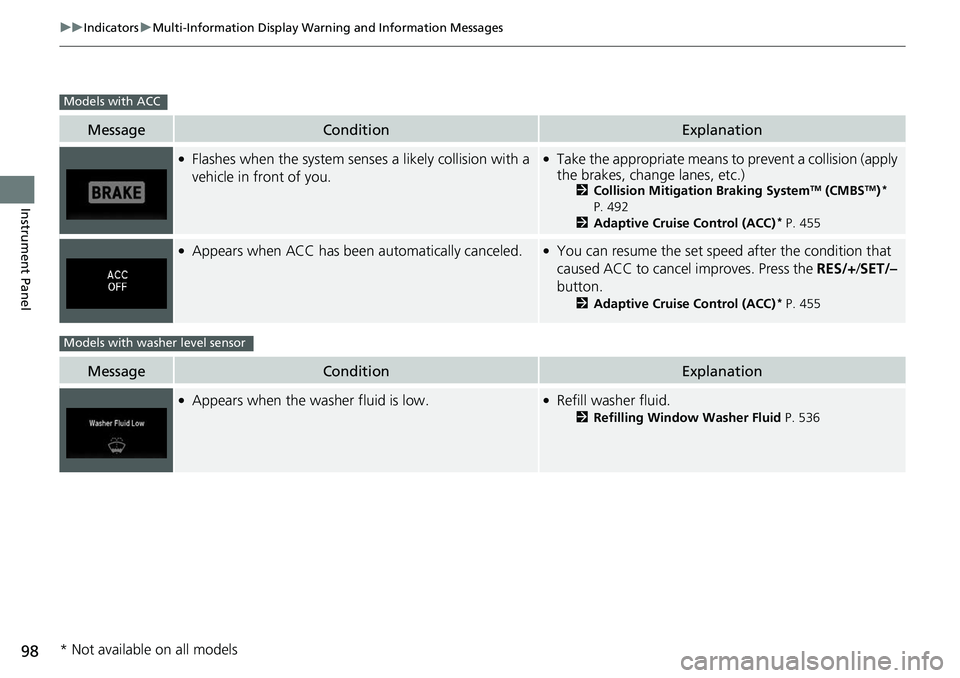
●Flashes when the system senses a likely collision with a
vehicle in front of you.●Take the appropriate means to prevent a collision (apply
the brakes, change lanes, etc.)
2 Collision Mitigation Braking SystemTM (CMBSTM)*
P. 492
2 Adaptive Cruise Control (ACC)
* P. 455
●Appears when ACC has been automatically canceled.●You can resume the set speed after the condition that
caused ACC to cancel improves. Press the RES/+/SET/–
button.
2 Adaptive Cruise Control (ACC)* P. 455
MessageConditionExplanation
●Appears when the washer fluid is low.●Refill washer fluid.
2Refilling Window Washer Fluid P. 536
Models with ACC
Models with washer level sensor
* Not available on all models
Page 338 of 623
336
uuCustomized Features u
Features
*1:Default SettingSetup
Group Customizable Features Descri
ption Selectable Settings
Vehicle Driver
Assist
System
Setup
*
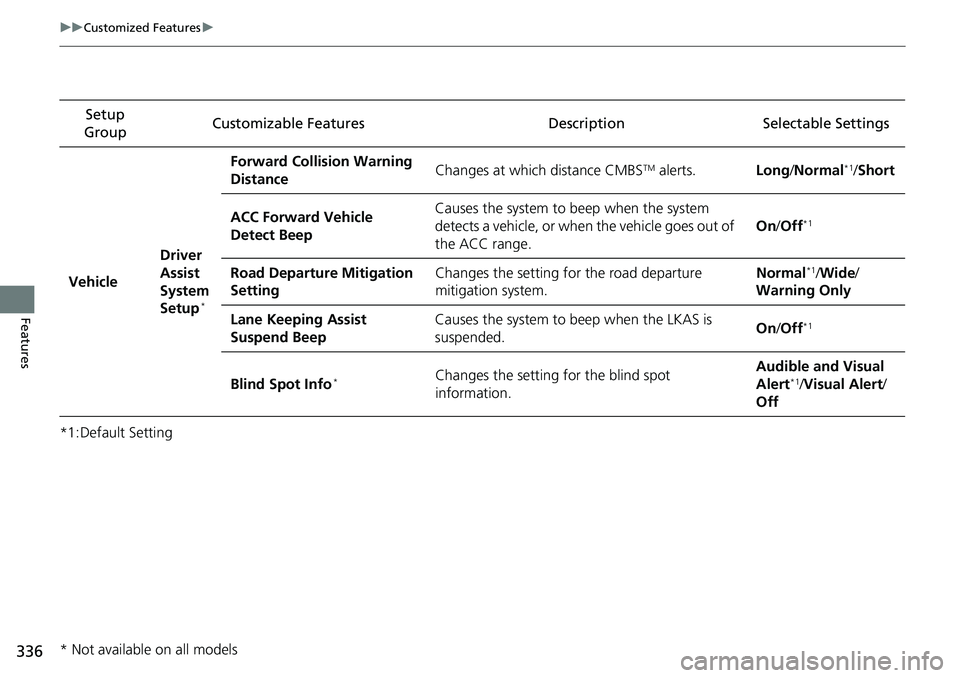
Forward Collision Warning
Distance
Changes at which distance CMBSTM alerts.
Long/Normal*1/ Short
ACC Forward Vehicle
Detect Beep Causes the system to
beep when the system
detects a vehicle, or when the vehicle goes out of
the ACC range. On
/Off
*1
Road Departure Mitigation
Setting Changes the setting for the road departure
mitigation system. Normal*1/
Wide /
Warning Only
Lane Keeping Assist
Suspend Beep Causes the system to b
eep when the LKAS is
suspended. On
/Off
*1
Blind Spot Info*Changes the setting for the blind spot
information. Audible and Visual
Alert*1/
Visual Alert /
Off
* Not available on all models
Page 411 of 623
409
Driving
This chapter discusses driving and refueling.
Before Driving................................... 410
Towing a Trailer ................................ 418
Off-Highway Driving Guidelines ..... 430
When Driving Starting the Engine .......................... 432
Precautions While Driving................. 438
Automatic Transmission ................... 439
Shifting ............................................ 440
ECON Button ................................... 442
Intelligent Traction Management...... 443
Cruise Control
*................................ 445
Front Sensor Camera*...................... 448Road Departure Mi tigation (RDM)
System*...................................... 450
Adaptive Cruise Control (ACC)*....... 455
Lane Keeping Assist System (LKAS)*.... 468Vehicle Stability Assist (VSA ®), aka Electronic
Stability Control (ESC), System ............. 476
Agile Handling Assist ....................... 478
i-VTM4 (Intelligent Variable Torque
Management)-4 ® System
*.............. 479
TPMS with Tire Fill Assist .................. 480
Tire Pressure Monitoring System (TPMS) -
Required Federal Explanation ......... 482
Blind spot inform ation (BSI) System
*.... 484
LaneWatchTM*.................................. 486 Braking
Brake System ................................... 488
Anti-lock Brake System (ABS) ........... 490
Brake Assist System ......................... 491
Collision Mitigation Braking System
TM
(CMBSTM)*..................................... 492
Parking Your Vehicle When Stopped ................................ 501
Parking Sensor System
*................... 502
Cross Traffic Monitor*..................... 506
Multi-View Rear Camera .................. 510
Refueling Fuel Information .............................. 512
How to Refuel ................................. 513
Fuel Economy and CO
2 Emissions .... 515
* Not available on all models
Page 452 of 623
450
uuWhen Driving uRoad Departure Mitigation (RDM) System*
Driving
Road Departure Mitigation (RDM) System*
Alerts and helps to assist you when the sy stem detects a possibility of your vehicle
unintentionally crossing over detected la ne markings and/or leaving the roadway
altogether.
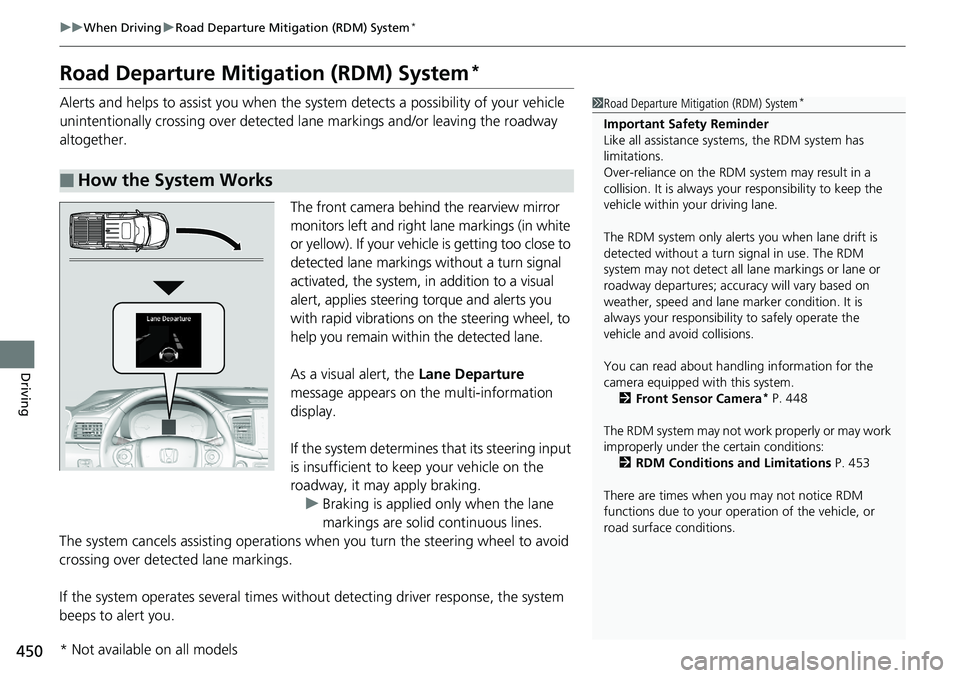
The front camera behind the rearview mirror
monitors left and right lane markings (in white
or yellow). If your vehicle is getting too close to
detected lane markings without a turn signal
activated, the system, in addition to a visual
alert, applies steering torque and alerts you
with rapid vibrations on the steering wheel, to
help you remain within the detected lane.
As a visual alert, the Lane Departure
message appears on the multi-information
display.
If the system determines that its steering input
is insufficient to keep your vehicle on the
roadway, it may apply braking. u Braking is applied only when the lane
markings are solid continuous lines.
The system cancels assistin g operations when you turn the steering wheel to avoid
crossing over detected lane markings.
If the system operates several times withou t detecting driver response, the system
beeps to alert you.
■How the System Works
1 Road Departure Mitigation (RDM) System*
Important Safety Reminder
Like all assistance systems, the RDM system has
limitations.
Over-reliance on the RDM system may result in a
collision. It is always your responsibility to keep the
vehicle within your driving lane.
The RDM system only alerts you when lane drift is
detected without a turn signal in use. The RDM
system may not detect all la ne markings or lane or
roadway departures; accu racy will vary based on
weather, speed and lane marker condition. It is
always your responsibilit y to safely operate the
vehicle and avoid collisions.
You can read about handling information for the
camera equipped with this system.
2 Front Sensor Camera
* P. 448
The RDM system may not wo rk properly or may work
improperly under the certain conditions: 2 RDM Conditions and Limitations P. 453
There are times when you may not notice RDM
functions due to your opera tion of the vehicle, or
road surface conditions.
* Not available on all models