fresh air HONDA RIDGELINE 2018 Owner's Manual (in English)
[x] Cancel search | Manufacturer: HONDA, Model Year: 2018, Model line: RIDGELINE, Model: HONDA RIDGELINE 2018Pages: 623, PDF Size: 25.85 MB
Page 190 of 623
188
Controls
Climate Control System*
Using Automatic Climate Control
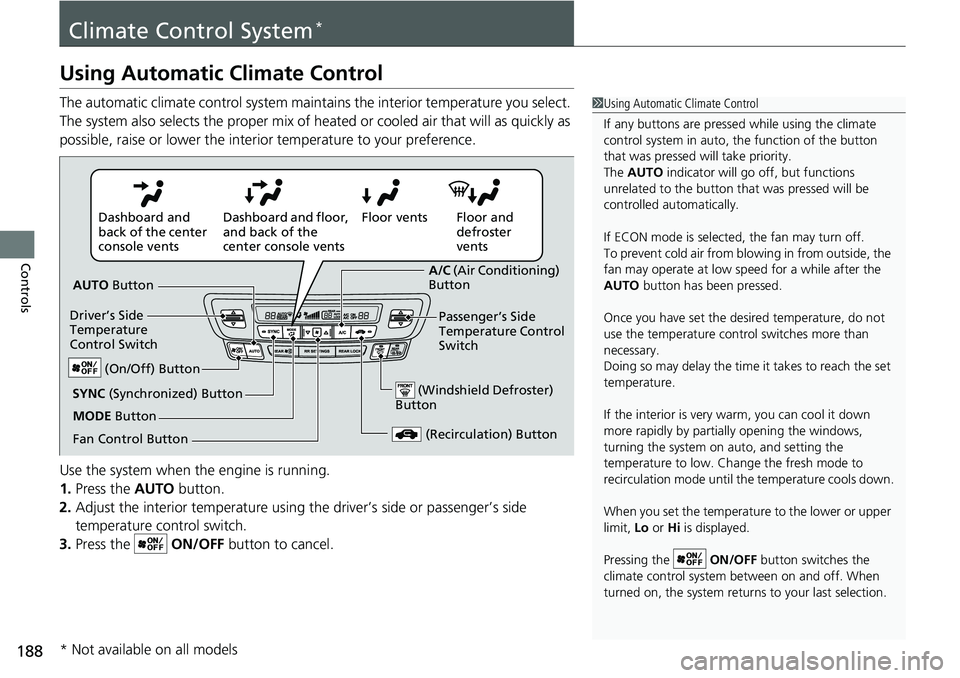
The automatic climate control system maintains the interior temperature you select.
The system also selects the proper mix of heated or cooled air that will as quickly as
possible, raise or lower the interior temperature to your preference.
Use the system when the engine is running.
1. Press the AUTO button.
2. Adjust the interior temperature using the driver’s side or passenger’s side
temperature control switch.
3. Press the ON/OFF button to cancel.1Using Automatic Climate Control
If any buttons are presse d while using the climate
control system in auto, the function of the button
that was pressed will take priority.
The AUTO indicator will go off, but functions
unrelated to the button th at was pressed will be
controlled automatically.
If ECON mode is selected, the fan may turn off.
To prevent cold air from bl owing in from outside, the
fan may operate at low speed for a while after the
AUTO button has been pressed.
Once you have set the de sired temperature, do not
use the temperature control switches more than
necessary.
Doing so may delay the time it takes to reach the set
temperature.
If the interior is very warm, you can cool it down
more rapidly by partial ly opening the windows,
turning the system on auto, and setting the
temperature to low. Change the fresh mode to
recirculation mode until the temperature cools down.
When you set the temperature to the lower or upper
limit, Lo or Hi is displayed.
Pressing the ON/OFF button switches the
climate control system be tween on and off. When
turned on, the system returns to your last selection.
Floor and
defroster
vents
Floor vents
Dashboard and floor,
and back of the
center console vents
Dashboard and
back of the center
console vents
AUTO Button
Driver’s Side
Temperature
Control Switch
(Recirculation) Button
Fan Control Button A/C
(Air Conditioning)
Button
Passenger’s Side
Temperature Control
Switch
(Windshield Defroster)
ButtonSYNC (Synchronized) Button
(On/Off) Button
MODE Button
* Not available on all models
Page 191 of 623
Continued189
uuClimate Control System*uUsing Automatic Climate Control
Controls
■Switching between the recirc ulation and fresh air modes
Press the button and switch the mode depending on environmental conditions.
Recirculation Mode (indicator on): Recirculates air from the vehicle’s interior through
the system.
Fresh Air Mode (indicator off): Maintains outside ventilation. Keep the system in
fresh air mode in normal situations.
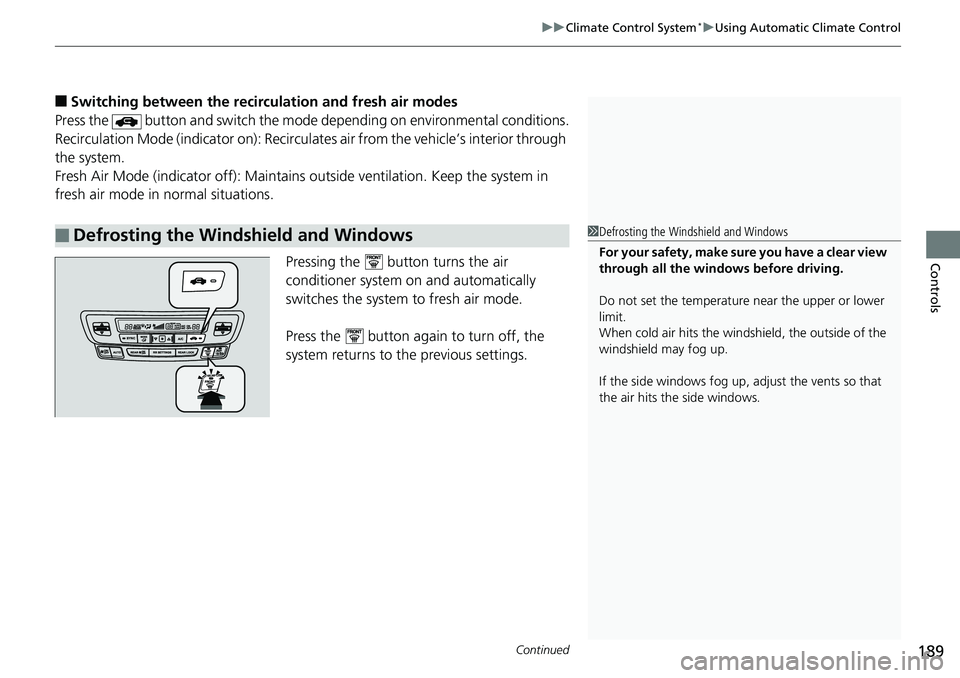
Pressing the button turns the air
conditioner system on and automatically
switches the system to fresh air mode.
Press the button again to turn off, the
system returns to the previous settings.
■Defrosting the Windshield and Windows1Defrosting the Windshield and Windows
For your safety, make sure you have a clear view
through all the windows before driving.
Do not set the temperatur e near the upper or lower
limit.
When cold air hits the windshield, the outside of the
windshield may fog up.
If the side windows fog up, adjust the vents so that
the air hits th e side windows.
Page 192 of 623
uuClimate Control System*uUsing Automatic Climate Control
190
Controls
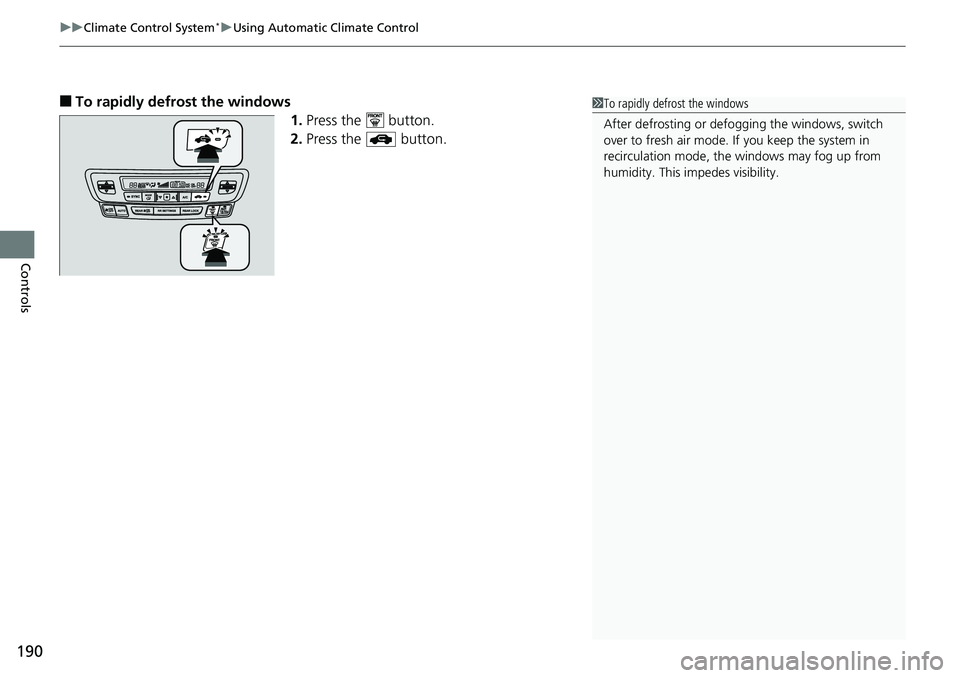
■To rapidly defrost the windows
1.Press the button.
2. Press the button.1To rapidly defrost the windows
After defrosting or defogging the windows, switch
over to fresh air mode. If you keep the system in
recirculation mode, the windows may fog up from
humidity. This impedes visibility.
Page 197 of 623
195Continued
Controls
Heating and Cooling System*
Using Vents, Heating and A/C
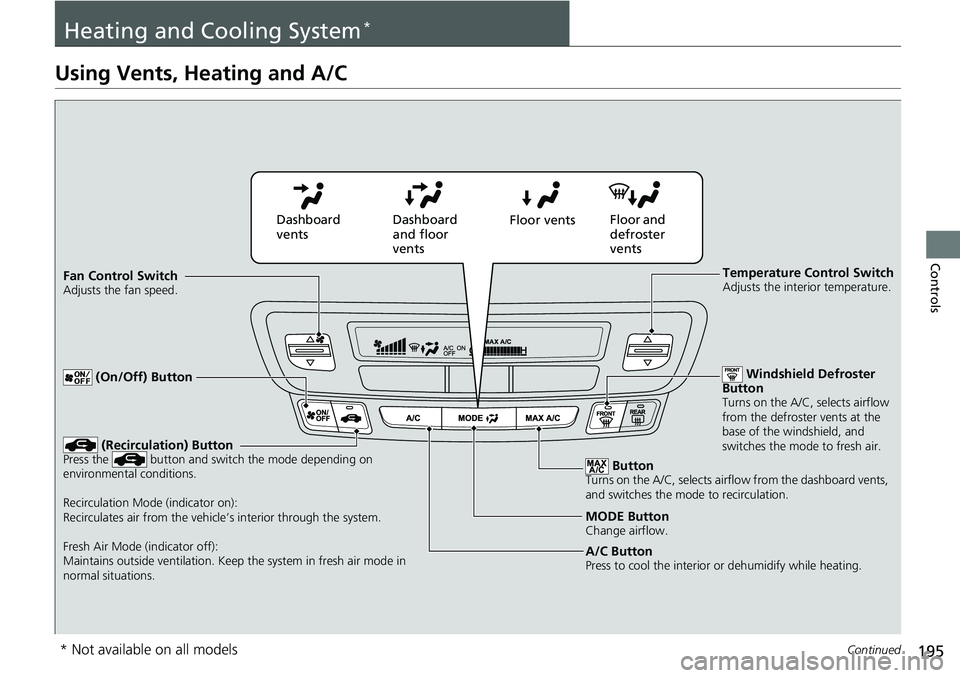
MODE ButtonChange airflow.
Floor and
defroster
vents
Floor vents
Dashboard
and floor
vents
Dashboard
vents
Fan Control Switch
Adjusts the fan speed.
ButtonTurns on the A/C, selects airflow from the dashboard vents,
and switches the mode to recirculation.
A/C ButtonPress to cool the interior or dehumidify while heating.
Windshield Defroster
Button
Turns on the A/C, selects airflow
from the defroster vents at the
base of the windshield, and
switches the mode to fresh air.
Temperature Control SwitchAdjusts the interior temperature.
(Recirculation) ButtonPress the button and switch the mode depending on
environmental conditions.
Recirculation Mode (indicator on):
Recirculates air from the vehicle’s interior through the system.
Fresh Air Mode (indicator off):
Maintains outside ventilation. Keep the system in fresh air mode in
normal situations.
(On/Off) Button
* Not available on all models
Page 198 of 623
uuHeating and Cooling System*uUsing Vents, Heating and A/C
196
Controls
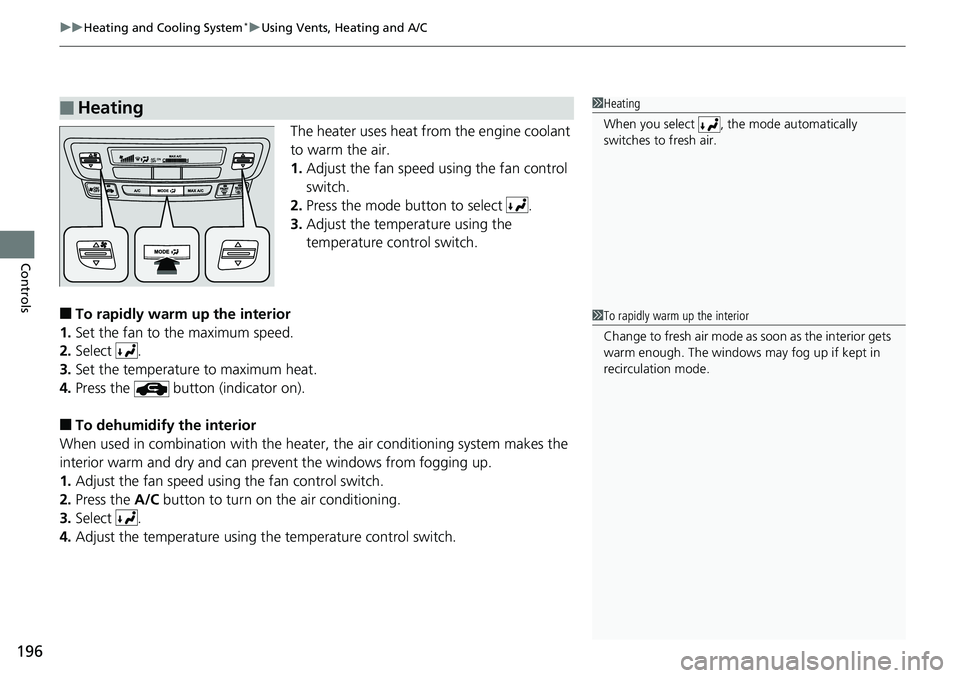
The heater uses heat from the engine coolant
to warm the air.
1. Adjust the fan speed using the fan control
switch.
2. Press the mode button to select .
3. Adjust the temperature using the
temperature control switch.
■To rapidly warm up the interior
1. Set the fan to the maximum speed.
2. Select .
3. Set the temperature to maximum heat.
4. Press the button (indicator on).
■To dehumidify the interior
When used in combination with the heater , the air conditioning system makes the
interior warm and dry and can prevent the windows from fogging up.
1. Adjust the fan speed using the fan control switch.
2. Press the A/C button to turn on the air conditioning.
3. Select .
4. Adjust the temperature using the temperature control switch.
■Heating1Heating
When you select , th e mode automatically
switches to fresh air.
1 To rapidly warm up the interior
Change to fresh air mode as soon as the interior gets
warm enough. The windows may fog up if kept in
recirculation mode.
Page 200 of 623
uuHeating and Cooling System*uUsing Vents, Heating and A/C
198
Controls
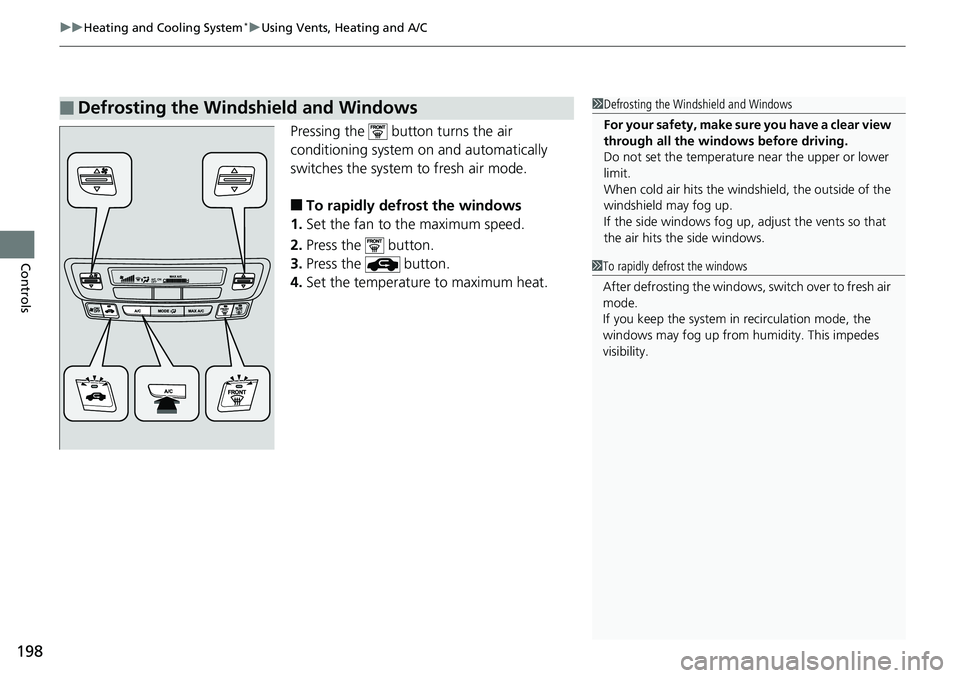
Pressing the button turns the air
conditioning system on and automatically
switches the system to fresh air mode.
■To rapidly defrost the windows
1. Set the fan to the maximum speed.
2. Press the button.
3. Press the button.
4. Set the temperature to maximum heat.
■Defrosting the Windshield and Windows1Defrosting the Windshield and Windows
For your safety, make sure you have a clear view
through all the windows before driving.
Do not set the temperatur e near the upper or lower
limit.
When cold air hits the windshield, the outside of the
windshield may fog up.
If the side windows fog up, adjust the vents so that
the air hits th e side windows.
1To rapidly defrost the windows
After defrosting the windows, switch over to fresh air
mode.
If you keep the system in recirculation mode, the
windows may fog up from humidity. This impedes
visibility.
Page 386 of 623
uuBluetooth ® HandsFreeLink ®u HFL Menus
384
Features
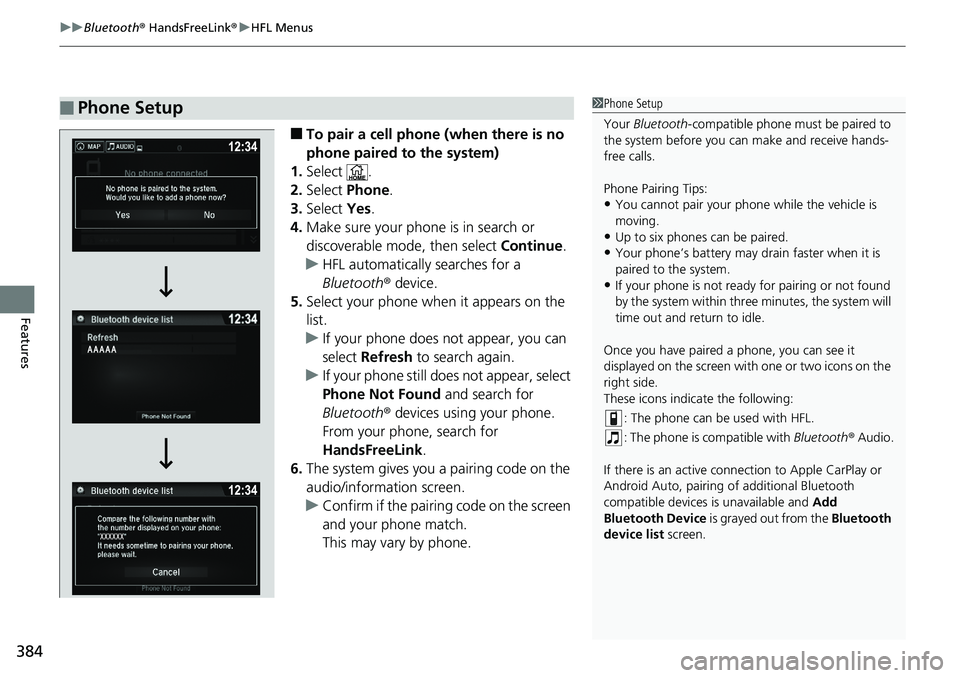
■To pair a cell phone (when there is no
phone paired to the system)
1. Select .
2. Select Phone .
3. Select Yes.
4. Make sure your phone is in search or
discoverable mode, then select Continue.
u HFL automatically searches for a
Bluetooth ® device.
5. Select your phone when it appears on the
list.
u If your phone does not appear, you can
select Refresh to search again.
u If your phone still does not appear, select
Phone Not Found and search for
Bluetooth ® devices using your phone.
From your phone, search for
HandsFreeLink .
6. The system gives you a pairing code on the
audio/information screen.
u Confirm if the pairing code on the screen
and your phone match.
This may vary by phone.
■Phone Setup1Phone Setup
Your Bluetooth -compatible phone must be paired to
the system before you ca n make and receive hands-
free calls.
Phone Pairing Tips:
•You cannot pair your phone while the vehicle is
moving.
•Up to six phones can be paired.
•Your phone’s battery may dr ain faster when it is
paired to the system.
•If your phone is not ready for pairing or not found
by the system within three minutes, the system will
time out and return to idle.
Once you have paired a phone, you can see it
displayed on the screen with one or two icons on the
right side.
These icons indicate the following: : The phone can be used with HFL.
: The phone is compatible with Bluetooth® Audio.
If there is an active connection to Appl e CarPlay or
Android Auto, pairing of additional Bluetooth
compatible devices is unavailable and Add
Bluetooth Device is grayed out from the Bluetooth
device list screen.
Page 613 of 623
Index
611
Index
Index
A
ABS (Anti-lock Brake System).................. 490
AC Power Outlet ...................................... 184
Accessories and Modifications ................ 563
Accessory Power Sockets ......................... 177
Adaptive Cruise Control (ACC) ................ 455
Indicator ................................................... 85
Additives
Coolant .................................................. 533
Engine Oil ............................................... 528
Washer ................................................... 536
Adjusting Armrest .................................................. 170
Front Seats.............................................. 163
Head Restraints ............................... 168, 169
Mirrors.................................................... 161
Rear Seats ............................................... 166
Steering Wheel ....................................... 160
Temperature ........................................... 106
Agile Handling Assist ............................... 478
Air Conditioning System (Climate Control System) ....................... 188
Changing the Mode................................ 189
Defrosting the Windshield and Windows .............................................. 189
Dust and Pollen Filter .............................. 556
Recirculation/Fresh Air Mode................... 189
Sensor .................................................... 194
Synchronized Mode ................................ 191
Using Automatic Climate Control............ 188 Air Conditioning System
(Heating and Cooling System) ............... 195
Cooling ................................................... 197
Defrosting the Windshield and Windows ............................................... 198
Heating ................................................... 196
Air Pressure ....................................... 546, 601
Airbags ........................................................ 42
Advanced Airbags ..................................... 48
After a Collision ......................................... 46
Airbag Care ............................................... 54
Front Airbags (SRS) .................................... 45
Indicator .............................................. 52, 77
Passenger Airbag Off Indicator .................. 53
Sensors ...................................................... 42
Side Airbags .............................................. 49
Side Curtain Airbags .................................. 51
All-wheel drive (AWD) Indicator ............... 83
AM/FM Radio .................................... 213, 249
Android Auto ............................................ 289
Anti-lock Brake System (ABS) .................. 490
Indicator .................................................... 77
Apple CarPlay ........................................... 286
Armrest ..................................................... 170
Audio Remote Controls ............................ 204
Audio System ............................................ 200
Adjusting the Sound ........................ 211, 242
Audio/Information Screen ................ 207, 225
Auxiliary Input Jack .................................. 202
Changing the Home Screen Icon Layout ................................................... 229 Closing Apps ........................................... 239
Display Setup .................................. 212, 243
Error Messages ........................................ 294
General Information ................................ 298
Home Screen........................................... 232
Limitations for Manual Operation ............ 244
MP3/WMA/AAC ...................... 218, 261, 273
Playing a CD............................................ 261
Reactivating ............................................ 203
Recommended CDs ................................. 299
Remote Controls ..................................... 204
Security Code .......................................... 203
Selecting an Audio Source ....................... 244
Status Area ............................................. 238
Theft Protection ...................................... 203
USB Flash Drives ...................................... 301
USB Port.................................................. 201
Wallpaper Setup.............................. 209, 230
Audio/Information Screen ............... 207, 225
Authorized Manuals ................................ 609
Auto Door Locking/Unlocking ................. 124
Customize ............................................... 340
Auto High-Beam ....................................... 151
Auto high-beam Indicator ......................... 81
Automatic Intermittent Wipers ............... 155
Automatic Lighting .................................. 147
Page 614 of 623
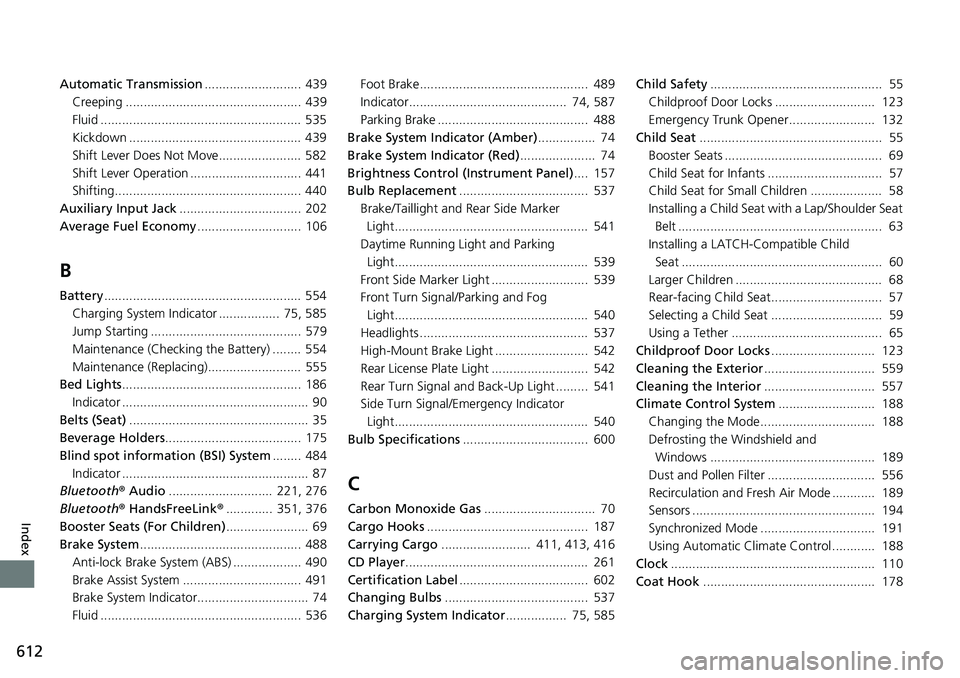
612
Index
Automatic Transmission........................... 439
Creeping ................................................. 439
Fluid ........................................................ 535
Kickdown ................................................ 439
Shift Lever Does Not Move....................... 582
Shift Lever Operation ............................... 441
Shifting.................................................... 440
Auxiliary Input Jack .................................. 202
Average Fuel Economy ............................. 106
B
Battery....................................................... 554
Charging System Indicator ................. 75, 585
Jump Starting .......................................... 579
Maintenance (Checking the Battery) ........ 554
Maintenance (Replacing).......................... 555
Bed Lights .................................................. 186
Indicator .................................................... 90
Belts (Seat) .................................................. 35
Beverage Holders ...................................... 175
Blind spot information (BSI) System ........ 484
Indicator .................................................... 87
Bluetooth ® Audio ............................. 221, 276
Bluetooth ® HandsFreeLink ®............. 351, 376
Booster Seats (For Children) ....................... 69
Brake System ............................................. 488
Anti-lock Brake System (ABS) ................... 490
Brake Assist System ................................. 491
Brake System Indicator............................... 74
Fluid ........................................................ 536 Foot Brake............................................... 489
Indicator............................................ 74, 587
Parking Brake .......................................... 488
Brake System Indicator (Amber) ................ 74
Brake System Indicator (Red) ..................... 74
Brightness Control (Instrument Panel).... 157
Bulb Replacement .................................... 537
Brake/Taillight and Rear Side Marker
Light...................................................... 541
Daytime Running Light and Parking
Light...................................................... 539
Front Side Marker Light ........................... 539
Front Turn Signal/Parking and Fog Light...................................................... 540
Headlights ............................................... 537
High-Mount Brake Light .......................... 542
Rear License Plate Light ........................... 542
Rear Turn Signal and Back-Up Light ......... 541
Side Turn Signal/Emergency Indicator Light...................................................... 540
Bulb Specifications ................................... 600
C
Carbon Monoxide Gas ............................... 70
Cargo Hooks ............................................. 187
Carrying Cargo ......................... 411, 413, 416
CD Player ................................................... 261
Certification Label .................................... 602
Changing Bulbs ........................................ 537
Charging System Indicator ................. 75, 585Child Safety
................................................ 55
Childproof Door Locks ............................ 123
Emergency Trunk Opener........................ 132
Child Seat ................................................... 55
Booster Seats ............................................ 69
Child Seat for Infants ................................ 57
Child Seat for Small Children .................... 58
Installing a Child Seat wi th a Lap/Shoulder Seat
Belt ......................................................... 63
Installing a LATCH-Compatible Child Seat ........................................................ 60
Larger Children ......................................... 68
Rear-facing Child Seat............................... 57
Selecting a Child Seat ............................... 59
Using a Tether .......................................... 65
Childproof Door Locks ............................. 123
Cleaning the Exterior ............................... 559
Cleaning the Interior ............................... 557
Climate Control System ........................... 188
Changing the Mode................................ 188
Defrosting the Windshield and Windows .............................................. 189
Dust and Pollen Filter .............................. 556
Recirculation and Fresh Air Mode ............ 189
Sensors ................................................... 194
Synchronized Mode ................................ 191
Using Automatic Climate Control............ 188
Clock ......................................................... 110
Coat Hook ................................................ 178