interior HONDA RIDGELINE 2018 Owner's Manual (in English)
[x] Cancel search | Manufacturer: HONDA, Model Year: 2018, Model line: RIDGELINE, Model: HONDA RIDGELINE 2018Pages: 623, PDF Size: 25.85 MB
Page 5 of 623
Contents
Child Safety P. 55Exhaust Gas Hazard P. 70Safety Labels P. 71
Opening and Closing the Tailgate P. 128 Opening and Closing the Trunk P. 130
Opening and Closing the Moonroof* P. 140 Operating the Switches Around the Steering Wheel P. 142
Interior Lights/Convenience It ems P. 171Climate Control System* P. 188
Audio System Basic Operation P. 206, 224 Audio Error Messages P. 294
Customized Features P. 317
Off-Highway Driving Guidelines P. 430 When Driving P. 432 Braking P. 488
Refueling P. 512 Fuel Economy and CO
2 Emissions P. 515
Maintenance Under the Hood P. 525 Replacing Light Bulbs P. 537
Checking and Maintaining Tires P. 545 Battery P. 554 Remote Transmitter Care P. 555
Cleaning P. 557 Accessories and Modifications P. 563
Engine Does Not Start P. 576Jump Starting P. 579 Shift Lever Does Not Move P. 582
Fuses P. 589 Emergency Towing P. 594
Refueling P. 596
Devices that Emit Radio Waves P. 603 Reporting Safety Defects P. 604
Authorized Manuals P. 609 Customer Service Information P. 610
Quick Reference GuideP. 4
Safe DrivingP. 29
Instrument PanelP. 73
ControlsP. 109
FeaturesP. 199
DrivingP. 409
MaintenanceP. 517
Handling the UnexpectedP. 565
InformationP. 599
IndexP. 611
Page 8 of 623
Visual Index
6
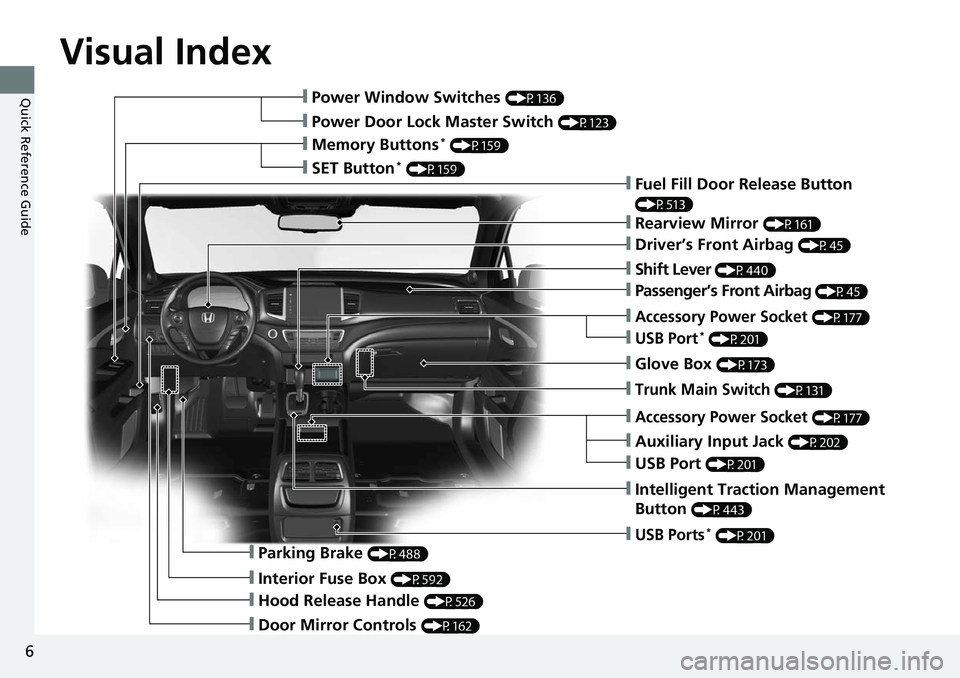
Quick Reference Guide❙Power Window Switches (P136)
❙Power Door Lock Master Switch (P123)
❙Memory Buttons* (P159)
❙SET Button* (P159)❙Fuel Fill Door Release Button
(P513)
❙Rearview Mirror (P161)
❙Driver’s Front Airbag (P45)
❙Shift Lever (P440)
❙Glove Box (P173)
❙Auxiliary Input Jack (P202)
❙Intelligent Traction Management
Button
(P443)
❙Parking Brake (P488)
❙Interior Fuse Box (P592)
❙Hood Release Handle (P526)
❙Door Mirror Controls (P162)
❙USB Ports* (P201)
❙Accessory Power Socket (P177)
❙USB Port (P201)
❙Trunk Main Switch (P131)
❙Accessory Power Socket (P177)
❙USB Port* (P201)
❙Passenger’s Front Airbag (P45)
Page 24 of 623
22
Quick Reference Guide
Honda SensingTM *
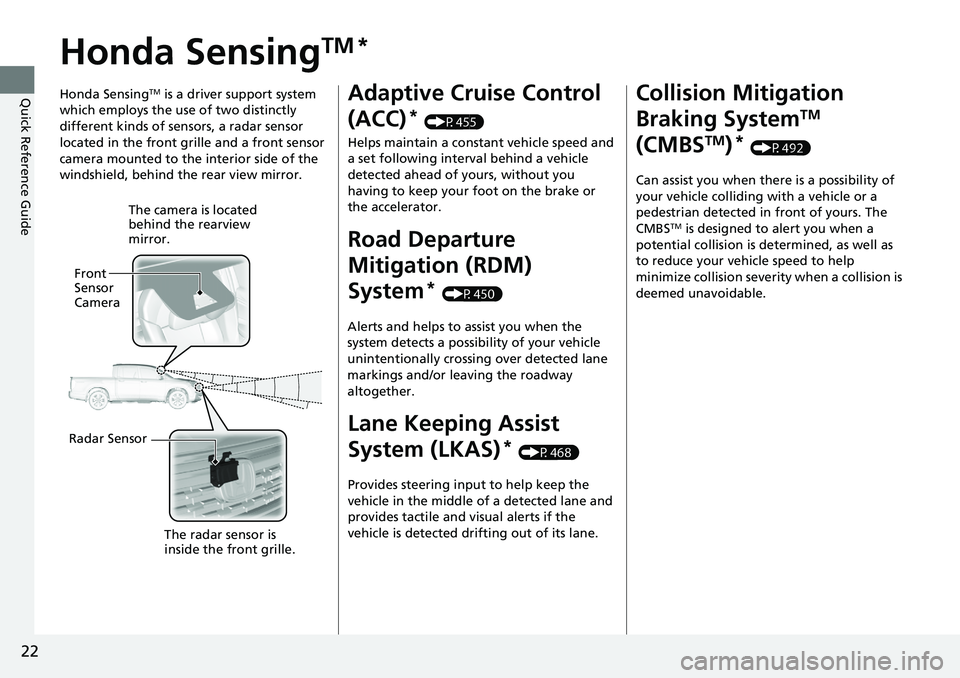
Honda SensingTM is a driver support system
which employs the use of two distinctly
different kinds of sensors, a radar sensor
located in the front grille and a front sensor
camera mounted to the interior side of the
windshield, behind the rear view mirror.
The camera is located
behind the rearview
mirror.
Front
Sensor
Camera
Radar Sensor The radar sensor is
inside the front grille.
Adaptive Cruise Control
(ACC)
* (P455)
Helps maintain a constant vehicle speed and
a set following interval behind a vehicle
detected ahead of yours, without you
having to keep your foot on the brake or
the accelerator.
Road Departure
Mitigation (RDM)
System
* (P450)
Alerts and helps to assist you when the
system detects a possibility of your vehicle
unintentionally crossing over detected lane
markings and/or leaving the roadway
altogether.
Lane Keeping Assist
System (LKAS)
* (P468)
Provides steering input to help keep the
vehicle in the middle of a detected lane and
provides tactile and visual alerts if the
vehicle is detected drifting out of its lane.
Collision Mitigation
Braking System
TM
(CMBS
TM)* (P492)
Can assist you when there is a possibility of
your vehicle colliding with a vehicle or a
pedestrian detected in front of yours. The
CMBS
TM is designed to alert you when a
potential collision is determined, as well as
to reduce your vehicle speed to help
minimize collision severity when a collision is
deemed unavoidable.
Page 72 of 623
70
Safe Driving
Exhaust Gas Hazard
Carbon Monoxide Gas
The engine exhaust from this vehicle contains carbon monoxide, a colorless,
odorless, and highly toxic gas. As long as you properly maintain your vehicle, carbon
monoxide gas will not get into the interior.
■Have the exhaust system in spected for leaks whenever
• The exhaust system is m aking an unusual noise.
• The exhaust system may have been damaged.
• The vehicle is raised for an oil change.
1Carbon Monoxide Gas
An enclosed area such as a garage can quickly fill up
with carbon monoxide gas.
Do not run the engine with the garage door closed.
Even when the garage door is open, drive out of the
garage immediately afte r starting the engine.
3WARNING
Carbon monoxide gas is toxic.
Breathing it can cause unconsciousness and
even kill you.
Avoid any enclosed areas or activities that
expose you to carbon monoxide.
Page 111 of 623
109
Controls
This chapter explains how to operate the various controls necessary for driving.
Clock.................................................. 110
Locking and Unlocking the Doors Key Types and Functions .................. 111
Low Smart Entry Remote Signal Strength... 113
Locking/Unlocking the Doors from the Outside .......................................... 114
Locking/Unlocking the Doors from the
Inside ............................................. 121
Childproof Door Locks ..................... 123
Auto Door Locking/Unlocking .......... 124
Opening and Closing the Tailgate ... 128
Opening and Closing the Trunk ....... 130
Security System
Immobilizer System .......................... 133
Security System Alarm ...................... 133
Opening and Closing the Windows .... 136
Opening and Closing the Moonroof*... 140Operating the Switches Around the Steering Wheel ENGINE START/STOP Button............. 142
Turn Signals ..................................... 145
Light Switches.................................. 146
Fog Lights
*...................................... 149
Daytime Running Lights ................... 150
Auto High-Beam (H igh Beam Support
System)
*........................................ 151
Wipers and Washers ........................ 154
Rear Defogger/Heat ed Door Mirror
*
Button ........................................... 156 Heated Windshield Button ............... 156
Brightness Control ........................... 157
Driving Position Memory System
*.... 158
Adjusting the Steering Wheel .......... 160
Adjusting the Mirrors Interior Rearview Mirror ................... 161
Power Door Mirrors ......................... 162
Adjusting the Seats .......................... 163
Interior Lights/Convenience Items
Interior Lights .................................. 171
Interior Convenience Items .............. 173
In-Bed Convenience Items................ 184
Climate Control System
*.................. 188
Heating and Cooling System*......... 195
Canadian models
* Not available on all models
Page 116 of 623
114
uuLocking and Unlocking the Doors uLocking/Unlocking the Doors from the Outside
Controls
Locking/Unlocking the Doors from the Outside
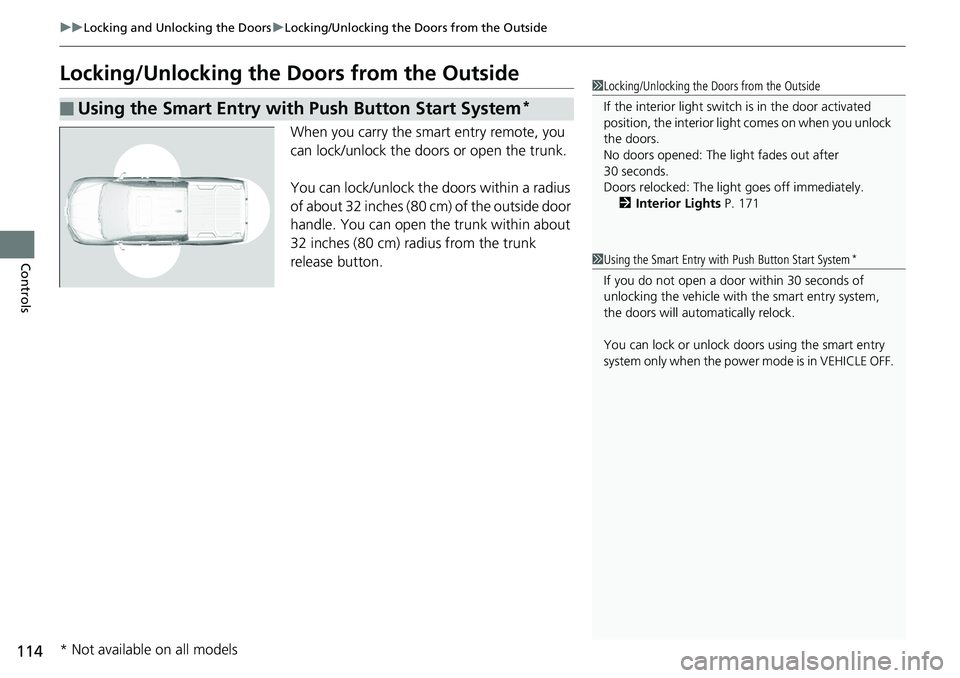
When you carry the smart entry remote, you
can lock/unlock the doors or open the trunk.
You can lock/unlock the doors within a radius
of about 32 inches (80 cm) of the outside door
handle. You can open the trunk within about
32 inches (80 cm) radius from the trunk
release button.
■Using the Smart Entry with Push Button Start System*
1 Locking/Unlocking the Doors from the Outside
If the interior light switch is in the door activated
position, the interior light comes on when you unlock
the doors.
No doors opened: The li ght fades out after
30 seconds.
Doors relocked: The light goes off immediately.
2 Interior Lights P. 171
1Using the Smart Entry with Push Button Start System*
If you do not open a door within 30 seconds of
unlocking the vehicle with the smart entry system,
the doors will auto matically relock.
You can lock or unlock doors using the smart entry
system only when the power mode is in VEHICLE OFF.
* Not available on all models
Page 154 of 623
uuOperating the Switches Around the Steering Wheel uAuto High-Beam (High Beam Support System)*
152
Controls
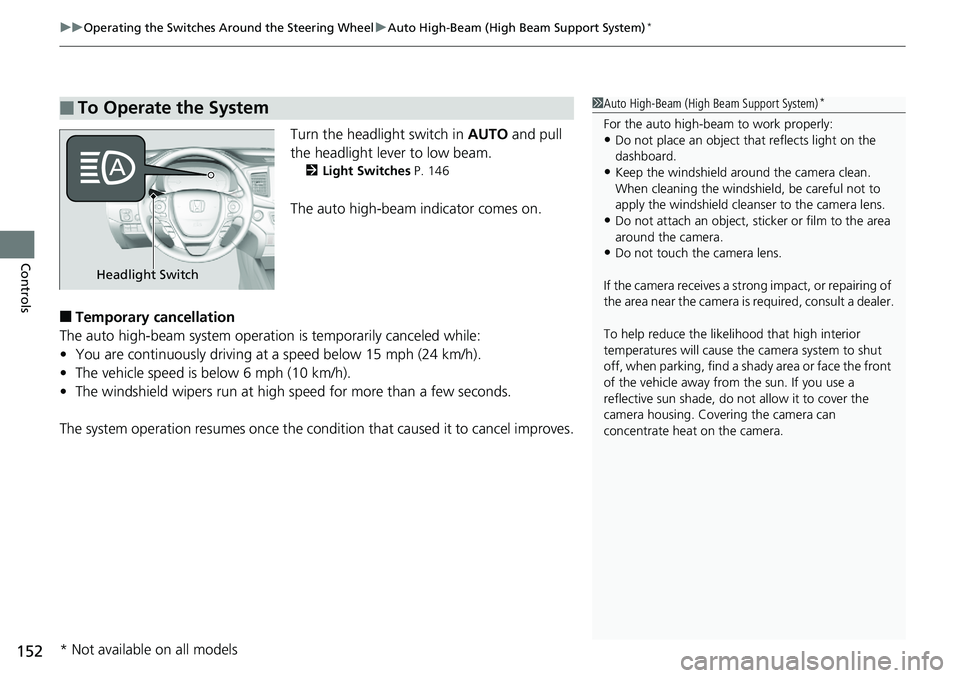
Turn the headlight switch in AUTO and pull
the headlight lever to low beam.
2 Light Switches P. 146
The auto high-beam indicator comes on.
■Temporary cancellation
The auto high-beam system operatio n is temporarily canceled while:
• You are continuously driving at a speed below 15 mph (24 km/h).
• The vehicle speed is below 6 mph (10 km/h).
• The windshield wipers run at high speed for more than a few seconds.
The system operation resumes once the condit ion that caused it to cancel improves.
■To Operate the System1Auto High-Beam (High Beam Support System)*
For the auto high-beam to work properly:•Do not place an object that reflects light on the
dashboard.
•Keep the windshield around the camera clean.
When cleaning the windshield, be careful not to
apply the windshield cleanser to the camera lens.
•Do not attach an object, sticker or film to the area
around the camera.
•Do not touch the camera lens.
If the camera receives a st rong impact, or repairing of
the area near the camera is required, consult a dealer.
To help reduce the likel ihood that high interior
temperatures will cause the camera system to shut
off, when parking, find a sh ady area or face the front
of the vehicle away from the sun. If you use a
reflective sun shade, do not allow it to cover the
camera housing. Covering the camera can
concentrate heat on the camera.
Headlight Switch
* Not available on all models
Page 163 of 623
161
Controls
Adjusting the Mirrors
Interior Rearview Mirror
Adjust the angle of the rearview mirror when you are sitting in the correct driving
position.
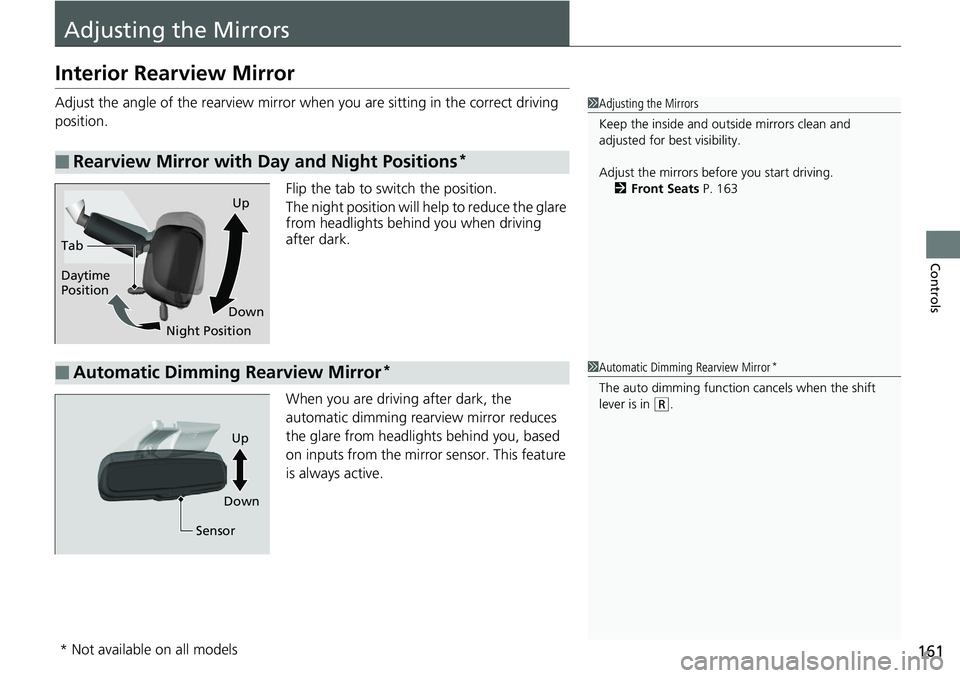
Flip the tab to switch the position.
The night position will help to reduce the glare
from headlights behind you when driving
after dark.
When you are driving after dark, the
automatic dimming rear view mirror reduces
the glare from headlights behind you, based
on inputs from the mirror sensor. This feature
is always active.
■Rearview Mirror with Day and Night Positions*
1 Adjusting the Mirrors
Keep the inside and out side mirrors clean and
adjusted for best visibility.
Adjust the mirrors befo re you start driving.
2 Front Seats P. 163
Tab
Daytime
Position
Night PositionUp
Down
■Automatic Dimming Rearview Mirror*1 Automatic Dimming Rearview Mirror*
The auto dimming function cancels when the shift
lever is in
(R.
Sensor
Up
Down
* Not available on all models
Page 169 of 623
167
uuAdjusting the Seats uMaintain a Proper Sitting Position
Controls
Maintain a Proper Sitting Position
After all occupants have adjusted their s eats and head restraints, and put on their
seat belts, it is very important that they continue to sit upright, well back in their
seats, with their feet on the floor, until the vehicle is safe ly parked and the engine is
off.
Sitting improperly can increase the chance of injury during a crash. For example, if
an occupant slouches, lies down, turns sideways, sits forward, leans forward or
sideways, or puts one or both feet up, the chance of injury during a crash is greatly
increased.
In addition, an occupant who is out of posi tion in the front seat can be seriously or
fatally injured in a crash by striking interior parts of the vehicle or being struck by an
inflating front airbag.1 Maintain a Proper Sitting Position
3WARNING
Sitting improperly or out of position can
result in serious injury or death in a crash.
Always sit upright, well back in the seat,
with your feet on the floor.
Page 173 of 623
171Continued
Controls
Interior Lights/Convenience Items
Interior Lights
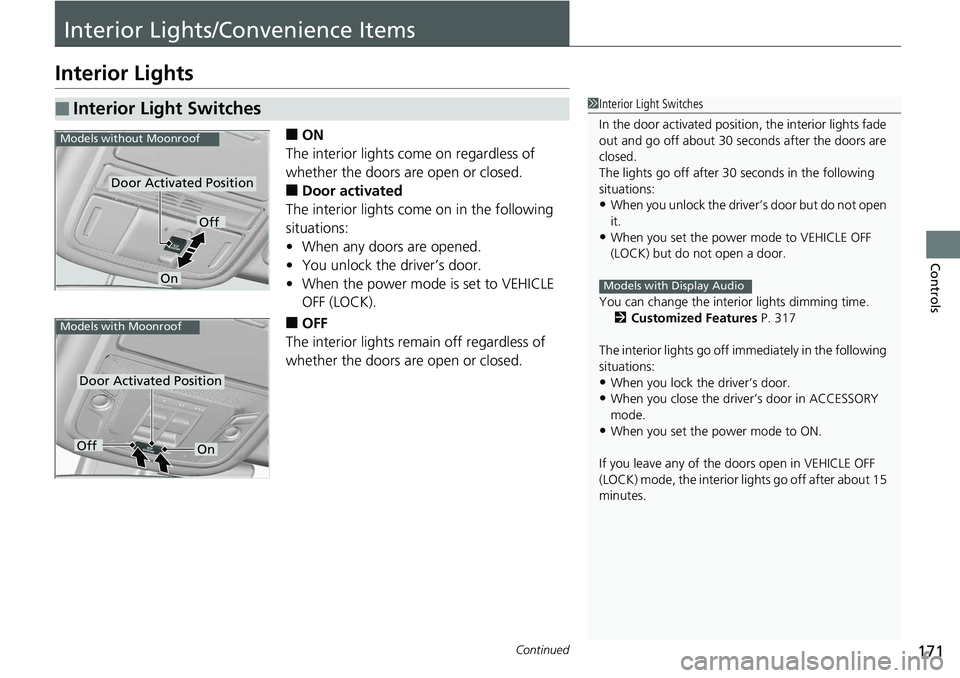
■ON
The interior lights come on regardless of
whether the doors are open or closed.
■Door activated
The interior lights come on in the following
situations:
• When any doors are opened.
• You unlock the driver’s door.
• When the power mode is set to VEHICLE
OFF (LOCK).
■OFF
The interior lights remain off regardless of
whether the doors are open or closed.
■Interior Light Switches1 Interior Light Switches
In the door activated position, the interior lights fade
out and go off about 30 se conds after the doors are
closed.
The lights go off after 30 seconds in the following
situations:
•When you unlock the driver’s door but do not open
it.
•When you set the power mode to VEHICLE OFF
(LOCK) but do not open a door.
You can change the interi or lights dimming time.
2 Customized Features P. 317
The interior lights go off i mmediately in the following
situations:
•When you lock the driver’s door.•When you close the driver’s door in ACCESSORY
mode.
•When you set the power mode to ON.
If you leave any of the doors open in VEHICLE OFF
(LOCK) mode, the interior lights go off after about 15
minutes.
Models with Display Audio
Door Activated Position
Off
On
Models without Moonroof
Door Activated Position
Models with Moonroof
OffOn