mirror HONDA RIDGELINE 2018 Owner's Manual (in English)
[x] Cancel search | Manufacturer: HONDA, Model Year: 2018, Model line: RIDGELINE, Model: HONDA RIDGELINE 2018Pages: 623, PDF Size: 25.85 MB
Page 4 of 623
Contents
This owner’s manual should be considered a permanent part of the
vehicle and should remain with the vehicle when it is sold.
This owner’s manual covers all models of your vehicle. You may find
descriptions of equipment and features that are not on your
particular model.
Images throughout this owner’s manual (including the front cover)
represent features and equipment that are available on some, but
not all, models. Your particular mo del may not have some of these
features.
This owner’s manual is for vehicles sold in the United States and
Canada.
The information and specifications in cluded in this publication were
in effect at the time of approval for printing. Honda Motor Co., Ltd.
reserves the right, however, to discontinue or change specifications
or design at any time without notice and without incurring any
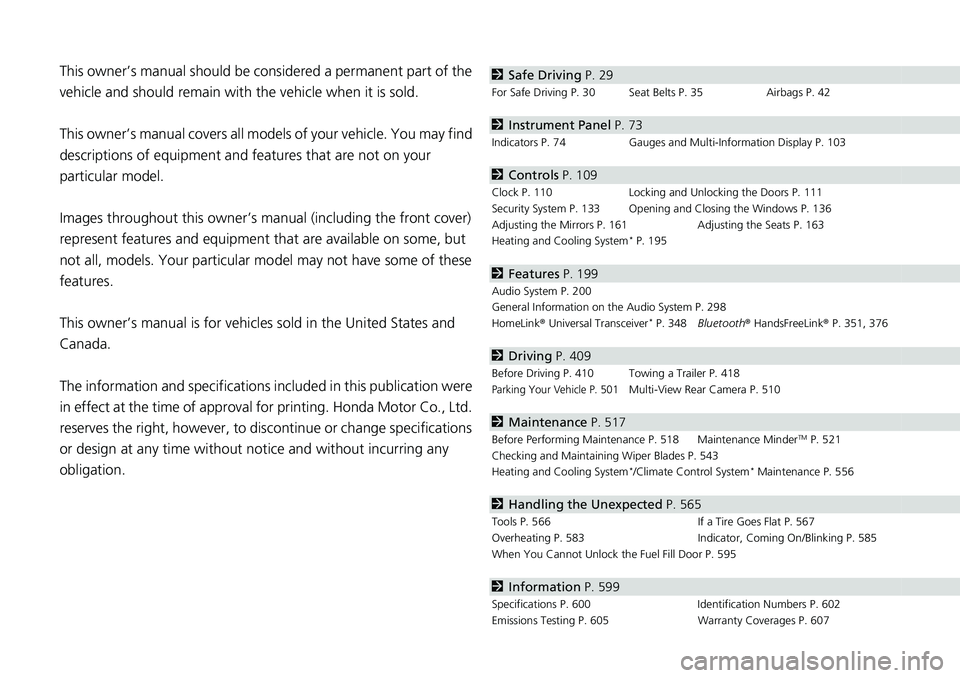
obligation.2 Safe Driving P. 29
For Safe Driving P. 30 Seat Belts P. 35 Airbags P. 42
2Instrument Panel P. 73
Indicators P. 74 Gauges and Multi-Information Display P. 103
2Controls P. 109
Clock P. 110 Locking and Unlocking the Doors P. 111
Security System P. 133 Opening and Closing the Windows P. 136
Adjusting the Mirrors P. 161 Adjusting the Seats P. 163
Heating and Cooling System
* P. 195
2 Features P. 199
Audio System P. 200
General Information on the Audio System P. 298
HomeLink ® Universal Transceiver
* P. 348 Bluetooth ® HandsFreeLink ® P. 351, 376
2 Driving P. 409
Before Driving P. 410 Towing a Trailer P. 418
Parking Your Vehicle P. 501Multi-View Rear Camera P. 510
2Maintenance P. 517
Before Performing Maintenance P. 518 Maintenance MinderTM P. 521
Checking and Maintaining Wiper Blades P. 543
Heating and Cooling System
*/Climate Control System* Maintenance P. 556
2 Handling the Unexpected P. 565
Tools P. 566 If a Tire Goes Flat P. 567
Overheating P. 583 Indicator, Coming On/Blinking P. 585
When You Cannot Unlock the Fuel Fill Door P. 595
2 Information P. 599
Specifications P. 600 Identification Numbers P. 602
Emissions Testing P. 605 Warranty Coverages P. 607
Page 6 of 623
4
Quick Reference Guide
Quick Reference Guide
Visual Index
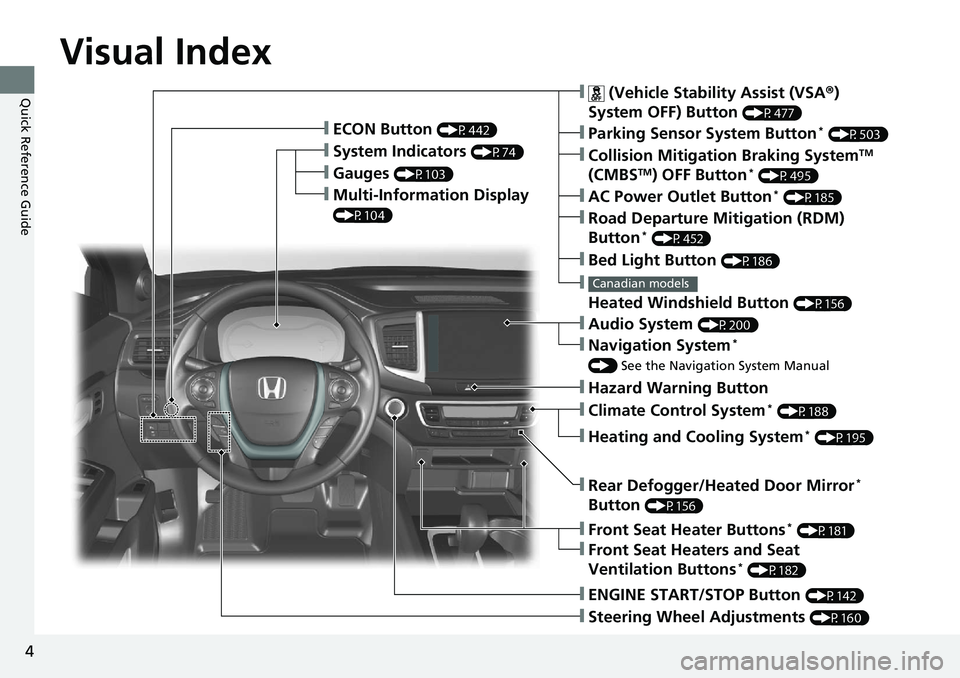
❙Gauges (P103)
❙Multi-Information Display
(P104)
❙System Indicators (P74)
❙ECON Button (P442)
❙Collision Mitigation Braking SystemTM
(CMBSTM) OFF Button* (P495)
❙
Heated Windshield Button (P156)
Canadian models
❙Parking Sensor System Button* (P503)
❙Steering Wheel Adjustments (P160)
❙ENGINE START/STOP Button (P142)
❙AC Power Outlet Button* (P185)
❙Road Departure Mitigation (RDM)
Button* (P452)
❙ (Vehicle Stability Assist (VSA ®)
System OFF) Button
(P477)
❙Bed Light Button (P186)
❙Audio System (P200)
❙Navigation System*
() See the Navigation System Manual
❙Front Seat Heater Buttons* (P181)
❙Front Seat Heaters and Seat
Ventilation Buttons* (P182)
❙Rear Defogger/Heated Door Mirror*
Button
(P156)
❙Heating and Cooling System* (P195)
❙Climate Control System* (P188)
❙Hazard Warning Button
Page 8 of 623
Visual Index
6
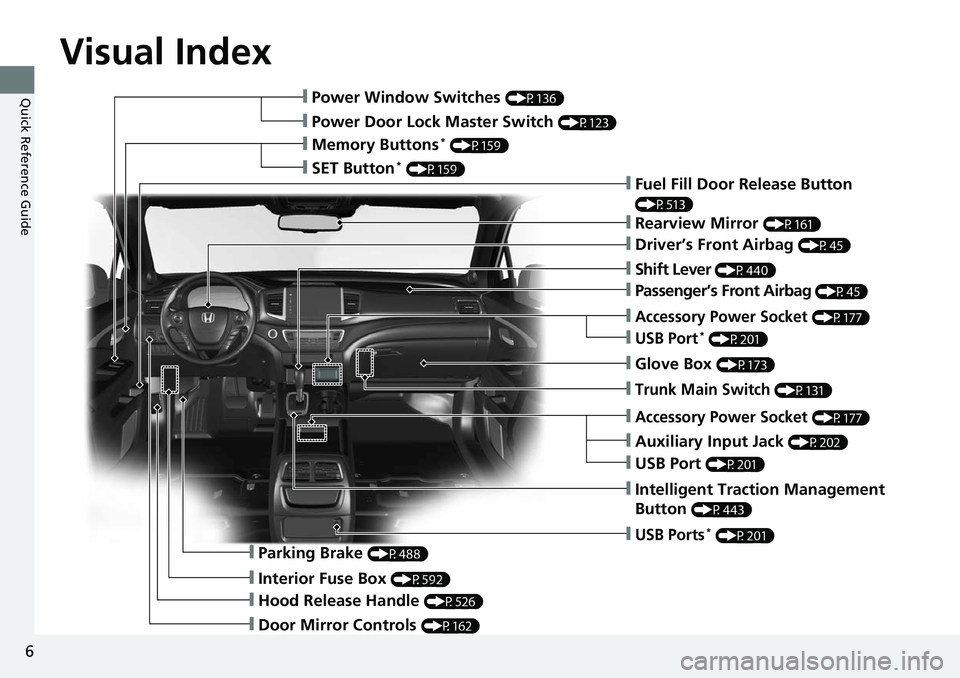
Quick Reference Guide❙Power Window Switches (P136)
❙Power Door Lock Master Switch (P123)
❙Memory Buttons* (P159)
❙SET Button* (P159)❙Fuel Fill Door Release Button
(P513)
❙Rearview Mirror (P161)
❙Driver’s Front Airbag (P45)
❙Shift Lever (P440)
❙Glove Box (P173)
❙Auxiliary Input Jack (P202)
❙Intelligent Traction Management
Button
(P443)
❙Parking Brake (P488)
❙Interior Fuse Box (P592)
❙Hood Release Handle (P526)
❙Door Mirror Controls (P162)
❙USB Ports* (P201)
❙Accessory Power Socket (P177)
❙USB Port (P201)
❙Trunk Main Switch (P131)
❙Accessory Power Socket (P177)
❙USB Port* (P201)
❙Passenger’s Front Airbag (P45)
Page 9 of 623
7
Quick Reference Guide
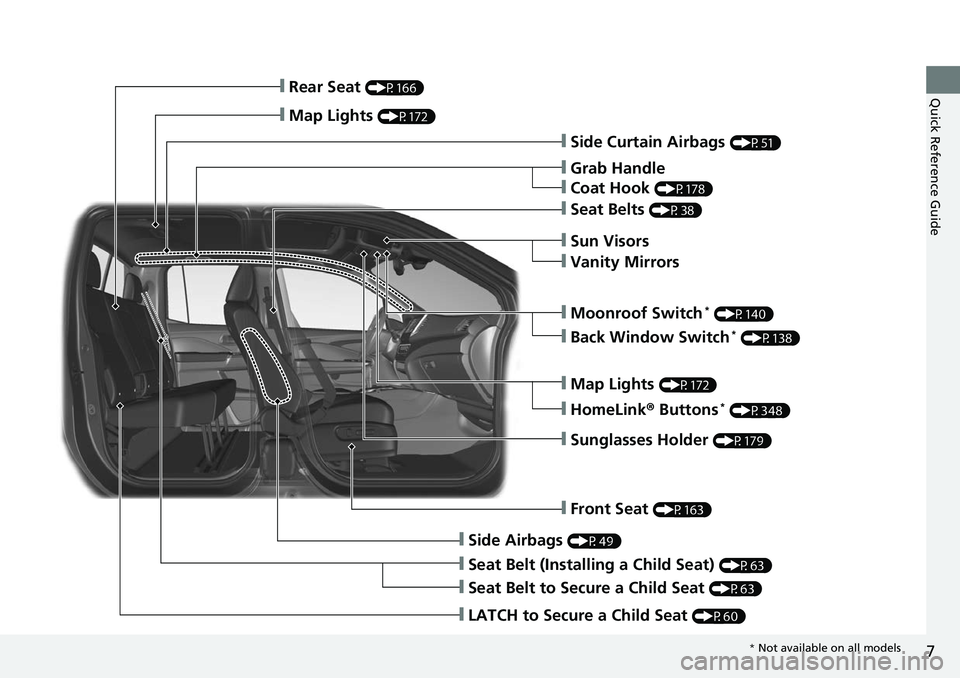
❙Side Curtain Airbags (P51)
❙Grab Handle
❙Coat Hook (P178)
❙Seat Belts (P38)
❙Sun Visors
❙Vanity Mirrors
❙Moonroof Switch* (P140)
❙Map Lights (P172)
❙HomeLink® Buttons* (P348)
❙Sunglasses Holder (P179)
❙Front Seat (P163)
❙Side Airbags (P49)
❙Seat Belt (Installing a Child Seat) (P63)
❙Seat Belt to Secure a Child Seat (P63)
❙LATCH to Secure a Child Seat (P60)
❙Rear Seat (P166)
❙Map Lights (P172)
❙Back Window Switch* (P138)
* Not available on all models
Page 10 of 623
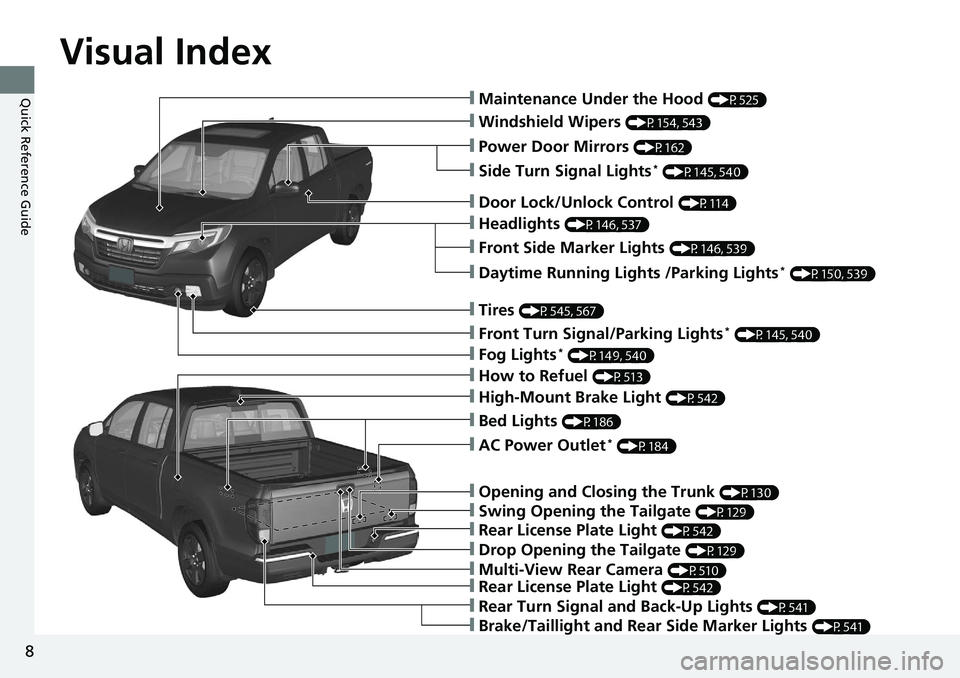
Visual Index
8
Quick Reference Guide❙Maintenance Under the Hood (P525)
❙Windshield Wipers (P154, 543)
❙Power Door Mirrors (P162)
❙Headlights (P146, 537)
❙Front Side Marker Lights (P146, 539)
❙Fog Lights* (P149, 540)
❙Side Turn Signal Lights* (P145, 540)
❙Daytime Running Lights /Parking Lights* (P150, 539)
❙How to Refuel (P513)
❙Rear Turn Signal and Back-Up Lights (P541)
❙Door Lock/Unlock Control (P114)
❙Tires (P545, 567)
❙Front Turn Signal/Parking Lights* (P145, 540)
❙Brake/Taillight and Rear Side Marker Lights (P541)
❙Rear License Plate Light (P542)
❙Multi-View Rear Camera (P510)
❙Drop Opening the Tailgate (P129)
❙Rear License Plate Light (P542)
❙Swing Opening the Tailgate (P129)
❙Opening and Closing the Trunk (P130)
❙AC Power Outlet* (P184)
❙High-Mount Brake Light (P542)
❙Bed Lights (P186)
Page 12 of 623
10
Quick Reference Guide
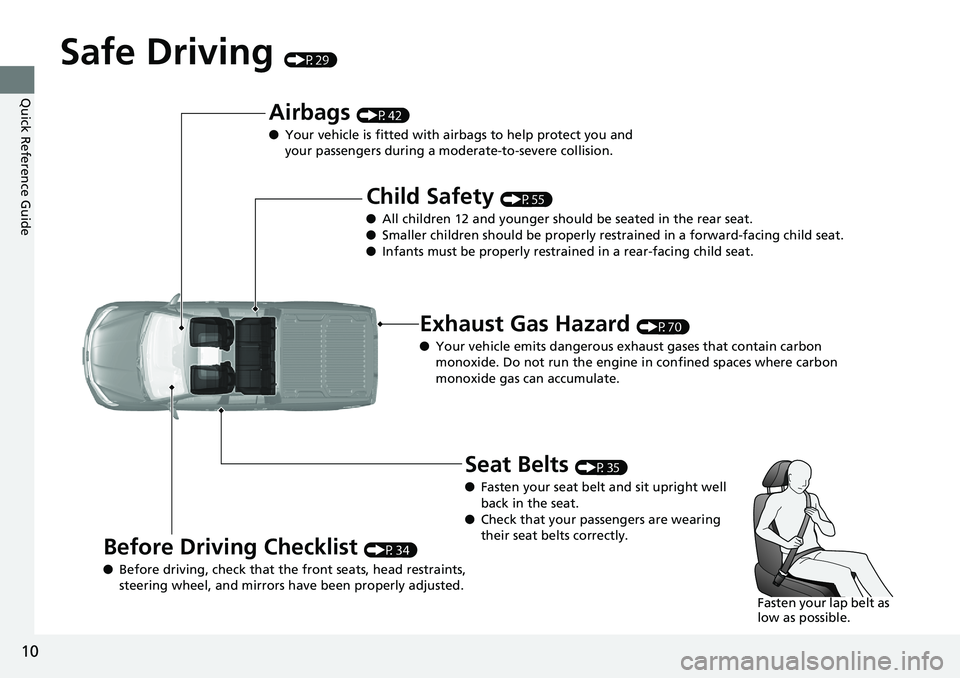
Safe Driving (P29)
Airbags (P42)
● Your vehicle is fitted with airbags to help protect you and
your passengers during a moderate-to-severe collision.
Child Safety (P55)
● All children 12 and younger should be seated in the rear seat.
● Smaller children should be properly restra ined in a forward-facing child seat.
● Infants must be properly restraine d in a rear-facing child seat.
Exhaust Gas Hazard (P70)
● Your vehicle emits dangerous exhaust gases that contain carbon
monoxide. Do not run the engine in confined spaces where carbon
monoxide gas can accumulate.
Before Driving Checklist (P34)
● Before driving, check that the front seats, head restraints,
steering wheel, and mirrors have been properly adjusted.
Seat Belts (P35)
● Fasten your seat belt and sit upright well
back in the seat.
● Check that your passengers are wearing
their seat belts correctly.
Fasten your lap belt as
low as possible.
Page 16 of 623
14
Quick Reference Guide
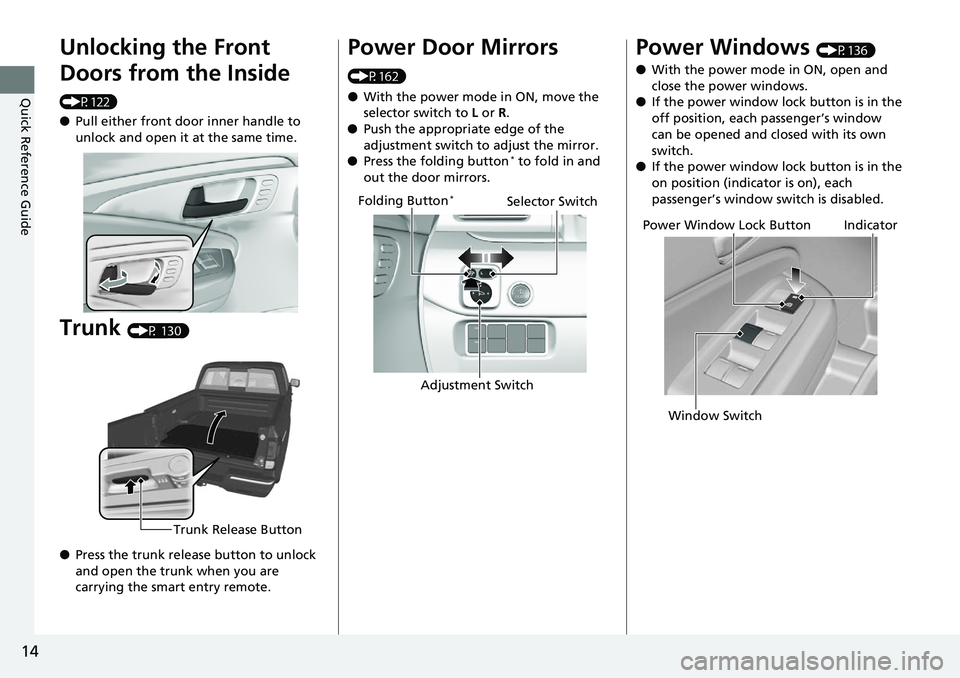
Unlocking the Front
Doors from the Inside
(P122)
●Pull either front door inner handle to
unlock and open it at the same time.
Trunk (P 130)
● Press the trunk release button to unlock
and open the trunk when you are
carrying the smart entry remote.
Trunk Release Button
Power Door Mirrors
(P162)
● With the power mode in ON, move the
selector switch to L or R.
● Push the appropriate edge of the
adjustment switch to adjust the mirror.
● Press the folding button
* to fold in and
out the door mirrors.
Selector Switch
Adjustment Switch
Folding Button*
Power Windows (P136)
● With the power mode in ON, open and
close the power windows.
● If the power window lock button is in the
off position, each passenger’s window
can be opened and closed with its own
switch.
● If the power window lock button is in the
on position (indicator is on), each
passenger’s window switch is disabled.
Power Window Lock Button
Window SwitchIndicator
Page 24 of 623
22
Quick Reference Guide
Honda SensingTM *
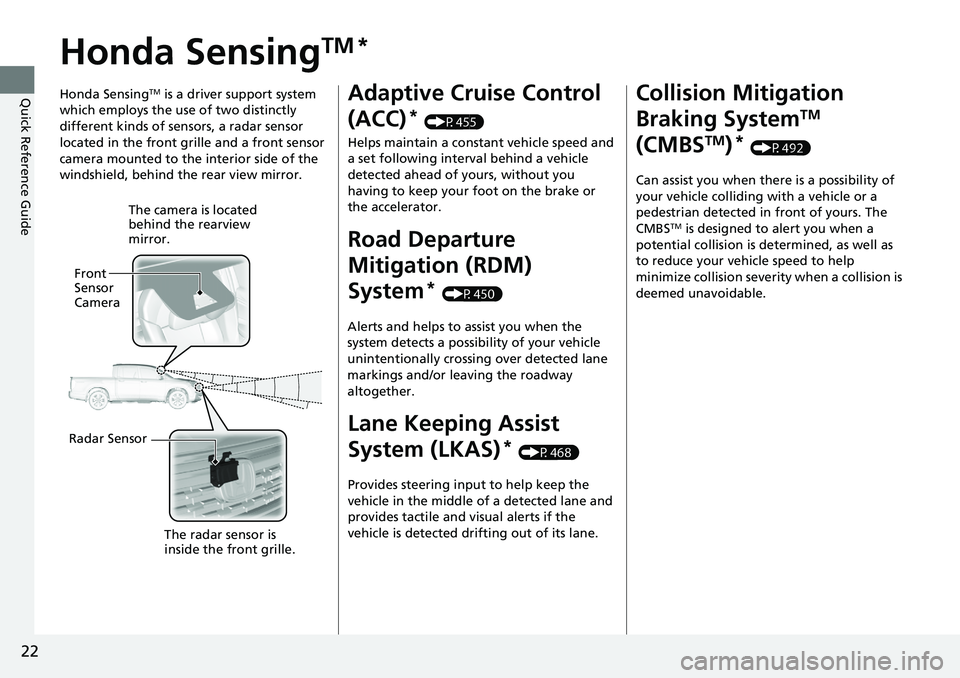
Honda SensingTM is a driver support system
which employs the use of two distinctly
different kinds of sensors, a radar sensor
located in the front grille and a front sensor
camera mounted to the interior side of the
windshield, behind the rear view mirror.
The camera is located
behind the rearview
mirror.
Front
Sensor
Camera
Radar Sensor The radar sensor is
inside the front grille.
Adaptive Cruise Control
(ACC)
* (P455)
Helps maintain a constant vehicle speed and
a set following interval behind a vehicle
detected ahead of yours, without you
having to keep your foot on the brake or
the accelerator.
Road Departure
Mitigation (RDM)
System
* (P450)
Alerts and helps to assist you when the
system detects a possibility of your vehicle
unintentionally crossing over detected lane
markings and/or leaving the roadway
altogether.
Lane Keeping Assist
System (LKAS)
* (P468)
Provides steering input to help keep the
vehicle in the middle of a detected lane and
provides tactile and visual alerts if the
vehicle is detected drifting out of its lane.
Collision Mitigation
Braking System
TM
(CMBS
TM)* (P492)
Can assist you when there is a possibility of
your vehicle colliding with a vehicle or a
pedestrian detected in front of yours. The
CMBS
TM is designed to alert you when a
potential collision is determined, as well as
to reduce your vehicle speed to help
minimize collision severity when a collision is
deemed unavoidable.
Page 111 of 623
109
Controls
This chapter explains how to operate the various controls necessary for driving.
Clock.................................................. 110
Locking and Unlocking the Doors Key Types and Functions .................. 111
Low Smart Entry Remote Signal Strength... 113
Locking/Unlocking the Doors from the Outside .......................................... 114
Locking/Unlocking the Doors from the
Inside ............................................. 121
Childproof Door Locks ..................... 123
Auto Door Locking/Unlocking .......... 124
Opening and Closing the Tailgate ... 128
Opening and Closing the Trunk ....... 130
Security System
Immobilizer System .......................... 133
Security System Alarm ...................... 133
Opening and Closing the Windows .... 136
Opening and Closing the Moonroof*... 140Operating the Switches Around the Steering Wheel ENGINE START/STOP Button............. 142
Turn Signals ..................................... 145
Light Switches.................................. 146
Fog Lights
*...................................... 149
Daytime Running Lights ................... 150
Auto High-Beam (H igh Beam Support
System)
*........................................ 151
Wipers and Washers ........................ 154
Rear Defogger/Heat ed Door Mirror
*
Button ........................................... 156 Heated Windshield Button ............... 156
Brightness Control ........................... 157
Driving Position Memory System
*.... 158
Adjusting the Steering Wheel .......... 160
Adjusting the Mirrors Interior Rearview Mirror ................... 161
Power Door Mirrors ......................... 162
Adjusting the Seats .......................... 163
Interior Lights/Convenience Items
Interior Lights .................................. 171
Interior Convenience Items .............. 173
In-Bed Convenience Items................ 184
Climate Control System
*.................. 188
Heating and Cooling System*......... 195
Canadian models
* Not available on all models
Page 158 of 623
156
uuOperating the Switches Around the Steering Wheel uRear Defogger/Heated Door Mirror* Button
Controls
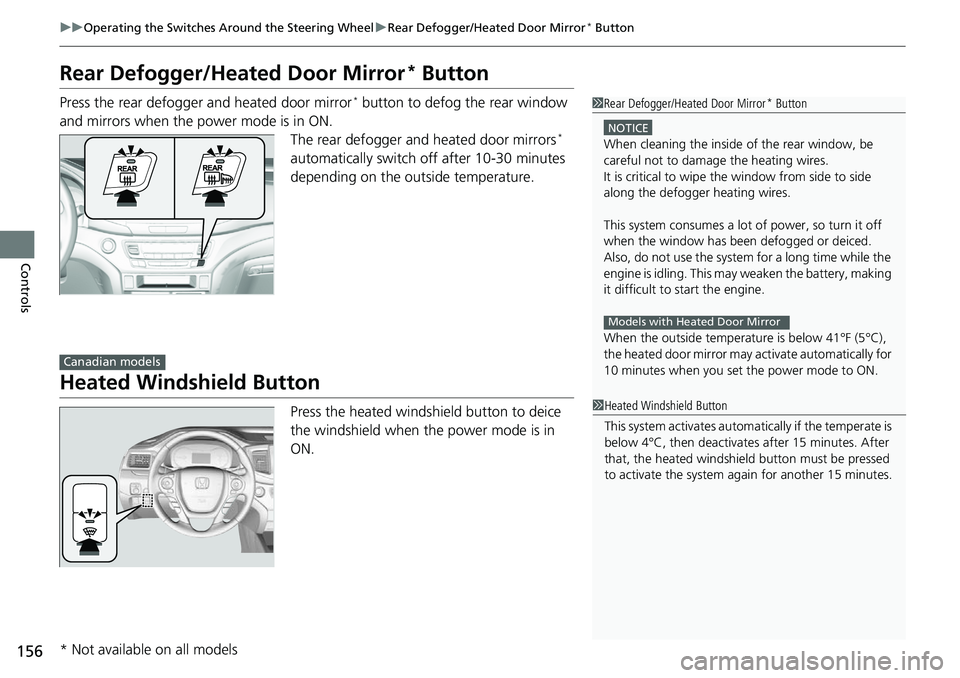
Rear Defogger/Heated Door Mirror* Button
Press the rear defogger and heated door mirror* button to defog the rear window
and mirrors when the power mode is in ON. The rear defogger and heated door mirrors
*
automatically switch off after 10-30 minutes
depending on the outside temperature.
Heated Windshield Button
Press the heated windshield button to deice
the windshield when the power mode is in
ON.
1 Rear Defogger/Heated Door Mirror* Button
NOTICE
When cleaning the inside of the rear window, be
careful not to damage the heating wires.
It is critical to wipe the window from side to side
along the defogger heating wires.
This system consumes a lot of power, so turn it off
when the window has been defogged or deiced.
Also, do not use the system for a long time while the
engine is idling. This may weaken the battery, making
it difficult to start the engine.
When the outside temperature is below 41