clock reset HONDA RIDGELINE 2019 Owner's Manual (in English)
[x] Cancel search | Manufacturer: HONDA, Model Year: 2019, Model line: RIDGELINE, Model: HONDA RIDGELINE 2019Pages: 624, PDF Size: 34.98 MB
Page 19 of 624
17
Quick Reference Guide
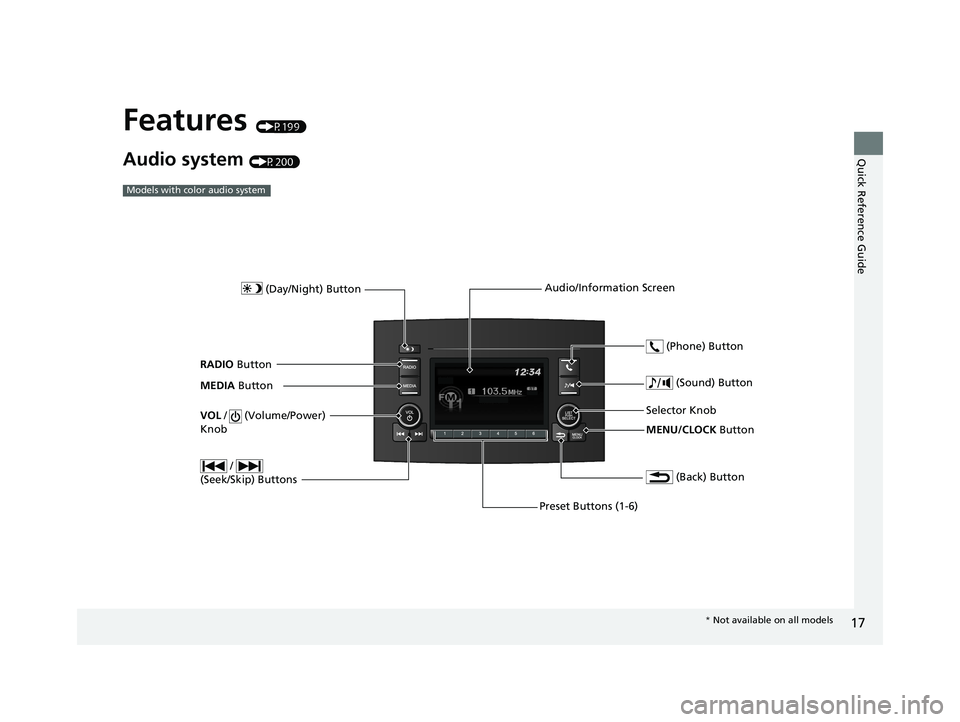
Features (P199)
Audio system (P200)
Models with color audio system
MENU/CLOCK Button
Selector Knob
(Day/Night) Button
(Back) Button
(Sound) Button
VOL
/ (Volume/Power)
Knob
Preset Buttons (1-6) (Phone) Button
RADIO
Button
/
(Seek/Skip) Buttons
MEDIA Button Audio/Information Screen
*
Not available on all models
Page 216 of 624
214
uuAudio System Basic Operation uPlaying AM/FM Radio
Features
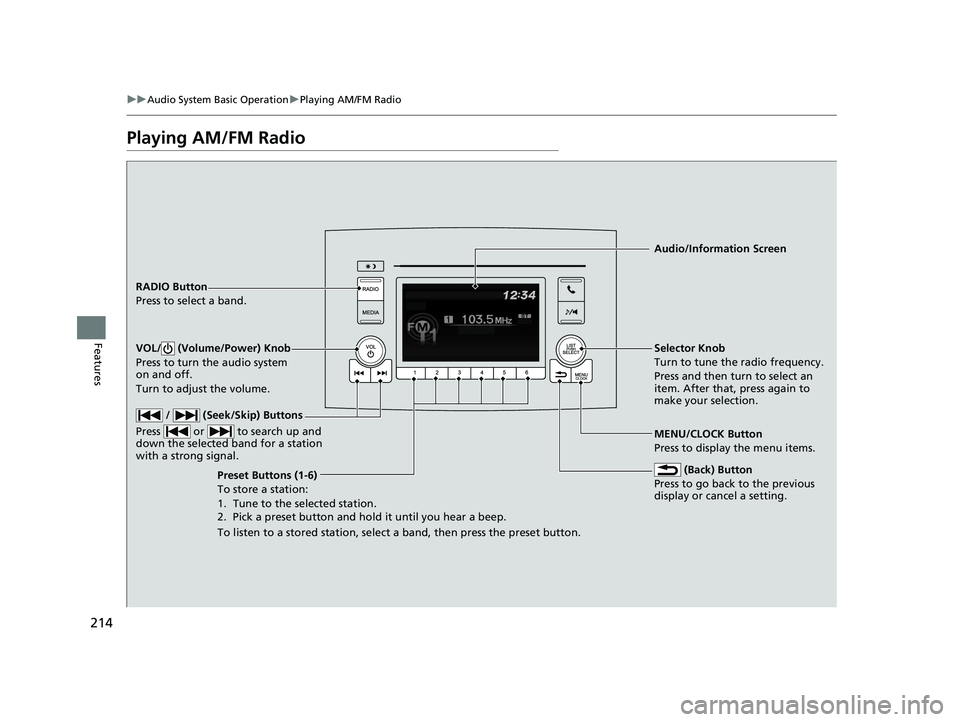
Playing AM/FM Radio
RADIO Button
Press to select a band.
(Back) Button
Press to go back to the previous
display or cancel a setting.
/ (Seek/Skip) Buttons
Press or to search up and
down the selected band for a station
with a strong signal.
VOL/ (Volume/Power) Knob
Press to turn the audio system
on and off.
Turn to adjust the volume.
Preset Buttons (1-6)
To store a station:
1. Tune to the selected station.
2. Pick a preset button and hold it until you hear a beep.
To listen to a stored station, select a band, then press the preset button. Selector Knob
Turn to tune the radio frequency.
Press and then turn to select an
item. After that, press again to
make your selection.
MENU/CLOCK Button
Press to display the menu items. Audio/Information Screen
Page 217 of 624
215
uuAudio System Basic Operation uPlaying AM/FM Radio
Features
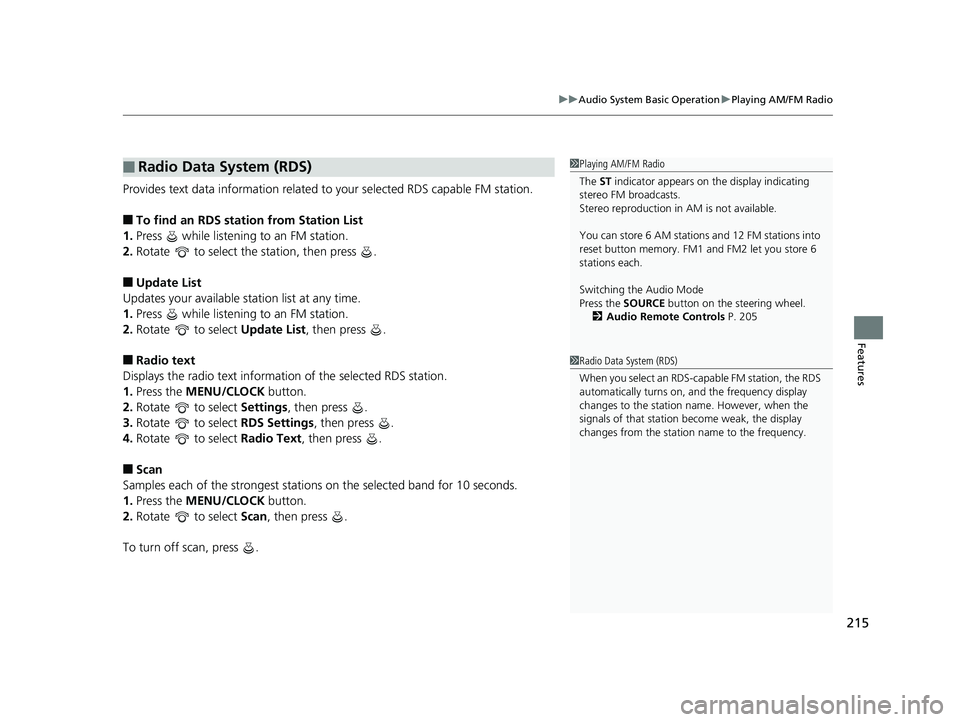
Provides text data information related to your selected RDS capable FM station.
■To find an RDS station from Station List
1. Press while listening to an FM station.
2. Rotate to select the station, then press .
■Update List
Updates your available st ation list at any time.
1. Press while listening to an FM station.
2. Rotate to select Update List, then press .
■Radio text
Displays the radio text informat ion of the selected RDS station.
1. Press the MENU/CLOCK button.
2. Rotate to select Settings, then press .
3. Rotate to select RDS Settings, then press .
4. Rotate to select Radio Text, then press .
■Scan
Samples each of the strongest stations on the selected band for 10 seconds.
1. Press the MENU/CLOCK button.
2. Rotate to select Scan, then press .
To turn off scan, press .
■Radio Data System (RDS)1 Playing AM/FM Radio
The ST indicator appears on the display indicating
stereo FM broadcasts.
Stereo reproduction in AM is not available.
You can store 6 AM stations and 12 FM stations into
reset button memory. FM1 and FM2 let you store 6
stations each.
Switching the Audio Mode
Press the SOURCE button on the steering wheel.
2 Audio Remote Controls P. 205
1Radio Data System (RDS)
When you select an RDS-capable FM station, the RDS
automatically turns on, and the frequency display
changes to the station name. However, when the
signals of that station become weak, the display
changes from the statio n name to the frequency.
Page 224 of 624
222
uuAudio System Basic Operation uPlaying Bluetooth ® Audio
Features
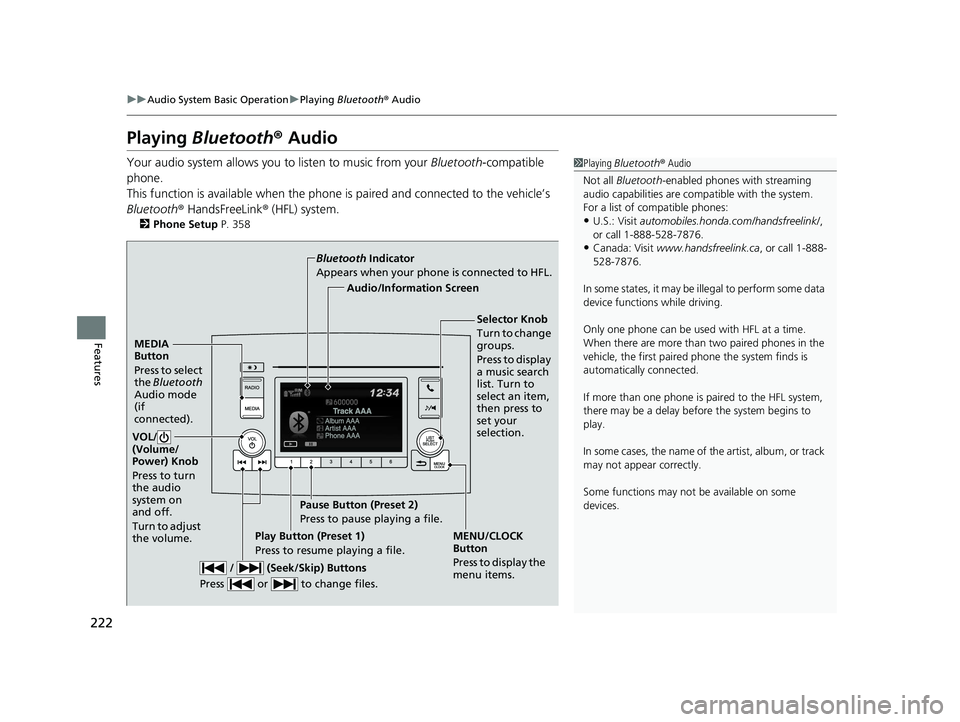
Playing Bluetooth ® Audio
Your audio system allows you to listen to music from your Bluetooth-compatible
phone.
This function is available when the phone is paired and connected to the vehicle’s
Bluetooth ® HandsFreeLink ® (HFL) system.
2 Phone Setup P. 358
1Playing Bluetooth ® Audio
Not all Bluetooth -enabled phones with streaming
audio capabilities are compatible with the system.
For a list of compatible phones:
•U.S.: Visit automobiles.honda.com /handsfreelink/,
or call 1-888-528-7876.
•Canada: Visit www.handsfreelink.ca , or call 1-888-
528-7876.
In some states, it may be il legal to perform some data
device functions while driving.
Only one phone can be used with HFL at a time.
When there are more than two paired phones in the
vehicle, the first paired phone the system finds is
automatically connected.
If more than one phone is paired to the HFL system,
there may be a delay before the system begins to
play.
In some cases, the name of the artist, album, or track
may not appear correctly.
Some functions may not be available on some
devices.
MEDIA
Button
Press to select
the Bluetooth
Audio mode
(if
connected).
VOL/
(Volume/
Power) Knob
Press to turn
the audio
system on
and off.
Turn to adjust
the volume.
MENU/CLOCK
Button
Press to display the
menu items.
Audio/Information Screen
Bluetooth
Indicator
Appears when your phone is connected to HFL.
/ (Seek/Skip) Buttons
Press or to change files.Play Button (Preset 1)
Press to resume playing a file. Pause Button (Preset 2)
Press to pause playing a file.
Selector Knob
Turn to change
groups.
Press to display
a music search
list. Turn to
select an item,
then press to
set your
selection.
Page 230 of 624

228
uuAudio System Basic Operation uAudio/Information Screen
Features
■Info
Displays Trip Computer or Clock/Wallpaper . To see all available information, Trip
Computer , Voice Info , Clock/Wallpaper , or System/Device Information , select
on the Info Menu screen.
Trip Computer :
• Current Drive tab: Displays the current trip information.
• History of Trip A tab: Displays information for the three previous drives. The
information is stored every time you reset Trip A.
To delete the history manually, select Delete History on the History of Trip A
tab. The confirmation message app ears on the screen, then select Yes.
Voice Info : Displays the all commands list.
Clock/Wallpaper : Displays the clock and wallpaper.
System/Device Information :
• System Info: Displays the software version of the audio system.
• USB Info : Displays the memory usage of the USB device.
■Audio
Displays the current audio information.
■Settings
Enters the customiz ing menu screen.
2Customized Features P. 324
■Navigation*
Displays the navigation screen.
2Refer to the Navigation System Manual
* Not available on all models
Page 328 of 624
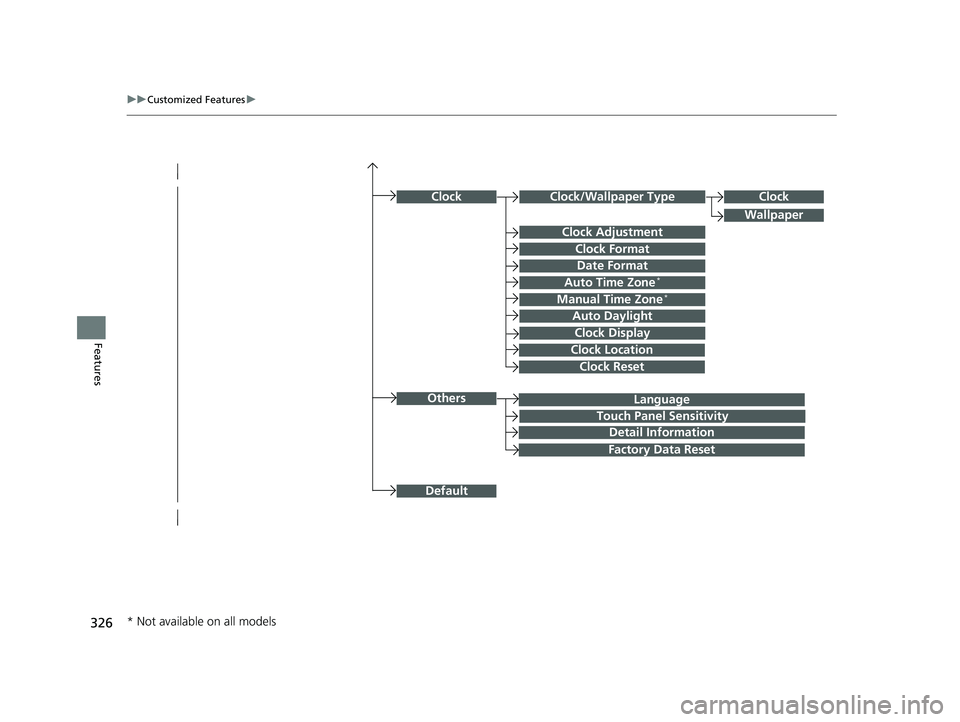
326
uuCustomized Features u
Features
Language
Default
Others
Clock/Wallpaper Type
Date Format
Clock Adjustment
ClockClock
Wallpaper
Manual Time Zone*
Auto Daylight
Clock Display
Touch Panel Sensitivity
Clock Format
Auto Time Zone*
Detail Information
Factory Data Reset
Clock Reset
Clock Location
* Not available on all models
Page 332 of 624
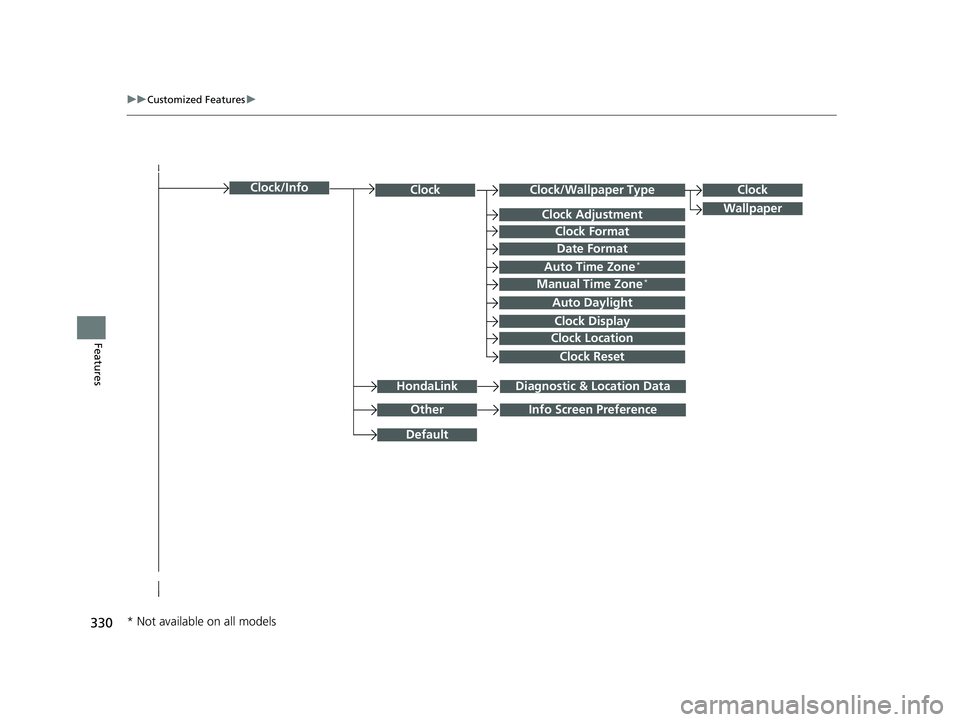
330
uuCustomized Features u
Features
Clock/Wallpaper TypeClockClock
WallpaperClock Adjustment
Clock Format
Date Format
Auto Time Zone*
Manual Time Zone*
Auto Daylight
Clock Display
Clock Location
Clock Reset
OtherInfo Screen Preference
Default
Clock/Info
HondaLinkDiagnostic & Location Data
* Not available on all models
Page 338 of 624
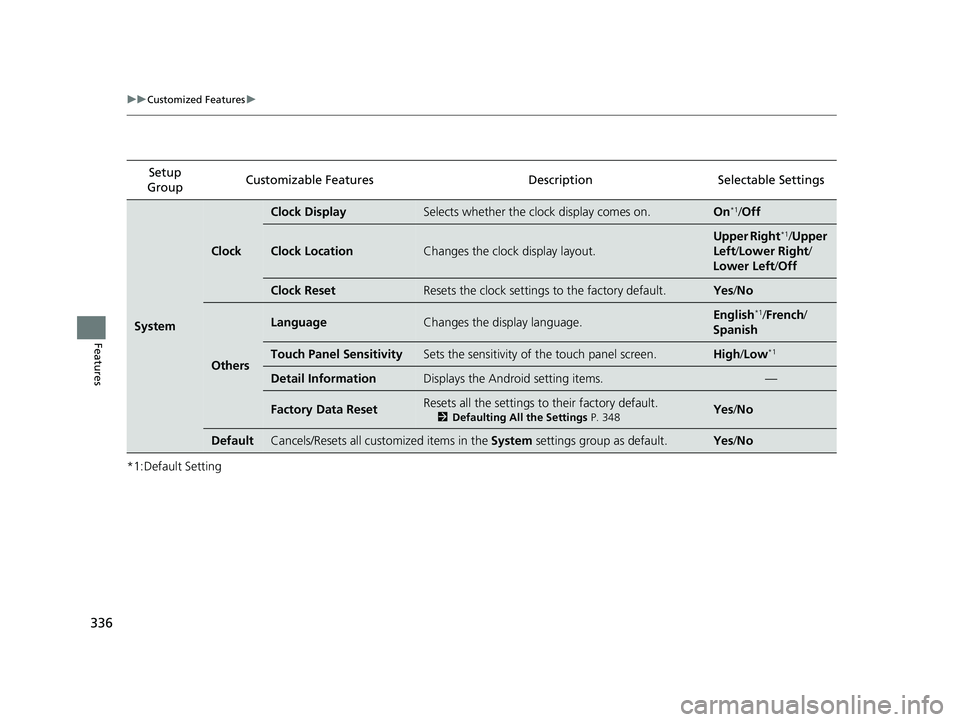
336
uuCustomized Features u
Features
*1:Default SettingSetup
Group Customizable Features Desc
ription Selectable Settings
System
Clock
Clock DisplaySelects whether the clock display comes on.On*1/Off
Clock LocationChanges the clock display layout.
Upper Right*1/Upper
Left /Lower Right /
Lower Left /Off
Clock ResetResets the clock settings to the factory default.Yes /No
Others
LanguageChanges the display language.English*1/French /
Spanish
Touch Panel SensitivitySets the sensitivity of the touch panel screen.High /Low*1
Detail InformationDisplays the Android setting items.—
Factory Data ResetResets all the settings to their factory default.
2 Defaulting All the Settings P. 348Yes/No
DefaultCancels/Resets all customized items in the System settings group as default.Yes/No
Page 346 of 624
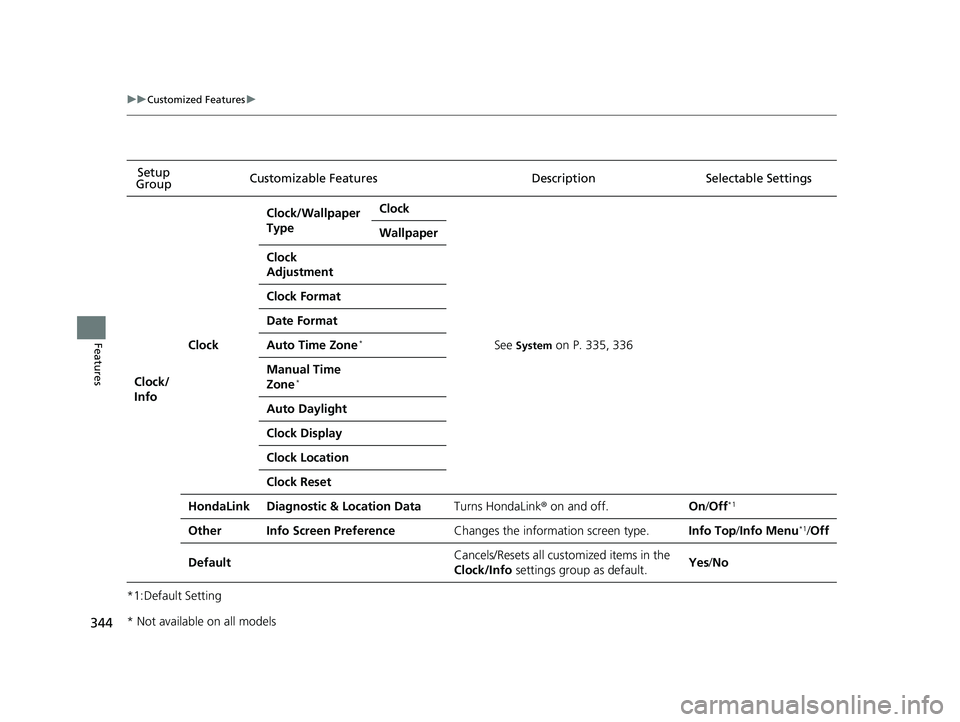
344
uuCustomized Features u
Features
*1:Default SettingSetup
Group Customizable Features Descri
ption Selectable Settings
Clock/
Info
Clock
Clock/Wallpaper
TypeClock
See System on P. 335, 336
Wallpaper
Clock
Adjustment
Clock Format
Date Format
Auto Time Zone*
Manual Time
Zone*
Auto Daylight
Clock Display
Clock Location
Clock Reset
HondaLinkDiagnostic & Location DataTurns HondaLink® on and off.On/Off*1
OtherInfo Screen PreferenceChanges the information screen type.Info Top /Info Menu*1/Off
DefaultCancels/Resets all cust omized items in the
Clock/Info settings group as default.Yes/No
* Not available on all models
Page 558 of 624
556
Maintenance
Battery
Checking the Battery
The condition of the battery is monitored by a sensor located on the negative
terminal of the battery. If there is a prob lem with this sensor, the multi-information
display will display a warning message. If this happens, have you vehicle inspected
by a dealer.
Check the battery terminal s for corrosion monthly.
If your vehicle’s battery is disconnected or goes dead:
• The audio system is disabled.
2 Audio System Theft Protection P. 204
•The clock resets.
2 Clock P. 110
Charging the Battery
Disconnect both battery cables to prevent da maging your vehicle’s electrical system.
Always disconnect the negative (–) cable first, and reconnect it last.
1 Battery
WARNING: Battery post, terminals,
and related accessories contain lead
and lead compounds.
Wash your hands after handling.
If you find corrosion, clea n the battery terminals by
applying a baking powder a nd water solution. Clean
the terminals with a damp towel. Cloth/towel dry the
battery. Coat the terminals with grease to help
prevent future corrosion.
3WARNING
The battery gives off explosive hydrogen
gas during normal operation.
A spark or flame can cause the battery to
explode with enough force to kill or
seriously hurt you.
When conducting any battery
maintenance, wear prot ective clothing and
a face shield, or have a skilled technician do
it.
Models without navigation system