open hood HONDA RIDGELINE 2019 Owner's Manual (in English)
[x] Cancel search | Manufacturer: HONDA, Model Year: 2019, Model line: RIDGELINE, Model: HONDA RIDGELINE 2019Pages: 624, PDF Size: 34.98 MB
Page 5 of 624
Contents
Child Safety P. 55Exhaust Gas Hazard P. 70Safety Labels P. 71
Opening and Closing the Tailgate P. 128 Opening and Closing the Trunk P. 130
Opening and Closing the Moonroof* P. 140 Operating the Switches Around the Steering Wheel P. 142
Interior Lights/Convenience It ems P. 171Climate Control System* P. 188
Audio System Basic Operation P. 207, 225 Audio Error Messages P. 295
Customized Features P. 318
Off-Highway Driving Guidelines P. 432 When Driving P. 434 Braking P. 490
Refueling P. 514 Fuel Economy and CO
2 Emissions P. 517
Maintenance Under the Hood P. 527 Replacing Light Bulbs P. 539
Checking and Maintaining Tires P. 547 Battery P. 556 Remote Transmitter Care P. 557
Cleaning P. 559 Accessories and Modifications P. 565
Engine Does Not Start P. 578Jump Starting P. 581 Shift Lever Does Not Move P. 584
Fuses P. 591 Emergency Towing P. 596
Refueling P. 598
Devices that Emit Radio Waves P. 605 Reporting Safety Defects P. 606
Authorized Manuals P. 611 Customer Service Information P. 612
Quick Reference GuideP. 4
Safe DrivingP. 29
Instrument PanelP. 73
ControlsP. 109
FeaturesP. 199
DrivingP. 411
MaintenanceP. 519
Handling the UnexpectedP. 567
InformationP. 601
IndexP. 613
Page 10 of 624
Visual Index
8
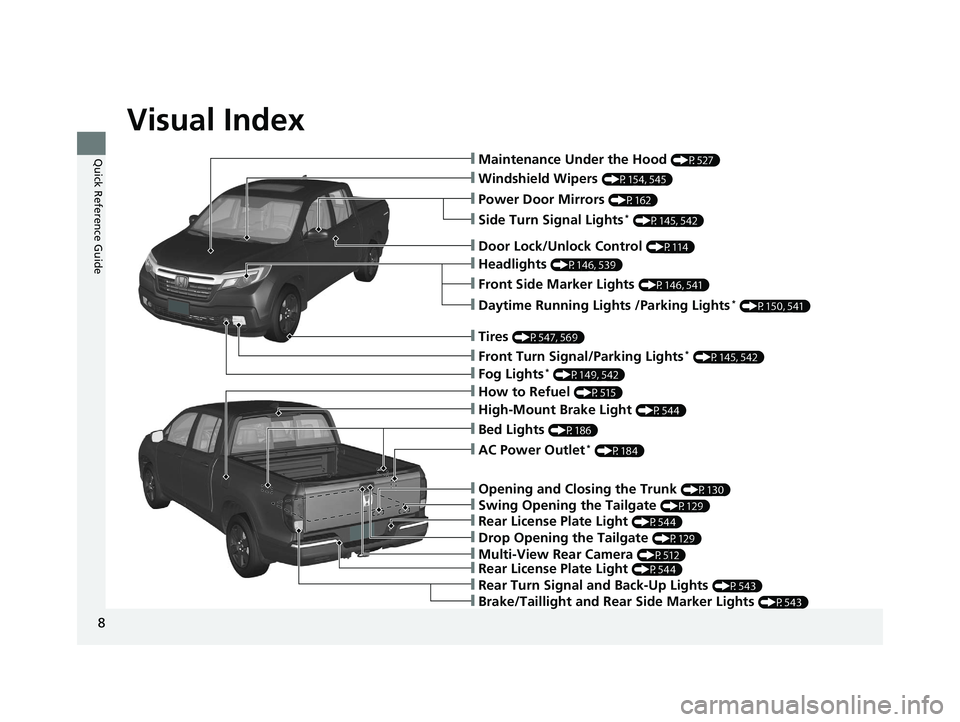
Quick Reference Guide❙Maintenance Under the Hood (P527)
❙Windshield Wipers (P154, 545)
❙Power Door Mirrors (P162)
❙Headlights (P146, 539)
❙Front Side Marker Lights (P146, 541)
❙Fog Lights* (P149, 542)
❙Side Turn Signal Lights* (P145, 542)
❙Daytime Running Lights /Parking Lights* (P150, 541)
❙How to Refuel (P515)
❙Rear Turn Signal and Back-Up Lights (P543)
❙Door Lock/Unlock Control (P114)
❙Tires (P547, 569)
❙Front Turn Signal/Parking Lights* (P145, 542)
❙Brake/Taillight and Rear Side Marker Lights (P543)
❙Rear License Plate Light (P544)
❙Multi-View Rear Camera (P512)
❙Drop Opening the Tailgate (P129)
❙Rear License Plate Light (P544)
❙Swing Opening the Tailgate (P129)
❙Opening and Closing the Trunk (P130)
❙AC Power Outlet* (P184)
❙High-Mount Brake Light (P544)
❙Bed Lights (P186)
Page 26 of 624
24
Quick Reference Guide
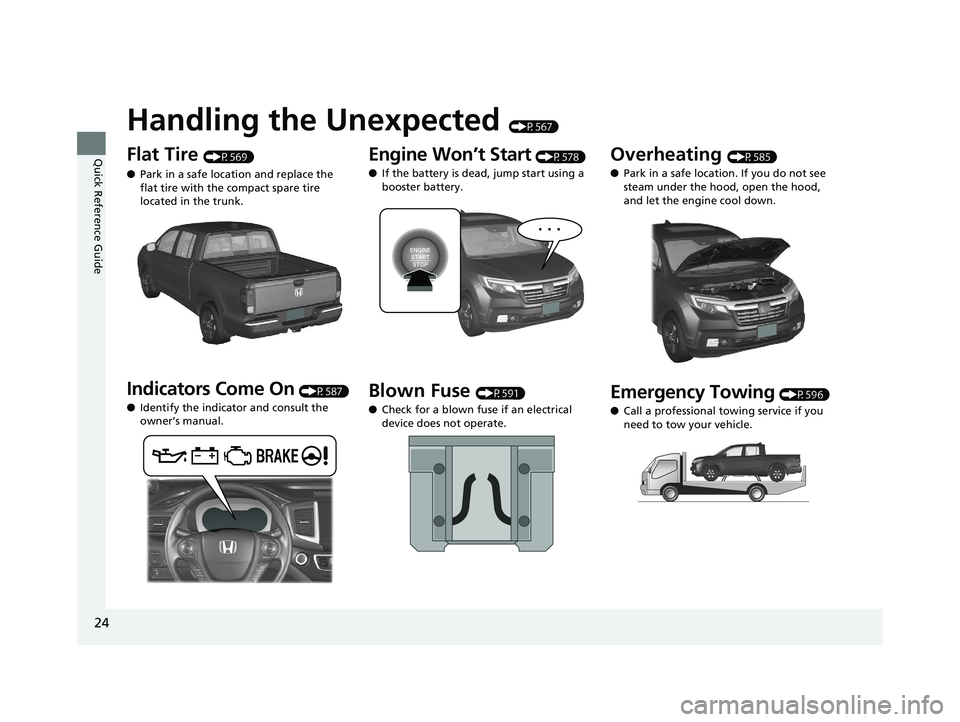
Handling the Unexpected (P567)
Flat Tire (P569)
● Park in a safe location and replace the
flat tire with the compact spare tire
located in the trunk.
Indicators Come On (P587)
● Identify the indicator and consult the
owner’s manual.
Engine Won’t Start (P578)
● If the battery is dead, jump start using a
booster battery.
Blown Fuse (P591)
● Check for a blown fuse if an electrical
device does not operate.
Overheating (P585)
● Park in a safe location. If you do not see
steam under the hood, open the hood,
and let the engine cool down.
Emergency Towing (P596)
● Call a professional towing service if you
need to tow your vehicle.
Page 120 of 624
uuLocking and Unlocking the Doors uLocking/Unlocking the Doors from the Outside
118
Controls
To temporarily deactivate the function:
1. Set the power mode to VEHICLE OFF
(LOCK).
2. Open the driver’s door.
3. Using the master door lock switch, operate
the lock as follows:
Lock Unlock Lock Unlock.
u The beeper sounds and the function is
deactivated.
To restore the function:
• Set the power mode to ON.
• Lock the vehicle without using the auto lock
function
• Open or close the door.1Locking the vehicle (Walk away auto lock)*
The auto lock function does not operate when any of
the following conditions are met.
•The smart entry remote is inside the vehicle.
•A door or the hood is not closed.
•The power mode is set to any mode other than
OFF.
•The smart entry remote is not located within a
radius of about 5 feet (1 .5 m) from the vehicle
when you get out of the vehicle and close the
doors.
Auto lock function operation stop beeper
After the auto lock function has been activated, the
auto lock operation stop beeper sounds for
approximately two seconds in the following cases.
•The smart entry remote is put inside the vehicle
through a window.
•You are located too close to the vehicle.
•The smart entry remote is put inside the trunk.
If the warning beeper sounds, check that you are
carrying the smart entry remote. Then, open/close a
door and confirm the auto lock activation beeper
sounds once.
* Not available on all models
Page 135 of 624
133Continued
Controls
Security System
Immobilizer System
The immobilizer system prevents a key that has not been pre-registered from
starting the engine. Each key contains electronic transmitters that use electronic
signals to verify the key.
Pay attention to the follo wing when pressing the ENGINE START/STOP button:
• Do not allow objects that emit strong radio waves near the ENGINE START/
STOP button.
• Make sure the key is not covered by or touching a metal object.
• Do not bring a key from another vehicle’s immobilizer system near the ENGINE
START/STOP button.
• Do not put the key near magnetic items. Electronic device such as televisions and
audio systems emit strong magnetic fiel ds. Note that even a key chain can
become magnetic.
Security System Alarm
The security system alarm activates when the trunk, hood or doors are forcibly
opened. The alarm does not go off if the trunk or doors are opened with the key,
remote transmitter or smart entry with push button start system.
However, the alarm goes off if a door is opened with the key and the shift lever is
moved out of
(P or the hood is opened before the power mode is set to ON.
■When the security system alarm activates
The horn sounds intermittently , some exterior lights flash.
1Immobilizer System
NOTICE
Leaving the smart entry remote in the vehicle can
result in theft or accident al movement of the vehicle.
Always take the key with you whenever you leave the
vehicle unattended.
Do not alter the system or add other devices to it.
Doing so may damage the system and make your
vehicle inoperable.
1 Security System Alarm
Do not alter the system or add other devices to it.
Doing so may damage the system and make your
vehicle inoperable.
The security alarm continues for a maximum of two
minutes until the security system alarm deactivates.
Page 136 of 624
uuSecurity System uSecurity System Alarm
134
Controls
■To deactivate the security system alarm
Unlock the vehicle using the key, remote transmitter, or smart entry with push
button start system. The system, along with the horn and flashing lights, is
deactivated.
■Setting the security system alarm
The security system alarm automatically sets when the following conditions have
been met:
• The power mode is set to VEHICLE OFF (LOCK).
• The hood and trunk are closed.
• All doors are locked from outside with the key, remote transmitter, or smart entry
system.
■When the security system alarm sets
The security system alarm indicator in the instrument panel blinks. When the
blinking interval changes after about 15 seconds, the security system alarm is set.
■To cancel the security system alarm
The security system alarm is canceled when the vehicle is unlocked using the key,
remote transmitter, smart entry system, or th e power mode is set to ON. The security
system alarm indicator goe s off at the same time.
1Security System Alarm
Do not set the security system alarm when someone
is in the vehicle or a window is open. The system can
accidentally activate when:
•Unlocking the door with the lock tab.•Opening the trunk with the trunk release or the
emergency trunk opener.
•Opening the hood with the hood release.•Moving the shift lever out of ( P.
If the battery goes dead after you have set the
security system alarm, the security alarm may go off
once the battery is re charged or replaced.
If this occurs, deactivate the security system alarm by
unlocking a door using the ke y, remote transmitter,
or smart entry system.
Page 414 of 624
412
Driving
Before Driving
Driving Preparation
Check the following items before you start driving.
• Make sure there are no obstructions on th e windows, door mirrors, exterior
lights, or other parts of the vehicle.
u Remove any frost, snow, or ice.
u Remove any snow on the roof, as this can slip down and obstruct your field of
vision while driving. If frozen solid , remove ice once it has softened.
u When removing ice from around the wheel s, be sure not to damage the wheel
or wheel components.
• Make sure the hood is securely closed.
u If the hood opens while driving, your front view will be blocked.
• Make sure the tires are in good condition.
u Check air pressure, check for damage and excessive wear.
2 Checking and Maintaining Tires P. 547
•Make sure the tailgate is fully closed when it is not being used as an extended
pickup bed.
• Make sure the trunk is secu rely closed and locked.
• Make sure there are no people or ob jects behind or around the vehicle.
u There are blind spots from the inside.
■Exterior Checks1Exterior Checks
NOTICE
When doors are frozen s hut, use warm water around
the door edges to melt any ice. Do not try to force
them open, as this can damage the rubber trim
around the doors. When done, wipe dry to avoid
further freezing.
Do not pour warm water into the key cylinder.
You will be unable to insert the key if the water
freezes in the hole.
Heat from the engine and exhaust can ignite
flammable material s left under the hood, causing a
fire. If you’ve parked y our vehicle for an extended
period, inspect and remove any debris that may have
collected, such as dried grass and leaves that have
fallen or have been carried in for use as a nest by a
small animal. Also check under the hood for leftover
flammable materials after you or someone else has
performed maintenance on your vehicle.
Page 438 of 624
uuWhen Driving uStarting the Engine
436
Driving
You can remotely start the engine using the smart entry remote.
■Remote Engine Start*1Remote Engine Start*
If there are buildings an d obstacles between your
vehicle and the remote, th e range will be reduced.
This distance may vary by external electrical
interference.
The engine may not start by the remote engine start
if:
•You have disabled a remo te engine start setting
using the audio/information screen.
•You do not press and hold the button
within 5 seconds after the button is pressed.
•The power mode is not in VEHICLE OFF (LOCK).•The shift lever is in a position other than ( P.
•The hood is open, or any door or the trunk is
unlocked.
•You have already used the remote twice to start
the engine.
•Another registered smart entry remote is in the
vehicle.
3WARNING
Engine exhaust contains toxic carbon
monoxide.
Breathing carbon monoxide can kill you or
cause unconsciousness.
Never use the remote engine starter when
the vehicle is parked in a garage or other
area with limited ventilation.
* Not available on all models
Page 439 of 624
Continued437
uuWhen Driving uStarting the Engine
Driving
■To start the engine
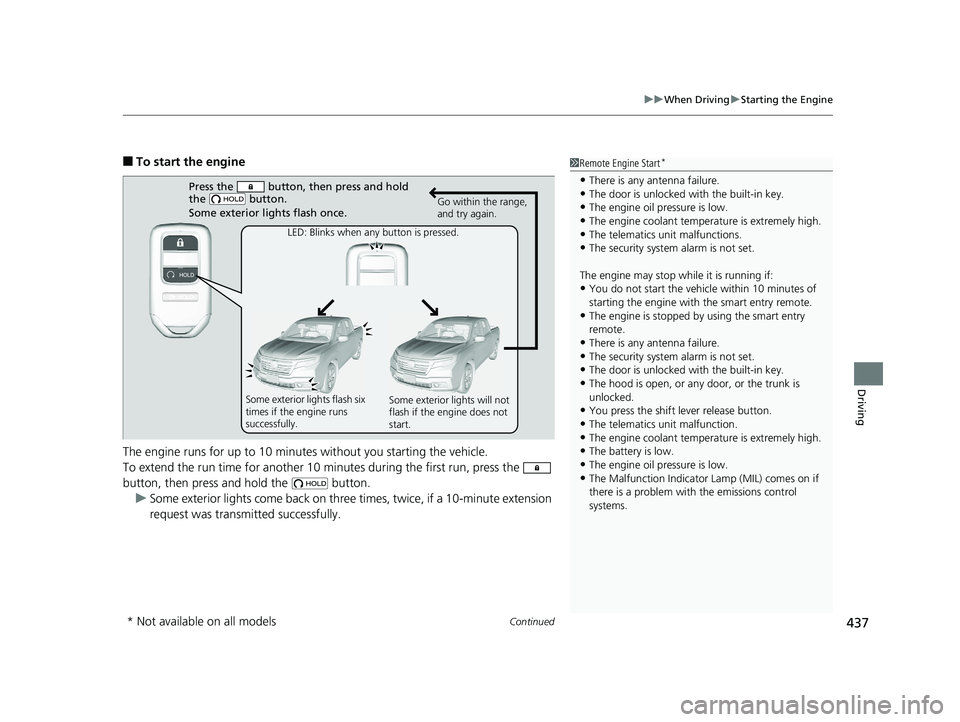
The engine runs for up to 10 minu tes without you starting the vehicle.
To extend the run time for another 10 mi nutes during the first run, press the
button, then press an d hold the button.
u Some exterior lights come back on three times, twice, if a 10-minute extension
request was transmitted successfully.1 Remote Engine Start*
•There is any antenna failure.•The door is unlocked with the built-in key.
•The engine oil pressure is low.
•The engine coolant temper ature is extremely high.•The telematics unit malfunctions.
•The security system alarm is not set.
The engine may stop whil e it is running if:
•You do not start the vehicl e within 10 minutes of
starting the engine with the smart entry remote.
•The engine is stopped by using the smart entry
remote.
•There is any antenna failure.•The security system alarm is not set.
•The door is unlocked with the built-in key.
•The hood is open, or any door, or the trunk is
unlocked.
•You press the shift lever release button.
•The telematics unit malfunction.
•The engine coolant temper ature is extremely high.•The battery is low.
•The engine oil pressure is low.
•The Malfunction Indicator Lamp (MIL) comes on if
there is a problem with the emissions control
systems.
Press the button, then press and hold
the button.
Some exterior lights flash once.
LED: Blinks when any button is pressed. Go within the range,
and try again.
Some exterior lights flash six
times if the engine runs
successfully. Some exterior lights will not
flash if the engine does not
start.
* Not available on all models
Page 521 of 624
519
Maintenance
This chapter discusses basic maintenance.
Before Performing MaintenanceInspection and Maintenance ............ 520
Safety When Performing Maintenance ... 521
Parts and Fluids Used in Maintenance Service ........................................... 522
Maintenance Minder
TM..................... 523
Maintenance Under the Hood Maintenance Items Under the Hood .... 527
Opening the Hood ........................... 528
Engine Compartment Cover ............. 529
Recommended Engine Oil ................ 530
Oil Check ......................................... 531
Adding Engine Oil ............................ 532
Changing the Engine Oil and Oil Filter ...533 Engine Coolant ................................ 535
Transmission Fluid ............................ 537
Brake Fluid ....................................... 538
Refilling Window Washer Fluid......... 538
Replacing Light Bulbs ....................... 539Checking and Maintaining Wiper
Blades .......................................... 545
Checking and Maintaining Tires
Checking Tires ................................. 547
Tire and Loading Information Label ... 548
Tire Labeling .................................... 548
DOT Tire Quality Grading (U.S. Vehicles) .... 550Wear Indicators................................ 552 Tire Service Life ................................ 552
Tire and Wheel Replacement ........... 553
Tire Rotation .................................... 554
Winter Tires ..................................... 555
Battery ............................................... 556
Remote Transmitter Care Replacing the Button Battery ........... 557
Heating and Cooling System*/Climate
Control System* Maintenance............. 558Cleaning Interior Care .................................... 559
Exterior Care.................................... 561
Accessories and Modifications ........ 565
* Not available on all models