roof HONDA RIDGELINE 2020 Owner's Manual (in English)
[x] Cancel search | Manufacturer: HONDA, Model Year: 2020, Model line: RIDGELINE, Model: HONDA RIDGELINE 2020Pages: 591, PDF Size: 32.88 MB
Page 5 of 591
Contents
Child Safety P. 55Exhaust Gas Hazard P. 70Safety Labels P. 71
Tailgate P. 127 Opening and Closing the Trunk P. 129
Moonroof* P. 139 Operating the Switches Around the Steering Wheel P. 141
Convenience Items P. 171 Climate Control System P. 187
Audio System Basic Operation P. 203 Audio Error Messages P. 272
Customized Features P. 295
Off-Highway Driving Guidelines P. 377 When Driving P. 379 Honda Sensing® P. 417
Multi-View Rear Camera P. 475 Refueling P. 477 Fuel Economy and CO
2 Emissions P. 480
Maintenance Under the Hood P. 489 Replacing Light Bulbs P. 501
Checking and Maintaining Tires P. 509 Battery P. 518 Remote Transmitter Care P. 520
Cleaning P. 522 Accessories and Modifications P. 528
Engine Does Not Start P. 543Jump Starting P. 546
Fuses P. 556 Emergency Towing P. 562
When You Cannot Unlock the Tailgate P. 564 Refueling P. 565
Devices that Emit Radio Waves P. 571 Reporting Safety Defects P. 572
Authorized Manuals P. 577 Customer Service Information P. 578
Quick Reference GuideP. 4
Safe DrivingP. 29
Instrument PanelP. 73
ControlsP. 111
FeaturesP. 195
DrivingP. 357
MaintenanceP. 481
Handling the UnexpectedP. 531
InformationP. 567
IndexP. 579
Page 9 of 591
7
Quick Reference Guide
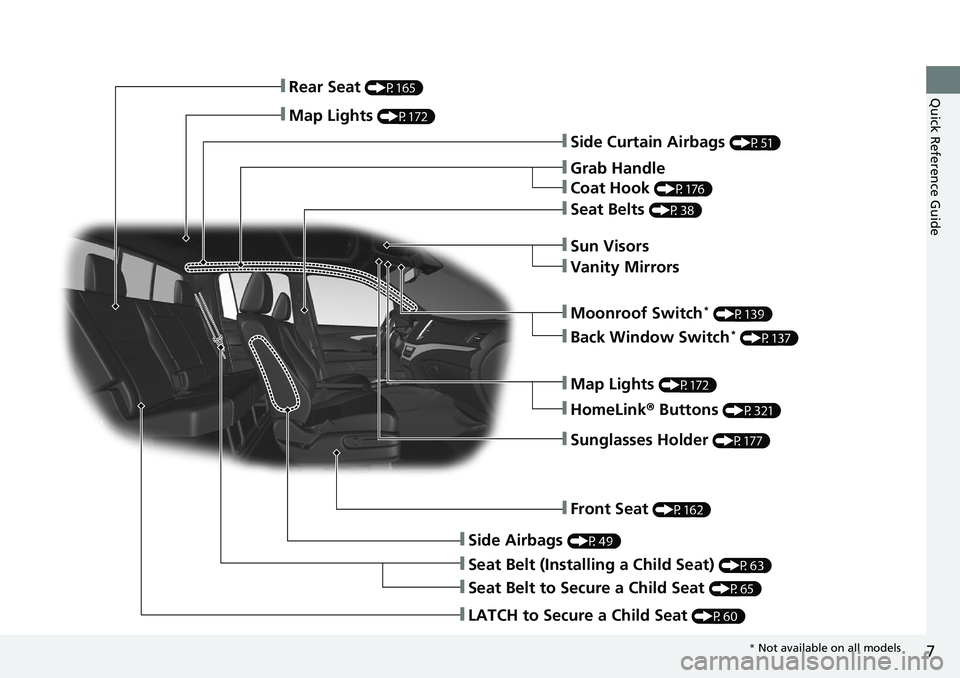
❚Side Curtain Airbags (P51)
❚Grab Handle
❚Coat Hook (P176)
❚Seat Belts (P38)
❚Sun Visors
❚Vanity Mirrors
❚Moonroof Switch* (P139)
❚Map Lights (P172)
❚HomeLink® Buttons (P321)
❚Sunglasses Holder (P177)
❚Front Seat (P162)
❚Side Airbags (P49)
❚Seat Belt (Installing a Child Seat) (P63)
❚Seat Belt to Secure a Child Seat (P65)
❚LATCH to Secure a Child Seat (P60)
❚Rear Seat (P165)
❚Map Lights (P172)
❚Back Window Switch* (P137)
* Not available on all models
Page 27 of 591
25
Quick Reference Guide
What to Do If
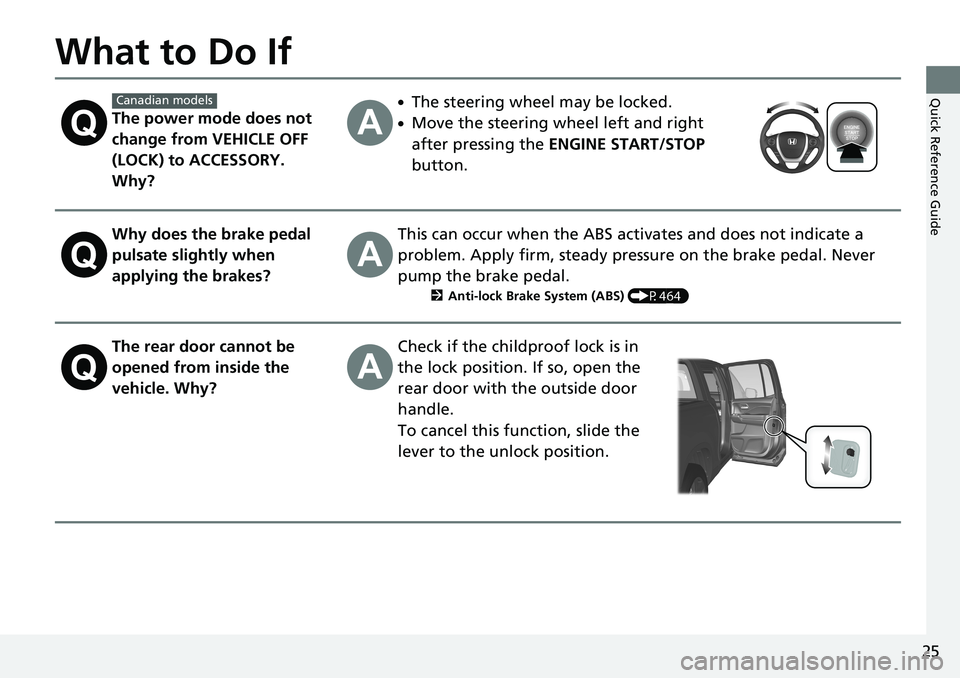
The power mode does not
change from VEHICLE OFF
(LOCK) to ACCESSORY.
Why?
●The steering wheel may be locked.
●Move the steering wheel left and right
after pressing the ENGINE START/STOP
button.
Why does the brake pedal
pulsate slightly when
applying the brakes?This can occur when the ABS activates and does not indicate a
problem. Apply firm, steady pressure on the brake pedal. Never
pump the brake pedal.
2 Anti-lock Brake System (ABS) (P464)
The rear door cannot be
opened from inside the
vehicle. Why?Check if the childproof lock is in
the lock position. If so, open the
rear door with the outside door
handle.
To cancel this function, slide the
lever to the unlock position.
Canadian models
Page 53 of 591
51
uuAirbags uSide Curtain Airbags
Continued
Safe Driving
Side Curtain Airbags
The side curtain airbags help protect the heads of the driver and passengers in the
outer seating positions during a moderate-to -severe side impact. The side curtain
airbags equipped in this vehicle are also de signed to help reduce the likelihood of
partial and complete ejection of vehicle occupants through side windows in crashes,
particularly rollover crashes.
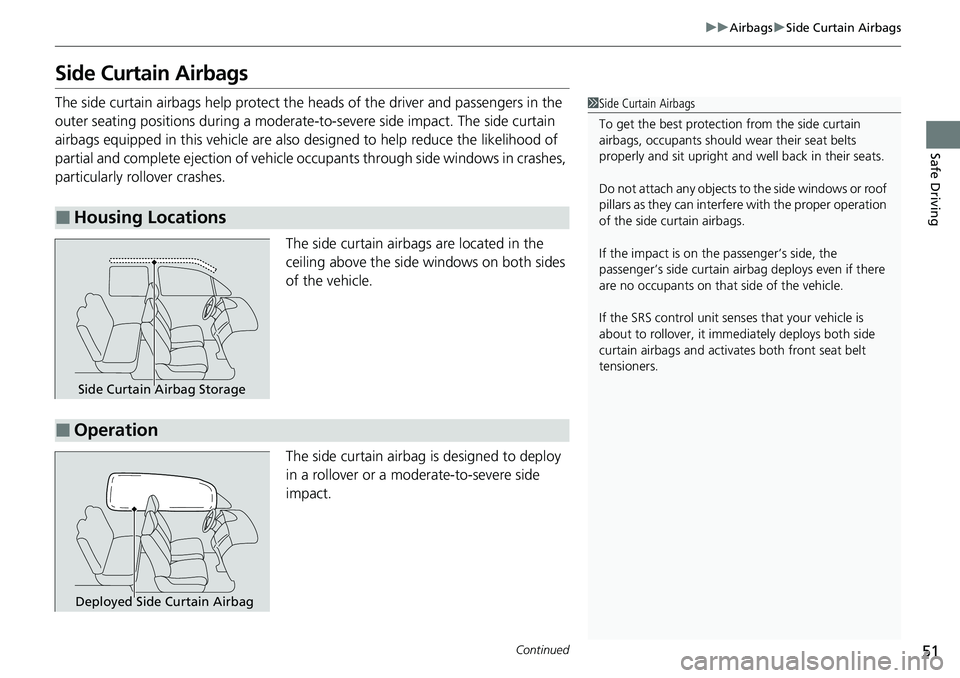
The side curtain airbags are located in the
ceiling above the side windows on both sides
of the vehicle.
The side curtain airbag is designed to deploy
in a rollover or a moderate-to-severe side
impact.
■Housing Locations
1 Side Curtain Airbags
To get the best protecti on from the side curtain
airbags, occupants should wear their seat belts
properly and sit upr ight and well back in their seats.
Do not attach any objects to the side windows or roof
pillars as they can interfere with the proper operation
of the side curtain airbags.
If the impact is on the passenger’s side, the
passenger’s side curtain airbag deploys even if there
are no occupants on that side of the vehicle.
If the SRS control unit sens es that your vehicle is
about to rollover, it imme diately deploys both side
curtain airbags and activates both front seat belt
tensioners.
Side Curtain Airbag Storage
■Operation
Deployed Side Curtain Airbag
Page 113 of 591
111
Controls
This chapter explains how to operate the various controls necessary for driving.
Clock.................................................. 112
Locking and Unlocking the Doors Key .................................................. 113
Low Smart Entry Remote Signal Strength... 115
Locking/Unlocking the Doors from the Outside .......................................... 116
Locking/Unlocking the Doors from the
Inside ............................................. 123
Childproof Door Locks ..................... 125
Auto Door Locking/Unlocking .......... 126
Tailgate .............................................. 127
Opening and Closing the Trunk ....... 129
Security System
Immobilizer System .......................... 132
Security System Alarm ...................... 132
Opening and Closing the Windows .... 135
Moonroof*............................................... 139Operating the Switches Around the Steering Wheel ENGINE START/STOP Button............. 141
Turn Signals ..................................... 144
Light Switches.................................. 145
Fog Lights ........................................ 148
Daytime Running Lights ................... 149
Auto High-Beam (H igh Beam Support
System)
*........................................ 150
Wipers and Washers ........................ 153
Rear Defogger/Heat ed Door Mirror
*
Button ........................................... 155 Heated Windshield Button ............... 155
Brightness Control ........................... 156
Driving Position Memory System
*.... 157
Adjusting the Steering Wheel .......... 159
Adjusting the Mirrors Interior Rearview Mirror ................... 160
Power Door Mirrors ......................... 161
Adjusting the Seats .......................... 162
Convenience Items
Interior Lights .................................. 171
Interior Storage Items ...................... 173
Other Interior Convenience Items..... 178
In-Bed Convenience Items................ 183
Climate Control System ................... 187
Canadian models
* Not available on all models
Page 126 of 591
uuLocking and Unlocking the Doors uLocking/Unlocking the Doors from the Inside
124
Controls
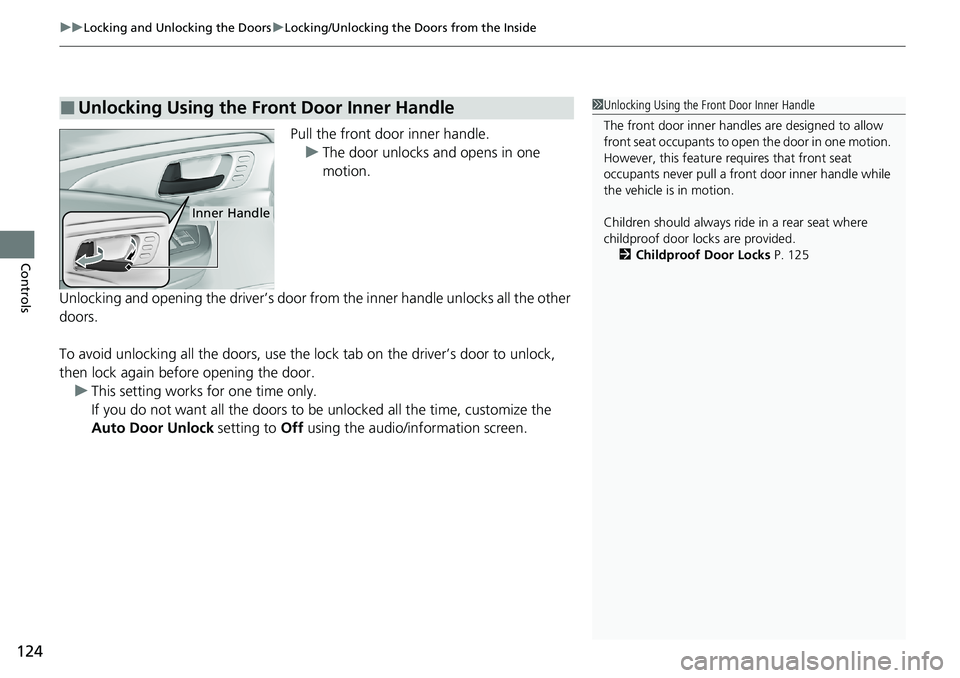
Pull the front door inner handle.
u The door unlocks and opens in one
motion.
Unlocking and opening the driver’s door from the inner handle unlocks all the other
doors.
To avoid unlocking all the doors, use the lock tab on the driver’s door to unlock,
then lock again before opening the door. u This setting works for one time only.
If you do not want all the doors to be unlocked all the time, customize the
Auto Door Unlock setting to Off using the audio/information screen.
■Unlocking Using the Front Door Inner Handle1Unlocking Using the Front Door Inner Handle
The front door inne r handles are designed to allow
front seat occupants to ope n the door in one motion.
However, this feature requires that front seat
occupants never pull a front door inner handle while
the vehicle is in motion.
Children should always ride in a rear seat where
childproof door locks are provided. 2 Childproof Door Locks P. 125
Inner Handle
Page 127 of 591
125
uuLocking and Unlocking the Doors uChildproof Door Locks
Controls
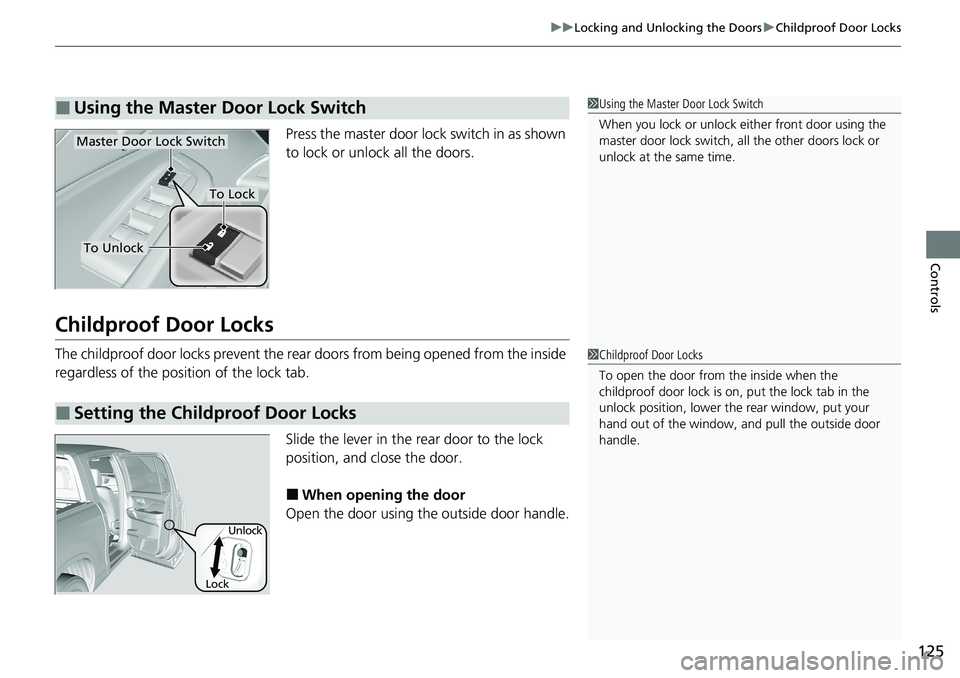
Press the master door lo ck switch in as shown
to lock or unlock all the doors.
Childproof Door Locks
The childproof door locks prevent the rear doors from being opened from the inside
regardless of the position of the lock tab.
Slide the lever in the rear door to the lock
position, and close the door.
■When opening the door
Open the door using the outside door handle.
■Using the Master Door Lock Switch1 Using the Master Door Lock Switch
When you lock or unlock either front door using the
master door lock switch, al l the other doors lock or
unlock at the same time.
To Unlock
Master Door Lock Switch
To Lock
■Setting the Childproof Door Locks
1 Childproof Door Locks
To open the door from the inside when the
childproof door lock is on, put the lock tab in the
unlock position, lower the rear window, put your
hand out of the window, and pull the outside door
handle.
Lock Unlock
Page 139 of 591
Continued137
uuOpening and Closing the Windows uOpening/Closing the Power Windows
Controls
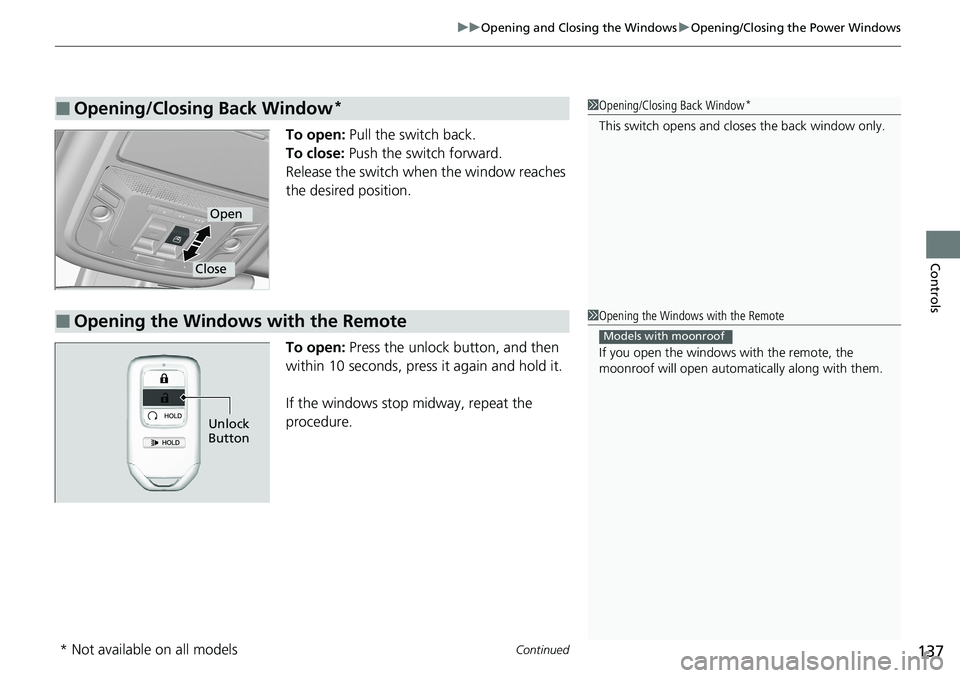
To open: Pull the switch back.
To close: Push the switch forward.
Release the switch when the window reaches
the desired position.
To open: Press the unlock button, and then
within 10 seconds, press it again and hold it.
If the windows stop midway, repeat the
procedure.
■Opening/Closing Back Window*1 Opening/Closing Back Window*
This switch opens and cl oses the back window only.
Open
Close
■Opening the Windows with the Remote1Opening the Windows with the Remote
If you open the windows with the remote, the
moonroof will open automati cally along with them.
Models with moonroof
Unlock
Button
* Not available on all models
Page 140 of 591
uuOpening and Closing the Windows uOpening/Closing th e Power Windows
138
Controls
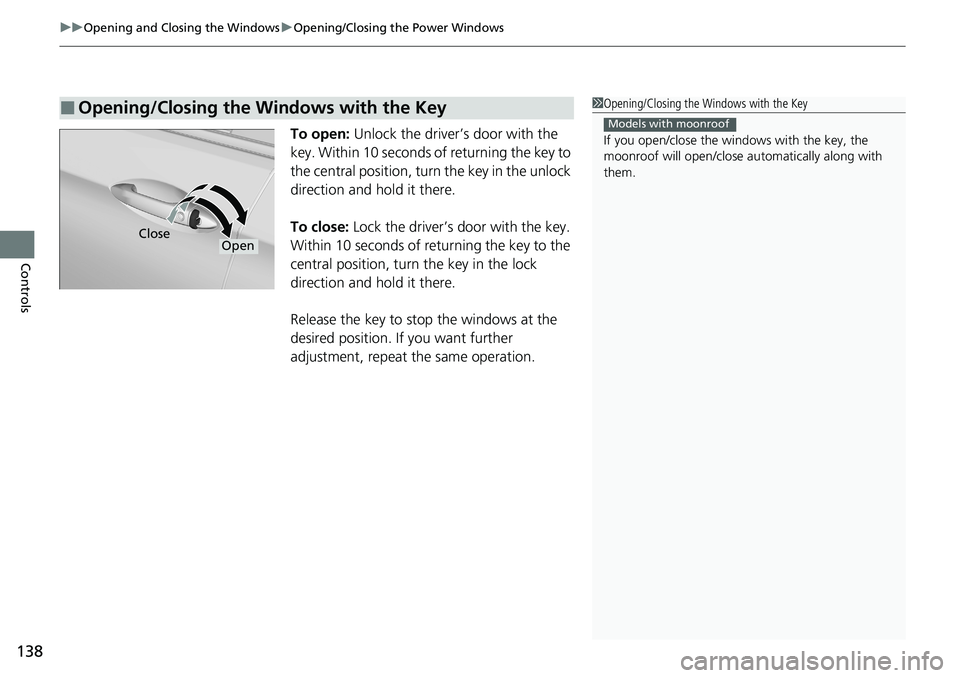
To open: Unlock the driver’s door with the
key. Within 10 seconds of returning the key to
the central position, turn the key in the unlock
direction and hold it there.
To close: Lock the driver’s door with the key.
Within 10 seconds of returning the key to the
central position, turn the key in the lock
direction and hold it there.
Release the key to stop the windows at the
desired position. If you want further
adjustment, repeat the same operation.
■Opening/Closing the Windows with the Key1 Opening/Closing the Windows with the Key
If you open/close the windows with the key, the
moonroof will open/close au tomatically along with
them.
Models with moonroof
CloseOpen
Page 141 of 591
139Continued
Controls
Moonroof*
Opening/Closing the Moonroof
You can only operate the moonroof when the power mode is in ON. Use the switch
in the front of the ceiling to open and close the moonroof.
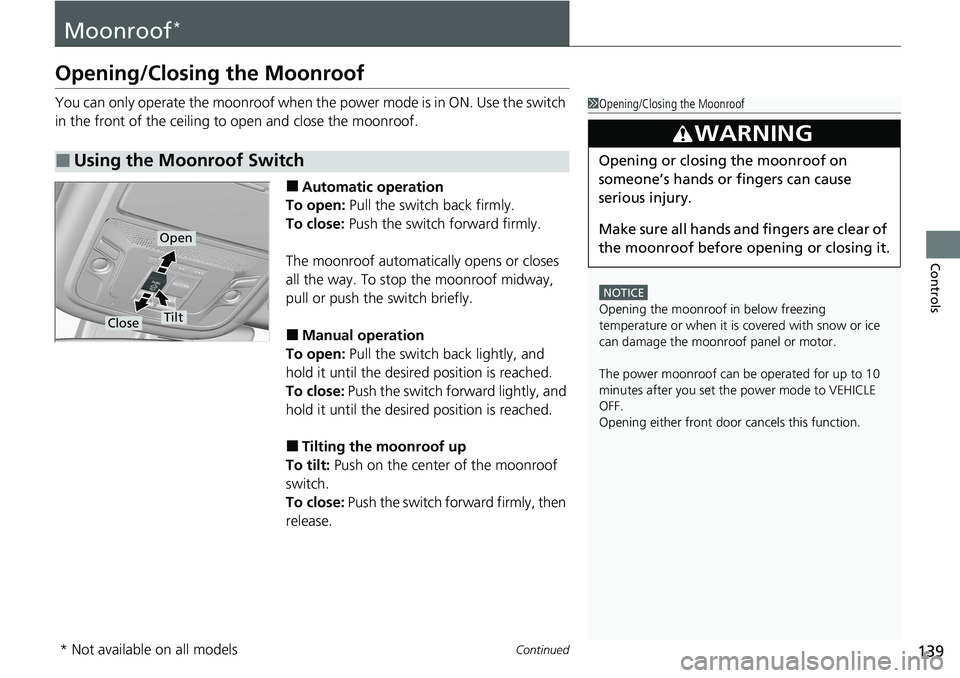
■Automatic operation
To open: Pull the switch back firmly.
To close: Push the switch forward firmly.
The moonroof automatically opens or closes
all the way. To stop the moonroof midway,
pull or push the switch briefly.
■Manual operation
To open: Pull the switch back lightly, and
hold it until the desired position is reached.
To close: Push the switch forward lightly, and
hold it until the desired position is reached.
■Tilting the moonroof up
To tilt: Push on the center of the moonroof
switch.
To close: Push the switch fo rward firmly, then
release.
■Using the Moonroof Switch
1 Opening/Closing the Moonroof
NOTICE
Opening the moonroof in below freezing
temperature or when it is covered with snow or ice
can damage the moonr oof panel or motor.
The power moonroof can be operated for up to 10
minutes after you set the power mode to VEHICLE
OFF.
Opening either front door cancels this function.
3WARNING
Opening or closing the moonroof on
someone’s hands or fingers can cause
serious injury.
Make sure all hands and fingers are clear of
the moonroof before opening or closing it.
Open
CloseTilt
* Not available on all models