charging HONDA RIDGELINE 2022 User Guide
[x] Cancel search | Manufacturer: HONDA, Model Year: 2022, Model line: RIDGELINE, Model: HONDA RIDGELINE 2022Pages: 598, PDF Size: 12.42 MB
Page 304 of 598
302
uuCustomized Features u
Features
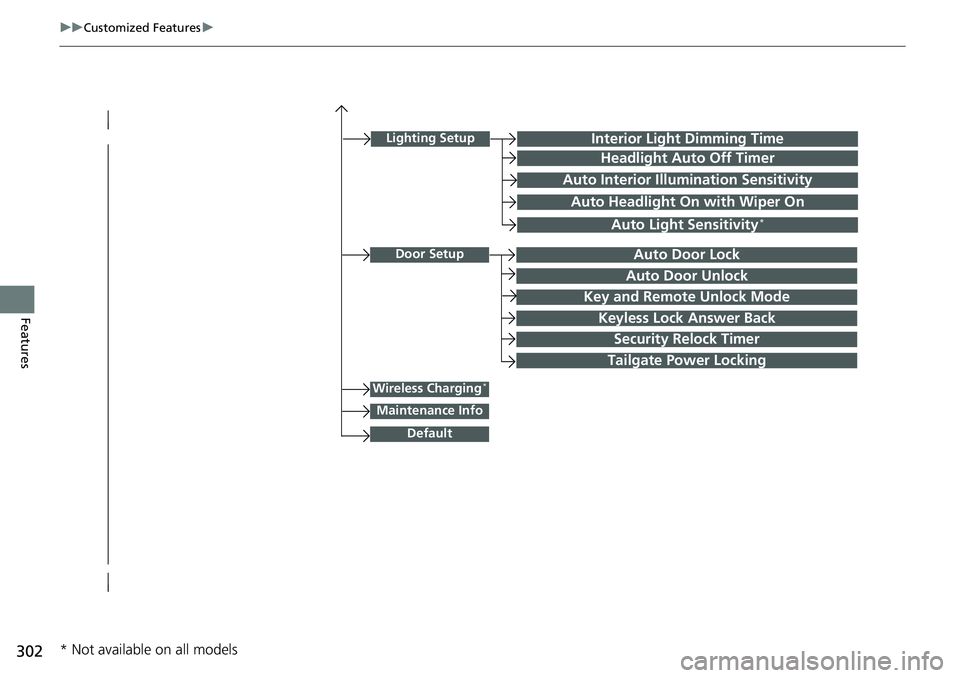
Lighting SetupInterior Light Dimming Time
Headlight Auto Off Timer
Auto Interior Illumination Sensitivity
Auto Headlight On with Wiper On
Auto Light Sensitivity*
Door SetupAuto Door Lock
Auto Door Unlock
Key and Remote Unlock Mode
Keyless Lock Answer Back
Security Relock Timer
Wireless Charging*
Default
Tailgate Power Locking
Maintenance Info
* Not available on all models
Page 317 of 598
315
uuCustomized Features u
Continued
Features
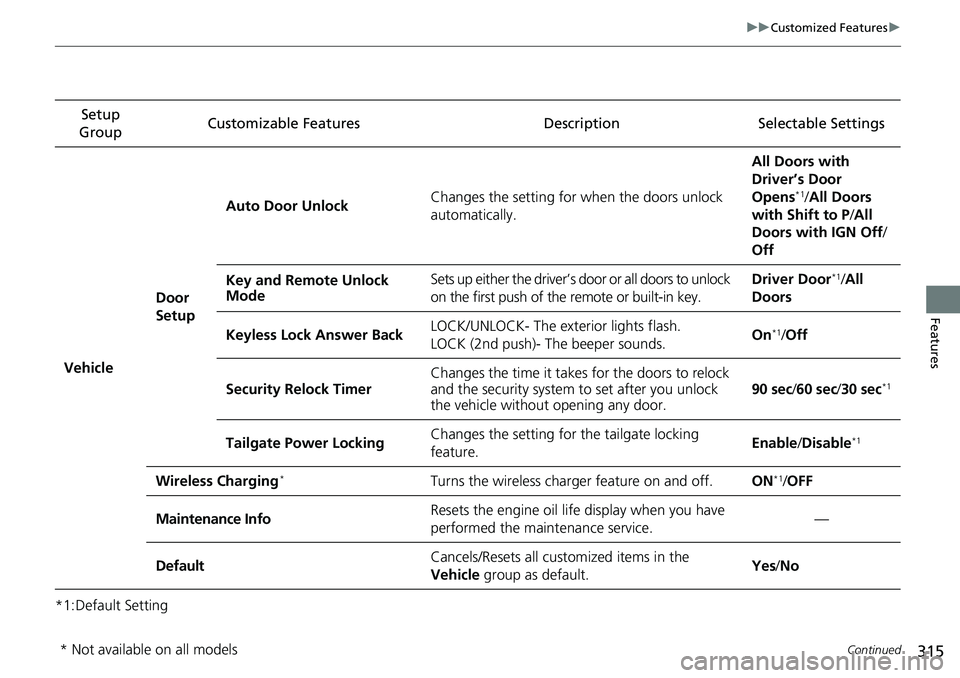
*1:Default SettingSetup
Group Customizable Features
DescriptionSelectable Settings
Vehicle
Door
SetupAuto Door Unlock
Changes the setting for when the doors unlock
automatically. All Doors with
Driver’s Door
Opens
*1/
All Doors
with Shift to P /All
Doors with IGN Off /
Off
Key and Remote Unlock
Mode Sets up either the driver’s
door or all doors to unlock
on the first push of the remote or built-in key. Driver Door
*1/
All
Doors
Keyless Lock Answer Back LOCK/UNLOCK- The exterior lights flash.
LOCK (2nd push)- The beeper sounds. On
*1/
Off
Security Relock Timer Changes the time it takes for the doors to relock
and the security system to set after you unlock
the vehicle without opening any door.
90 sec
/60 sec /30 sec
*1
Tailgate Power Locking Changes the setting for
the tailgate locking
feature. Enable
/Disable*1
Wireless Charging*Turns the wireless charger feature on and off.ON*1/ OFF
Maintenance InfoResets the engine oil life display when you have
performed the maintenance service.—
DefaultCancels/Resets all customized items in the
Vehicle group as default.Yes/No
* Not available on all models
Page 401 of 598
![HONDA RIDGELINE 2022 User Guide Continued399
uuWhen Driving uShifting
Driving
■If you want to keep the transmission in (N position [car wash mode]
With the engine running:
1. Press and hold the brake pedal.
2. Select
(N, then rel](/img/13/58878/w960_58878-400.png "HONDA RIDGELINE 2022 User Guide Continued399
uuWhen Driving uShifting
Driving
■If you want to keep the transmission in (N position [car wash mode]
With the engine running:
1. Press and hold the brake pedal.
2. Select
(N, then rel")
Continued399
uuWhen Driving uShifting
Driving
■If you want to keep the transmission in (N position [car wash mode]
With the engine running:
1. Press and hold the brake pedal.
2. Select
(N, then release the button to display (Neutral) (N hold mode on the
multi-information display.
3. Press and hold
(N again for two seconds.
u This puts the vehicle in car wash mode which must be used when your vehicle
is pulled through a conveyor type automatic car wash where you or an
attendant do not remain in the vehicle.
If the ENGINE STOP/START button is pressed
after car wash mode has been activated, the
power mode will change to ACCESSORY and a
message will be displayed on the multi-
information display. u For 15 minutes the transmission remains
in
(N with the power mode in
ACCESSORY. After that, the
transmission automatically changes to
(P and the power mode changes to OFF.
u Manually changing to
(P cancels
ACCESSORY mode. The
(P indicator
comes on and the power mode changes
to OFF. You must always put the
transmission into
(P when car wash
mode is no longer needed.
1If you want to keep the transmission in ( N position [car wash mode]
Note that the transmiss ion may not stay in (N
position while any of the following indicators is on:
•Transmission system indicator.
•Malfunction indicator lamp.•Charging system indicator.
Page 528 of 598
526
uuBattery uCharging the AGM Battery
Maintenance
Charging the AGM Battery
AGM labeled batteries like those installe d in your vehicle require a compatible
charger to be properly charged. Damage to the battery can result if the battery is
charged improperly or with the wrong equipment. For more information on how to
charge your vehicle’s AGM battery, consult a dealer.1Battery
The battery installed in this vehicle is specifically
designed for a model wi th Auto Idle Stop.
Using a battery other than this specified type may
shorten the battery life, a nd prevent Auto Idle Stop
from activating. If you need to replace the battery,
make sure to select the specified type and size. Ask a
dealer for more details.
Page 539 of 598
537
Handling the Unexpected
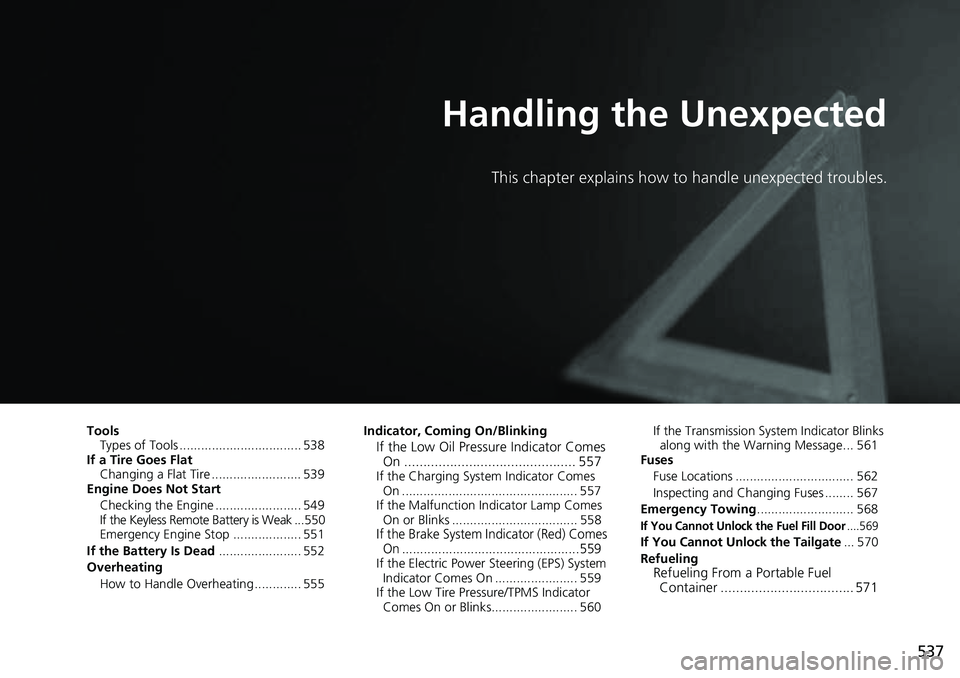
This chapter explains how to handle unexpected troubles.
ToolsTypes of Tools .................................. 538
If a Tire Goes Flat Changing a Flat Tire ......................... 539
Engine Does Not Start
Checking the Engine ........................ 549
If the Keyless Remote Battery is Weak ...550
Emergency Engine Stop ................... 551
If the Battery Is Dead ....................... 552
Overheating How to Handle Overheating ............. 555 Indicator, Coming On/Blinking
If the Low Oil Pressure Indicator Comes
On ............................................. 557
If the Charging System Indicator Comes
On ................................................. 557
If the Malfunction Indicator Lamp Comes On or Blinks ................................... 558
If the Brake System I ndicator (Red) Comes
On .................................................559
If the Electric Power Steering (EPS) System
Indicator Comes On ....................... 559
If the Low Tire Pressure/TPMS Indicator Comes On or Blinks........................ 560 If the Transmission System Indicator Blinks
along with the Warning Message... 561
Fuses
Fuse Locations ................................. 562
Inspecting and Changing Fuses ........ 567
Emergency Towing ........................... 568
If You Cannot Unlock the Fuel Fill Door....569
If You Cannot Unlock the Tailgate ... 570
Refueling
Refueling From a Portable Fuel Container ................................... 571
Page 554 of 598
552
Handling the Unexpected
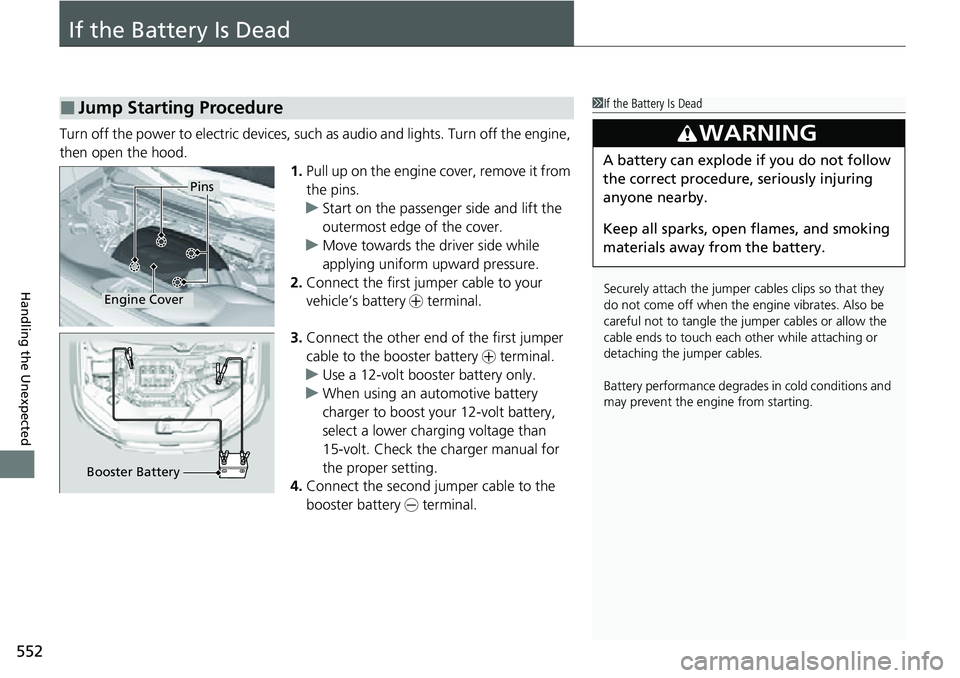
If the Battery Is Dead
Turn off the power to electric devices, such as audio and lights. Turn off the engine,
then open the hood. 1.Pull up on the engine cover, remove it from
the pins.
u Start on the passenger side and lift the
outermost edge of the cover.
u Move towards the driver side while
applying uniform upward pressure.
2. Connect the first jump er cable to your
vehicle’s battery + terminal.
3. Connect the other end of the first jumper
cable to the booster battery + terminal.
u Use a 12-volt booster battery only.
u When using an automotive battery
charger to boost your 12-volt battery,
select a lower charging voltage than
15-volt. Check the charger manual for
the proper setting.
4. Connect the second jumper cable to the
booster battery - terminal.
■Jump Starting Procedure1If the Battery Is Dead
Securely attach the jumper cables clips so that they
do not come off when the e ngine vibrates. Also be
careful not to tangle the ju mper cables or allow the
cable ends to touch each other while attaching or
detaching the jumper cables.
Battery performance degrades in cold conditions and
may prevent the engi ne from starting.
3WARNING
A battery can explode if you do not follow
the correct procedure, seriously injuring
anyone nearby.
Keep all sparks, open flames, and smoking
materials away from the battery.
Pins
Engine Cover
Booster Battery
Page 559 of 598
557
Handling the Unexpected
Indicator, Coming On/Blinking
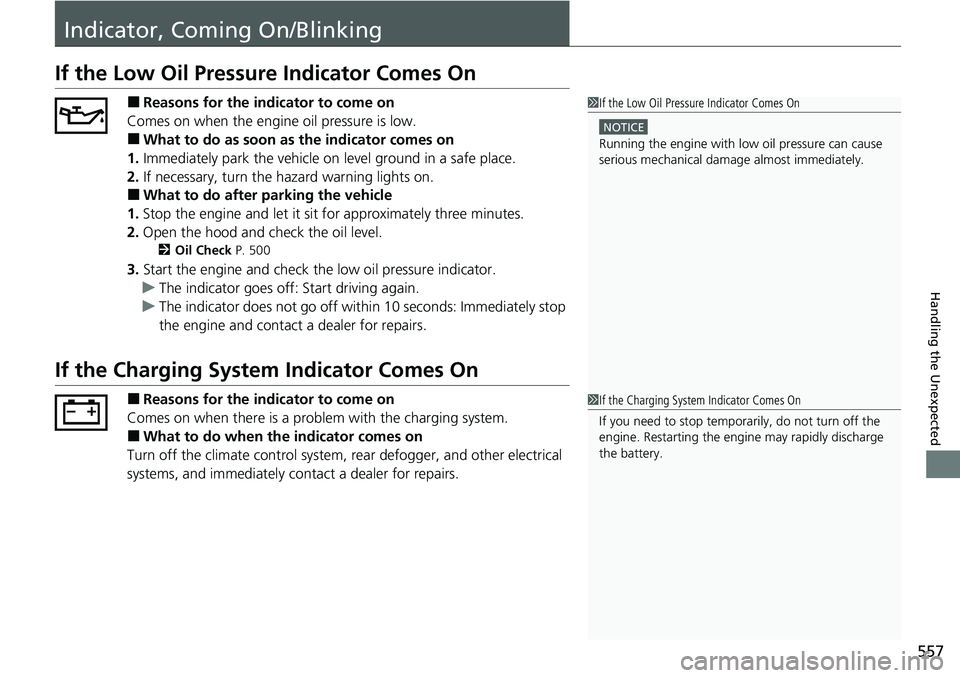
If the Low Oil Pressure Indicator Comes On
■Reasons for the indicator to come on
Comes on when the engine oil pressure is low.
■What to do as soon as the indicator comes on
1. Immediately park the vehicle on level ground in a safe place.
2. If necessary, turn the hazard warning lights on.
■What to do after parking the vehicle
1. Stop the engine and let it sit for approximately three minutes.
2. Open the hood and check the oil level.
2 Oil Check P. 500
3.Start the engine and check th e low oil pressure indicator.
u The indicator goes off: Start driving again.
u The indicator does not go off within 10 seconds: Immediately stop
the engine and contact a dealer for repairs.
If the Charging System Indicator Comes On
■Reasons for the indicator to come on
Comes on when there is a prob lem with the charging system.
■What to do when the indicator comes on
Turn off the climate control system, rear defogger, and other electrical
systems, and immediately co ntact a dealer for repairs.
1If the Low Oil Pressure Indicator Comes On
NOTICE
Running the engine with low oil pressure can cause
serious mechanical damage almost immediatelyM
1If the Charging System Indicator Comes On
If you need to stop temporarily, do not turn off the
engine. Restarting the engi ne may rapidly discharge
the battery.
Page 590 of 598

588
Index
Average Fuel Economy............................. 113
B
Battery....................................................... 525
Charging System Indicator ................. 79, 557
If the Battery Is Dead ............................... 552
Maintenance (Checking the Battery) ........ 525
Bed Lights .................................................. 193
Indicator .................................................... 95
Belts (Seat) .................................................. 37
Beverage Holders ...................................... 179
Blind spot information System ................ 420
Indicator .................................................... 92
Bluetooth ® Audio ..................................... 259
Bluetooth ® HandsFreeLink ®................... 329
Booster Seats (For Children) ....................... 73
Brake System ............................................. 468
Anti-lock Brake System (ABS) ................... 470
Brake Assist System ................................. 471
Brake System Indicator............................... 78
Fluid ........................................................ 507
Foot Brake ............................................... 469
Indicator ............................................ 78, 559
Parking Brake .......................................... 468
Brake System Indicator (Amber) ................ 78
Brake System Indicator (Red) ............. 78, 559
Brightness Control (Instrument Panel) .... 160
Bulb Replacement ..................................... 508
Brake/Taillight and Rear Side Marker
Light ...................................................... 512 Daytime Running Light
and Parking
Light...................................................... 510
Front Side Marker Light ........................... 510
Front Turn Signal/Parking Light ................ 511
Headlights ............................................... 508
High-Mount Brake Light .......................... 513
Rear License Plate Light ........................... 513
Rear Turn Signal and Back-Up Light ......... 512
Side Turn Signal/Emergency Indicator Light...................................................... 511
Bulb Specifications ................................... 574
C
Car Wash Mode........................................ 399
Carbon Monoxide Gas ............................... 74
Cargo Hooks ............................................. 194
Carrying Cargo ......................... 365, 367, 370
Certification Label .................................... 576
Changing Bulbs ........................................ 508
Charging System Indicator ................. 79, 557
Child Safety ................................................. 59
Childproof Door Locks............................. 129
Emergency Trunk Opener ........................ 135
Child Seat .................................................... 59
Booster Seats ............................................ 73
Child Seat for Infants................................. 61
Child Seat for Small Children ..................... 62
Installing a Child Seat with a Lap/Shoulder Seat Belt ......................................................... 67 Installing a LATCH-Compatible Child
Seat ........................................................ 64
Larger Children ......................................... 72
Rear-facing Child Seat............................... 61
Selecting a Child Seat ............................... 63
Using a Tether .......................................... 69
Childproof Door Locks ............................. 129
Cleaning the Exterior ............................... 531
Cleaning the Interior ............................... 529
Climate Control System ........................... 195
Changing the Mode................................ 195
Defrosting the Windshield and Windows .............................................. 196
Dust and Pollen Filter .............................. 528
Recirculation and Fresh Air Mode ............ 196
Sensors ................................................... 201
Synchronized Mode ................................ 198
Using Automatic Climate Control............ 195
Clock ......................................................... 116
Coat Hook ................................................ 180
Collision Mitigation Braking System
TM
(CMBSTM) ................................................. 426
Indicator ............................................. 93, 94
Compact Spare Tire .......................... 539, 575
Console Compartment ............................. 178
Controls .................................................... 115
Conversation Mirror ................................ 181
Coolant (Engine) ...................................... 504
Adding to the Radiator ........................... 505
Adding to the Reserve Tank .................... 504
Overheating ............................................ 555
Page 593 of 598
591
Index
Illumination Control................................ 160
Button .................................................... 160
Immobilizer System .................................. 136
Indicator ................................................... 86
In-Bed Box ................................................ 191
Indicators .................................................... 78
Adaptive Cruise Control (ACC).................. 91
All-wheel drive (AWD)............................... 88
Anti-lock Brake System (ABS) .................... 82
Auto High-Beam ....................................... 86
Auto Idle Stop........................................... 89
Auto Idle Stop System ............................... 89
Bed Lights On ........................................... 95
Blind spot information System........... 92, 421
Brake System (Amber) ............................... 78
Charging System............................... 79, 557
Collision Mitigati on Braking System
TM
(CMBSTM) .......................................... 93, 94
ECON Mode ............................................. 92
Electric Power Steering (EPS) System ............................................ 85, 559
Fog Lights ................................................. 86
High Beam ................................................ 85
Immobilizer System ................................... 86
Intelligent Traction Management .............. 95
Keyless Access System............................... 88
Lane Keeping Assist System (LKAS) ....................................... 91, 92, 453
Lights On .................................................. 86
Low Fuel ................................................... 82
Low Oil Pressure ............................... 79, 557 Low Tire Pressure/TPMS ..................... 85, 560
M (sequential mode)/Se
quential Mode Gear
Selection.................................................. 80
Malfunction Indicator Lamp ............... 79, 558
Parking Brake and Brake System
(Red)................................................ 78, 559
Road Departure Mitigation ........................ 90
Seat Belt Reminder .............................. 38, 81
Security System Alarm ............................... 87
Shift Position ............................................. 80
Supplemental Restraint System ............ 55, 82
System Message ........................................ 87
Transmission System .................... 80, 81, 561
Turn Signal and Haza rd Warning ............... 85
Vehicle Stability Assist
TM (VSA ®) OFF ......... 413
Vehicle Stability AssistTM (VSA ®)
System............................................. 83, 412
Information ............................................... 573
Information Button .................................. 111
Instant Fuel Economy ............................... 114
Instrument Panel ........................................ 77
Brightness Control ................................... 160
Intelligent Traction Management System ..................................................... 404
Indicator .................................................... 95
Intelligent Variable Torque Management (i-VTM4
TM) AWD System ......................... 415
Interior Lights ........................................... 175
Interior Rearview Mirror .......................... 164
iPhone ....................................................... 282
iPod ................................................... 247, 282
J
Jack (Wheel Nut Wrench) ........................ 543
Jump Starting ........................................... 552
K
Key............................................................ 117
Lockout Prevention.................................. 126
Number Tag ............................................ 118
Rear Door Won’t Open............................ 129
Remote Transmitter ................................. 125
Key Number Tag ....................................... 118
Keyless Access System .............................. 120
Keyless Access System Indicators ............... 88
Keyless Lockout Prevention ..................... 126
Kickdown (Automatic Transmission) ....... 394
L
Lane Keeping Assist System (LKAS)......... 451
Indicator.............................................. 91, 92
LATCH (Child Seats) .............................. 64, 69
Lights ................................................. 149, 508
Auto High Beam...................................... 154
Automatic ............................................... 150
Bed ......................................................... 193
Bulb Replacement ................................... 508
Daytime Running Lights........................... 153
Fog Lights ............................................... 152
High Beam Indicator .................................. 85
Interior .................................................... 175