turn signal HONDA RIDGELINE 2022 User Guide
[x] Cancel search | Manufacturer: HONDA, Model Year: 2022, Model line: RIDGELINE, Model: HONDA RIDGELINE 2022Pages: 598, PDF Size: 12.42 MB
Page 314 of 598
312
uuCustomized Features u
Features
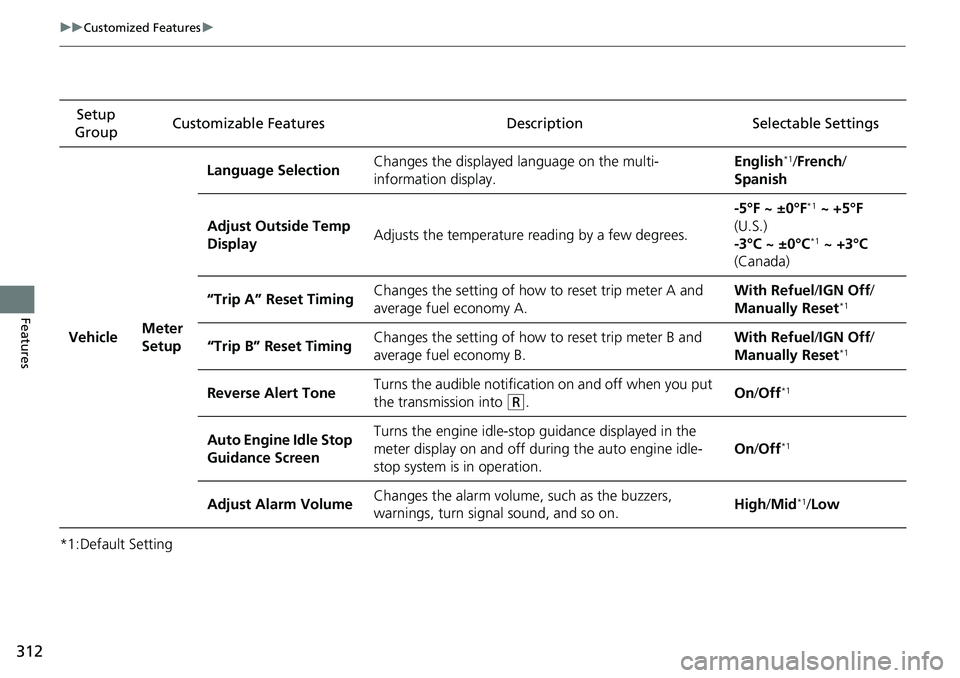
*1:Default SettingSetup
Group Customizable Features
Description Selectable Settings
Vehicle Meter
SetupLanguage Selection
Changes the displayed language on the multi-
information display. English
*1/
French /
Spanish
Adjust Outside Temp
Display Adjusts the temperature r
eading by a few degrees. -5°F ~ ±0°F
*1
~ +5°F
(U.S.)
-3°C ~ ±0°C
*1 ~ +3°C
(Canada)
“Trip A” Reset Timing Changes the setting of how to reset trip meter A and
average fuel economy A. With Refuel
/IGN Off /
Manually Reset
*1
“Trip B” Reset Timing Changes the setting of how
to reset trip meter B and
average fuel economy B. With Refuel
/IGN Off /
Manually Reset*1
Reverse Alert Tone Turns the audible notificati
on on and off when you put
the transmission into (R. On
/Off*1
Auto Engine Idle Stop
Guidance Screen Turns the engine idle-stop
guidance displayed in the
meter display on and off duri ng the auto engine idle-
stop system is in operation. On
/Off*1
Adjust Alarm Volume Changes the alarm volume, such as the buzzers,
warnings, turn signal sound, and so on. High
/Mid*1/Low
Page 380 of 598
uuTowing a Trailer uTowing Preparation
378
Driving
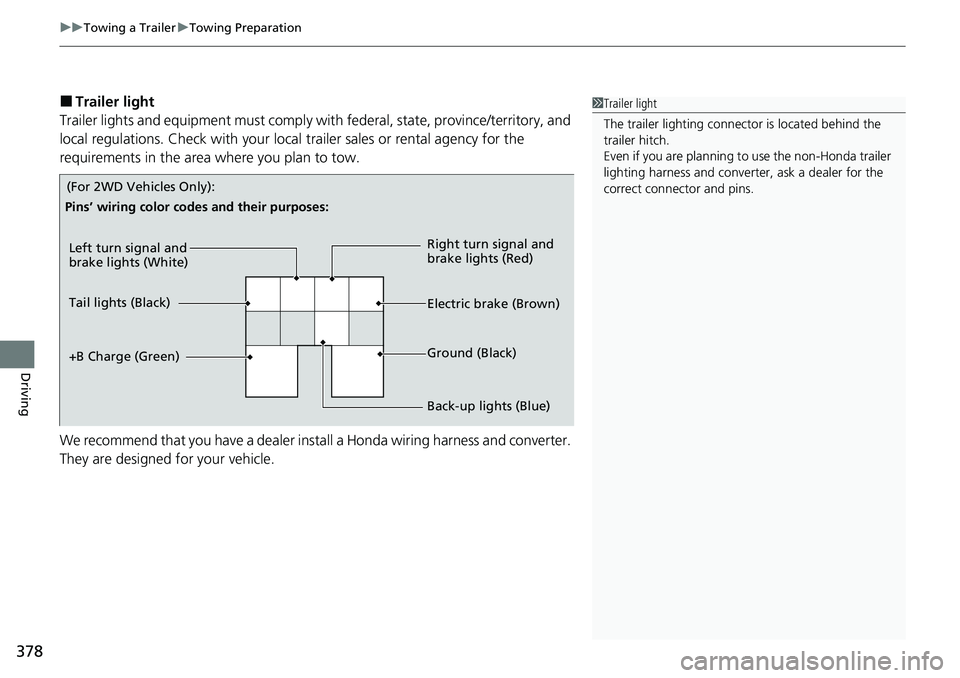
■Trailer light
Trailer lights and equipment must comply with federal, state, province/territory, and
local regulations. Check with your local trailer sales or rental agency for the
requirements in the area where you plan to tow.
We recommend that you have a dealer install a Honda wiring harness and converter.
They are designed for your vehicle.1 Trailer light
The trailer lighting connect or is located behind the
trailer hitch.
Even if you are planning to use the non-Honda trailer
lighting harness and converte r, ask a dealer for the
correct connector and pins.
Left turn signal and
brake lights (White)
Electric brake (Brown) Right turn signal and
brake lights (Red)
Back-up lights (Blue) Ground (Black)
Tail lights (Black)
+B Charge (Green)
Pins’ wiring color codes and their purposes:
(For 2WD Vehicles Only):
Page 381 of 598
379
uuTowing a Trailer uTowing Preparation
Driving
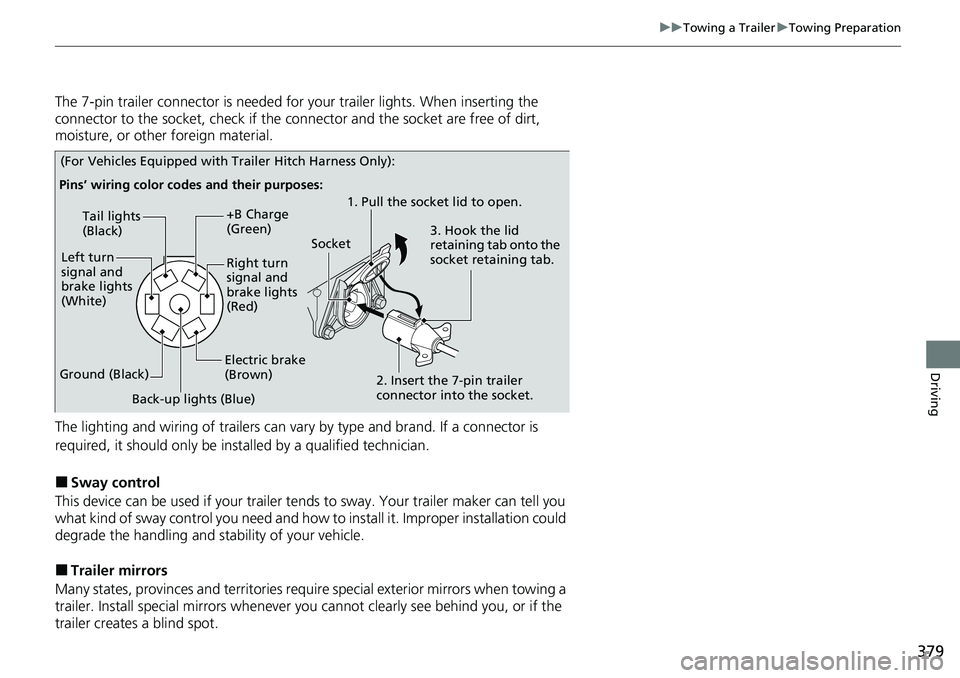
The 7-pin trailer connector is needed for your trailer lights. When inserting the
connector to the socket, check if the co nnector and the socket are free of dirt,
moisture, or other foreign material.
The lighting and wiring of trailers can vary by type and brand. If a connector is
required, it should only be installed by a qualified technician.
■Sway control
This device can be used if your trailer te nds to sway. Your trailer maker can tell you
what kind of sway control you need and how to install it. Improper installation could
degrade the handling and stability of your vehicle.
■Trailer mirrors
Many states, provinces and territories requir e special exterior mirrors when towing a
trailer. Install special mirrors whenever you cannot clearly see behind you, or if the
trailer creates a blind spot.
Pins’ wiring color codes and their purposes:
Tail lights
(Black)
Left turn
signal and
brake lights
(White)
Ground (Black) +B Charge
(Green)
Right turn
signal and
brake lights
(Red)
Electric brake
(Brown)
Back-up lights (Blue) 1. Pull the socket lid to open.
2. Insert the 7-pin trailer
connector into the socket. 3. Hook the lid
retaining tab onto the
socket retaining tab.
Socket
(For Vehicles Equipped with Trailer Hitch Harness Only):
Page 423 of 598
Continued421
uuWhen Driving uBlind spot information System*
Driving
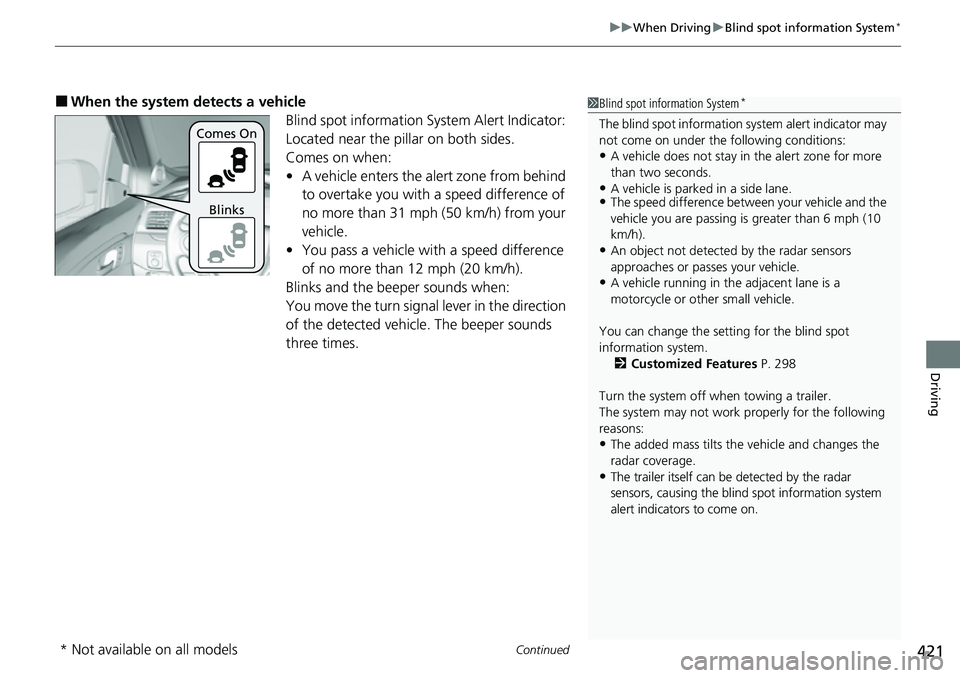
■When the system detects a vehicle
Blind spot information System Alert Indicator:
Located near the pillar on both sides.
Comes on when:
•A vehicle enters the alert zone from behind
to overtake you with a speed difference of
no more than 31 mph (50 km/h) from your
vehicle.
• You pass a vehicle with a speed difference
of no more than 12 mph (20 km/h).
Blinks and the beeper sounds when:
You move the turn signal lever in the direction
of the detected vehicle. The beeper sounds
three times.1 Blind spot information System*
The blind spot information system alert indicator may
not come on under the following conditions:
•A vehicle does not stay in the alert zone for more
than two seconds.
•A vehicle is parked in a side lane.•The speed difference betw een your vehicle and the
vehicle you are passing is greater than 6 mph (10
km/h).
•An object not detected by the radar sensors
approaches or passes your vehicle.
•A vehicle running in the adjacent lane is a
motorcycle or other small vehicle.
You can change the setting for the blind spot
information system. 2 Customized Features P. 298
Turn the system off when towing a trailer.
The system may not work properly for the following
reasons:
•The added mass tilts the vehicle and changes the
radar coverage.
•The trailer itself can be detected by the radar
sensors, causing the blind spot information system
alert indicators to come on.
Comes On
Blinks
* Not available on all models
Page 453 of 598
451
uuHonda Sensing ®u Lane Keeping Assist System (LKAS)
Continued
Driving
Lane Keeping Assist System (LKAS)
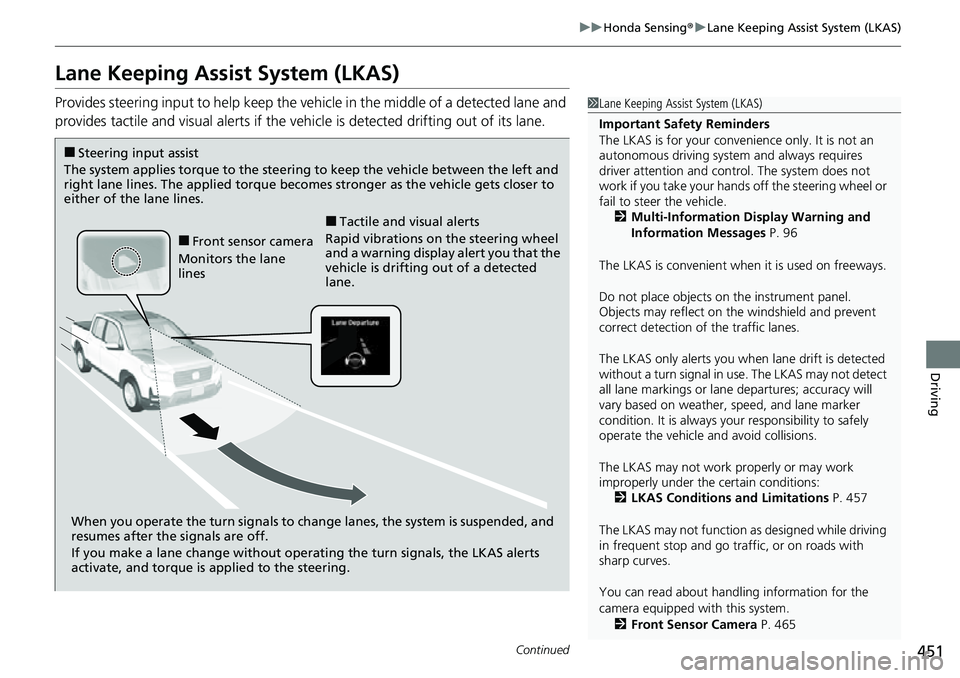
Provides steering input to help keep the vehicle in the middle of a detected lane and
provides tactile and visual al erts if the vehicle is detected drifting out of its lane.1Lane Keeping Assist System (LKAS)
Important Safety Reminders
The LKAS is for your convenience only. It is not an
autonomous driving system and always requires
driver attention and control. The system does not
work if you take your hands off the steering wheel or
fail to steer the vehicle. 2 Multi-Information Display Warning and
Information Messages P. 96
The LKAS is convenient when it is used on freeways.
Do not place objects on the instrument panel.
Objects may reflect on th e windshield and prevent
correct detection of the traffic lanes.
The LKAS only alerts you when lane drift is detected
without a turn signal in use. The LKAS may not detect
all lane markings or lane departures; accuracy will
vary based on weather, speed, and lane marker
condition. It is always your responsibility to safely
operate the vehicle an d avoid collisions.
The LKAS may not work properly or may work
improperly under the certain conditions: 2 LKAS Conditions and Limitations P. 457
The LKAS may not function as designed while driving
in frequent stop and go traf fic, or on roads with
sharp curves.
You can read about handling information for the
camera equipped with this system.
2 Front Sensor Camera P. 465
When you operate the turn signals to chan ge lanes, the system is suspended, and
resumes after the signals are off.
If you make a lane change without operat ing the turn signals, the LKAS alerts
activate, and torque is applied to the steering.
■Front sensor camera
Monitors the lane
lines
■Tactile and visual alerts
Rapid vibrations on the steering wheel
and a warning display alert you that the
vehicle is drifting out of a detected
lane.
■Steering input assist
The system applies torque to the steering to keep the vehicle between the left and
right lane lines. The applied torque becomes stronger as the vehicle gets closer to
either of the lane lines.
Page 455 of 598
Continued453
uuHonda Sensing ®u Lane Keeping Assist System (LKAS)
Driving
The system can be used when th e following conditions are met.
• The lane in which you are driving has detectable lane markers on both sides, and
your vehicle is in the center of the lane.
• The vehicle is traveling between about 45 and 90 mph (72 and 145 km/h).
• You are driving on a straight or slightly curved road.
• The turn signals are off.
• The brake pedal is not depressed.
• The wipers are not in continuous operation.
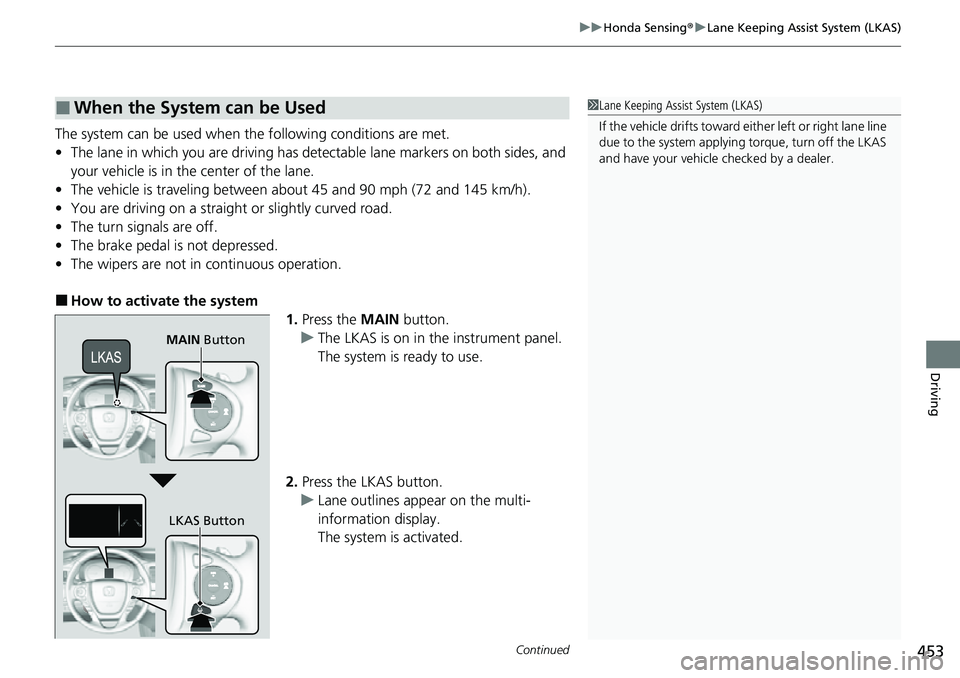
■How to activate the system
1.Press the MAIN button.
u The LKAS is on in the instrument panel.
The system is ready to use.
2. Press the LKAS button.
u Lane outlines appear on the multi-
information display.
The system is activated.
■When the System can be Used1Lane Keeping Assist System (LKAS)
If the vehicle drifts toward ei ther left or right lane line
due to the system applying torque, turn off the LKAS
and have your vehicle checked by a dealer.
MAIN Button
LKAS Button
Page 462 of 598
460
uuHonda Sensing ®u Road Departure Mitigation System
Driving
Road Departure Mitigation System
Alerts and helps to assist you when the sy stem detects a possibility of your vehicle
unintentionally crossing over detected la ne markings and/or leaving the roadway
altogether.
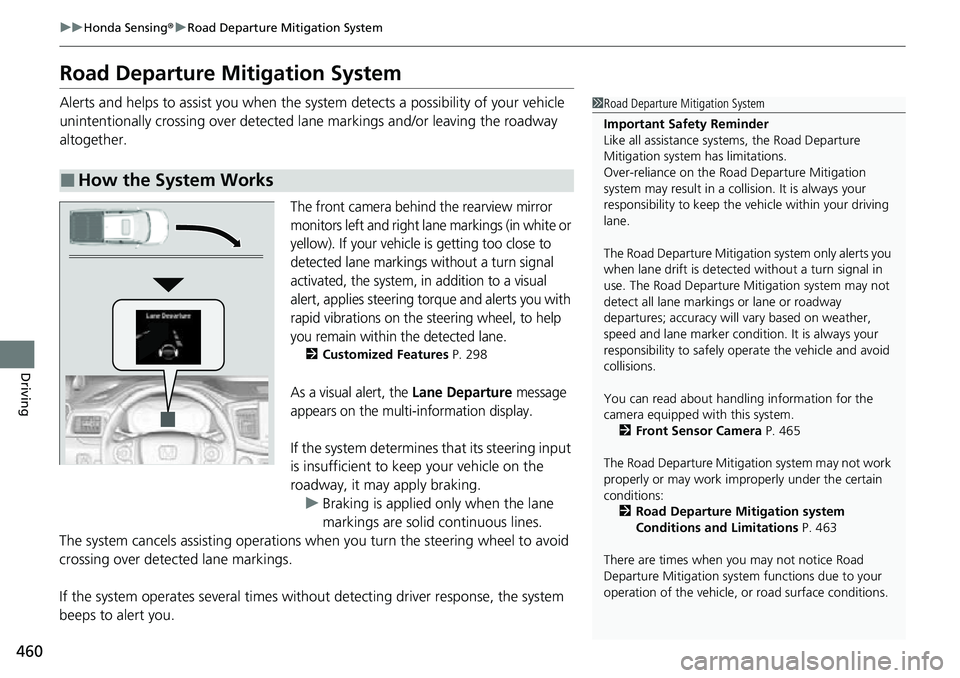
The front camera behind the rearview mirror
monitors left and right lane markings (in white or
yellow). If your vehicle is getting too close to
detected lane markings without a turn signal
activated, the system, in addition to a visual
alert, applies steering torque and alerts you with
rapid vibrations on the steering wheel, to help
you remain within the detected lane.
2 Customized Features P. 298
As a visual alert, the Lane Departure message
appears on the multi-information display.
If the system determines that its steering input
is insufficient to keep your vehicle on the
roadway, it may apply braking.
u Braking is applied only when the lane
markings are solid continuous lines.
The system cancels assisting operations wh en you turn the steering wheel to avoid
crossing over detected lane markings.
If the system operates several times without detecting driver response, the system
beeps to alert you.
■How the System Works
1 Road Departure Mitigation System
Important Safety Reminder
Like all assistance systems, the Road Departure
Mitigation system has limitations.
Over-reliance on the Road Departure Mitigation
system may result in a collision. It is always your
responsibility to keep the vehicle within your driving
lane.
The Road Departure Mitigation system only alerts you
when lane drift is detected without a turn signal in
use. The Road Departure Mitigation system may not
detect all lane markings or lane or roadway
departures; accuracy will vary based on weather,
speed and lane marker condi tion. It is always your
responsibility to sa fely operate the vehicle and avoid
collisions.
You can read about handling information for the
camera equipped with this system. 2 Front Sensor Camera P. 465
The Road Departure Mitigati on system may not work
properly or may work im properly under the certain
conditions: 2 Road Departure Mitigation system
Conditions and Limitations P. 463
There are times when you may not notice Road
Departure Mitigation system functions due to your
operation of the vehicle, or road surface conditions.
Page 463 of 598
Continued461
uuHonda Sensing ®u Road Departure Mitigation System
Driving
The system activates when all the following conditions are met:
• The vehicle is traveling between about 45 and 90 mph (72 and 145 km/h).
• The vehicle is on a straight or slightly curved road.
• The turn signals are off.
• The brake pedal is not depressed.
• The wipers are not in continuous operation.
• The system makes a determination that th e driver is not actively accelerating,
braking, or steering.
■How the System Activates1 How the System Activates
The Road Departure Mi tigation system may
automatically shut off and the indicator comes
and stays on. 2 Indicators P. 78
Road Departure Mi tigation system function can be
impacted when the vehicle is:
•Not driven within a traffic lane.•Driven on the inside edge of a curve, or outside of
a lane.
•Driven in a narrow lane.
Page 512 of 598
510
uuReplacing Light Bulbs uDaytime Running Lights and Parking Light Bulbs
Maintenance
Daytime Running Lights and Parking Light Bulbs
Daytime running lights and parking lights are LED type. Have an authorized Honda
dealer inspect and replace the light assembly.
Daytime running light bulbs and high beam headlight bulbs are the same.
2Headlight Bulbs P. 508
Parking light bulbs and front turn signal bulbs are the same.
2Front Turn Signal/Parking* Light Bulbs P. 511
Front Side Marker Lights
Front side marker lights are LED type. Have an authorized Honda dealer inspect and
replace the light assembly.
Fog Lights
Fog lights are LED type. Have an authoriz ed Honda dealer inspect and replace the
light assembly.
Models with LED parking lights
Models without LED parking lights
* Not available on all models
Page 513 of 598
511
uuReplacing Light Bulbs uFront Turn Signal/Parking* Light Bulbs
Maintenance
Front Turn Signal/Parking* Light Bulbs
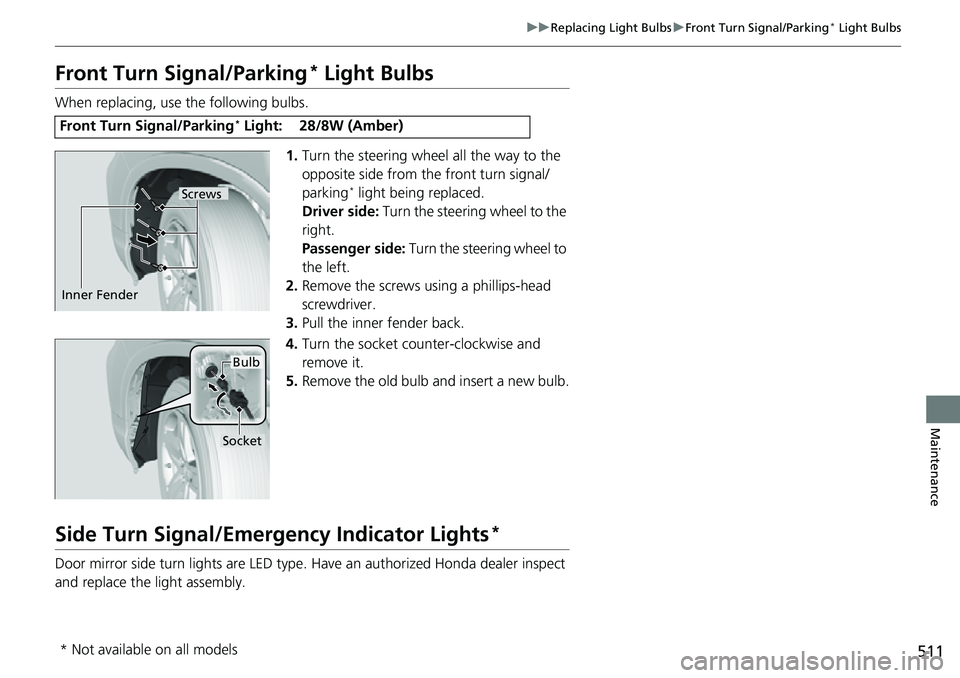
When replacing, use the following bulbs.
1.Turn the steering wheel all the way to the
opposite side from the front turn signal/
parking
* light being replaced.
Driver side: Turn the steering wheel to the
right.
Passenger side: Turn the steering wheel to
the left.
2. Remove the screws using a phillips-head
screwdriver.
3. Pull the inner fender back.
4. Turn the socket counter-clockwise and
remove it.
5. Remove the old bulb and insert a new bulb.
Side Turn Signal/Emer gency Indicator Lights*
Door mirror side turn lights are LED type. Have an authorized Honda dealer inspect
and replace the light assembly.
Front Turn Signal/Parking* Light:28/8W (Amber)
Screws
Inner Fender
Bulb
Socket
* Not available on all models