phone HONDA RIDGELINE 2022 Owner's Guide
[x] Cancel search | Manufacturer: HONDA, Model Year: 2022, Model line: RIDGELINE, Model: HONDA RIDGELINE 2022Pages: 598, PDF Size: 12.42 MB
Page 281 of 598
279
uuAudio Error Messages uPandora ®*
Features
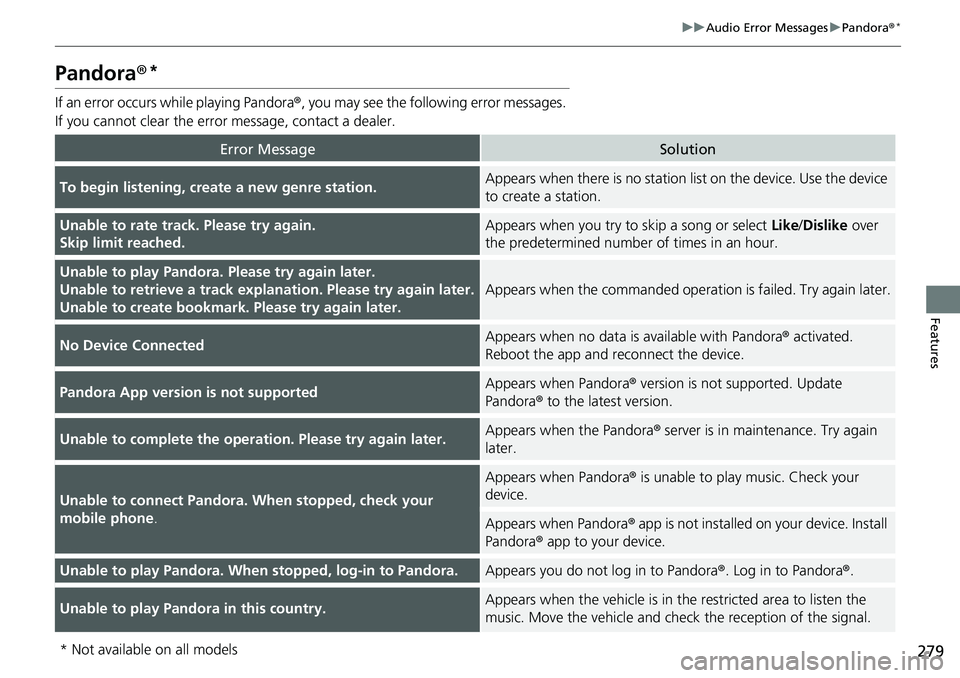
Pandora ®*
If an error occurs while playing Pandora ®, you may see the following error messages.
If you cannot clear the error message, contact a dealer.
Error MessageSolution
To begin listening, create a new genre station.Appears when there is no station list on the device. Use the device
to create a station.
Unable to rate track. Please try again.
Skip limit reached.Appears when you try to skip a song or select Like/Dislike over
the predetermined number of times in an hour.
Unable to play Pandora. Please try again later.
Unable to retrieve a track explanation. Please try again later.
Unable to create bookmark. Please try again later.
Appears when the commanded operat ion is failed. Try again later.
No Device ConnectedAppears when no data is available with Pandora ® activated.
Reboot the app and reconnect the device.
Pandora App version is not supportedAppears when Pandora® version is not supported. Update
Pandora ® to the latest version.
Unable to complete the operation. Please try again later.Appears when the Pandora ® server is in maintenance. Try again
later.
Unable to connect Pandora. When stopped, check your
mobile phone .
Appears when Pandora® is unable to play music. Check your
device.
Appears when Pandora ® app is not installed on your device. Install
Pandora ® app to your device.
Unable to play Pandora. When stopped, log-in to Pandora.Appears you do not log in to Pandora ®. Log in to Pandora ®.
Unable to play Pandora in this country.Appears when the vehicle is in th e restricted area to listen the
music. Move the vehicle and check the reception of the signal.
* Not available on all models
Page 284 of 598
282
uuGeneral Information on the Audio System uCompatible iPod, iPhone, and USB Flash Drives
Features
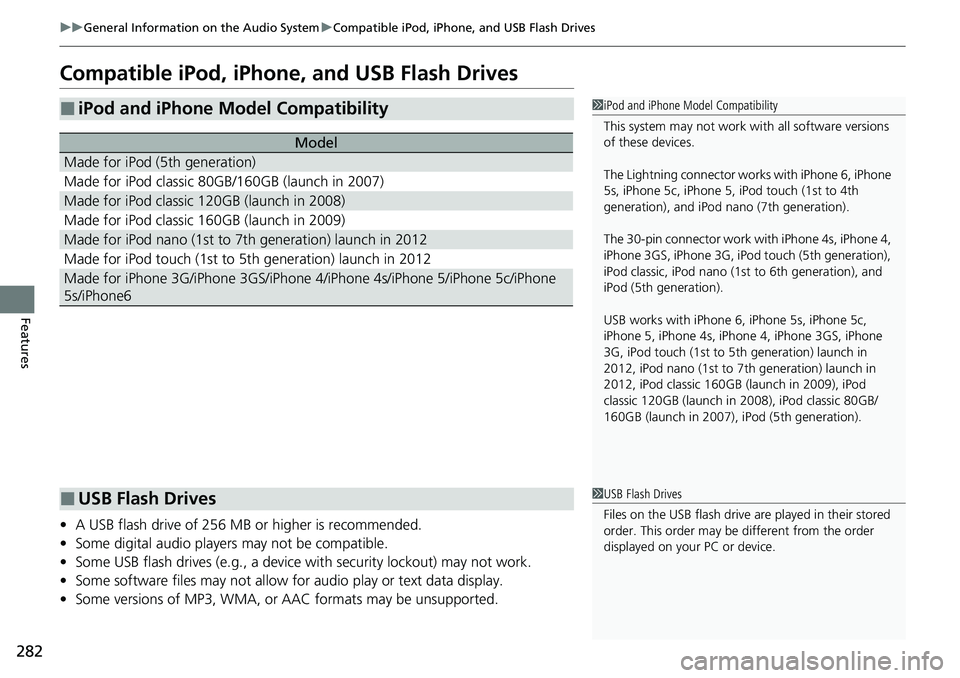
Compatible iPod, iPhone, and USB Flash Drives
• A USB flash drive of 256 MB or higher is recommended.
• Some digital audio players may not be compatible.
• Some USB flash drives (e.g., a device with security lockout) may not work.
• Some software files may not allow for audio play or text data display.
• Some versions of MP3, WMA, or AAC formats may be unsupported.
■iPod and iPhone Model Compatibility
Model
Made for iPod (5th generation)
Made for iPod classic 80GB/160GB (launch in 2007)
Made for iPod classic 120GB (launch in 2008)
Made for iPod classic 160GB (launch in 2009)
Made for iPod nano (1st to 7th generation) launch in 2012
Made for iPod touch (1st to 5th generation) launch in 2012
Made for iPhone 3G/iPhone 3GS/iPhone 4/iPhone 4s/iPhone 5/iPhone 5c/iPhone
5s/iPhone6
1 iPod and iPhone Model Compatibility
This system may not work with all software versions
of these devices.
The Lightning connector work s with iPhone 6, iPhone
5s, iPhone 5c, iPhone 5, iPod touch (1st to 4th
generation), and iPod na no (7th generation).
The 30-pin connector work wi th iPhone 4s, iPhone 4,
iPhone 3GS, iPhone 3G, iPod touch (5th generation),
iPod classic, iPod nano (1st to 6th generation), and
iPod (5th generation).
USB works with iPhone 6, iPhone 5s, iPhone 5c,
iPhone 5, iPhone 4s, iPhone 4, iPhone 3GS, iPhone
3G, iPod touch (1st to 5th generation) launch in
2012, iPod nano (1st to 7th generation) launch in
2012, iPod classic 160GB (launch in 2009), iPod
classic 120GB (launch in 2008), iPod classic 80GB/
160GB (launch in 2007), iPod (5th generation).
■USB Flash Drives1 USB Flash Drives
Files on the USB flash drive are played in their stored
order. This order may be different from the order
displayed on your PC or device.
Page 295 of 598
293
uuGeneral Information on the Audio System uHonda App License Agreement
Continued
Features
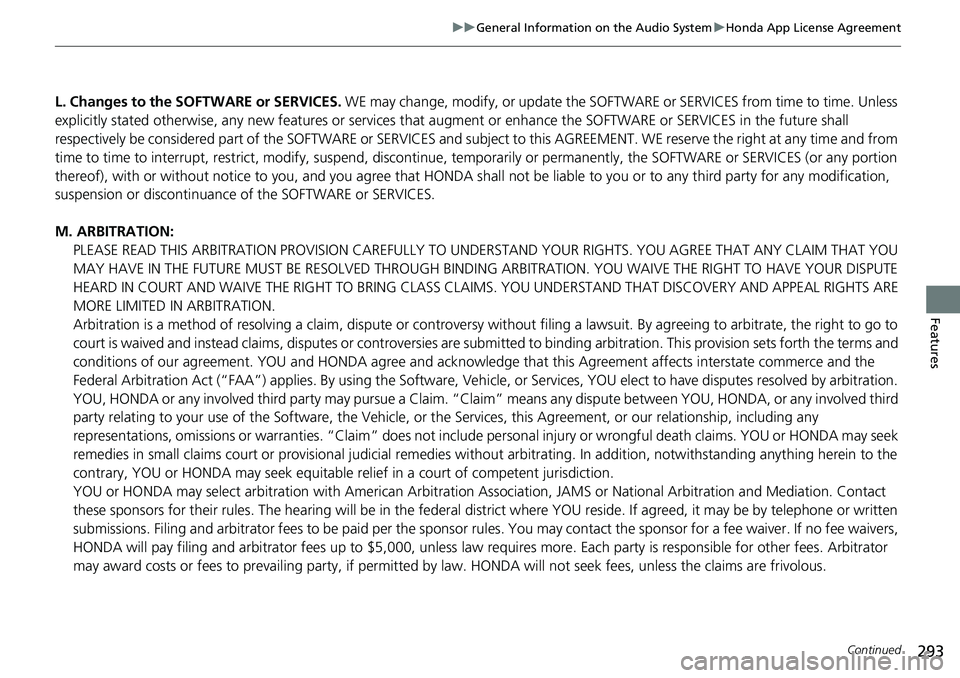
L. Changes to the SOFTWARE or SERVICES. WE may change, modify, or update the SOFT WARE or SERVICES from time to time. Unless
explicitly stated otherwise, any new featur es or services that augment or enhance the SOFTWARE or SERVICES in the future shall
respectively be considered part of the SOFTWARE or SERVICES and s ubject to this AGREEMENT. WE reserve the right at any time and from
time to time to interrupt, res trict, modify, suspend, discontinue, temporarily or permanently, the SOFTWARE or SERVICES (or any portion
thereof), with or without notice to you, and you agree that HONDA shall not be li able to you or to any third party for any modification,
suspension or discontinuance of the SOFTWARE or SERVICES.
M. ARBITRATION: PLEASE READ THIS ARBITRATION PROVISION CAREFULLY TO UND ERSTAND YOUR RIGHTS. YOU AGREE THAT ANY CLAIM THAT YOU
MAY HAVE IN THE FUTURE MUST BE RESOLVED THROUGH BINDING ARBITRATION. YOU WAIVE THE RIGHT TO HAVE YOUR DISPUTE
HEARD IN COURT AND WAIVE THE RIGHT TO BRING CLASS CLAIMS. YOU UNDERSTAND THAT DISCOVERY AND APPEAL RIGHTS ARE
MORE LIMITED IN ARBITRATION.
Arbitration is a method of resolving a claim, dispute or contro versy without filing a lawsuit. By agreeing to arbitrate, the right to go to
court is waived and instead claims, disputes or controversies are submitted to binding arbitration. This provision sets forth t he terms and
conditions of our agreement. YOU and HONDA agree and acknowle dge that this Agreement affects interstate commerce and the
Federal Arbitration Act (“FAA”) applies. By using the Software, Ve hicle, or Services, YOU elect to have disputes resolved by arbitration.
YOU, HONDA or any involved thir d party may pursue a Claim. “Claim” means any di spute between YOU, HONDA, or any involved third
party relating to your use of the Software , the Vehicle, or the Services, this Agreement, or our relationship, including any
representations, omissions or warranties. “C laim” does not include personal injury or wrongful death claims. YOU or HONDA may s eek
remedies in small claims court or provisional judicial remedies without arbitrating. In addition, notwithstanding anything here in to the
contrary, YOU or HONDA may seek equitable re lief in a court of competent jurisdiction.
YOU or HONDA may select arbitration with American Arbitration Asso ciation, JAMS or National Arbitration and Mediation. Contact
these sponsors for their rules. Th e hearing will be in the federal district where YOU reside. If agreed, it may be by telephone or written
submissions. Filing and arbitrator fees to be paid per the sponsor rules. You may contact the sponsor for a fee waiver. If no fee waivers,
HONDA will pay filing and arbitrator fees up to $5,000, unless law requires more. Each party is responsible for other fees. Arbitrator
may award costs or fees to prevailing party, if permitted by law. HONDA will not seek fees, unless the claims are frivolous.
Page 297 of 598
295
uuGeneral Information on the Audio System uLegal Information on Apple CarPlay/Android Auto
Continued
Features
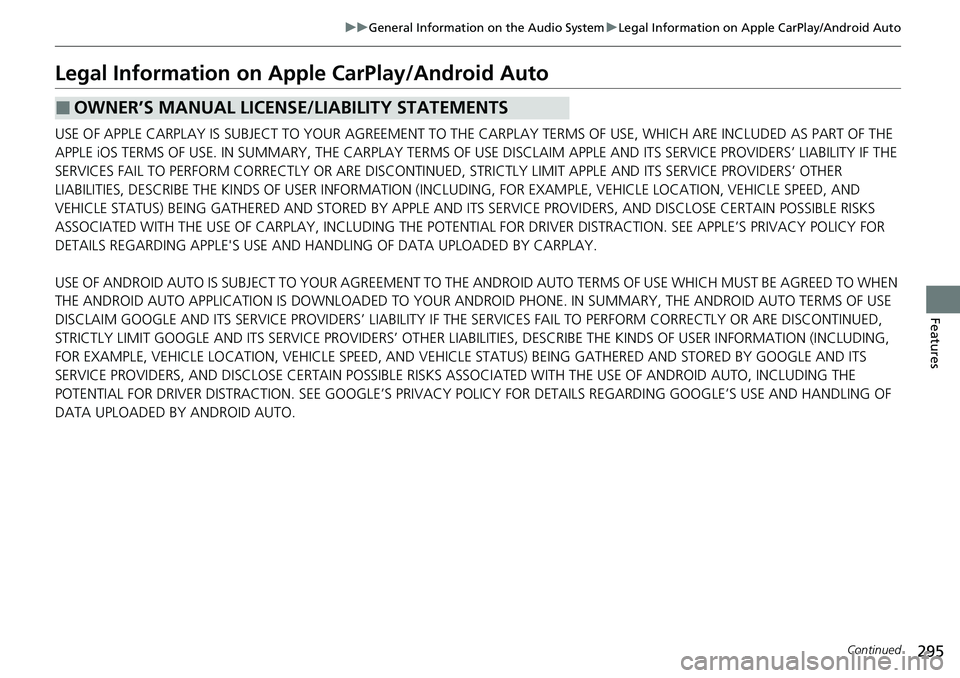
Legal Information on Appl e CarPlay/Android Auto
USE OF APPLE CARPLAY IS SUBJECT TO YOUR AGREEMENT TO THE CARPLAY TERMS OF USE, WHICH ARE INCLUDED AS PART OF THE
APPLE iOS TERMS OF USE. IN SUMMARY, THE CARPLAY TERMS OF USE DISCLAIM APPLE AND ITS SERVICE PROVIDERS’ LIABILITY IF THE
SERVICES FAIL TO PERFORM CORRECTLY OR ARE DISCONTINUED, STRICTLY LIMIT APPLE AND ITS SERVICE PROVIDERS’ OTHER
LIABILITIES, DESCRIBE THE KINDS OF USER INFORMATION (INCLUDING, FOR EXAMPL E, VEHICLE LOCATION, VEHICLE SPEED, AND
VEHICLE STATUS) BEING GATHERED AND STORED BY APPLE AND IT S SERVICE PROVIDERS, AND DISCLOSE CERTAIN POSSIBLE RISKS
ASSOCIATED WITH THE USE OF CARPLAY, INCLUDING THE POTENTIAL FOR DRIVER DISTRACTION. SEE APPLE’S PRIVACY POLICY FOR
DETAILS REGARDING APPLE'S USE AND HANDL ING OF DATA UPLOADED BY CARPLAY.
USE OF ANDROID AUTO IS SUBJECT TO YOUR AGREEMENT TO THE ANDROID AUTO TERMS OF USE WHICH MUST BE AGREED TO WHEN\
THE ANDROID AUTO APPLICATION IS DOWNLOADED TO YOUR ANDR OID PHONE. IN SUMMARY, THE ANDROID AUTO TERMS OF USE
DISCLAIM GOOGLE AND ITS SERVICE PROVIDERS’ LIABILITY IF THE SERVICES FAIL TO PERFORM CORRECTLY OR ARE DISCONTINUED,
STRICTLY LIMIT GOOGLE AND ITS SERVICE PROV IDERS’ OTHER LIABILITIES, DESCRIBE THE KINDS OF USER INFORMATION (INCLUDING,
FOR EXAMPLE, VEHICLE LOCATION, VEHI CLE SPEED, AND VEHICLE STATUS) BEING GATHERED AND STORED BY GOOGLE AND ITS
SERVICE PROVIDERS, AND DISCLOSE CERTAIN POSSIBLE RISKS ASSOCIATED WITH THE USE OF ANDROID AUTO, INCLUDING THE
POTENTIAL FOR DRIVER DISTRACTION. SEE GOOGLE’S PRIVACY PO LICY FOR DETAILS REGARDING GOOGLE’S USE AND HANDLING OF
DATA UPLOADED BY ANDROID AUTO.
■OWNER’S MANUAL LICENSE/LIABILITY STATEMENTS
Page 301 of 598
299
uuCustomized Features u
Continued
Features
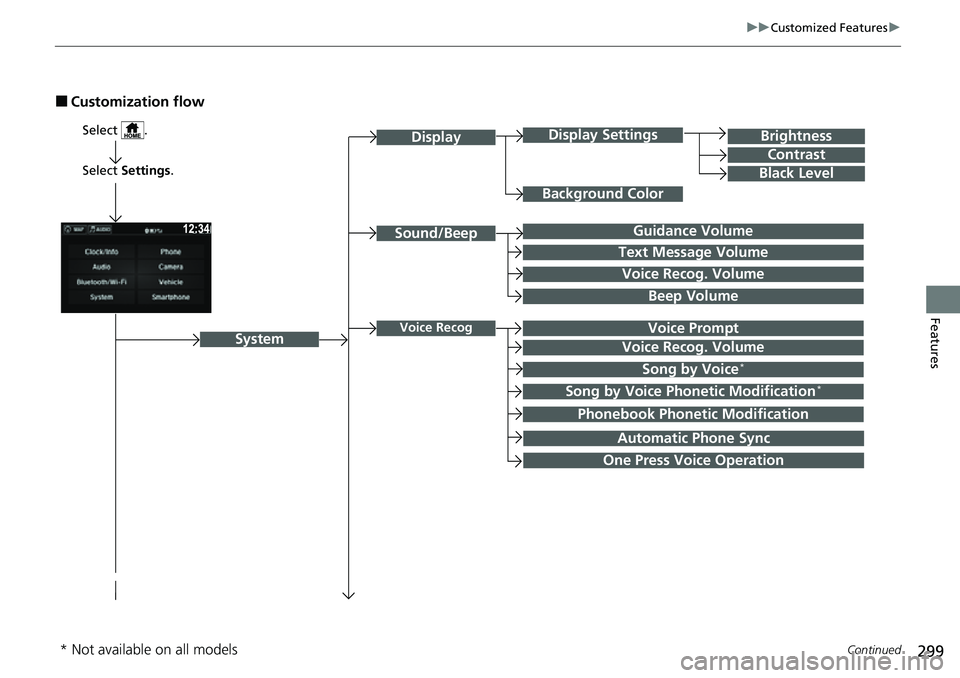
■Customization flow
Select Settings .
Brightness
Contrast
Black Level
Sound/Beep
System
DisplayDisplay Settings
Background Color
Guidance Volume
Text Message Volume
Select .
Voice RecogVoice Prompt
Voice Recog. Volume
Beep Volume
Voice Recog. Volume
Song by Voice*
Song by Voice Phonetic Modification*
Phonebook Phonetic Modification
Automatic Phone Sync
One Press Voice Operation
* Not available on all models
Page 307 of 598
305
uuCustomized Features u
Continued
Features
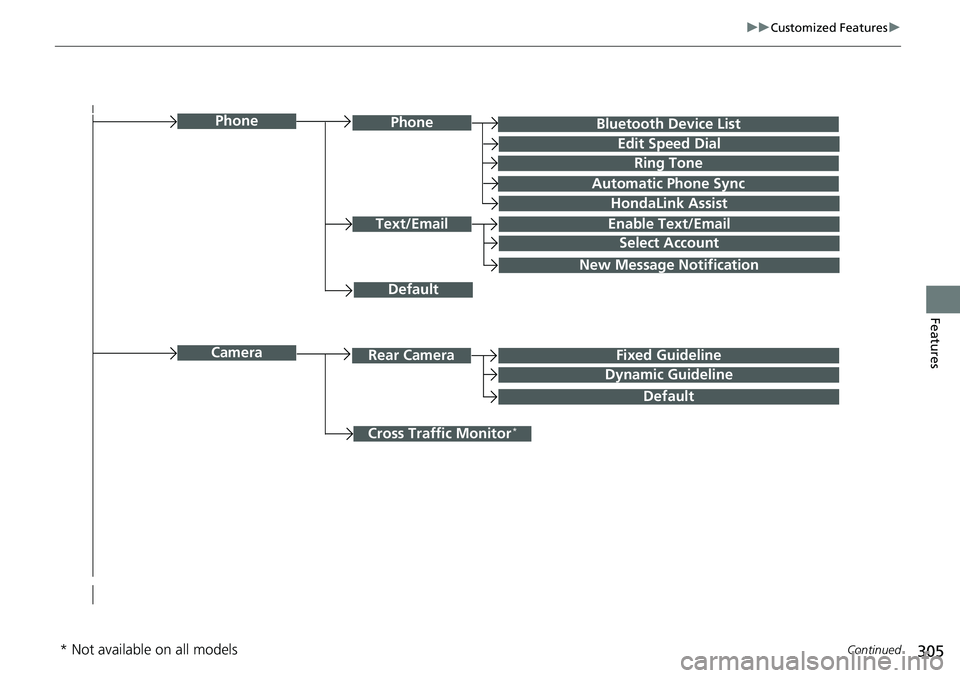
Bluetooth Device List
Default
PhonePhone
Edit Speed Dial
Ring Tone
Automatic Phone Sync
HondaLink Assist
Text/EmailEnable Text/Email
Select Account
New Message Notification
Cross Traffic Monitor*
CameraRear CameraFixed Guideline
Dynamic Guideline
Default
* Not available on all models
Page 308 of 598
306
uuCustomized Features u
Features
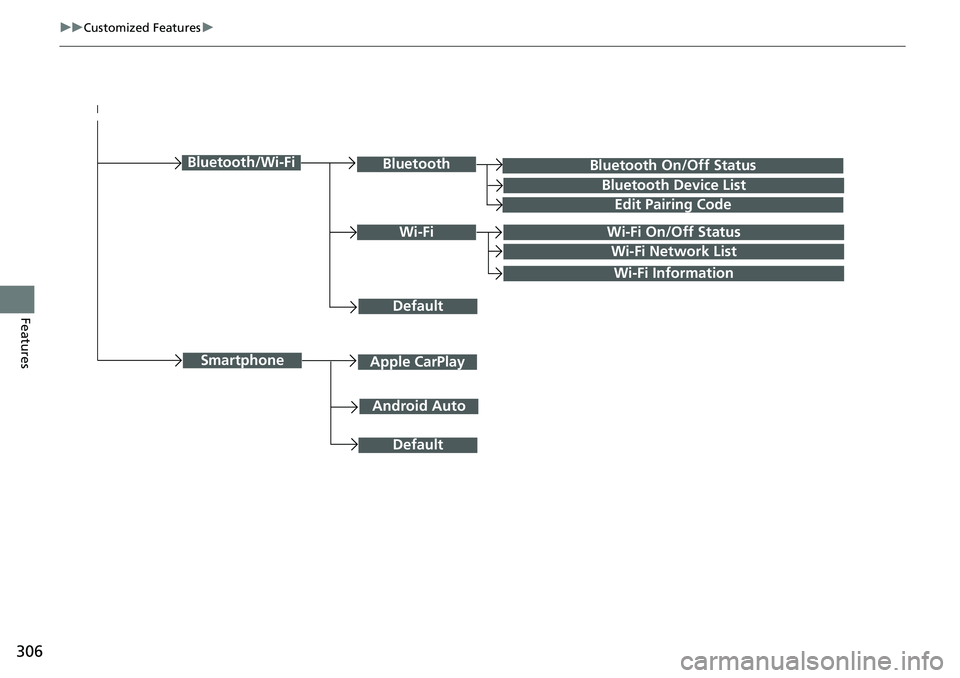
Bluetooth On/Off Status
Default
Bluetooth/Wi-FiBluetooth
Bluetooth Device List
Edit Pairing Code
Wi-FiWi-Fi On/Off Status
Wi-Fi Network List
Wi-Fi Information
Android Auto
SmartphoneApple CarPlay
Default
Page 310 of 598
308
uuCustomized Features u
Features
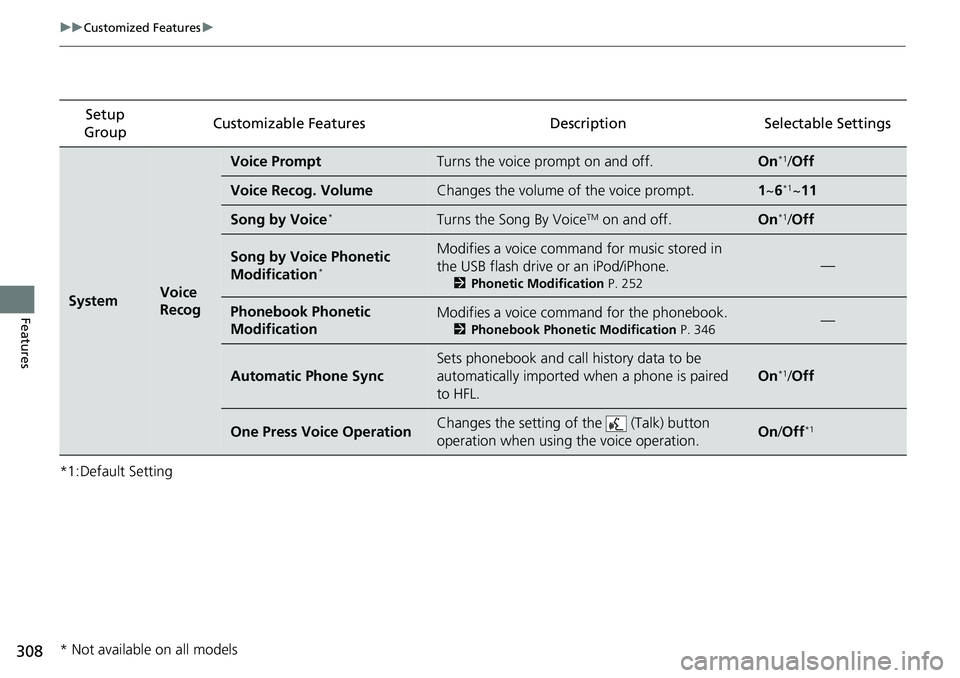
*1:Default SettingSetup
Group Customizable Features
DescriptionSelectable Settings
SystemVoice
Recog
Voice PromptTurns the voice prompt on and off.On*1/Off
Voice Recog. VolumeChanges the volume of the voice prompt.1 ~6*1~11
Song by Voice*Turns the Song By VoiceTM on and off.On*1/Off
Song by Voice Phonetic
Modification*
Modifies a voice comman d for music stored in
the USB flash drive or an iPod/iPhone.
2 Phonetic Modification P. 252
—
Phonebook Phonetic
ModificationModifies a voice comm and for the phonebook.
2Phonebook Phonetic Modification P. 346—
Automatic Phone Sync
Sets phonebook and call history data to be
automatically imported when a phone is paired
to HFL.
On*1/Off
One Press Voice OperationChanges the setting of the (Talk) button
operation when using the voice operation.On /Off*1
* Not available on all models
Page 318 of 598
316
uuCustomized Features u
Features
*1:Default SettingSetup
Group Customizable Features
DescriptionSelectable Settings
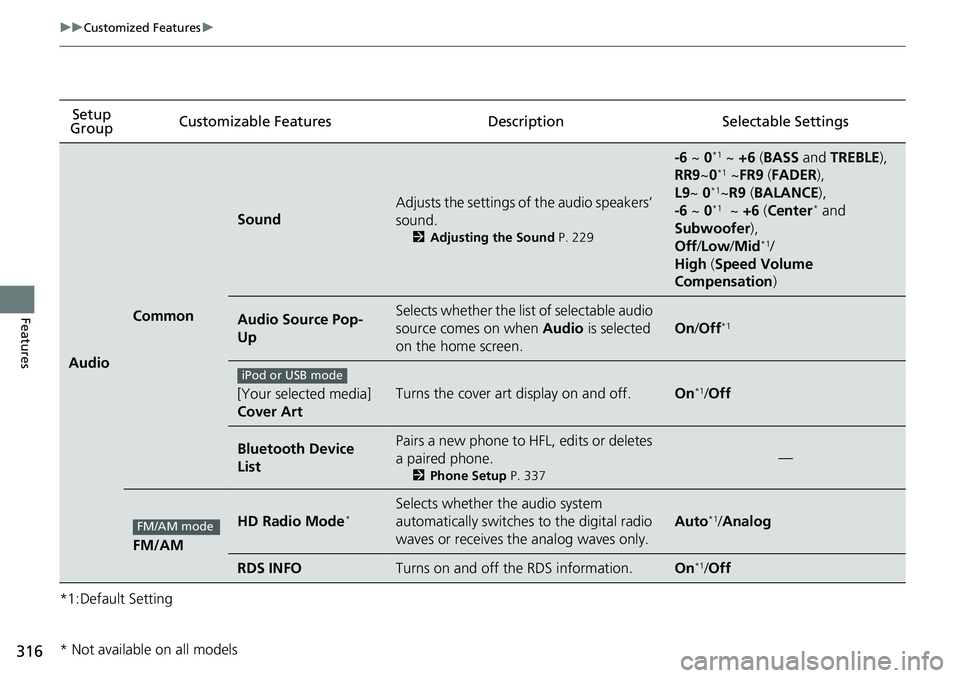
Audio
Common
Sound
Adjusts the settings of the audio speakers’
sound.
2Adjusting the Sound P. 229
-6 ~ 0*1 ~ +6 (BASS and TREBLE ),
RR9 ~0*1 ~FR9 (FADER ),
L9 ~ 0*1~R9 (BALANCE ),
-6 ~ 0*1 ~ +6 (Center* and
Subwoofer ),
Off /Low /Mid
*1/
High (Speed Volume
Compensation )
Audio Source Pop-
UpSelects whether the list of selectable audio
source comes on when Audio is selected
on the home screen.
On /Off*1
[Your selected media]
Cover ArtTurns the cover art display on and off.On*1/ Off
Bluetooth Device
ListPairs a new phone to HFL, edits or deletes
a paired phone.
2 Phone Setup P. 337
—
FM/AM
HD Radio Mode*Selects whether the audio system
automatically switches to the digital radio
waves or receives the analog waves only.
Auto*1/Analog
RDS INFOTurns on and off the RDS information.On*1/Off
iPod or USB mode
FM/AM mode
* Not available on all models
Page 321 of 598
319
uuCustomized Features u
Continued
Features
*1:Default SettingSetup
Group Customizable Features
DescriptionSelectable Settings
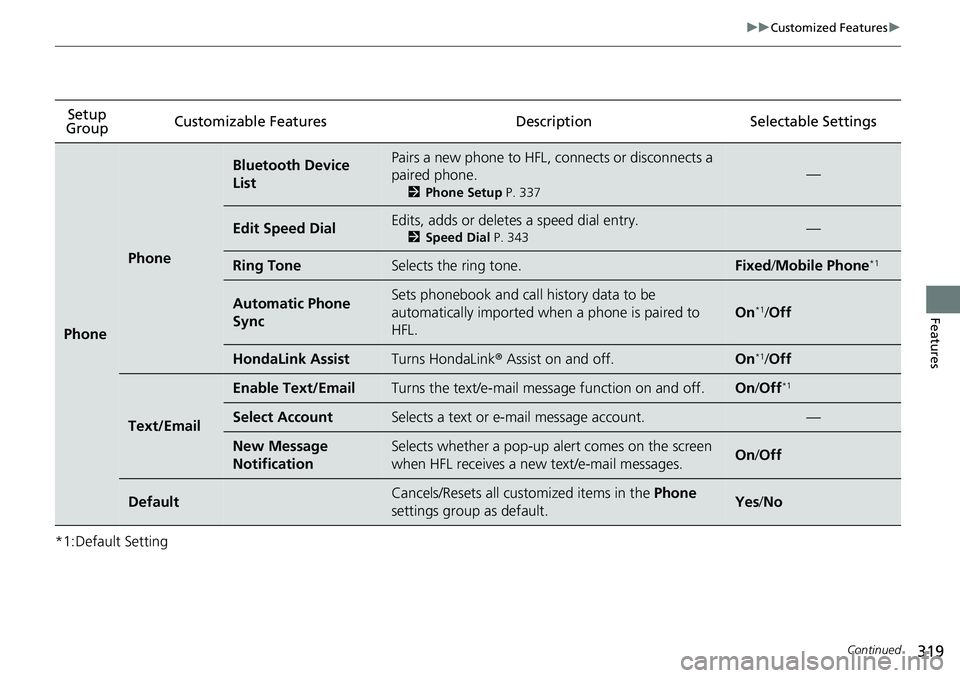
Phone
Phone
Bluetooth Device
ListPairs a new phone to HFL, connects or disconnects a
paired phone.
2Phone Setup P. 337
—
Edit Speed DialEdits, adds or deletes a speed dial entry.
2Speed Dial P. 343—
Ring ToneSelects the ring tone.Fixed/Mobile Phone*1
Automatic Phone
SyncSets phonebook and call history data to be
automatically imported when a phone is paired to
HFL.
On*1/Off
HondaLink AssistTurns HondaLink ® Assist on and off.On*1/Off
Text/Email
Enable Text/EmailTurns the text/e-mail message function on and off.On /Off*1
Select AccountSelects a text or e-mail message account.—
New Message
NotificationSelects whether a pop-up alert comes on the screen
when HFL receives a new text/e-mail messages.On /Off
DefaultCancels/Resets all customized items in the Phone
settings group as default.Yes /No