audio HONDA RIDGELINE 2023 Owners Manual
[x] Cancel search | Manufacturer: HONDA, Model Year: 2023, Model line: RIDGELINE, Model: HONDA RIDGELINE 2023Pages: 598, PDF Size: 12.34 MB
Page 277 of 598
Continued275
uuAudio System Basic Operation uAndroid AutoTM
Features
■ Exit
Select the Exit icon to go back to the home screen.
■
You can check Android notifications.
■
Operate Android Auto with your voice.
When you connect an Android phone to the unit via USB, Android Auto is
automatically initiated.
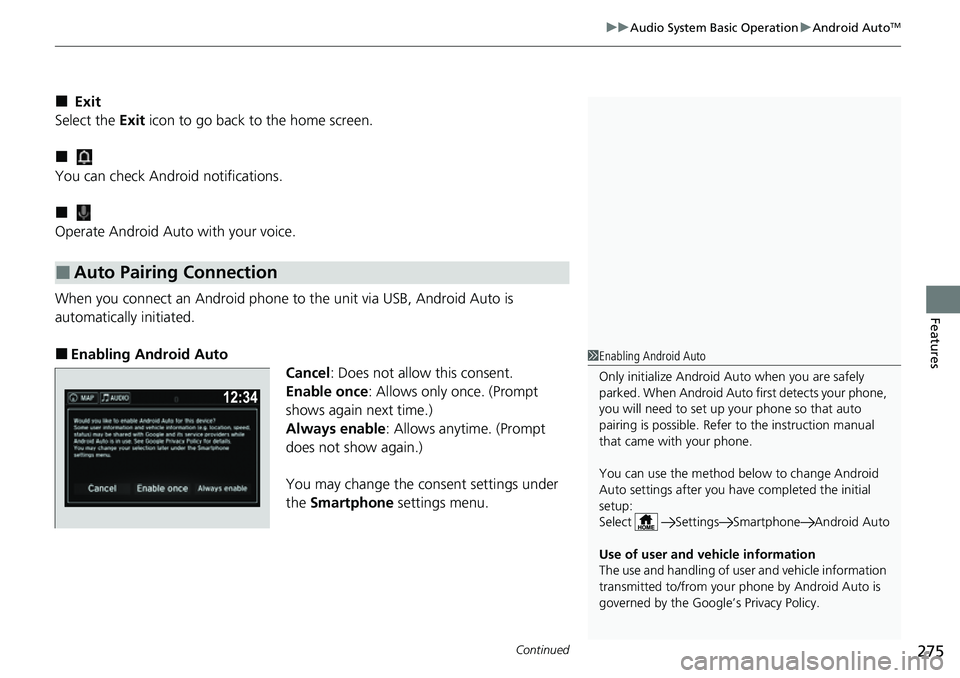
■Enabling Android Auto Cancel: Does not allow this consent.
Enable once : Allows only once. (Prompt
shows again next time.)
Always enable: Allows anytime. (Prompt
does not show again.)
You may change the consent settings under
the Smartphone settings menu.
■Auto Pairing Connection
1Enabling Android Auto
Only initialize Android Auto when you are safely
parked. When Android Auto first detects your phone,
you will need to set up your phone so that auto
pairing is possibl e. Refer to the instruction manual
that came with your phone.
You can use the method below to change Android
Auto settings after you ha ve completed the initial
setup:
Select Settings Sm artphone Android Auto
Use of user and vehicle information
The use and handling of user and vehicle information
transmitted to/from your phone by Android Auto is
governed by the Google’s Privacy Policy.
Page 278 of 598
uuAudio System Basic Operation uAndroid AutoTM
276
Features
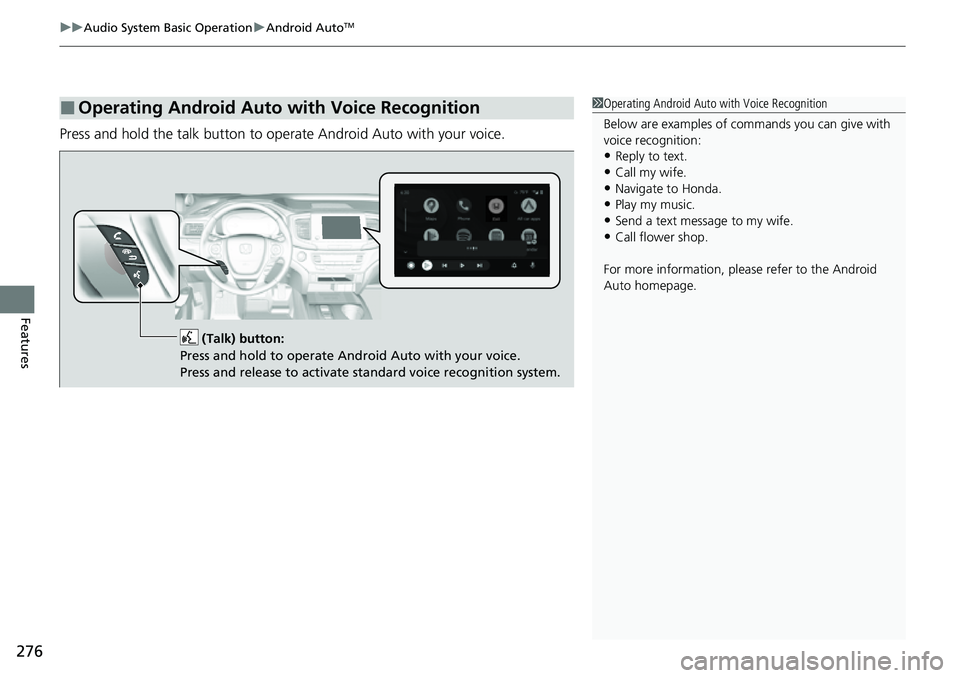
Press and hold the talk button to op erate Android Auto with your voice.
■Operating Android Auto with Voice Recognition1Operating Android Auto with Voice Recognition
Below are examples of co mmands you can give with
voice recognition:
•Reply to text.
•Call my wife.•Navigate to Honda.
•Play my music.
•Send a text message to my wife.•Call flower shop.
For more information, please refer to the Android
Auto homepage.
(Talk) button:
Press and hold to operate Android Auto with your voice.
Press and release to activate standard voice recognition system.
Page 279 of 598
277
uuAudio System Basic Operation uTruck Bed Audio System*
Features
Truck Bed Audio System*
When the vehicle is stopped or moving at speeds up to 9 mph (15 km/h), audio can
be played from the truck bed.
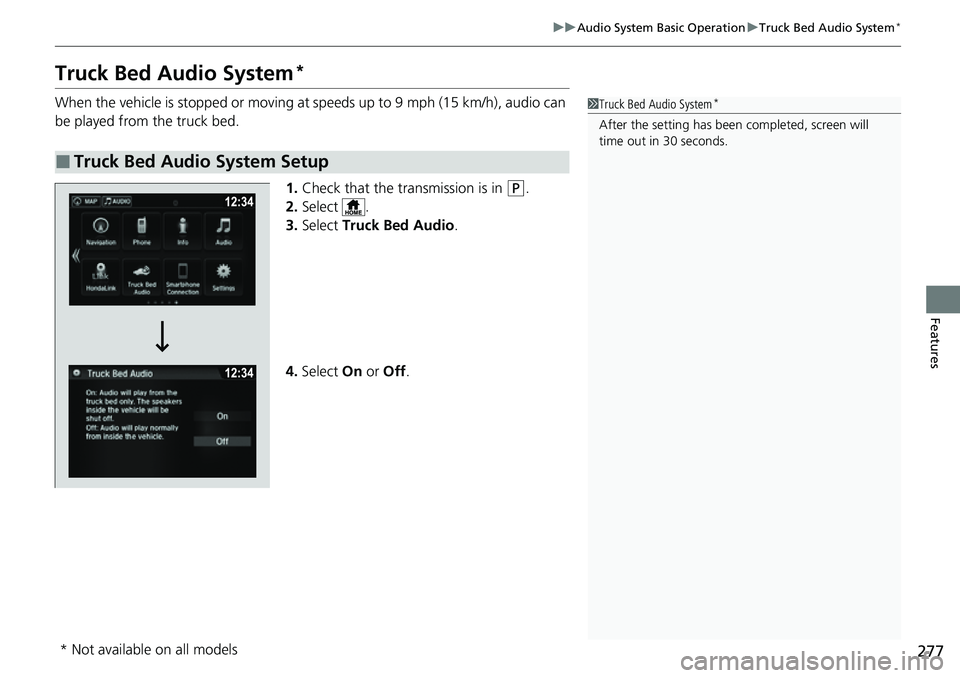
1.Check that the transmission is in
(P.
2. Select .
3. Select Truck Bed Audio .
4. Select On or Off .
■Truck Bed Audio System Setup
1Truck Bed Audio System*
After the setting has been completed, screen will
time out in 30 seconds.
* Not available on all models
Page 280 of 598
278
Features
Audio Error Messages
iPod/USB Flash Drive
If an error occurs while playing an iPod or USB flash drive, you may see the following
error messages. If you cannot clear the error message, contact a dealer.
Error MessageSolution
USB ErrorAppears when there is a problem with th e audio system. Check if the device is
compatible with the audio system.
The connected USB device has a problem.
See Owner's ManualAppears when an incompatible device is connected. Disconnect the device. Then turn
the audio system off, and turn it on again. Do not reconnect the device that caused the
error.
Unsupported VersionAppears when an unsupported iPod is connected. If it appears when a supported iPod
is connected, update the iPod software to the newer version.
Connect RetryAppears when the system does not acknowledge the iPod. Reconnect the iPod.
Unplayable FileAppears when the files in the USB flash dr ive are DRM or an unsupported format. This
error message appears for about three seconds, then plays the next file.
No Data
Appears when the iPod is empty.
Appears when the USB flash drive is empty or there are no MP3, WMA, or AAC files in
the USB flash drive.
Check that compatible files are stored on the device.
UnsupportedAppears when an unsupported device is conn ected. If it appears when a supported
device is connected, reconnect the device.
iPod
USB flash drive
iPod and USB flash drive
Page 281 of 598
279
uuAudio Error Messages uPandora ®*
Features
Pandora ®*
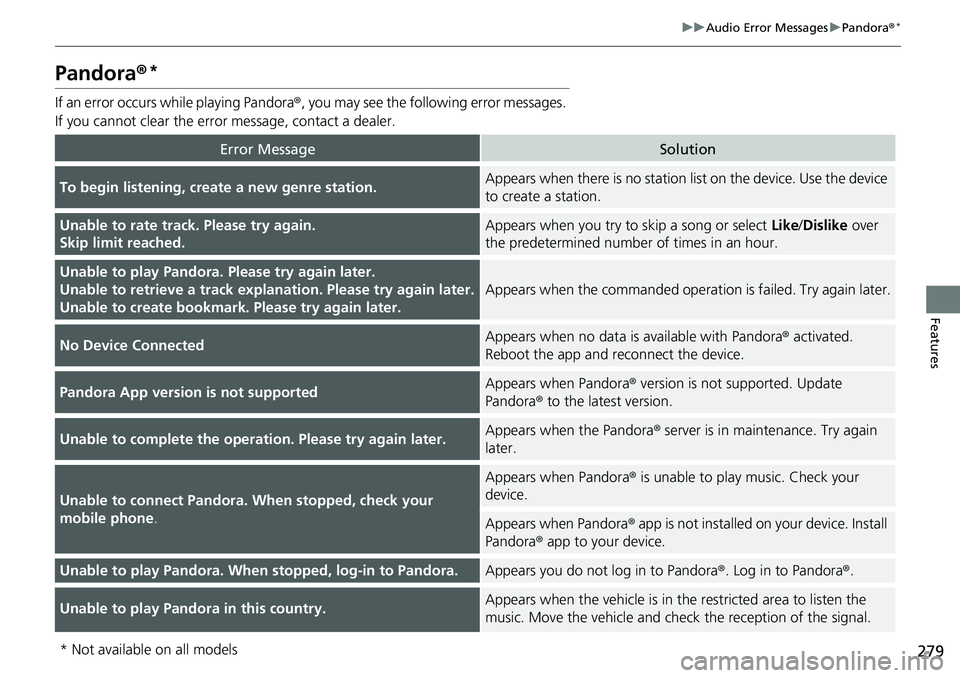
If an error occurs while playing Pandora ®, you may see the following error messages.
If you cannot clear the error message, contact a dealer.
Error MessageSolution
To begin listening, create a new genre station.Appears when there is no station list on the device. Use the device
to create a station.
Unable to rate track. Please try again.
Skip limit reached.Appears when you try to skip a song or select Like/Dislike over
the predetermined number of times in an hour.
Unable to play Pandora. Please try again later.
Unable to retrieve a track explanation. Please try again later.
Unable to create bookmark. Please try again later.
Appears when the commanded operat ion is failed. Try again later.
No Device ConnectedAppears when no data is available with Pandora ® activated.
Reboot the app and reconnect the device.
Pandora App version is not supportedAppears when Pandora® version is not supported. Update
Pandora ® to the latest version.
Unable to complete the operation. Please try again later.Appears when the Pandora ® server is in maintenance. Try again
later.
Unable to connect Pandora. When stopped, check your
mobile phone .
Appears when Pandora® is unable to play music. Check your
device.
Appears when Pandora ® app is not installed on your device. Install
Pandora ® app to your device.
Unable to play Pandora. When stopped, log-in to Pandora.Appears you do not log in to Pandora ®. Log in to Pandora®.
Unable to play Pandora in this country.Appears when the vehicle is in th e restricted area to listen the
music. Move the vehicle and check the reception of the signal.
* Not available on all models
Page 282 of 598
280
uuAudio Error Messages uAndroid/Apps
Features
Android/Apps
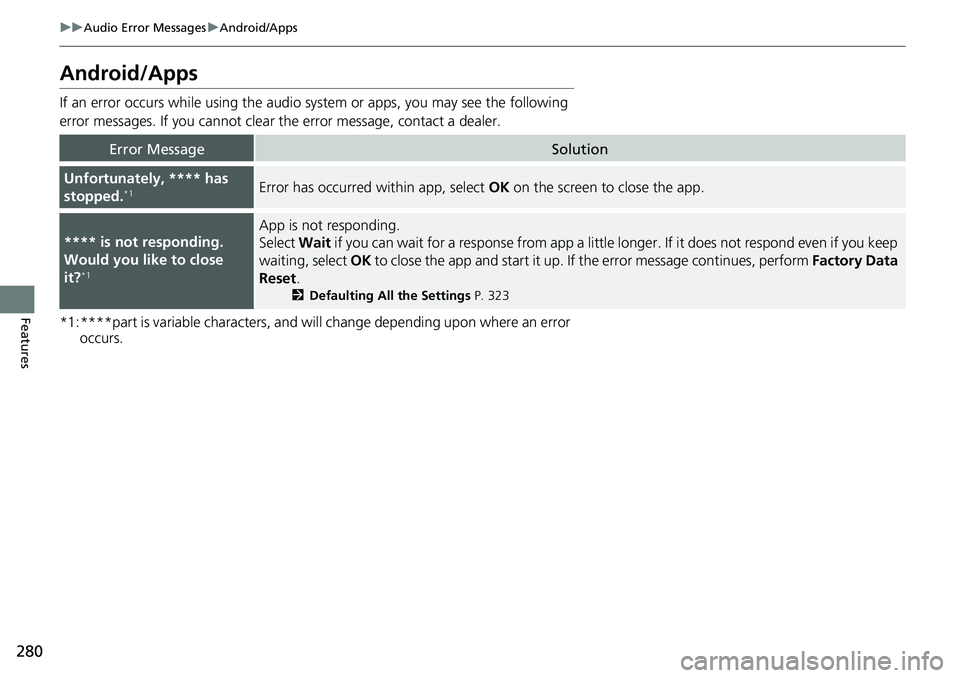
If an error occurs while using the audio system or apps, you may see the following
error messages. If you cannot clear the error message, contact a dealer.
*1:****part is variable characters, and will change depending upon where an error occurs.
Error MessageSolution
Unfortunately, **** has
stopped.*1Error has occurred within app, select OK on the screen to close the app.
**** is not responding.
Would you like to close
it?
*1
App is not responding.
Select Wait if you can wait for a response from app a littl e longer. If it does not respond even if you keep
waiting, select OK to close the app and start it up. If the error message continues, perform Factory Data
Reset .
2Defaulting All the Settings P. 323
Page 283 of 598
281
Features
General Information on the Audio System
SiriusXM® Radio Service*
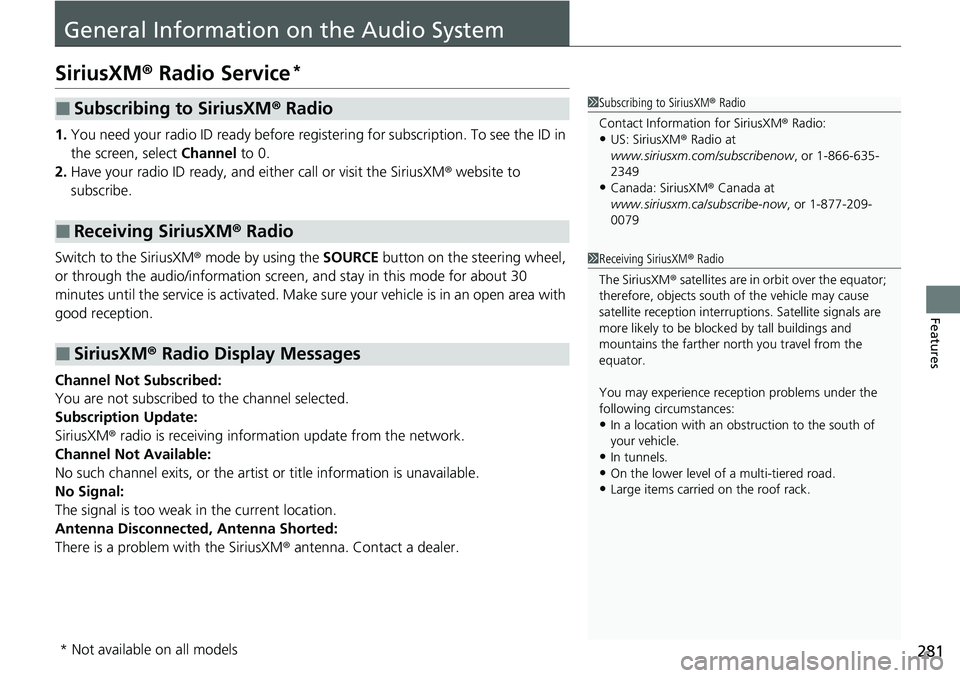
1.You need your radio ID ready before regist ering for subscription. To see the ID in
the screen, select Channel to 0.
2. Have your radio ID ready, and either call or visit the SiriusXM® website to
subscribe.
Switch to the SiriusXM ® mode by using the SOURCE button on the steering wheel,
or through the audio/information screen, and stay in this mode for about 30
minutes until the service is activated. Make sure your vehicle is in an open area with
good reception.
Channel Not Subscribed:
You are not subscribed to the channel selected.
Subscription Update:
SiriusXM ® radio is receiving informati on update from the network.
Channel Not Available:
No such channel exits, or the artist or title information is unavailable.
No Signal:
The signal is too weak in the current location.
Antenna Disconnected, Antenna Shorted:
There is a problem with the SiriusXM ® antenna. Contact a dealer.
■Subscribing to SiriusXM® Radio
■Receiving SiriusXM ® Radio
■SiriusXM ® Radio Display Messages
1 Subscribing to SiriusXM ® Radio
Contact Information for SiriusXM ® Radio:
•US: SiriusXM ® Radio at
www.siriusxm.com/subscribenow , or 1-866-635-
2349
•Canada: SiriusXM ® Canada at
www.siriusxm.ca/subscribe-now , or 1-877-209-
0079
1 Receiving SiriusXM ® Radio
The SiriusXM ® satellites are in orbit over the equator;
therefore, objects south of the vehicle may cause
satellite reception interruptions. Sa tellite signals are
more likely to be blocked by tall buildings and
mountains the farther north you travel from the
equator.
You may experience rece ption problems under the
following circumstances:
•In a location with an obstruction to the south of
your vehicle.
•In tunnels.
•On the lower level of a multi-tiered road.
•Large items carried on the roof rack.
* Not available on all models
Page 284 of 598
282
uuGeneral Information on the Audio System uCompatible iPod, iPhone, and USB Flash Drives
Features
Compatible iPod, iPhone, and USB Flash Drives
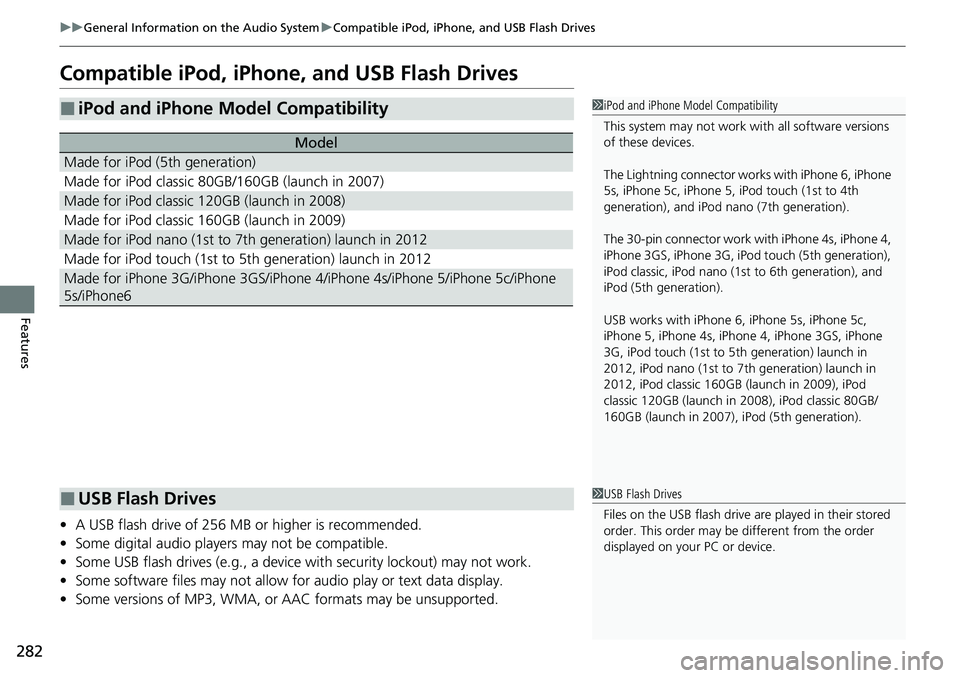
• A USB flash drive of 256 MB or higher is recommended.
• Some digital audio players may not be compatible.
• Some USB flash drives (e.g., a device with security lockout) may not work.
• Some software files may not allow for audio play or text data display.
• Some versions of MP3, WMA, or AAC formats may be unsupported.
■iPod and iPhone Model Compatibility
Model
Made for iPod (5th generation)
Made for iPod classic 80GB/160GB (launch in 2007)
Made for iPod classic 120GB (launch in 2008)
Made for iPod classic 160GB (launch in 2009)
Made for iPod nano (1st to 7th generation) launch in 2012
Made for iPod touch (1st to 5th generation) launch in 2012
Made for iPhone 3G/iPhone 3GS/iPhone 4/iPhone 4s/iPhone 5/iPhone 5c/iPhone
5s/iPhone6
1 iPod and iPhone Model Compatibility
This system may not work with all software versions
of these devices.
The Lightning connector work s with iPhone 6, iPhone
5s, iPhone 5c, iPhone 5, iPod touch (1st to 4th
generation), and iPod na no (7th generation).
The 30-pin connector work wi th iPhone 4s, iPhone 4,
iPhone 3GS, iPhone 3G, iPod touch (5th generation),
iPod classic, iPod nano (1st to 6th generation), and
iPod (5th generation).
USB works with iPhone 6, iPhone 5s, iPhone 5c,
iPhone 5, iPhone 4s, iPhone 4, iPhone 3GS, iPhone
3G, iPod touch (1st to 5th generation) launch in
2012, iPod nano (1st to 7th generation) launch in
2012, iPod classic 160GB (launch in 2009), iPod
classic 120GB (launch in 2008), iPod classic 80GB/
160GB (launch in 2007), iPod (5th generation).
■USB Flash Drives1 USB Flash Drives
Files on the USB flash drive are played in their stored
order. This order may be different from the order
displayed on your PC or device.
Page 285 of 598
283
uuGeneral Information on the Audio System uHonda App License Agreement
Continued
Features
Honda App License Agreement
PLEASE CAREFULLY READ THIS END USER LICENSE AGREEMENT (THI S “AGREEMENT”) WHICH GOVERNS YOUR USE OF THE SOFTWARE
INSTALLED ON YOUR HONDA OR ACURA VEHICLE (YOUR “VEHICLE”) AS WELL AS THE APPLICATIONS, SERVICES, FUNCTIONS, AND
CONTENT PROVIDED THROUGH THE SOFTWARE (COLLECTIVELY, THE “SERVICES”). YOUR USE OF THE SOFTWARE OR SERVICES WILL
SERVE AS YOUR CONSENT TO THE TERMS OF THIS AGREEMENT. THE SOFTWARE IS OWNED (OR LICENSED), PROVIDED, AND/OR
OPERATED BY AMERICAN HONDA MOTOR CO . INC., (“HONDA,” “US,” “WE,” OR “OUR”), WITH ITS BUSINESS ADDRESS AT 1919
TORRANCE BLVD., TORRANCE, CA 90501. REFERENCE TO “HONDA” IN THIS AGREEMENT INCLUDES HONDA’S PARENT COMPANY AND
ITS AFFILIATES AND DESIGNATED AGENTS. THE SERVICES ARE OWNED (OR LICENSED), PR OVIDED, AND/OR OPERATED BY HONDA OR A
THIRD-PARTY SERVICE PROVIDER (A “PROVI DER”). REFERENCE TO A “PROVIDER” IN THIS AGREEMENT INCLUDES SUCH PROVIDER’S
PARENT COMPANY, AFFILIATES, AND DESIGNATED AGENTS.
A. Description of the Software. The SOFTWARE includes the software, firmware and the like, installed and executing on your VEHICLE
during manufacture, and thereafter updated from time to time by HONDA, you or an authorized HONDA dealer (a “DEALER”). The
SOFTWARE allows you to access and use a variety of SERVICES, including but not limited to: (a) HONDA applications, services, an d content
provided through the SOFTWARE (together, “H ONDA SERVICES”); and (b) PROVIDER applicatio ns, services, and content provided through
the SOFTWARE (together, “PROVIDER SERVICES” ), each of which may provide access to various information, media, content, and services.
B. SOFTWARE Licensing and Intellectual Property.
1. SOFTWARE. This AGREEMENT grants you a non-exclus ive, limited, and revocable license to use the SOFTWARE and SERVICES solely (a)
as installed on your VEHICLE by HONDA, (b) as updated on your Vehicle by HONDA, you (but only as and when directed by HONDA), or a
DEALER and (c) as permitted under the terms of this AGREEMENT.
2. HONDA Services. The SOFTWARE may provide you with access to various HONDA SERVICES. Inst allation, activation, or use of HONDA
SERVICES may require your consent to addi tional terms, conditions, and privacy policies applicable to those HONDA SERVICES (the
“HONDA TERMS”). You acknowledge and agree that any collection, use, sharing of data generated by yo ur VEHICLE or your use of your
VEHICLE, and your use of the HONDA SERVIC ES shall be subject to this AGREEMENT and any additional HONDA TERMS that may be
specifically applicable to such HONDA SERVICES or data generation. The HONDA SERVI CES may collect, use, and share such data while
you are using the SOFTWARE.
■END USER LICENSE AGREEMENT
Page 286 of 598
284
uuGeneral Information on the Audio System uHonda App License Agreement
Features
3. Open-Source Software. The SOFTWARE and SERVICES may incorporate softw are licensed to HONDA under free or open-source
licenses which govern HONDA’s distri bution and your use of such software. HONDA and the third-party authors, licensors, and distributors
of such software disclaim all warranties and all liability ar ising from any and all use or distribution of the software. To the extent such
software is provided under terms that diffe r from the applicable free or open-source licenses, those terms are offered by HONDA alone.
Additional information regarding free and open -source software incorporated in the SOFTWARE and SERVICES is available in this m anual
or within the SOFTWARE.
4. Provider Services. The SOFTWARE may provide you with access to various PR OVIDER SERVICES. Installation or use of such PROVIDER
SERVICES may require your consent to additi onal terms, conditions, and privacy policies of the applicable PROVIDER (the “PROVIDER
TERMS”). This AGREEMENT restricts the manner in which you can in stall and use PROVIDER SERVICES but does not grant you a license or
permission to use such PROVIDER SERVICES. Your permission to use PROVIDER SERVICES is limited a nd subject to any license grants,
conditions, and limitations included in the PROVIDER TERMS. You ac knowledge that any collection, use, sharing of your information,
targeted advertising practices by PROVIDERS, and your use of the PROVIDER SERVICES shall be subject to both this AGREEMENT and any
applicable PROVIDER TERMS. The PROVIDER SERVICES may collect, use, and share such information while you are using the SOFTWARE.
5. License Limitations and Restrictions on Use.
(a) Limited License.
You understand and agree that the SOFT WARE and SERVICES are licensed, not sold, to you solely for use in accordance
with this AGREEMENT and any applicable PR OVIDER TERMS, and any documentation for th e VEHICLE made available to you by HONDA
(any “DOCUMENTATION”). HONDA and its licenso rs reserve all rights in the SOFTWARE and HONDA SERVICES not expressly granted to
you under this AGREEMENT. PROVIDERS and th eir licensors reserve all rights in the PROVIDER SERVICES not expressly granted to yo u under
the applicable PROVIDER TERMS.