accessory power mode HONDA RIDGELINE 2023 User Guide
[x] Cancel search | Manufacturer: HONDA, Model Year: 2023, Model line: RIDGELINE, Model: HONDA RIDGELINE 2023Pages: 598, PDF Size: 12.34 MB
Page 159 of 598
157
uuOperating the Switches Around the Steering Wheel uWipers and Washers
Continued
Controls
Wipers and Washers
The windshield wipers and washers can be
used when the power mode is in ON.
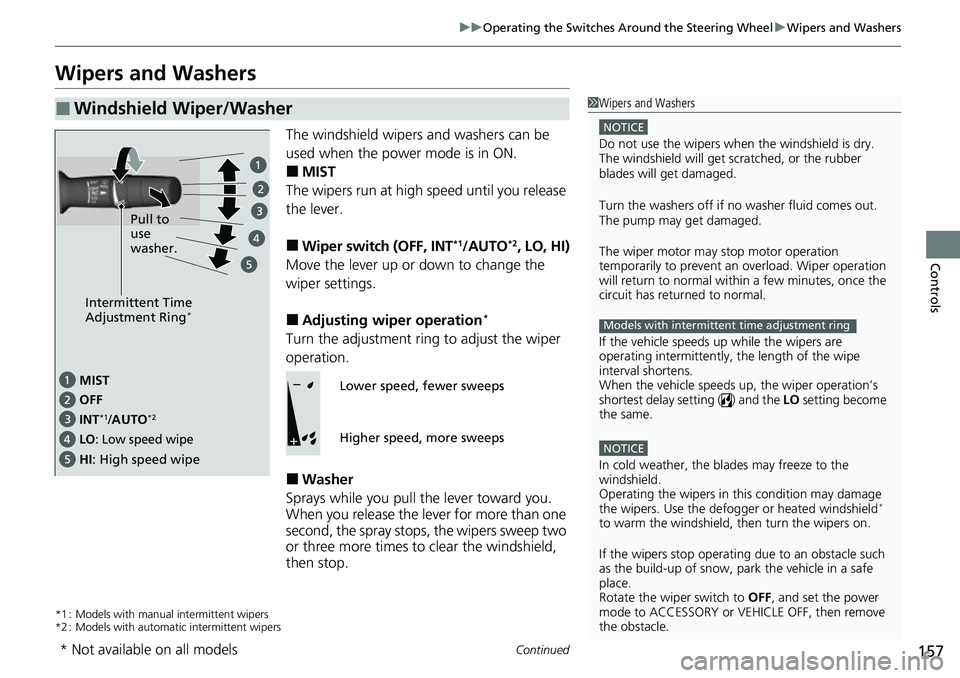
■MIST
The wipers run at high speed until you release
the lever.
■Wiper switch (OFF, INT*1/AUTO*2, LO, HI)
Move the lever up or down to change the
wiper settings.
■Adjusting wiper operation*
Turn the adjustment ring to adjust the wiper
operation.
■Washer
Sprays while you pull the lever toward you.
When you release the le ver for more than one
second, the spray stops, the wipers sweep two
or three more times to clear the windshield,
then stop.
*1 : Models with manual intermittent wipers
*2 : Models with automatic intermittent wipers
■Windshield Wiper/Washer1 Wipers and Washers
NOTICE
Do not use the wipers when the windshield is dry.
The windshield will get sc ratched, or the rubber
blades will get damaged.
Turn the washers off if no washer fluid comes out.
The pump may get damaged.
The wiper motor may stop motor operation
temporarily to prevent an overload. Wiper operation
will return to normal within a few minutes, once the
circuit has returned to normal.
If the vehicle speeds up while the wipers are
operating intermittently, the length of the wipe
interval shortens.
When the vehicle speeds up, the wiper operation’s
shortest delay setting ( ) and the LO setting become
the same.
NOTICE
In cold weather, the blades may freeze to the
windshield.
Operating the wipers in th is condition may damage
the wipers. Use the defogge r or heated windshield
*
to warm the windshield, then turn the wipers on.
If the wipers st op operating due to an obstacle such
as the build-up of snow, pa rk the vehicle in a safe
place.
Rotate the wiper switch to OFF, and set the power
mode to ACCESSORY or VEHICLE OFF, then remove
the obstacle.
Models with intermittent time adjustment ring
Intermittent Time
Adjustment Ring*
MIST
INT
*1/AUTO*2OFF
LO: Low speed wipe
HI: High speed wipe Pull to
use
washer.
Lower speed, fewer sweeps
Higher speed, more sweeps
* Not available on all models
Page 163 of 598
161
uuOperating the Switches Around the Steering Wheel uDriving Position Memory System*
Continued
Controls
Driving Position Memory System*
You can store two driver’s seat (except for power lumbar) and door mirror positions
with the driving position memory system.
When you unlock and open the driver’s door with a remote transmitter or keyless
access system, the seat and door mirrors adjust automatically to one of the two
preset positions.
When you enter the vehicle, the multi-in formation display briefly shows you which
remote transmitter you used to unlock the vehicle.
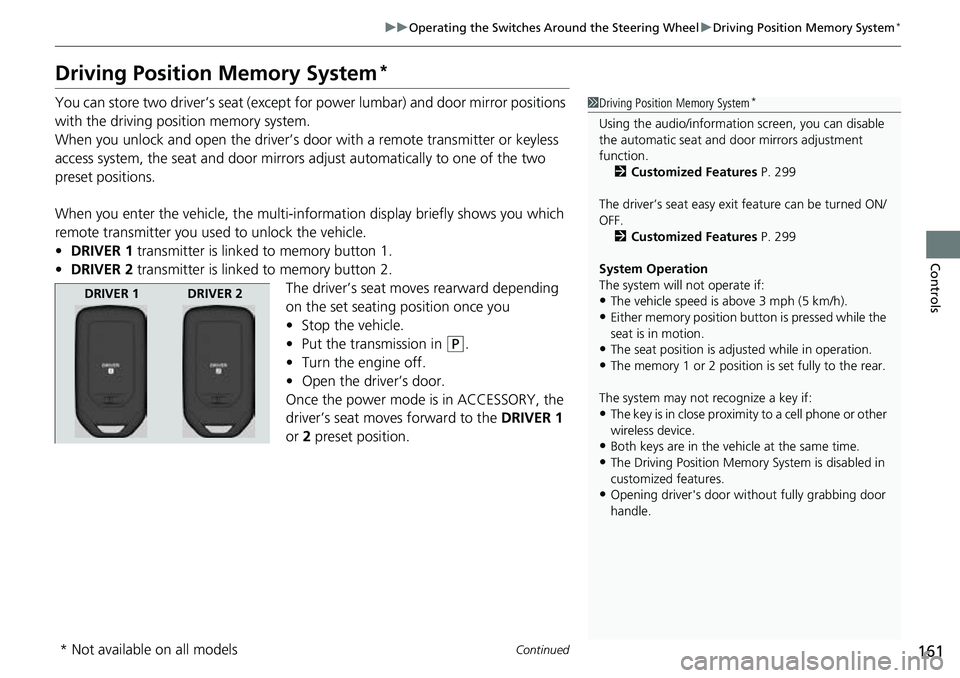
• DRIVER 1 transmitter is linked to memory button 1.
• DRIVER 2 transmitter is linked to memory button 2.
The driver’s seat moves rearward depending
on the set seating position once you
•Stop the vehicle.
• Put the transmission in
(P.
• Turn the engine off.
• Open the driv er’s door.
Once the power mode is in ACCESSORY, the
driver’s seat moves forward to the DRIVER 1
or 2 preset position.
1 Driving Position Memory System*
Using the audio/informati on screen, you can disable
the automatic seat and d oor mirrors adjustment
function. 2 Customized Features P. 299
The driver’s seat easy exit feature can be turned ON/
OFF. 2 Customized Features P. 299
System Operation
The system will not operate if:
•The vehicle speed is above 3 mph (5 km/h).•Either memory position button is pressed while the
seat is in motion.
•The seat position is adju sted while in operation.•The memory 1 or 2 position is set fully to the rear.
The system may not recognize a key if:
•The key is in close proximity to a cell phone or other
wireless device.
•Both keys are in the vehicle at the same time.•The Driving Position Memory System is disabled in
customized features.
•Opening driver's door wi thout fully grabbing door
handle.
DRIVER 1 DRIVER 2
* Not available on all models
Page 177 of 598
175Continued
Controls
Interior/Exterior Convenience Items
Interior Lights
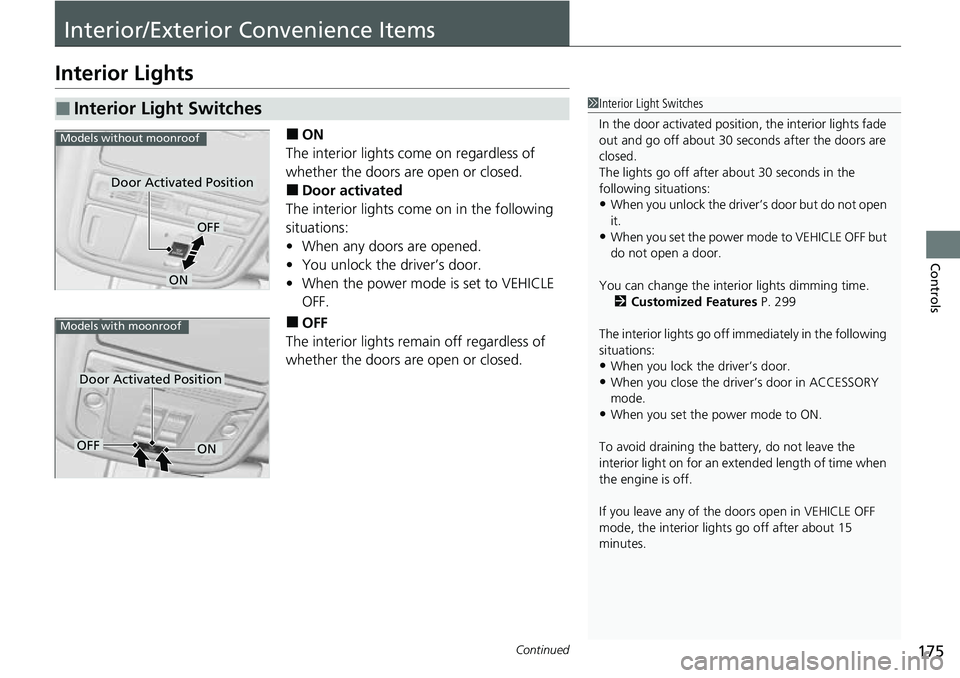
■ON
The interior lights come on regardless of
whether the doors are open or closed.
■Door activated
The interior lights come on in the following
situations:
• When any doors are opened.
• You unlock the driver’s door.
• When the power mode is set to VEHICLE
OFF.
■OFF
The interior lights remain off regardless of
whether the doors are open or closed.
■Interior Light Switches1 Interior Light Switches
In the door activated position, the interior lights fade
out and go off about 30 seconds after the doors are
closed.
The lights go off after about 30 seconds in the
following situations:
•When you unlock the driver’s door but do not open
it.
•When you set the power mode to VEHICLE OFF but
do not open a door.
You can change the interi or lights dimming time.
2 Customized Features P. 299
The interior lights go off im mediately in the following
situations:
•When you lock the driver’s door.•When you close the driver’s door in ACCESSORY
mode.
•When you set the power mode to ON.
To avoid draining the ba ttery, do not leave the
interior light on for an extended length of time when
the engine is off.
If you leave any of the doors open in VEHICLE OFF
mode, the interior light s go off after about 15
minutes.
Door Activated Position
OFF
ON
Models without moonroof
Door Activated Position
Models with moonroof
OFFON
Page 184 of 598
182
uuInterior/Exterior Convenience Items uOther Interior Convenience Items
Controls
Other Interior Convenience Items
The accessory power sockets can be used when the power mode is in ACCESSORY
or ON.
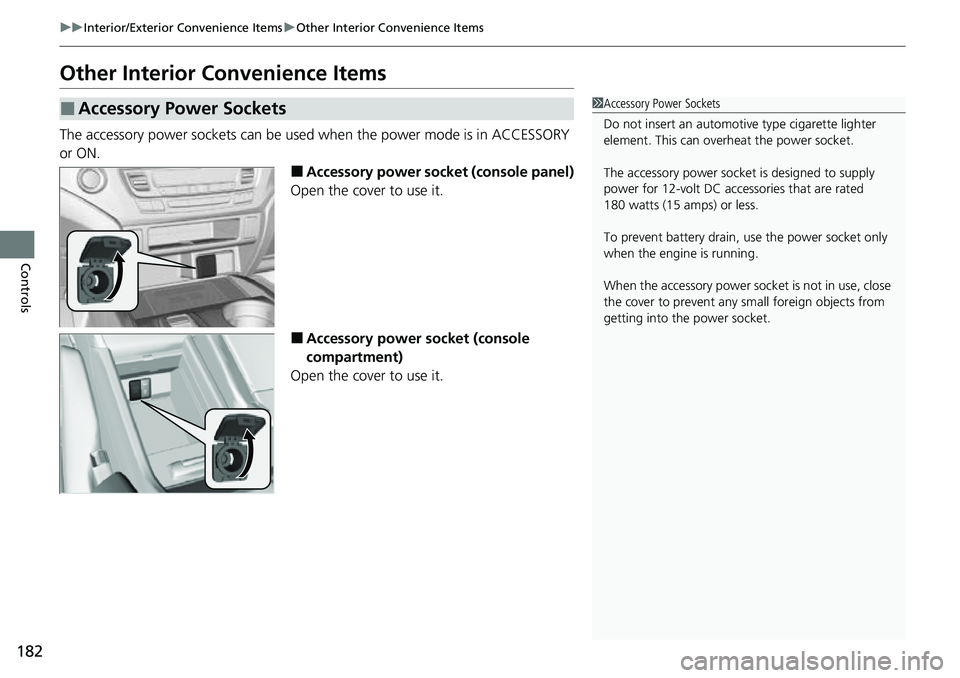
■Accessory power socket (console panel)
Open the cover to use it.
■Accessory power socket (console
compartment)
Open the cover to use it.
■Accessory Power Sockets1 Accessory Power Sockets
Do not insert an automotive type cigarette lighter
element. This can overheat the power socket.
The accessory power socket is designed to supply
power for 12-volt DC accessories that are rated
180 watts (15 amps) or less.
To prevent battery drain, use the power socket only
when the engine is running.
When the accessory power soc ket is not in use, close
the cover to prevent any small foreign objects from
getting into the power socket.
Page 185 of 598
Continued183
uuInterior/Exterior Convenience Items uOther Interior Convenience Items
Controls
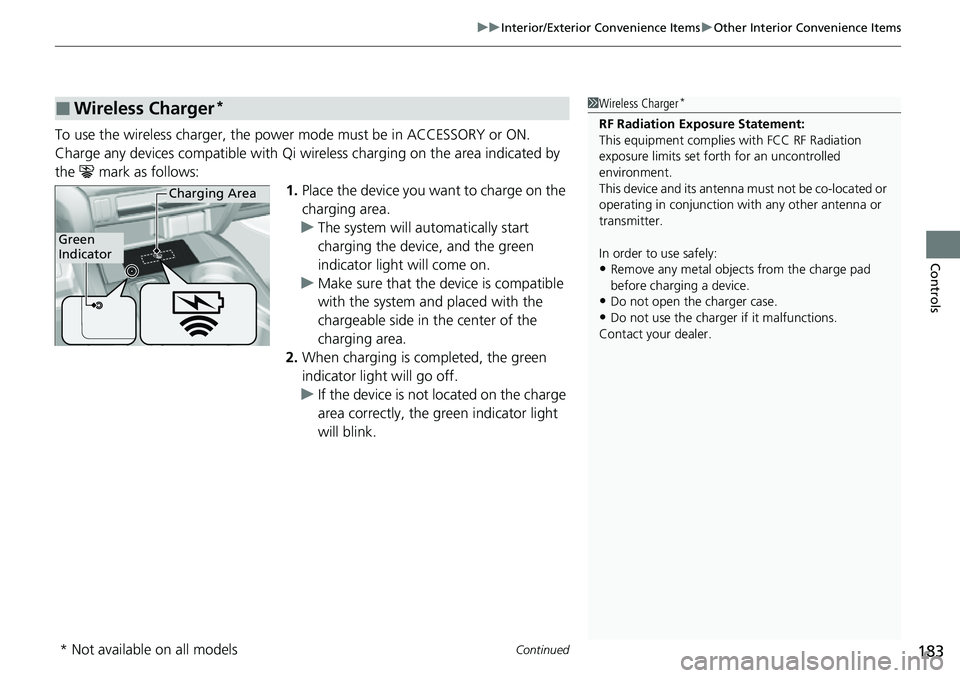
To use the wireless charger, the power mode must be in ACCESSORY or ON.
Charge any devices compatible with Qi wi reless charging on the area indicated by
the mark as follows: 1.Place the device you want to charge on the
charging area.
u The system will au tomatically start
charging the device, and the green
indicator light will come on.
u Make sure that the device is compatible
with the system and placed with the
chargeable side in the center of the
charging area.
2. When charging is completed, the green
indicator light will go off.
u If the device is not located on the charge
area correctly, the green indicator light
will blink.
■Wireless Charger*1Wireless Charger*
RF Radiation Exposure Statement:
This equipment complies with FCC RF Radiation
exposure limits set forth for an uncontrolled
environment.
This device and its antenna must not be co-located or
operating in conjunction with any other antenna or
transmitter.
In order to use safely:
•Remove any metal objects from the charge pad
before charging a device.
•Do not open the charger case.
•Do not use the charger if it malfunctions.
Contact your dealer.
Green
Indicator
Charging Area
* Not available on all models
Page 193 of 598
191
uuInterior/Exterior Convenience Items uIn-Bed Convenience Items
Continued
Controls
In-Bed Convenience Items
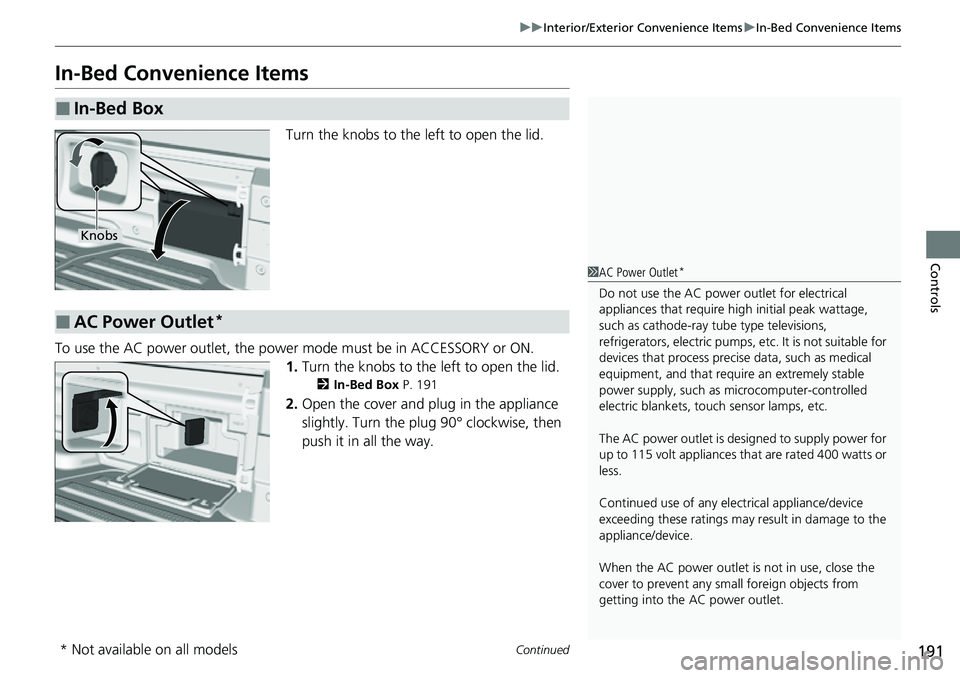
Turn the knobs to the left to open the lid.
To use the AC power outlet, the power mode must be in ACCESSORY or ON. 1.Turn the knobs to the left to open the lid.
2 In-Bed Box P. 191
2.Open the cover and plug in the appliance
slightly. Turn the plug 90° clockwise, then
push it in all the way.
■In-Bed Box
Knobs
■AC Power Outlet*
1AC Power Outlet*
Do not use the AC power outlet for electrical
appliances that require high initial peak wattage,
such as cathode-ray tube type televisions,
refrigerators, electric pumps, etc. It is not suitable for
devices that process precis e data, such as medical
equipment, and that require an extremely stable
power supply, such as microcomputer-controlled
electric blankets, touc h sensor lamps, etc.
The AC power outlet is desi gned to supply power for
up to 115 volt appliances that are rated 400 watts or
less.
Continued use of any elec trical appliance/device
exceeding these ratings may result in damage to the
appliance/device.
When the AC power outlet is not in use, close the
cover to prevent any small foreign objects from
getting into the AC power outlet.
* Not available on all models
Page 194 of 598
uuInterior/Exterior Convenience Items uIn-Bed Convenience Items
192
Controls
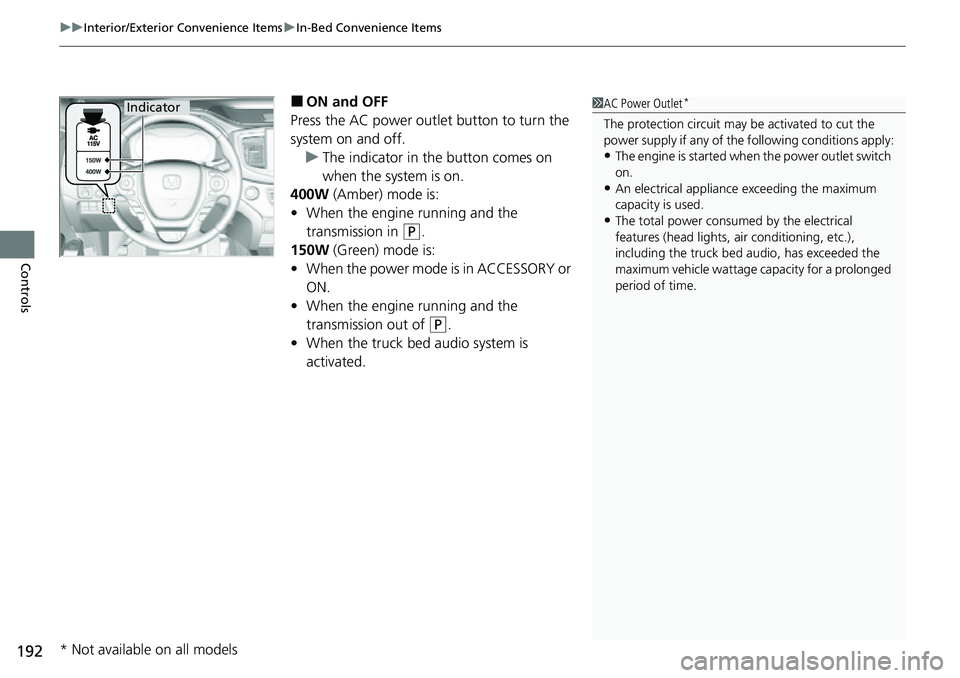
■ON and OFF
Press the AC power outlet button to turn the
system on and off. u The indicator in the button comes on
when the system is on.
400W (Amber) mode is:
• When the engine running and the
transmission in
(P.
150W (Green) mode is:
• When the power mode is in ACCESSORY or
ON.
• When the engine running and the
transmission out of
(P.
• When the truck bed audio system is
activated.
1AC Power Outlet*
The protection circuit may be activated to cut the
power supply if any of th e following conditions apply:
•The engine is started when the power outlet switch
on.
•An electrical appliance exceeding the maximum
capacity is used.
•The total power consumed by the electrical
features (head lights, air conditioning, etc.),
including the truck bed a udio, has exceeded the
maximum vehicle wattage ca pacity for a prolonged
period of time.
Indicator
* Not available on all models
Page 195 of 598
Continued193
uuInterior/Exterior Convenience Items uIn-Bed Convenience Items
Controls
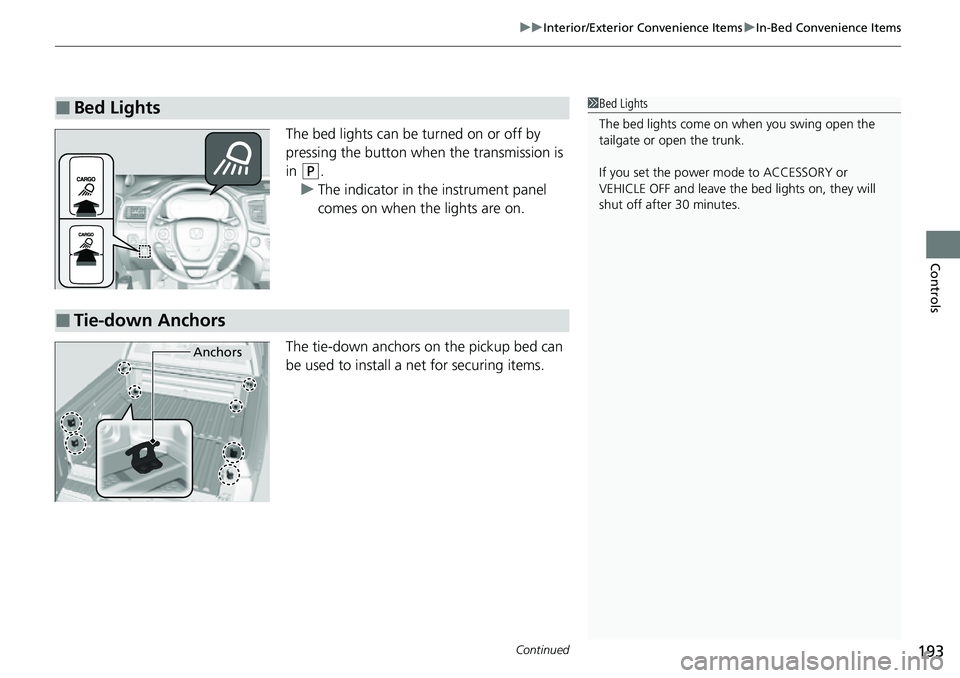
The bed lights can be turned on or off by
pressing the button when the transmission is
in
(P.
u The indicator in the instrument panel
comes on when the lights are on.
The tie-down anchors on the pickup bed can
be used to install a net for securing items.
■Bed Lights1Bed Lights
The bed lights come on when you swing open the
tailgate or open the trunk.
If you set the power mode to ACCESSORY or
VEHICLE OFF and leave the bed lights on, they will
shut off after 30 minutes.
■Tie-down Anchors
Anchors
Page 213 of 598
211
Features
Audio System Basic Operation
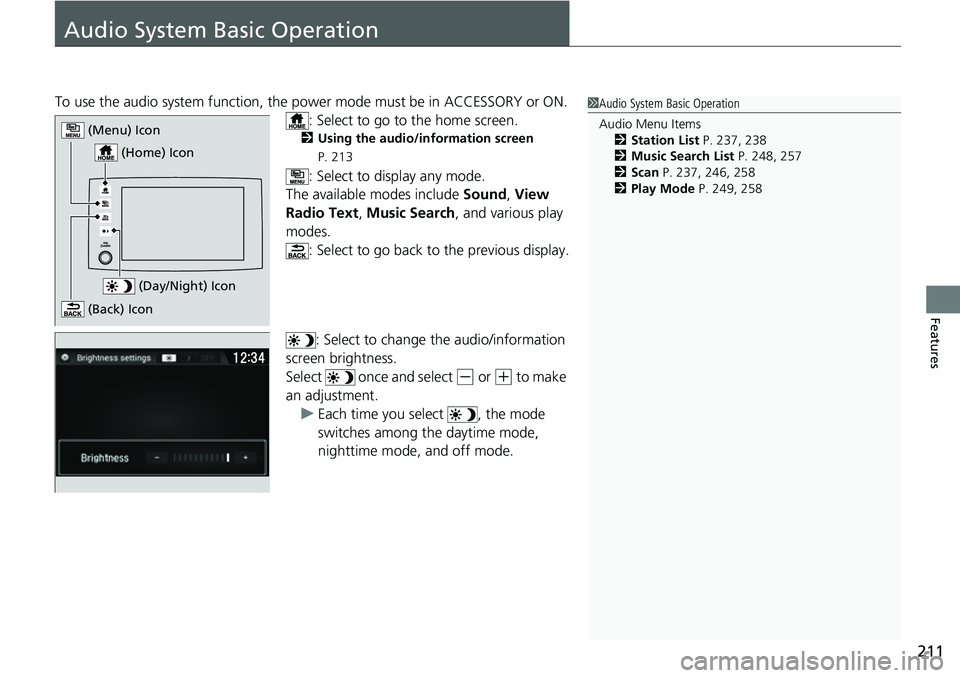
To use the audio system function, the power mode must be in ACCESSORY or ON.
: Select to go to the home screen.
2 Using the audio/information screen
P. 213
: Select to display any mode.
The available modes include Sound, View
Radio Text , Music Search, and various play
modes. : Select to go back to the previous display.
: Select to change the audio/information
screen brightness.
Select once and select
(- or (+ to make
an adjustment.
u Each time you select , the mode
switches among the daytime mode,
nighttime mode, and off mode.
1Audio System Basic Operation
Audio Menu Items
2 Station List P. 237, 238
2 Music Search List P. 248, 257
2 Scan P. 237, 246, 258
2 Play Mode P. 249, 258
(Day/Night) Icon
(Home) Icon
(Menu) Icon
(Back) Icon
Page 394 of 598
392
uuWhen Driving uPrecautions While Driving
Driving
Precautions While Driving
Utility vehicles have a significantly higher rollover rate than other types of vehicles.
To prevent rollovers or loss of control:
• Take corners at slower speeds than yo u would with a passenger vehicle.
• Avoid sharp turns and abrupt maneuvers whenever possible.
• Do not modify your vehicle in any way that you would raise the center of gravity.
• Do not carry heavy cargo on the roof.
Never carry more than 165 lbs (75 kg) of cargo on the roof rack (Honda accessory).
Avoid driving in deep water and on flooded roads. This can damage the engine or
driveline, or cause electrical component failure.
If there is a strong impact with something under the vehicle, stop in a safe location.
Check the underside of the vehicle for damage or any fluid leaks.
■Driving Guidelines for Your Utility Vehicle
■In Rain
■Other Precautions
1 Precautions While Driving
NOTICE
Do not select a shift button while pressing the
accelerator pedal. You could damage the
transmission.
NOTICE
If you repeatedly turn the steering wheel at an
extremely low speed, or hold the steering wheel in
the full left or right position for a while, the electric
power steering (EPS) system heats up. The system
goes into a protective mode, and limits its
performance. The steering wheel becomes harder
and harder to operate. Once the system cools down,
the EPS system is restor ed. Repeated operation under
these conditions can eventually damage the system.
If the power mode is set to ACCESSORY while
driving, the engine will shut down and all steering
and brake power assist functi ons will stop, making it
difficult to control the vehicle.
Do not select
( N while driving as you will lose engine
braking (and accelera tion) performance.
During the first 600 miles (1,000 km) of operation,
avoid sudden acceleration or full throttle operation so
as not to damage the engine or powertrain.
Avoid hard braking for the first 200 miles (300 km)
after purchasing your new vehicle or replacing the
brake pads or rotors, to allow for proper break-in.