climate control HONDA RIDGELINE 2023 User Guide
[x] Cancel search | Manufacturer: HONDA, Model Year: 2023, Model line: RIDGELINE, Model: HONDA RIDGELINE 2023Pages: 598, PDF Size: 12.34 MB
Page 109 of 598
107
uuIndicators uMulti-Information Display Warning and Information Messages
Continued
Instrument Panel
MessageConditionExplanation
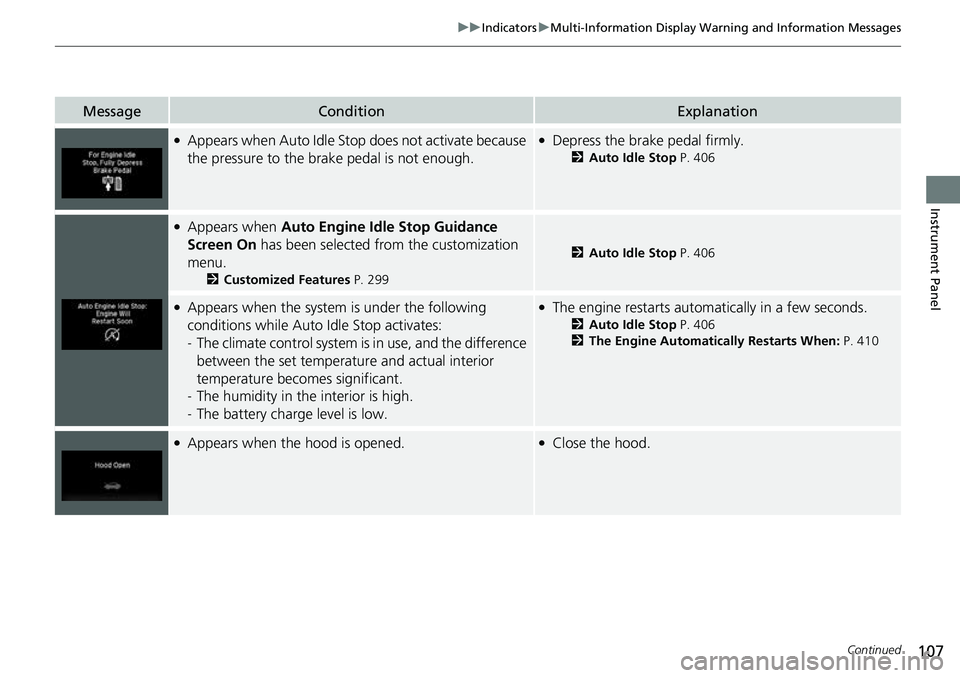
●Appears when Auto Idle St op does not activate because
the pressure to the brake pedal is not enough.●Depress the brake pedal firmly.
2 Auto Idle Stop P. 406
●Appears when Auto Engine Idle Stop Guidance
Screen On has been selected from the customization
menu.
2 Customized Features P. 299
2Auto Idle Stop P. 406
●Appears when the system is under the following
conditions while Auto Idle Stop activates:
- The climate control system is in use, and the difference
between the set temperature and actual interior
temperature becomes significant.
- The humidity in the interior is high.
- The battery charge level is low.●The engine restarts automatically in a few seconds.
2 Auto Idle Stop P. 406
2 The Engine Automatically Restarts When: P. 410
●Appears when the hood is opened.●Close the hood.
Page 117 of 598
115
Controls
This chapter explains how to operate the various controls necessary for driving.
Clock.................................................. 116
Locking and Unlocking the Doors Key .................................................. 117
Low Keyless Remote Signal Strength .....119
Locking/Unlocking the Doors from the Outside .......................................... 120
Locking/Unlocking the Doors from the
Inside ............................................. 127
Childproof Door Locks ..................... 129
Auto Door Locking/Unlocking .......... 130
Tailgate .............................................. 131
Opening and Closing the Trunk ....... 133
Security System
Immobilizer System .......................... 136
Security System Alarm ...................... 136Windows ............................................... 139
Moonroof*............................................... 143Operating the Switches Around the Steering Wheel ENGINE START/STOP Button............. 145
Turn Signals ..................................... 148
Light Switches.................................. 149
Fog Lights ........................................ 152
Daytime Running Lights ................... 153
Auto High-Beam (H igh Beam Support
System) .......................................... 154
Wipers and Washers ........................ 157
Rear Defogger/Heat ed Door Mirror
*
Button ........................................... 159 Heated Windshield Button
*............. 159
Brightness Control ........................... 160
Driving Position Memory System
*.... 161
Adjusting the Steering Wheel .......... 163
Mirrors Interior Rearview Mirror ................... 164
Power Door Mirrors ......................... 165
Seats .................................................. 166
Interior/Exterior Convenience Items
Interior Lights .................................. 175
Storage Items .................................. 177
Other Interior Convenience Items..... 182
In-Bed Convenience Items................ 191
Climate Control System ................... 195
* Not available on all models
Page 158 of 598
uuOperating the Switches Around the Steering Wheel uAuto High-Beam (High Beam Support System)
156
Controls
You can turn the auto high-beam system off. If you want to turn the system off or
on, set the power mode to ON, then carry out the following procedures while the
vehicle is stationary.
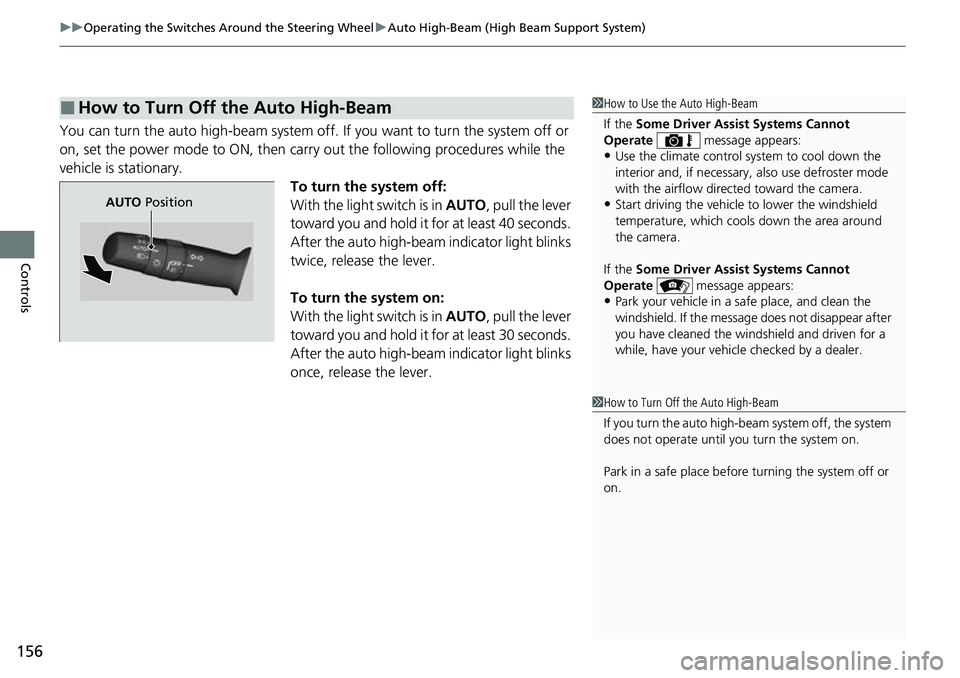
To turn the system off:
With the light switch is in AUTO, pull the lever
toward you and hold it for at least 40 seconds.
After the auto high-beam indicator light blinks
twice, release the lever.
To turn the system on:
With the light switch is in AUTO, pull the lever
toward you and hold it for at least 30 seconds.
After the auto high-beam indicator light blinks
once, release the lever.
■How to Turn Off the Auto High-Beam1 How to Use the Auto High-Beam
If the Some Driver Assist Systems Cannot
Operate message appears:
•Use the climate control system to cool down the
interior and, if necessary, also use defroster mode
with the airflow directed toward the camera.
•Start driving the vehicle to lower the windshield
temperature, which cool s down the area around
the camera.
If the Some Driver Assist Systems Cannot
Operate message appears:
•Park your vehicle in a sa fe place, and clean the
windshield. If the message does not disappear after
you have cleaned the windshield and driven for a
while, have your vehicle checked by a dealer.
1 How to Turn Off the Auto High-Beam
If you turn the au to high-beam system off, the system
does not operate until you turn the system on.
Park in a safe place before turning the system off or
on.
AUTO Position
Page 197 of 598
195Continued
Controls
Climate Control System
Using Automatic Climate Control
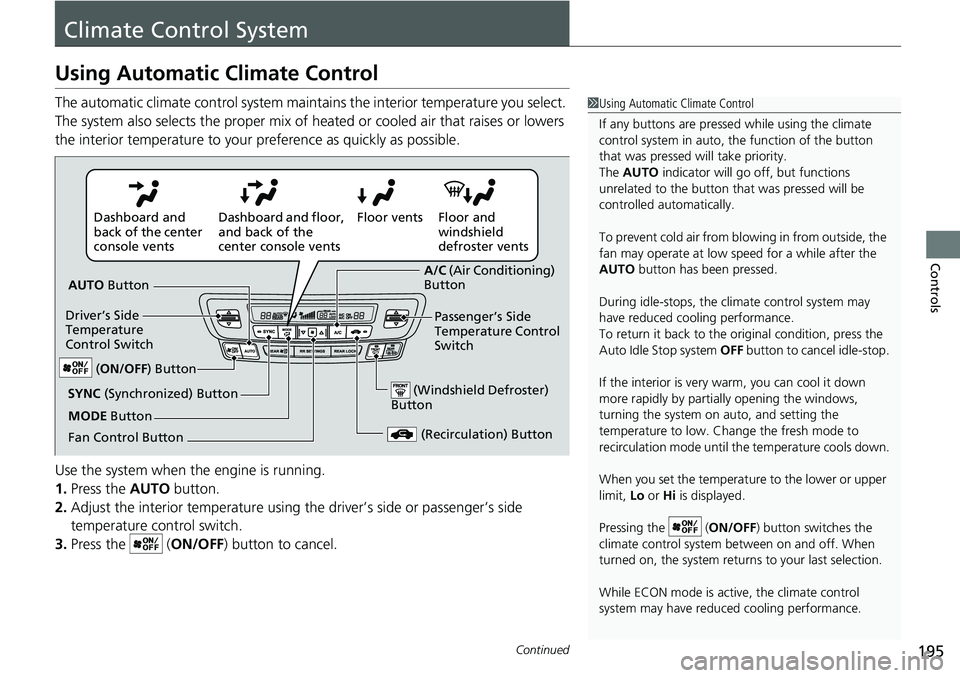
The automatic climate control system maintains the interior temperature you select.
The system also selects the proper mix of heat ed or cooled air that raises or lowers
the interior temperature to your pr eference as quickly as possible.
Use the system when the engine is running.
1. Press the AUTO button.
2. Adjust the interior temperature using the driver’s side or passenger’s side
temperature control switch.
3. Press the ( ON/OFF) button to cancel.1Using Automatic Climate Control
If any buttons are presse d while using the climate
control system in auto, the function of the button
that was pressed will take priority.
The AUTO indicator will go off, but functions
unrelated to the button th at was pressed will be
controlled automatically.
To prevent cold air from bl owing in from outside, the
fan may operate at low speed for a while after the
AUTO button has been pressed.
During idle-stops, the climate control system may
have reduced cool ing performance.
To return it back to the original condition, press the
Auto Idle Stop system OFF button to cancel idle-stop.
If the interior is very warm, you can cool it down
more rapidly by partial ly opening the windows,
turning the system on auto, and setting the
temperature to low. Change the fresh mode to
recirculation mode until the temperature cools down.
When you set the temperat ure to the lower or upper
limit, Lo or Hi is displayed.
Pressing the ( ON/OFF) button switches the
climate control system be tween on and off. When
turned on, the system returns to your last selection.
While ECON mode is active, the climate control
system may have reduced cooling performance.
Floor and
windshield
defroster vents
Floor vents
Dashboard and floor,
and back of the
center console vents
Dashboard and
back of the center
console vents
AUTO Button
Driver’s Side
Temperature
Control Switch
(Recirculation) Button
Fan Control Button A/C
(Air Conditioning)
Button
Passenger’s Side
Temperature Control
Switch
(Windshield Defroster)
ButtonSYNC (Synchronized) Button
(ON/OFF ) Button
MODE Button
Page 198 of 598
uuClimate Control System uUsing Automatic Climate Control
196
Controls
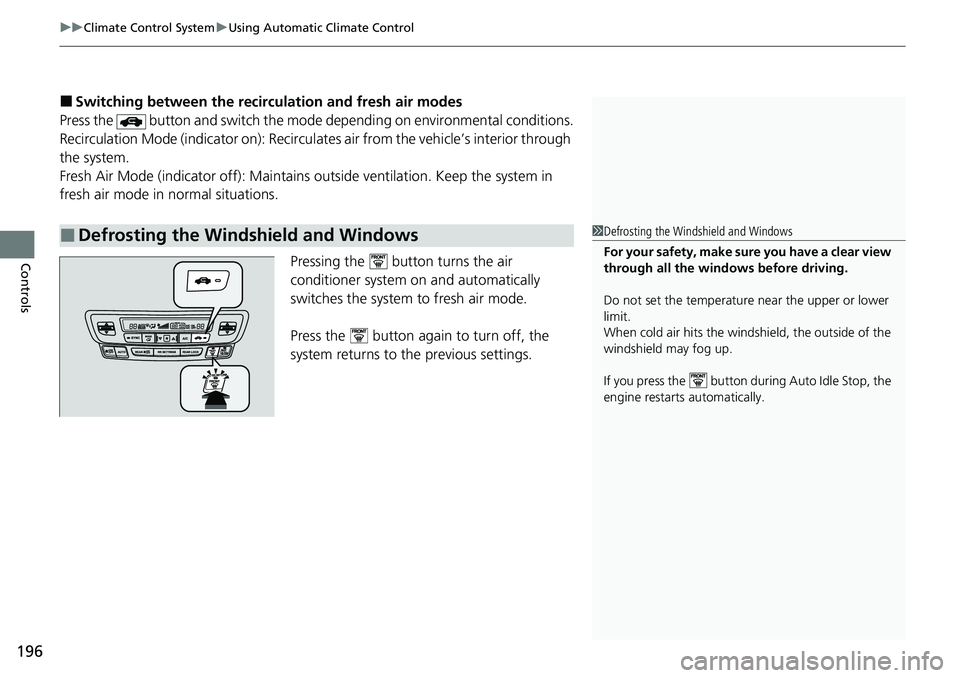
■Switching between the recirc ulation and fresh air modes
Press the button and switch the mode depending on environmental conditions.
Recirculation Mode (indicator on): Recirculat es air from the vehicle’s interior through
the system.
Fresh Air Mode (indicator off): Maintains outside ventilation. Keep the system in
fresh air mode in normal situations.
Pressing the button turns the air
conditioner system on and automatically
switches the system to fresh air mode.
Press the button again to turn off, the
system returns to the previous settings.
■Defrosting the Windshield and Windows1 Defrosting the Windshield and Windows
For your safety, make sure you have a clear view
through all the windows before driving.
Do not set the temperatur e near the upper or lower
limit.
When cold air hits the windshield, the outside of the
windshield may fog up.
If you press the button during Auto Idle Stop, the
engine restarts automatically.
Page 199 of 598
Continued197
uuClimate Control System uUsing Automatic Climate Control
Controls
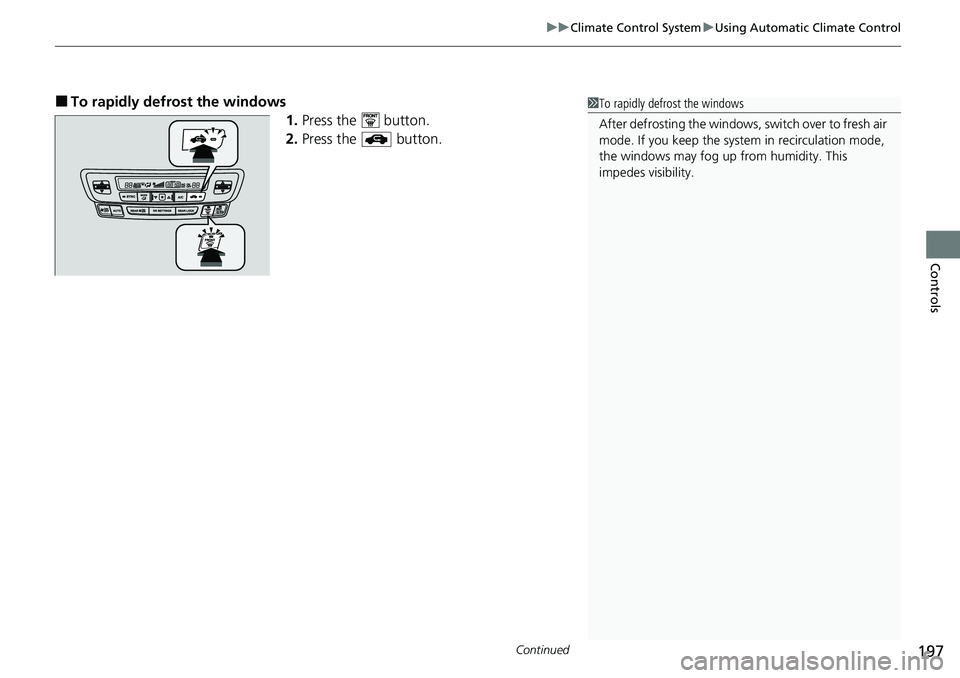
■To rapidly defrost the windows
1.Press the button.
2. Press the button.1To rapidly defrost the windows
After defrosting the windows, switch over to fresh air
mode. If you keep the syst em in recirculation mode,
the windows may fog up from humidity. This
impedes visibility.
Page 200 of 598
uuClimate Control System uUsing Automatic Climate Control
198
Controls
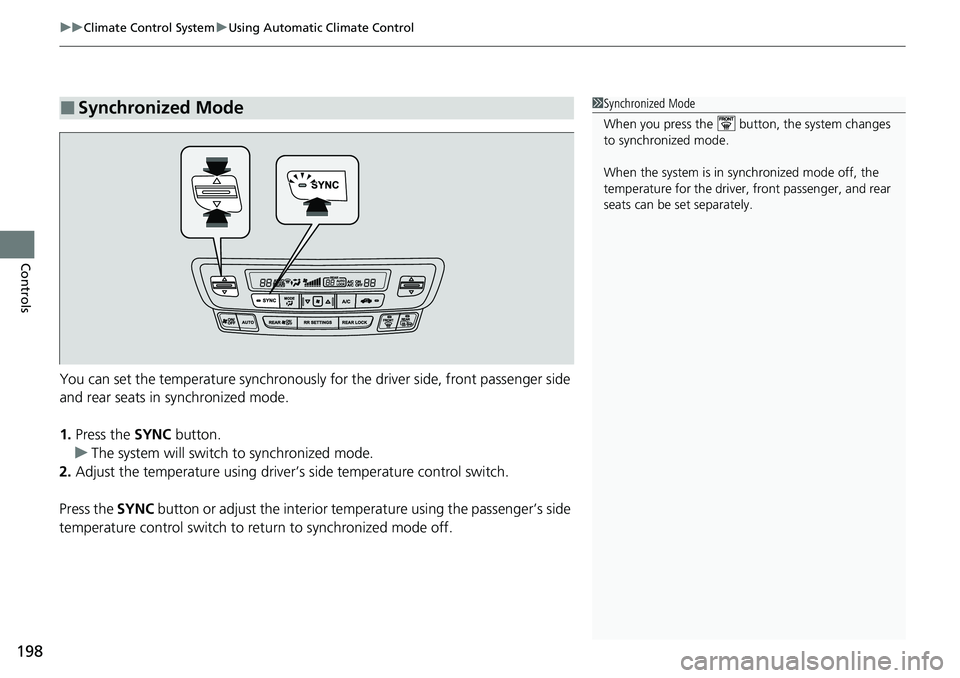
You can set the temperature synchronously for the driver side, front passenger side
and rear seats in synchronized mode.
1. Press the SYNC button.
u The system will switch to synchronized mode.
2. Adjust the temperature using driver’s side temperature control switch.
Press the SYNC button or adjust the interior temperature using the passenger’s side
temperature control switch to re turn to synchronized mode off.
■Synchronized Mode1Synchronized Mode
When you press the button, the system changes
to synchronized mode.
When the system is in synchronized mode off, the
temperature for the driver, front passenger, and rear
seats can be set separately.
Page 201 of 598
199
uuClimate Control System uRear Climate Control System
Continued
Controls
Rear Climate Control System
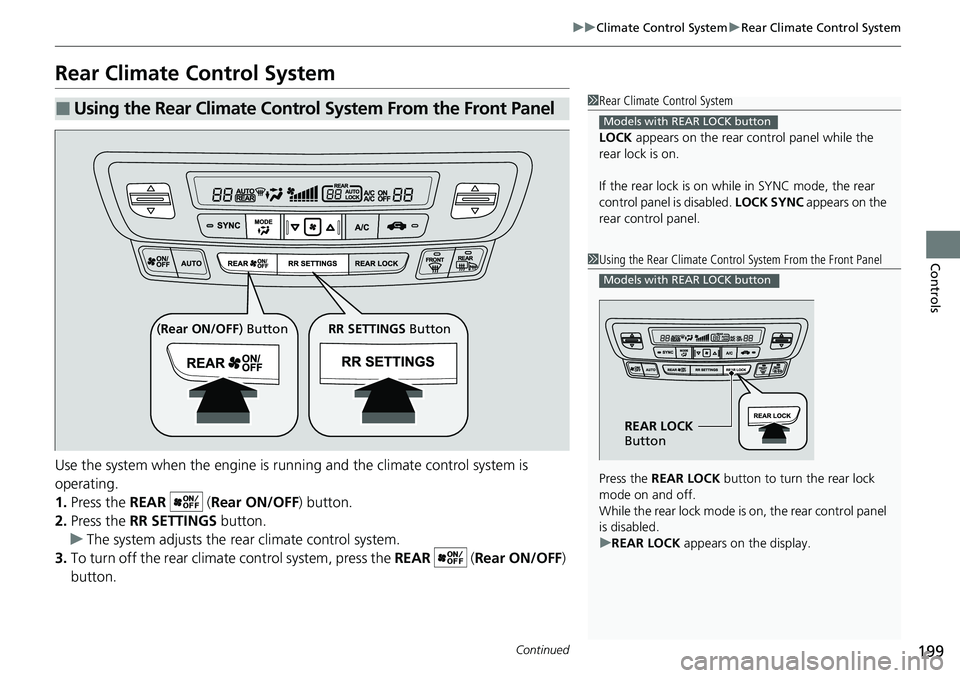
Use the system when the engine is runni ng and the climate control system is
operating.
1. Press the REAR ( Rear ON/OFF) button.
2. Press the RR SETTINGS button.
u The system adjusts the rear climate control system.
3. To turn off the rear climat e control system, press the REAR ( Rear ON/OFF)
button.
■Using the Rear Climate Control System From the Front Panel1 Rear Climate Control System
LOCK appears on the rear control panel while the
rear lock is on.
If the rear lock is on while in SYNC mode, the rear
control panel is disabled. LOCK SYNC appears on the
rear control panel.
Models with REAR LOCK button
1 Using the Rear Climate Control System From the Front Panel
Press the REAR LOCK button to turn the rear lock
mode on and off.
While the rear lock mode is on, the rear control panel
is disabled.
u REAR LOCK appears on the display.
Models with REAR LOCK button
REAR LOCK
Button
( Rear ON/OFF ) Button RR SETTINGS Button
Page 202 of 598
uuClimate Control System uRear Climate Control System
200
Controls
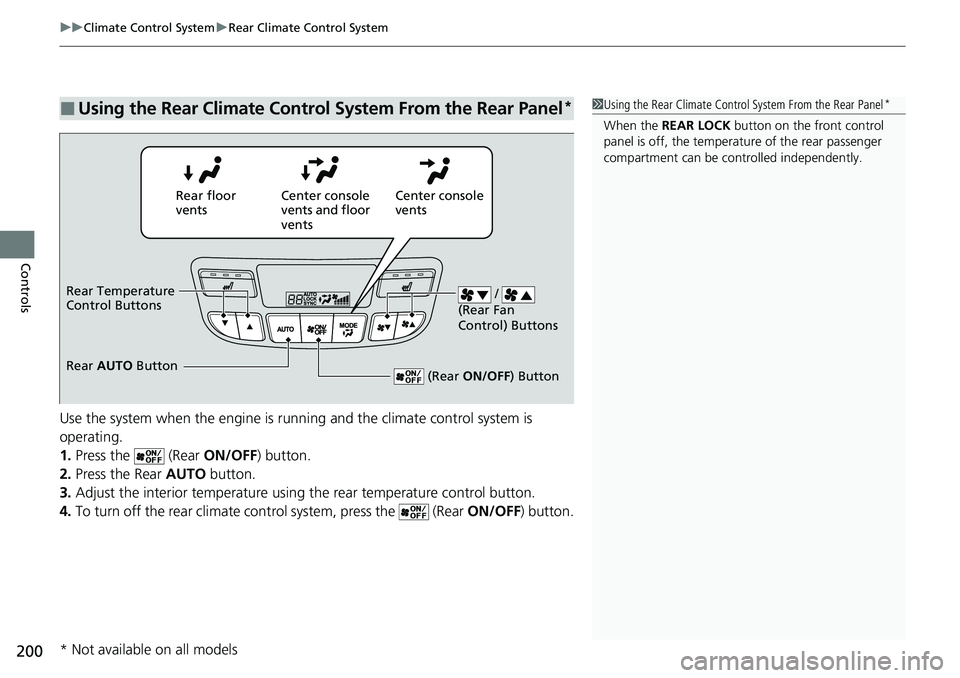
Use the system when the engine is running and the climate control system is
operating.
1. Press the (Rear ON/OFF) button.
2. Press the Rear AUTO button.
3. Adjust the interior temperature using the rear temperature control button.
4. To turn off the rear climate control system, press the (Rear ON/OFF) button.
■Using the Rear Climate Control System From the Rear Panel*1Using the Rear Climate Control System From the Rear Panel*
When the REAR LOCK button on the front control
panel is off, the temperat ure of the rear passenger
compartment can be cont rolled independently.
Rear floor
ventsCenter console
vents and floor
vents Center console
vents
/
(Rear Fan
Control) Buttons
(Rear ON/OFF ) Button
Rear Temperature
Control Buttons
Rear AUTO Button
* Not available on all models
Page 203 of 598
201
uuClimate Control System uAutomatic Climate Control Sensors
Controls
Automatic Climate Control Sensors
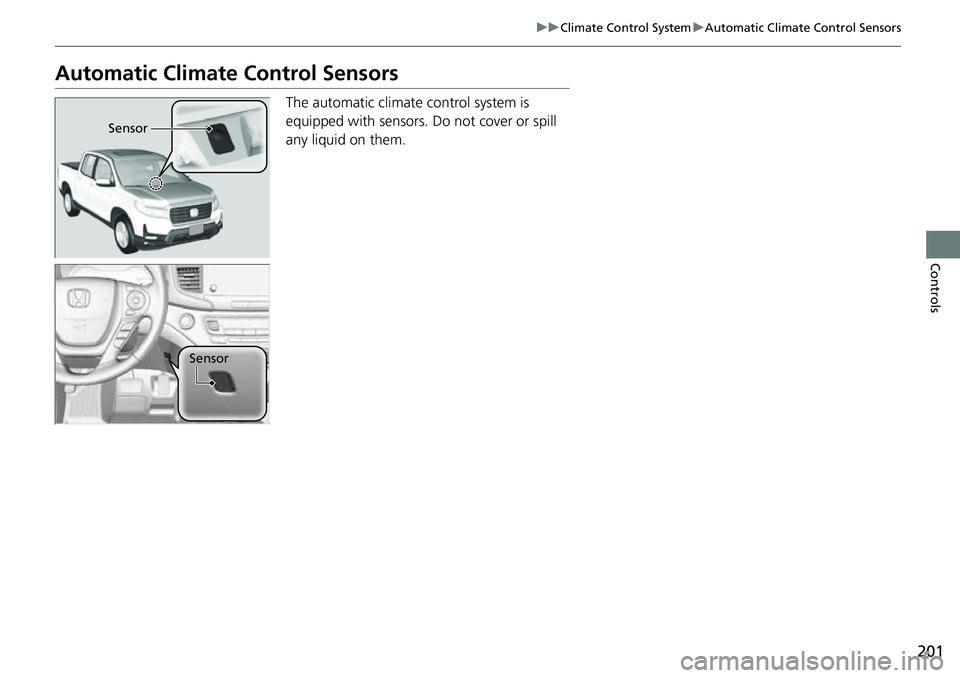
The automatic climate control system is
equipped with sensors. Do not cover or spill
any liquid on them.
Sensor
Sensor