hondalink HONDA RIDGELINE 2023 User Guide
[x] Cancel search | Manufacturer: HONDA, Model Year: 2023, Model line: RIDGELINE, Model: HONDA RIDGELINE 2023Pages: 598, PDF Size: 12.34 MB
Page 267 of 598
265
uuAudio System Basic Operation uHondaLink ®
Features
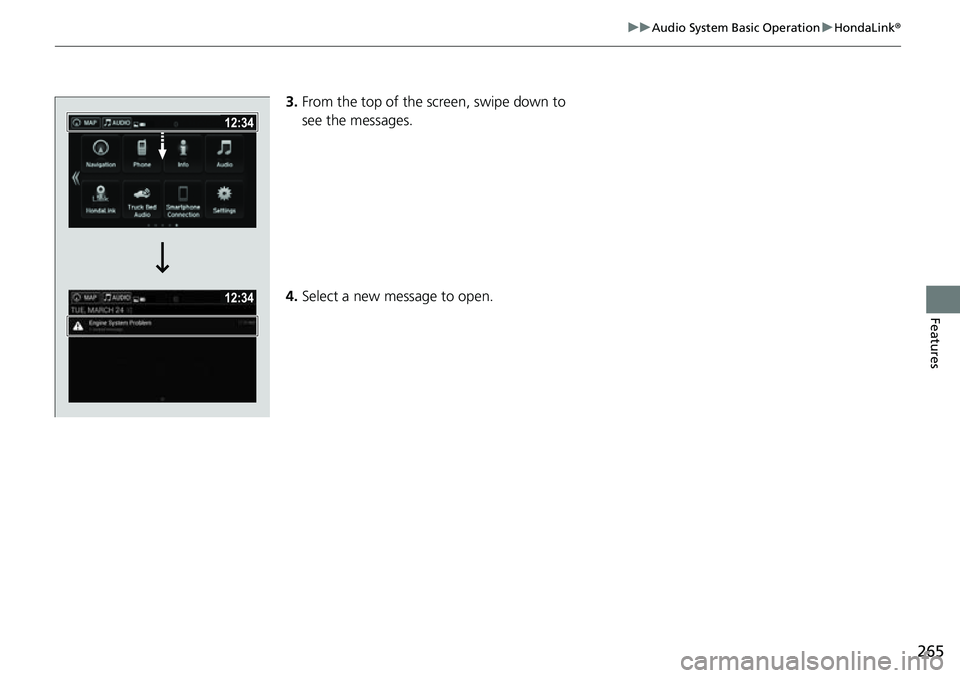
3.From the top of the screen, swipe down to
see the messages.
4. Select a new message to open.
Page 307 of 598
305
uuCustomized Features u
Continued
Features
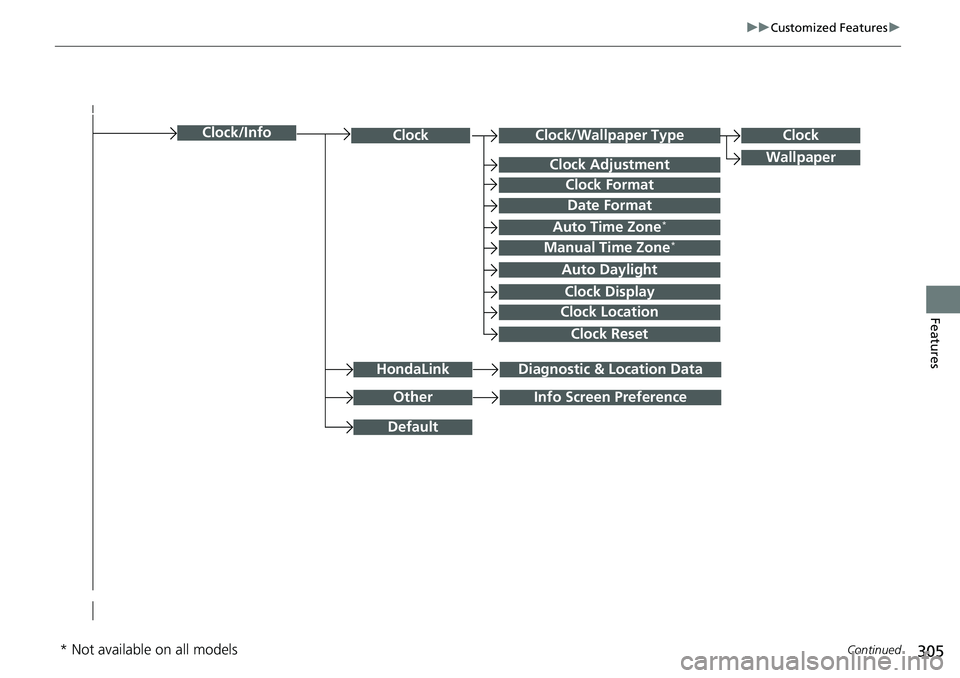
Clock/Wallpaper TypeClockClock
WallpaperClock Adjustment
Clock Format
Date Format
Auto Time Zone*
Manual Time Zone*
Auto Daylight
Clock Display
Clock Location
Clock Reset
OtherInfo Screen Preference
Default
Clock/Info
HondaLinkDiagnostic & Location Data
* Not available on all models
Page 308 of 598
306
uuCustomized Features u
Features
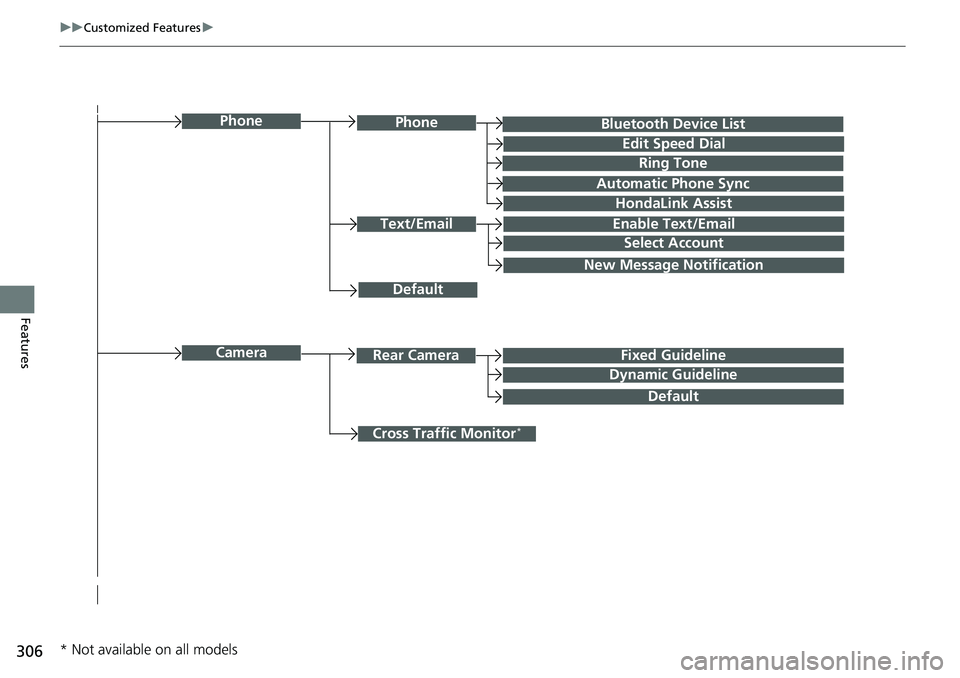
Bluetooth Device List
Default
PhonePhone
Edit Speed Dial
Ring Tone
Automatic Phone Sync
HondaLink Assist
Text/EmailEnable Text/Email
Select Account
New Message Notification
Cross Traffic Monitor*
CameraRear CameraFixed Guideline
Dynamic Guideline
Default
* Not available on all models
Page 321 of 598
319
uuCustomized Features u
Continued
Features
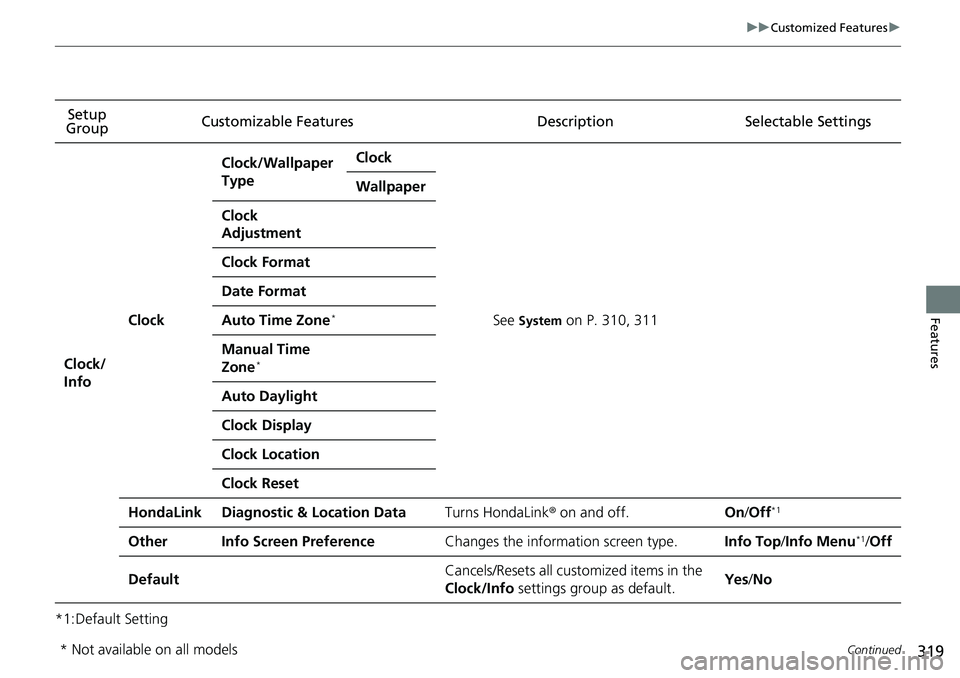
*1:Default SettingSetup
Group Customizable Features Desc
ription Selectable Settings
Clock/
Info
Clock
Clock/Wallpaper
TypeClock
See System on P. 310, 311
Wallpaper
Clock
Adjustment
Clock Format
Date Format
Auto Time Zone*
Manual Time
Zone*
Auto Daylight
Clock Display
Clock Location
Clock Reset
HondaLinkDiagnostic & Location DataTurns HondaLink® on and off.On/Off*1
OtherInfo Screen PreferenceChanges the information screen type.Info Top /Info Menu*1/Off
DefaultCancels/Resets all customized items in the
Clock/Info settings group as default.Yes/No
* Not available on all models
Page 322 of 598
320
uuCustomized Features u
Features
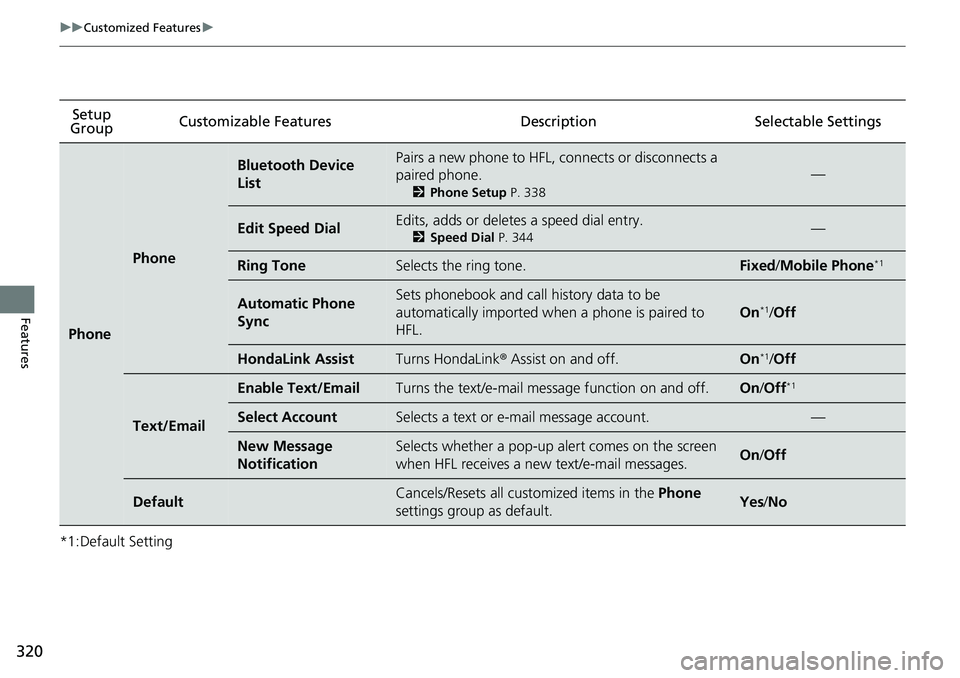
*1:Default SettingSetup
Group Customizable Features Description Selectable Settings
Phone
Phone
Bluetooth Device
ListPairs a new phone to HFL, connects or disconnects a
paired phone.
2
Phone Setup P. 338
—
Edit Speed DialEdits, adds or deletes a speed dial entry.
2Speed Dial P. 344—
Ring ToneSelects the ring tone.Fixed/Mobile Phone*1
Automatic Phone
SyncSets phonebook and call history data to be
automatically imported when a phone is paired to
HFL.
On*1/Off
HondaLink AssistTurns HondaLink ® Assist on and off.On*1/Off
Text/Email
Enable Text/EmailTurns the text/e-mail mess age function on and off.On/Off*1
Select AccountSelects a text or e-mail message account.—
New Message
NotificationSelects whether a pop-up al ert comes on the screen
when HFL receives a new text/e-mail messages.On /Off
DefaultCancels/Resets all cust omized items in the Phone
settings group as default.Yes /No
Page 325 of 598
323
uuCustomized Features uDefaulting All the Settings
Features
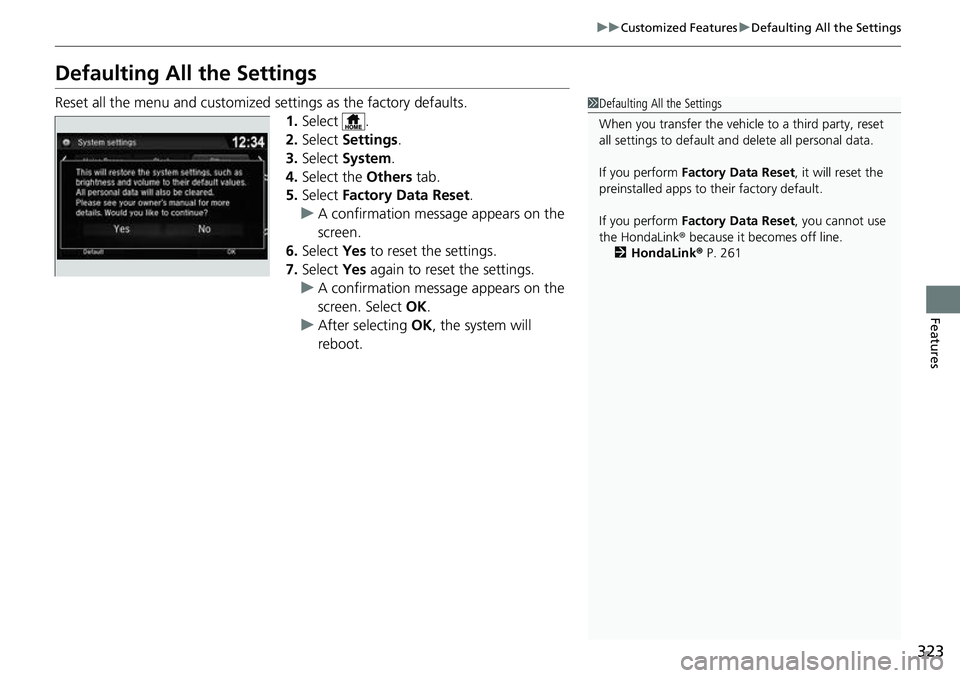
Defaulting All the Settings
Reset all the menu and customized settings as the factory defaults.
1.Select .
2. Select Settings .
3. Select System.
4. Select the Others tab.
5. Select Factory Data Reset .
u A confirmation message appears on the
screen.
6. Select Yes to reset the settings.
7. Select Yes again to reset the settings.
u A confirmation message appears on the
screen. Select OK.
u After selecting OK, the system will
reboot.1 Defaulting All the Settings
When you transfer the vehicle to a third party, reset
all settings to default a nd delete all personal data.
If you perform Factory Data Reset , it will reset the
preinstalled apps to their factory default.
If you perform Factory Data Reset , you cannot use
the HondaLink ® because it becomes off line.
2 HondaLink® P. 261
Page 336 of 598
334
uuBluetooth ® HandsFreeLink ®u HFL Menus
Features
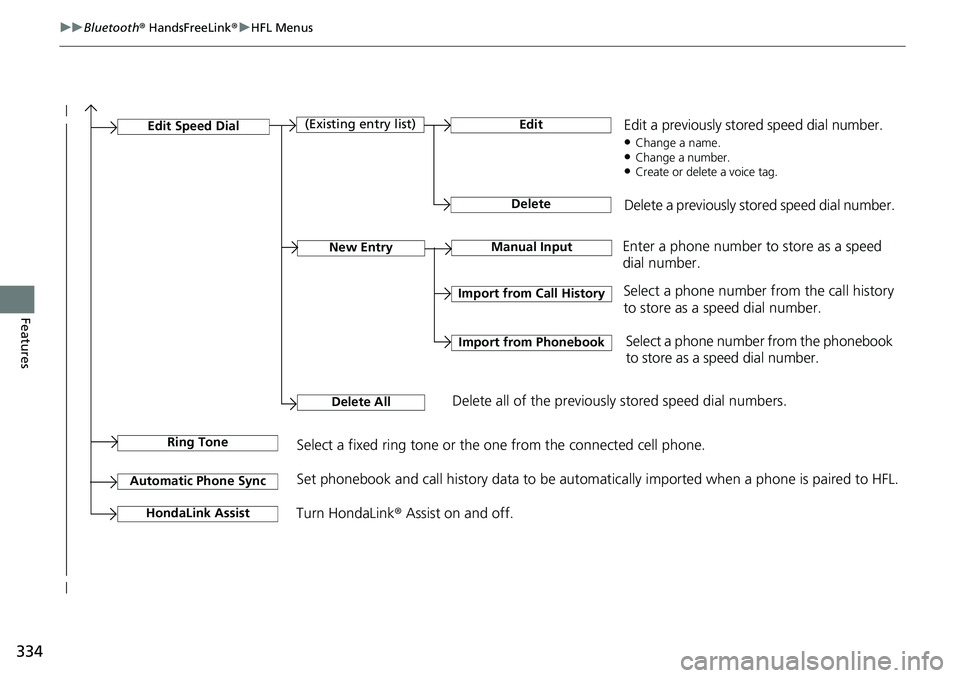
Manual InputNew Entry
Import from Call History
Import from Phonebook
Edit
Delete
(Existing entry list)Edit Speed Dial
Delete All
Enter a phone number to store as a speed
dial number.
Select a phone number from the call history
to store as a speed dial number.
Delete all of the previously stored speed dial numbers. Select a phone number from the phonebook
to store as a speed dial number.
Edit a previously stored speed dial number.
●Change a name.●Change a number.●Create or delete a voice tag.
Delete a previously stored speed dial number.
Ring ToneSelect a fixed ring tone or the one from the connected cell phone.
Automatic Phone SyncSet phonebook and call history data to be automatically imported when a phone is paired to HFL.
Turn HondaLink
® Assist on and off.HondaLink Assist
Page 363 of 598
Continued361
uuBluetooth ® HandsFreeLink ®u HFL Menus
Features
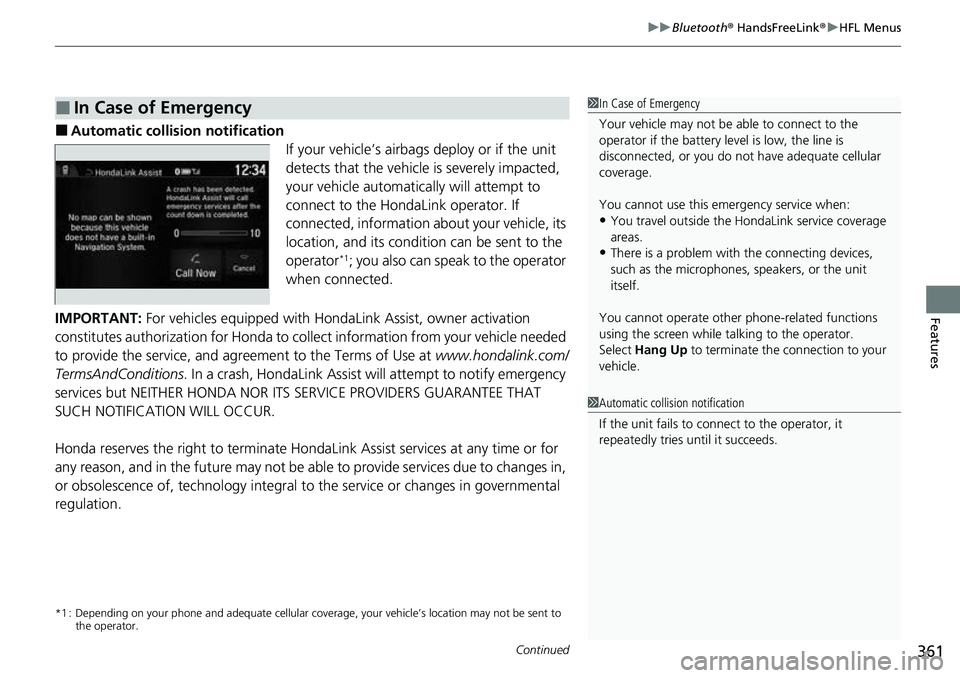
■Automatic collis ion notification
If your vehicle’s airbags deploy or if the unit
detects that the vehicle is severely impacted,
your vehicle automatically will attempt to
connect to the HondaLink operator. If
connected, information ab out your vehicle, its
location, and its condition can be sent to the
operator
*1; you also can speak to the operator
when connected.
IMPORTANT: For vehicles equipped with HondaLink Assist, owner activation
constitutes authorization for Honda to collect information from your vehicle needed
to provide the service, and agreement to the Terms of Use at www.hondalink.com/
TermsAndConditions . In a crash, HondaLink Assist will attempt to notify emergency
services but NEITHER HONDA NOR I TS SERVICE PROVIDERS GUARANTEE THAT
SUCH NOTIFICATION WILL OCCUR.
Honda reserves the right to terminate HondaLink Assist services at any time or for
any reason, and in the future may not be ab le to provide services due to changes in,
or obsolescence of, technology integral to the service or changes in governmental
regulation.
*1 : Depending on your phone and adequate cellular co verage, your vehicle’s location may not be sent to
the operator.
■In Case of Emergency1 In Case of Emergency
Your vehicle may not be able to connect to the
operator if the battery level is low, the line is
disconnected, or you do not have adequate cellular
coverage.
You cannot use this emergency service when:
•You travel outside the HondaLink service coverage
areas.
•There is a problem with the connecting devices,
such as the microphones, speakers, or the unit
itself.
You cannot operate othe r phone-related functions
using the screen while talking to the operator.
Select Hang Up to terminate the connection to your
vehicle.
1 Automatic collision notification
If the unit fails to connect to the operator, it
repeatedly tries until it succeeds.
Page 364 of 598
uuBluetooth ® HandsFreeLink ®u HFL Menus
362
Features
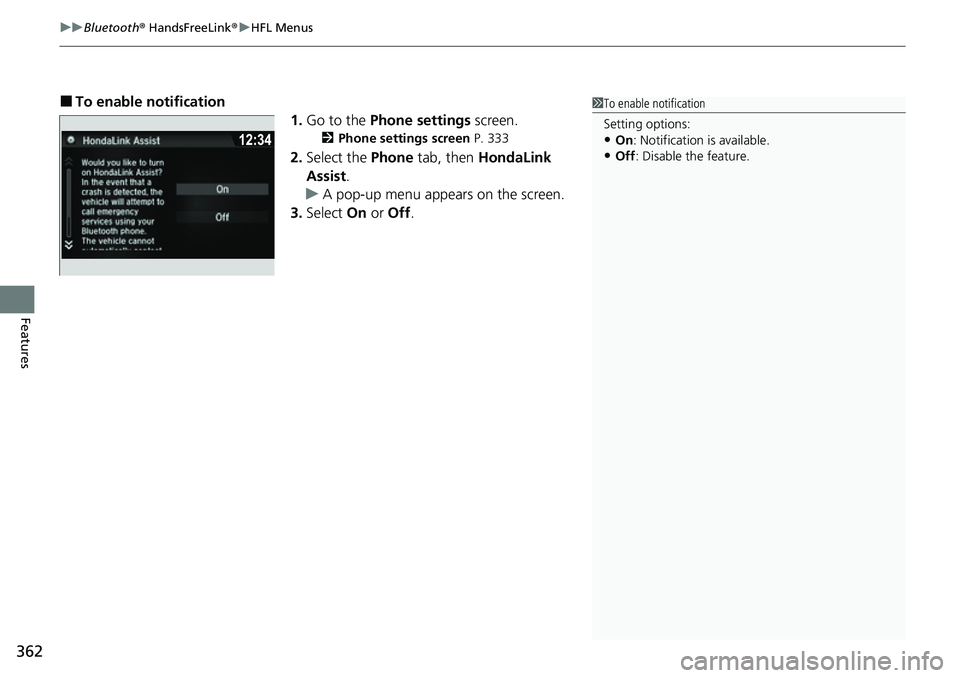
■To enable notification
1.Go to the Phone settings screen.
2Phone settings screen P. 333
2.Select the Phone tab, then HondaLink
Assist .
u A pop-up menu appears on the screen.
3. Select On or Off .
1To enable notification
Setting options:
•On : Notification is available.
•Off : Disable the feature.
Page 592 of 598

590
Index
Engine Coolant ........................................ 504
Windshield Washer .................................. 507
FM/AM Radio ............................................ 236
Fog Lights .................................................. 152
Indicator .................................................... 86
Folding Up the Rear Seat ......................... 169
Foot Brake ................................................. 469
Front Airbags (SRS) ..................................... 47
Front Seats ................................................ 166
Adjusting ................................................. 166
Front Sensor Camera ................................ 465
Fuel ...................................................... 23, 483
Economy ................................................. 486
Gauge ..................................................... 110
Instant Fuel Economy ............................... 114
Low Fuel Indicator ..................................... 82
Range ...................................................... 114
Recommendation .................................... 483
Refueling ................................................. 483
Fuel Economy and CO
2 Emissions ............ 486
Fuel Fill Door ....................................... 23, 484
Unable to Unlock ..................................... 569
Fuses .......................................................... 562
Inspecting and Changing ......................... 567
Locations ......................... 562, 564, 565, 566
G
Gasoline (Fuel) Economy ................................................. 486
Gauge ..................................................... 110 Information ............................................. 483
Instant Fuel Economy .............................. 114
Low Fuel Indicator ..................................... 82
Refueling................................................. 483
Gauges ...................................................... 110
Glass (care) ................................................ 533
Glove Box .................................................. 177
H
Halogen Bulbs .......................................... 508
Handling the Unexpected ........................ 537
HandsFreeLink ® (HFL) ............................... 330
Automatic Import of Ce llular Phonebook and
Call History ............................................ 343
Displaying Messages................................ 357
HFL Buttons............................................. 330
HFL Menus .............................................. 333
HFL Status Display ................................... 332
In Case of Emergency .............................. 361
Limitations for Manual Operation ............ 332
Making a Call .......................................... 351
Options During a Call .............................. 354
Phone Setup............................................ 338
Phonebook Phonetic Modification ........... 347
Receiving a Call ....................................... 354
Receiving a Text/E-mail Message.............. 355
Ring Tone................................................ 342
Selecting a Text/E-mail Message Account ................................................ 356
Speed Dial ............................................... 344 To Set Up Text Message/E-mail
Options ................................................. 341
Hazard Warning Button .............................. 6
Hazard Warning Indicator ......................... 85
HD Radio
TM............................................... 238
Head Restraints ................................ 171, 172
Headlights ................................................ 149
Aiming.................................................... 508
Auto High-Beam System ......................... 154
Automatic Operation .............................. 150
Dimming......................................... 149, 153
Operating ............................................... 149
Heated Door Mirrors ............................... 159
Heated Steering Wheel ........................... 187
Heated Windshield Button ...................... 159
Heater (Steering Wheel) .......................... 187
Heaters (Seat) ........................... 188, 189, 190
HFL (HandsFreeLink ®) .............................. 330
High Beam Indicator .................................. 85
Hill Start Assist System ............................. 391
HomeLink ® Universal Transceiver ........... 324
Honda App License Agreement .............. 283
Honda Sensing ®................................ 24, 423
HondaLink ®............................................ 261
I
Identification Numbers ............................ 576
Engine and Transmission ......................... 576
Vehicle Identification............................... 576