snow mode HONDA RIDGELINE 2023 User Guide
[x] Cancel search | Manufacturer: HONDA, Model Year: 2023, Model line: RIDGELINE, Model: HONDA RIDGELINE 2023Pages: 598, PDF Size: 12.34 MB
Page 406 of 598
404
uuWhen Driving uIntelligent Traction Management
Driving
Intelligent Traction Management
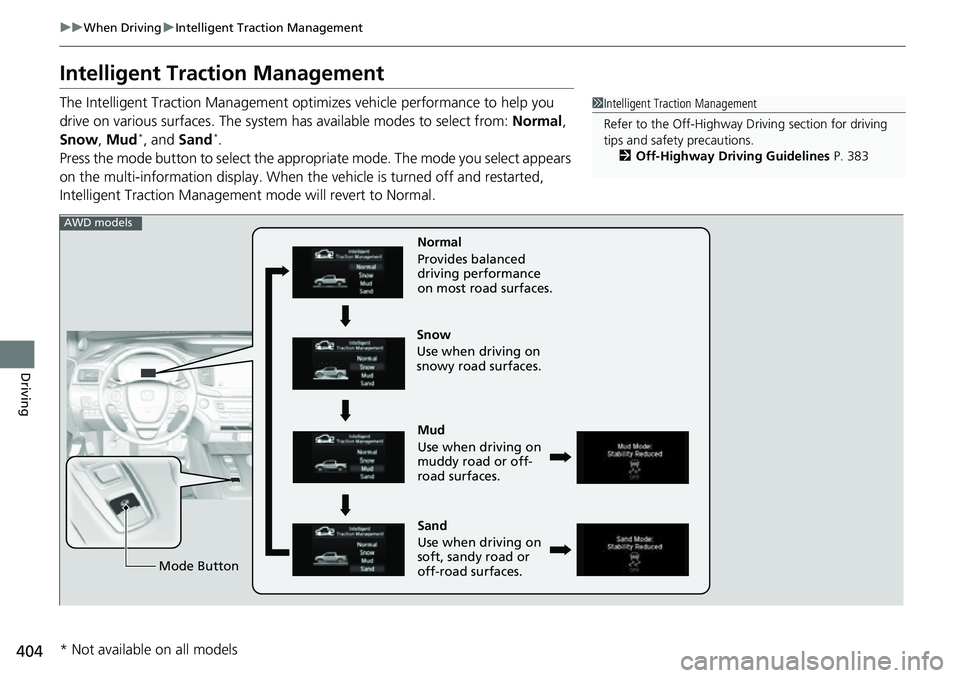
The Intelligent Traction Management opti mizes vehicle performance to help you
drive on various surfaces. The system has available modes to select from: Normal,
Snow , Mud
*, and Sand*.
Press the mode button to select the appropr iate mode. The mode you select appears
on the multi-information display. When the vehicle is turned off and restarted,
Intelligent Traction Management mode will revert to Normal.
1Intelligent Traction Management
Refer to the Off-Highway Dr iving section for driving
tips and safety precautions.
2 Off-Highway Driving Guidelines P. 383
Mud
Use when driving on
muddy road or off-
road surfaces.
Sand
Use when driving on
soft, sandy road or
off-road surfaces. Normal
Provides balanced
driving performance
on most road surfaces.
Mode Button
Snow
Use when driving on
snowy road surfaces.
AWD models
* Not available on all models
Page 407 of 598
405
uuWhen Driving uIntelligent Traction Management
Driving
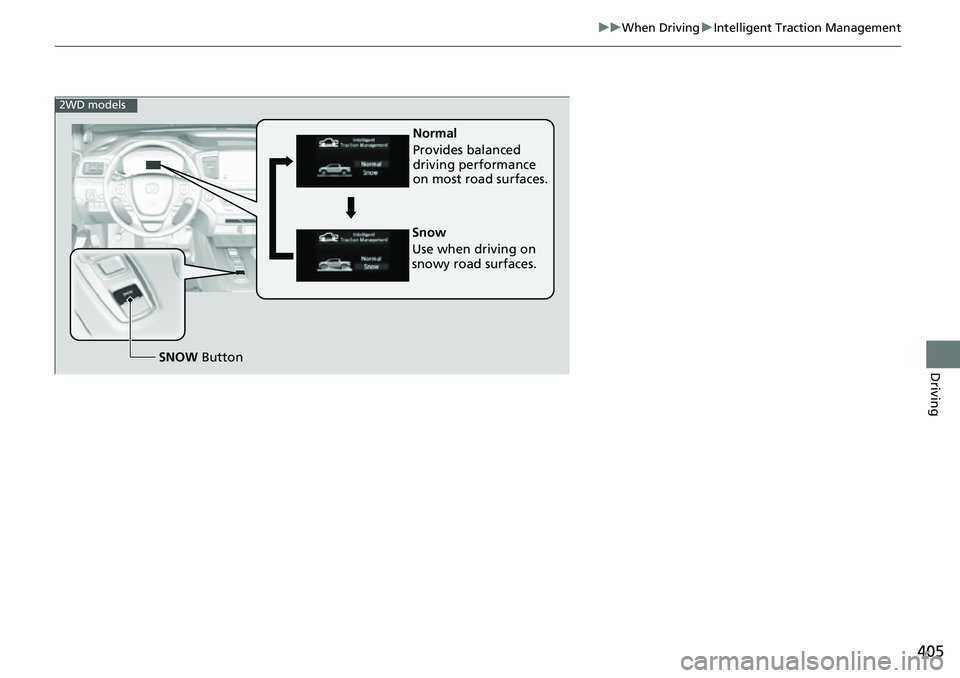
Normal
Provides balanced
driving performance
on most road surfaces.
SNOW Button
Snow
Use when driving on
snowy road surfaces.
2WD models
Page 410 of 598
uuWhen Driving uAuto Idle Stop
408
Driving
The vehicle stops with the transmission in (D and the brake pedal depressed.
When you put the transmission into
(P, the Auto Idle Stop continues to operate,
even if the brake pedal is released. u If you depress the brake pedal, the engine may automatically restart.
■Auto Idle Stop does not activate when:
• The Auto Idle Stop OFF button is pressed.
• The driver’s seat belt is not fastened.
• The engine is not adequately warmed up or coolant temperature is high.
• The transmission fluid temperature is low or high.
• The vehicle comes to a stop again befo re the vehicle speed reaches 3 mph (5
km/h) after the engine starts.
• The vehicle is stopped on a steep incline.
• The transmission is in a position other than
(D.
• The engine is started with the hood open.
u Turn off the engine. Close the hood before you restart the engine to activate
Auto Idle Stop.
• The battery charge is low.
• The internal temperature of the battery is 14°F (−10°C) or less.
• The climate control system is in use, an d the outside temperature is below −4°F
(−20°C) or over 104°F (40°C).
• The climate control system is in us e, and the temperature is set to Hi or Lo.
• is ON (indicator on).
• The Intelligent Traction Management is set to Snow, Mud
*, or Sand*.
• The AC power outlet is used.
■Auto Idle Stop Activates When:1Auto Idle Stop Activates When:
Do not open the hood while the Auto Idle Stop
function is activated. If the hood is opened, the
engine will not re start automatically.
In this case, restart the engine with the ENGINE
START/STOP button.
2 Starting the Engine P. 385
Pressing the ENGINE START/STOP button causes
the engine to no longer restart automatically.
Follow the standard proce dure to start the engine.
2 Starting the Engine P. 385
Models with AC Power Outlet
* Not available on all models
Page 412 of 598
uuWhen Driving uAuto Idle Stop
410
Driving
The brake pedal is released.
■The engine restarts even if the brake pedal is depressed when:
• The Auto Idle Stop OFF button is pressed.
• The steering wheel is operated.
• The transmission is put into
(R or (S, or when it is set from (N to (D.
u If you put the transmission into
(P after the Auto Idle Stop activates, the Auto
Idle Stop continues to operate. In this case, the engine restarts when you
depress the brake pedal.
• The pressure on the brake pedal is redu ced and the vehicle starts moving while
stopped on an incline.
• The pressure on the brake pedal is repeated ly applied and released slightly during
a stop.
• The battery charge becomes low.
• The accelerator pedal is depressed.
• The driver’s seat belt is unlatched.
• is ON (indicator on).
• The climate control system is in us e, and the difference between the set
temperature and actual interior temperature becomes significant.
• The climate control system is bein g used to dehumidify the interior.
• The Intelligent Traction Management is set to Snow, Mud
*, or Sand*.
• The AC power outlet is used.
■The Engine Automatically Restarts When:1The Engine Automatically Restarts When:
If you are using an electroni c device during Auto Idle
Stop, the device may tempor arily be turned off when
the engine restarts.
Models with AC Power Outlet
* Not available on all models
Page 415 of 598
413
uuWhen Driving uVehicle Stability AssistTM (VSA ®), aka Electronic Stability Control (ESC), System
Driving
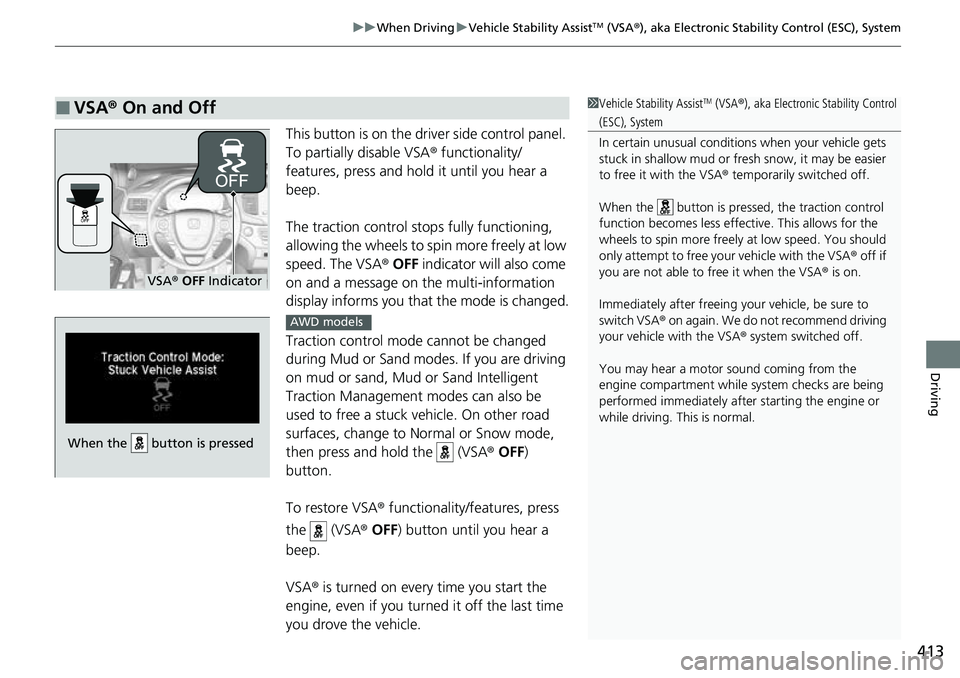
This button is on the driver side control panel.
To partially disable VSA ® functionality/
features, press and hold it until you hear a
beep.
The traction control stop s fully functioning,
allowing the wheels to spin more freely at low
speed. The VSA ® OFF indicator will also come
on and a message on the multi-information
display informs you that the mode is changed.
Traction control mode cannot be changed
during Mud or Sand modes. If you are driving
on mud or sand, Mud or Sand Intelligent
Traction Management modes can also be
used to free a stuck ve hicle. On other road
surfaces, change to Normal or Snow mode,
then press and hold the (VSA ® OFF )
button.
To restore VSA ® functionality/features, press
the (VSA ® OFF ) button until you hear a
beep.
VSA ® is turned on every time you start the
engine, even if you turned it off the last time
you drove the vehicle.
■VSA ® On and Off1 Vehicle Stability AssistTM (VSA® ), aka Electronic Stability Control
(ESC), System
In certain unusual conditions when your vehicle gets
stuck in shallow mud or fr esh snow, it may be easier
to free it with the VSA ® temporarily switched off.
When the button is pressed, the traction control
function becomes less effective. This allows for the
wheels to spin more freely at low speed. You should
only attempt to free your vehicle with the VSA ® off if
you are not able to free it when the VSA ® is on.
Immediately after freeing your vehicle, be sure to
switch VSA ® on again. We do not recommend driving
your vehicle with the VSA ® system switched off.
You may hear a motor sound coming from the
engine compartment while system checks are being
performed immediately after starting the engine or
while driving. This is normal.
VSA ® OFF Indicator
When the button is pressed
AWD models
Page 424 of 598
uuWhen Driving uBlind spot information System*
422
Driving
1Blind spot information System*
Blind spot information sy stem may be adversely
affected when:
•Objects (guard rails, poles, trees, etc.) are detected.
•An object that does not re flect radio waves well,
such as a motorcycle, is in the alert zone.
•Driving on a curved road.
•A vehicle is moving from a far lane to the adjacent
lane.
•The system picks up external electrical interference.
•The rear bumper or the sens ors have been improperly
repaired or the rear bu mper has been deformed.
•The orientation of the sensors has been changed.
•In bad weather (Heavy rain, snow, and fog).
For a proper blind spot in formation system operation:
•Always keep the rear bumper corner area clean.•Do not cover the rear bumper corner area with
labels or stickers of any kind.
•Take your vehicle to a deal er if you need the rear
bumper corner area or the radar sensors to be repaired,
or the rear bumper corner area is strongly impacted.
* Not available on all models
Page 440 of 598
438
uuHonda Sensing ®u Adaptive Cruise Control (ACC)
Driving
Adaptive Cruise Control (ACC)
Helps maintain a constant vehicle speed a nd a set following-interval behind a vehicle
detected ahead of yours, without you havi ng to keep your foot on the brake or the
accelerator.1 Adaptive Cruise Control (ACC)
ACC cannot be activated if Intelligent Traction
Management settin g is snow, sand
* or mud*.
3WARNING
Improper use of ACC can lead to a crash.
Use ACC only when driving on expressways
or freeways and in go od road and weather
conditions.
3WARNING
ACC has limited braking capability.
When your vehicle speed drops below
22 mph (35 km/h), ACC will automatically
cancel and no longer will apply your
vehicle's brakes.
Always be prepared to apply the brake
pedal when conditions require.
When to use
■Vehicle speed for ACC: Desired speed in a range above
roughly 25 mph (40 km/h) ~
■Shift position for ACC: In ( D or (S
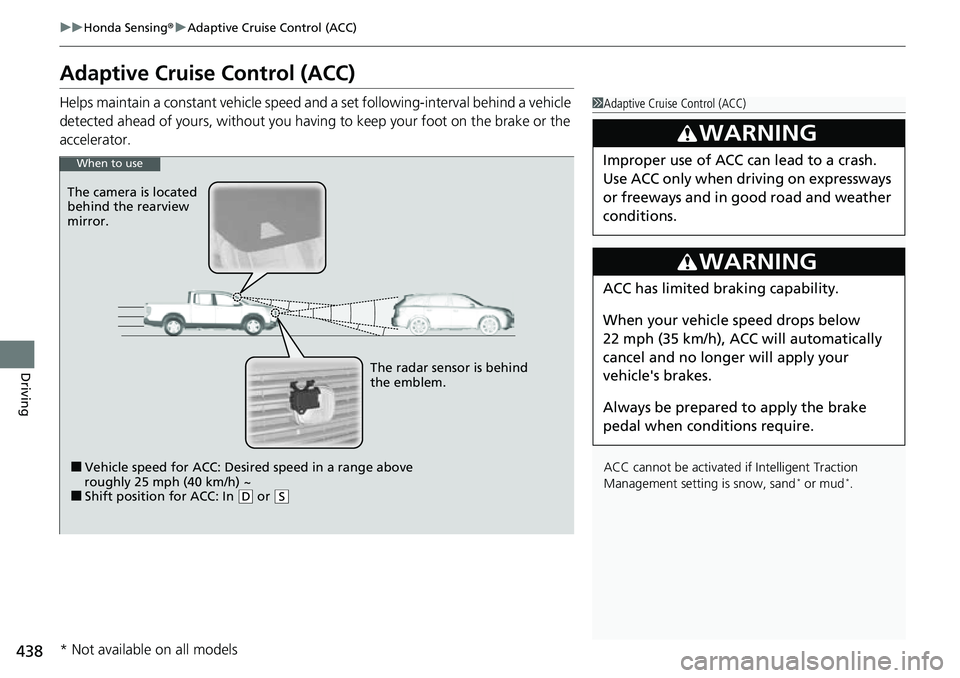
The radar sensor is behind
the emblem.
The camera is located
behind the rearview
mirror.
* Not available on all models
Page 475 of 598
473
uuParking Your Vehicle uParking Sensor System*
Continued
Driving
Parking Sensor System*
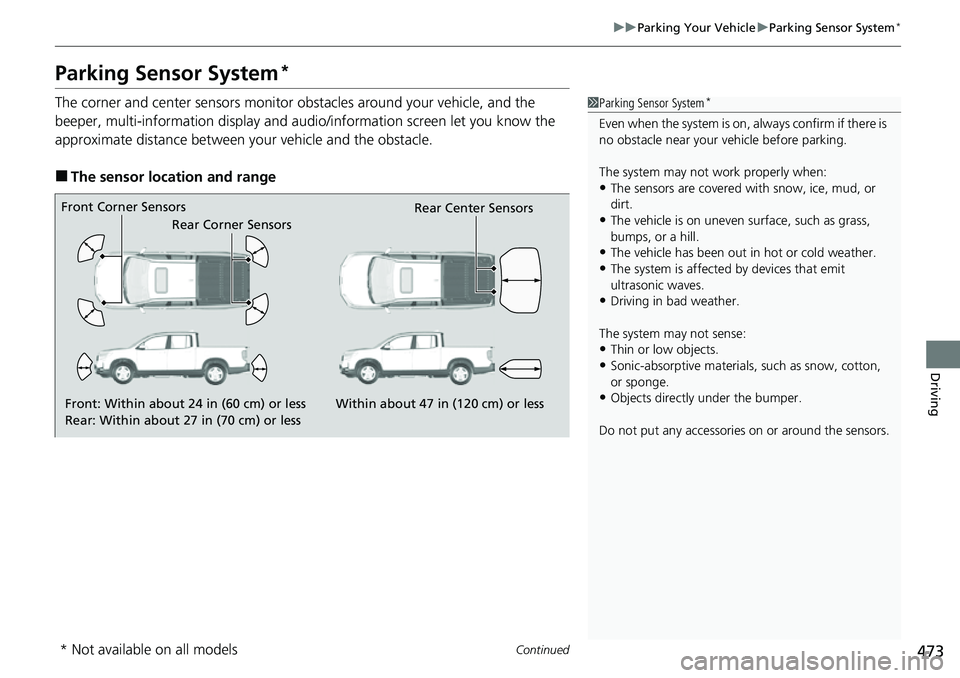
The corner and center sensors monitor obstacles around your vehicle, and the
beeper, multi-information display and audi o/information screen let you know the
approximate distance between your vehicle and the obstacle.
■The sensor location and range
1 Parking Sensor System*
Even when the system is on, always confirm if there is
no obstacle near your ve hicle before parking.
The system may not work properly when:
•The sensors are covered with snow, ice, mud, or
dirt.
•The vehicle is on uneven su rface, such as grass,
bumps, or a hill.
•The vehicle has been out in hot or cold weather.•The system is affected by devices that emit
ultrasonic waves.
•Driving in bad weather.
The system may not sense:
•Thin or low objects.•Sonic-absorptive materials, such as snow, cotton,
or sponge.
•Objects directly under the bumper.
Do not put any accessories on or around the sensors.Front: Within about 24 in (60 cm) or less
Rear: Within about 27 in (70 cm) or less
Front Corner Sensors
Rear Corner Sensors Rear Center Sensors
Within about 47 in (120 cm) or less
* Not available on all models
Page 480 of 598
uuParking Your Vehicle uCross Traffic Monitor*
478
Driving
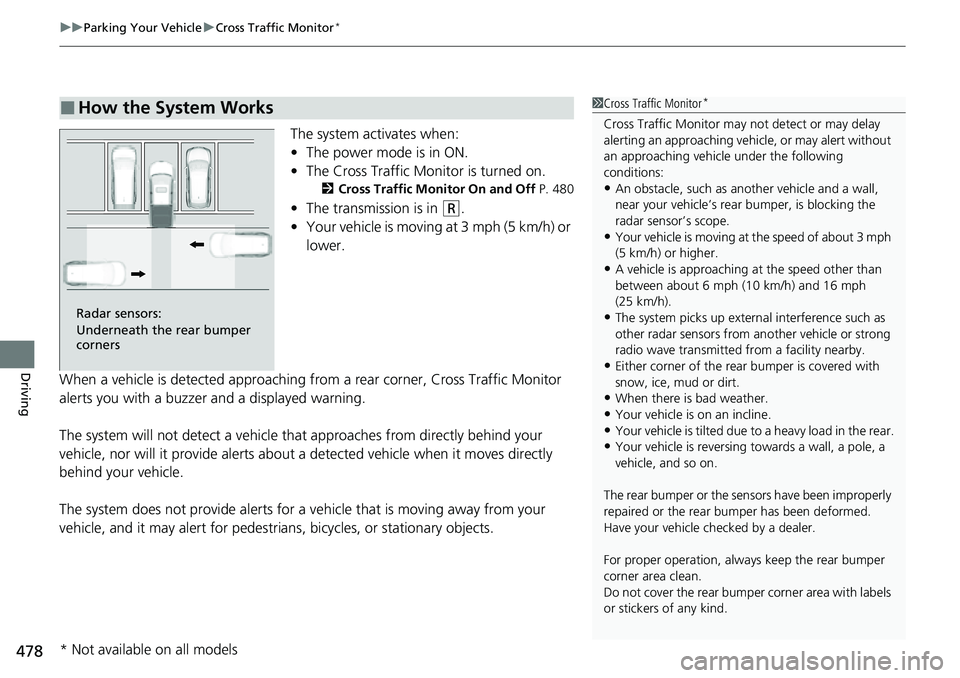
The system activates when:
• The power mode is in ON.
• The Cross Traffic Monitor is turned on.
2 Cross Traffic Monitor On and Off P. 480
•The transmission is in (R.
• Your vehicle is moving at 3 mph (5 km/h) or
lower.
When a vehicle is detected approaching from a rear corner, Cross Traffic Monitor
alerts you with a buzzer and a displayed warning.
The system will not detect a vehicle that approaches from directly behind your
vehicle, nor will it provide alerts about a detected vehicle when it moves directly
behind your vehicle.
The system does not provide alerts for a vehicle that is moving away from your
vehicle, and it may alert for pedestri ans, bicycles, or stationary objects.
■How the System Works1Cross Traffic Monitor*
Cross Traffic Monitor may not detect or may delay
alerting an approach ing vehicle, or may alert without
an approaching vehicle under the following
conditions:
•An obstacle, such as a nother vehicle and a wall,
near your vehicle’s rear bumper, is blocking the
radar sensor’s scope.
•Your vehicle is moving at the speed of about 3 mph
(5 km/h) or higher.
•A vehicle is approaching at the speed other than
between about 6 mph (10 km/h) and 16 mph
(25 km/h).
•The system picks up external interference such as
other radar sensors from an other vehicle or strong
radio wave transmitted fr om a facility nearby.
•Either corner of the rear bumper is covered with
snow, ice, mud or dirt.
•When there is bad weather.
•Your vehicle is on an incline.
•Your vehicle is tilted due to a heavy load in the rear.•Your vehicle is reversing towards a wall, a pole, a
vehicle, and so on.
The rear bumper or the sens ors have been improperly
repaired or the rear bum per has been deformed.
Have your vehicle checked by a dealer.
For proper operation, always keep the rear bumper
corner area clean.
Do not cover the rear bumper corner area with labels
or stickers of any kind.
Radar sensors:
Underneath the rear bumper
corners
* Not available on all models
Page 595 of 598
593
Index
Passing Indicators..................................... 149
Playing Bluetooth ® Audio ....................... 259
Power Windows ....................................... 139
Precautions While Driving ....................... 392
Driving Guidelines for Your Utility
Vehicle .................................................. 392
Rain ........................................................ 392
Pregnant Women ....................................... 42
Puncture (Tire) ......................................... 539
R
Radar Sensor............................................ 467
Radiator .................................................... 505
Radio (FM/AM) ......................................... 236
Radio (SiriusXM ®)..................................... 239
Radio Data System (RDS) ......................... 238
Range ........................................................ 114
RDS (Radio Data System) ......................... 238
Readiness Codes (Emissions Testing) ...... 579
Rear Climate Control System ................... 199
From the Rear Panel ................................ 200
Rear Defogger/Heated Door Mirror Button ..................................................... 159
Rear Outer Seat Heaters .......................... 190
Rear Seats ................................................. 169
Rearview Mirror ....................................... 164
Refueling .................................................. 483
Fuel Gauge ............................................. 110
Gasoline ......................................... 483, 574
Low Fuel Indicator..................................... 82 Regulations
............................... 418, 519, 577
Remote Engine Start ................................ 387
Remote Transmitter ................................. 125
Replacement Battery .................................................... 527
Bulbs ....................................................... 508
Fuses ............................... 562, 564, 565, 566
Tires ........................................................ 522
Wiper Blade Rubber ................................. 514
Reporting Safety Defects ......................... 578
RESET Button ............................................ 111
Resetting a Trip Meter ............................. 113
Reverse Tilt Door Mirror .......................... 165
Road Departure Mitigation ..................... 460
Indicator .................................................... 90
On and Off .............................................. 462
S
Safe Driving ................................................ 31
Safety Check ............................................... 36
Safety Labels ............................................... 75
Safety Message ............................................. 3
Seat Belts ..................................................... 37
Adjusting the Shoulder Anchor .................. 41
Automatic Seat Belt Tensioners .................. 39
Checking ................................................... 43
Fastening ................................................... 40
Installing a Child Seat with a Lap/Shoulder Seat Belt.......................................................... 67
Pregnant Women ...................................... 42 Reminder .................................................. 38
Warning Indicator ............................... 38, 81
Seat Heaters .............................. 188, 189, 190
Seat Ventilation ........................................ 189
Seats .......................................................... 166
Adjusting ................................................ 166
Driver’s Seat Lumbar Support .................. 166
Front Seats .............................................. 166
Rear Seats ............................................... 169
Seat Heaters ............................ 188, 189, 190
Seat Ventilation ....................................... 189
Security System ......................................... 136
Immobilizer System Indicator ..................... 86
Security System Alarm Indicator................. 87
Selecting a Child Seat ................................. 63
Sequential Mode ...................................... 401
Sequential Mode Operation .................... 402
Setting the Clock ...................................... 116
Shift Button ........................................ 21, 395
Operation.......................................... 21, 397
Shift Position Indicator ...................... 80, 397
Shifting (Transmission) ....................... 21, 395
Shoulder Anchor ........................................ 41
Side Airbags ................................................ 52
Side Curtain Airbags .................................. 54
Siri Eyes Free ............................................. 268
SiriusXM ® Radio ........................................ 239
Snow Tires ................................................. 524
Song By Voice
TM (SBV) .............................. 250
Spare Tire .......................................... 539, 575
Spark Plugs ............................................... 574