defrost control HONDA RIDGELINE 2023 Owners Manual
[x] Cancel search | Manufacturer: HONDA, Model Year: 2023, Model line: RIDGELINE, Model: HONDA RIDGELINE 2023Pages: 598, PDF Size: 12.34 MB
Page 20 of 598
18
Quick Reference Guide
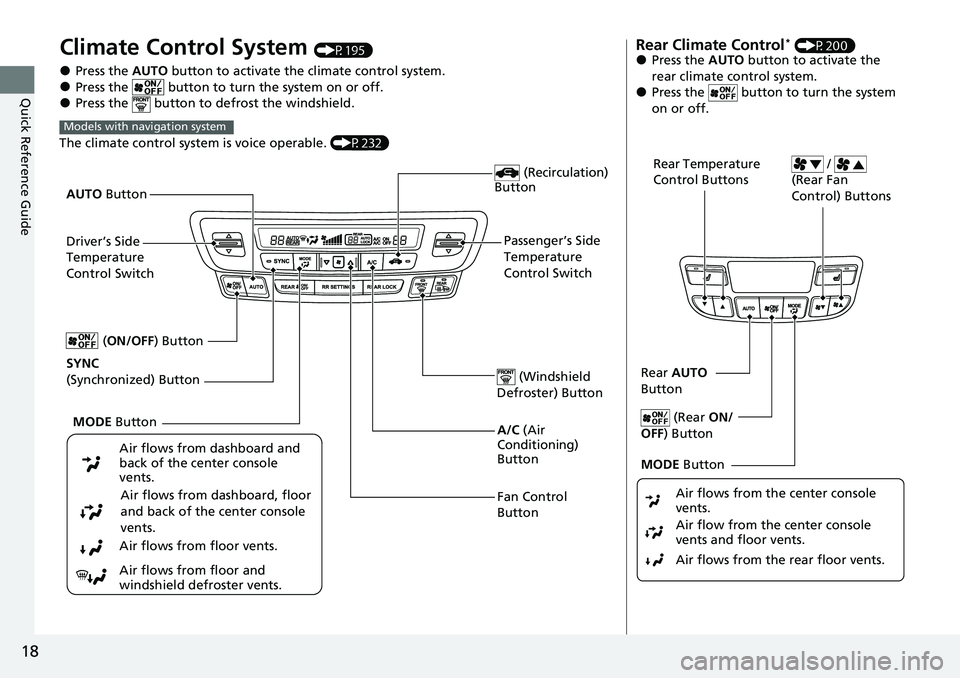
Climate Control System (P195)
●Press the AUTO button to activate the climate control system.●Press the button to turn the system on or off.●Press the button to defrost the windshield.
The climate control system is voice operable. (P232)
Models with navigation system
Fan Control
Button (Windshield
Defroster) Button
A/C (Air
Conditioning)
Button
Air flows from dashboard and
back of the center console
vents.
Air flows from dashboard, floor
and back of the center console
vents.
Air flows from floor vents.
Air flows from floor and
windshield defroster vents. (Recirculation)
Button
Passenger’s Side
Temperature
Control Switch
AUTO
Button
Driver’s Side
Temperature
Control Switch
MODE Button
SYNC
(Synchronized) Button (
ON/OFF) Button
Rear Climate Control* (P200)●Press the AUTO button to activate the
rear climate control system.
●Press the button to turn the system
on or off.
Rear Temperature
Control Buttons /
(Rear Fan
Control) Buttons
Rear AUTO
Button
(Rear ON/
OFF ) Button
MODE Button
Air flows from the rear floor vents. Air flow from the center console
vents and floor vents. Air flows from the center console
vents.
Page 158 of 598
uuOperating the Switches Around the Steering Wheel uAuto High-Beam (High Beam Support System)
156
Controls
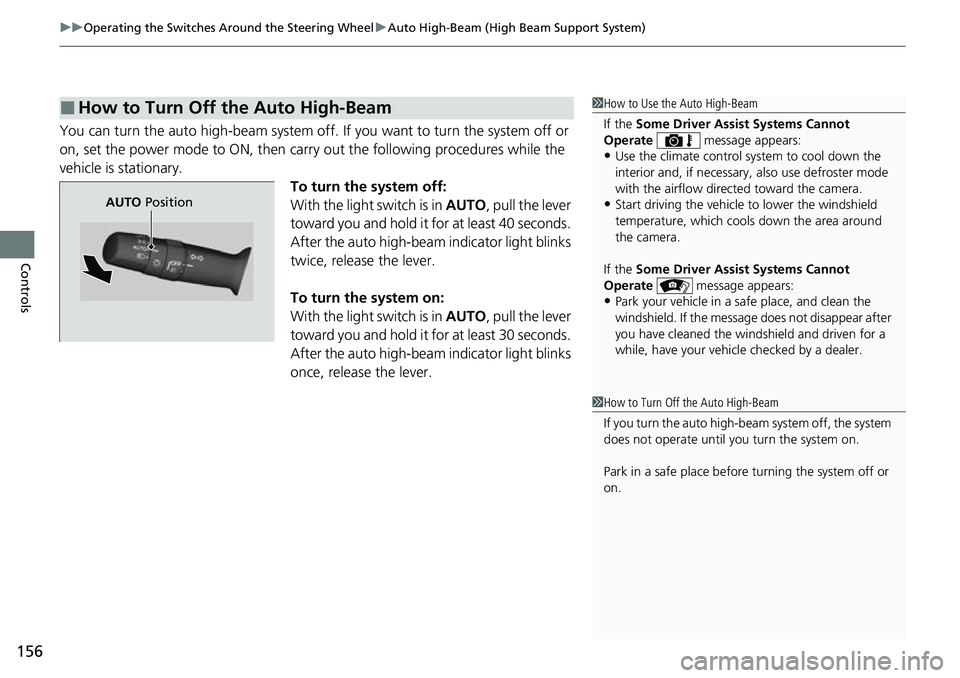
You can turn the auto high-beam system off. If you want to turn the system off or
on, set the power mode to ON, then carry out the following procedures while the
vehicle is stationary.
To turn the system off:
With the light switch is in AUTO, pull the lever
toward you and hold it for at least 40 seconds.
After the auto high-beam indicator light blinks
twice, release the lever.
To turn the system on:
With the light switch is in AUTO, pull the lever
toward you and hold it for at least 30 seconds.
After the auto high-beam indicator light blinks
once, release the lever.
■How to Turn Off the Auto High-Beam1 How to Use the Auto High-Beam
If the Some Driver Assist Systems Cannot
Operate message appears:
•Use the climate control system to cool down the
interior and, if necessary, also use defroster mode
with the airflow directed toward the camera.
•Start driving the vehicle to lower the windshield
temperature, which cool s down the area around
the camera.
If the Some Driver Assist Systems Cannot
Operate message appears:
•Park your vehicle in a sa fe place, and clean the
windshield. If the message does not disappear after
you have cleaned the windshield and driven for a
while, have your vehicle checked by a dealer.
1 How to Turn Off the Auto High-Beam
If you turn the au to high-beam system off, the system
does not operate until you turn the system on.
Park in a safe place before turning the system off or
on.
AUTO Position
Page 197 of 598
195Continued
Controls
Climate Control System
Using Automatic Climate Control
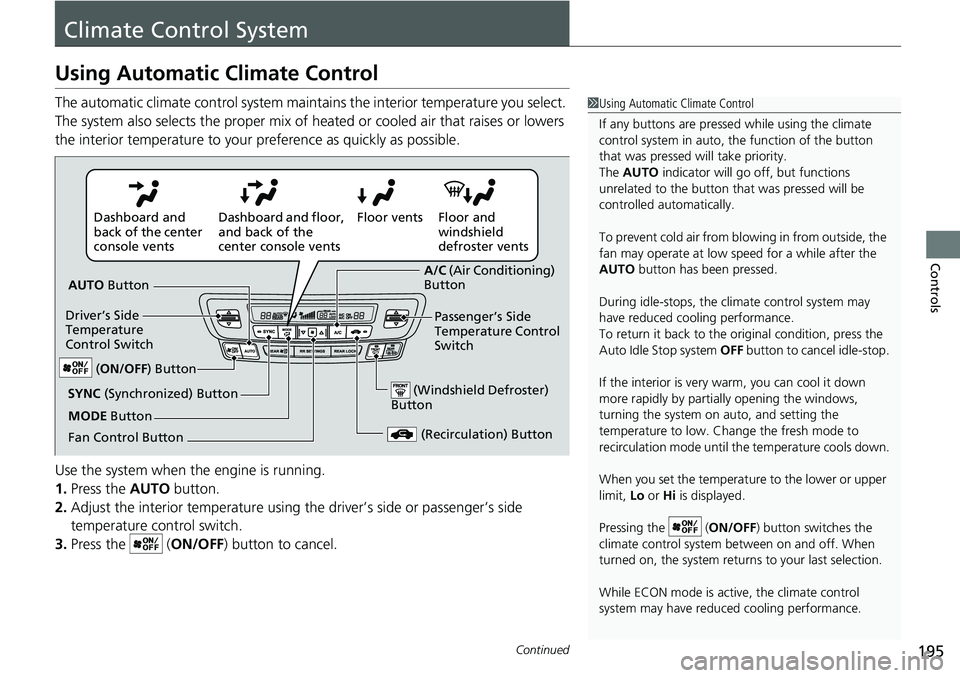
The automatic climate control system maintains the interior temperature you select.
The system also selects the proper mix of heat ed or cooled air that raises or lowers
the interior temperature to your pr eference as quickly as possible.
Use the system when the engine is running.
1. Press the AUTO button.
2. Adjust the interior temperature using the driver’s side or passenger’s side
temperature control switch.
3. Press the ( ON/OFF) button to cancel.1Using Automatic Climate Control
If any buttons are presse d while using the climate
control system in auto, the function of the button
that was pressed will take priority.
The AUTO indicator will go off, but functions
unrelated to the button th at was pressed will be
controlled automatically.
To prevent cold air from bl owing in from outside, the
fan may operate at low speed for a while after the
AUTO button has been pressed.
During idle-stops, the climate control system may
have reduced cool ing performance.
To return it back to the original condition, press the
Auto Idle Stop system OFF button to cancel idle-stop.
If the interior is very warm, you can cool it down
more rapidly by partial ly opening the windows,
turning the system on auto, and setting the
temperature to low. Change the fresh mode to
recirculation mode until the temperature cools down.
When you set the temperat ure to the lower or upper
limit, Lo or Hi is displayed.
Pressing the ( ON/OFF) button switches the
climate control system be tween on and off. When
turned on, the system returns to your last selection.
While ECON mode is active, the climate control
system may have reduced cooling performance.
Floor and
windshield
defroster vents
Floor vents
Dashboard and floor,
and back of the
center console vents
Dashboard and
back of the center
console vents
AUTO Button
Driver’s Side
Temperature
Control Switch
(Recirculation) Button
Fan Control Button A/C
(Air Conditioning)
Button
Passenger’s Side
Temperature Control
Switch
(Windshield Defroster)
ButtonSYNC (Synchronized) Button
(ON/OFF ) Button
MODE Button
Page 198 of 598
uuClimate Control System uUsing Automatic Climate Control
196
Controls
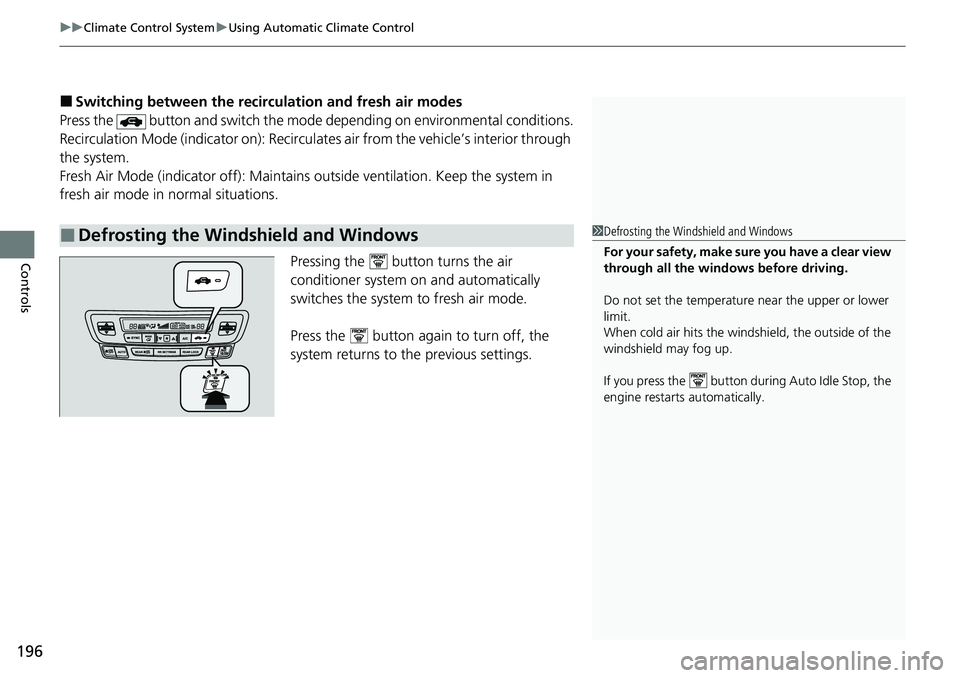
■Switching between the recirc ulation and fresh air modes
Press the button and switch the mode depending on environmental conditions.
Recirculation Mode (indicator on): Recirculat es air from the vehicle’s interior through
the system.
Fresh Air Mode (indicator off): Maintains outside ventilation. Keep the system in
fresh air mode in normal situations.
Pressing the button turns the air
conditioner system on and automatically
switches the system to fresh air mode.
Press the button again to turn off, the
system returns to the previous settings.
■Defrosting the Windshield and Windows1 Defrosting the Windshield and Windows
For your safety, make sure you have a clear view
through all the windows before driving.
Do not set the temperatur e near the upper or lower
limit.
When cold air hits the windshield, the outside of the
windshield may fog up.
If you press the button during Auto Idle Stop, the
engine restarts automatically.
Page 199 of 598
Continued197
uuClimate Control System uUsing Automatic Climate Control
Controls
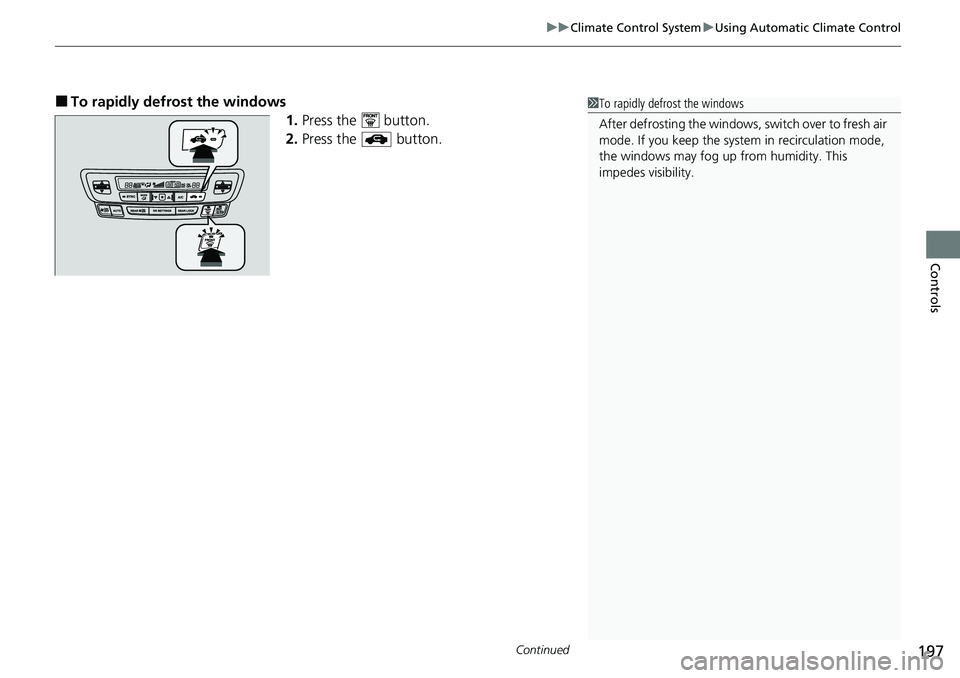
■To rapidly defrost the windows
1.Press the button.
2. Press the button.1To rapidly defrost the windows
After defrosting the windows, switch over to fresh air
mode. If you keep the syst em in recirculation mode,
the windows may fog up from humidity. This
impedes visibility.
Page 237 of 598
235
uuAudio System Basic Operation uVoice Control Operation
Features
When On Screen Commands is selected,
the explanation scr een is displayed.
The system accepts th ese commands on the
Music Search screen.
■Using Song By Voice
Song By VoiceTM is a feature that allows you
to select music from yo ur iPod or USB device
using Voice Commands. To activate this
mode, you must push the talk switch and
say: “ Music search ”.
■Song By Voice Commands
• What am I listening to?
• Who am I listening to?
• Who is this?
• What’s playing?
• Who’s playing?
• What album is this?
*1: Models with navigation system
■On Screen Commands
■Music Search Commands*1
■Play Commands
• Play artist
• Play track/song
• Play album
• Play genre/category
• Play playlist
• Play composer
■List Commands
• List artist
• List album
• List genre/category
• List playlist
• List composer
• What time is it?
• What is today’s date?
■General Commands
•Climate Control on
• Climate Control off
• Fan Speed <1-7>
• Temperature max heat
• Temperature max cool
• Temperature <57-87> degrees
• Defrost on
• Defrost off
• Air conditioner on
• Air conditioner off
• More
• Climate control automatic
• Vent
• Dash and floor
• Fan speed up
• Fan speed down
• Floor vents
• Floor and defrost
• Temperature up
• Temperature down
■Climate Control Commands*1
Page 392 of 598
uuWhen Driving uStarting the Engine
390
Driving
1Remote Engine Start
While the engine is running, the vehicle will
automatically preconditi on inside the vehicle.
When it is warm outside:
•The climate control system is activated in
recirculation mode.
•The seat ventilation* is activated.
When it is cold outside:
•The defroster is activated at a moderately warm
temperature.
•The rear defogger and door mirror heaters* are
activated.
•The seat heaters* and heated steering wheel* are
activated. 2Heated Steering Wheel
* P. 187
2 Front Seat Heaters* P. 188
2 Front Seat Heaters / Ventilators* P. 189
2 Rear Seat Heaters* P. 190
* Not available on all models
Page 468 of 598
uuHonda Sensing ®u Front Sensor Camera
466
Driving
1Front Sensor Camera
If the Some Driver Assist Systems Cannot
Operate message appears:
•Use the climate control system to cool down the
interior and, if necessary, also use defroster mode
with the airflow directed towards the camera.
•Start driving the vehicle to lower the windshield
temperature, which cool s down the area around
the camera.
If the Some Driver Assist Systems Cannot
Operate message appears:
•Park your vehicle in a sa fe place, and clean the
windshield. If the message does not disappear after
you have cleaned the windshield and driven for a
while, have your vehicle checked by a dealer.
Page 589 of 598
Index
587
Index
Index
A
ABS (Anti-lock Brake System).................. 470
AC Power Outlet ...................................... 191
Accessories and Modifications ................ 535
Accessory Power Sockets ......................... 182
Adaptive Cruise Control (ACC) ................ 438
Indicator ................................................... 91
Additives
Coolant .................................................. 504
Engine Oil ............................................... 499
Washer ................................................... 507
Adjusting Armrest .................................................. 174
Front Seats.............................................. 166
Head Restraints ............................... 171, 172
Mirrors.................................................... 164
Rear Seats ............................................... 169
Steering Wheel ....................................... 163
Temperature ........................................... 113
Agile Handling Assist ............................... 414
Air Conditioning System (Climate Control System) .................................................... 195
Changing the Mode................................ 195
Defrosting the Windshield and Windows .............................................. 196
Dust and Pollen Filter .............................. 528
Recirculation/Fresh Air Mode................... 196
Sensor .................................................... 201
Synchronized Mode ................................ 198
Using Automatic Climate Control............ 195
Air Pressure ...................................... 517, 575 Airbags
........................................................ 44
Advanced Airbags ..................................... 50
After a Collision ......................................... 47
Airbag Care ............................................... 58
Event Data Recorder .................................... 0
Front Airbags (SRS) .................................... 47
Indicator .............................................. 55, 82
Passenger Airbag Off Indicator .................. 56
Sensors ...................................................... 44
Side Airbags .............................................. 52
Side Curtain Airbags .................................. 54
All-wheel drive (AWD) Indicator ............... 88
AM/FM Radio ............................................ 236
Android Auto ............................................ 273
Anti-lock Brake System (ABS) .................. 470
Indicator .................................................... 82
Apple CarPlay ........................................... 269
Armrest ..................................................... 174
Audio Remote Controls ............................ 209
Audio System ............................................ 204
Adjusting the Sound ................................ 229
Audio/Information Screen ........................ 212
Auxiliary Input Jack .................................. 207
Changing the Home Screen Icon Layout ................................................... 216
Closing Apps ........................................... 226
Display Setup ........................................... 230
Error Messages ........................................ 278
General Information ................................ 281
Home Screen ........................................... 219
Limitations for Manua l Operation ............ 231 MP3/WMA/AAC ...................................... 256
Reactivating ............................................ 208
Remote Controls ..................................... 209
Security Code .......................................... 208
Selecting an Audio Source ....................... 231
Status Area ............................................. 225
Theft Protection ...................................... 208
Truck Bed Audio...................................... 277
USB Flash Drives .............................. 256, 282
USB Port.................................................. 205
Wallpaper Setup...................................... 217
Audio/Information Screen ....................... 212
Authorized Manuals ................................ 584
Auto Door Locking/Unlocking ................. 130
Customize ....................................... 315, 316
Auto High-Beam ....................................... 154
Indicator.................................................... 86
Auto Idle Stop .......................................... 406
OFF Button .............................................. 407
Auto Idle Stop Indicator (Green) ............... 89
Auto Idle Stop System Indicator (Amber) ..................................................... 89
Automatic Intermittent Wipers ............... 158
Automatic Lighting .................................. 150
Automatic Transmission ........................... 394
Creeping ................................................. 394
Fluid ................. .....................
.................. 506
Kickdown ................................................ 394
Operating the Shift Button ...................... 397
Shifting ................................................... 395
Auxiliary Input Jack .................................. 207
Page 590 of 598
588
Index
Average Fuel Economy............................. 113
B
Battery....................................................... 525
Charging System Indicator ................. 79, 557
If the Battery Is Dead ............................... 552
Maintenance (Checking the Battery) ........ 525
Bed Lights .................................................. 193
Indicator .................................................... 95
Belts (Seat) .................................................. 37
Beverage Holders ...................................... 179
Blind spot information System ................ 420
Indicator .................................................... 92
Bluetooth ® Audio ..................................... 259
Bluetooth ® HandsFreeLink ®................... 330
Booster Seats (For Children) ....................... 73
Brake System ............................................. 468
Anti-lock Brake System (ABS) ................... 470
Brake Assist System ................................. 471
Brake System Indicator............................... 78
Fluid ........................................................ 507
Foot Brake ............................................... 469
Indicator ............................................ 78, 559
Parking Brake .......................................... 468
Brake System Indicator (Amber) ................ 78
Brake System Indicator (Red) ............. 78, 559
Brightness Control (Instrument Panel) .... 160
Bulb Replacement ..................................... 508
Brake/Taillight and Rear Side Marker
Light ...................................................... 512 Daytime Running Light
and Parking
Light...................................................... 510
Front Side Marker Light ........................... 510
Front Turn Signal/Parking Light ................ 511
Headlights ............................................... 508
High-Mount Brake Light .......................... 513
Rear License Plate Light ........................... 513
Rear Turn Signal and Back-Up Light ......... 512
Side Turn Signal/Emergency Indicator Light...................................................... 511
Bulb Specifications ................................... 574
C
Car Wash Mode........................................ 399
Carbon Monoxide Gas ............................... 74
Cargo Hooks ............................................. 194
Carrying Cargo ......................... 365, 367, 370
Certification Label .................................... 576
Changing Bulbs ........................................ 508
Charging System Indicator ................. 79, 557
Child Safety ................................................. 59
Childproof Door Locks............................. 129
Emergency Trunk Opener ........................ 135
Child Seat .................................................... 59
Booster Seats ............................................ 73
Child Seat for Infants................................. 61
Child Seat for Small Children ..................... 62
Installing a Child Seat with a Lap/Shoulder Seat Belt ......................................................... 67 Installing a LATCH-Compatible Child
Seat ........................................................ 64
Larger Children ......................................... 72
Rear-facing Child Seat............................... 61
Selecting a Child Seat ............................... 63
Using a Tether .......................................... 69
Childproof Door Locks ............................. 129
Cleaning the Exterior ............................... 531
Cleaning the Interior ............................... 529
Climate Control System ........................... 195
Changing the Mode................................ 195
Defrosting the Windshield and Windows .............................................. 196
Dust and Pollen Filter .............................. 528
Recirculation and Fresh Air Mode ............ 196
Sensors ................................................... 201
Synchronized Mode ................................ 198
Using Automatic Climate Control............ 195
Clock ......................................................... 116
Coat Hook ................................................ 180
Collision Mitigation Braking System
TM
(CMBSTM) ................................................. 426
Indicator ............................................. 93, 94
Compact Spare Tire .......................... 539, 575
Console Compartment ............................. 178
Controls .................................................... 115
Conversation Mirror ................................ 181
Coolant (Engine) ...................................... 504
Adding to the Radiator ........................... 505
Adding to the Reserve Tank .................... 504
Overheating ............................................ 555