maps HONDA RIDGELINE 2023 Owners Manual
[x] Cancel search | Manufacturer: HONDA, Model Year: 2023, Model line: RIDGELINE, Model: HONDA RIDGELINE 2023Pages: 598, PDF Size: 12.34 MB
Page 271 of 598
269
uuAudio System Basic Operation uApple CarPlay
Continued
Features
Apple CarPlay
If you connect an Apple CarPlay-compatible iPhone to the system via the 1.5A USB
port, you can use the audio/information screen, instead of the iPhone display, to
make a phone call, listen to music, view maps (navigation), and access messages.
2USB Ports P. 205
■Phone
Access the contact list, make phone ca lls, or listen to voice mail.
■Messages
Check and reply to text messages, or have messages read to you.
■Music
Play music stored on your iPhone.
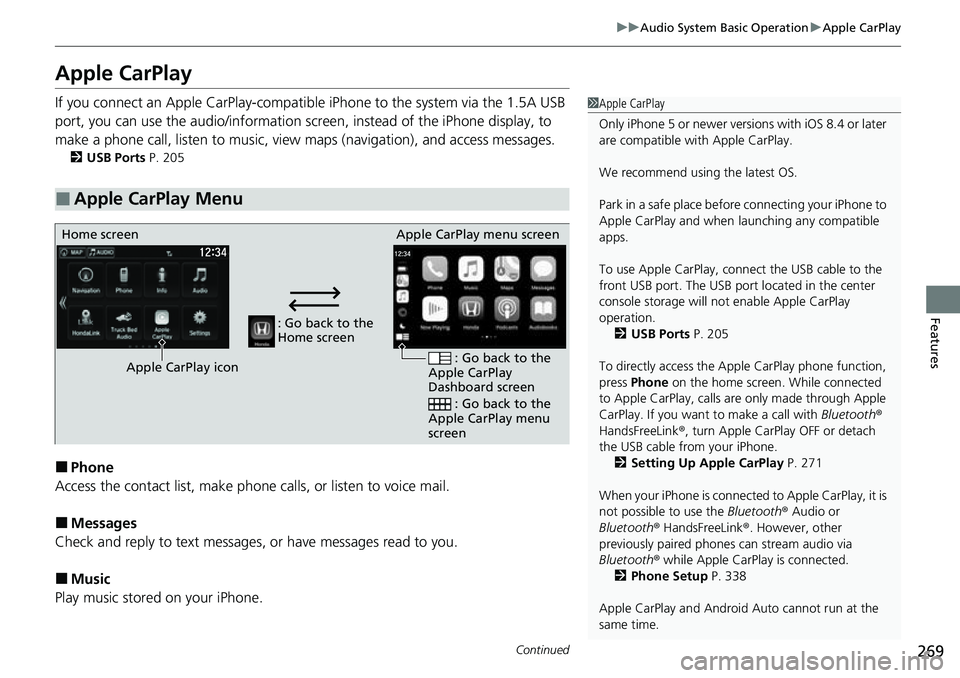
■Apple CarPlay Menu
1 Apple CarPlay
Only iPhone 5 or newer versi ons with iOS 8.4 or later
are compatible with Apple CarPlay.
We recommend using the latest OS.
Park in a safe place before connecting your iPhone to
Apple CarPlay and when launching any compatible
apps.
To use Apple CarPlay, connect the USB cable to the
front USB port. The USB por t located in the center
console storage will not enable Apple CarPlay
operation. 2 USB Ports P. 205
To directly access the Appl e CarPlay phone function,
press Phone on the home screen. While connected
to Apple CarPlay, calls are only made through Apple
CarPlay. If you want to make a call with Bluetooth®
HandsFreeLink ®, turn Apple CarPlay OFF or detach
the USB cable from your iPhone. 2 Setting Up Apple CarPlay P. 271
When your iPhone is connected to Apple CarPlay, it is
not possible to use the Bluetooth® Audio or
Bluetooth ® HandsFreeLink ®. However, other
previously paired phones can stream audio via
Bluetooth ® while Apple CarPlay is connected.
2 Phone Setup P. 338
Apple CarPlay and Android Auto cannot run at the
same time.
: Go back to the
Home screen
Home screen
Apple CarPlay icon Apple CarPlay menu screen
: Go back to the
Apple CarPlay
Dashboard screen
: Go back to the
Apple CarPlay menu
screen
Page 272 of 598
uuAudio System Basic Operation uApple CarPlay
270
Features
■Maps
Display Apple Maps and use the navigation function just as you would on your
iPhone.
Only one navigation system (pre-installed navigation or Apple CarPlay) can give
directions at a time. When you are using one system, directions to any prior
destination set on the other system will be canceled, and the system you are
currently using will direct you to your destination.1 Apple CarPlay
For details on c ountries and regions where Apple
CarPlay is available, as well as information pertaining
to function, refer to the Apple homepage.
Apple CarPlay Operating Requirements &
Limitations
Apple CarPlay requi res a compatible iPhone with an
active cellular connecti on and data plan. Your
carrier’s rate plans will apply.
Changes in operating systems, hardware, software,
and other technology integral to providing Apple
CarPlay functionality, as well as new or revised
governmental regulations, may result in a decrease or
cessation of Apple CarPlay functionality and services.
Honda cannot and does not pr ovide any warranty or
guarantee of future Appl e CarPlay performance or
functionality.
It is possible to use 3r d party apps if they are
compatible with Apple CarPlay. Refer to the Apple
homepage for information on compatible apps.
Models with navigation system
Page 275 of 598
273
uuAudio System Basic Operation uAndroid AutoTM
Continued
Features
Android AutoTM
When you connect an Android phone to the Display Audio system via USB, Android
Auto is automatically initiated. When connected via Android Auto, you can use the
audio/information screen to access the Phone, Google Maps (Navigation), Google
Play Music, and Google Now functions. When you first use Android Auto, a tutorial
will appear on the screen.
We recommend that you complete this tuto rial while safely parked before using
Android Auto.
2 USB Ports P. 205
2 Auto Pairing Connection P. 275
1Android AutoTM
To use Android Auto, you need to download the
Android Auto app from Google Play to your
smartphone.
Only Android 5.0 (Lollipop) or later versions are
compatible with Android Auto.
Bluetooth A2DP cannot be used while your phone is
connected to Android Auto.
Park in a safe place befo re connecting your Android
phone to Android Auto and when launching any
compatible apps.
To use Android Auto, connect the USB cable to the
front USB port. The USB port in the center console
storage will not enable Android Auto operation.
2 USB Ports P. 205
When your Android phone is connected to Android
Auto, it is not possible to use the Bluetooth® Audio.
However, other previously paired phones can stream
audio via Bluetooth ® while Android Auto is
connected. 2 Phone Setup P. 338
Apple CarPlay and Android Auto cannot run at the
same time.
Android Auto is a trademark of Google LLC.
Page 276 of 598
uuAudio System Basic Operation uAndroid AutoTM
274
Features
■Maps
Display Google Maps and use the navigation function just as you would with your
Android phone. When the vehicle is in mo tion, it is not possible to make keyboard
entries. Stop the vehicle in a safe location to undertake a search or provide other
inputs.
Only one navigation system (pre-installe d navigation or Android Auto) can give
directions at a time. When you are using one system, directions to any prior
destination set on the other system will be canceled, and the system you are
currently using will direct you to your destination.
The audio/information screen shows you turn -by-turn driving directions to your
destination.
■ Phone
Make and receive phone calls as well as listen to voicemail.
■ (Android Auto Home)
Display useful information organized by Andr oid Auto into simple cards that appear
just when they’re needed.
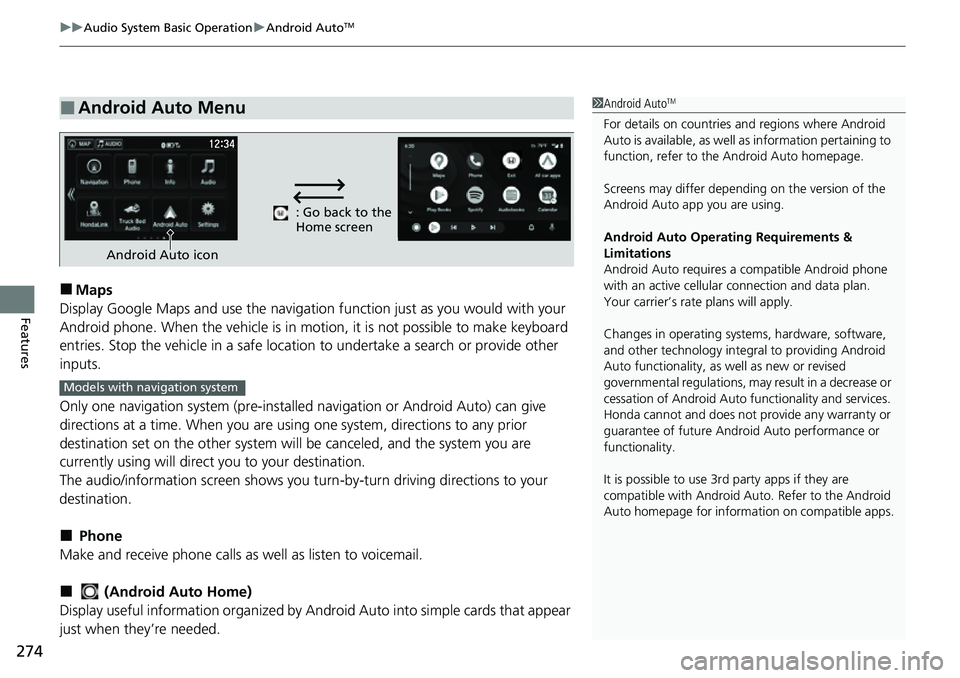
■Android Auto Menu1 Android AutoTM
For details on c ountries and regions where Android
Auto is available, as well as information pertaining to
function, refer to the Android Auto homepage.
Screens may differ depending on the version of the
Android Auto app you are using.
Android Auto Operating Requirements &
Limitations
Android Auto requires a compatible Android phone
with an active cellular connection and data plan.
Your carrier’s rate plans will apply.
Changes in operating systems, hardware, software,
and other technology integral to providing Android
Auto functionality, as well as new or revised
governmental regulations, may result in a decrease or
cessation of Android Auto functionality and services.
Honda cannot and does not pr ovide any warranty or
guarantee of future Android Auto performance or
functionality.
It is possible to use 3r d party apps if they are
compatible with Android Auto. Refer to the Android
Auto homepage for informat ion on compatible apps.
: Go back to the
Home screen
Android Auto icon
Models with navigation system
Page 290 of 598
288
uuGeneral Information on the Audio System uHonda App License Agreement
Features
2. Potential Map Inaccuracy and Route Safety. Maps used by this system may be inaccurate because of changes in roads, traffic controls,
routing, or driving conditions. Always use good judgment and co mmon sense when following suggested routes. Do not follow the ro ute
suggestions if doing so would result in an un safe or illegal driving maneuver, if you would be placed in an unsafe situation, o r if you would
be directed into an area that you consider unsafe. Do not rely on any navigation feat ures included in the system to route you to emergency
services. Not all emergency services such as police, fire stations, hospitals, or clinics are likely to be contained in the map database for such
navigation features. Ask local authorities or an emergency services operator for such locations and routes. The driver is ultimately
responsible for the safe operation of the ve hicle and therefore, must evaluate whether it is safe to follow the suggested directions. Any
navigation features are provided only as an aid. Make your driving decisions based on your observations of local conditions and existing
traffic regulations. Navigation features are not a substitute for your personal judgmen t. Any route suggestions made by the SOFTWARE or
SERVICES should never replace any local traffic regulations or yo ur personal judgment or knowledge of safe driving practices.
3. Speech Recognition:
You acknowledge and understand that HONDA and PROVIDERS may reco rd, retain, and use voices commands
when you use the speech recognition components of the SOFTWARE or SERVICES. You and all VEHICLE operators and passengers (a)
consent to the recording and retention of voice commands in su pport of providing speech recognition components and (b) release HONDA
and PROVIDERS from all claims, liabilities, and losses that may result from any use of such recorded voice commands. Recognitio n errors
are inherent in speech recognition. It is your responsibility to monitor any speech recognition functions included in the syste m and address
any errors. Neither HONDA nor PROVIDERS will be liable for any damages arising out of errors in the speech recognition process.
4. Distraction Hazards.
Navigation features may require manua l (non-verbal) input or setup. Attempting to perform such set-up or insert
data while driving can seriously distract your attention and could cause a crash or other serious consequences; the ability to undertake such
interactions may also be limited by state or local law, which la ws you are responsible to know and follow. Even occasional shor t scans of
the screen may be hazardous if your attention has been diverted away from your driving at a crit ical time. Pull over and stop the vehicle in
a safe and legal manner before attempting to access a function of the system requiring prolonged attention. Do not raise the vo lume
excessively. Keep the volume at a level wh ere you can still hear outside traffic and em ergency signals while driving. Driving while unable
to hear these sounds could result in a crash.