parking brake release HONDA RIDGELINE 2023 Owners Manual
[x] Cancel search | Manufacturer: HONDA, Model Year: 2023, Model line: RIDGELINE, Model: HONDA RIDGELINE 2023Pages: 598, PDF Size: 12.34 MB
Page 10 of 598
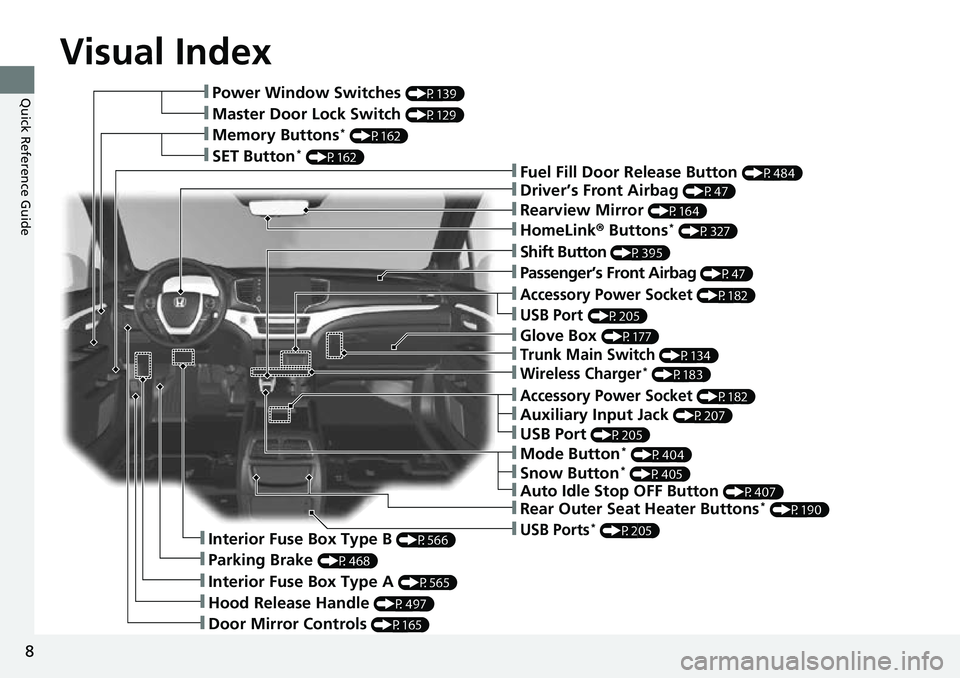
Visual Index
8
Quick Reference Guide❚Power Window Switches (P139)
❚Master Door Lock Switch (P129)
❚Memory Buttons* (P162)
❚SET Button* (P162)❚Fuel Fill Door Release Button (P484)
❚Driver’s Front Airbag (P47)
❚Shift Button (P395)
❚Auxiliary Input Jack (P207)
❚Parking Brake (P468)
❚Interior Fuse Box Type A (P565)
❚Hood Release Handle (P497)
❚Door Mirror Controls (P165)
❚Accessory Power Socket (P182)
❚USB Port (P205)
❚Auto Idle Stop OFF Button (P407)
❚Mode Button* (P404)
❚Trunk Main Switch (P134)
❚Interior Fuse Box Type B (P566)
❚Snow Button* (P405)
❚Wireless Charger* (P183)
❚Glove Box (P177)
❚USB Ports* (P205)
❚Accessory Power Socket (P182)
❚Passenger’s Front Airbag (P47)
❚Rearview Mirror (P164)
❚HomeLink® Buttons* (P327)
❚Rear Outer Seat Heater Buttons* (P190)
❚USB Port (P205)
Page 30 of 598
28
Quick Reference Guide
Why do the doors lock
after I unlocked the doors?If you do not open the doors within 30 seconds, the doors are
relocked automatically for security.
Why does the beeper
sound when I open the
driver’s door?The beeper sounds when:
●The power mode is in ACCESSORY.
●The exterior lights are left on.
●The Auto Idle Stop is in operation.
Why does a beeper sound
when I walk away from the
vehicle after I close the
door?The beeper sounds if you move outside the walk away auto lock
operating range before the door completely closes.
2Locking the doors (Walk away auto lock ®) (P123)
Why does the beeper
sound when I start driving?The beeper sounds when:
●Driver and/or front passenger are not wearing their seat belts.
●The parking brake pedal is not fully released.
Why do I hear a screeching
sound when I apply the
brake pedal?The brake pads may need to be replaced. Have your vehicle
inspected by a dealer.
Page 80 of 598
78
Instrument Panel
Indicators
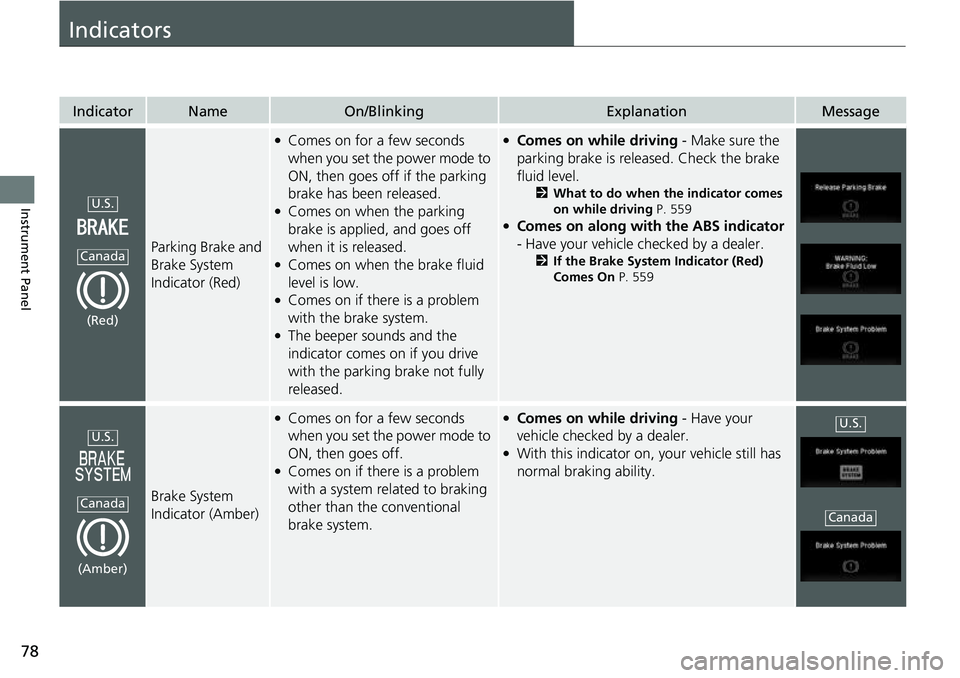
IndicatorNameOn/BlinkingExplanationMessage
Parking Brake and
Brake System
Indicator (Red)
●Comes on for a few seconds
when you set the power mode to
ON, then goes off if the parking
brake has been released.
●Comes on when the parking
brake is applied, and goes off
when it is released.
●Comes on when the brake fluid
level is low.
●Comes on if there is a problem
with the brake system.
●The beeper sounds and the
indicator comes on if you drive
with the parking brake not fully
released.
●Comes on while driving - Make sure the
parking brake is released. Check the brake
fluid level.
2 What to do when the indicator comes
on while driving P. 559
●Comes on along with the ABS indicator
- Have your vehicle checked by a dealer.
2 If the Brake System Indicator (Red)
Comes On P. 559
Brake System
Indicator (Amber)
●Comes on for a few seconds
when you set the power mode to
ON, then goes off.
●Comes on if there is a problem
with a system related to braking
other than the conventional
brake system.
●Comes on while driving - Have your
vehicle checked by a dealer.
●With this indicator on, your vehicle still has
normal braking ability.
U.S.
Canada
(Red)
U.S.
Canada
(Amber)
U.S.
Canada
Page 151 of 598
149
uuOperating the Switches Around the Steering Wheel uLight Switches
Continued
Controls
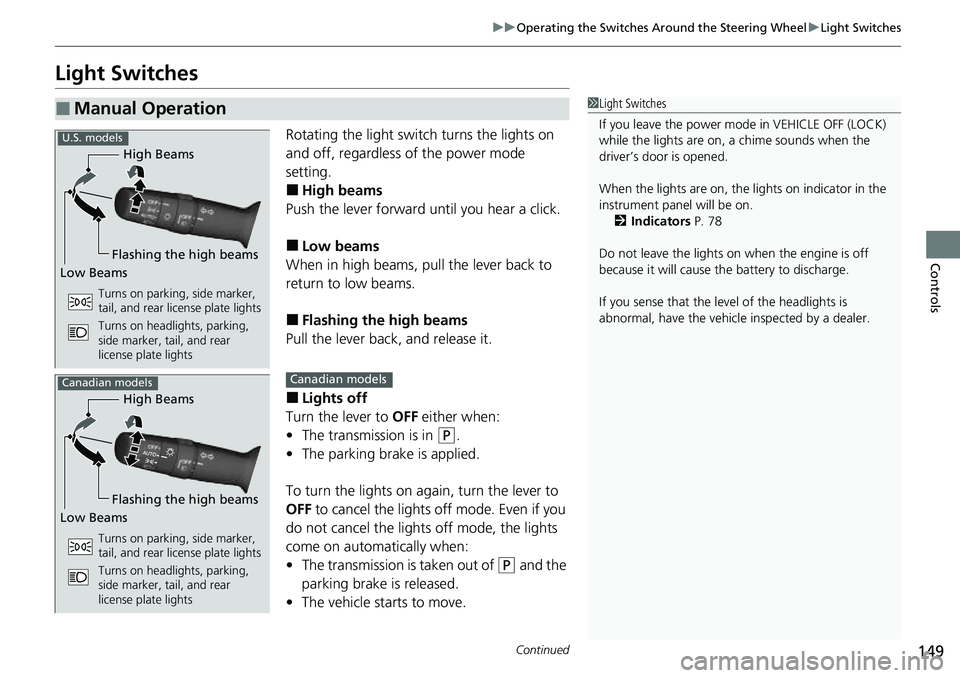
Light Switches
Rotating the light switch turns the lights on
and off, regardless of the power mode
setting.
■High beams
Push the lever forward until you hear a click.
■Low beams
When in high beams, pull the lever back to
return to low beams.
■Flashing the high beams
Pull the lever back, and release it.
■Lights off
Turn the lever to OFF either when:
• The transmission is in
(P.
• The parking brake is applied.
To turn the light s on again, turn the lever to
OFF to cancel the lights off mode. Even if you
do not cancel the lights off mode, the lights
come on automatically when:
• The transmission is taken out of
(P and the
parking brake is released.
• The vehicle starts to move.
■Manual Operation1Light Switches
If you leave the power mode in VEHICLE OFF (LOCK)
while the lights are on, a chime sounds when the
driver’s door is opened.
When the lights are on, the lights on indicator in the
instrument pane l will be on.
2 Indicators P. 78
Do not leave the lights on when the engine is off
because it will cause the battery to discharge.
If you sense that the le vel of the headlights is
abnormal, have the vehicl e inspected by a dealer.
High Beams
Flashing the high beams
Low Beams
Turns on parking, side marker,
tail, and rear license plate lights
Turns on headlights, parking,
side marker, tail, and rear
license plate lights
U.S. models
High Beams
Flashing the high beams
Low Beams
Turns on parking, side marker,
tail, and rear license plate lights
Turns on headlights, parking,
side marker, tail, and rear
license plate lights
Canadian modelsCanadian models
Page 155 of 598
153
uuOperating the Switches Around the Steering Wheel uDaytime Running Lights
Controls
Daytime Running Lights
The daytime running lights come on when th e following conditions have been met:
• The power mode is in ON.
• The headlight switch is AUTO or OFF .
• The parking brake is released.
• The power mode is in ON.
• The headlight switch is AUTO.
• The parking brake is released.
The lights remain on even if you set the parking brake.
Setting the power mode to VEHICLE OFF will turn off the daytime running lights.
The daytime running lights are off once the h eadlight switch is turned on, or when
the headlight switch is in AUTO and it is getting darker outside.
U.S. models
Canadian models
Page 393 of 598
391
uuWhen Driving uStarting the Engine
Driving
1. Depress and hold the brake pedal, then press the ENGINE START/STOP button.
2. Keeping your right foot on the brake pedal, release the parking brake. Check that
the parking brake indicator has gone off.
2 Parking Brake P. 468
3.Put the transmission into (D. Select (R when reversing.
4. Gradually release the brake pedal and gently depress the accelerator pedal to pull
away.
■Hill start assist system
Hill start assist keeps the brake engaged br iefly to help prevent the vehicle from
rolling on inclines as you move your foot from the brake pedal to the accelerator.
Put the transmission into
(D, or (S when facing uphill, or ( R when facing downhill,
then release the brake pedal.
You can turn the engine off when the vehicle is completely stopped.
1. Put the transmission into
(P.
2. Press the ENGINE START/STOP button.
■Starting to Drive
■Stopping the Engine
1Starting to Drive
The engine stops when th e transmission is taken out
of
( P before the ENGINE START/STOP button is
pressed. Follow step 1 when starting to drive.
When the engine was started using the keyless remoteWhen the engine was started using the keyless remote
When the engine was started in any case
1 Hill start assist system
Hill start assist may not prevent the vehicle from
rolling downhill on a very st eep or slippery slope, and
will not operate on small inclines.
Hill start assist will operate even when VSA ® is
switched off.
Hill start assist is not a replacement for the parking
brake.
Page 442 of 598
uuHonda Sensing ®u Adaptive Cruise Control (ACC)
440
Driving
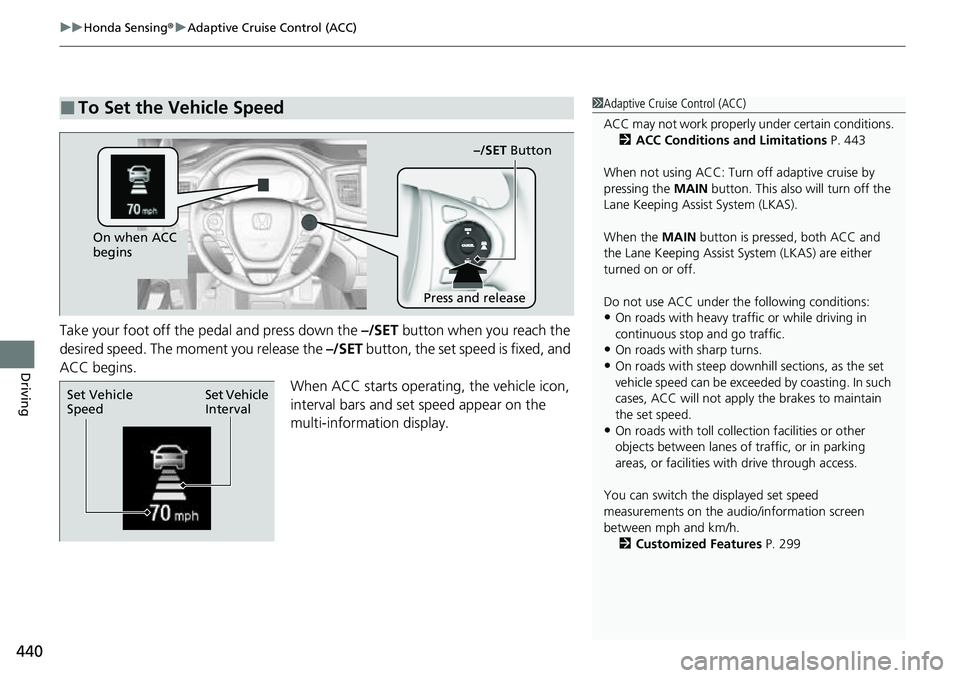
Take your foot off the pedal and press down the –/SET button when you reach the
desired speed. The moment you release the –/SET button, the set speed is fixed, and
ACC begins.
When ACC starts operating, the vehicle icon,
interval bars and set speed appear on the
multi-information display.
■To Set the Vehicle Speed1 Adaptive Cruise Control (ACC)
ACC may not work properly under certain conditions.
2 ACC Conditions and Limitations P. 443
When not using ACC: Turn off adaptive cruise by
pressing the MAIN button. This also will turn off the
Lane Keeping Assist System (LKAS).
When the MAIN button is pressed, both ACC and
the Lane Keeping Assist System (LKAS) are either
turned on or off.
Do not use ACC under the following conditions:
•On roads with heavy traf fic or while driving in
continuous stop and go traffic.
•On roads with sharp turns.
•On roads with steep downhill sections, as the set
vehicle speed can be exceeded by coasting. In such
cases, ACC will not apply the brakes to maintain
the set speed.
•On roads with toll collection facilities or other
objects between lanes of traffic, or in parking
areas, or faci lities with driv e through access.
You can switch the displayed set speed
measurements on the audio/information screen
between mph and km/h. 2 Customized Features P. 299
On when ACC
begins
Press and release–/SET
Button
Set Vehicle
Interval
Set Vehicle
Speed
Page 470 of 598
468
Driving
Braking
Brake System
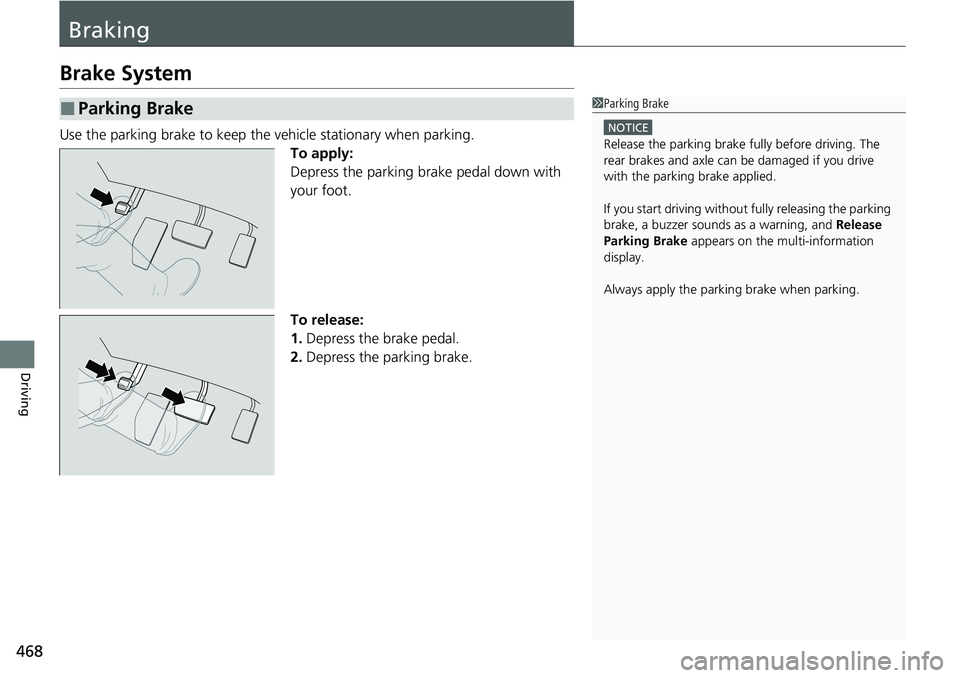
Use the parking brake to keep the vehicle stationary when parking.To apply:
Depress the parking brake pedal down with
your foot.
To release:
1.Depress the brake pedal.
2. Depress the parking brake.
■Parking Brake1Parking Brake
NOTICE
Release the parking brake fu lly before driving. The
rear brakes and axle can be damaged if you drive
with the parki ng brake applied.
If you start driving without fully releasing the parking
brake, a buzzer sounds as a warning, and Release
Parking Brake appears on the multi-information
display.
Always apply the parking brake when parking.
Page 499 of 598
497
uuMaintenance Under the Hood uOpening the Hood
Maintenance
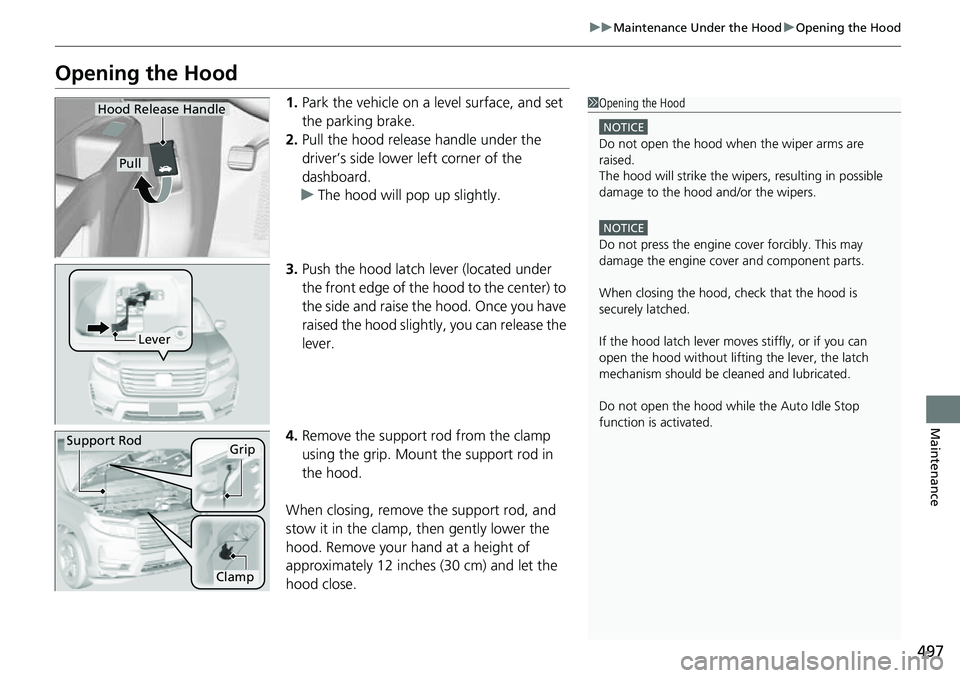
Opening the Hood
1. Park the vehicle on a level surface, and set
the parking brake.
2. Pull the hood release handle under the
driver’s side lower left corner of the
dashboard.
u The hood will pop up slightly.
3. Push the hood latch lever (located under
the front edge of the hood to the center) to
the side and raise the hood. Once you have
raised the hood slightly, you can release the
lever.
4. Remove the support rod from the clamp
using the grip. Mount the support rod in
the hood.
When closing, remove the support rod, and
stow it in the clamp, then gently lower the
hood. Remove your hand at a height of
approximately 12 inches (30 cm) and let the
hood close.1 Opening the Hood
NOTICE
Do not open the hood when the wiper arms are
raised.
The hood will strike the wipe rs, resulting in possible
damage to the hood and/or the wipers.
NOTICE
Do not press the engine cover forcibly. This may
damage the engine cover and component parts.
When closing the hood, check that the hood is
securely latched.
If the hood latch lever moves stiffly, or if you can
open the hood without lifti ng the lever, the latch
mechanism should be cl eaned and lubricated.
Do not open the hood while the Auto Idle Stop
function is activated.
Hood Release Handle
Pull
Lever
Support RodGrip
Clamp