light HONDA S2000 2001 1.G User Guide
[x] Cancel search | Manufacturer: HONDA, Model Year: 2001, Model line: S2000, Model: HONDA S2000 2001 1.GPages: 276, PDF Size: 3.79 MB
Page 53 of 276
Control
s Nea r th e Steerin g Whee l
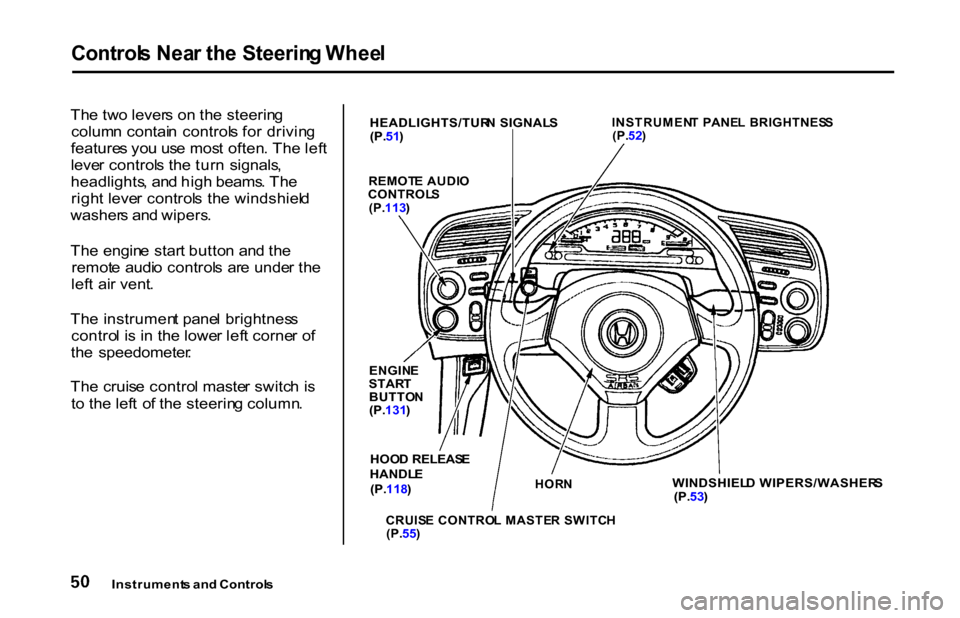
Th e tw o lever s o n th e steerin g
colum n contai n control s fo r drivin g
feature s yo u us e mos t often . Th e lef t
leve r control s th e tur n signals ,
headlights , an d hig h beams . Th e
righ t leve r control s th e windshiel d
washer s an d wipers .
Th e engin e star t butto n an d th e
remot e audi o control s ar e unde r th e
lef t ai r vent .
Th e instrumen t pane l brightnes s
contro l i s i n th e lowe r lef t corne r o f
th e speedometer .
Th e cruis e contro l maste r switc h is
t o th e lef t o f th e steerin g column .
Instrument s an d Control s
HEADLIGHTS/TUR
N SIGNAL S
(P. 51)
INSTRUMEN
T PANE L BRIGHTNES S
(P. 52)
REMOT E AUDI O
CONTROL S
(P. 113 )
ENGIN E
STAR T
BUTTO N
(P. 131 )
HOO D RELEAS E
HANDL E
(P. 118 )
HOR
N
CRUIS E CONTRO L MASTE R SWITC H
(P. 55)
WINDSHIEL
D WIPERS/WASHER S
(P. 53)
Page 54 of 276
Control
s Nea r th e Steerin g Whee l
Headlight s
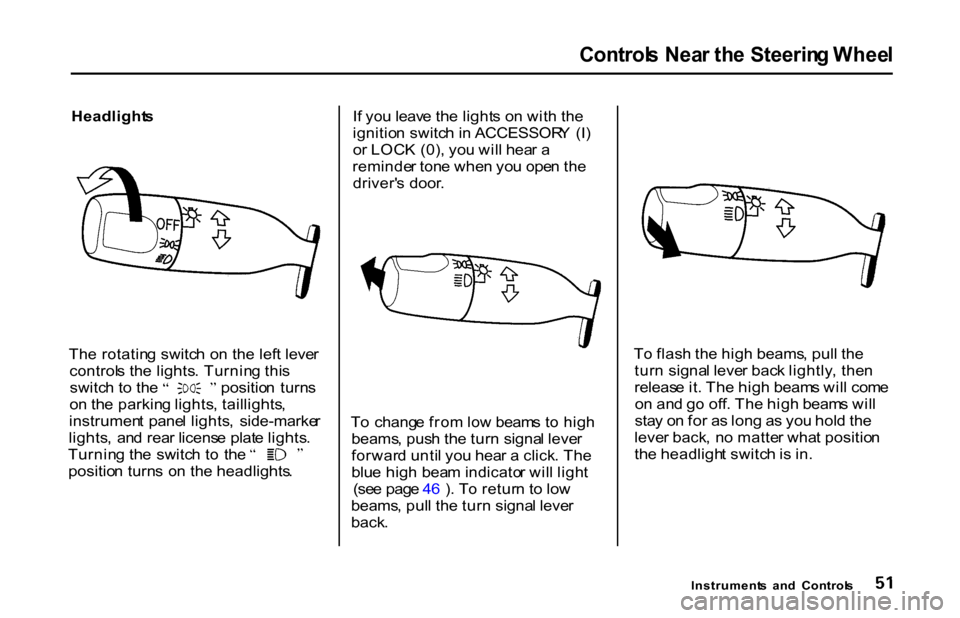
Th e rotatin g switc h o n the left leve r
control s th e lights . Turnin g thi s switc
h t o th e positio n turn s
o n th e parkin g lights , taillights ,
instrumen t pane l lights , side-marke r
lights , an d rea r licens e plat e lights . Turnin
g th e switc h t o th e
positio n turn s o n th e headlights .I
f yo u leav e th e light s o n wit h th e
ignitio n switc h in ACCESSOR Y (I )
o r LOC K (0) , yo u wil l hea r a
reminde r ton e whe n yo u ope n th e
driver' s door .
T o chang e fro m lo w beam s t o hig h
beams , pus h th e tur n signa l leve r
forwar d unti l yo u hea r a click . Th e
blu e hig h bea m indicato r wil l ligh t
(se e pag e 4 6 ) . T o retur n t o lo w
beams , pul l th e tur n signa l leve r
back . T
o flas h th e hig h beams , pul l th e
tur n signa l leve r bac k lightly , the n
releas e it . Th e hig h beam s wil l com e
o n an d g o off . Th e hig h beam s wil l
sta y o n fo r a s lon g a s yo u hol d th e
leve r back , n o matte r wha t positio n
th e headligh t switc h is in .
Instrument s an d Control s
Page 55 of 276
Control
s Nea r th e Steerin g Whee l
Daytim e Runnin g Light s
Canadian models only
Wit h th e headligh t switc h off , th e
hig h bea m headlight s com e o n wit h
reduce d brightnes s whe n yo u tur n
th e ignitio n switc h t o O N (II ) an d
releas e th e parkin g brake . The y
remai n o n unti l yo u tur n th e ignitio n
off , eve n if yo u se t th e parkin g brake .
Th e headlight s rever t t o norma l
operatio n whe n yo u tur n the m o n
wit h th e switch . Instrumen
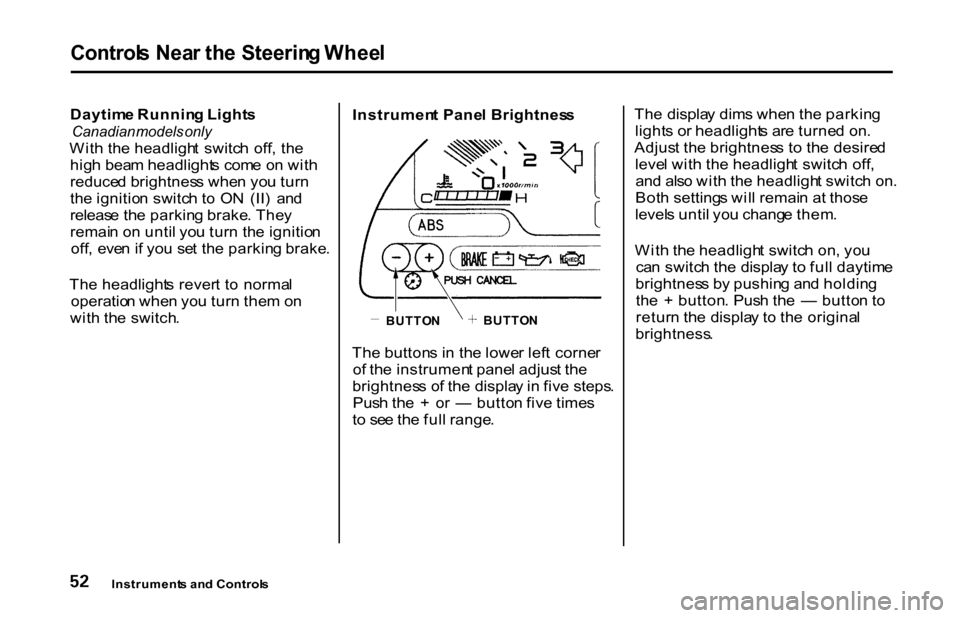
t Pane l Brightnes s
Th e button s i n th e lowe r lef t corne r
o f th e instrumen t pane l adjus t th e
brightnes s o f th e displa y in fiv e steps .
Pus h th e + o r — butto n fiv e time s
t o se e th e ful l range . Th
e displa y dim s whe n th e parkin g
light s o r headlight s ar e turne d on .
Adjus t th e brightnes s t o th e desire d
leve l wit h th e headligh t switc h off ,
an d als o wit h th e headligh t switc h on .
Bot h setting s wil l remai n a t thos e
level s unti l yo u chang e them .
Wit h th e headligh t switc h on , yo u
ca n switc h th e displa y t o ful l daytim e
brightnes s b y pushin g an d holdin g
th e + button . Pus h th e — butto n t o
retur n th e displa y t o th e origina l
brightness .
Instrument s an d Control s
BUTTO
N
BUTTO
N
Page 56 of 276
Control
s Nea r th e Steerin g Whee l
Tur n Signal s
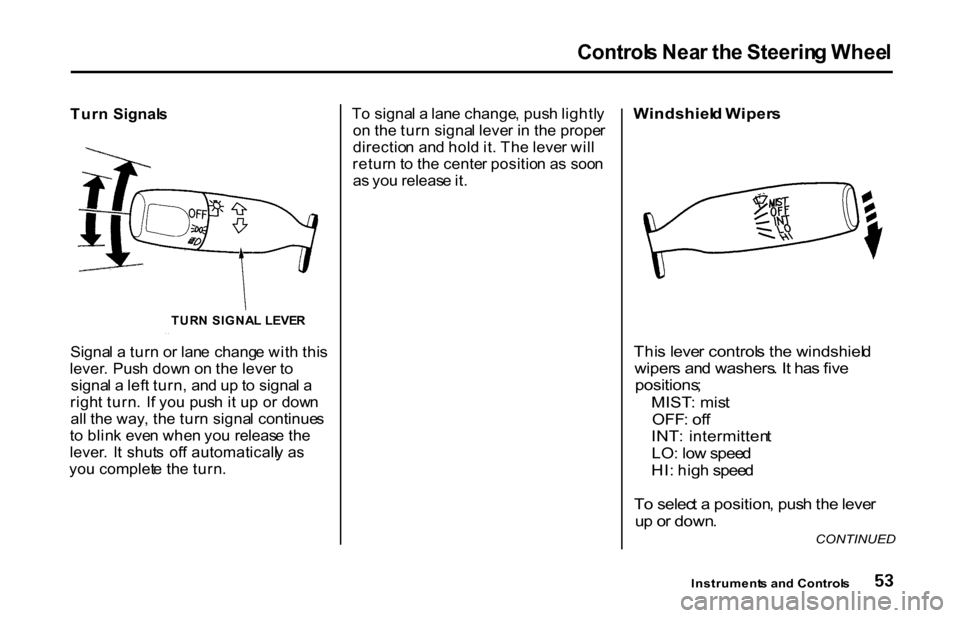
Signa l a tur n o r lan e chang e wit h thi s
lever . Pus h dow n o n th e leve r t o
signa l a lef t turn , an d u p to signa l a
righ t turn . I f yo u pus h i t u p o r dow n
al l th e way , th e tur n signa l continue s
t o blin k eve n whe n yo u releas e th e
lever . I t shut s of f automaticall y a s
yo u complet e th e turn . T
o signa l a lan e change , pus h lightl y
o n th e tur n signa l leve r i n th e prope r
directio n an d hol d it . Th e leve r wil l
retur n to th e cente r positio n a s soo n
a s yo u releas e it .
Windshiel
d Wiper s
Thi s leve r control s th e windshiel d
wiper s an d washers . I t ha s fiv e
positions ;
MIST : mis t
OFF : of f
INT : intermitten t
LO : lo w spee d
HI : hig h spee d
T o selec t a position , pus h th e leve r
u p o r down .
Instrument s an d Control s
CONTINUED
TUR
N SIGNA L LEVE R
Page 58 of 276
Steerin
g Whee l Control s
Cruis e Contro l
Cruis e contro l allow s yo u t o maintai n
a se t spee d abov e 2 5 mp h (4 0 km/h )
withou t keepin g you r foo t o n th e
accelerato r pedal . I t shoul d b e use d
fo r cruisin g o n straight , ope n
highways . I t i s no t recommende d fo r
condition s suc h a s cit y driving ,
windin g roads , slipper y roads , heav y
rain , o r ba d weather . Yo u shoul d
hav e ful l contro l o f th e ca r unde r
thos e conditions .
The cruise control, as it operates,
moves the accelerator pedal. You can
damage your vehicle's accelerator
mechanism by resting your foot under
the pedal and blocking the movement. Using the Cruise Control
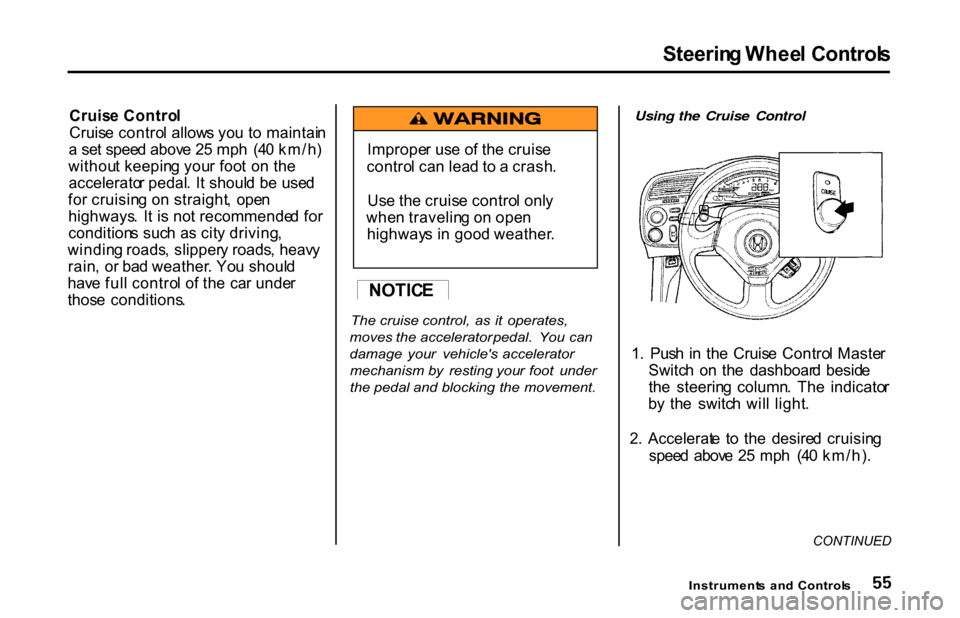
1 . Pus h i n th e Cruis e Contro l Maste r
Switc h o n th e dashboar d besid e
th e steerin g column . Th e indicato r
b y th e switc h wil l light .
2 . Accelerat e t o th e desire d cruisin g
spee d abov e 2 5 mp h (4 0 km/h) .
CONTINUED
Instrument s an d Control s
NOTIC
E
Imprope
r us e o f th e cruis e
contro l ca n lea d t o a crash .
Us e th e cruis e contro l onl y
whe n travelin g o n ope n
highway s i n goo d weather .
Page 59 of 276
Steerin
g Whee l Control s
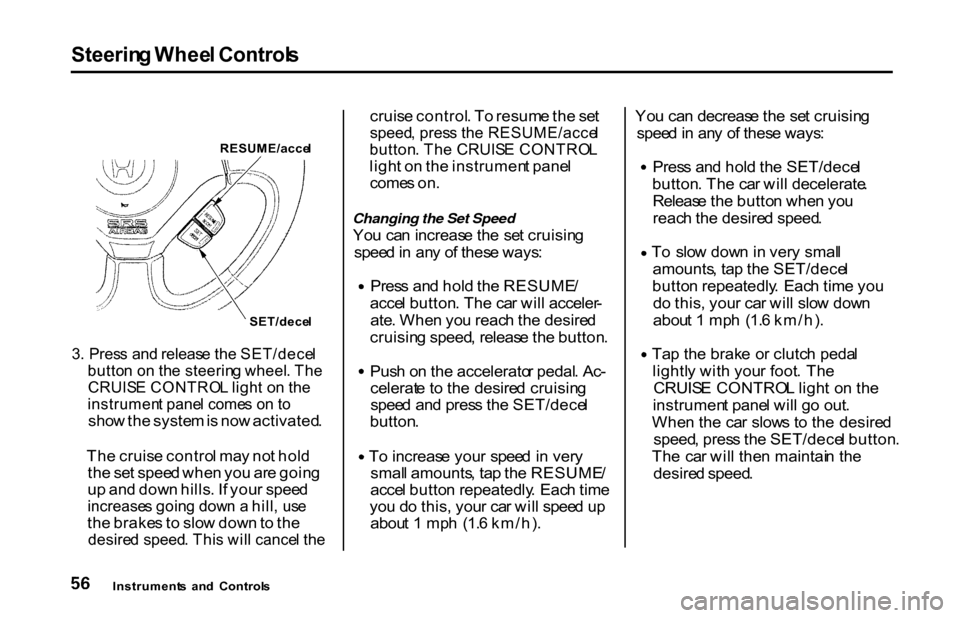
RESUME/acce l
SET/dece l
3 . Pres s an d releas e th e SET/dece l
butto n o n th e steerin g wheel . Th e
CRUIS E CONTRO L ligh t o n th e
instrumen t pane l come s o n t o
sho w th e syste m is no w activated .
Th e cruis e contro l ma y no t hol d
th e se t spee d whe n yo u ar e goin g
u p an d dow n hills . I f you r spee d
increase s goin g dow n a hill , us e
th e brake s t o slo w dow n to th e
desire d speed . Thi s wil l cance l th e
cruis
e control . T o resum e th e se t
speed , pres s th e RESUME/acce l
button . Th e CRUIS E CONTRO L
ligh t o n th e instrumen t pane l
come s on .
Changing the Set Speed Yo u ca n increas e th e se t cruisin g
spee d in an y o f thes e ways : Pres
s an d hol d th e RESUME /
acce l button . Th e ca r wil l acceler -
ate . Whe n yo u reac h th e desire d
cruisin g speed , releas e th e button . Pus
h o n th e accelerato r pedal . Ac -
celerat e t o th e desire d cruisin g
spee d an d pres s th e SET/dece l
button .
To
increas e you r spee d in ver y
smal l amounts , ta p th e RESUME /
acce l butto n repeatedly . Eac h tim e
yo u d o this , you r ca r wil l spee d u p
abou t 1 mp h (1. 6 km/h) . Yo
u ca n decreas e th e se t cruisin g
spee d in an y o f thes e ways : Pres
s an d hol d th e SET/dece l
button . Th e ca r wil l decelerate .
Releas e th e butto n whe n yo u
reac h th e desire d speed . T
o slo w dow n in ver y smal l
amounts , ta p th e SET/dece l
butto n repeatedly . Eac h tim e yo u
d o this , you r ca r wil l slo w dow n
abou t 1 mp h (1. 6 km/h) . Ta
p th e brak e o r clutc h peda l
lightl y wit h you r foot . Th e
CRUIS E CONTRO L ligh t o n th e
instrumen t pane l wil l g o out .
Whe n th e ca r slow s t o th e desire d
speed , pres s th e SET/dece l button .
Th e ca r wil l the n maintai n th e
desire d speed .
Instrument s an d Control s
Page 61 of 276
Key
s an d Lock s
Key s
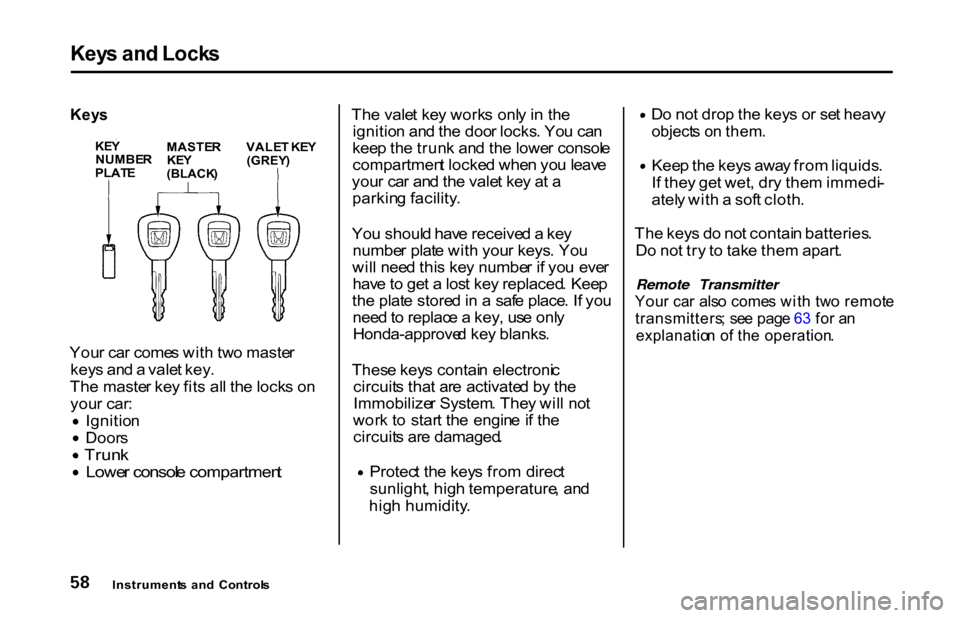
You r ca r come s wit h tw o maste r
key s an d a vale t key .
Th e maste r ke y fit s al l th e lock s o n
you r car : Ignitio
n
Door
s
Trun
k Lowe
r consol e compartmen t
Th
e vale t ke y work s onl y i n th e
ignitio n an d th e doo r locks . Yo u ca n
kee p th e trun k an d th e lowe r consol e
compartmen t locke d whe n yo u leav e
you r ca r an d th e vale t ke y a t a
parkin g facility .
Yo u shoul d hav e receive d a ke y
numbe r plat e wit h you r keys . Yo u
wil l nee d thi s ke y numbe r i f yo u eve r
hav e to ge t a los t ke y replaced . Kee p
th e plat e store d in a saf e place . I f yo u
nee d to replac e a key , us e onl y
Honda-approve d ke y blanks .
Thes e key s contai n electroni c
circuit s tha t ar e activate d b y th e
Immobilize r System . The y wil l no t
wor k t o star t th e engin e if th e
circuit s ar e damaged . Protec
t th e key s fro m direc t
sunlight , hig h temperature , an d
hig h humidity . D
o no t dro p th e key s o r se t heav y
object s o n them .
Kee
p th e key s awa y fro m liquids .
I f the y ge t wet , dr y the m immedi -
atel y wit h a sof t cloth .
Th e key s d o no t contai n batteries .
D o no t tr y t o tak e the m apart .
Remote Transmitter
You r ca r als o come s wit h tw o remot e
transmitters ; se e pag e 6 3 fo r a n
explanatio n o f th e operation .
Instrument s an d Control s
KE
Y
NUMBE R
PLAT E
MASTE
R
KE Y
(BLACK )
VALE
T KE Y
(GREY )
Page 63 of 276
Key
s an d Lock s
As required by the FCC:
This device complies with Part 15 of the
FCC rules. Operation is subject to the
following two conditions: (1) This device
may not cause harmful interference, and
(2) this device must accept any
interference received, including
interference that may cause undesired
operation.
Changes or modifications not expressly
approved by the party responsible for
compliance could void the user's
authority to operate the equipment.
This device complies with Industry
Canada Standard RSS-210.
Operation is subject to the following two
conditions: (1) this device may not cause
interference, and (2) this device must
accept any interference that may cause
undesired operation of the device.
Ignitio
n Switc h
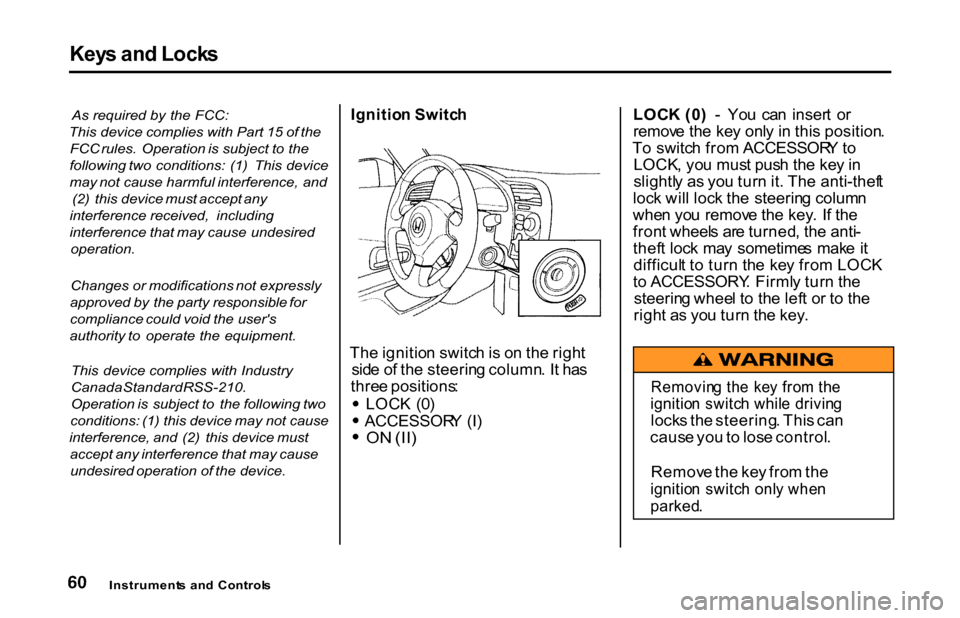
Th e ignitio n switc h is o n th e righ t
sid e o f th e steerin g column . I t ha s
thre e positions : LOC
K (0 ) ACCESSOR
Y (I )
O
N (II )
LOC
K (0 ) - Yo u ca n inser t o r
remov e th e ke y onl y i n thi s position .
T o switc h fro m ACCESSOR Y to
LOCK , yo u mus t pus h th e ke y in
slightl y a s yo u tur n it . Th e anti-thef t
loc k wil l loc k th e steerin g colum n
whe n yo u remov e th e key . I f th e
fron t wheel s ar e turned , th e anti -
thef t loc k ma y sometime s mak e it
difficul t t o tur n th e ke y fro m LOC K
t o ACCESSORY . Firml y tur n th e
steerin g whee l t o th e lef t o r t o th e
righ t a s yo u tur n th e key .
Instrument s an d Control s
Removin
g th e ke y fro m th e
ignitio n switc h whil e drivin g
lock s th e steering . Thi s ca n
caus e yo u to los e control .
Remov e th e ke y fro m th e
ignitio n switc h onl y whe n
parked .
Page 64 of 276
Key
s an d Lock s
ACCESSOR Y (I ) - In thi s position ,
yo u ca n operat e th e audi o syste m
an d th e accessor y powe r socket .
O N (II ) — Thi s i s th e norma l ke y
positio n whe n driving . Al l feature s
an d accessorie s o n th e ca r ar e usable .
Severa l o f th e light s o n th e instru -
men t pane l com e o n a s a tes t whe n
yo u tur n th e ignitio n switc h fro m
ACCESSOR Y to ON .
Th e engin e ca n b e starte d wit h th e
ke y in thi s positio n b y pressin g th e
engin e STAR T butto n (se e pag e
131 ).
Th e engin e wil l no t star t i f th e
Immobilize r Syste m doe s no t
recogniz e th e key' s codin g (se e pag e
59 ) . Yo
u wil l hea r a reminde r beepe r i f
yo u leav e th e ke y in th e ignitio n
switc h in th e LOC K (0 ) o r
ACCESSOR Y (I ) positio n an d ope n
th e driver' s door . Remov e th e ke y to
tur n of f th e beeper .
Instruments an d Control s
Page 66 of 276
Key
s an d Lock s
Remot e Transmitte r
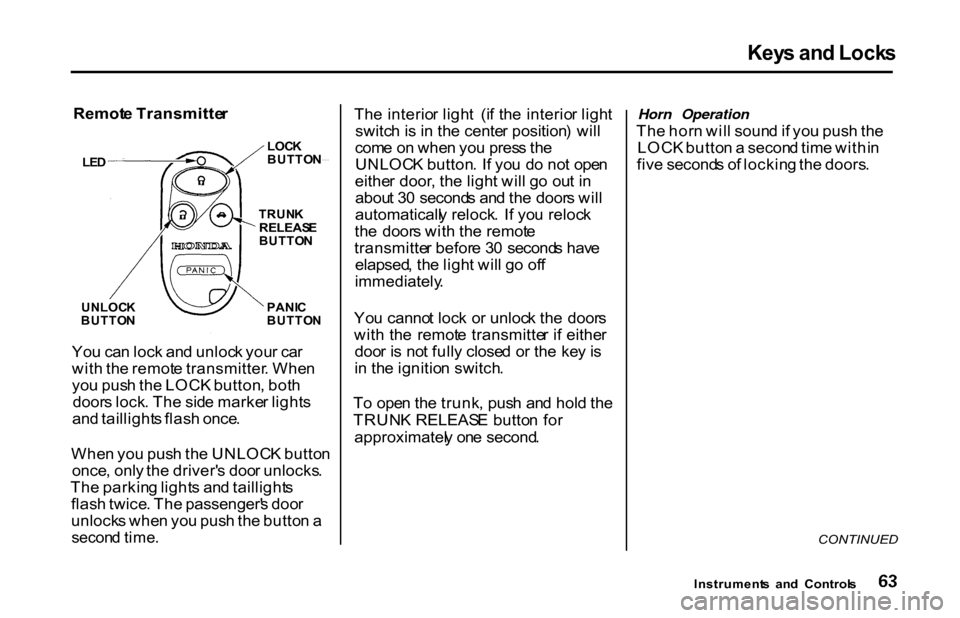
Yo u ca n loc k an d unloc k you r ca r
wit h th e remot e transmitter . Whe n
yo u pus h th e LOC K button , bot h
door s lock . Th e sid e marke r light s
an d taillight s flas h once .
Whe n yo u pus h th e UNLOC K butto n
once , onl y th e driver' s doo r unlocks .
Th e parkin g light s an d taillight s
flas h twice . Th e passenger' s doo r
unlock s whe n yo u pus h th e butto n a
secon d time .
Th
e interio r ligh t (i f th e interio r ligh t
switc h is i n th e cente r position ) wil l
com e o n whe n yo u pres s th e
UNLOC K button . I f yo u d o no t ope n
eithe r door , th e ligh t wil l g o ou t i n
abou t 3 0 second s an d th e door s wil l
automaticall y relock . I f yo u reloc k
th e door s wit h th e remot e
transmitte r befor e 3 0 second s hav e
elapsed , th e ligh t wil l g o of f
immediately .
Yo u canno t loc k o r unloc k th e door s
wit h th e remot e transmitte r i f eithe r
doo r i s no t full y close d o r th e ke y is
i n th e ignitio n switch .
T o ope n th e trunk , pus h an d hol d th e
TRUN K RELEAS E butto n fo r
approximatel y on e second . Horn Operation
Th e hor n wil l soun d if yo u pus h th e
LOC K butto n a secon d tim e withi n
fiv e second s o f lockin g th e doors .
CONTINUED
Instrument s an d Control s
UNLOC
K
BUTTO N
LOC
K
BUTTO N
TRUN K
RELEAS E
BUTTO N
PANI C
BUTTO N
LE
D