lights HONDA S2000 2003 1.G User Guide
[x] Cancel search | Manufacturer: HONDA, Model Year: 2003, Model line: S2000, Model: HONDA S2000 2003 1.GPages: 280, PDF Size: 3.9 MB
Page 67 of 280
When the remote transmitter’s
battery begins to get weak, it may
take several pushes on the button to
lock or unlock the doors, and the
LED will get dim. Replace the
battery as soon as possible.
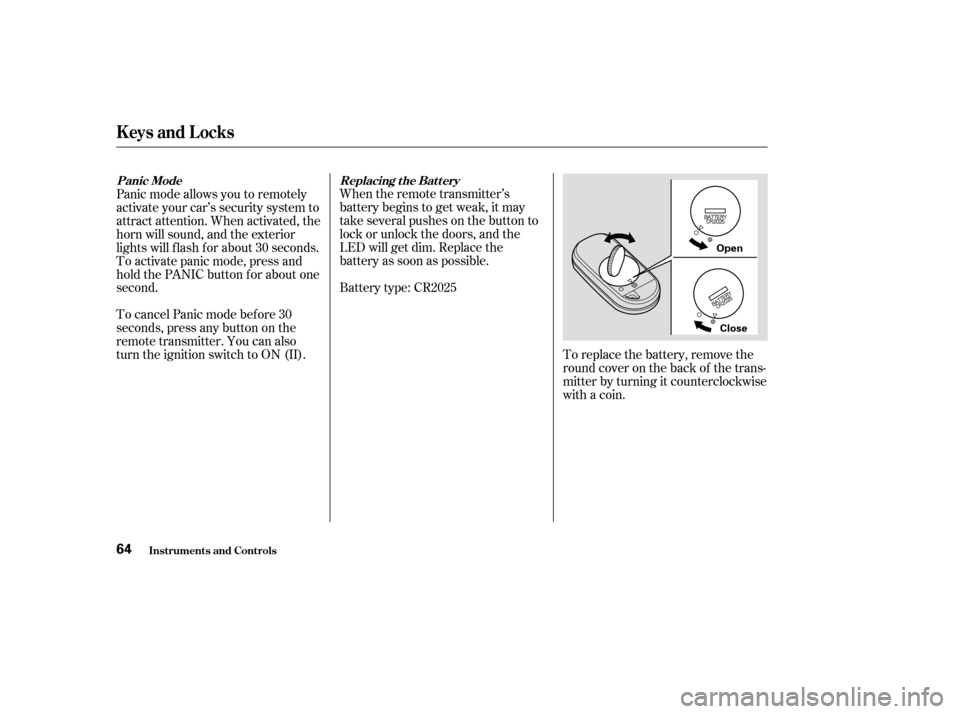
Battery type: CR2025To replace the battery, remove the
round cover on the back of the trans-
mitter by turning it counterclockwise
with a coin.
Panic mode allows you to remotely
activate your car’s security system to
attract attention. When activated, the
horn will sound, and the exterior
lights will f lash f or about 30 seconds.
To activate panic mode, press and
hold the PANIC button for about one
second.
To cancel Panic mode bef ore 30
seconds, press any button on the
remote transmitter. You can also
turn the ignition switch to ON (II).
Panic Mode
Replacing t he Bat t ery
Keys and Locks
Inst rument s and Cont rols64
Open
Close
Page 83 of 280
Keeptheinsideandoutsidemirrors
clean and adjusted f or best visibility.
Be sure to adjust the mirrors bef ore
you start driving.
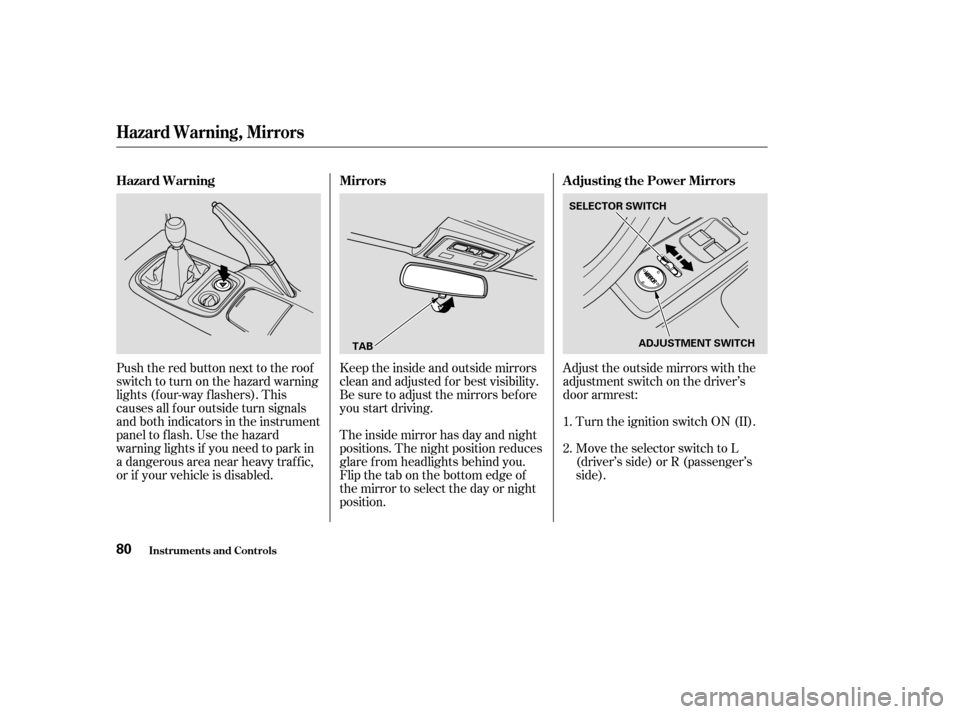
The inside mirror has day and night
positions. The night position reduces
glare f rom headlights behind you.
Flip the tab on the bottom edge of
the mirror to select the day or night
position.Adjust the outside mirrors with the
adjustment switch on the driver’s
door armrest:
Turn the ignition switch ON (II).
Move the selector switch to L
(driver’s side) or R (passenger’s
side).
Push the red button next to the roof
switch to turn on the hazard warning
lights (f our-way f lashers). This
causes all f our outside turn signals
and both indicators in the instrument
panel to f lash. Use the hazard
warning lights if you need to park in
a dangerous area near heavy traffic,
or if your vehicle is disabled.
1.
2.
Mirrors
Adjusting the Power Mirrors
Hazard Warning
Hazard Warning, Mirrors
Inst rument s and Cont rols80
TAB SELECTOR SWITCH
ADJUSTMENT SWITCH
Page 86 of 280
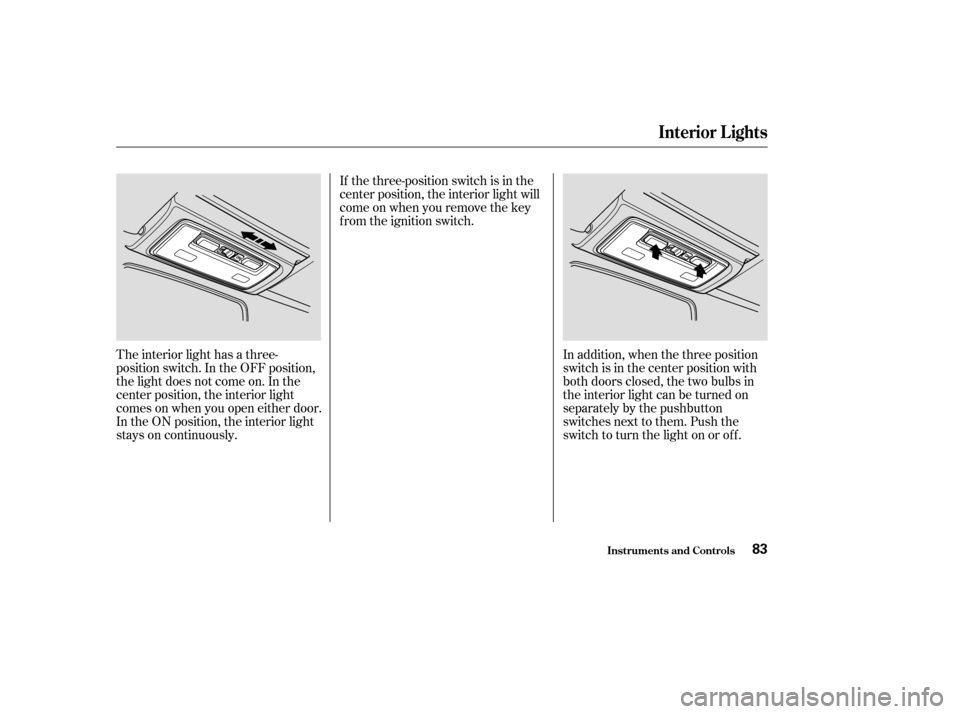
The interior light has a three-
position switch. In the OFF position,
the light does not come on. In the
center position, the interior light
comes on when you open either door.
In the ON position, the interior light
stays on continuously.In addition, when the three position
switch is in the center position with
both doors closed, the two bulbs in
the interior light can be turned on
separately by the pushbutton
switches next to them. Push the
switch to turn the light on or off.
If the three-position switch is in the
center position, the interior light will
come on when you remove the key
from the ignition switch.
Interior Lights
Inst rument s and Cont rols83
Page 89 of 280
Proper use of the Heating and
Cooling system can make the
interior dry and comf ortable, and
keep the windows clear f or the best
visibility.
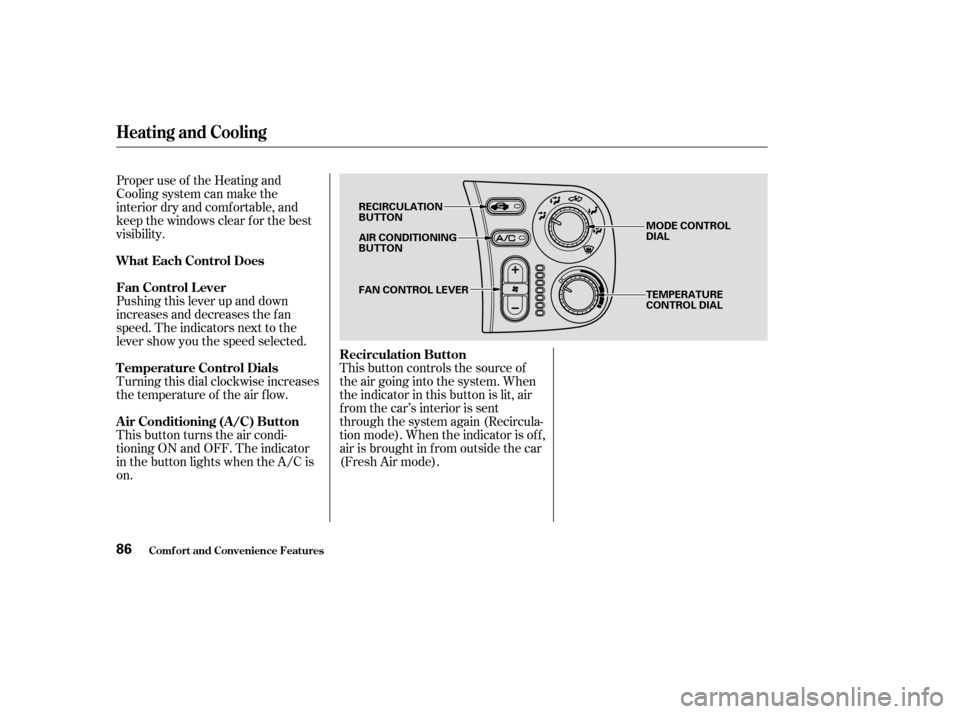
Pushing this lever up and down
increases and decreases the f an
speed. The indicators next to the
lever show you the speed selected.
This button turns the air condi-
tioning ON and OFF. The indicator
in the button lights when the A/C is
on. Turning this dial clockwise increases
the temperature of the air flow.This button controls the source of
the air going into the system. When
the indicator in this button is lit, air
from the car’s interior is sent
through the system again (Recircula-
tion mode). When the indicator is off,
air is brought in f rom outside the car
(Fresh Air mode).
Comf ort and Convenience Feat ures
Heating and Cooling
What Each Control Does
Recirculation Button
Fan Control L ever
Air Conditioning (A/C) Button T emperature Control Dials
86
RECIRCULATION
BUTTON
AIR CONDITIONING
BUTTON
FAN CONTROL LEVER MODE CONTROL
DIAL
TEMPERATURE
CONTROL DIAL
Page 96 of 280

These settings direct all the air f low
to the defroster vents at the base of
the windshield and the side window
def roster vents. The air f low will get
warmer and clear the windows faster
as the engine warms up. You can
close the side vents with the dial
beside each vent. This will send
more warm air to the windshield
defroster vents.
For saf ety, make sure you have a
clear view through all the windows
bef ore driving away.You should shut the system
completely of f only f or the f irst f ew
minutes of driving in cold weather,
until the engine coolant warms up
enough to operate the heater. Keep
the fan on at all other times so stale
air does not build up in the interior. To shut of f the system temporarily,
turn of f the f an (no lights
illuminated).
Heating and Cooling
Comf ort and Convenience Feat ures
To Turn Everything Of f
93
Page 105 of 280

The audio system illuminates when
the parking lights are on, even if the
radio is turned of f .Stations must use these exact
f requencies. It is f airly common f or
stations to round-of f the f requency in
their advertising, so your radio could
display a f requency of 100.9 even
though the announcer may identif y
the station as ‘‘FM101.’’
Your Honda’s radio can receive the
complete AM and FM bands.
Those bands cover these f requen-
cies:
AM band:
530 to 1,710 kilohertz
FM band:
87.7 to 107.9 megahertz
Radio stations on the AM band are
assigned f requencies at least ten
kilohertz apart (530, 540, 550).
Stations on the FM band are
assigned f requencies at least 0.2
megahertz apart (87.9, 88.1, 88.3).
A udio System L ighting
Radio Frequencies
Audio System
Comf ort and Convenience Feat ures102
Page 129 of 280
When properly installed, cellular
phones, alarms, two-way radios, and
low-powered audio systems should
not interf ere with your car’s
computer-controlled systems, such
as the SRS and anti-lock brake
system.If possible, have your dealer inspect
the f inal installation.Be sure electronic accessories do
not overload electrical circuits
(see page ). Make sure the accessory does not
obscure any lights, or interf ere
with proper car operation or
perf ormance.
Bef ore installing any accessory: However, if electronic accessories
are improperly installed, or exceed
your car’s electrical system capacity,
they can interfere with the operation
of your car, or even cause the
airbags to deploy.
Modif ying your car, or installing
some non-Honda accessories, can
make your car unsaf e. Bef ore you
make any modif ications or add any
accessories,besuretoreadthe
f ollowing inf ormation.
Your dealer has genuine Honda
accessories that allow you to
personalize your car. These
accessories have been designed and
approved f or your car, and are
covered by warranty.
Non-Honda accessories are usually
designed f or universal applications.
Although aftermarket accessories
may f it on your car, they may not
meet f actory specif ications, and
could adversely af f ect your car’s
handling and stability. (See
‘‘Modif ications’’ on page f or
additional information.) Have the installer contact your
Honda dealer f or assistance bef ore
installing any electronic accessory.
239
127
A ccessories
A ccessories and Modif ications
Bef ore Driving126
Improper accessories or
modifications can affect your
car’s handling, stability, and
performance, and cause a
crash in which you can be hurt
or killed.
Follow all instructions in this
owner’s manual regarding
accessories and modifications.
Page 137 of 280

Make sure all windows, mirrors,
and outside lights are clean and
unobstructed. Remove f rost, snow,
or ice.Check that any items you may be
carrying with you inside are stored
properly or f astened down
securely.
Check the adjustment of the seat
(see page ).
Check the adjustment of the
inside and outside mirrors (see
page ).Fasten your seat belt. Check that
your passenger has f astened his or
her seat belt (see page ).
Turn the ignition switch ON (II).
Check the indicator lights in the
instrument panel.
Start the engine (see page ).
Check the gauges and indicator
lights in the instrument panel (see
page ).
Visually check the tires. If a tire
looks low, use a gauge to check its
pressure.
Youshoulddothefollowingchecks
and adjustments every day bef ore
you drive your car.
Check that the hood and trunk are
f ully closed. Make sure the doors are securely
closed and locked.
1.
2.
3. 4.
5.
6.
7.8.
9.
10.
11. 15
69
80 45135
Driving
Preparing to Drive
134
Page 142 of 280

Place any packages, valuables, etc.,
in the trunk or take them with you. Turn of f the lights.
Always use the parking brake when
you park your car. The indicator on
the instrument panel shows that the
parking brake is not f ully released; it
does not indicate that the parking
brakeisfirmlyset.Makesurethe
parking brake is set f irmly or your
car may roll if it is parked on an
incline. If the car is f acing uphill, turn the
f ront wheels away f rom the curb and
put the transmission in f irst gear.
If the car is f acing downhill, turn the
f ront wheels toward the curb and put
the transmission in reverse gear.
Make sure the parking brake is f ully
released bef ore driving away.
Driving with the parking brake
partially set can overheat or damage
the rear brakes. Make sure the convertible top and
the windows are closed.
Lockthedoorswiththekeyorthe
remote transmitter.
Never park over dry leaves, tall
grass, or other f lammable
materials. The three way catalytic
converter gets very hot, and could
cause these materials to catch on
fire.
Parking T ips
Parking
Driving139
Page 143 of 280

All f our brakes have audible brake
wear indicators.
Check your brakes af ter driving
through deep water. Apply the
brakes moderately to see if they f eel
normal. If not, apply them gently and
f requently until they do. Since a
longer distance is needed to stop
with wet brakes, be extra cautious
and alert in your driving. Constant application of the brakes
when going down a long hill builds
up heat and reduces their ef f ective-
ness. Use the engine to assist the
brakes by downshif ting to a lower
gear and taking your f oot of f the
accelerator pedal.
Put your f oot on the brake pedal only
when you intend to brake. Resting
your f oot on the pedal keeps the
brakes applied lightly, causing them
to build up heat. Heat build-up can
reduce how well your brakes work. It
also keeps your brake lights on all
the time, conf using drivers behind
you. When the brake pads need replacing,
you will hear a distinctive metallic
‘‘screeching’’ sound when you apply
the brakes. If you do not have the
brake pads replaced, they will begin
screeching all the time.
Your brakes may sometimes squeal
or squeak when you apply them
lightly. Do not conf use this with the
brakewearindicators.Theymakea
very audible ‘‘screeching.’’
Your Honda is equipped with disc
brakes at all f our wheels. A power
assist helps reduce the ef f ort needed
on the brake pedal. The ABS helps
you retain steering control when
braking very hard.
Brake Wear Indicators
The Braking System
Driving140