reset HONDA S2000 2003 1.G User Guide
[x] Cancel search | Manufacturer: HONDA, Model Year: 2003, Model line: S2000, Model: HONDA S2000 2003 1.GPages: 280, PDF Size: 3.9 MB
Page 116 of 280
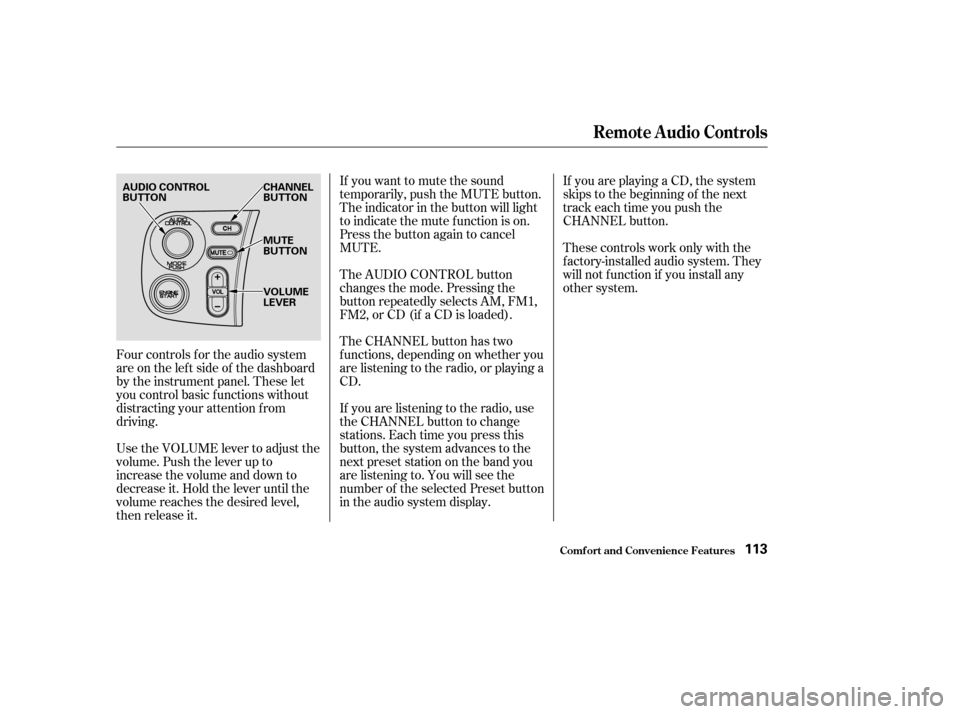
Four controls f or the audio system
areontheleftsideof thedashboard
by the instrument panel. These let
you control basic f unctions without
distracting your attention f rom
driving.
Use the VOLUME lever to adjust the
volume. Push the lever up to
increase the volume and down to
decrease it. Hold the lever until the
volume reaches the desired level,
then release it.If you want to mute the sound
temporarily, push the MUTE button.
The indicator in the button will light
to indicate the mute f unction is on.
Press the button again to cancel
MUTE.
The AUDIO CONTROL button
changes the mode. Pressing the
button repeatedly selects AM, FM1,
FM2, or CD (if a CD is loaded).
The CHANNEL button has two
f unctions, depending on whether you
are listening to the radio, or playing a
CD.
If you are listening to the radio, use
the CHANNEL button to change
stations. Each time you press this
button, the system advances to the
next preset station on the band you
are listening to. You will see the
number of the selected Preset button
in the audio system display.
If youareplayingaCD,thesystem
skips to the beginning of the next
track each time you push the
CHANNEL button.
These controls work only with the
f actory-installed audio system. They
will not f unction if you install any
other system.
Comf ort and Convenience Feat ures
Remote Audio Controls
113
AUDIO CONTROL
BUTTON
CHANNEL
BUTTON
MUTE
BUTTON
VOLUME
LEVER
Page 117 of 280

If your car’s battery is disconnected
or goes dead, or the radio f use is
removed, the audio system will
disable itself . If this happens, you
will see ‘‘Code’’ in the f requency
display the next time you turn on the
system. Use the Preset buttons to
enter the f ive-digit code. If it is
entered correctly, the radio will start
playing.
If you make a mistake entering the
code, do not start over or try to
correct your mistake. Complete the
f ive-digit sequence, then enter the
correct code. You have ten tries to
enter the correct code. If you are
unsuccessful in ten attempts, you
must then leave the system on for
one hour bef ore trying again.You will have to store your favorite
stations in the Preset buttons after
the system begins working. Your
original settings were lost when
power was disconnected.
Your car’s audio system will disable
itself if it is disconnected f rom
electrical power f or any reason. To
make it work again, the user must
enter a specif ic f ive-digit code in the
Preset buttons. Because there are
hundreds of number combinations
possible f rom f ive digits, making the
system work without knowing the
exact code is nearly impossible.
Youshouldhavereceivedacardthat
lists your audio system’s code
number and serial number. It is best
tostorethiscardinasafeplaceat
home. In addition, you should write
the audio system’s serial number in
this Owner’s Manual. If you should
happen to lose the card, you must
obtain the code number f rom your
Honda dealer. To do this, you will
need the system’s serial number.
Comf ort and Convenience Feat ures
Thef t Protection
114
Page 186 of 280

If your car’s battery is disconnected
or goes dead, the audio system will
disableitself.Thenexttimeyouturn
on the radio you will see ‘‘ ’’ in
the f requency display. Use the
Preset buttons to enter the five-digit
code (see page ).114
Battery
Maint enance183
Charging the battery with the cables
connected can seriously damage your
car’s electronic controls. Detach the
battery cables bef ore connecting the
battery to a charger.
Page 206 of 280
Install the new bulb in the socket.
Testthelightstomakesurethe
new bulb is working. Push the socket into the light
assembly and turn it clockwise
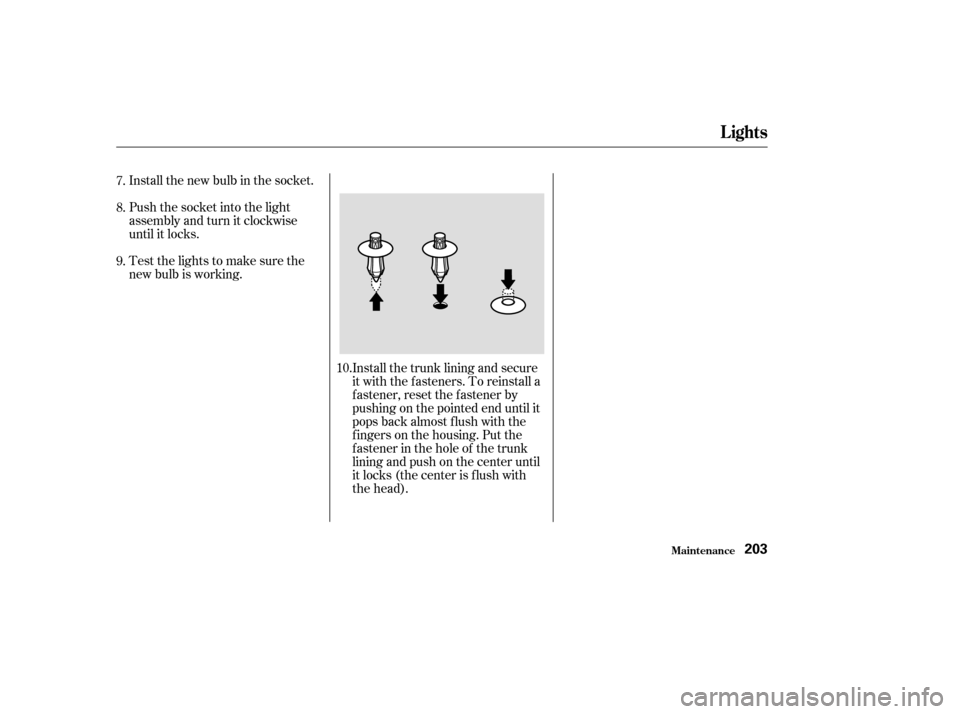
until it locks.Install the trunk lining and secure
it with the fasteners. To reinstall a
f astener, reset the f astener by
pushing on the pointed end until it
pops back almost f lush with the
f ingers on the housing. Put the
f astener in the hole of the trunk
lining and push on the center until
it locks (the center is f lush with
the head).
7.
8.
9.
10.
Lights
Maint enance203