audio HUMMER H2 2004 User Guide
[x] Cancel search | Manufacturer: HUMMER, Model Year: 2004, Model line: H2, Model: HUMMER H2 2004Pages: 472, PDF Size: 5.01 MB
Page 208 of 472
CD Messages
If the CD comes out, it could be for one of the following
reasons:
It is very hot. When the temperature returns to
normal, the CD should play.
You are driving on a very rough road. When the
road becomes smooth, the CD should play.
The CD is dirty, scratched, wet, or upside down.
The air is very humid. If so, wait about an hour and
try again.
There may have been a problem while burning
the CD.
The label may be caught in the CD player.
If the CD is not playing correctly, for any other reason,
try a known good CD.
If any error occurs repeatedly or if an error cannot be
corrected, contact your dealer. If your radio displays an
error message, write it down and provide it to your
dealer when reporting the problem.
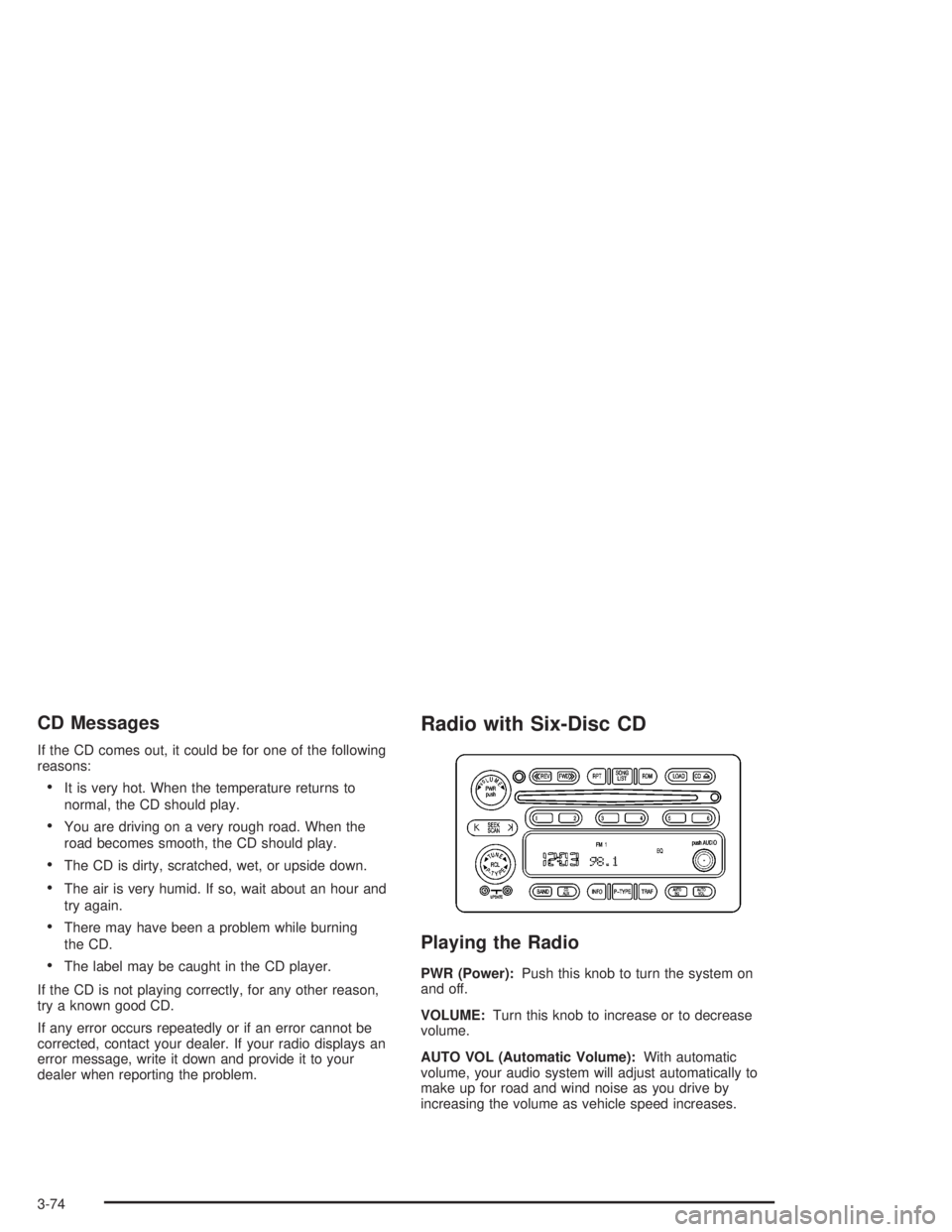
Radio with Six-Disc CD
Playing the Radio
PWR (Power):Push this knob to turn the system on
and off.
VOLUME:Turn this knob to increase or to decrease
volume.
AUTO VOL (Automatic Volume):With automatic
volume, your audio system will adjust automatically to
make up for road and wind noise as you drive by
increasing the volume as vehicle speed increases.
3-74
Page 210 of 472
Setting Preset Stations
The six numbered pushbuttons let you return to your
favorite stations. You can set up to 18 stations (six FM1,
six FM2, and six AM), by performing the following
steps:
1. Turn the radio on.
2. Press BAND to select FM1, FM2, or AM.
3. Tune in the desired station.
4. Press AUTO EQ to select the equalization.
5. Press and hold one of the six numbered
pushbuttons until you hear a beep. Whenever you
press that numbered pushbutton, the station
you set will return and the equalization that you
selected will be automatically stored for that
pushbutton.
6. Repeat the steps for each pushbutton.
Setting the Tone (Bass/Treble)
AUDIO:Push and release the AUDIO knob until BASS,
MID, or TREB appears on the display. Turn the knob
to increase or to decrease. The display will show
the bass, midrange, or treble level. If a station is weak
or noisy, you may want to decrease the treble.
To adjust the bass, midrange, and treble to the middle
position, push the AUDIO knob. The radio will
produce one beep and adjust the display level to the
middle position.
To adjust all tone and speaker controls to the middle
position, push and hold the AUDIO knob when no tone
or speaker control is displayed. CENTERED will
appear on the display and you will hear a beep.
AUTO EQ (Automatic Equalization):Press this button
to select customized equalization settings.
The radio will save separate AUTO EQ settings for each
preset and source.
If you radio is equipped with the Bose audio system,
your equalization settings are either CUSTOM or TALK.
3-76
Page 211 of 472
Adjusting the Speakers (Balance/Fade)
AUDIO:To adjust the balance between the right
and the left speakers, push and release the AUDIO
knob until BAL appears on the display. Turn the knob to
move the sound toward the right or the left speakers.
To adjust the fade between the front and the rear
speakers, push and release the AUDIO knob until FADE
appears on the display. Turn the knob to move the
sound toward the front or the rear speakers.
To adjust the balance and fade to the middle position,
push and hold the AUDIO knob. The radio will produce
one beep and adjust the display level to the middle
position.
To adjust all tone and speaker controls to the middle
position, push and hold the AUDIO knob when no tone
or speaker control is displayed. CENTERED will
appear on the display and you will hear a beep.
Radio Data System (RDS)
Your audio system is equipped with a Radio Data
System (RDS). RDS features are available for use only
on FM stations that broadcast RDS information.
With RDS, your radio can do the following:
Seek to stations broadcasting the selected type of
programming
Receive announcements concerning local and
national emergencies
Display messages from radio stations
Seek to stations with traffic announcements
This system relies upon receiving specic information
from these stations and will only work when the
information is available. In rare cases, a radio station
may broadcast incorrect information that will cause
the radio features to work improperly. If this happens,
contact the radio station.
While you are tuned to an RDS station, the station
name or the call letters will appear on the display instead
of the frequency. RDS stations may also provide the
time of day, a program type (PTY) for current
programming, and the name of the program being
broadcast.
3-77
Page 221 of 472
Rear Seat Audio (RSA)
This feature allows rear seat passengers to listen to any
of the audio sources: radio, cassette tapes, or CDs,
depending on your vehicles options. However, the rear
seat passengers can only control the music sources
that the front seat passengers are not listening to. For
example, rear seat passengers may listen to a cassette
tape through headphones while the driver listens to
the radio through the front speakers. The rear seat
passengers have control of the volume for each set of
headphones. The front seat audio controls always
override the RSA controls.
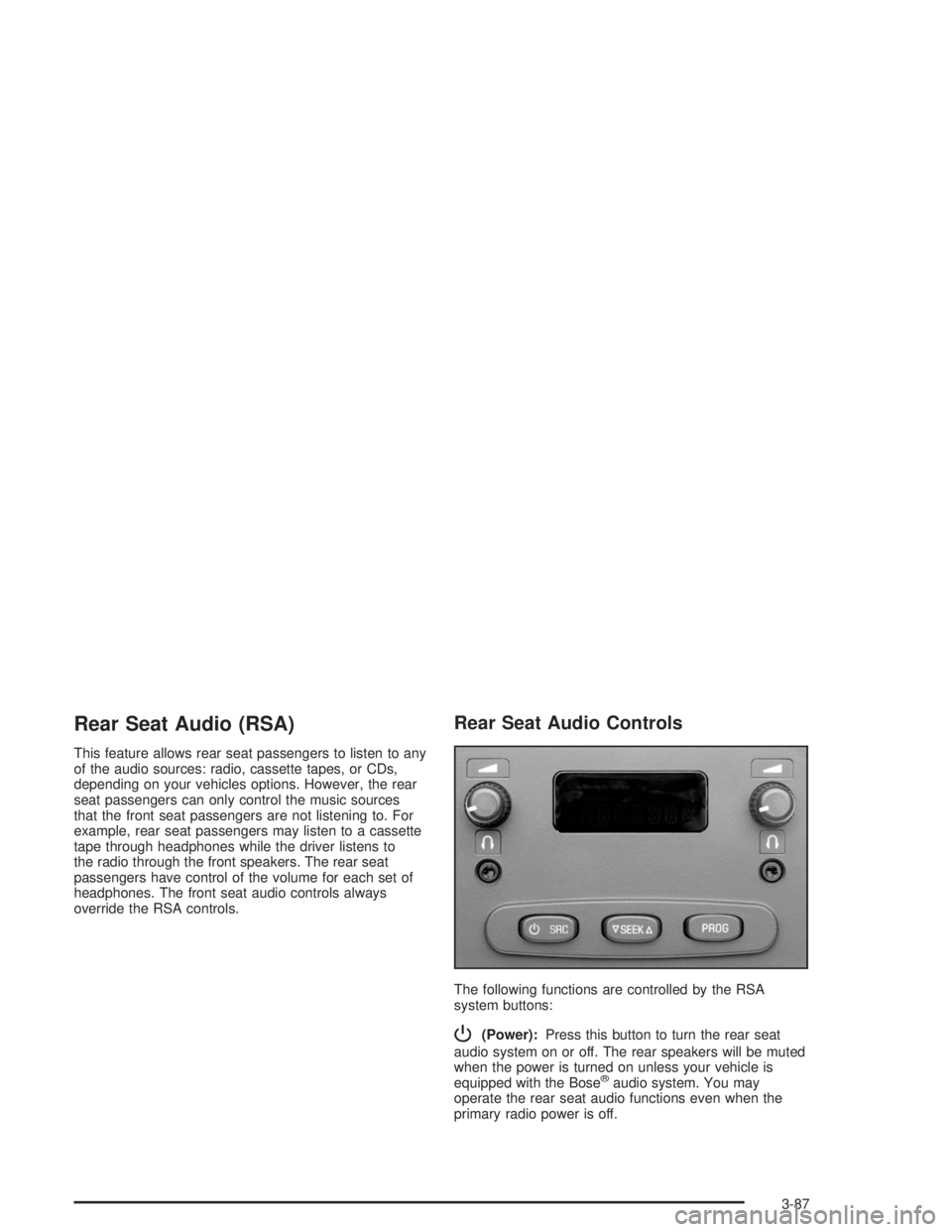
Rear Seat Audio Controls
The following functions are controlled by the RSA
system buttons:
P(Power):Press this button to turn the rear seat
audio system on or off. The rear speakers will be muted
when the power is turned on unless your vehicle is
equipped with the Bose
®audio system. You may
operate the rear seat audio functions even when the
primary radio power is off.
3-87
Page 222 of 472
u(Volume):Turn the knob to increase or to decrease
volume. The left knob controls the left headphone and
the right knob controls the right headphone.
SRC (Source):Press this button to select an audio
source: radio, cassette tape, or CD, depending on your
vehicles options.
xSEEKw:While listening to FM1, FM2, or AM,
press the up or the down arrow to tune to the next or to
the previous station and stay there. If the front radio
is in use, you cannot seek through different stations.
While listening to a cassette tape, press the up or the
down arrow to hear the next or the previous selection. If
the cassette tape on the front radio is in use, you cannot
seek through different selections on a tape.
While listening to a CD, press the up arrow to hear the
next track on the CD. Press the down arrow to go back to
the start of the current track if more than eight seconds
have played. If the CD player on the front radio is in use,
you cannot seek through different tracks.PROG (Program):The front passengers must be
listening to something different for each of these
functions to work:
Press this button to go to the preset radio stations
set on the pushbuttons on the main radio.
When a cassette tape is playing, press this button
to go to the other side of the tape.
When a CD is playing in the radio, press this button
to go back to the beginning of the CD.
When a CD is playing in the CD changer, press this
button to select the next CD.
Theft-Deterrent Feature
THEFTLOCK®is designed to discourage theft of your
radio. The feature works automatically by learning a
portion of the Vehicle Identication Number (VIN). If the
radio is moved to a different vehicle, it will not operate
and LOCKED will appear on the display.
When the radio and vehicle are turned off, the blinking
red light indicates that THEFTLOCK
®is armed.
With THEFTLOCK
®activated, your radio will not operate
if stolen.
3-88
Page 223 of 472

Audio Steering Wheel Controls
You can control certain radio functions using the buttons
on your steering wheel.
g(OnStar/Voice Recognition):You can press this
button to interact with the OnStar®system. See the
OnStar®manual provided with your vehicle for more
information.
PROG (Program):Press this button to play a station
you have programmed on the radio preset buttons
on the selected band.If a cassette tape is playing, press this button to play
the other side of the tape.
If a CD is playing in the CD changer, press this button
to go to the next available CD.
QSOURCER:Press this button to select FM1,
FM2, AM or a cassette tape or CD. The cassette or CD
must be loaded to play. Available loaded sources are
shown on the display as a tape or a CD symbol.
QSEEKR:Press the up or the down arrow to seek
to the next or to the previous radio station and stay
there.
If a cassette tape or CD is playing, the player will
advance with the up arrow and reverse with the down
arrow.
QVOLR(Volume):Press the up or the down arrow
to increase or to decrease volume.
3-89
Page 357 of 472

{CAUTION:
Batteries have acid that can burn you and gas
that can explode. You can be badly hurt if you
are not careful. SeeJump Starting on
page 5-43for tips on working around a battery
without getting hurt.
Contact your dealer to learn how to prepare your
vehicle for longer storage periods.
Also, for your audio system, seeTheft-Deterrent
Feature on page 3-88.
Jump Starting
If your battery has run down, you may want to use
another vehicle and some jumper cables to start your
vehicle. But please use the following steps to do it
safely.
{CAUTION:
Batteries can hurt you. They can be dangerous
because:
They contain acid that can burn you.
They contain gas that can explode or
ignite.
They contain enough electricity to
burn you.
If you do not follow these steps exactly, some
or all of these things can hurt you.
Notice:Ignoring these steps could result in costly
damage to your vehicle that would not be covered
by your warranty.
Trying to start your vehicle by pushing or pulling it
will not work, and it could damage your vehicle.
1. Check the other vehicle. It must have a 12-volt
battery with a negative ground system.
Notice:If the other vehicle’s system is not a 12-volt
system with a negative ground, both vehicles can
be damaged. Only use vehicles with 12-volt systems
with negative grounds to jump start your vehicle.
5-43
Page 424 of 472
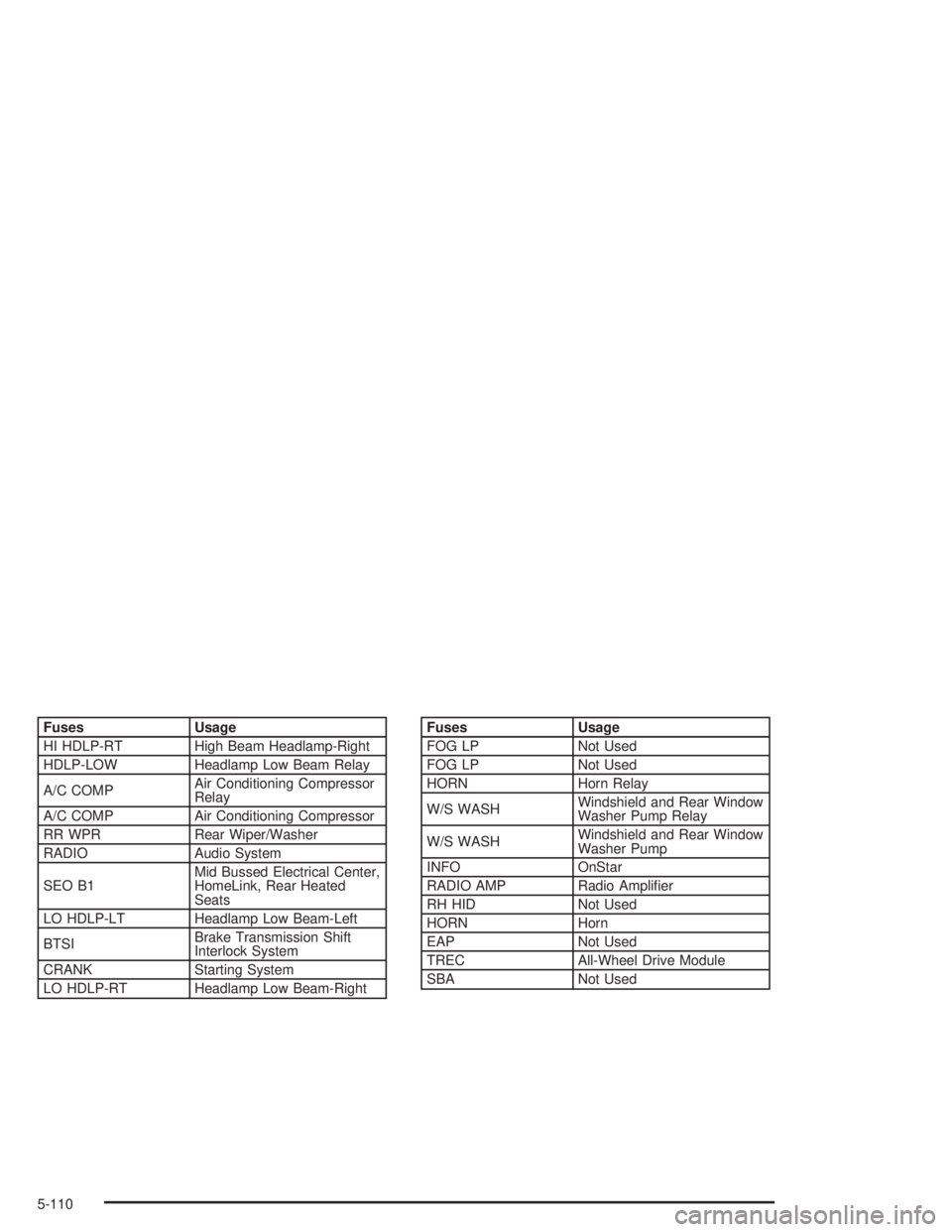
Fuses Usage
HI HDLP-RT High Beam Headlamp-Right
HDLP-LOW Headlamp Low Beam Relay
A/C COMPAir Conditioning Compressor
Relay
A/C COMP Air Conditioning Compressor
RR WPR Rear Wiper/Washer
RADIO Audio System
SEO B1Mid Bussed Electrical Center,
HomeLink, Rear Heated
Seats
LO HDLP-LT Headlamp Low Beam-Left
BTSIBrake Transmission Shift
Interlock System
CRANK Starting System
LO HDLP-RT Headlamp Low Beam-RightFuses Usage
FOG LP Not Used
FOG LP Not Used
HORN Horn Relay
W/S WASHWindshield and Rear Window
Washer Pump Relay
W/S WASHWindshield and Rear Window
Washer Pump
INFO OnStar
RADIO AMP Radio Amplier
RH HID Not Used
HORN Horn
EAP Not Used
TREC All-Wheel Drive Module
SBA Not Used
5-110
Page 457 of 472
A
Accessory Inator...........................................5-76
Accessory Power Outlets.................................3-18
Adding Equipment to Your Air Bag-Equipped
Vehicle.......................................................1-73
Adding Washer Fluid.......................................5-37
Additional Program Information........................... 7-8
Additives, Fuel................................................. 5-6
Add-On Electrical Equipment...........................5-101
Add-On Equipment..........................................4-72
Adjusting the Speakers (Balance/Fade)......3-65, 3-77
After Off-Road Driving.....................................4-41
Air Bag
Off Light.....................................................3-30
Readiness Light..........................................3-28
Air Bag System..............................................1-61
Adding Equipment to Your Air Bag-Equipped
Vehicle...................................................1-73
Air Bag Off Switch.......................................1-68
How Does an Air Bag Restrain?....................1-65
Servicing Your Air Bag-Equipped Vehicle.........1-72
What Makes an Air Bag Inate?....................1-65
What Will You See After an Air Bag Inates?......1-66
When Should an Air Bag Inate?...................1-65
Where Are the Air Bags?..............................1-63
Air Cleaner/Filter, Engine.................................5-19
Air Conditioning..............................................3-23
Air Suspension...............................................4-74
Airbag Sensing and Diagnostic Module (SDM)...... 7-9All-Wheel Drive...............................................5-48
All-Wheel Drive (AWD) System.........................2-25
AM ...............................................................3-90
Antenna, Fixed Mast.......................................3-92
Anti-lock Brake System (ABS)............................ 4-7
Anti-Lock Brake, System Warning Light..............3-34
Appearance Care............................................5-92
Care of Safety Belts....................................5-95
Chemical Paint Spotting...............................5-99
Cleaning the Inside of Your Vehicle................5-93
Cleaning the Outside of Your Vehicle..............5-95
Finish Damage............................................5-99
Sheet Metal Damage...................................5-98
Underbody Maintenance...............................5-99
Vehicle Care/Appearance Materials...............5-100
Weatherstrips..............................................5-95
Approaching a Hill..........................................4-32
Ashtrays........................................................3-18
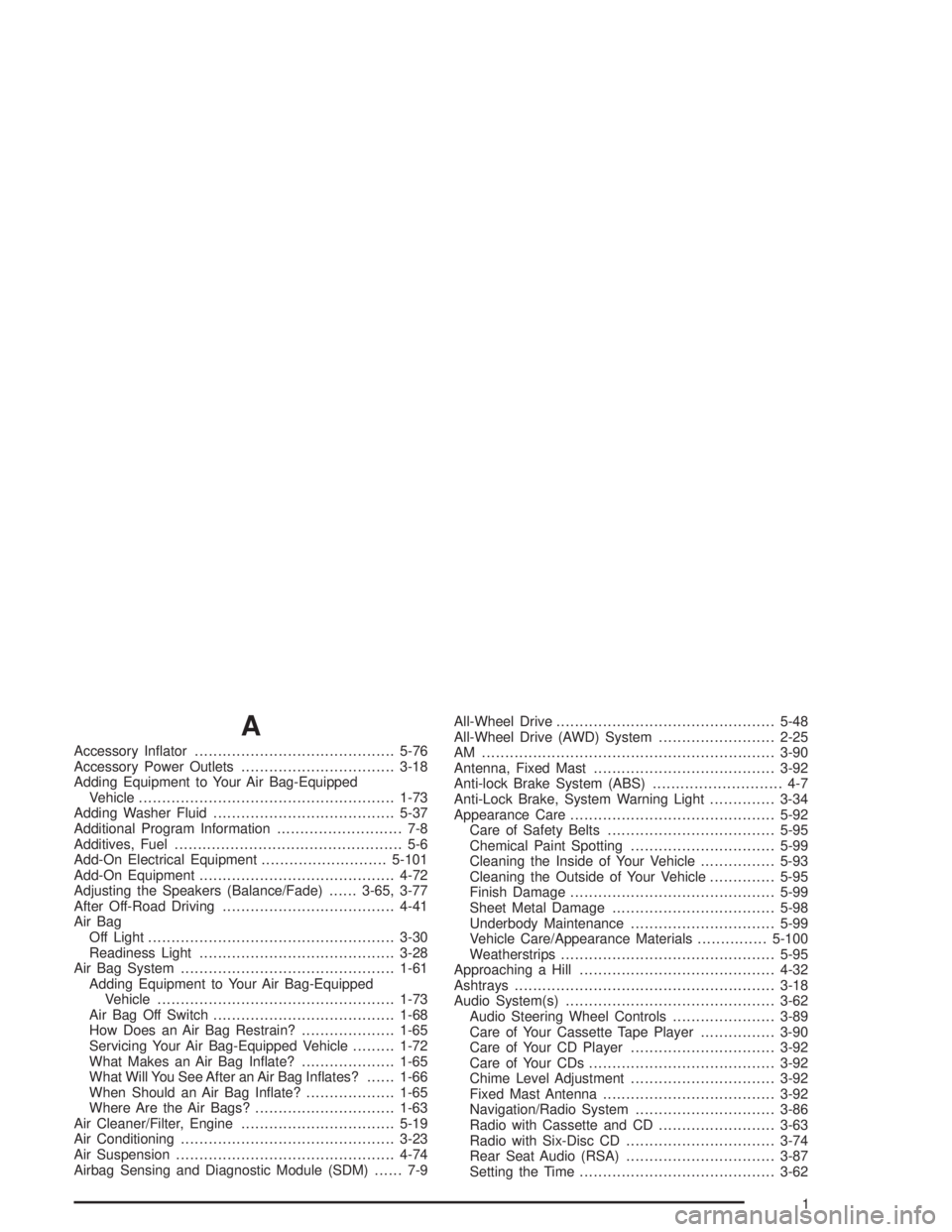
Audio System(s).............................................3-62
Audio Steering Wheel Controls......................3-89
Care of Your Cassette Tape Player................3-90
Care of Your CD Player...............................3-92
Care of Your CDs........................................3-92
Chime Level Adjustment...............................3-92
Fixed Mast Antenna.....................................3-92
Navigation/Radio System..............................3-86
Radio with Cassette and CD.........................3-63
Radio with Six-Disc CD................................3-74
Rear Seat Audio (RSA)................................3-87
Setting the Time..........................................3-62
1
Page 458 of 472

Audio System(s) (cont.)
Theft-Deterrent Feature................................3-88
Understanding Radio Reception.....................3-90
Automatic Climate Control System.....................3-19
Automatic Dimming Mirror Operation..................2-35
Automatic Headlamp System............................3-14
Automatic Transmission
Fluid..........................................................5-21
Operation...................................................2-22
B
Backing Up....................................................4-82
Battery..........................................................5-42
BATTERY NOT CHARGING.............................3-57
Battery Replacement......................................... 2-5
Battery Run-Down Protection............................3-17
Before Leaving on a Long Trip.........................4-48
Before You Go Off-Roading..............................4-17
Bench Seat, Split (60/40)................................... 1-8
Brake
Parking......................................................2-29
System Warning Light..................................3-33
Brake Adjustment............................................5-42
Brake and Throttle Operation Techniques for
Off-Road Driving..........................................4-27
Brake Fluid....................................................5-38
Brake Pedal Travel.........................................5-42Brake Wear...................................................5-41
Brakes..........................................................5-38
Braking........................................................... 4-6
Braking in Emergencies..................................... 4-9
Break-In, New Vehicle.....................................2-18
Bulb Replacement...........................................5-52
Center High-Mounted Stoplamp (CHMSL)........5-57
Daytime Running Lamps...............................5-54
Front Turn Signal and Parking Lamps.............5-53
Halogen Bulbs............................................5-52
Headlamps.................................................5-52
Replacement Bulbs......................................5-58
Roof Marker Lamps.....................................5-55
Sidemarker Lamps.......................................5-54
Taillamps....................................................5-57
Buying New Tires...........................................5-71
C
California Fuel.................................................. 5-6
Canada – Customer Assistance.......................... 7-4
Canadian Owners................................................ ii
Canadian Roadside Assistance........................... 7-7
Capacities and Specications..........................5-111
Carbon Monoxide...................4-52, 4-75, 2-13, 2-33
Care of
Safety Belts................................................5-95
Your Cassette Tape Player............................3-90
2