audio HUMMER H2 2005 Owner's Manual
[x] Cancel search | Manufacturer: HUMMER, Model Year: 2005, Model line: H2, Model: HUMMER H2 2005Pages: 468, PDF Size: 3.21 MB
Page 222 of 468
Playing a CD
If the ignition or radio is turned off, with a CD in the
player, it will stay in the player. When the ignition
or radio is turned on, the CD will start playing where it
stopped, if it was the last selected audio source.
When a CD is inserted, the CD symbol will appear on
the CD. As each new track starts to play, the track
number will appear on the display.
The CD player can play the smaller 3 inch (8 cm) single
CDs with an adapter ring. Full-size CDs and the
smaller CDs are loaded in the same manner.
If playing a CD-R the sound quality may be reduced
due to CD-R quality, the method of recording, the quality
of the music that has been recorded, and the way the
CD-R has been handled. There may be an increase
in skipping, difficulty in nding tracks, and/or difficulty in
loading and ejecting. If these problems occur try a
known good CD.
Do not add paper labels to CDs, they could get caught
in the CD player.
If an error appears on the display, see “CD Messages”
later in this section.LOAD:Press this button to load CDs into the CD
player. This CD player will hold up to six CDs.
To insert one CD, do the following:
1. Turn the ignition on.
2. Press and release the LOAD button.
3. Wait for the indicator light, located to the right of the
slot, to turn green.
4. Load a CD. Insert the CD partway into the slot,
label side up. The player will pull the CD in.
To insert multiple CDs, do the following:
1. Turn the ignition on.
2. Press and hold the LOAD button for two seconds.
You will hear a beep and the indicator light, located
to the right of the slot, will begin to ash and
MULTI LOAD # will appear on the display.
3. Once the light stops ashing and turns green,
INSERT CD # will appear on the display, load
a CD. Insert the CD partway into the slot, label side
up. The player will pull the CD in.
Once the CD is loaded, the indicator light will begin
ashing again. Once the light stops ashing and
turns green, you can load another CD. The
CD player takes up to six CDs. Do not try to load
more than six.
3-82
Page 227 of 468
CD Messages
CHECK CD:If this message appears on the display
and/or the CD comes out, it could be for one of the
following reasons:
It is very hot. When the temperature returns to
normal, the CD should play.
You are driving on a very rough road. When the
road becomes smoother, the CD should play.
The CD is dirty, scratched, wet, or upside down.
The air is very humid. If so, wait about an hour and
try again.
There may have been a problem while burning
the CD.
The label may be caught in the CD player.
If the CD is not playing correctly, for any other reason,
try a known good CD.
If any error occurs repeatedly or if an error cannot be
corrected, contact your GM dealer. If the radio displays
an error message, write it down and provide it to
your GM dealer when reporting the problem.
Navigation/Radio System
Your vehicle may have a navigation radio system that
includes Radio Data System (RDS) with Program Type
(PTY) selections that will seek out the kind of music you
want to listen to and XM™ Satellite Radio Service
capabilities (if equipped). The radio can also
communicate with the navigation system to broadcast
announcements on traffic, weather, and emergency alert
communications. For information on how to use this
system, see the “Navigation System” manual.
Rear Seat Audio (RSA)
This feature allows rear seat passengers to listen to any
of the sources: radio, cassette tapes, or CDs. However,
the rear seat passengers can only control the sources
that the front seat passengers are not listening to. For
example, rear seat passengers may listen to and control
cassette tapes or CDs through the headphones while the
driver listens to the radio through the front speakers. The
rear seat passengers have control of the volume for each
set of headphones.
The front seat audio controls always have priority over
the RSA controls. If the front seat passengers switch the
source for the main radio to a remote source, the RSA will
not be able to control the source. You can operate the
rear seat audio when the main radio is off.
3-87
Page 228 of 468

P(Power):Press this button to turn the system on or
off. The rear speakers will be muted when the power
is turned on unless your vehicle is equipped with
the Bose
®audio system.
u(Volume):Turn this knob to increase or to
decrease the volume. The left knob controls the left
headphones and the right knob controls the right
headphones.SRC (Source):Press this button to select a source:
radio, cassette tape, or CD.
xSEEKw:When listening to FM1, FM2, AM, or XM1
or XM2 (if equipped), press the up or the down arrow to
go to the next or to the previous station and stay there.
This function is inactive if the front seat passengers are
listening to the radio.
When a cassette tape is playing, press the up or the
down arrow to go to the next or the previous selection.
This function is inactive if the front seat passengers are
listening to a cassette tape.
When a CD is playing, press the up arrow to got to the
next track on the CD. Press the down arrow to go to the
start of the current track if more than eight seconds have
played. This function is inactive if the front seat
passengers are listening to a CD.
PROG (Program):Press this button to go to the next
preset radio station set on the pushbuttons on the main
radio. This function is inactive if the front seat passengers
are listening to the radio.
When a cassette tape is playing, press this button to go to
the other side of the tape. This function is inactive if the
front seat passengers are listening to a cassette tape.
3-88
Page 229 of 468
When a CD is playing, press this button to go to the
beginning of the CD. This function is inactive if the front
seat passengers are listening to a CD.
When a CD is playing in the six-disc CD changer, press
this button to select the next CD, if multiple CDs are
loaded. This function is inactive if the front seat
passengers are listening to a CD.
Theft-Deterrent Feature
THEFTLOCK®is designed to discourage theft of your
vehicle’s radio. The feature works automatically by
learning a portion of the Vehicle Identication Number
(VIN). If the radio is moved to a different vehicle, it
will not operate and LOCKED will appear on the display.
When the radio and vehicle are turned off, the blinking
red light indicates that THEFTLOCK
®is armed.
With THEFTLOCK
®activated, the radio will not operate
if stolen.
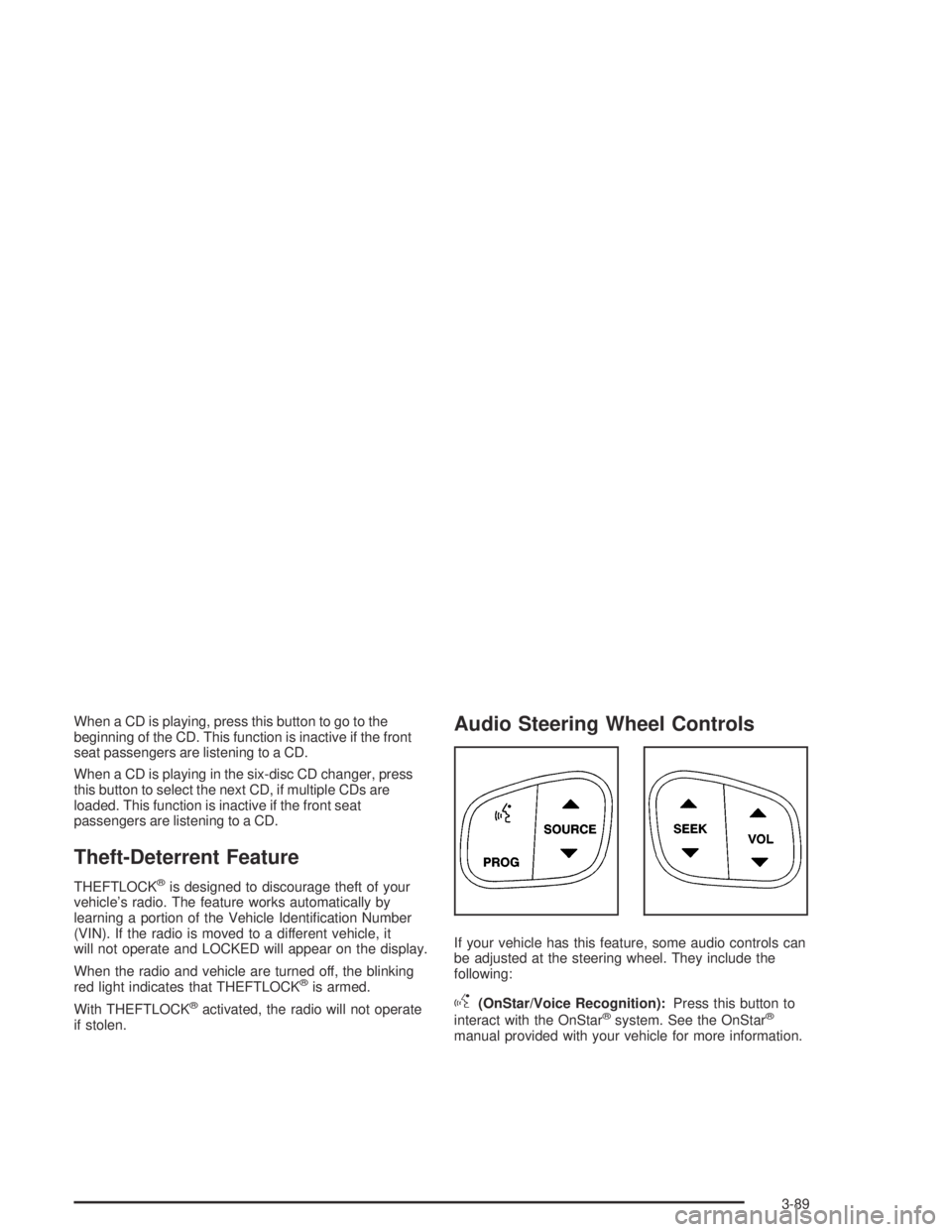
Audio Steering Wheel Controls
If your vehicle has this feature, some audio controls can
be adjusted at the steering wheel. They include the
following:
g(OnStar/Voice Recognition):Press this button to
interact with the OnStar®system. See the OnStar®
manual provided with your vehicle for more information.
3-89
Page 350 of 468

Replacing Brake System Parts
The braking system on a vehicle is complex. Its many
parts have to be of top quality and work well together if
the vehicle is to have really good braking. Your
vehicle was designed and tested with top-quality GM
brake parts. When you replace parts of your braking
system — for example, when your brake linings
wear down and you need new ones put in — be sure
you get new approved GM replacement parts. If you do
not, your brakes may no longer work properly. For
example, if someone puts in brake linings that are wrong
for your vehicle, the balance between your front and
rear brakes can change — for the worse. The braking
performance you have come to expect can change
in many other ways if someone puts in the wrong
replacement brake parts.
Battery
Your vehicle has a maintenance free battery. When it is
time for a new battery, get one that has the replacement
number shown on the original battery’s label. We
recommend an ACDelco
®replacement battery. See
Engine Compartment Overview on page 5-12for
battery location.Warning:Battery posts, terminals and related
accessories contain lead and lead compounds,
chemicals known to the State of California to
cause cancer and reproductive harm. Wash hands
after handling.
Vehicle Storage
If you are not going to drive your vehicle for 25 days
or more, remove the black, negative (−) cable from
the battery. This will help keep your battery from
running down.
{CAUTION:
Batteries have acid that can burn you and gas
that can explode. You can be badly hurt if you
are not careful. SeeJump Starting on
page 5-39for tips on working around a battery
without getting hurt.
Also, for your audio system, seeTheft-Deterrent
Feature on page 3-89.
5-38
Page 423 of 468
Fuses Usage
IPC/DICInstrument Panel
Cluster/Driver Information
Center
HVAC/ECASClimate Control
Controller/Electronically
Controlled Air Suspension
CIG LTR Cigarette Lighter
HI HDLP-RT High Beam Headlamp-Right
HDLP-LOW Headlamp Low Beam Relay
A/C COMPAir Conditioning
Compressor Relay
A/C COMP Air Conditioning Compressor
RR WPR Rear Wiper/Washer
RADIO Audio System
SEO B1Mid Bussed Electrical
Center, HomeLink, Rear
Heated Seats
LO HDLP-LT Headlamp Low Beam-Left
BTSIBrake Transmission Shift
Interlock SystemFuses Usage
CRNK Starting System
LO HDLP-RT Headlamp Low Beam-Right
FOG LP Not Used
FOG LP Not Used
HORN Horn Relay
W/S WASHWindshield and Rear Window
Washer Pump Relay
W/S WASHWindshield and Rear Window
Washer Pump
INFO OnStar
RADIO AMP Radio Amplier
RH HID Not Used
HORN Horn
EAP Not Used
TREC All-Wheel Drive Module
SBA Not Used
5-111
Page 455 of 468
A
Accessory Inator...........................................5-67
Accessory Power Outlets.................................3-18
Adding Equipment to Your Airbag-Equipped
Vehicle.......................................................1-69
Additives, Fuel................................................. 5-6
Add-On Electrical Equipment...........................5-102
Air Cleaner/Filter, Engine.................................5-18
Air Conditioning..............................................3-19
Air Suspension...............................................4-66
Airbag
Off Light.....................................................3-30
Readiness Light..........................................3-29
Airbag Sensing and Diagnostic Module (SDM)...... 7-9
Airbag System................................................1-58
Adding Equipment to Your Airbag-Equipped
Vehicle...................................................1-69
Airbag Off Switch........................................1-65
How Does an Airbag Restrain?......................1-63
Servicing Your Airbag-Equipped Vehicle..........1-68
What Makes an Airbag Inate?......................1-63
What Will You See After an Airbag Inates?....1-64
When Should an Airbag Inate?....................1-61
Where Are the Airbags?...............................1-60
All-Wheel Drive...............................................5-43
All-Wheel Drive (AWD) System.........................2-32
Antenna, Fixed Mast.......................................3-92
Anti-Lock Brake System (ABS)........................... 4-7
Anti-Lock Brake, System Warning Light..............3-34Appearance Care............................................5-92
Aluminum Wheels........................................5-98
Care of Safety Belts....................................5-95
Chemical Paint Spotting...............................5-99
Cleaning Exterior Lamps/Lenses....................5-97
Fabric/Carpet..............................................5-92
Finish Care.................................................5-97
Finish Damage............................................5-99
Glass Surfaces............................................5-95
Instrument Panel.........................................5-94
Interior Plastic Components...........................5-94
Leather......................................................5-94
Sheet Metal Damage...................................5-99
Speaker Covers..........................................5-95
Tires..........................................................5-99
Underbody Maintenance...............................5-99
Vehicle Care/Appearance Materials...............5-100
Vinyl..........................................................5-94
Washing Your Vehicle...................................5-96
Weatherstrips..............................................5-95
Windshield, Backglass, and Wiper Blades.......5-98
Wood Panels..............................................5-95
Ashtrays........................................................3-18
Audio System(s).............................................3-60
Audio Steering Wheel Controls......................3-89
Care of Your Cassette Tape Player................3-91
Care of Your CD Player...............................3-92
Care of Your CDs........................................3-92
Chime Level Adjustment...............................3-92
Fixed Mast Antenna.....................................3-92
1
Page 456 of 468
Audio System(s) (cont.)
Navigation/Radio System..............................3-87
Radio with Cassette and CD.........................3-61
Radio with Six-Disc CD................................3-74
Rear Seat Audio (RSA)................................3-87
Setting the Time..........................................3-61
Theft-Deterrent Feature................................3-89
Understanding Radio Reception.....................3-90
Automatic Headlamp System............................3-15
Automatic Transmission
Fluid..........................................................5-21
Operation...................................................2-28
B
Battery..........................................................5-38
Run-Down Protection...................................3-17
Before Leaving on a Long Trip.........................4-45
Bench Seat, Split (60/40)................................... 1-7
Brake
Anti-Lock Brake System (ABS)........................ 4-7
Emergencies................................................ 4-8
Parking......................................................2-36
System Warning Light..................................3-32
Brakes..........................................................5-35
Braking........................................................... 4-6
Braking in Emergencies..................................... 4-8
Break-In, New Vehicle.....................................2-25Bulb Replacement...........................................5-45
Daytime Running Lamps...............................5-47
Front Turn Signal and Parking Lamps.............5-47
Halogen Bulbs............................................5-45
Headlamps.................................................5-46
Replacement Bulbs......................................5-52
Roof Marker Lamps.....................................5-48
Taillamps....................................................5-50
Buying New Tires...........................................5-63
C
California Fuel.................................................. 5-5
Canadian Owners................................................ ii
Capacities and Specications..........................5-112
Carbon Monoxide . . . 2-13, 2-14, 2-16, 2-39, 4-48, 4-68
Care of
Safety Belts................................................5-95
Your Cassette Tape Player............................3-91
Your CD Player...........................................3-92
Your CDs ...................................................3-92
Cargo Area, All-Weather..................................2-59
Cargo Tie Downs............................................2-59
Center Console Storage Area...........................2-55
Center Overhead Console................................2-54
Chains, Tire...................................................5-67
Charging System Light....................................3-31
2
Page 463 of 468
Outside (cont.)
Heated Mirrors............................................2-47
Power Mirrors.............................................2-46
Overheated Engine Protection Operating Mode.....5-28
Owner Checks and Services.............................. 6-9
Owners, Canadian............................................... ii
P
Park (P)
Shifting Into................................................2-37
Shifting Out of............................................2-38
Parking
Brake........................................................2-36
Over Things That Burn.................................2-38
Passing.........................................................4-13
Passlock
®......................................................2-24
Personalization, Climate Controls......................3-25
Power
Accessory Outlets........................................3-18
Door Locks.................................................. 2-9
Electrical System.......................................5-102
Lumbar Controls........................................... 1-3
Retained Accessory (RAP)............................2-26
Seat............................................................ 1-2
Steering Fluid.............................................5-33
Windows....................................................2-19
Power Winch Platform.....................................4-57Programmable Automatic Door Locks.................2-10
Programming the HomeLink
®Transmitter...........2-51
Q
Questions and Answers About Safety Belts.........1-21
R
Radios..........................................................3-60
Care of Your Cassette Tape Player................3-91
Care of Your CD Player...............................3-92
Care of Your CDs........................................3-92
Navigation/Radio System..............................3-87
Radio with Cassette and CD.........................3-61
Radio with Six-Disc CD................................3-74
Rear Seat Audio..........................................3-87
Setting the Time..........................................3-61
Theft-Deterrent............................................3-89
Understanding Reception..............................3-90
Reading Lamps..............................................3-17
Rear Axle......................................................5-44
Locking......................................................4-10
Rear Door Security Locks................................2-12
Rear Heated Seats........................................... 1-7
Rear Safety Belt Comfort Guides......................1-33
Rear Seat Armrest..........................................2-59
9
Page 464 of 468
Rear Seat Audio (RSA)....................................3-87
Rear Seat Passengers, Safety Belts..................1-30
Rearview Mirror, Automatic Dimming with
Compass and Temperature Display................2-43
Rearview Mirror, Automatic Dimming with
OnStar
®, Compass and Temperature Display.....2-41
Reclining Seatbacks.......................................... 1-5
Recommended Fluids and Lubricants.................6-12
Recovery Loops..............................................4-53
Recreational Vehicle Towing.............................4-64
Remote Keyless Entry System............................ 2-4
Remote Keyless Entry System, Operation............ 2-5
Removing the Flat Tire and Installing the
Spare Tire..................................................5-79
Removing the Spare Tire and Tools...................5-71
Replacement Bulbs.........................................5-52
Reporting Safety Defects
Canadian Government..................................7-11
General Motors...........................................7-11
United States Government............................7-10
Restraint System Check
Checking Your Restraint Systems...................1-69
Replacing Restraint System Parts After a
Crash.....................................................1-70
Restraint Systems
Checking....................................................1-69
Replacing Parts...........................................1-70Retained Accessory Power (RAP)......................2-26
Ride Height, Selectable Extended Rear Ride......4-65
Right Front Passenger Position, Safety Belts......1-30
Roadside
Assistance Program....................................... 7-6
Rocking Your Vehicle to Get it Out....................4-53
Routing, Engine Drive Belt...............................6-14
Running Your Engine While You Are Parked.......2-40
S
Safety Belt
Reminder Light............................................3-28
Safety Belts
Care of......................................................5-95
Driver Position............................................1-22
How to Wear Safety Belts Properly................1-22
Questions and Answers About Safety Belts.....1-21
Rear Safety Belt Comfort Guides for
Children and Small Adults.........................1-33
Rear Seat Passengers.................................1-30
Right Front Passenger Position......................1-30
Safety Belt Extender....................................1-35
Safety Belt Use During Pregnancy.................1-29
Safety Belts Are for Everyone.......................1-16
Safety Warnings and Symbols.............................. iii
Scheduled Maintenance..................................... 6-4
10