air condition HUMMER H2 2006 User Guide
[x] Cancel search | Manufacturer: HUMMER, Model Year: 2006, Model line: H2, Model: HUMMER H2 2006Pages: 502, PDF Size: 3.35 MB
Page 179 of 502

Malfunction Indicator Lamp
Check Engine Light
Your vehicle is equipped
with a computer which
monitors operation of the
fuel, ignition, and emission
control systems.
This system is called OBD II (On-Board
Diagnostics-Second Generation) and is intended to
assure that emissions are at acceptable levels for the
life of the vehicle, helping to produce a cleaner
environment. The check engine light comes on to
indicate that there is a problem and service is required.
Malfunctions often will be indicated by the system
before any problem is apparent. This may prevent more
serious damage to your vehicle. This system is also
designed to assist your service technician in correctly
diagnosing any malfunction.
Notice:If you keep driving your vehicle with this
light on, after awhile, your emission controls
may not work as well, your fuel economy may not
be as good, and your engine may not run as
smoothly. This could lead to costly repairs that may
not be covered by your warranty.Notice:Modications made to the engine,
transmission, exhaust, intake, or fuel system of
your vehicle or the replacement of the original tires
with other than those of the same Tire Performance
Criteria (TPC) can affect your vehicle’s emission
controls and may cause this light to come on.
Modications to these systems could lead to costly
repairs not covered by your warranty. This may
also result in a failure to pass a required Emission
Inspection/Maintenance test. SeeAccessories
and Modifications on page 5-3.
This light should come on, as a check to show you it is
working, when the ignition is on and the engine is
not running. If the light does not come on, have it
repaired. This light will also come on during a
malfunction in one of two ways:
Light Flashing— A misre condition has been
detected. A misre increases vehicle emissions
and may damage the emission control system on
your vehicle. Diagnosis and service may be
required.
Light On Steady— An emission control system
malfunction has been detected on your vehicle.
Diagnosis and service may be required.
3-39
Page 190 of 502
ENGINE COOLANT HOT
If the cooling system temperature gets hot, this message
will appear in the DIC. Turn off the air conditioning. If
the message is still on, or if the engine coolant
temperature gage continues to rise, pull the vehicle over
when it is safe to do so. SeeEngine Coolant
Temperature Gage on page 3-37for more information.
Stop the vehicle and let the engine idle in PARK (P)
for a few minutes to allow the coolant to reach a
safe temperature. This message will clear when the
coolant temperature drops to a safe operating
temperature. Pressing any of the four DIC buttons or
the trip odometer reset stem will clear the message from
the DIC display.
ENGINE OVERHEATED
If the engine cooling system reaches unsafe
temperatures for operation, this message will appear in
the DIC and you will hear a chime. Stop and turn off
the vehicle as soon as it is safe to do so to avoid severe
damage. This message will clear when the engine
has cooled to a safe operating temperature.
FUEL LEVEL LOW
If the fuel level is low, this message will appear on the
DIC and you will hear a chime. Refuel as soon as
possible. Pressing any of the four DIC buttons or the
trip odometer reset stem will clear the message from the
DIC display. It will also clear itself after 10 seconds.
The low fuel light near the fuel gage will still remain on
in either case. SeeLow Fuel Warning Light on
page 3-44,Fuel Gage on page 3-44, andFuel on
page 5-5for more information.
KEYFOB X BATTERY LOW
If a remote keyless entry transmitter battery is low, this
message will appear on the DIC. The battery needs
to be replaced in the transmitter. See “Battery
Replacement” underRemote Keyless Entry System
Operation on page 2-5. Pressing any of the
four DIC buttons or the trip odometer reset stem
will clear the message from the DIC display.
LEFT REAR DOOR AJAR
If the driver’s side rear door is not fully closed and the
vehicle is in a drive gear, this message will appear
on the display and you will hear a chime. Stop and turn
off the vehicle, check the door for obstacles, and
close the door again. Check to see if the message still
appears on the DIC. Pressing any of the four DIC
buttons or the trip odometer reset stem will clear the
message from the DIC display.
3-50
Page 209 of 502

XM™ Radio Messages
Radio Display
MessageCondition Action Required
XL (Explicit
Language Channels)XL on the radio display,
after the channel name,
indicates content with
explicit language.These channels, or any others, can be blocked at a
customer’s request, by calling 1-800-852-XMXM (9696).
Updating Updating
encryption codeThe encryption code in the receiver is being updated, and
no action is required. This process should take no longer
than 30 seconds.
No Signal Loss of signal The system is functioning correctly, but the vehicle is in a
location that is blocking the XM signal. When you move into
an open area, the signal should return.
Loading XM Acquiring channel audio
(after 4 second delay)The audio system is acquiring and processing audio and
text data. No action is needed. This message should
disappear shortly.
CH Off Air Channel not in service This channel is not currently in service. Tune to
another channel.
CH Unavail Channel no
longer availableThis previously assigned channel is no longer assigned.
Tune to another station. If this station was one of the
presets, choose another station for that preset button.
No Info Artist Name/Feature
not availableNo artist information is available at this time on this channel.
The system is working properly.
No Info Song/Program Title
not availableNo song title information is available at this time on this
channel. The system is working properly.
3-69
Page 221 of 502

XM™ Radio Messages
Radio Display
MessageCondition Action Required
XL (Explicit
Language Channels)XL on the radio display,
after the channel name,
indicates content with
explicit language.These channels, or any others, can be blocked at a
customer’s request, by calling 1-800-852-XMXM (9696).
Updating Updating
encryption codeThe encryption code in the receiver is being updated, and
no action is required. This process should take no longer
than 30 seconds.
No Signal Loss of signal The system is functioning correctly, but the vehicle is in a
location that is blocking the XM signal. When you move into
an open area, the signal should return.
Loading XM Acquiring channel audio
(after 4 second delay)The audio system is acquiring and processing audio and
text data. No action is needed. This message should
disappear shortly.
CH Off Air Channel not in service This channel is not currently in service. Tune to
another channel.
CH Unavail Channel no
longer availableThis previously assigned channel is no longer assigned.
Tune to another station. If this station was one of the
presets, choose another station for that preset button.
No Info Artist Name/Feature
not availableNo artist information is available at this time on this channel.
The system is working properly.
No Info Song/Program Title not
availableNo song title information is available at this time on this
channel. The system is working properly.
3-81
Page 265 of 502
You must wait for the light in the button to stop ashing
and remain illuminated before the rear axle is locked.
Notice:If you try to lock the rear axle while
your vehicle is stuck and the tires are spinning, you
could damage your vehicle’s drivetrain. The
repairs would not be covered by your warranty.
Always lock the rear axle before attempting
situations and/or navigating terrain which could
possibly cause the vehicle to become stuck.
The locking rear axle will be disengaged when the
vehicle’s speed is greater than 20 mph (32 km/h), if the
vehicle’s battery is low and/or the transfer case is
shifted out of Four-Wheel-Low-Lock mode.
Notice:If you lock the rear axle while driving on
pavement, you could damage your vehicle’s
drivetrain. The repairs would not be covered by
your warranty. Do not use the locking rear axle on
pavement. If you need four-wheel drive when
traveling on pavement, use only 4HI.
Steering
Power Steering
If you lose power steering assist because the engine
stops or the system is not functioning, you can steer but
it will take much more effort.
Steering Tips
It is important to take curves at a reasonable speed.
A lot of the “driver lost control” accidents mentioned on
the news happen on curves. Here is why:
Experienced driver or beginner, each of us is subject to
the same laws of physics when driving on curves.
The traction of the tires against the road surface makes
it possible for the vehicle to change its path when
you turn the front wheels. If there is no traction, inertia
will keep the vehicle going in the same direction. If
you have ever tried to steer a vehicle on wet ice, you
will understand this.
The traction you can get in a curve depends on the
condition of your tires and the road surface, the angle at
which the curve is banked, and your speed. While
you are in a curve, speed is the one factor you
can control.
Suppose you are steering through a sharp curve.
Then you suddenly accelerate. Both control
systems — steering and acceleration — have to do
their work where the tires meet the road. Adding
the sudden acceleration can demand too much of
those places. You can lose control. SeeTraction
Control System (TCS) on page 4-9.
What should you do if this ever happens? Ease up on
the accelerator pedal, steer the vehicle the way you
want it to go, and slow down.
4-11
Page 315 of 502
6. Release the parking brake only after the vehicle
being towed is rmly attached to the towing
vehicle. You can use your vehicle’s front mounted
receiver with the proper accessories to tow it.
See “Front Mounted Receiver” underIf Your Vehicle
is Stuck in Sand, Mud, Ice or Snow on page 4-50.
7. Turn the ignition to ACCESSORY.
8. Disconnect the battery if you are going to tow for
long distances or long periods of time.
When towing your vehicle for extended periods of time,
start your vehicle as often as possible to prevent
battery drain. This should only be done when the tow
vehicle is parked.
Dolly Towing
Your vehicle cannot be dolly towed. If you must tow
your vehicle behind another, use the dinghy towing
procedure listed previously.
Notice:Dolly towing your vehicle will damage
drivetrain components. Do not dolly tow your
vehicle.
Selectable Extended Rear
Ride Height
If your vehicle has this feature it comes as part of the
electronically controlled air suspension system.
The selectable rear ride height allows you to raise the
rear of the vehicle about 2 inches (5 cm) over the normal
ride height. This can be helpful when driving off-road
where you may need more ground clearance to clear an
obstacle.
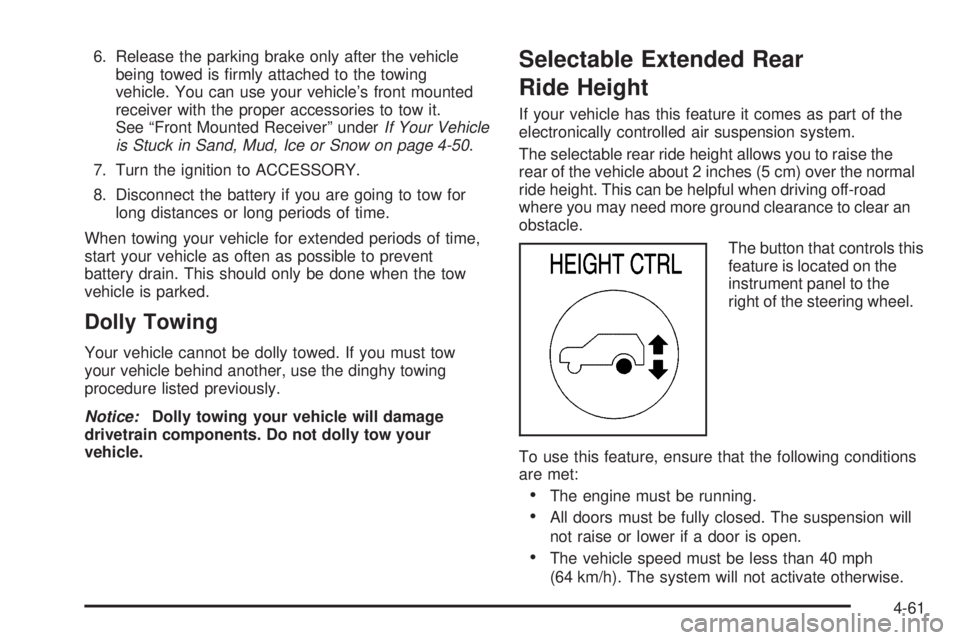
The button that controls this
feature is located on the
instrument panel to the
right of the steering wheel.
To use this feature, ensure that the following conditions
are met:
The engine must be running.
All doors must be fully closed. The suspension will
not raise or lower if a door is open.
The vehicle speed must be less than 40 mph
(64 km/h). The system will not activate otherwise.
4-61
Page 336 of 502

California Fuel
If your vehicle is certied to meet California Emissions
Standards, it is designed to operate on fuels that
meet California specications. See the underhood
emission control label. If this fuel is not available
in states adopting California emissions standards, your
vehicle will operate satisfactorily on fuels meeting
federal specications, but emission control system
performance may be affected. The malfunction indicator
lamp may turn on and your vehicle may fail a
smog-check test. SeeMalfunction Indicator Lamp on
page 3-39. If this occurs, return to your authorized
GM dealer for diagnosis. If it is determined that
the condition is caused by the type of fuel used, repairs
may not be covered by your warranty.
Additives
To provide cleaner air, all gasolines in the United States
are now required to contain additives that will help
prevent engine and fuel system deposits from forming,
allowing your emission control system to work
properly. In most cases, you should not have to add
anything to your fuel. However, some gasolines contain
only the minimum amount of additive required to
meet U.S. Environmental Protection Agency regulations.
To help keep fuel injectors and intake valves clean,
or if your vehicle experiences problems due to
dirty injectors or valves, look for gasoline that is
advertised as TOP TIER Detergent Gasoline. Also, your
GM dealer has additives that will help correct and
prevent most deposit-related problems.
5-6
Page 358 of 502
If No Steam Is Coming From
Your Engine
The ENGINE COOLANT HOT message, along with a
low coolant condition, can indicate a serious problem.
If you get an engine overheat warning, but see or
hear no steam, the problem may not be too serious.
Sometimes the engine can get a little too hot when you:
Climb a long hill on a hot day.
Stop after high-speed driving.
Idle for long periods in traffic.
Tow a trailer. SeeTowing a Trailer on page 4-63.
If you get the ENGINE COOLANT HOT message with
no sign of steam, try this for a minute or so:
1. Turn on your heater to full hot at the highest fan
speed and open the windows as necessary.
2. If you are in a traffic jam, shift to NEUTRAL (N);
otherwise, shift to the highest gear while
driving — DRIVE (D).
If you no longer have the overheat warning, you can
drive. Just to be safe, drive slower for about 10 minutes.
If the warning does not come back on, you can drive
normally.
If the warning continues and you have not stopped, pull
over, stop, and park your vehicle right away.If there is still no sign of steam, push down the
accelerator until the engine speed is about twice as fast
as normal idle speed for at least three minutes while
you are parked. If you still have the warning, turn off the
engine and get everyone out of the vehicle until it
cools down. Also, see “Overheated Engine Protection
Operating Mode” later in this section.
You may decide not to lift the hood but to get service
help right away.
Overheated Engine Protection
Operating Mode
If an overheated engine condition exists and the
REDUCED ENGINE POWER message is displayed, an
overheat protection mode which alternates ring
groups of cylinders helps prevent engine damage. In
this mode, you will notice a loss in power and engine
performance. This operating mode allows your vehicle to
be driven to a safe place in an emergency. Driving
extended miles (km) and/or towing a trailer in the
overheat protection mode should be avoided.
Notice:After driving in the overheated engine
protection operating mode, to avoid engine damage,
allow the engine to cool before attempting any repair.
The engine oil will be severely degraded. Repair the
cause of coolant loss, change the oil and reset the oil
life system. SeeEngine Oil on page 5-14.
5-28
Page 367 of 502

Brake Wear
Your vehicle has four-wheel disc brakes.
Disc brake pads have built-in wear indicators that make
a high-pitched warning sound when the brake pads
are worn and new pads are needed. The sound
may come and go or be heard all the time your vehicle
is moving, except when you are pushing on the
brake pedal rmly.
{CAUTION:
The brake wear warning sound means that soon
your brakes will not work well. That could lead
to an accident. When you hear the brake wear
warning sound, have your vehicle serviced.
Notice:Continuing to drive with worn-out brake
pads could result in costly brake repair.Some driving conditions or climates may cause a brake
squeal when the brakes are rst applied or lightly
applied. This does not mean something is wrong with
your brakes.
Properly torqued wheel nuts are necessary to help
prevent brake pulsation. When tires are rotated, inspect
brake pads for wear and evenly tighten wheel nuts in
the proper sequence to GM torque specications.
Brake linings should always be replaced as complete
axle sets.
Brake Pedal Travel
See your dealer if the brake pedal does not return to
normal height, or if there is a rapid increase in
pedal travel. This could be a sign of brake trouble.
Brake Adjustment
Every time you make a brake stop, your disc brakes
adjust for wear.
5-37
Page 387 of 502

Tire Terminology and Denitions
Air Pressure:The amount of air inside the tire pressing
outward on each square inch of the tire. Air pressure
is expressed in pounds per square inch (psi) or
kilopascal (kPa).
Accessory Weight:This means the combined weight
of optional accessories. Some examples of optional
accessories are, automatic transmission, power steering,
power brakes, power windows, power seats, and air
conditioning.
Aspect Ratio:The relationship of a tire’s height to
its width.
Belt:A rubber coated layer of cords that is located
between the plies and the tread. Cords may be made
from steel or other reinforcing materials.
Bead:The tire bead contains steel wires wrapped by
steel cords that hold the tire onto the rim.
Bias Ply Tire:A pneumatic tire in which the plies are
laid at alternate angles less than 90 degrees to the
centerline of the tread.
Cold Ination Pressure:The amount of air pressure in
a tire, measured in pounds per square inch (psi) or
kilopascals (kPa) before a tire has built up heat
from driving. SeeInation - Tire Pressure on page 5-59.Curb Weight:This means the weight of a motor
vehicle with standard and optional equipment including
the maximum capacity of fuel, oil and coolant, but
without passengers and cargo.
DOT Markings:A code molded into the sidewall of a
tire signifying that the tire is in compliance with the U.S.
Department of Transportation (DOT) motor vehicle
safety standards. The DOT code includes the Tire
Identication Number (TIN), an alphanumeric designator
which can also identify the tire manufacturer, production
plant, brand and date of production.
GVWR:Gross Vehicle Weight Rating, seeLoading
Your Vehicle on page 4-55.
GAWR FRT:Gross Axle Weight Rating for the front
axle, seeLoading Your Vehicle on page 4-55.
GAWR RR:Gross Axle Weight Rating for the rear axle,
seeLoading Your Vehicle on page 4-55.
Intended Outboard Sidewall:The side of an
asymmetrical tire, that must always face outward when
mounted on a vehicle.
Kilopascal (kPa):The metric unit for air pressure.
Light Truck (LT-Metric) Tire:A tire used on light duty
trucks and some multipurpose passenger vehicles.
5-57