door lock HUMMER H2 2006 Owner's Manual
[x] Cancel search | Manufacturer: HUMMER, Model Year: 2006, Model line: H2, Model: HUMMER H2 2006Pages: 502, PDF Size: 3.35 MB
Page 158 of 502
Dome Lamps
The dome lamps will come on when you open a door or
the midgate, if equipped, and will turn off when all
doors or midgate are closed.
You can also turn the dome lamps on by turning the
thumbwheel, located next to the exterior lamp control, all
the way up. In this position, the dome lamps will
remain on whether a door is opened or closed.
Dome Lamp Override
E(Dome Override):Press this button, located below
the exterior lamp control, to turn dome lamps off even
while a door is opened. To return the lamps to automatic
operation, press the button again and it will return to
the out position. In this position, the dome lamps
will come on when you open a door.
Entry/Exit Lighting
Your vehicle is equipped with an illuminated entry/exit
feature.
When a door is opened or the key is removed from the
ignition, the dome lamps will come on if the dome
override button is in the out position.
Reading Lamps
Your vehicle has reading lamps located in the overhead
console. Press the button located next to the lamp to
turn it on. The lamps can be adjusted to point in
the direction you want.
Press the button again to turn the lamp off.
These lamps will also come on with the dome lamps.
Battery Run-Down Protection
This feature shuts off the dome lamps if they are left on
for more than 10 minutes when the ignition is in
LOCK. This will keep your battery from running down.
Rear Vision Camera
Your vehicle may be equipped with a rear vision camera
system. Read this entire section before using the
camera system.
The rear vision camera system is designed to help the
driver when backing up by displaying a view of the area
behind the vehicle. When the driver shifts the vehicle into
REVERSE (R), the video screen will automatically slide
out from the rear view mirror. Once the driver shifts out of
REVERSE (R), the video screen will slide back into the
rear view mirror after a delay.
3-18
Page 192 of 502

REPLACE LIFTGATE FUSE (SUV)
This message will be displayed if the liftgate lock
malfunctions and/or the liftgate fuse blows. For more
information on fuses, seeInstrument Panel Fuse Block
on page 5-116andUnderhood Fuse Block on
page 5-119.
If the message returns after replacing the fuse, see your
dealer for service.
RIGHT REAR DOOR AJAR
If the passenger’s side rear door is not fully closed and
the vehicle is in a drive gear, this message will
appear on the display and you will hear a chime. Stop
and turn off the vehicle, check the door for obstacles,
and close the door again. Check to see if the
message still appears on the DIC. Pressing any of
the four DIC buttons or the trip odometer reset stem will
clear the message from the DIC display.
SERVICE 4WD (Full-Time
Four-Wheel Drive)
If a problem occurs with the Full-Time Four-Wheel Drive
system, this message will appear on the DIC. If this
message appears, stop as soon as possible and turn off
the vehicle. Restart the vehicle and check for the
message on the DIC display. If the message is still
displayed, or appears again when you begin driving,
there is a problem with the Full-Time Four-Wheel Drive
system. See your dealer for service. Pressing any of
the four DIC buttons or the trip odometer reset stem will
clear the message from the DIC display.
SERVICE AIR BAG
If there is a problem with the airbag system, this
message will be displayed on the DIC. Have your dealer
inspect the system for problems. Pressing any of the
four DIC buttons or the trip odometer reset stem
will clear the message from the DIC display. SeeAirbag
Readiness Light on page 3-32andAirbag System on
page 1-58for more information.
3-52
Page 196 of 502

Lock Doors
Press the customization button until LOCK DOORS
appears in the display. To select your preference
for automatic locking, press the select button while
LOCK DOORS is displayed on the DIC. Pressing the
select button will scroll through the following choices:
LOCK DOORS: IN GEAR (default):The doors will lock
when the vehicle is shifted out of PARK (P).
LOCK DOORS: WITH SPEED:The doors will lock
when the vehicle speed is above 8 mph (13 km/h) for
three seconds.
Choose one of the available options and press the
customization button while it is displayed on the DIC to
select it and move on to the next feature.
Unlock Doors
Press the customization button until UNLOCK DOORS
appears in the display. To select your preference for
automatic unlocking, press the select button while
UNLOCK DOORS is displayed on the DIC. Pressing the
select button will scroll through the following choices:
UNLOCK DOORS: IN PARK (default):All of the doors
will unlock when the vehicle is shifted into PARK (P).
UNLOCK DRIVER: IN PARK:The driver’s door will be
unlocked when the vehicle is shifted into PARK (P).UNLOCK DOORS: KEY OUT:All of the doors will
unlock when the key is taken out of the ignition.
UNLOCK DOORS: MANUALLY:The doors will not be
unlocked automatically.
Choose one of the available options and press the
customization button while it is displayed on the DIC to
select it and move on to the next feature.
Door Lock Delay
If your DIC does not have this feature, you can still
program the delayed locking feature. SeeDelayed
Locking on page 2-9for more information.
When locking the doors with the power lock switch or
the remote keyless entry transmitter and a door or
the liftgate is open, the delayed locking feature will delay
locking the doors and liftgate until ve seconds after
the last door is closed.
Press the customization button until DOOR LOCK
DELAY appears in the display. To select your
preference for delayed locking, press the select button
while DOOR LOCK DELAY is displayed on the DIC.
Pressing the select button will scroll through the
following choices:
DOOR LOCK DELAY: OFF (default):The doors will
lock immediately when pressing the power lock switch or
the lock button on the remote keyless entry transmitter.
3-56
Page 197 of 502
DOOR LOCK DELAY: ON:The doors will not lock until
ve seconds after the last door or the liftgate is
closed. You will hear three chimes to signal that the
delayed locking feature is in use. You can temporarily
override delayed locking by pressing the lock button
on the door or the remote keyless entry transmitter a
second time.
Choose one of the available options and press the
customization button while it is displayed on the DIC to
select it and move on to the next feature.
This feature will not operate if the key is in the ignition.
Lock Feedback
Press the customization button until LOCK FEEDBACK
appears in the display. To select your preference for
the feedback you receive when locking the vehicle with
the remote keyless entry transmitter, press the select
button while LOCK FEEDBACK is displayed on the DIC.
Pressing the select button will scroll through the
following choices:
LOCK FEEDBACK: BOTH (default):The parking
lamps will ash each time you press the button with the
lock symbol on the remote keyless entry transmitter
and the horn will chirp the second time you press the
lock button.
LOCK FEEDBACK: LAMPS:The parking lamps will
ash each time you press the button with the lock
symbol on the remote keyless entry transmitter.LOCK FEEDBACK: HORN:The horn will chirp the
second time you press the button with the lock symbol
on the remote keyless entry transmitter.
LOCK FEEDBACK: OFF:There will be no feedback
when locking the vehicle.
Choose one of the available options and press the
customization button while it is displayed on the DIC to
select it and move on to the next feature.
Unlock Feedback
Press the customization button until UNLOCK
FEEDBACK appears in the display. To select your
preference for the feedback you will receive when
unlocking the vehicle with the remote keyless entry
transmitter, press the select button while UNLOCK
FEEDBACK is displayed on the DIC. Pressing the select
button will scroll through the following choices:
UNLOCK FEEDBACK: LAMPS (default):The parking
lamps will ash each time you press the button with
the unlock symbol on the remote keyless entry
transmitter.
UNLOCK FEEDBACK: HORN:The horn will chirp the
second time you press the button with the unlock
symbol on the remote keyless entry transmitter.
3-57
Page 309 of 502
Loading Your Vehicle
It is very important to know how much weight your
vehicle can carry. This weight is called the vehicle
capacity weight and includes the weight of all occupants,
cargo, and all nonfactory-installed options. Two labels
on your vehicle show how much weight it may properly
carry, the Tire and Loading Information label and the
Certication/Tire label.
{CAUTION:
Do not load your vehicle any heavier than the
Gross Vehicle Weight Rating (GVWR), or either
the maximum front or rear Gross Axle Weight
Rating (GAWR). If you do, parts on your
vehicle can break, and it can change the way
your vehicle handles. These could cause you
to lose control and crash. Also, overloading
can shorten the life of your vehicle.
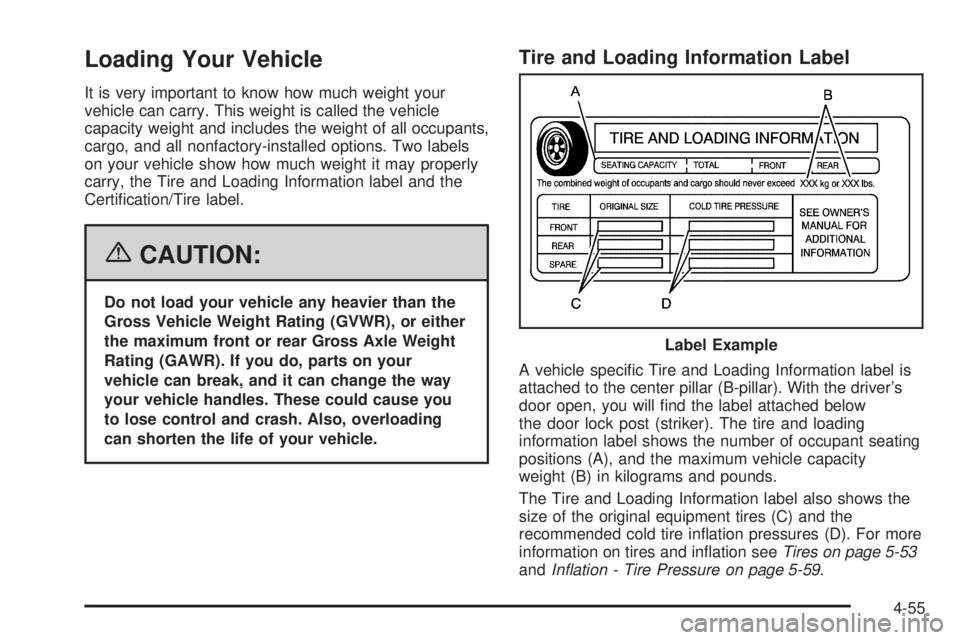
Tire and Loading Information Label
A vehicle specic Tire and Loading Information label is
attached to the center pillar (B-pillar). With the driver’s
door open, you will nd the label attached below
the door lock post (striker). The tire and loading
information label shows the number of occupant seating
positions (A), and the maximum vehicle capacity
weight (B) in kilograms and pounds.
The Tire and Loading Information label also shows the
size of the original equipment tires (C) and the
recommended cold tire ination pressures (D). For more
information on tires and ination seeTires on page 5-53
andInation - Tire Pressure on page 5-59. Label Example
4-55
Page 338 of 502
Filling the Tank
{CAUTION:
Fuel vapor burns violently and a fuel re can
cause bad injuries. To help avoid injuries to
you and others, read and follow all the
instructions on the pump island. Turn off your
engine when you are refueling. Do not smoke
if you are near fuel or refueling your vehicle.
Keep sparks, ames, and smoking materials
away from fuel. Do not leave the fuel pump
unattended when refueling your vehicle — this
is against the law in some places. Keep
children away from the fuel pump; never let
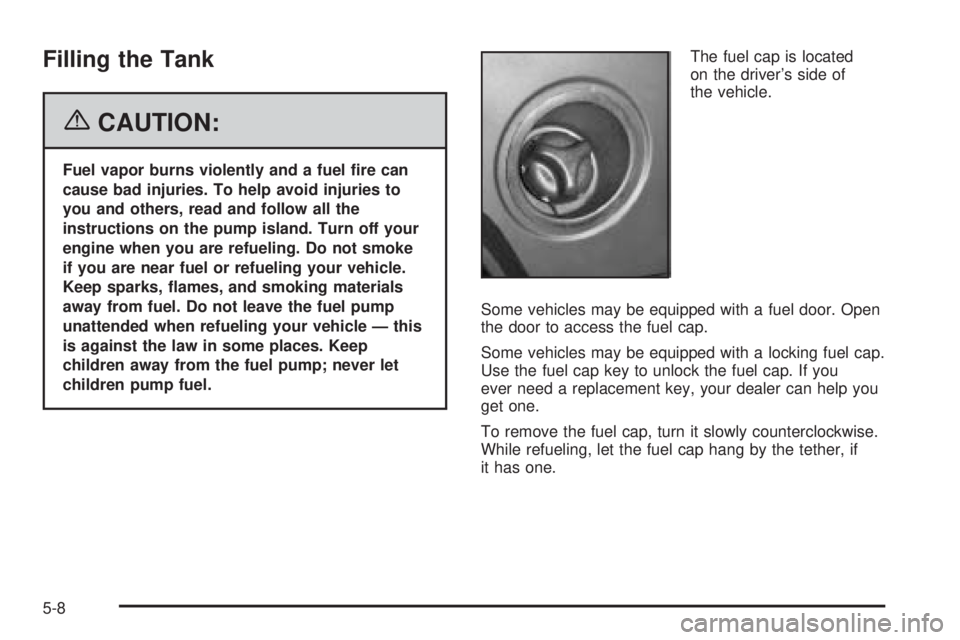
children pump fuel.The fuel cap is located
on the driver’s side of
the vehicle.
Some vehicles may be equipped with a fuel door. Open
the door to access the fuel cap.
Some vehicles may be equipped with a locking fuel cap.
Use the fuel cap key to unlock the fuel cap. If you
ever need a replacement key, your dealer can help you
get one.
To remove the fuel cap, turn it slowly counterclockwise.
While refueling, let the fuel cap hang by the tether, if
it has one.
5-8
Page 446 of 502
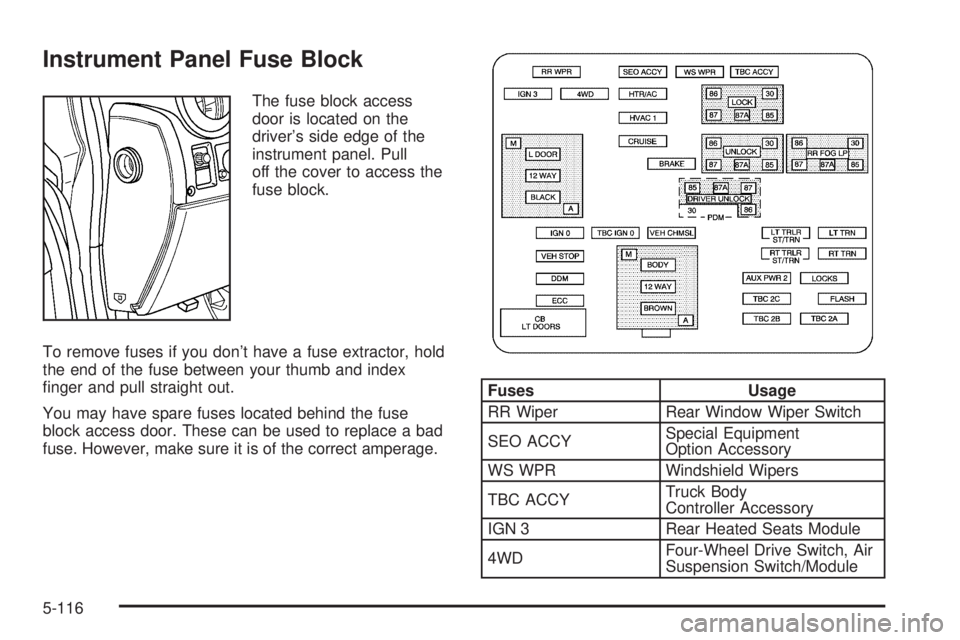
Instrument Panel Fuse Block
The fuse block access
door is located on the
driver’s side edge of the
instrument panel. Pull
off the cover to access the
fuse block.
To remove fuses if you don’t have a fuse extractor, hold
the end of the fuse between your thumb and index
nger and pull straight out.
You may have spare fuses located behind the fuse
block access door. These can be used to replace a bad
fuse. However, make sure it is of the correct amperage.
Fuses Usage
RR Wiper Rear Window Wiper Switch
SEO ACCYSpecial Equipment
Option Accessory
WS WPR Windshield Wipers
TBC ACCYTruck Body
Controller Accessory
IGN 3 Rear Heated Seats Module
4WDFour-Wheel Drive Switch, Air
Suspension Switch/Module
5-116
Page 447 of 502
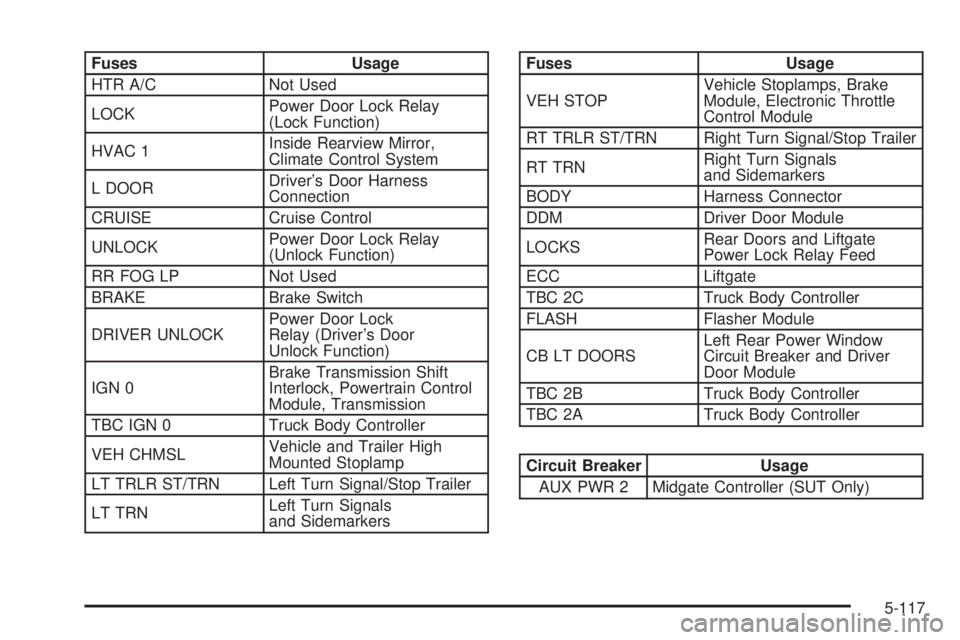
Fuses Usage
HTR A/C Not Used
LOCKPower Door Lock Relay
(Lock Function)
HVAC 1Inside Rearview Mirror,
Climate Control System
L DOORDriver’s Door Harness
Connection
CRUISE Cruise Control
UNLOCKPower Door Lock Relay
(Unlock Function)
RR FOG LP Not Used
BRAKE Brake Switch
DRIVER UNLOCKPower Door Lock
Relay (Driver’s Door
Unlock Function)
IGN 0Brake Transmission Shift
Interlock, Powertrain Control
Module, Transmission
TBC IGN 0 Truck Body Controller
VEH CHMSLVehicle and Trailer High
Mounted Stoplamp
LT TRLR ST/TRN Left Turn Signal/Stop Trailer
LT TRNLeft Turn Signals
and SidemarkersFuses Usage
VEH STOPVehicle Stoplamps, Brake
Module, Electronic Throttle
Control Module
RT TRLR ST/TRN Right Turn Signal/Stop Trailer
RT TRNRight Turn Signals
and Sidemarkers
BODY Harness Connector
DDM Driver Door Module
LOCKSRear Doors and Liftgate
Power Lock Relay Feed
ECC Liftgate
TBC 2C Truck Body Controller
FLASH Flasher Module
CB LT DOORSLeft Rear Power Window
Circuit Breaker and Driver
Door Module
TBC 2B Truck Body Controller
TBC 2A Truck Body Controller
Circuit Breaker Usage
AUX PWR 2 Midgate Controller (SUT Only)
5-117
Page 448 of 502
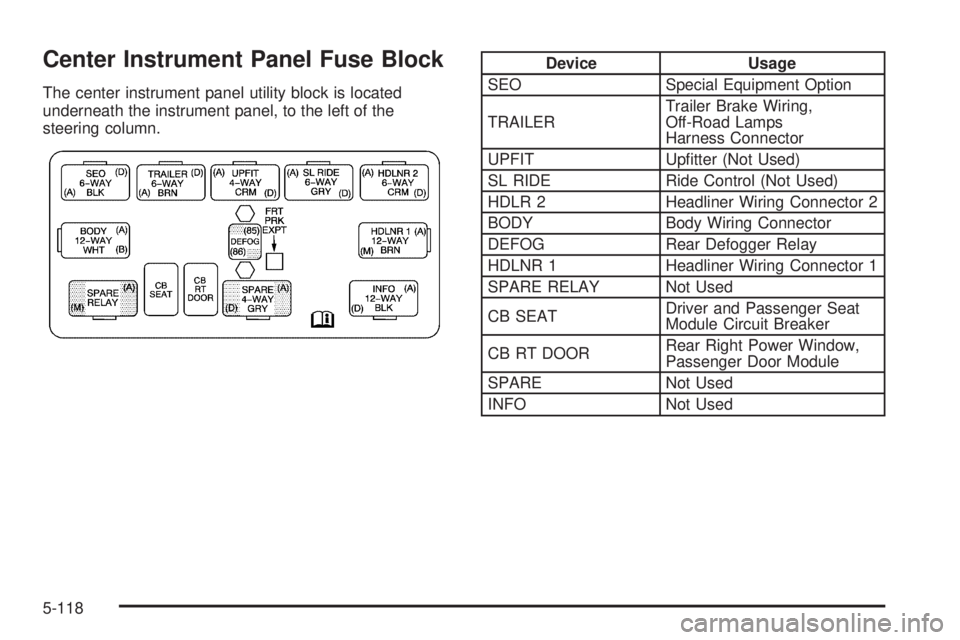
Center Instrument Panel Fuse Block
The center instrument panel utility block is located
underneath the instrument panel, to the left of the
steering column.
Device Usage
SEO Special Equipment Option
TRAILERTrailer Brake Wiring,
Off-Road Lamps
Harness Connector
UPFIT Uptter (Not Used)
SL RIDE Ride Control (Not Used)
HDLR 2 Headliner Wiring Connector 2
BODY Body Wiring Connector
DEFOG Rear Defogger Relay
HDLNR 1 Headliner Wiring Connector 1
SPARE RELAY Not Used
CB SEATDriver and Passenger Seat
Module Circuit Breaker
CB RT DOORRear Right Power Window,
Passenger Door Module
SPARE Not Used
INFO Not Used
5-118
Page 451 of 502
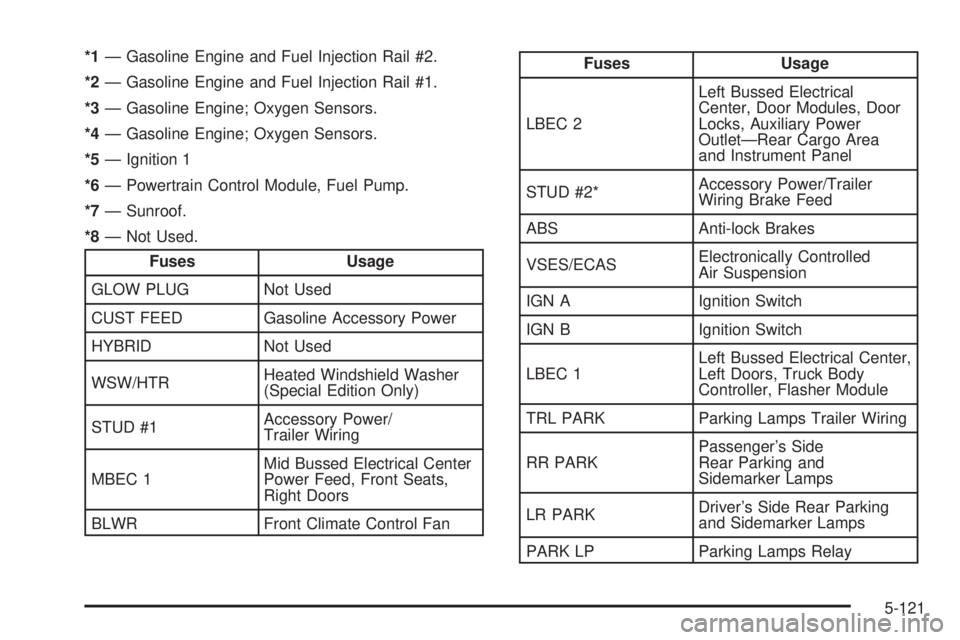
*1— Gasoline Engine and Fuel Injection Rail #2.
*2— Gasoline Engine and Fuel Injection Rail #1.
*3— Gasoline Engine; Oxygen Sensors.
*4— Gasoline Engine; Oxygen Sensors.
*5— Ignition 1
*6— Powertrain Control Module, Fuel Pump.
*7— Sunroof.
*8— Not Used.
Fuses Usage
GLOW PLUG Not Used
CUST FEED Gasoline Accessory Power
HYBRID Not Used
WSW/HTRHeated Windshield Washer
(Special Edition Only)
STUD #1Accessory Power/
Trailer Wiring
MBEC 1Mid Bussed Electrical Center
Power Feed, Front Seats,
Right Doors
BLWR Front Climate Control Fan
Fuses Usage
LBEC 2Left Bussed Electrical
Center, Door Modules, Door
Locks, Auxiliary Power
Outlet—Rear Cargo Area
and Instrument Panel
STUD #2*Accessory Power/Trailer
Wiring Brake Feed
ABS Anti-lock Brakes
VSES/ECASElectronically Controlled
Air Suspension
IGN A Ignition Switch
IGN B Ignition Switch
LBEC 1Left Bussed Electrical Center,
Left Doors, Truck Body
Controller, Flasher Module
TRL PARK Parking Lamps Trailer Wiring
RR PARKPassenger’s Side
Rear Parking and
Sidemarker Lamps
LR PARKDriver’s Side Rear Parking
and Sidemarker Lamps
PARK LP Parking Lamps Relay
5-121