ECO mode HUMMER H2 2007 User Guide
[x] Cancel search | Manufacturer: HUMMER, Model Year: 2007, Model line: H2, Model: HUMMER H2 2007Pages: 570, PDF Size: 3.34 MB
Page 178 of 570
Turn Signal/Multifunction Lever
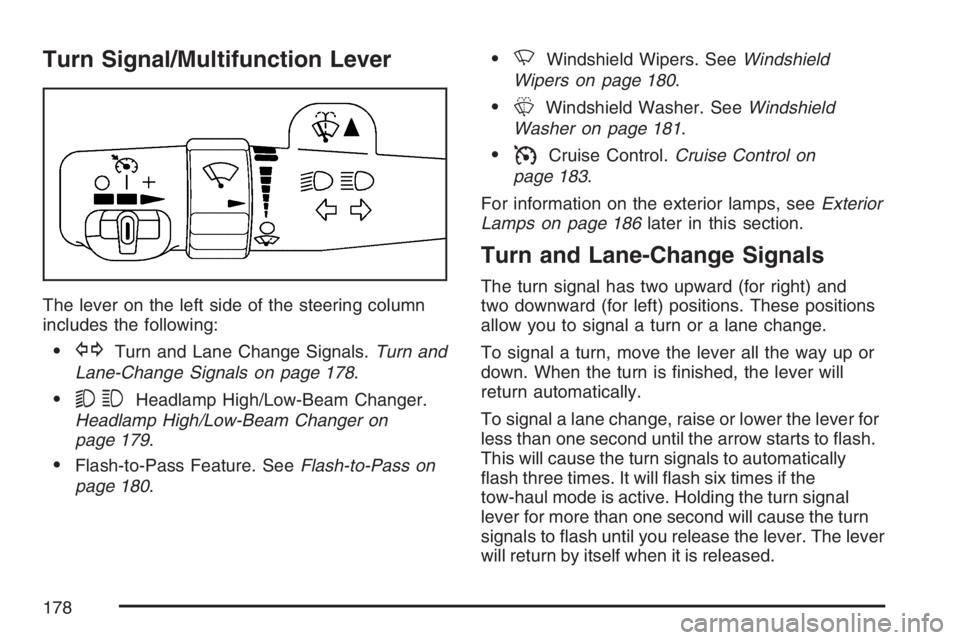
The lever on the left side of the steering column
includes the following:
GTurn and Lane Change Signals.Turn and
Lane-Change Signals on page 178.
53Headlamp High/Low-Beam Changer.
Headlamp High/Low-Beam Changer on
page 179.
Flash-to-Pass Feature. SeeFlash-to-Pass on
page 180.
NWindshield Wipers. SeeWindshield
Wipers on page 180.
LWindshield Washer. SeeWindshield
Washer on page 181.
ICruise Control.Cruise Control on
page 183.
For information on the exterior lamps, seeExterior
Lamps on page 186later in this section.
Turn and Lane-Change Signals
The turn signal has two upward (for right) and
two downward (for left) positions. These positions
allow you to signal a turn or a lane change.
To signal a turn, move the lever all the way up or
down. When the turn is nished, the lever will
return automatically.
To signal a lane change, raise or lower the lever for
less than one second until the arrow starts to ash.
This will cause the turn signals to automatically
ash three times. It will ash six times if the
tow-haul mode is active. Holding the turn signal
lever for more than one second will cause the turn
signals to ash until you release the lever. The lever
will return by itself when it is released.
178
Page 181 of 570
Windshield Washer
{CAUTION:
In freezing weather, do not use your
washer until the windshield is warmed.
Otherwise the washer uid can form ice
on the windshield, blocking your vision.
LQ(Washer Fluid):There is a paddle marked
with the windshield washer symbol at the top of
the multifunction lever. Push the paddle to
spray washer uid on the windshield. The wipers
will clear the window and then either stop or
return to the preset speed.
_(Heated Washer Fluid):If your vehicle has
the heated windshield washer uid system, it
is used to help clear ice, snow, tree sap, or bugs
from your windshield.To activate Automatic mode for de-icing, press the
heated washer button located above the
headlamp switch on the left side of the dash.
Pushing the heated washer uid button will
activate the heated windshield washer uid
system. This activation will initiate four heated
wash/wipe cycles. The rst heated wash/wipe
cycle may take up to 40 seconds to occur,
depending on outside temperature. After the rst
wash/wipe cycle, it may take up to 20 seconds
for each of the remaining cycles. The heated
windshield washer uid system may be turned off
at any time by pushing the button again prior
to the completion of 4 wash/wipe cycles.
When the heated windshield washer uid system
is activated under certain outside temperature
conditions, steam may ow out of the washer
nozzles for a short period of time before washer
uid is sprayed. This is a normal condition.
A message will be displayed on the Driver
Information Center (DIC) when the washer uid is
low. SeeDIC Warnings and Messages on
page 226.
181
Page 198 of 570

Driver’s Side Temperature Knob
The driver’s side knob is used to adjust the
temperature of the air coming through the system
on the driver’s side. The temperature can be
adjusted even if the system is turned off. This is
possible since outside air will always ow through
the system as the vehicle is moving forward
unless it is set to recirculation mode. See
“Recirculation” later in this section.
Turn the knob counterclockwise or clockwise to
lower or increase the cabin temperature. The
display will show the temperature setting
decreasing or increasing and an arrow pointing to
the driver will be displayed under and to the
left of the temperature setting.
Passenger’s Side Temperature Knob
The passenger’s side knob can be used to change
the temperature of the air coming through the
system on the passenger’s side of the vehicle. The
temperature can be adjusted even if the system
is turned off. This is possible since outside air will
always ow through the system as the vehicle
is moving forward unless it is set to recirculation
mode. See “Recirculation” later in this section.
Turn the knob counterclockwise or clockwise
to lower or increase the cabin temperature. The
display will show the temperature setting
decreasing or increasing and an arrow pointing to
the passenger will be displayed under and to
the right of the temperature setting.
The passenger’s temperature setting can be set to
match the driver’s temperature setting by pressing
and holding the AUTO button for four seconds. Both
the driver and passenger arrows will be displayed.
198
Page 199 of 570

Automatic Operation
AUTO (Automatic):When automatic operation is
active the system will control the inside
temperature, the air delivery, and the fan speed.
Use the steps below to place the entire system in
automatic mode:
1. Press the AUTO button.
When AUTO is selected, the display will
change to show the current driver’s set
temperature, delivery mode and fan speed.
Press the AUTO button again within
ve seconds to display the passenger’s set
temperature.
If the driver and passenger’s temperature
settings are not the same, the opposite side
temperature setting will be displayed for
an additional ve seconds. To make the
passenger’s temperature the same as
the driver’s press and hold the AUTO button
for about four seconds.
When auto is selected, the air conditioning
operation and air inlet will be automatically
controlled. The air conditioning compressor will
run when the outside temperature is over about
40°F (4°C). The air inlet will normally be set to
outside air. If it’s hot outside, the air inlet mayautomatically switch to recirculate inside air to
help quickly cool down your vehicle. The light
on the button will illuminate in recirculation.
2. Set the driver’s and passenger’s temperature.
To nd your comfort setting, start with a 74°F
(23°C) temperature setting and allow about
20 minutes for the system to regulate. Turn the
driver’s or passenger’s side temperature knob
to adjust the temperature setting as necessary.
If you choose the temperature setting of 60°F
(15°C) the system will remain at the maximum
cooling setting. If you choose the temperature
setting of 90°F (32°C) the system will remain at
the maximum heat setting. Choosing either
maximum setting will not cause the vehicle to
heat or cool any faster.
Be careful not to cover the sensor located on
the top of the instrument panel near the
windshield. This sensor regulates air
temperature based on sun load, and also
turns on your headlamps.
To avoid blowing cold air in cold weather, the
system will delay turning on the fan until
warm air is available. The length of delay
depends on the engine coolant temperature.
Pressing the fan switch will override this delay
and change the fan to a selected speed.
199
Page 201 of 570

Pressing this button also cancels the auto
recirculation feature. To resume the auto
recirculation function, press the AUTO button.
Each time the vehicle is started, the system will
revert to the auto recirculation function.
If you select recirculation while in defrost, defog or
oor, the light in the button will ash and then go out
to let you know that this is not allowed. This is
normal and helps to prevent fogging.
When the weather is cool or damp, operating the
system in recirculation for extended periods of time
may cause fogging of the vehicle’s windows. To
clear the fog, select either defog or front defrost.
You may also notice that the A/C compressor will
run while in recirculation mode. This is normal and
helps to prevent fogging.
9(Off):Press this button to turn off the entire
climate control system. Outside air will still enter the
vehicle, and will be directed to the oor. This
direction can be changed by pressing the mode
button. The temperature can also be adjusted using
either temperature knob. Press the up or down
arrows on the fan switch, the defrost button, the
AUTO button, or the air conditioning button to turn
the system on when it is off.
Display
If you press the MODE button to select an air
delivery mode, the display will change to show you
the selected air delivery mode. After ten seconds,
the display will change to show the driver
temperature setting and the selected mode.
If you press the up or down arrows on the fan
switch, the display will change to show the
selected fan speed. After ten seconds, the display
will change to show the driver temperature
setting and the selected mode.
Whenever you press AUTO, the display will
change to show the following:
the current driver’s set temperature and an
arrow for ve seconds,
the current passenger’s set temperature
setting and an arrow for ve seconds and
the automatic air delivery mode and fan speed.
If the driver’s and passenger’s temperature settings
are the same when AUTO is pressed, the
temperature setting and both arrows will be
displayed for ve seconds along with the automatic
air delivery mode and fan speed. After the
ve second update, the display will change to show
the temperature setting, both arrows and AUTO.
201
Page 219 of 570
A reading in the low pressure zone may be
caused by a dangerously low oil level or some
other problem causing low oil pressure. Check
your oil as soon as possible. SeeEngine Oil on
page 404.
{CAUTION:
Do not keep driving if the oil pressure is
low. If you do, your engine can become so
hot that it catches re. You or others could
be burned. Check your oil as soon as
possible and have your vehicle serviced.
Notice:Lack of proper engine oil maintenance
may damage the engine. The repairs would
not be covered by your warranty. Always follow
the maintenance schedule in this manual for
changing engine oil.
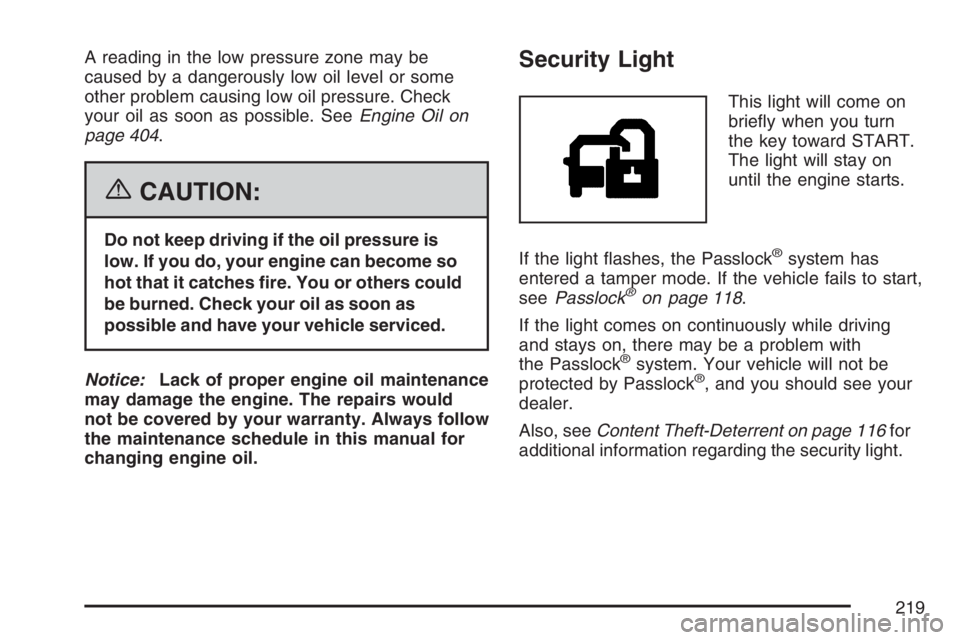
Security Light
This light will come on
briey when you turn
the key toward START.
The light will stay on
until the engine starts.
If the light ashes, the Passlock
®system has
entered a tamper mode. If the vehicle fails to start,
seePasslock
®on page 118.
If the light comes on continuously while driving
and stays on, there may be a problem with
the Passlock
®system. Your vehicle will not be
protected by Passlock®, and you should see your
dealer.
Also, seeContent Theft-Deterrent on page 116for
additional information regarding the security light.
219
Page 222 of 570
Driver Information Center (DIC)
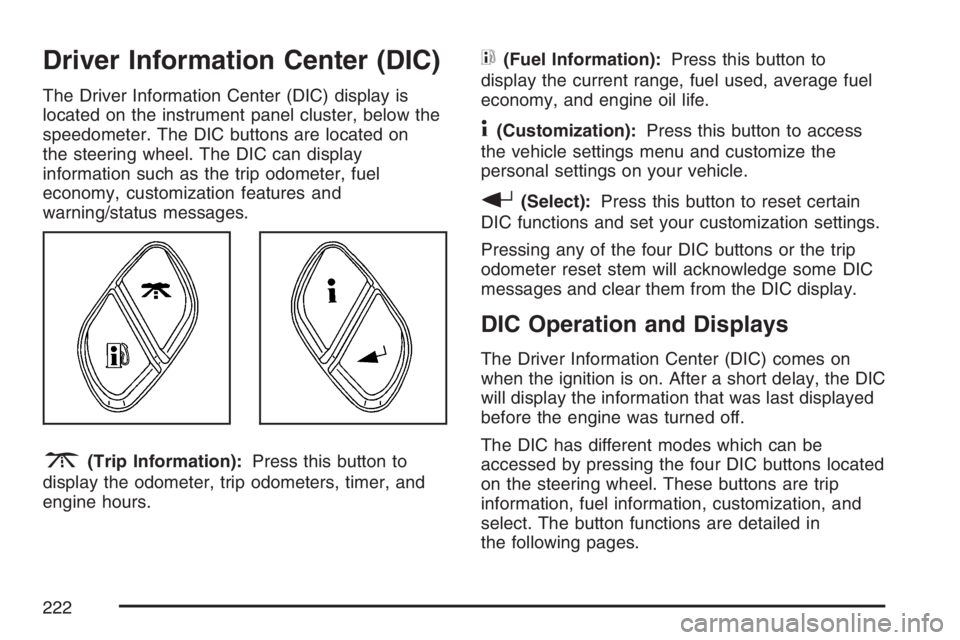
The Driver Information Center (DIC) display is
located on the instrument panel cluster, below the
speedometer. The DIC buttons are located on
the steering wheel. The DIC can display
information such as the trip odometer, fuel
economy, customization features and
warning/status messages.
3(Trip Information):Press this button to
display the odometer, trip odometers, timer, and
engine hours.
t(Fuel Information):Press this button to
display the current range, fuel used, average fuel
economy, and engine oil life.
4(Customization):Press this button to access
the vehicle settings menu and customize the
personal settings on your vehicle.
r(Select):Press this button to reset certain
DIC functions and set your customization settings.
Pressing any of the four DIC buttons or the trip
odometer reset stem will acknowledge some DIC
messages and clear them from the DIC display.
DIC Operation and Displays
The Driver Information Center (DIC) comes on
when the ignition is on. After a short delay, the DIC
will display the information that was last displayed
before the engine was turned off.
The DIC has different modes which can be
accessed by pressing the four DIC buttons located
on the steering wheel. These buttons are trip
information, fuel information, customization, and
select. The button functions are detailed in
the following pages.
222
Page 223 of 570
Trip Information Button
3
(Trip Information):Press the trip
information button to scroll through the
ODOMETER, TRIP A, TRIP B, TIMER, and
ENGINE HOURS.
Odometer:Press the trip information button until
ODOMETER appears on the display. This mode
shows the total distance the vehicle has been
driven in either miles or kilometers. Pressing the
reset stem located on the instrument cluster with
the vehicle off will also display the odometer.
Trip A:Press the trip information button until
TRIP A appears on the display. This mode shows
the current distance traveled since the last
reset for TRIP A in either miles or kilometers.
Trip B:Press the trip information button
until TRIP B appears on the display. This mode
shows the current distance traveled since the last
reset for TRIP B in either miles or kilometers.
To reset TRIP A or TRIP B information, press and
hold the select button for one second while in
one of the trip modes. This will reset the
information for TRIP A or TRIP B.You can also reset TRIP A or TRIP B while they
are displayed by pressing the reset stem on
the cluster. If you press and hold the reset stem or
the select button for four seconds, the display
will show the distance traveled since the last
ignition cycle for TRIP A or TRIP B.
SeeTrip Odometer on page 206for more
information.
Timer:The DIC can be used as a timer. Press the
select button while TIMER is displayed to start the
timer. The display will show the amount of time that
has passed since the timer was last reset, not
including time the ignition is off. Time will continue
to be counted as long as the ignition is on, even if
another display is being shown on the DIC. The
timer will record up to 99 hours, 59 minutes and
59 seconds (99:59:59) after which the display will
roll back to zero.
To stop the counting of time, press the select button
briey while TIMER is displayed.
To reset the timer to zero, press and hold the select
button while TIMER is displayed.
223
Page 224 of 570
Engine Hours:Press the trip information button
until ENGINE HOURS appears on the display.
This mode shows the total number of hours
the engine has run. Pressing and holding the reset
stem located on the instrument cluster for about
four seconds will also display the engine hour
information after the odometer is displayed when
the vehicle is off.
Fuel Information Button
t
(Fuel Information):Press the fuel information
button to scroll through the range, fuel used,
average fuel economy, and the engine oil
life system.
Fuel Range:Press the fuel information button
until RANGE appears on the display. This
mode shows the remaining distance you can drive
without refueling. It is based on fuel economy
and the fuel remaining in the fuel tank. The display
will show LOW if the fuel level is low.The fuel economy data used to determine fuel
range is an average of recent driving conditions.
As your driving conditions change, this data is
gradually updated. Fuel range cannot be reset.
Fuel Used:Press the fuel information button until
FUEL USED appears on the display. This mode
shows the number of gallons or liters of fuel used
since the last reset of this menu item. To reset
the fuel used information, press and hold the select
button for one second while FUEL USED is
displayed.
Average Fuel Economy:Press the fuel
information button until AVG ECON appears on
the display. This mode shows how many miles per
gallon (MPG) or liters per 100 kilometers
(L/100 km) your vehicle is getting based on
current and past driving conditions.
Press and hold the select button for one second
while AVG ECON is displayed to reset the average
fuel economy. Average fuel economy will then
be calculated starting from that point. If the
average fuel economy is not reset, it will be
continually updated each time you drive.
224
Page 233 of 570
TRANSMISSION HOT
Notice:If you drive your vehicle while the
transmission uid is overheating and the
transmission temperature warning is displayed
on the instrument panel cluster and/or DIC,
you can damage the transmission. This could
lead to costly repairs that would not be
covered by your warranty. Do not drive your
vehicle with overheated transmission uid
or while the transmission temperature warning
is displayed.
This message displays if the transmission uid
temperature becomes high.
When the transmission enters the protection
mode, you may notice a change in the
transmission shifting patterns. When the
transmission uid temperature returns to normal,
the display turns off and the transmission
shifting patterns return to normal.If the vehicle has the Tow/Haul mode, use this
feature if the transmission is operating at higher
temperatures and/or the following situations
exist, which can cause the transmission to operate
at higher temperatures:
Towing a trailer
Hot outside air temperatures
Hauling a large or heavy load
Over-loading
Low transmission uid level
High transmission uid level
Restricted air ow to the radiator and the
auxiliary transmission oil cooler, if your vehicle
has this feature
A temporary solution to hotter transmission
operating temperatures may be to let the
transmission cool down. If the transmission is
operated at higher temperatures on a frequent
basis, seeScheduled Maintenance on page 517
for the proper transmission maintenance intervals
for the transmission on your vehicle. Also see
Transmission Temperature Gage on page 213for
more information.
233