door lock HUMMER H2 2007 Owner's Manual
[x] Cancel search | Manufacturer: HUMMER, Model Year: 2007, Model line: H2, Model: HUMMER H2 2007Pages: 570, PDF Size: 3.34 MB
Page 188 of 570

2(Headlamps):Turn the control to this position
to turn on the headlamps, together with the
previously listed lamps and lights.
When the vehicle is turned off and the headlamps
are in AUTO, the headlamps may automatically
remain on for a set time. You can change
this delay time using the DIC. SeeDriver
Information Center (DIC) on page 222.
You can switch your headlamps from low to
high-beam by pushing the turn signal/multifunction
lever toward the instrument panel.
Headlamps on Reminder
If a door is open, a reminder chime will sound
when your headlamps or parking lamps are
manually turned on and your key is out of the
ignition. To turn off the chime, turn the headlamp
switch to off or AUTO and then back on, or
close and re-open the door. In the AUTO mode,
the headlamps turn off once the ignition is in LOCK
or may remain on until the headlamp delay ends
(if enabled in the DIC). See “Exit Lighting”
underDIC Vehicle Customization on page 234.
Daytime Running Lamps (DRL)
Daytime Running Lamps (DRL) can make it easier
for others to see the front of your vehicle during
the day. DRL can be helpful in many different
driving conditions, but they can be especially
helpful in the short periods after dawn and before
sunset. Fully functional daytime running lamps
are required on all vehicles rst sold in Canada.
The DRL system will come on when the following
conditions are met:
The ignition is on.
The exterior lamps control is in AUTO.
The transmission is not in PARK (P).
The light sensor determines it is daytime.
When the DRL are on, only your DRL lamps will
be on. The taillamps, sidemarker, and other lamps
will not be on. The instrument panel will not be
lit up either.
When it begins to get dark, the automatic
headlamp system will switch from DRL to the
headlamps.
188
Page 230 of 570
REDUCED ENGINE POWER
This message displays when the cooling system
temperature gets too hot and the engine further
enters the engine coolant protection mode.
SeeEngine Overheating on page 418for further
information.
This message may also display when the vehicle
determines that there is a problem with the
electronic throttle control. See your dealer
for service.
This message also displays when the vehicle’s
engine power is reduced. Reduced engine power
can affect the vehicle’s ability to accelerate.
If this message is on, but there is no reduction in
performance, proceed to your destination. The
performance may be reduced the next time the
vehicle is driven. The vehicle may be driven at a
reduced speed while this message is on, but
acceleration and speed may be reduced. Anytime
this message stays on, the vehicle should be taken
to your dealer for service as soon as possible.
REPLACE LIFTGATE FUSE (SUV)
This message displays if the liftgate lock
malfunctions and/or the liftgate fuse blows. For
more information on fuses, seeInstrument Panel
Fuse Block on page 504andUnderhood Fuse
Block on page 507.
If the message returns after replacing the fuse,
see your dealer for service.
RIGHT REAR DOOR AJAR
This message displays and a chime sounds if the
passenger’s side rear door is not fully closed
and the vehicle is in a drive gear. Stop and turn
off the vehicle, check the door for obstructions, and
close the door again. Check to see if the
message still appears on the DIC. Press any of
the DIC buttons, or the trip stem, to acknowledge
this message and clear it from the DIC display.
230
Page 234 of 570

TURN SIGNAL ON
This message displays and a chime sounds if a
turn signal is left on for 3/4 of a mile (1.2 km).
Move the turn signal/multifunction lever to the off
position. Press any of the DIC buttons, or the
trip stem, to acknowledge this message and clear
it from the DIC display.
DIC Vehicle Customization
Your vehicle may have customization capabilities
that allow you to program some features to
one personalized setting based on your
preference. All of the customizable options listed
may not be available on your vehicle. Only
the options available will be displayed on the
Driver Information Center (DIC).
The default settings for the customization features
were set when your vehicle left the factory, but
may have been changed from their default
state since then.
To change feature preferences, make sure the
ignition is on and the vehicle is in PARK (P). To
avoid excessive drain on the battery, it is
recommended that the headlamps are turned off.Press the customization button to scroll through
the available customizable options.
After pressing the customization button, VEHICLE
SETTINGS will momentarily display before
going to a customization option.
Lock Doors
Press the customization button until LOCK
DOORS appears in the display. To select your
preference for automatic locking, press the select
button while LOCK DOORS is displayed on
the DIC. Pressing the select button will scroll
through the following choices:
LOCK DOORS: IN GEAR (default):The doors
will lock when the vehicle is shifted out of
PARK (P).
LOCK DOORS: WITH SPEED:The doors will
lock when the vehicle speed is above
8 mph (13 km/h) for three seconds.
Choose one of the available options and press the
customization button while it is displayed on the
DIC to select it and move on to the next feature.
234
Page 235 of 570

Unlock Doors
Press the customization button until UNLOCK
DOORS appears in the display. To select
your preference for automatic unlocking, press the
select button while UNLOCK DOORS is displayed
on the DIC. Pressing the select button will
scroll through the following choices:
UNLOCK DOORS: IN PARK (default):All of the
doors will unlock when the vehicle is shifted
into PARK (P).
UNLOCK DRIVER: IN PARK:The driver’s door
will be unlocked when the vehicle is shifted
into PARK (P).
UNLOCK DOORS: KEY OUT:All of the doors
will unlock when the key is taken out of the
ignition.
UNLOCK DOORS: MANUALLY:The doors will
not be unlocked automatically.
Choose one of the available options and press the
customization button while it is displayed on the
DIC to select it and move on to the next feature.
Door Lock Delay
If the DIC does not have this feature, you can still
program the delayed locking feature. See
Delayed Locking on page 102for more
information.
When locking the doors with the power lock switch
or the Remote Keyless Entry (RKE) transmitter and
a door or the liftgate is open, the delayed locking
feature will delay locking the doors and liftgate until
ve seconds after the last door is closed.
Press the customization button until DOOR LOCK
DELAY appears in the display. To select your
preference for delayed locking, press the select
button while DOOR LOCK DELAY is displayed on
the DIC. Pressing the select button will scroll
through the following choices:
DOOR LOCK DELAY: OFF (default):The doors
will lock immediately when pressing the power
lock switch or the lock button on the
RKE transmitter.
235
Page 236 of 570
DOOR LOCK DELAY: ON:The doors will not
lock until ve seconds after the last door or
the liftgate is closed. You will hear three chimes to
signal that the delayed locking feature is in use.
You can temporarily override delayed locking
by pressing the lock button on the door or the
RKE transmitter a second time.
Choose one of the available options and press the
customization button while it is displayed on the
DIC to select it and move on to the next feature.
This feature will not operate if the key is in
the ignition.
Lock Feedback
Press the customization button until LOCK
FEEDBACK appears in the display. To select your
preference for the feedback you receive when
locking the vehicle with the Remote Keyless
Entry (RKE) transmitter, press the select button
while LOCK FEEDBACK is displayed on the DIC.
Pressing the select button will scroll through
the following choices:
LOCK FEEDBACK: BOTH (default):The parking
lamps will ash each time you press the button with
the lock symbol on the RKE transmitter and the
horn will chirp the second time you press the lock
button.LOCK FEEDBACK: LAMPS:The parking lamps
will ash each time you press the button with
the lock symbol on the RKE transmitter.
LOCK FEEDBACK: HORN:The horn will chirp
the second time you press the button with the lock
symbol on the RKE transmitter.
LOCK FEEDBACK: OFF:There will be no
feedback when locking the vehicle.
Choose one of the available options and press the
customization button while it is displayed on the
DIC to select it and move on to the next feature.
Unlock Feedback
Press the customization button until UNLOCK
FEEDBACK appears in the display. To select your
preference for the feedback you will receive
when unlocking the vehicle with the Remote
Keyless Entry (RKE) transmitter, press the select
button while UNLOCK FEEDBACK is displayed
on the DIC. Pressing the select button will
scroll through the following choices:
UNLOCK FEEDBACK: LAMPS (default):The
parking lamps will ash each time you press
the button with the unlock symbol on the
RKE transmitter.
236
Page 363 of 570
Tire and Loading Information Label
A vehicle specic Tire and Loading Information
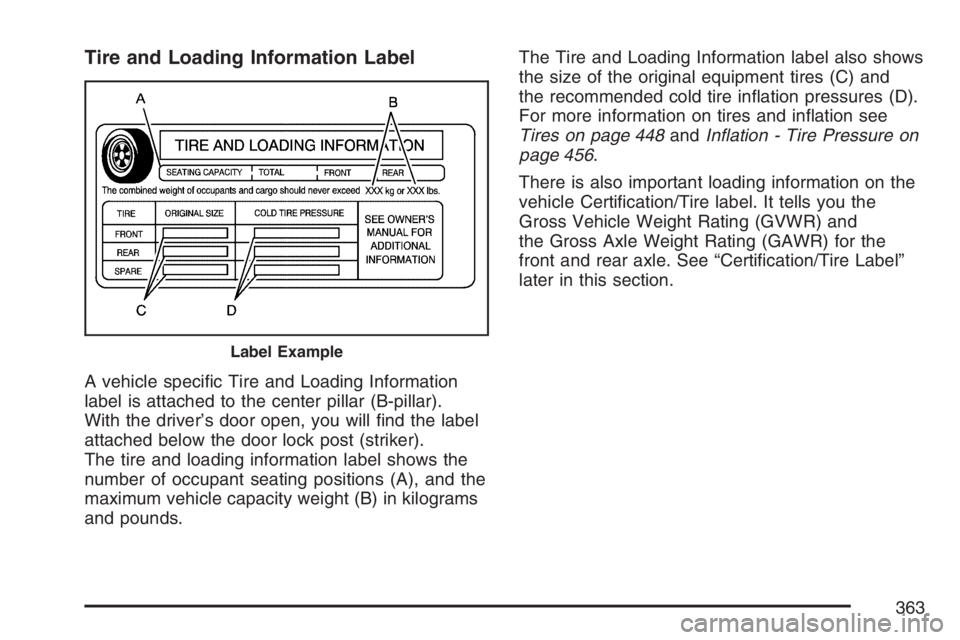
label is attached to the center pillar (B-pillar).
With the driver’s door open, you will nd the label
attached below the door lock post (striker).
The tire and loading information label shows the
number of occupant seating positions (A), and the
maximum vehicle capacity weight (B) in kilograms
and pounds.The Tire and Loading Information label also shows
the size of the original equipment tires (C) and
the recommended cold tire ination pressures (D).
For more information on tires and ination see
Tires on page 448andInation - Tire Pressure on
page 456.
There is also important loading information on the
vehicle Certication/Tire label. It tells you the
Gross Vehicle Weight Rating (GVWR) and
the Gross Axle Weight Rating (GAWR) for the
front and rear axle. See “Certication/Tire Label”
later in this section.
Label Example
363
Page 397 of 570
Filling the Tank
{CAUTION:
Fuel vapor burns violently and a fuel re
can cause bad injuries. To help avoid
injuries to you and others, read and follow
all the instructions on the pump island.
Turn off your engine when you are
refueling. Do not smoke if you are near fuel
or refueling your vehicle. Keep sparks,
ames, and smoking materials away
from fuel. Do not leave the fuel pump
unattended when refueling your vehicle.
This is against the law in some places.
Keep children away from the fuel pump;
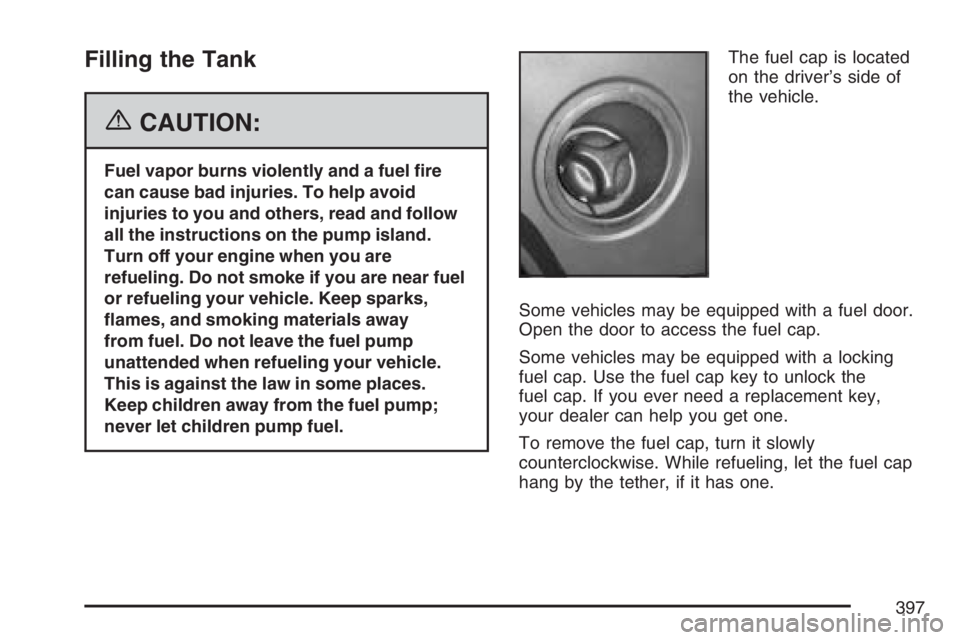
never let children pump fuel.The fuel cap is located
on the driver’s side of
the vehicle.
Some vehicles may be equipped with a fuel door.
Open the door to access the fuel cap.
Some vehicles may be equipped with a locking
fuel cap. Use the fuel cap key to unlock the
fuel cap. If you ever need a replacement key,
your dealer can help you get one.
To remove the fuel cap, turn it slowly
counterclockwise. While refueling, let the fuel cap
hang by the tether, if it has one.
397
Page 504 of 570

Fuses and Circuit Breakers
The wiring circuits in your vehicle are protected
from short circuits by a combination of fuses,
circuit breakers and fusible thermal links.
This greatly reduces the chance of res
caused by electrical problems.
Look at the silver-colored band inside the fuse.
If the band is broken or melted, replace the fuse.
Be sure you replace a bad fuse with a new
one of the identical size and rating.
If you ever have a problem on the road and
don’t have a spare fuse, you can borrow one
that has the same amperage. Just pick some
feature of your vehicle that you can get along
without – like the radio or cigarette lighter – and
use its fuse, if it is the correct amperage.
Replace it as soon as you can.
Instrument Panel Fuse Block
The fuse block access
door is located on the
driver’s side edge of
the instrument panel.
Pull off the cover to
access the fuse block.
To remove fuses if you don’t have a fuse extractor,
hold the end of the fuse between your thumb
and index nger and pull straight out.
You may have spare fuses located behind the
fuse block access door. These can be used
to replace a bad fuse. However, make sure it is
of the correct amperage.
504
Page 505 of 570

Fuses Usage
RR Wiper Rear Window Wiper Switch
SEO ACCYSpecial Equipment Option
Accessory
WS WPR Windshield Wipers
TBC ACCYTruck Body Controller
Accessory
IGN 3 Rear Heated Seats Module
Fuses Usage
4WDFour-Wheel Drive Switch, Air
Suspension Switch/Module
HTR A/C Not Used
LOCKPower Door Lock Relay
(Lock Function)
HVAC 1Inside Rearview Mirror,
Climate Control System
L DOORDriver’s Door Harness
Connection
CRUISE Cruise Control
UNLOCKPower Door Lock Relay
(Unlock Function)
RR FOG LP Not Used
BRAKE Brake Switch
DRIVER UNLOCKPower Door Lock Relay
(Driver’s Door Unlock
Function)
IGN 0Brake Transmission Shift
Interlock, Powertrain Control
Module, Transmission
TBC IGN 0 Truck Body Controller
VEH CHMSLVehicle and Trailer High
Mounted Stoplamp
LT TRLR ST/TRN Left Turn Signal/Stop Trailer
505
Page 506 of 570

Fuses Usage
LT TRNLeft Turn Signals and
Sidemarkers
VEH STOPVehicle Stoplamps, Brake
Module, Electronic Throttle
Control Module
RT TRLR ST/TRN Right Turn Signal/Stop Trailer
RT TRNRight Turn Signals and
Sidemarkers
BODY Harness Connector
DDM Driver Door Module
LOCKSRear Doors and Liftgate
Power Lock Relay Feed
ECC Liftgate
TBC 2C Truck Body Controller
FLASH Flasher Module
CB LT DOORSLeft Rear Power Window
Circuit Breaker and Driver
Door Module
TBC 2B Truck Body Controller
TBC 2A Truck Body Controller
Circuit Breaker Usage
AUX PWR 2 Midgate Controller (SUT Only)
Center Instrument Panel Fuse Block
The center instrument panel utility block is
located underneath the instrument panel, to the
left of the steering column.
Device Usage
SEO Special Equipment Option
TRAILERTrailer Brake Wiring,
Off-Road Lamps Harness
Connector
UPFIT Uptter (Not Used)
SL RIDE Ride Control (Not Used)
HDLR 2Headliner Wiring
Connector 2
506