transmission HUMMER H2 2008 User Guide
[x] Cancel search | Manufacturer: HUMMER, Model Year: 2008, Model line: H2, Model: HUMMER H2 2008Pages: 504, PDF Size: 7.12 MB
Page 121 of 504
Shifting Out of Four-Wheel Low Lock
To shift from Four-Wheel-Low Lock to Four-Wheel High
or Four-Wheel-High Lock, your vehicle must be
stopped or moving less than 3 mph (5 km/h) with the
transmission in NEUTRAL (N) and the ignition
in RUN. The preferred method for shifting out of
Four-Wheel-Low Lock is to have your vehicle moving
1 to 2 mph (1.6 to 3.2 km/h). Turn the dial to the
Four-Wheel High or Four-Wheel-High Lock position.
You must wait for the Four-Wheel High or
Four-Wheel-High Lock indicator light to stop ashing
and remain lit before shifting your transmission into gear.
It is normal for your vehicle to have engagement
noise and bump when shifting between Four-Wheel Low
and Four-Wheel High or Four-Wheel-High Lock ranges
or from NEUTRAL with the engine running.
If the Four-Wheel High or Four-Wheel-High Lock position
is selected when your vehicle is in gear and/or moving,
the Four-Wheel High or Four-Wheel-High Lock indicator
light will ash for 30 seconds but will not complete the
shift unless your vehicle is moving less than 3 mph
(5 km/h) and the transmission is in NEUTRAL (N).
Notice:Shifting the transmission into gear before
the indicator light stops ashing could cause
damage to the transfer case. Always wait until the
indicator light stops ashing before putting the
transmission back in gear.
Shifting into NEUTRAL
To shift the transfer case to NEUTRAL do the following:
1. Make sure the vehicle is parked so that it will not roll.
2. Set the parking brake and apply the regular brake
pedal. SeeParking Brake on page 2-40
3. Start the vehicle or turn the ignition to ON/RUN.
4. Put the transmission in NEUTRAL (N).
5. Shift the transfer case to Two-Wheel Drive High.
6. Turn the transfer case dial clockwise to NEUTRAL
position. The transfer case will not shift to NEUTRAL
unless this position is held for 10 seconds.
The NEUTRAL light will come on and then the dial
can be slowly released. The dial will be in the
Four-Wheel Low Lock position but the transfer case
will be in NEUTRAL with the NEUTRAL light on.
7. If the engine is running, make sure that the transfer
case is in NEUTRAL (N) by shifting the transmission
to REVERSE (R) for one second, then shift the
transmission to DRIVE (D) for one second.
8. Turn the ignition to ACC/ACCESSORY, which will
turn the engine off.
9. Place the transmission shift lever in PARK (P).
10. Release the parking brake prior to moving
the vehicle.
11. Turn the ignition to LOCK/OFF.
2-39
Page 122 of 504
Shifting Out of NEUTRAL
To shift out of NEUTRAL do the following:
1. Set the parking brake and apply the regular brake
pedal.
2. Shift the transmission to NEUTRAL (N) and turn
the ignition to RUN with the engine off.
3. Turn the transfer case dial to Four-Wheel High,
Four-Wheel High Lock or Four-Wheel Low Lock.
After the transfer case has shifted out of NEUTRAL
the NEUTRAL light will go out.
4. Release the parking brake prior to moving the
vehicle.
Notice:Shifting the transmission into gear before
the requested mode indicator light has stopped
ashing could damage the transfer case. To help
avoid damaging your vehicle, always wait for the
mode indicator lights to stop ashing before shifting
the transmission into gear.
5. Start the engine and shift the transmission to the
desired position.
Parking Brake
To set the parking brake, hold the regular brake pedal
down with your right foot. Push down the parking
brake pedal with your left foot.
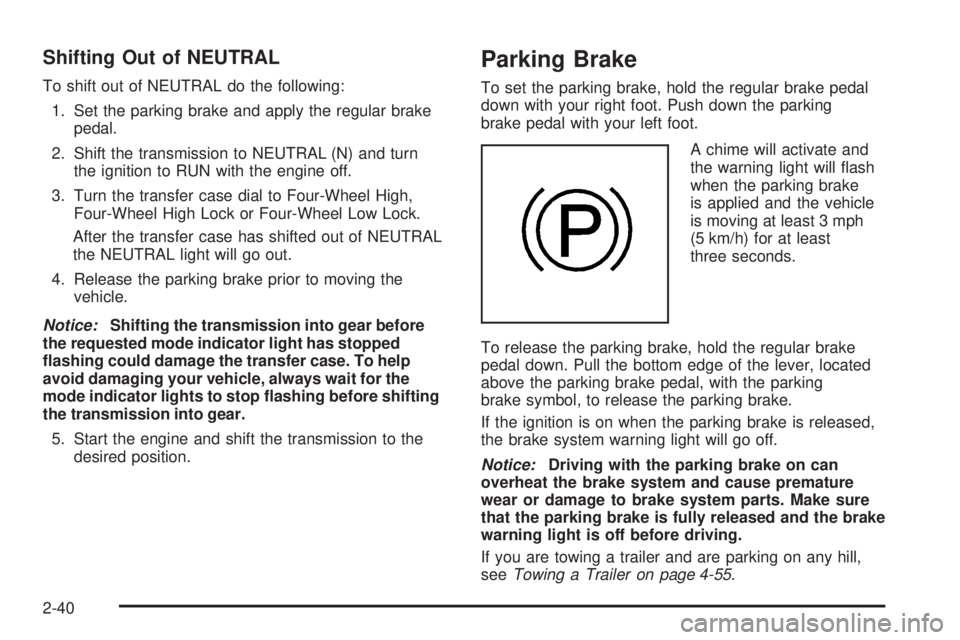
A chime will activate and
the warning light will ash
when the parking brake
is applied and the vehicle
is moving at least 3 mph
(5 km/h) for at least
three seconds.
To release the parking brake, hold the regular brake
pedal down. Pull the bottom edge of the lever, located
above the parking brake pedal, with the parking
brake symbol, to release the parking brake.
If the ignition is on when the parking brake is released,
the brake system warning light will go off.
Notice:Driving with the parking brake on can
overheat the brake system and cause premature
wear or damage to brake system parts. Make sure
that the parking brake is fully released and the brake
warning light is off before driving.
If you are towing a trailer and are parking on any hill,
seeTowing a Trailer on page 4-55.
2-40
Page 124 of 504
Torque Lock
If you are parking on a hill and you do not shift your
transmission into PARK (P) properly, the weight of the
vehicle may put too much force on the parking pawl
in the transmission. You may nd it difficult to pull the
shift lever out of PARK (P). This is called “torque
lock.” To prevent torque lock, set the parking brake and
then shift into PARK (P) properly before you leave
the driver’s seat. To nd out how, seeShifting
Into PARK (P) on page 2-41.
When you are ready to drive, move the shift lever out of
PARK (P) before you release the parking brake.
If torque lock does occur, you may need to have another
vehicle push yours a little uphill to take some of the
pressure from the parking pawl in the transmission,
so you can pull the shift lever out of PARK (P).
Shifting Out of PARK (P)
This vehicle is equipped with an electronic shift lock
release system. The shift lock release is designed to:
Prevent ignition key removal unless the shift
lever is in PARK (P) with the shift lever button
fully released, and
Prevent movement of the shift lever out of
PARK (P), unless the ignition is in ON/RUN or
ACC/ACCESSORY and the regular brake pedal
is applied.
The shift lock release is always functional except in the
case of an uncharged or low voltage (less than 9 volt)
battery.
If your vehicle has an uncharged battery or a battery
with low voltage, try charging or jump starting the
battery. SeeJump Starting on page 5-40for more
information.
To shift out of PARK (P) use the following:
1. Apply the brake pedal.
2. Then press the shift lever button.
3. Move the shift lever to the desired position.
2-42
Page 155 of 504
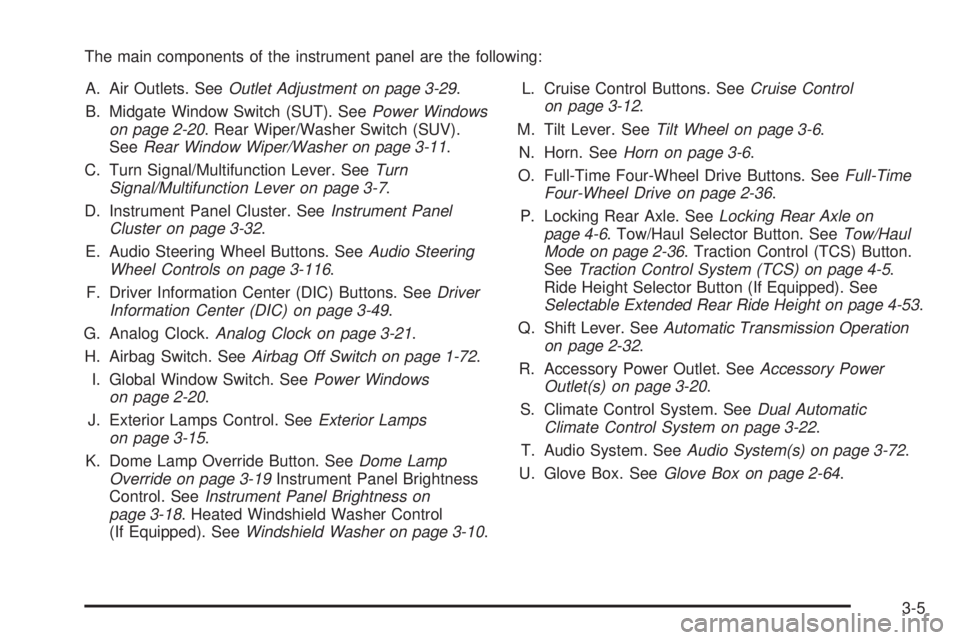
The main components of the instrument panel are the following:
A. Air Outlets. SeeOutlet Adjustment on page 3-29.
B. Midgate Window Switch (SUT). SeePower Windows
on page 2-20. Rear Wiper/Washer Switch (SUV).
SeeRear Window Wiper/Washer on page 3-11.
C. Turn Signal/Multifunction Lever. SeeTurn
Signal/Multifunction Lever on page 3-7.
D. Instrument Panel Cluster. SeeInstrument Panel
Cluster on page 3-32.
E. Audio Steering Wheel Buttons. SeeAudio Steering
Wheel Controls on page 3-116.
F. Driver Information Center (DIC) Buttons. SeeDriver
Information Center (DIC) on page 3-49.
G. Analog Clock.Analog Clock on page 3-21.
H. Airbag Switch. SeeAirbag Off Switch on page 1-72.
I. Global Window Switch. SeePower Windows
on page 2-20.
J. Exterior Lamps Control. SeeExterior Lamps
on page 3-15.
K. Dome Lamp Override Button. SeeDome Lamp
Override on page 3-19Instrument Panel Brightness
Control. SeeInstrument Panel Brightness on
page 3-18. Heated Windshield Washer Control
(If Equipped). SeeWindshield Washer on page 3-10.L. Cruise Control Buttons. SeeCruise Control
on page 3-12.
M. Tilt Lever. SeeTilt Wheel on page 3-6.
N. Horn. SeeHorn on page 3-6.
O. Full-Time Four-Wheel Drive Buttons. SeeFull-Time
Four-Wheel Drive on page 2-36.
P. Locking Rear Axle. SeeLocking Rear Axle on
page 4-6. Tow/Haul Selector Button. SeeTow/Haul
Mode on page 2-36. Traction Control (TCS) Button.
SeeTraction Control System (TCS) on page 4-5.
Ride Height Selector Button (If Equipped). See
Selectable Extended Rear Ride Height on page 4-53.
Q. Shift Lever. SeeAutomatic Transmission Operation
on page 2-32.
R. Accessory Power Outlet. SeeAccessory Power
Outlet(s) on page 3-20.
S. Climate Control System. SeeDual Automatic
Climate Control System on page 3-22.
T. Audio System. SeeAudio System(s) on page 3-72.
U. Glove Box. SeeGlove Box on page 2-64.
3-5
Page 167 of 504
Headlamps on Reminder
If a door is open, a reminder chime will sound when
your headlamps or parking lamps are manually turned
on and your key is out of the ignition. To turn off
the chime, turn the headlamp switch to off or AUTO
and then back on, or close and re-open the door.
In the AUTO mode, the headlamps turn off once the
ignition is in LOCK or may remain on until the headlamp
delay ends (if enabled in the DIC). See “Exit Lighting”
underDIC Vehicle Customization (With DIC Buttons)
on page 3-63.
Daytime Running Lamps (DRL)
Daytime Running Lamps (DRL) can make it easier
for others to see the front of your vehicle during the day.
DRL can be helpful in many different driving conditions,
but they can be especially helpful in the short periods
after dawn and before sunset. Fully functional
daytime running lamps are required on all vehicles
rst sold in Canada.The DRL system will come on when the following
conditions are met:
The ignition is on.
The exterior lamps control is in AUTO.
The transmission is not in PARK (P).
The light sensor determines it is daytime.
When the DRL are on, only the DRL lamps will be on.
The taillamps, sidemarker, and other lamps will not
be on. The instrument panel will not be lit up either.
When it begins to get dark, the automatic headlamp
system will switch from DRL to the headlamps.
To turn off the DRL lamps, turn the exterior lamps
control to the OFF position and then release.
For vehicles rst sold in Canada, the transmission
must be in the PARK (P) position, before the
DRL lamps can be turned off.
3-17
Page 168 of 504
Automatic Headlamp System
When it is dark enough outside and the headlamp
switch is in AUTO, the automatic headlamp system will
turn on the headlamps at the normal brightness along
with other lamps such as the taillamps, sidemarker,
parking lamps, roof marker lamps, and the instrument
panel lights. The radio lights will also be dim.
To turn off the automatic headlamp system, turn the
exterior lamps switch to the off position and then
release. For vehicles rst sold in Canada, the
transmission must be in the PARK (P) position, before
the automatic headlamp system can be turned off.
The vehicle has a light sensor located on the top of
the instrument panel. Be sure it is not covered,
or the system will be on whenever the ignition is on.
The system may also turn on the headlamps when
driving through a parking garage, heavy overcast
weather, or a tunnel. This is normal.
There is a delay in the transition between the
daytime and nighttime operation of the Daytime
Running Lamps (DRL) and the automatic headlamp
systems so that driving under bridges or bright
overhead street lights does not affect the system.The DRL and automatic headlamp system will only be
affected when the light sensor sees a change in lighting
lasting longer than the delay.
If the vehicle is started in a dark garage, the automatic
headlamp system will come on immediately. Once
the vehicle leaves the garage, it takes approximately
one minute for the automatic headlamp system to
change to DRL if it is light outside. During that delay,
the instrument panel cluster may not be as bright
as usual. Make sure the instrument panel brightness
control is in the full bright position. SeeInstrument
Panel Brightness on page 3-18.
Instrument Panel Brightness
D(Instrument Panel Brightness):This feature
controls the brightness of the instrument panel lights
and is located next to the exterior lamp control.
Push the knob to extend out and then it can be turned.
Turn the knob clockwise or counterclockwise to
brighten or dim the instrument panel lights. Turning
the knob to the farthest clockwise position turns
on the dome lamps.
3-18
Page 192 of 504
Malfunction Indicator Lamp
Check Engine Light
A computer system called OBD II (On-Board
Diagnostics-Second Generation) monitors operation
of the fuel, ignition, and emission control systems.
It makes sure that emissions are at acceptable
levels for the life of the vehicle, helping to produce
a cleaner environment.
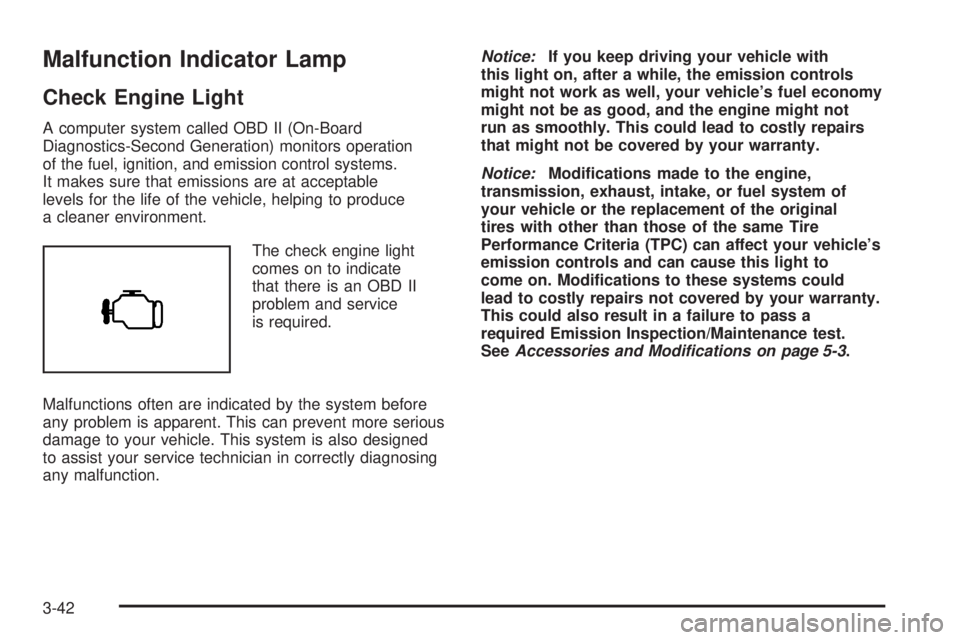
The check engine light
comes on to indicate
that there is an OBD II
problem and service
is required.
Malfunctions often are indicated by the system before
any problem is apparent. This can prevent more serious
damage to your vehicle. This system is also designed
to assist your service technician in correctly diagnosing
any malfunction.Notice:If you keep driving your vehicle with
this light on, after a while, the emission controls
might not work as well, your vehicle’s fuel economy
might not be as good, and the engine might not
run as smoothly. This could lead to costly repairs
that might not be covered by your warranty.
Notice:Modications made to the engine,
transmission, exhaust, intake, or fuel system of
your vehicle or the replacement of the original
tires with other than those of the same Tire
Performance Criteria (TPC) can affect your vehicle’s
emission controls and can cause this light to
come on. Modications to these systems could
lead to costly repairs not covered by your warranty.
This could also result in a failure to pass a
required Emission Inspection/Maintenance test.
SeeAccessories and Modifications on page 5-3.
3-42
Page 200 of 504
DIC Buttons
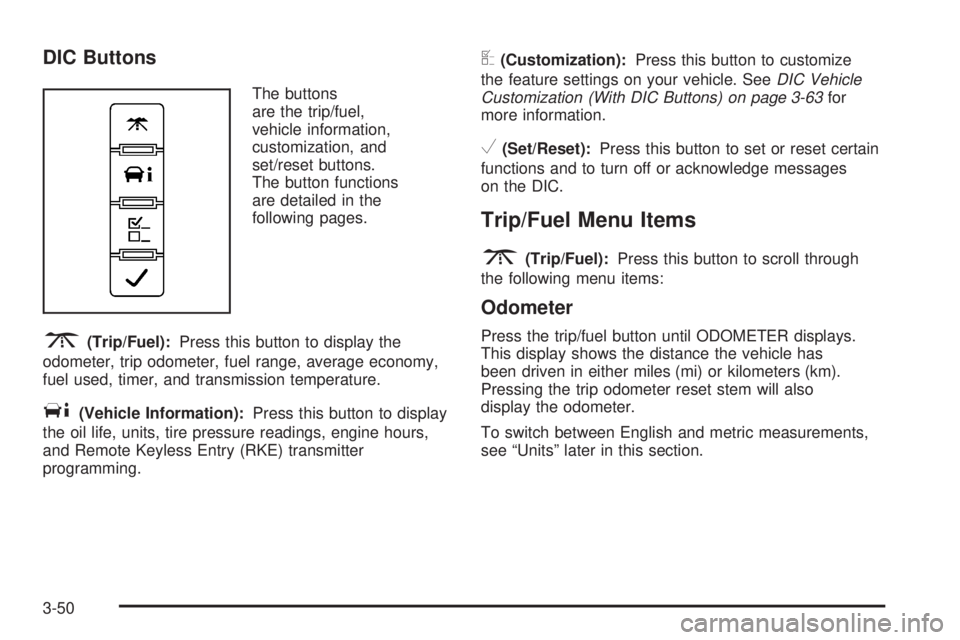
The buttons
are the trip/fuel,
vehicle information,
customization, and
set/reset buttons.
The button functions
are detailed in the
following pages.
3(Trip/Fuel):Press this button to display the
odometer, trip odometer, fuel range, average economy,
fuel used, timer, and transmission temperature.
T(Vehicle Information):Press this button to display
the oil life, units, tire pressure readings, engine hours,
and Remote Keyless Entry (RKE) transmitter
programming.
U(Customization):Press this button to customize
the feature settings on your vehicle. SeeDIC Vehicle
Customization (With DIC Buttons) on page 3-63for
more information.
V(Set/Reset):Press this button to set or reset certain
functions and to turn off or acknowledge messages
on the DIC.
Trip/Fuel Menu Items
3
(Trip/Fuel):Press this button to scroll through
the following menu items:
Odometer
Press the trip/fuel button until ODOMETER displays.
This display shows the distance the vehicle has
been driven in either miles (mi) or kilometers (km).
Pressing the trip odometer reset stem will also
display the odometer.
To switch between English and metric measurements,
see “Units” later in this section.
3-50
Page 202 of 504

Average Economy
Press the trip/fuel button until AVG ECONOMY displays.
This display shows the approximate average miles
per gallon (mpg) or liters per 100 kilometers (L/100 km).
This number is calculated based on the number of
mpg (L/100 km) recorded since the last time this
menu item was reset. To reset AVG ECONOMY,
press and hold the set/reset button.
Fuel Used
Press the trip/fuel button until FUEL USED displays.
This display shows the number of gallons (gal) or
liters (L) of fuel used since the last reset of this menu
item. To reset the fuel used information, press and hold
the set/reset button while FUEL USED is displayed.
Timer
Press the trip/fuel button until TIMER displays.
This display can be used as a timer.
To start the timer, press the set/reset button while
TIMER is displayed. The display will show the amount
of time that has passed since the timer was last
reset, not including time the ignition is off. Time will
continue to be counted as long as the ignition is
on, even if another display is being shown on the
DIC. The timer will record up to 99 hours, 59 minutes
and 59 seconds (99:59:59) after which the display
will return to zero.To stop the timer, press the set/reset button briey
while TIMER is displayed.
To reset the timer to zero, press and hold the set/reset
button while TIMER is displayed.
Transmission Temperature
Press the trip/fuel button until TRANS TEMP displays.
This display shows the temperature of the automatic
transmission uid in either degrees Fahrenheit (°F)
or degrees Celsius (°C).
Blank Display
This display shows no information.
Vehicle Information Menu Items
T
(Vehicle Information):Press this button to scroll
through the following menu items:
Oil Life
Press the vehicle information button until OIL LIFE
REMAINING displays. This display shows an estimate
of the oil’s remaining useful life. If you see 99% OIL
LIFE REMAINING on the display, that means 99% of the
current oil life remains. The engine oil life system will
alert you to change the oil on a schedule consistent
with your driving conditions.
3-52
Page 212 of 504
TIGHTEN GAS CAP
This message may display along with the check engine
light on the instrument panel cluster if the vehicle’s
fuel cap is not tightened properly. SeeMalfunction
Indicator Lamp on page 3-42. Reinstall the fuel cap
fully. SeeFilling the Tank on page 5-7. The diagnostic
system can determine if the fuel cap has been left off
or improperly installed. A loose or missing fuel cap
allows fuel to evaporate into the atmosphere.
A few driving trips with the cap properly installed
should turn this light and message off.
TIRE LEARNING ACTIVE
This message displays when the Tire Pressure Monitor
System (TPMS) is re-learning the tire positions on your
vehicle. The tire positions must be re-learned after
rotating the tires or after replacing a tire or sensor. See
Tire Inspection and Rotation on page 5-67,Tire Pressure
Monitor System on page 5-62, andInflation - Tire
Pressure on page 5-61for more information.
TRACTION CONTROL OFF
This message displays when you turn off the Traction
Control System (TCS) or when the TCS has been
automatically disabled. Adjust your driving accordingly.
SeeTraction Control System (TCS) on page 4-5and
StabiliTrak
®System on page 4-7for more information.
TCS may be automatically disabled due to overheating,
which could occur if the TCS activates continuously
for an extended period of time.
TRANSMISSION HOT IDLE ENGINE
Notice:If you drive your vehicle while the
transmission uid is overheating and the
transmission temperature warning is displayed
on the instrument panel cluster and/or DIC, you
can damage the transmission. This could lead
to costly repairs that would not be covered by
your warranty. Do not drive your vehicle with
overheated transmission uid or while the
transmission temperature warning is displayed.
3-62