lock HUMMER H2 2008 Owner's Manual
[x] Cancel search | Manufacturer: HUMMER, Model Year: 2008, Model line: H2, Model: HUMMER H2 2008Pages: 504, PDF Size: 7.12 MB
Page 89 of 504
Matching Transmitter(s) to Your Vehicle
Each RKE transmitter is coded to prevent another
transmitter from unlocking your vehicle. If a transmitter
is lost or stolen, a replacement can be purchased
through your dealer/retailer. All transmitters need to be
re-coded to match the new transmitter. The lost
transmitter will no longer work after the new transmitters
are re-coded. The vehicle can have a maximum of
eight transmitters matched to it. See “Relearn Remote
Key” underDIC Operation and Displays (Using DIC
Buttons) on page 3-49orDIC Operation and Displays
(Using Trip Odometer Reset Stem) on page 3-54
for instructions on how to match RKE transmitters to
your vehicle.
Battery Replacement
Replace the battery if the REPLACE BATTERY IN
REMOTE KEY message displays in the DIC. See
“REPLACE BATTERY IN REMOTE KEY” underDIC
Warnings and Messages on page 3-56for additional
information.
Notice:When replacing the battery, use care not to
touch any of the circuitry. Static from your body
transferred to these surfaces may damage the
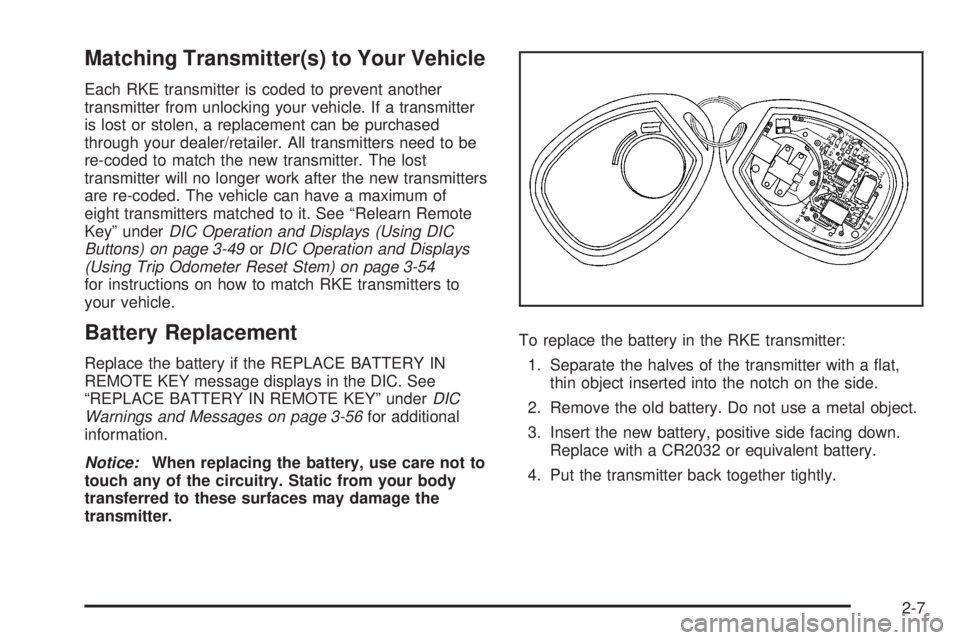
transmitter.To replace the battery in the RKE transmitter:
1. Separate the halves of the transmitter with a at,
thin object inserted into the notch on the side.
2. Remove the old battery. Do not use a metal object.
3. Insert the new battery, positive side facing down.
Replace with a CR2032 or equivalent battery.
4. Put the transmitter back together tightly.
2-7
Page 91 of 504

/(Remote Start):Press and release the lock button
and then press and hold the remote start button to
start the vehicle.
To start the vehicle using the remote start feature:
1. Aim the transmitter at the vehicle.
2. Press and release the transmitter’s lock button,
then immediately press and hold the transmitter’s
remote start button until the turn signal lights ash.
If you cannot see the vehicle’s lights, press
and hold the remote start button for at least
four seconds. The vehicle’s doors will lock.
Pressing the remote start button again after the
vehicle has started will turn off the ignition.
When the vehicle starts, the parking lamps will turn
on and remain on while the vehicle is running.
3. If it is the rst remote start since the vehicle has
been driven, repeat these steps, while the engine
is still running, to extend the engine running time
by 10 minutes. Remote start can be extended
one time.
After entering the vehicle during a remote start, insert
and turn the key to ON/RUN to drive the vehicle.If the vehicle is left running it will automatically
shut off after 10 minutes unless a time extension
has been done.
To manually shut off a remote start:
Aim the RKE transmitter at the vehicle and press
the remote start button until the parking lamps
turn off.
Turn on the hazard warning ashers.
Turn the ignition switch on and then off.
The vehicle can be remote started two separate times
between driving sequences. The engine will run for
10 minutes after each remote start.
Or, you can extend the engine run time by another
10 minutes within the rst 10 minute remote start time
frame, and before the engine stops.
For example, if the lock button and then the remote
start buttons are pressed again after the vehicle
has been running for ve minutes, 10 minutes are
added, allowing the engine to run for 15 minutes.
The additional ten minutes are considered a
second remote vehicle start.
2-9
Page 92 of 504
Once two remote starts, or a single remote start with
one time extension has been done, the vehicle must be
started with the key.
After the key is removed from the ignition, the vehicle
can be remote started again.
The vehicle cannot be remote started if the key is in the
ignition, the hood is not closed, or if there is an
emission control system malfunction.
Also, the engine will turn off during a remote vehicle
start if the coolant temperature gets too high or if the
oil pressure gets low.
Vehicles that have the remote vehicle start feature are
shipped from the factory with the remote vehicle
start system enabled. The system may be enabled or
disabled through the DIC. See “REMOTE START” under
DIC Vehicle Customization (With DIC Buttons) on
page 3-63for additional information. If your vehicle
does not have DIC buttons, see your dealer/retailer to
enable or disable the remote vehicle start system.Doors and Locks
Door Locks
{CAUTION:
Unlocked doors can be dangerous.
Passengers, especially children, can easily
open the doors and fall out of a moving
vehicle. When a door is locked, the handle
will not open it. You increase the chance
of being thrown out of the vehicle in a
crash if the doors are not locked. So, wear
safety belts properly and lock the doors
whenever you drive.
Young children who get into unlocked
vehicles may be unable to get out. A child
can be overcome by extreme heat and can
suffer permanent injuries or even death
from heat stroke. Always lock your vehicle
whenever you leave it.
CAUTION: (Continued)
2-10
Page 93 of 504

CAUTION: (Continued)
Outsiders can easily enter through an
unlocked door when you slow down or
stop your vehicle. Locking your doors can
help prevent this from happening.
There are several ways to lock and unlock your vehicle.
To unlock the door from the outside, use the keyless
entry system or the key.
To unlock or lock the door from the inside, slide the
manual lever at the top of the door up or down.
Power Door Locks
The power door lock switches are located on the
front doors.
Q(Lock):Remove the key from the ignition and
press to lock all of the doors.
K(Unlock):Press to unlock the doors.
Delayed Locking
When locking the doors with the power lock switch or
the keyless entry transmitter and a door or the liftgate
(if equipped) is open, the delayed locking feature
will delay locking the doors until ve seconds after the
last door is closed. You will hear three chimes to
signal that the delayed locking feature is in use.
Pressing the power lock switch twice will override the
delayed locking feature and immediately lock all
the doors.
You can also program this feature using the DIC.
SeeDIC Vehicle Customization (With DIC Buttons)
on page 3-63.
Programmable Automatic
Door Locks
Your vehicle is equipped with an automatic lock/unlock
feature which enables you to program your vehicle’s
power door locks. You can program this feature through
the Driver Information Center (DIC). SeeDIC Vehicle
Customization (With DIC Buttons) on page 3-63for more
information on DIC programming.
2-11
Page 94 of 504

Rear Door Security Locks
Your vehicle may have rear door security locks.
These prevent passengers from opening the rear doors
from the inside.
The rear door security
locks are located on the
inside edge of each
rear door. You must open
the rear doors to access
them. The label depicting
lock and unlock positions
is located near the lock.
To set the locks, do the following:
1. Insert the key into the security lock slot and turn it
so the slot is in the horizontal position.
2. Close the door.To open a rear door when the security lock is on, do the
following:
1. Unlock the by lifting the rear door manual lock, the
power door lock switch, or if the vehicle has one, by
using the Remote Keyless Entry (RKE) transmitter.
2. Open the door from the outside.
To cancel the rear door security lock, do the following:
1. Unlock the door and open it from the outside.
2. Insert the key into the security lock slot and turn it
so the slot is in the vertical position.
Lockout Protection
This feature protects you from locking your key in the
vehicle when the key is in the ignition and a door
is open.
If the driver’s side power lock switch is pressed when a
door is open and the key is in the ignition, all of the
doors will lock and then the driver’s door will unlock.
If the passenger’s side power lock switch is pressed
when a door is open and the key is in the ignition,
all of the doors will lock and then the passenger’s door
will unlock. Security Lock Label
shown
2-12
Page 95 of 504
Liftgate (SUV)
{CAUTION:
It can be dangerous to drive with the liftgate
open because carbon monoxide (CO) gas can
come into your vehicle. You can not see or
smell CO. It can cause unconsciousness and
even death. If you must drive with the liftgate
open or if electrical wiring or other cable
connections must pass through the seal
between the body and the liftgate:
Make sure all other windows are shut.
Turn the fan on your heating or cooling
system to its highest speed and select the
control setting that will force outside air
into your vehicle. SeeDual Automatic
Climate Control System on page 3-22.
If you have air outlets on or under the
instrument panel, open them all the way.
SeeEngine Exhaust on page 2-43.To lock and unlock the liftgate, use any of the power
door lock switches or the remote keyless entry (RKE)
transmitter.
To open the liftgate, do the following:
1. Move the spare tire carrier out of the way.
See “Opening the Spare Tire Carrier” under
Tailgate/Spare Tire Carrier on page 2-16.
2. Pull the handle located in the center of the door.
To close the liftgate, do the following:
1. Pull the liftgate down until it latches.
2. Move the spare tire carrier back into place.
See “Closing the Spare Tire Carrier” under
Tailgate/Spare Tire Carrier on page 2-16.
2-13
Page 102 of 504
Power Windows
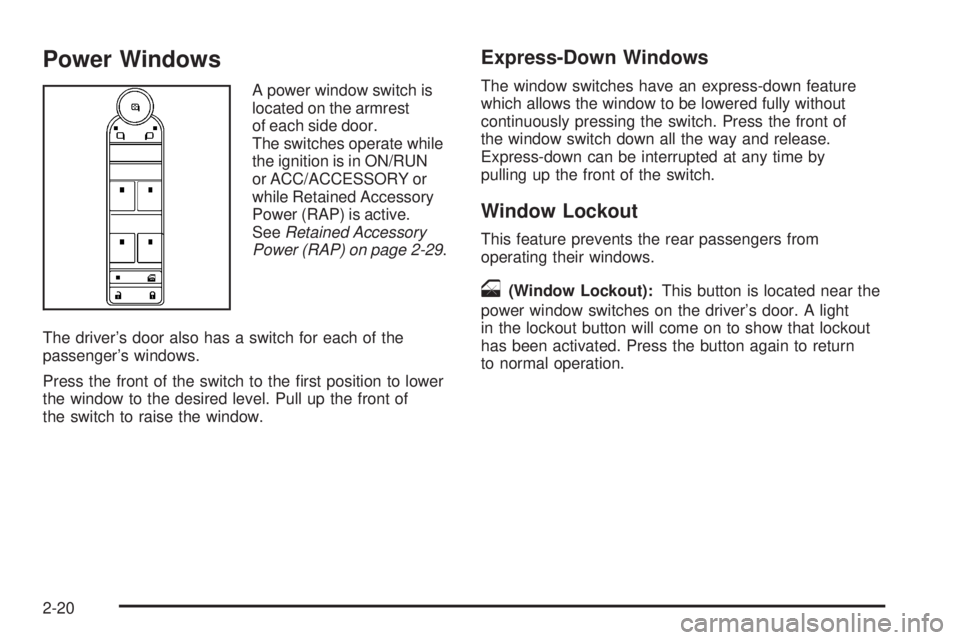
A power window switch is
located on the armrest
of each side door.
The switches operate while
the ignition is in ON/RUN
or ACC/ACCESSORY or
while Retained Accessory
Power (RAP) is active.
SeeRetained Accessory
Power (RAP) on page 2-29.
The driver’s door also has a switch for each of the
passenger’s windows.
Press the front of the switch to the rst position to lower
the window to the desired level. Pull up the front of
the switch to raise the window.
Express-Down Windows
The window switches have an express-down feature
which allows the window to be lowered fully without
continuously pressing the switch. Press the front of
the window switch down all the way and release.
Express-down can be interrupted at any time by
pulling up the front of the switch.
Window Lockout
This feature prevents the rear passengers from
operating their windows.
o(Window Lockout):This button is located near the
power window switches on the driver’s door. A light
in the lockout button will come on to show that lockout
has been activated. Press the button again to return
to normal operation.
2-20
Page 103 of 504
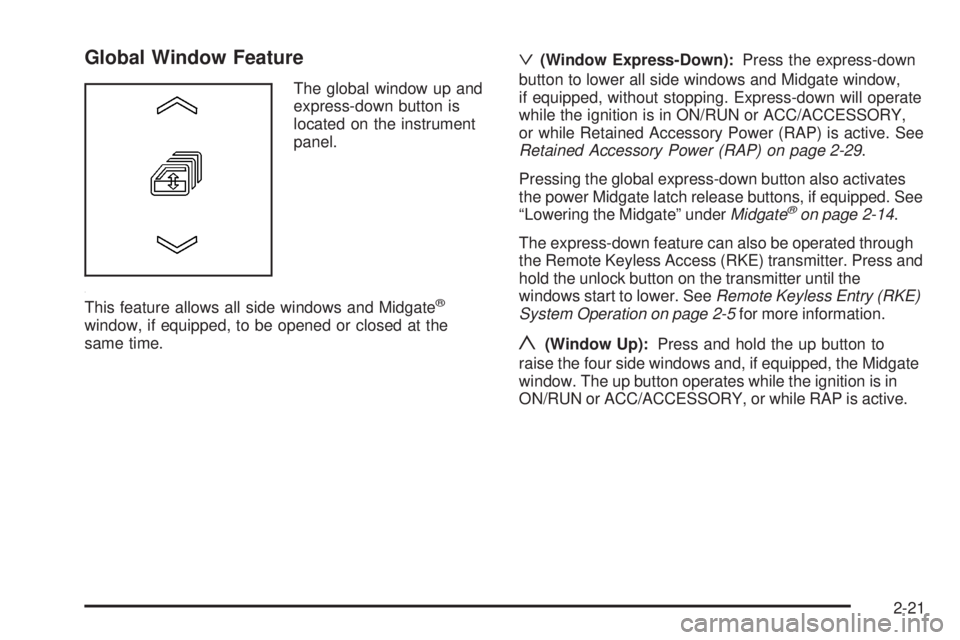
Global Window Feature
The global window up and
express-down button is
located on the instrument
panel.
This feature allows all side windows and Midgate
®
window, if equipped, to be opened or closed at the
same time.
ª(Window Express-Down):Press the express-down
button to lower all side windows and Midgate window,
if equipped, without stopping. Express-down will operate
while the ignition is in ON/RUN or ACC/ACCESSORY,
or while Retained Accessory Power (RAP) is active. See
Retained Accessory Power (RAP) on page 2-29.
Pressing the global express-down button also activates
the power Midgate latch release buttons, if equipped. See
“Lowering the Midgate” underMidgate
®on page 2-14.
The express-down feature can also be operated through
the Remote Keyless Access (RKE) transmitter. Press and
hold the unlock button on the transmitter until the
windows start to lower. SeeRemote Keyless Entry (RKE)
System Operation on page 2-5for more information.
y(Window Up):Press and hold the up button to
raise the four side windows and, if equipped, the Midgate
window. The up button operates while the ignition is in
ON/RUN or ACC/ACCESSORY, or while RAP is active.
2-21
Page 105 of 504

The window auto-reversal function can be overridden in
the express override mode. To override, the window
must be operated manually by pressing and holding the
Midgate window switch or the global window button.
This must be done within two seconds after the Midgate
window has stopped at a partially open position.
The express override mode only works immediately
following a window auto-reversal. Window express
functions will not work while in this mode.
Midgate Window Error/Jog Mode
If the Midgate window has sensed conditions which may
lead to damage or malfunction of the window system,
the window will automatically go into Error/Jog mode.
In this mode, window express functions will not
work. The window can only be operated manually by
pressing the Midgate window switch or the global
window button. The window will move slightly and stop.
Press and hold the window switch or global window
button to continue to close the window a small amount
at a time.
To Exit Error/Jog Mode
1. Ensure normal Midgate window operating conditions
have begun.
2. Press and hold the Midgate window down switch
approximately one second to start window
express-down.
3. Release the window down switch and allow the
window to fully open.
Do not use any window switches once window
movement has started.
4. Press the Midgate window up switch and visually
conrm that the express-up has been completed.
Sun Visors
Swing the sun visor down to block glare. Swing the sun
visor to the side to cover the side window.
Illuminated Visor Vanity Mirrors
Swing the sun visor down and lift the mirror cover to
turn the lamps on.
2-23
Page 106 of 504

Theft-Deterrent Systems
Vehicle theft is big business, especially in some cities.
Although your vehicle has a number of theft-deterrent
features, we know that nothing we put on it can make it
impossible to steal.
Content Theft-Deterrent
Your vehicle is equipped with a content theft-deterrent
alarm system.
With this system, the
security light in the
instrument panel cluster
will ash as you open
the door if your ignition
is off.
This light reminds you to activate the theft-deterrent
system.To activate the theft-deterrent system:
1. Open the door.
2. Lock the door with the Remote Keyless Entry (RKE)
transmitter. The security light will illuminate to
inform the driver the system is arming. If a door is
open when the doors are locked, the security
light will ash.
3. Close all doors. The security light should go off
after about 30 seconds. The alarm is not armed
until the security light goes off.
If the delayed locking feature is turned on, the
theft-deterrent system will not start the arming
process until the last door is closed and the delay
timer has expired. SeeDelayed Locking on
page 2-11.
If a locked door is opened without the RKE transmitter,
the alarm will go off. The headlamps and parking
lamps will ash and the horn will sound for 30 seconds,
then will turn off to save the battery power.
2-24