change time HUMMER H2 2008 Owners Manual
[x] Cancel search | Manufacturer: HUMMER, Model Year: 2008, Model line: H2, Model: HUMMER H2 2008Pages: 504, PDF Size: 7.12 MB
Page 2 of 504
GENERAL MOTORS, GM, the GM Emblem, HUMMER,
the name HUMMER, H2 and the H2 Design are
registered trademarks of General Motors Corporation.
This manual includes the latest information at the time it
was printed. We reserve the right to make changes
after that time without further notice. For vehicles rst
sold in Canada, substitute the name “General Motors of
Canada Limited” for HUMMER whenever it appears
in this manual.
This manual describes features that may be available in
this model, but your vehicle may not have all of them.
For example, more than one entertainment system may
be offered or your vehicle may have been ordered
without a front passenger or rear seats.
Keep this manual in the vehicle for quick reference.
Canadian Owners
A French language copy of this manual can be obtained
from your dealer/retailer or from:
Helm, Incorporated
P.O. Box 07130
Detroit, MI 48207
1-800-551-4123
www.helminc.com
Propriétaires Canadiens
On peut obtenir un exemplaire de ce guide en français
auprès de concessionnaire ou à l’adresse suivante:
Helm Incorporated
P.O. Box 07130
Detroit, MI 48207
1-800-551-4123
www.helminc.com
Litho in U.S.A.
Part No. 15862631 A First Printing
©2007 General Motors Corporation. All Rights Reserved.
ii
Page 43 of 504
Infants and Young Children
Everyone in a vehicle needs protection! This includes
infants and all other children. Neither the distance
traveled nor the age and size of the traveler changes
the need, for everyone, to use safety restraints. In fact,
the law in every state in the United States and in
every Canadian province says children up to some age
must be restrained while in a vehicle.{CAUTION:
Children can be seriously injured or strangled if
a shoulder belt is wrapped around their neck
and the safety belt continues to tighten. Never
leave children unattended in a vehicle and never
allow children to play with the safety belts.
Every time infants and young children ride in vehicles,
they should have the protection provided by appropriate
restraints. Children who are not restrained properly
can strike other people, or can be thrown out of
the vehicle. In addition, young children should not use
the vehicle’s adult safety belts alone; they need to
use a child restraint.
1-39
Page 135 of 504
Notice:The spare tire extends farther away from
rear of the vehicle than the trailer hitch shown
on rear vision camera display. Your spare tire could
hit an object even though there appears to be
enough distance on the display between the trailer
hitch and objects behind you causing vehicle or
property damage. Do not use this system to judge
the distance between the spare tire and objects
behind you.
When the System Does Not Seem To
Work Properly
The rear vision camera system may not work properly
or display a clear image in the following situations:
In the dark.
When the sun or the beam of headlights is shining
directly into the camera lens.
If ice, snow, mud, or anything else builds up on the
camera lens. Clean the lens, rinse it with water, and
wipe it with a soft cloth.
If the back of the vehicle is in an accident, the
position and mounting angle of the camera may
change or the camera may be affected. Be sure to
have the camera and its position and mounting angle
checked at your dealer.
Extreme high or low temperatures or extreme
temperature changes can affect the image displayed.
OnStar®System
OnStar uses several innovative technologies and live
advisors to provide you with a wide range of safety,
security, information, and convenience services. If your
airbags deploy, the system is designed to make an
automatic call to OnStar Emergency advisors who can
request emergency services be sent to your location.
If you lock your keys in the vehicle, call OnStar at
1-888-4-ONSTAR and they can send a signal to unlock
your doors. If you need roadside assistance, press
the OnStar button and they can contact Roadside
Service for you.
OnStar service is provided to you subject to the
OnStar Terms and Conditions. You may cancel your
OnStar service at any time by contacting OnStar.
2-53
Page 151 of 504
Instrument Panel Overview...............................3-4
Hazard Warning Flashers................................3-6
Other Warning Devices...................................3-6
Horn.............................................................3-6
Tilt Wheel.....................................................3-6
Turn Signal/Multifunction Lever.........................3-7
Turn and Lane-Change Signals........................3-8
Headlamp High/Low-Beam Changer..................3-8
Flash-to-Pass.................................................3-9
Windshield Wipers..........................................3-9
Windshield Washer.......................................3-10
Rear Window Wiper/Washer...........................3-11
Cruise Control..............................................3-12
Exterior Lamps.............................................3-15
Headlamps on Reminder................................3-17
Daytime Running Lamps (DRL).......................3-17
Automatic Headlamp System..........................3-18
Instrument Panel Brightness...........................3-18
Dome Lamps...............................................3-19
Dome Lamp Override....................................3-19
Entry/Exit Lighting.........................................3-19
Reading Lamps............................................3-19
Battery Run-Down Protection..........................3-19
Accessory Power Outlet(s).............................3-20
Ashtray(s) and Cigarette Lighter......................3-21
Analog Clock...............................................3-21Climate Controls............................................3-22
Dual Automatic Climate Control System...........3-22
Outlet Adjustment.........................................3-29
Rear Air Conditioning and Heating System
and Electronic Climate Controls...................3-29
Warning Lights, Gages, and Indicators............3-31
Instrument Panel Cluster................................3-32
Speedometer and Odometer...........................3-33
Trip Odometer
..............................................3-33
Tachometer.................................................3-33
Safety Belt Reminders...................................3-33
Airbag Readiness Light..................................3-34
Airbag Off Light............................................3-35
Charging System Light..................................3-37
Voltmeter Gage............................................3-37
Brake System Warning Light..........................3-38
Antilock Brake System Warning Light...............3-39
StabiliTrak
®Indicator Light..............................3-40
Engine Coolant Temperature Gage..................3-40
Tire Pressure Light.......................................3-41
Malfunction Indicator Lamp.............................3-42
Oil Pressure Gage........................................3-45
Oil Pressure Light.........................................3-46
Security Light...............................................3-46
Cruise Control Light......................................3-46
Section 3 Instrument Panel
3-1
Page 158 of 504
Turn and Lane-Change Signals
The turn signal has two upward (for right) and
two downward (for left) positions. These positions
allow you to signal a turn or a lane change.
To signal a turn, move the lever all the way up
or down. When the turn is nished, the lever will
return automatically.
To signal a lane change, raise or lower the lever for
less than one second until the arrow starts to ash.
This will cause the turn signals to automatically
ash three times. It will ash six times if the tow-haul
mode is active. Holding the turn signal lever for
more than one second will cause the turn signals to
ash until you release the lever. The lever will return
by itself when it is released.
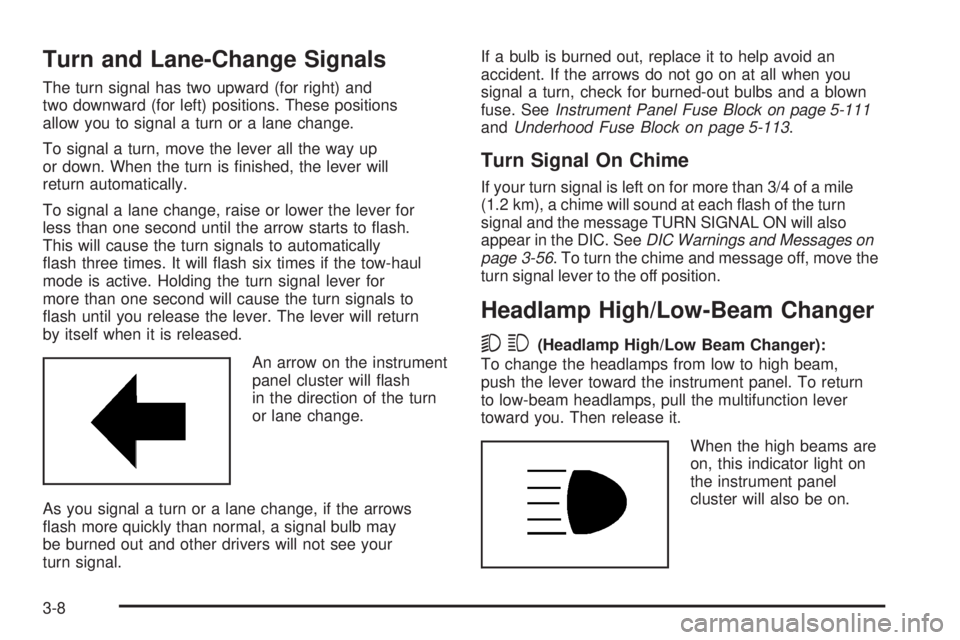
An arrow on the instrument
panel cluster will ash
in the direction of the turn
or lane change.
As you signal a turn or a lane change, if the arrows
ash more quickly than normal, a signal bulb may
be burned out and other drivers will not see your
turn signal.If a bulb is burned out, replace it to help avoid an
accident. If the arrows do not go on at all when you
signal a turn, check for burned-out bulbs and a blown
fuse. SeeInstrument Panel Fuse Block on page 5-111
andUnderhood Fuse Block on page 5-113.
Turn Signal On Chime
If your turn signal is left on for more than 3/4 of a mile
(1.2 km), a chime will sound at each ash of the turn
signal and the message TURN SIGNAL ON will also
appear in the DIC. SeeDIC Warnings and Messages on
page 3-56. To turn the chime and message off, move the
turn signal lever to the off position.
Headlamp High/Low-Beam Changer
53(Headlamp High/Low Beam Changer):
To change the headlamps from low to high beam,
push the lever toward the instrument panel. To return
to low-beam headlamps, pull the multifunction lever
toward you. Then release it.
When the high beams are
on, this indicator light on
the instrument panel
cluster will also be on.
3-8
Page 168 of 504
Automatic Headlamp System
When it is dark enough outside and the headlamp
switch is in AUTO, the automatic headlamp system will
turn on the headlamps at the normal brightness along
with other lamps such as the taillamps, sidemarker,
parking lamps, roof marker lamps, and the instrument
panel lights. The radio lights will also be dim.
To turn off the automatic headlamp system, turn the
exterior lamps switch to the off position and then
release. For vehicles rst sold in Canada, the
transmission must be in the PARK (P) position, before
the automatic headlamp system can be turned off.
The vehicle has a light sensor located on the top of
the instrument panel. Be sure it is not covered,
or the system will be on whenever the ignition is on.
The system may also turn on the headlamps when
driving through a parking garage, heavy overcast
weather, or a tunnel. This is normal.
There is a delay in the transition between the
daytime and nighttime operation of the Daytime
Running Lamps (DRL) and the automatic headlamp
systems so that driving under bridges or bright
overhead street lights does not affect the system.The DRL and automatic headlamp system will only be
affected when the light sensor sees a change in lighting
lasting longer than the delay.
If the vehicle is started in a dark garage, the automatic
headlamp system will come on immediately. Once
the vehicle leaves the garage, it takes approximately
one minute for the automatic headlamp system to
change to DRL if it is light outside. During that delay,
the instrument panel cluster may not be as bright
as usual. Make sure the instrument panel brightness
control is in the full bright position. SeeInstrument
Panel Brightness on page 3-18.
Instrument Panel Brightness
D(Instrument Panel Brightness):This feature
controls the brightness of the instrument panel lights
and is located next to the exterior lamp control.
Push the knob to extend out and then it can be turned.
Turn the knob clockwise or counterclockwise to
brighten or dim the instrument panel lights. Turning
the knob to the farthest clockwise position turns
on the dome lamps.
3-18
Page 202 of 504

Average Economy
Press the trip/fuel button until AVG ECONOMY displays.
This display shows the approximate average miles
per gallon (mpg) or liters per 100 kilometers (L/100 km).
This number is calculated based on the number of
mpg (L/100 km) recorded since the last time this
menu item was reset. To reset AVG ECONOMY,
press and hold the set/reset button.
Fuel Used
Press the trip/fuel button until FUEL USED displays.
This display shows the number of gallons (gal) or
liters (L) of fuel used since the last reset of this menu
item. To reset the fuel used information, press and hold
the set/reset button while FUEL USED is displayed.
Timer
Press the trip/fuel button until TIMER displays.
This display can be used as a timer.
To start the timer, press the set/reset button while
TIMER is displayed. The display will show the amount
of time that has passed since the timer was last
reset, not including time the ignition is off. Time will
continue to be counted as long as the ignition is
on, even if another display is being shown on the
DIC. The timer will record up to 99 hours, 59 minutes
and 59 seconds (99:59:59) after which the display
will return to zero.To stop the timer, press the set/reset button briey
while TIMER is displayed.
To reset the timer to zero, press and hold the set/reset
button while TIMER is displayed.
Transmission Temperature
Press the trip/fuel button until TRANS TEMP displays.
This display shows the temperature of the automatic
transmission uid in either degrees Fahrenheit (°F)
or degrees Celsius (°C).
Blank Display
This display shows no information.
Vehicle Information Menu Items
T
(Vehicle Information):Press this button to scroll
through the following menu items:
Oil Life
Press the vehicle information button until OIL LIFE
REMAINING displays. This display shows an estimate
of the oil’s remaining useful life. If you see 99% OIL
LIFE REMAINING on the display, that means 99% of the
current oil life remains. The engine oil life system will
alert you to change the oil on a schedule consistent
with your driving conditions.
3-52
Page 203 of 504
When the remaining oil life is low, the CHANGE
ENGINE OIL SOON message will appear on the display.
See “CHANGE ENGINE OIL SOON” underDIC
Warnings and Messages on page 3-56. You should
change the oil as soon as you can. SeeEngine Oil
on page 5-13. In addition to the engine oil life system
monitoring the oil life, additional maintenance is
recommended in the Maintenance Schedule in this
manual. SeeScheduled Maintenance on page 6-4
for more information.
Remember, you must reset the OIL LIFE display
yourself after each oil change. It will not reset itself.
Also, be careful not to reset the OIL LIFE display
accidentally at any time other than when the oil has
just been changed. It cannot be reset accurately until
the next oil change. To reset the engine oil life system,
seeEngine Oil Life System on page 5-16.
Units
Press the vehicle information button until UNITS
displays. This display allows you to select between
English or Metric units of measurement. Once in this
display, press the set/reset button to select between
ENGLISH or METRIC units. All of the vehicle information
will then be displayed in the unit of measurement
selected.
Tire Pressure
The pressure for each tire can be viewed in the DIC.
The tire pressure will be shown in either pounds
per square inch (psi) or kilopascals (kPa). Press
the vehicle information button until the DIC displays
FRONT TIRES PSI (kPa) LEFT ## RIGHT ##. Press
the vehicle information button again until the DIC
displays REAR TIRES PSI (kPa) LEFT ## RIGHT ##.
If a low or high tire pressure condition is detected by
the system while driving, a message advising you
to check the pressure in a specic tire will appear in
the display. SeeInflation - Tire Pressure on page 5-61
andDIC Warnings and Messages on page 3-56for
more information.
If the tire pressure display shows dashes instead of
a value, there may be a problem with your vehicle.
If this consistently occurs, see your dealer/retailer
for service.
Engine Hours
Press the vehicle information button until
ENGINE HOURS displays. This display shows
the total number of hours the engine has run.
3-53
Page 206 of 504
DIC Warnings and Messages
Messages are displayed on the DIC to notify the
driver that the status of the vehicle has changed and
that some action may be needed by the driver to
correct the condition. Multiple messages may appear
one after another.
Some messages may not require immediate action,
but you can press any of the DIC buttons on the
instrument panel or the trip odometer reset stem on
the instrument panel cluster to acknowledge that
you received the messages and to clear them from
the display.
Some messages cannot be cleared from the DIC
display because they are more urgent. These messages
require action before they can be cleared. You should
take any messages that appear on the display seriously
and remember that clearing the messages will only
make the messages disappear, not correct the problem.
The following are the possible messages that can
be displayed and some information about them.
CHANGE ENGINE OIL SOON
This message displays when the engine oil needs to
be changed. When you change the engine oil, be sure
to reset the CHANGE ENGINE OIL SOON message.
SeeEngine Oil Life System on page 5-16for information
on how to reset the message. SeeEngine Oil on
page 5-13andScheduled Maintenance on page 6-4
for more information.
CHECK TIRE PRESSURE
This message displays when the pressure in one
or more of the vehicle’s tires needs to be checked. This
message also displays LEFT FRONT, RIGHT FRONT,
LEFT REAR, or RIGHT REAR to indicate which tire
needs to be checked. You can receive more than one
tire pressure message at a time. To read the other
messages that may have been sent at the same time,
press the set/reset button or the trip odometer reset
stem. If a tire pressure message appears on the DIC,
stop as soon as you can. Have the tire pressures
checked and set to those shown on the Tire Loading
Information label. SeeTires on page 5-55,Loading Your
Vehicle on page 4-44, andInflation - Tire Pressure on
page 5-61. The DIC also shows the tire pressure values.
See “DIC Operation and Displays (Using DIC Buttons)”
earlier in this section. If the tire pressure is low,
the low tire pressure warning light comes on.
SeeTire Pressure Light on page 3-41.
3-56
Page 217 of 504

DELAY DOOR LOCK
This feature allows you to select whether or not the
locking of the vehicle’s doors and liftgate will be delayed.
When locking the doors and liftgate with the power
door lock switch or the Remote Keyless Entry (RKE)
transmitter and a door or the liftgate is open, this feature
will delay locking the doors and liftgate until ve seconds
after the last door is closed. You will hear three chimes to
signal that the delayed locking feature is in use. The key
must be out of the ignition for this feature to work. You
can temporarily override delayed locking by pressing the
power door lock switch or the RKE transmitter a second
time. SeeDelayed Locking on page 2-11for more
information.
Press the customization button until DELAY DOOR
LOCK appears on the DIC display. Press the set/reset
button once to access the settings for this feature.
Then press the customization button to scroll through
the following settings:
OFF:There will be no delayed locking of the
vehicle’s doors.
ON (default):The doors will not lock until ve seconds
after the last door or the liftgate is closed.
NO CHANGE:No change will be made to this feature.
The current setting will remain.
To select a setting, press the set/reset button while the
desired setting is displayed on the DIC.
EXIT LIGHTING
This feature allows you to select the amount of time you
want the exterior lamps to remain on when it is dark
enough outside. This happens after the key is turned
from ON/RUN to LOCK/OFF.
Press the customization button until EXIT LIGHTING
appears on the DIC display. Press the set/reset button
once to access the settings for this feature. Then
press the customization button to scroll through the
following settings:
OFF:The exterior lamps will not turn on.
30 SECONDS (default):The exterior lamps will stay on
for 30 seconds.
1 MINUTE:The exterior lamps will stay on for
one minute.
2 MINUTES:The exterior lamps will stay on for
two minutes.
NO CHANGE:No change will be made to this feature.
The current setting will remain.
To select a setting, press the set/reset button while the
desired setting is displayed on the DIC.
3-67