ECO mode HUMMER H2 2009 User Guide
[x] Cancel search | Manufacturer: HUMMER, Model Year: 2009, Model line: H2, Model: HUMMER H2 2009Pages: 524, PDF Size: 3.1 MB
Page 144 of 524

Universal Home Remote System
Operation
Your vehicle may have the Universal Home Remote
System. If there are three round Light Emitting Diode
(LED) indicator lights above the Universal Home Remote
buttons, follow the instructions below.
This system provides a way to replace up to three
remote control transmitters used to activate devices
such as garage door openers, security systems,
and home automation devices.Do not use this system with any garage door opener
that does not have the stop and reverse feature.
This includes any garage door opener model
manufactured before April 1, 1982.
Read the instructions completely before attempting to
program the transmitter. Because of the steps involved,
it may be helpful to have another person available to
assist you in programming the transmitter.
Be sure to keep the original remote control transmitter
for use in other vehicles, as well as, for future
programming. You only need the original remote control
transmitter for Fixed Code programming. It is also
recommended that upon the sale or lease termination of
the vehicle, the programmed buttons should be erased
for security purposes. See “Erasing Universal Home
Remote Buttons” later in this section.
When programming a garage door, it is advised to
park outside of the garage. Be sure that people
and objects are clear of the garage door or security
device you are programming.
2-58
Page 148 of 524

Your panel of switches may not appear exactly as
they do in the examples above, but they should
be similar.
The switch positions on your hand-held transmitter
may be labeled, as follows:
A switch in the up position may be labeled
as “Up,” “+,” or “On.”
A switch in the down position may be labeled
as “Down,” “−,” or “Off.”
A switch in the middle position may be labeled
as “Middle,” “0,” or “Neutral.”2. Write down the eight to 12 switch settings from left
to right as follows:
When a switch is in the up position, write “Right.”
When a switch is in the down position,
write “Left.”
If a switch is set between the up and down
position, write “Middle.”
The switch settings that you wrote down in
Step 2 will now become the button strokes you
enter into the Universal Home Remote in Step 4.
Be sure to enter the switch settings that you wrote
down in Step 2, in order from left to right, into
the Universal Home Remote, when completing
Step 4.
3. From inside your vehicle, rst rmly press all three
buttons at the same time for about three seconds.
Release the buttons to put the Universal Home
Remote into programming mode. Example of Eight Dip Switches with Three Positions
2-62
Page 164 of 524
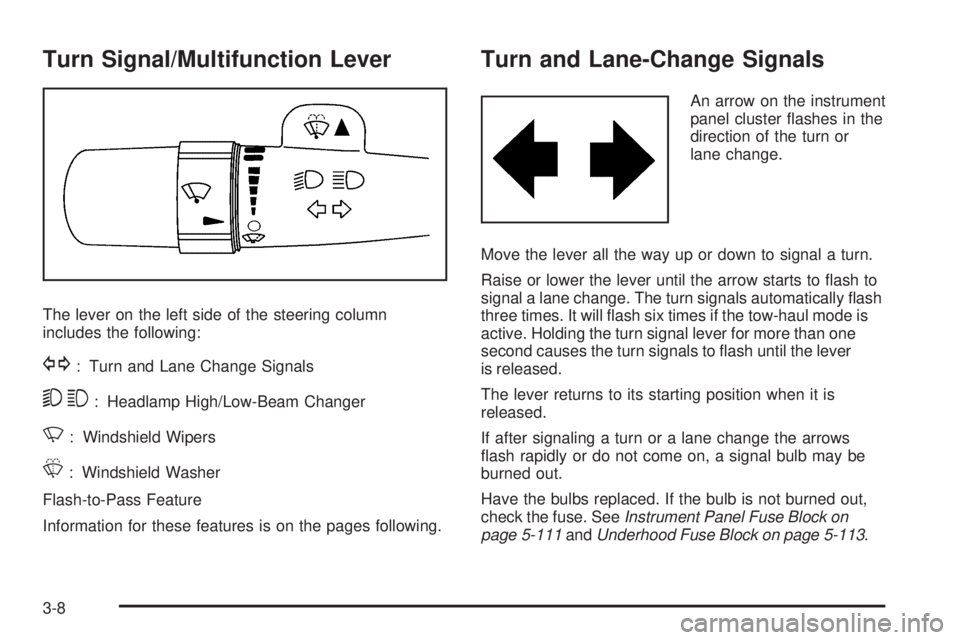
Turn Signal/Multifunction Lever
The lever on the left side of the steering column
includes the following:
G: Turn and Lane Change Signals
53: Headlamp High/Low-Beam Changer
N: Windshield Wipers
L: Windshield Washer
Flash-to-Pass Feature
Information for these features is on the pages following.
Turn and Lane-Change Signals
An arrow on the instrument
panel cluster ashes in the
direction of the turn or
lane change.
Move the lever all the way up or down to signal a turn.
Raise or lower the lever until the arrow starts to ash to
signal a lane change. The turn signals automatically ash
three times. It will ash six times if the tow-haul mode is
active. Holding the turn signal lever for more than one
second causes the turn signals to ash until the lever
is released.
The lever returns to its starting position when it is
released.
If after signaling a turn or a lane change the arrows
ash rapidly or do not come on, a signal bulb may be
burned out.
Have the bulbs replaced. If the bulb is not burned out,
check the fuse. SeeInstrument Panel Fuse Block on
page 5-111andUnderhood Fuse Block on page 5-113.
3-8
Page 179 of 524

Driver and Passenger Side Temperature
Control
The driver and passenger side temperature buttons
are used to adjust the temperature of the air coming
through the system on the driver or passengers side
of the vehicle. The temperature can be adjusted even
if the system is turned off. This is possible since outside
air always ows through the system as the vehicle is
moving forward unless it is set to recirculation mode.
See “Recirculation” later in this section.
Press the + or−buttons to increase or decrease
the cabin temperature. The driver side or passenger
side temperature display shows the temperature setting
decreasing or increasing.
The passenger temperature setting can be set to match
the driver temperature setting by pressing the PASS
button and turning off the PASS indicator. When the
passenger temperature setting is set different than
the driver’s setting, the indicator on the PASS button
illuminates and both the driver side and passenger
side temperature displays are shown.
Automatic Operation
AUTO (Automatic):When automatic operation is
active the system will control the inside temperature,
the air delivery, and the fan speed.
Use the steps below to place the entire system in
automatic mode:
1. Press the AUTO button.
When AUTO is selected, the display will change
to show the current temperature(s) and AUTO will
be lit on the display. The current delivery mode
and fan speed will also be displayed for
approximately 5 seconds.
When AUTO is selected, the air conditioning
operation and air inlet will be automatically
controlled. The air conditioning compressor
will run when the outside temperature is over
about 40°F (4°C). The air inlet will normally be
set to outside air. If it is hot outside, the air inlet
may automatically switch to recirculate inside air
to help quickly cool down the vehicle. The light
on the button comes on in recirculation.
3-23
Page 181 of 524

H(Vent):Air is directed to the instrument panel
outlets.
)(Bi-Level):Air is divided between the instrument
panel and oor outlets. Some air is directed towards the
windshield and side window outlets.
6(Floor):Air is directed to the oor outlets, with
some to the windshield, side window outlets, and second
row oor outlets. In this mode, the system automatically
selects outside air.
-(Defog):This mode clears the windows of fog or
moisture. Air is directed to the windshield, oor outlets,
and side window vents. In this mode, the system turns off
recirculation and runs the air conditioning compressor
unless the outside temperature is close to freezing.
The recirculation mode cannot be selected while in
the defog mode.
0(Defrost):This mode removes fog or frost from the
windshield more quickly. Air is directed to the windshield
and side window vents, with some directed to the oor
vents. In this mode, the system automatically forces
outside air into the vehicle and runs the air conditioning
compressor unless the outside temperature is close to
freezing. The recirculation mode cannot be selected while
in the defrost mode.
Do not drive the vehicle until all the windows are clear.
#(Air Conditioning):Press to turn the air
conditioning (A/C) compressor on and off. An indicator
light comes on to show that the air conditioning is on.
If this button is pressed when the air conditioning
compressor is unavailable, the indicator ashes three
times and then turns off. If the air conditioning is on and
the outside temperature drops below a temperature
which is too cool for air conditioning to be effective,
the air conditioning light turns off to show that the air
conditioning mode has been canceled.
On hot days, open the windows long enough to let hot
inside air escape. This helps to reduce the time it takes
for the vehicle to cool down. It also helps the system to
operate more efficiently.
The air conditioning system removes moisture from
the air, so a small amount of water might drip under
the vehicle while idling or after turning off the engine.
This is normal.
@(Recirculation):Press to turn the recirculation
mode on or off. An indicator light comes on to show
that the recirculation is on.
This mode recirculates and helps to quickly cool the
air inside the vehicle. It can be used to help prevent
outside air and odors from entering the vehicle.
3-25
Page 185 of 524
Manual Operation
DC(Fan Control):Press these buttons on the rear
seat audio control panel to increase or decrease airow.
+/−(Temperature Control):Press these buttons
to adjust the temperature of the air owing into the
passenger area. Press the + button for warmer air
and press the−button for cooler air. The temperature
settings will display in 0-12 increments, going from
the coolest (0) to the warmest (12) setting.
N(Air Delivery Mode Control):Press the mode
button to change the direction of the airow in the
vehicle. Repeatedly press the button until the desired
mode appears on the display. Multiple presses will cycle
through the delivery selections.
Select from the following:
H(Vent):Air is directed to the headliner outlets.
)(Bi-Level):Air is directed to the oor outlets as well
as the headliner outlets. The rear system oor outlet
is located at the passenger side rear quarter trim panel.
6(Floor):Air is directed to the oor outlets.
The rear system oor outlets are located under
the seats.
Warning Lights, Gages, and
Indicators
Warning lights and gages can signal that something is
wrong before it becomes serious enough to cause
an expensive repair or replacement. Paying attention
to the warning lights and gages could prevent injury.
Warning lights come on when there may be or is
a problem with one of the vehicle’s functions. Some
warning lights come on briey when the engine is
started to indicate they are working.
Gages can indicate when there may be or is a problem
with one of the vehicle’s functions. Often gages and
warning lights work together to indicate a problem with
the vehicle.
When one of the warning lights comes on and stays on
while driving, or when one of the gages shows there may
be a problem, check the section that explains what to do.
Follow this manual’s advice. Waiting to do repairs can be
costly and even dangerous.
3-29
Page 192 of 524
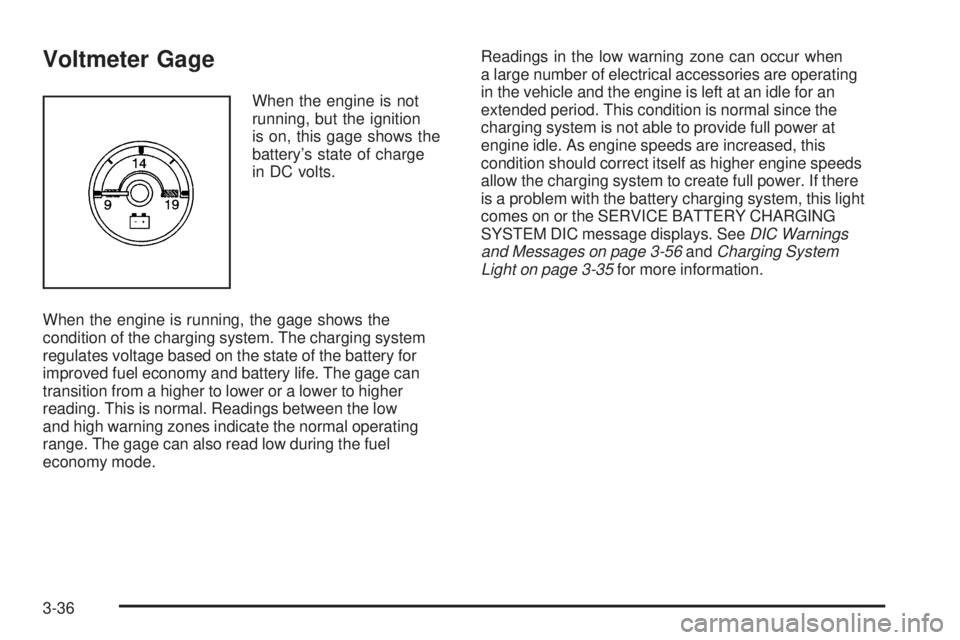
Voltmeter Gage
When the engine is not
running, but the ignition
is on, this gage shows the
battery’s state of charge
in DC volts.
When the engine is running, the gage shows the
condition of the charging system. The charging system
regulates voltage based on the state of the battery for
improved fuel economy and battery life. The gage can
transition from a higher to lower or a lower to higher
reading. This is normal. Readings between the low
and high warning zones indicate the normal operating
range. The gage can also read low during the fuel
economy mode.Readings in the low warning zone can occur when
a large number of electrical accessories are operating
in the vehicle and the engine is left at an idle for an
extended period. This condition is normal since the
charging system is not able to provide full power at
engine idle. As engine speeds are increased, this
condition should correct itself as higher engine speeds
allow the charging system to create full power. If there
is a problem with the battery charging system, this light
comes on or the SERVICE BATTERY CHARGING
SYSTEM DIC message displays. SeeDIC Warnings
and Messages on page 3-56andCharging System
Light on page 3-35for more information.
3-36
Page 208 of 524

Relearn Remote Key
This display allows you to match Remote Keyless
Entry (RKE) transmitters to your vehicle. To match
an RKE transmitter to your vehicle:
1. Press the vehicle information button until
PRESS
VTO RELEARN REMOTE KEY displays.
2. Press the set/reset button until REMOTE KEY
LEARNING ACTIVE is displayed.
3. Press and hold the lock and unlock buttons on
the rst transmitter at the same time for about
15 seconds.
On vehicles with memory recall seats, the rst
transmitter learned will match driver 1 and
the second will match driver 2.
A chime will sound indicating that the transmitter is
matched.
4. To match additional transmitters at this time, repeat
Step 3.
Each vehicle can have a maximum of eight
transmitters matched to it.
5. To exit the programming mode, you must cycle the
key to LOCK/OFF.
Compass Zone Setting
This display allows for setting the compass zone.
SeeDIC Compass on page 3-54for more information.
Compass Recalibration
This display allows for calibrating the compass.
SeeDIC Compass on page 3-54for more information.
Blank Display
This display shows no information.
DIC Operation and Displays
(Using Trip Odometer Reset Stem)
The DIC has different displays which can be accessed
by pressing the trip odometer reset stem located on the
instrument panel cluster. Pressing the trip odometer reset
stem will also turn off, or acknowledge, DIC messages.
You can use the trip odometer reset stem to view
the following displays: odometer, engine hours, trip
odometer, compass zone setting, compass recalibration,
and display language.
3-52
Page 213 of 524
CHECK TIRE PRESSURE
On vehicles with the Tire Pressure Monitor
System (TPMS), this message displays when the
pressure in one or more of the vehicle’s tires needs to
be checked. This message also displays LEFT FRONT,
RIGHT FRONT, LEFT REAR, or RIGHT REAR to
indicate which tire needs to be checked. You can receive
more than one tire pressure message at a time. To read
the other messages that may have been sent at the same
time, press the set/reset button or the trip odometer reset
stem. If a tire pressure message appears on the DIC,
stop as soon as you can. Have the tire pressures
checked and set to those shown on the Tire Loading
Information label. SeeTires on page 5-57,Loading the
Vehicle on page 4-44, andInflation - Tire Pressure on
page 5-63. The DIC also shows the tire pressure values.
See “DIC Operation and Displays (Using DIC Buttons)”
earlier in this section. If the tire pressure is low, the low
tire pressure warning light comes on. SeeTire Pressure
Light on page 3-39.
DRIVER DOOR OPEN
This message displays and a chime sounds if the driver
door is not fully closed and the vehicle is shifted out
of P (Park). Stop and turn off the vehicle, check the
door for obstructions, and close the door again.
Check to see if the message still appears on the DIC.
ENGINE HOT A/C (Air Conditioning)
TURNED OFF
This message displays when the engine coolant
becomes hotter than the normal operating temperature.
SeeEngine Coolant Temperature Gage on page 3-39.
To avoid added strain on a hot engine, the air
conditioning compressor automatically turns off.
When the coolant temperature returns to normal,
the air conditioning compressor turns back on.
You can continue to drive your vehicle.
If this message continues to appear, have the system
repaired by your dealer/retailer as soon as possible
to avoid damage to the engine.
ENGINE OVERHEATED IDLE ENGINE
Notice:If you drive your vehicle while the engine
is overheating, severe engine damage may occur.
If an overheat warning appears on the instrument
panel cluster and/or DIC, stop the vehicle as soon
as possible. SeeEngine Overheating on page 5-33
for more information.
This message displays when the engine coolant
temperature is too hot. Stop and allow the vehicle
to idle until it cools down. SeeEngine Coolant
Temperature Gage on page 3-39.
SeeOverheated Engine Protection Operating Mode on
page 5-35for information on driving to a safe place
in an emergency.
3-57
Page 217 of 524
SERVICE BRAKES SOON
This message displays if there is a problem with the
brake system. If this message appears, stop as soon
as possible and turn off the vehicle. Restart the vehicle
and check for the message on the DIC display. If the
message is still displayed or appears again when
you begin driving, the brake system needs service.
See your dealer/retailer.
SERVICE STABILITRAK
This message displays when there may be a problem
with the StabiliTrak®system. If you see this message, try
to reset the system. Stop; turn off the engine for at least
15 seconds; then start the engine again. If this message
still comes on, it means there is a problem. You should
see your dealer/retailer for service. The vehicle is safe to
drive, however, you do not have the benet of StabiliTrak,
so reduce your speed and drive accordingly.
SERVICE SUSPENSION SYSTEM
On some models, this message displays if a problem
occurs with the suspension system. If this message
appears, stop as soon as possible and turn off
the vehicle. Restart the vehicle and check for the
message on the DIC display. If the message is still
displayed, or appears again when you begin driving,
there is a problem with the air suspension system.
See your dealer/retailer for service.
SERVICE THEFT DETERRENT SYSTEM
This message displays when there is a problem with
the theft-deterrent system. The vehicle may or may not
restart so you may want to take the vehicle to your
dealer/retailer before turning off the engine. See
PASS-Key
®III+ Electronic Immobilizer Operation
on page 2-26for more information.
SERVICE TIRE MONITOR SYSTEM
On vehicles with the Tire Pressure Monitor
System (TPMS), this message displays if a part
on the TPMS is not working properly. The tire pressure
light also ashes and then remains on during the same
ignition cycle. SeeTire Pressure Light on page 3-39.
Several conditions may cause this message to appear.
SeeTire Pressure Monitor Operation on page 5-66for
more information. If the warning comes on and stays
on, there may be a problem with the TPMS. See your
dealer/retailer.
SERVICE TRACTION CONTROL
This message displays when there is a problem with
the Traction Control System (TCS). When this message
displays, the system will not limit wheel spin. Adjust
your driving accordingly. See your dealer/retailer
for service. SeeTraction Control System (TCS) on
page 4-9andStabiliTrak
®System on page 4-6for
more information.
3-61