automatic transmission HUMMER H2 2009 User Guide
[x] Cancel search | Manufacturer: HUMMER, Model Year: 2009, Model line: H2, Model: HUMMER H2 2009Pages: 524, PDF Size: 3.1 MB
Page 173 of 524
Automatic Headlamp System
When it is dark enough outside and the headlamp
switch is in AUTO, the automatic headlamp system will
turn on the headlamps at the normal brightness along
with other lamps such as the taillamps, sidemarker,
parking lamps, roof marker lamps, and the instrument
panel lights. The radio lights will also be dim.
To turn off the automatic headlamp system, turn the
exterior lamps switch to the off position and then release.
For vehicles rst sold in Canada, the transmission must
be in the P (Park) position, before the automatic
headlamp system can be turned off.
The vehicle has a light sensor located on the top of
the instrument panel. Do not cover this sensor or
the system will come on whenever the ignition is on.
The system may also turn on the headlamps when
driving through a parking garage, heavy overcast
weather, or a tunnel. This is normal.
There is a delay in the transition between the
daytime and nighttime operation of the Daytime Running
Lamps (DRL) and the automatic headlamp systems so
that driving under bridges or bright overhead street lights
does not affect the system. The DRL and automatic
headlamp system will only be affected when the light
sensor sees a change in lighting lasting longer than
the delay.If the vehicle is started in a dark garage, the automatic
headlamp system will come on immediately. Once the
vehicle leaves the garage, it takes approximately
one minute for the automatic headlamp system to
change to DRL if it is light outside. During that delay, the
instrument panel cluster may not be as bright as usual.
Make sure the instrument panel brightness control is in
the full bright position. SeeInstrument Panel Brightness
on page 3-17.
Instrument Panel Brightness
D(Instrument Panel Brightness):This feature
controls the brightness of the instrument panel lights
and is located next to the exterior lamp control.
Push the knob to extend out and then it can be turned.
Turn the knob clockwise or counterclockwise to
brighten or dim the instrument panel lights. Turning
the knob to the farthest clockwise position turns on
the dome lamps.
3-17
Page 206 of 524
Timer
Press the trip/fuel button until TIMER displays.
This display can be used as a timer.
To start the timer, press the set/reset button while
TIMER is displayed. The display will show the amount
of time that has passed since the timer was last reset,
not including time the ignition is off. Time will continue to
be counted as long as the ignition is on, even if another
display is being shown on the DIC. The timer will record
up to 99 hours, 59 minutes and 59 seconds (99:59:59)
after which the display will return to zero.
To stop the timer, press the set/reset button briey while
TIMER is displayed.
To reset the timer to zero, press and hold the set/reset
button while TIMER is displayed.
Transmission Temperature
Press the trip/fuel button until TRANS TEMP displays.
This display shows the temperature of the automatic
transmission uid in either degrees Fahrenheit (°F)
or degrees Celsius (°C).
Blank Display
This display shows no information.
Vehicle Information Menu Items
T
(Vehicle Information):Press this button to scroll
through the following menu items:
Oil Life
Press the vehicle information button until OIL LIFE
REMAINING displays. This display shows an estimate
of the oil’s remaining useful life. If you see 99% OIL LIFE
REMAINING on the display, that means 99% of the
current oil life remains. The engine oil life system will alert
you to change the oil on a schedule consistent with your
driving conditions.
When the remaining oil life is low, the CHANGE
ENGINE OIL SOON message will appear on the
display. See “CHANGE ENGINE OIL SOON” under
DIC Warnings and Messages on page 3-56. You should
change the oil as soon as you can. SeeEngine Oil on
page 5-15. In addition to the engine oil life system
monitoring the oil life, additional maintenance is
recommended in the Maintenance Schedule in this
manual. SeeScheduled Maintenance on page 6-4
for more information.
Remember, you must reset the OIL LIFE display
yourself after each oil change. It will not reset itself. Also,
be careful not to reset the OIL LIFE display accidentally at
any time other than when the oil has just been changed.
3-50
Page 219 of 524
TRACTION CONTROL OFF
This message displays when you turn off the Traction
Control System (TCS) or when the TCS has been
automatically disabled. Adjust your driving accordingly.
SeeTraction Control System (TCS) on page 4-9
andStabiliTrak
®System on page 4-6for more
information.
TCS may be automatically disabled due to overheating,
which could occur if the TCS activates continuously
for an extended period of time.
TRANSMISSION HOT IDLE ENGINE
Notice:If you drive your vehicle while the
transmission uid is overheating and the
transmission temperature warning is displayed
on the instrument panel cluster and/or DIC, you
can damage the transmission. This could lead to
costly repairs that would not be covered by your
warranty. Do not drive your vehicle with overheated
transmission uid or while the transmission
temperature warning is displayed.This message displays along with a continuous chime
if the transmission uid in the vehicle gets hot. Driving
with the transmission uid temperature high can cause
damage to the vehicle. Stop the vehicle and let it idle to
allow the transmission to cool. This message clears and
the chime stops when the uid temperature reaches a
safe level.
TURN SIGNAL ON
This message displays and a chime sounds if a turn
signal is left on for 3/4 of a mile (1.2 km). Move the turn
signal/multifunction lever to the off position.
WASHER FLUID LOW ADD FLUID
This message displays when the windshield washer uid
is low. Fill the windshield washer uid reservoir as soon
as possible. SeeEngine Compartment Overview on
page 5-14for the location of the windshield washer
uid reservoir. Also, seeWindshield Washer Fluid
on page 5-37for more information.
3-63
Page 294 of 524
Traction Control Operation
The traction control system is part of the
StabiliTrak system. Traction control limits wheel
spin by reducing engine power to the wheels (engine
speed management) and by applying brakes to
each individual wheel (brake-traction control) as
necessary.
The traction control system is enabled automatically
when the vehicle is started. It will activate and the
StabiliTrak light will ash if it senses that any of the
wheels are spinning or beginning to lose traction while
driving. If the traction control is turned off, only the
brake-traction control portion of traction control will work.
The engine speed management will be disabled. In this
mode, engine power is not reduced automatically and the
driven wheels can spin more freely. This can cause the
brake-traction control to activate constantly.
Notice:If the wheel(s) of one axle is allowed to
spin excessively while the StabiliTrak, ABS
and brake warning lights and any relevant DIC
messages are displayed, the transfer case could bedamaged. The repairs would not be covered by the
vehicle warranty. Reduce engine power and do
not spin the wheel(s) excessively while these lights
and messages are displayed.
The traction control system may activate on dry or
rough roads or under conditions such as heavy
acceleration while turning or abrupt upshifts/downshifts
of the transmission. When this happens, a reduction
in acceleration may be noticed, or a noise or vibration
may be heard. This is normal.
If cruise control is being used when StabiliTrak activates,
the cruise control automatically disengages. The
cruise control can be re-engaged when road conditions
allow. SeeCruise Control on page 3-12.
StabiliTrak may also turn off automatically if it determines
that a problem exists with the system. If the problem does
not clear itself after restarting the vehicle, see your
dealer/retailer for service.
4-8
Page 295 of 524

Traction Control System (TCS)
The vehicle has a Traction Control System (TCS) that
limits wheel spin. This is especially useful in slippery road
conditions. The system operates only if it senses that any
of the wheels are spinning or beginning to lose traction.
When this happens, TCS applies the brakes to limit wheel
spin and also reduces engine power. The system may be
heard or felt while it is working, but this is normal.
TCS can operate on dry roads under some conditions.
When this happens, the system may be heard while it is
working or a reduction in acceleration may be noticed.
This is normal and does not mean there is a problem with
the vehicle. Examples of these conditions include hard
acceleration in a turn, an abrupt upshift or downshift of
the transmission or driving on rough roads.
If cruise control is being used when TCS begins to limit
wheel spin, the cruise control automatically disengages.
The cruise control can be re-engaged when road
conditions allow. SeeCruise Control on page 3-12.SERVICE TRACTION CONTROL comes on in the
Driver information Center (DIC) when a Traction Control
System or Antilock Brake System problem has been
detected and the vehicle needs service. SeeDIC
Warnings and Messages on page 3-56. When this
message is on, the system will not limit wheel spin.
Adjust your driving accordingly.
The traction control system automatically comes on
whenever the vehicle is started. To limit wheel
spin, especially in slippery road conditions, the system
should always be left on. But the traction control
system can be turned off if needed. It may be necessary
to turn the system off if the vehicle is stuck in sand,
mud, ice, or snow, and you want to “rock” the vehicle to
attempt to free it. SeeIf Your Vehicle is Stuck in
Sand, Mud, Ice, or Snow on page 4-39.
4-9
Page 313 of 524

{CAUTION:
Driving to the top (crest) of a hill at full speed can
cause an accident. There could be a drop-off,
embankment, cliff, or even another vehicle. You
could be seriously injured or killed. As you near
the top of a hill, slow down and stay alert.
If the vehicle stalls, or is about to stall, and you cannot
make it up the hill:
Push the brake pedal to stop the vehicle and keep
it from rolling backwards and apply the parking
brake.
If the engine is still running, shift the transmission to
R (Reverse), release the parking brake, and slowly
back down the hill in R (Reverse).
If the engine has stopped running, you need to
restart it. With the brake pedal pressed, apply
the parking brake. If the vehicle has an automatic
transmission, shift the transmission to P (Park).
Restart the engine. Then, shift to R (Reverse),
release the parking brake, and slowly back down
the hill as straight as possible in R (Reverse).
While backing down the hill, put your left hand on the
steering wheel at the 12 o’clock position so you can
tell if the wheels are straight and can maneuver as
you back down. It is best to back down the hill with
the wheels straight rather than in the left or right
direction. Turning the wheel too far to the left or right
will increase the possibility of a rollover.
4-27
Page 330 of 524

Put your transmission in N (Neutral).
Use your regular brakes to hold your vehicle in
place and block the wheels to keep the vehicle from
moving.
Notice:Using a power winch with the transmission
in gear to pull out another vehicle may damage
the transmission. When operating a power winch,
always leave the transmission in N (Neutral).
Notice:Driving your vehicle through an automatic
car wash with the winch installed, can cause
damage to your vehicle and the car wash. Always
remove the winch from your vehicle before using an
automatic car wash. SeeWashing Your Vehicle
on page 5-105for more information.
If you are using a winch to pull out your own vehicle,
follow the winch manufacturer’s guidelines for self
recovery and observe the following to prevent damage
to your vehicle:
Do not self recover your vehicle by wrapping the
winch cable around an object (such as a pulley
block or tree) and attaching it back to your vehicle’s
recovery loops.
Always attach the winch cable directly to a solid
anchor directly in front of your vehicle to achieve
a straight line pull.
Loading the Vehicle
It is very important to know how much weight your
vehicle can carry. This weight is called the vehicle
capacity weight and includes the weight of all
occupants, cargo, and all nonfactory-installed
options. Two labels on your vehicle show how much
weight it may properly carry, the Tire and Loading
Information label and the Certication/Tire label.
{CAUTION:
Do not load the vehicle any heavier than
the Gross Vehicle Weight Rating (GVWR),
or either the maximum front or rear Gross
Axle Weight Rating (GAWR). If you do, parts
on the vehicle can break, and it can change
the way your vehicle handles. These could
cause you to lose control and crash. Also,
overloading can shorten the life of the
vehicle.
4-44
Page 351 of 524
Making Turns
Notice:Making very sharp turns while trailering
could cause the trailer to come in contact with the
vehicle. The vehicle could be damaged. Avoid
making very sharp turns while trailering.
When turning with a trailer, make wider turns than
normal. Do this so the trailer will not strike soft shoulders,
curbs, road signs, trees or other objects. Avoid jerky or
sudden maneuvers. Signal well in advance.
Turn Signals When Towing a Trailer
The arrows on the instrument panel ash whenever
signaling a turn or lane change. Properly hooked up, the
trailer lamps also ash, telling other drivers the vehicle
is turning, changing lanes or stopping.
When towing a trailer, the arrows on the instrument panel
ash for turns even if the bulbs on the trailer are burned
out. For this reason you may think other drivers are
seeing the signal when they are not. It is important to
check occasionally to be sure the trailer bulbs are still
working.
Driving On Grades
Reduce speed and shift to a lower gearbeforestarting
down a long or steep downgrade. If the transmission is
not shifted down, the brakes might have to be used so
much that they would get hot and no longer work well.
Vehicles can tow in D (Drive). Shift the transmission to
a lower gear if the transmission shifts too often under
heavy loads and/or hilly conditions.
The tow/haul mode may be used if the transmission
shifts too often. SeeTow/Haul Mode Light on page 3-44.
When towing at high altitude on steep uphill grades,
consider the following: Engine coolant will boil at a lower
temperature than at normal altitudes. If the engine is
turned off immediately after towing at high altitude on
steep uphill grades, the vehicle may show signs similar to
engine overheating. To avoid this, let the engine run while
parked, preferably on level ground, with the automatic
transmission in P (Park) for a few minutes before turning
the engine off. If the overheat warning comes on, see
Engine Overheating on page 5-33.
4-65
Page 353 of 524
Maintenance When Trailer Towing
The vehicle needs service more often when pulling a
trailer. See this manual’s Maintenance Schedule or Index
for more information. Things that are especially important
in trailer operation are automatic transmission uid,
engine oil, axle lubricant, belts, cooling system and brake
system. It is a good idea to inspect these before and
during the trip.
Check periodically to see that all hitch nuts and bolts
are tight.
Trailer Wiring Harness
Heavy-Duty Trailer Wiring Harness
Package
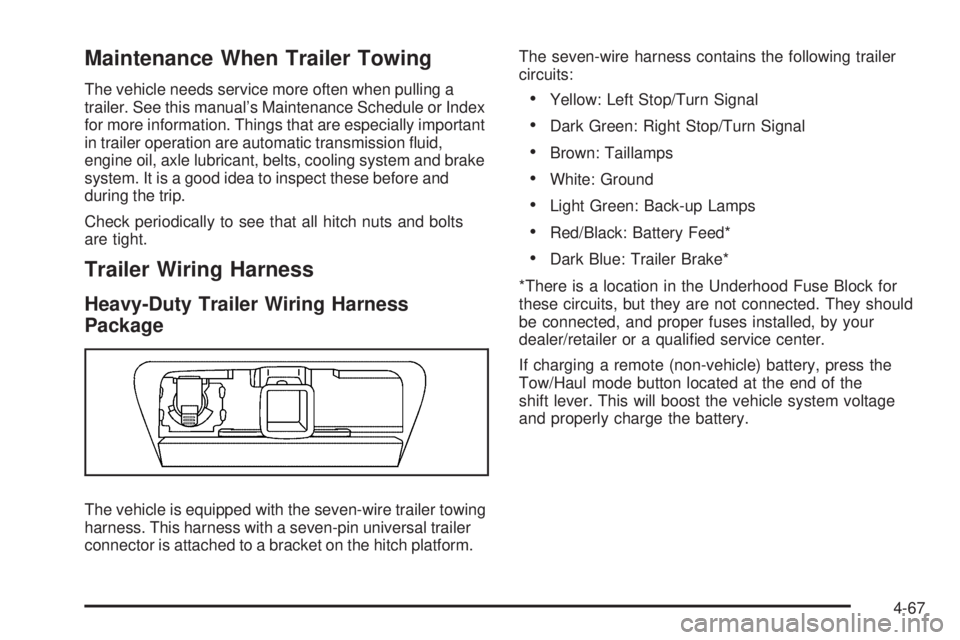
The vehicle is equipped with the seven-wire trailer towing
harness. This harness with a seven-pin universal trailer
connector is attached to a bracket on the hitch platform.The seven-wire harness contains the following trailer
circuits:
Yellow: Left Stop/Turn Signal
Dark Green: Right Stop/Turn Signal
Brown: Taillamps
White: Ground
Light Green: Back-up Lamps
Red/Black: Battery Feed*
Dark Blue: Trailer Brake*
*There is a location in the Underhood Fuse Block for
these circuits, but they are not connected. They should
be connected, and proper fuses installed, by your
dealer/retailer or a qualied service center.
If charging a remote (non-vehicle) battery, press the
Tow/Haul mode button located at the end of the
shift lever. This will boost the vehicle system voltage
and properly charge the battery.
4-67
Page 355 of 524
Service............................................................5-3
Accessories and Modications..........................5-3
California Proposition 65 Warning.....................5-4
California Perchlorate Materials Requirements.....5-4
Doing Your Own Service Work.........................5-4
Adding Equipment to the Outside of
the Vehicle.................................................5-5
Fuel................................................................5-5
Gasoline Octane............................................5-5
Gasoline Specications....................................5-5
California Fuel...............................................5-6
Additives.......................................................5-6
Fuel E85 (85% Ethanol)..................................5-7
Fuels in Foreign Countries...............................5-8
Filling the Tank..............................................5-8
Filling a Portable Fuel Container.....................5-10
Checking Things Under the Hood....................5-11
Hood Release..............................................5-12
Engine Compartment Overview.......................5-14
Engine Oil...................................................5-15
Engine Oil Life System..................................5-18
Engine Air Cleaner/Filter................................5-20
Automatic Transmission Fluid.........................5-23
Cooling System............................................5-27
Engine Coolant.............................................5-31
Engine Overheating.......................................5-33Overheated Engine Protection
Operating Mode.........................................5-35
Power Steering Fluid.....................................5-36
Windshield Washer Fluid................................5-37
Brakes........................................................5-38
Battery........................................................5-41
Jump Starting...............................................5-42
Rear Axle.......................................................5-47
Four-Wheel Drive............................................5-48
Front Axle......................................................5-49
Bulb Replacement..........................................5-50
Halogen Bulbs..............................................5-50
Headlamps..................................................5-51
Front Turn Signal and Parking Lamps..............5-52
Daytime Running Lamps (DRL).......................5-52
Roof Marker Lamps......................................5-53
Taillamps, Turn Signal, Stoplamps and
Back-up Lamps.........................................5-54
Replacement Bulbs.......................................5-55
Windshield Wiper Blade Replacement..............5-56
Tires..............................................................5-57
Tire Sidewall Labeling...................................5-58
Tire Terminology and Denitions.....................5-60
Ination - Tire Pressure.................................5-63
Tire Pressure Monitor System.........................5-64
Section 5 Service and Appearance Care
5-1