tow HUMMER H3 2007 User Guide
[x] Cancel search | Manufacturer: HUMMER, Model Year: 2007, Model line: H3, Model: HUMMER H3 2007Pages: 480, PDF Size: 2.73 MB
Page 108 of 480

DRIVE (D):This position is for normal driving.
It provides the best fuel economy for your vehicle.
If you need more power for passing, and you are:
Going less than about 35 mph (55 km/h), push
your accelerator pedal about halfway down.
Going about 35 mph (55 km/h) or more, push
the accelerator all the way down.
Downshifting the transmission in slippery road
conditions could result in skidding, see “Skidding”
underLoss of Control on page 249.
DRIVE (D) can be used when towing a trailer.
You may want to shift the transmission to
THIRD (3) or, if necessary, a lower gear if the
transmission shifts too often under heavy loads
and/or hilly conditions.
THIRD (3):This position is also used for normal
driving. However it reduces vehicle speed
more than DRIVE (D) without using your brakes.
You might choose THIRD (3) instead of DRIVE (D)
when driving on hilly, winding roads, when
towing a trailer, so there is less shifting between
gears and when going down a steep hill.SECOND (2): This position reduces vehicle speed
even more than THIRD (3) without using your
brakes. You can use SECOND (2) on hills. It can
help control your speed as you go down steep
mountain roads, but then you would also want to
use your brakes off and on.
FIRST (1): This position reduces vehicle speed
even more than SECOND (2) without using
your brakes. You can use it on very steep hills, or
in deep snow or mud. If the shift lever is put in
FIRST (1) while the vehicle is moving forward, the
transmission will not shift into rst gear until the
vehicle is going slowly enough.
Notice:Spinning the tires or holding the
vehicle in one place on a hill using only
the accelerator pedal may damage the
transmission. The repair will not be covered
by your warranty. If you are stuck, do not spin
the tires. When stopping on a hill, use the
brakes to hold the vehicle in place.
108
Page 111 of 480

Full-Time Four-Wheel Drive
Full-Time Four-Wheel Drive sends your engine’s
driving power to all four wheels for extra traction.
To get the most out of Full-Time Four-Wheel
Drive, you must be familiar with its operation.
Transfer Case Buttons
The transfer case buttons are located to the
right of the instrument panel cluster. Use these
switches to shift into and out of the different
Full-Time Four-Wheel Drive modes.You can choose between four modes:
4
m(Four-Wheel High):This setting is used for
driving in most street and highway situations.
You can also use this setting for light or variable
off-road conditions.
N (NEUTRAL):Shift the vehicle’s transfer case
to NEUTRAL only when towing your vehicle.
SeeRecreational Vehicle Towing on page 295
orTowing Your Vehicle on page 294for more
information.
Notice:Driving on pavement in Four-Wheel
High Lock or Four Wheel Low Lock for
extended periods may cause premature wear
on your vehicle’s powertrain and tires. Do not
drive in Four-Wheel High Lock or Four-Wheel
Low Lock on pavement for extended periods.
4
mQ(Four-Wheel-High Lock):Use this
mode when you need extra traction in most
off-road situations such as sand, mud, snow or
level, rocky trails.
111
Page 116 of 480

Parking Brake
The parking brake pedal
is located to the left of
the regular brake pedal,
near the driver’s door.
To set the parking brake, hold the regular brake
pedal down with your right foot. Push the
parking brake pedal down to its fully-applied
position with your left foot.
A chime will activate and the brake warning light,
located on the instrument panel, will ash
when the parking brake is applied and the vehicle
is moving at least 3 mph (5 km/h) for at least
three seconds. The chime will deactivate and the
light will turn off when the parking brake is set
and the vehicle is moving below 3 mph (5 km/h).
SeeBrake System Warning Light on page 182.To release the parking brake, hold the regular
brake pedal down. Pull the bottom edge of
the lever, located above the parking brake pedal,
with the parking brake symbol, directly rearward
to release the parking brake.
If the ignition is on when the parking brake is
released, the brake system warning light will go off.
Notice:Driving with the parking brake on can
overheat the brake system and cause premature
wear or damage to brake system parts. Verify
that the parking brake is fully released and the
brake warning light is off before driving.
If you are towing a trailer and are parking on any
hill, seeTowing a Trailer on page 297.
116
Page 117 of 480
Shifting Into Park (P)
(Automatic Transmission)
{CAUTION:
It can be dangerous to get out of your
vehicle if the shift lever is not fully in
PARK (P) with the parking brake rmly
set. Your vehicle can roll. If you have left
the engine running, the vehicle can move
suddenly. You or others could be injured.
To be sure your vehicle will not move,
even when you are on fairly level ground,
use the steps that follow. If you are
pulling a trailer, seeTowing a Trailer on
page 297.
1. Hold the brake pedal down with your right foot
and set the parking brake.
{CAUTION:
With all-wheel drive, your vehicle will be
free to roll — even if your shift lever is in
PARK (P) — if your transfer case is in
NEUTRAL. So, be sure the transfer case is
in a drive gear, four-wheel high (4H) or
four-wheel low (4L) — not in NEUTRAL.
2. Move the shift lever into PARK (P) by pressing
the shift lever button and moving the lever as
far forward as it will go.
3. Turn the ignition key to LOCK.
4. Remove the key and take it with you. If you
can leave your vehicle with the key, your
vehicle is in PARK (P).
117
Page 119 of 480

Shifting Out of Park (P)
(Automatic Transmission)
Your vehicle has an automatic transmission shift
lock control system. You have to apply your
regular brake before you can shift from PARK (P)
when the ignition is in ON. SeeAutomatic
Transmission Operation on page 106.
If you cannot shift out of PARK (P), ease pressure
on the shift lever and push the shift lever all the way
into PARK (P) as you maintain brake application.
Then move the shift lever into the gear you wish.
Press the shift lever button before moving the
shift lever.
Parking Your Vehicle
(Manual Transmission)
Your vehicle has a manual transmission. Before
you get out of your vehicle, move the shift
lever into REVERSE (R), and rmly apply the
parking brake. Once the shift lever has been
placed into REVERSE (R) with the clutch pedal
pressed in, turn the ignition key to LOCK, remove
the key and release the clutch.
If you are parking on a hill, or if your vehicle is
pulling a trailer, seeTowing a Trailer on page 297.
Parking Over Things That Burn
{CAUTION:
Things that can burn could touch hot
exhaust parts under your vehicle and
ignite. Do not park over papers, leaves,
dry grass, or other things that can burn.
119
Page 121 of 480
Running the Engine While Parked
It is better not to park with the engine running. But if
you ever have to, here are some things to know.
{CAUTION:
Idling the engine with the climate control
system off could allow dangerous exhaust
into your vehicle. See the earlier caution
underEngine Exhaust on page 120.
Also, idling in a closed-in place can let
deadly carbon monoxide (CO) into your
vehicle even if the climate control fan is at
the highest setting. One place this can
happen is a garage. Exhaust — with
CO — can come in easily. NEVER park in
a garage with the engine running.
Another closed-in place can be a blizzard.
SeeWinter Driving on page 281.
{CAUTION:
It can be dangerous to get out of your
vehicle if the automatic transmission shift
lever is not fully in PARK (P) with the
parking brake rmly set. Your vehicle can
roll. Do not leave your vehicle when the
engine is running unless you have to. If
you have left the engine running, the
vehicle can move suddenly. You or others
could be injured. To be sure your vehicle
will not move, even when it is on fairly
level ground, always set the parking brake
and move the automatic transmission
shift lever to PARK (P), or the manual
transmission shift lever to NEUTRAL.
Follow the proper steps to be sure your vehicle will
not move. SeeShifting Into Park (P) (Automatic
Transmission) on page 117andParking Your
Vehicle (Manual Transmission) on page 119.
If you are pulling a trailer with your vehicle, see
Towing a Trailer on page 297.
121
Page 125 of 480

Cleaning the Mirror
When cleaning the mirror, use a paper towel or
similar material dampened with glass cleaner.
Do not spray glass cleaner directly on the mirror
as that may cause the liquid cleaner to enter
the mirror housing.
Automatic Dimming Rearview
Mirror with Compass and
Temperature Display
Your vehicle may have this mirror. When on, an
automatic dimming mirror will dim to the proper
level to minimize glare from lights behind you
after dark.
The mirror also includes a dual display in the
upper right corner of the mirror with the compass
reading and the outside temperature.
Yb:Briey press this button to turn the display
on or off.
Temperature Display
The temperature can be displayed by pressing the
compass/temperature button. Pressing the
compass/temperature button once briey, will
toggle the display reading on and off. To alternate
the temperature reading between Fahrenheit and
Celsius, press and hold the compass/temperature
button for approximately three seconds until the
display blinks F and C. After approximately ve
seconds of inactivity, the display will stop blinking
and display the last selection made.
If an abnormal reading is displayed, see your
dealer.
Automatic Dimming Mirror Operation
O
:Press this button to turn the automatic
dimming feature on or off. The indicator light to
the left of the button will turn on to indicate when
the feature is on. Once the mirror is turned off,
it will remain off until it is turned back on, or until
the vehicle is restarted.
125
Page 127 of 480

To adjust for compass variance:
1. Find your current location and variance zone
number on the following zone map.
2. Press and hold the compass/temperature
button for six seconds until a zone number
appears in the display.3. Press the compass/temperature button on the
bottom of the mirror until the new zone
number appears in the display. After you stop
pressing the button, the display will show a
compass direction within a few seconds.
Cleaning the Mirror
Use a paper towel or similar material dampened
with glass cleaner. Do not spray glass cleaner
directly on the mirror as that may cause the liquid
cleaner to enter the mirror housing.
127
Page 128 of 480

Outside Power Mirrors
The outside power
mirror controls are
located on the driver’s
door armrest.
To adjust the power mirrors, do the following:
1. Press the top of the selector switch to choose
the driver’s side mirror. Press the bottom of
the selector switch to choose the passenger’s
side mirror.
2. Use the round, four-way control pad to move
the mirror in the desired direction.
If the mirror begins making a ratcheting sound, the
mirror has reached the end of its travel and can go
no farther in that direction. To stop the sound,
reverse the mirror direction using the control pad.
The mirrors can be manually folded inward to
prevent damage when going through an automatic
car wash or conned space. Pull the mirror toward
the vehicle to fold. To return the mirror to its original
position, push outward. Be sure to return both
mirrors to the unfolded position before driving.
Outside Convex Mirror
Your passenger’s outside rearview mirror is
convex. A convex mirror’s surface is curved so
you can see more from the driver’s seat.
{CAUTION:
A convex mirror can make things (like
other vehicles) look farther away than
they really are. If you cut too sharply into
the right lane, you could hit a vehicle on
your right. Check your inside mirror or
glance over your shoulder before
changing lanes.
128
Page 155 of 480
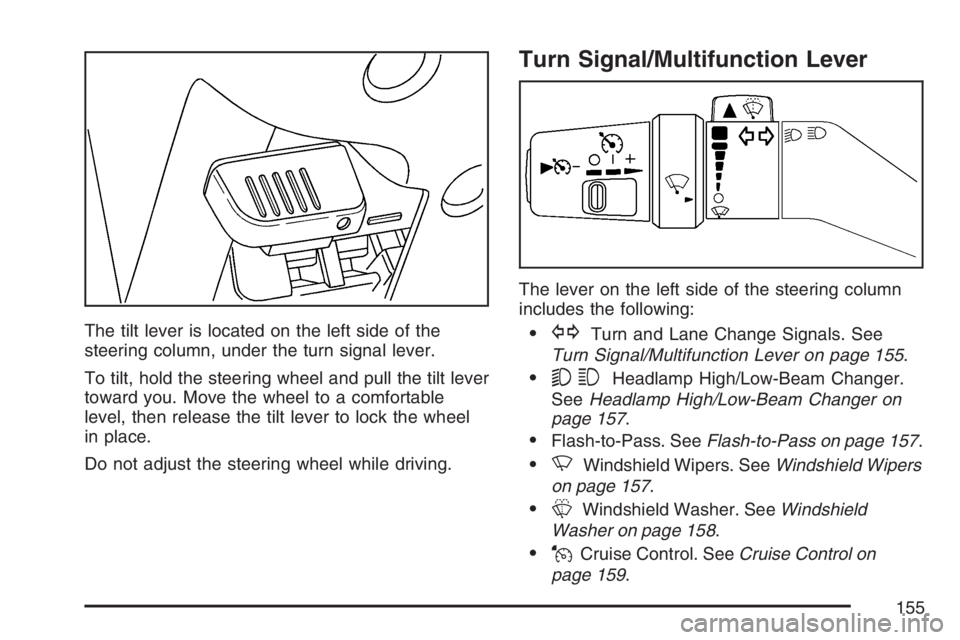
The tilt lever is located on the left side of the
steering column, under the turn signal lever.
To tilt, hold the steering wheel and pull the tilt lever
toward you. Move the wheel to a comfortable
level, then release the tilt lever to lock the wheel
in place.
Do not adjust the steering wheel while driving.
Turn Signal/Multifunction Lever
The lever on the left side of the steering column
includes the following:
GTurn and Lane Change Signals. See
Turn Signal/Multifunction Lever on page 155.
53Headlamp High/Low-Beam Changer.
SeeHeadlamp High/Low-Beam Changer on
page 157.
Flash-to-Pass. SeeFlash-to-Pass on page 157.
NWindshield Wipers. SeeWindshield Wipers
on page 157.
LWindshield Washer. SeeWindshield
Washer on page 158.
JCruise Control. SeeCruise Control on
page 159.
155