remote HUMMER H3 2007 Owner's Guide
[x] Cancel search | Manufacturer: HUMMER, Model Year: 2007, Model line: H3, Model: HUMMER H3 2007Pages: 480, PDF Size: 2.73 MB
Page 323 of 480
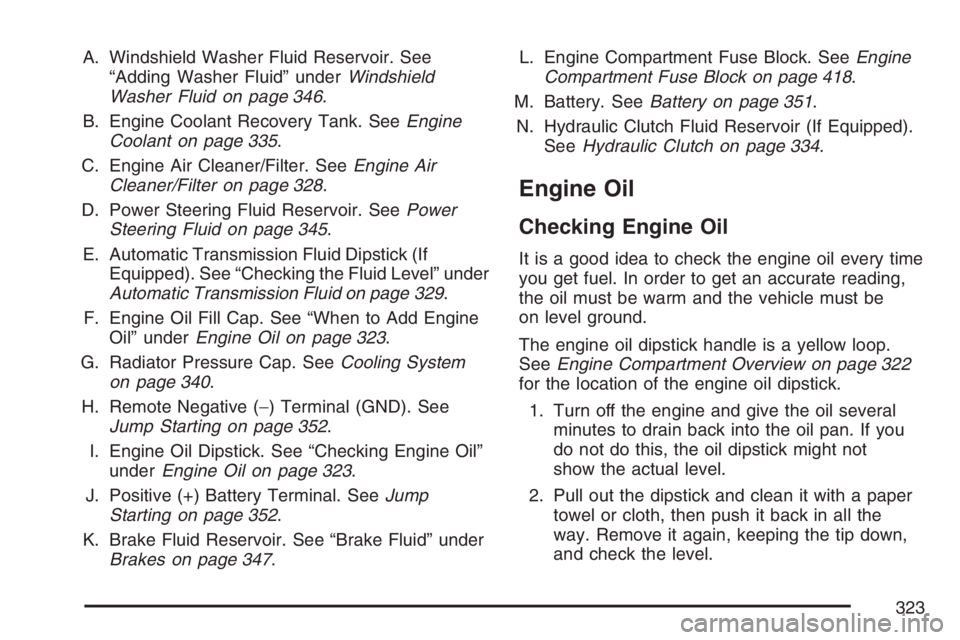
A. Windshield Washer Fluid Reservoir. See
“Adding Washer Fluid” underWindshield
Washer Fluid on page 346.
B. Engine Coolant Recovery Tank. SeeEngine
Coolant on page 335.
C. Engine Air Cleaner/Filter. SeeEngine Air
Cleaner/Filter on page 328.
D. Power Steering Fluid Reservoir. SeePower
Steering Fluid on page 345.
E. Automatic Transmission Fluid Dipstick (If
Equipped). See “Checking the Fluid Level” under
Automatic Transmission Fluid on page 329.
F. Engine Oil Fill Cap. See “When to Add Engine
Oil” underEngine Oil on page 323.
G. Radiator Pressure Cap. SeeCooling System
on page 340.
H. Remote Negative (−) Terminal (GND). See
Jump Starting on page 352.
I. Engine Oil Dipstick. See “Checking Engine Oil”
underEngine Oil on page 323.
J. Positive (+) Battery Terminal. SeeJump
Starting on page 352.
K. Brake Fluid Reservoir. See “Brake Fluid” under
Brakes on page 347.L. Engine Compartment Fuse Block. SeeEngine
Compartment Fuse Block on page 418.
M. Battery. SeeBattery on page 351.
N. Hydraulic Clutch Fluid Reservoir (If Equipped).
SeeHydraulic Clutch on page 334.
Engine Oil
Checking Engine Oil
It is a good idea to check the engine oil every time
you get fuel. In order to get an accurate reading,
the oil must be warm and the vehicle must be
on level ground.
The engine oil dipstick handle is a yellow loop.
SeeEngine Compartment Overview on page 322
for the location of the engine oil dipstick.
1. Turn off the engine and give the oil several
minutes to drain back into the oil pan. If you
do not do this, the oil dipstick might not
show the actual level.
2. Pull out the dipstick and clean it with a paper
towel or cloth, then push it back in all the
way. Remove it again, keeping the tip down,
and check the level.
323
Page 354 of 480
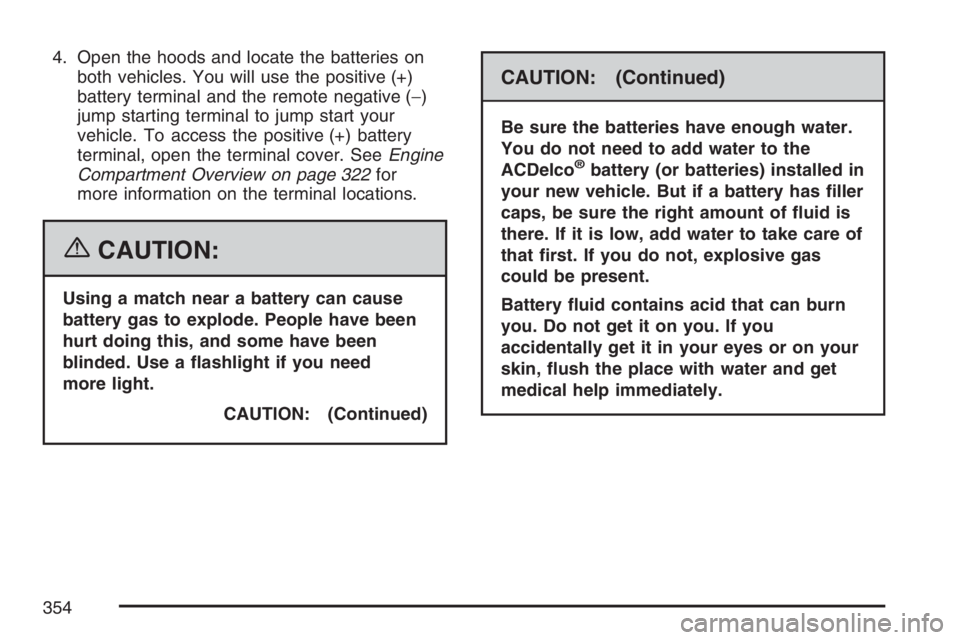
4. Open the hoods and locate the batteries on
both vehicles. You will use the positive (+)
battery terminal and the remote negative (−)
jump starting terminal to jump start your
vehicle. To access the positive (+) battery
terminal, open the terminal cover. SeeEngine
Compartment Overview on page 322for
more information on the terminal locations.
{CAUTION:
Using a match near a battery can cause
battery gas to explode. People have been
hurt doing this, and some have been
blinded. Use a ashlight if you need
more light.
CAUTION: (Continued)
CAUTION: (Continued)
Be sure the batteries have enough water.
You do not need to add water to the
ACDelco
®battery (or batteries) installed in
your new vehicle. But if a battery has ller
caps, be sure the right amount of uid is
there. If it is low, add water to take care of
that rst. If you do not, explosive gas
could be present.
Battery uid contains acid that can burn
you. Do not get it on you. If you
accidentally get it in your eyes or on your
skin, ush the place with water and get
medical help immediately.
354
Page 355 of 480
{CAUTION:
Fans or other moving engine parts can
injure you badly. Keep your hands away
from moving parts once the engine is
running.
5. Check that the jumper cables do not have
loose or missing insulation. If they do, you
could get a shock. The vehicles could
be damaged too.
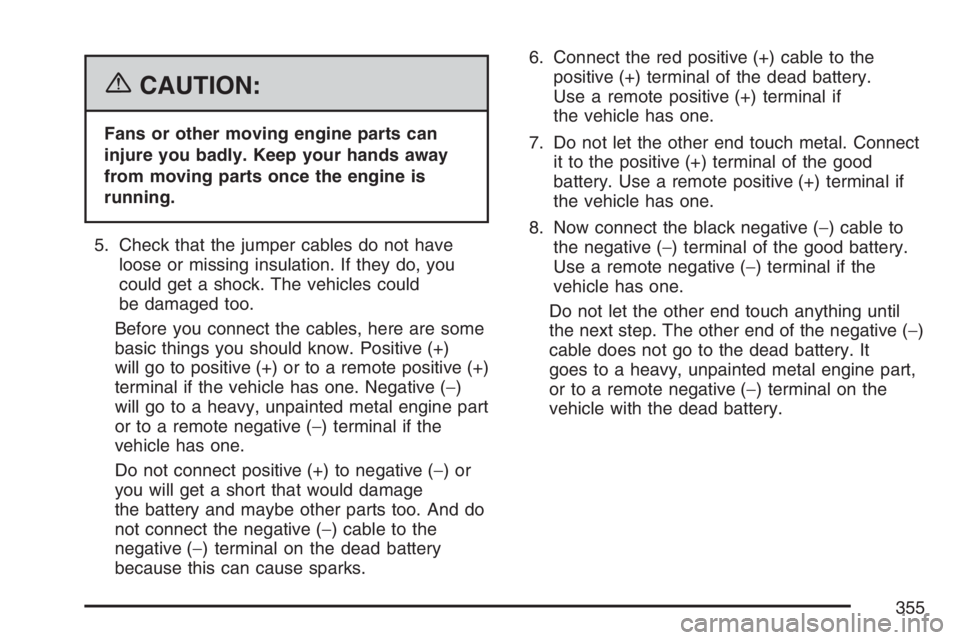
Before you connect the cables, here are some
basic things you should know. Positive (+)
will go to positive (+) or to a remote positive (+)
terminal if the vehicle has one. Negative (−)
will go to a heavy, unpainted metal engine part
or to a remote negative (−) terminal if the
vehicle has one.
Do not connect positive (+) to negative (−)or
you will get a short that would damage
the battery and maybe other parts too. And do
not connect the negative (−) cable to the
negative (−) terminal on the dead battery
because this can cause sparks.6. Connect the red positive (+) cable to the
positive (+) terminal of the dead battery.
Use a remote positive (+) terminal if
the vehicle has one.
7. Do not let the other end touch metal. Connect
it to the positive (+) terminal of the good
battery. Use a remote positive (+) terminal if
the vehicle has one.
8. Now connect the black negative (−) cable to
the negative (−) terminal of the good battery.
Use a remote negative (−) terminal if the
vehicle has one.
Do not let the other end touch anything until
the next step. The other end of the negative (−)
cable does not go to the dead battery. It
goes to a heavy, unpainted metal engine part,
or to a remote negative (−) terminal on the
vehicle with the dead battery.
355
Page 356 of 480
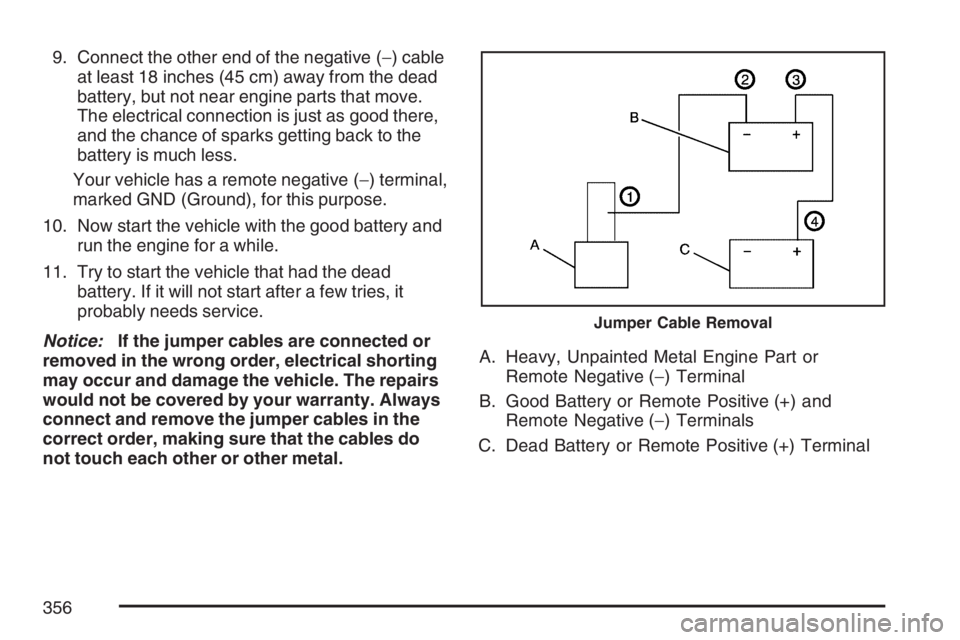
9. Connect the other end of the negative (−) cable
at least 18 inches (45 cm) away from the dead
battery, but not near engine parts that move.
The electrical connection is just as good there,
and the chance of sparks getting back to the
battery is much less.
Your vehicle has a remote negative (−) terminal,
marked GND (Ground), for this purpose.
10. Now start the vehicle with the good battery and
run the engine for a while.
11. Try to start the vehicle that had the dead
battery. If it will not start after a few tries, it
probably needs service.
Notice:If the jumper cables are connected or
removed in the wrong order, electrical shorting
may occur and damage the vehicle. The repairs
would not be covered by your warranty. Always
connect and remove the jumper cables in the
correct order, making sure that the cables do
not touch each other or other metal.A. Heavy, Unpainted Metal Engine Part or
Remote Negative (−) Terminal
B. Good Battery or Remote Positive (+) and
Remote Negative (−) Terminals
C. Dead Battery or Remote Positive (+) Terminal
Jumper Cable Removal
356
Page 476 of 480

Power (cont.)
Steering Fluid.......................................... 345
Windows.................................................... 97
Pretensioners, Safety Belt............................. 38
Programmable Automatic Door Locks............ 94
Q
Questions and Answers About
Safety Belts............................................... 21
R
Radiator Pressure Cap................................ 338
Radios........................................................ 201
Care of Your CD Player........................... 232
Care of Your CDs.................................... 231
Navigation/Radio System,
see Navigation Manual......................... 230
Radio with CD......................................... 203
Radio with Six-Disc CD............................ 211
Setting the Time...................................... 202
Theft-Deterrent......................................... 230
Understanding Reception......................... 230
Reading Lamps........................................... 168Rear Axle.................................................... 357
Locking.................................................... 243
Rear Safety Belt Comfort Guides.................. 35
Rear Seat Passengers, Safety Belts.............. 32
Rear Storage Area...................................... 146
Rear Windshield Washer/Wiper.................... 159
Rearview Mirror, Automatic Dimming with
Compass and Temperature Display.......... 125
Rearview Mirror, Automatic Dimming
with OnStar
®, Compass and
Temperature Display................................ 122
Reclining Seatbacks...................................... 10
Recommended Fluids and Lubricants.......... 440
Recovery Loops.......................................... 287
Recreational Vehicle Towing........................ 295
Remote Keyless Entry (RKE) System............ 88
Remote Keyless Entry (RKE)
System, Operation..................................... 89
Removing the Flat Tire and Installing
the Spare Tire.......................................... 396
Removing the Spare Tire and Tools............ 393
Replacement Bulbs..................................... 365
Reporting Safety Defects
Canadian Government............................. 464
General Motors........................................ 464
United States Government....................... 464
476
Page 479 of 480
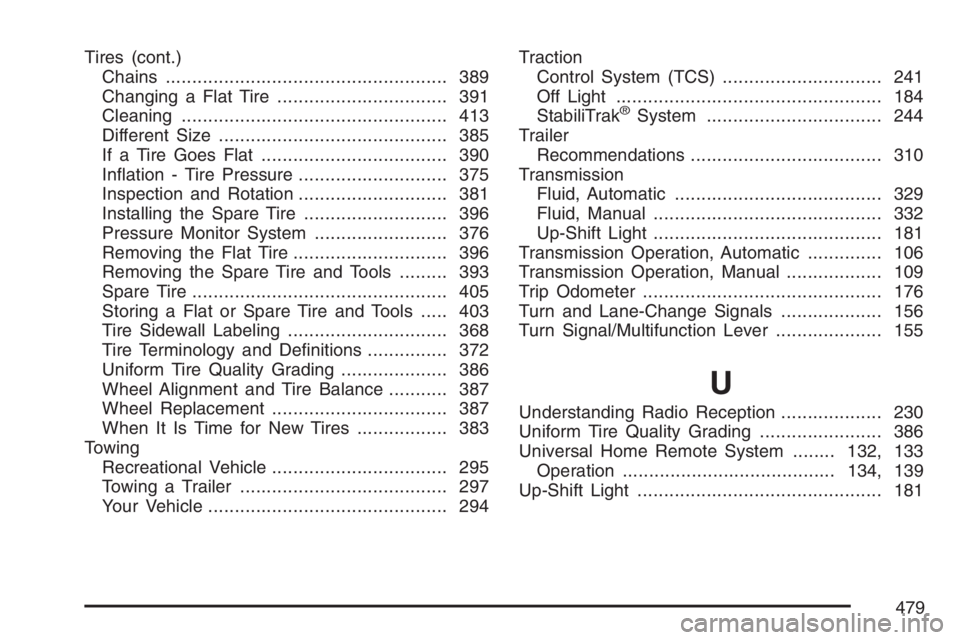
Tires (cont.)
Chains..................................................... 389
Changing a Flat Tire................................ 391
Cleaning.................................................. 413
Different Size........................................... 385
If a Tire Goes Flat................................... 390
Ination - Tire Pressure............................ 375
Inspection and Rotation............................ 381
Installing the Spare Tire........................... 396
Pressure Monitor System......................... 376
Removing the Flat Tire............................. 396
Removing the Spare Tire and Tools......... 393
Spare Tire................................................ 405
Storing a Flat or Spare Tire and Tools..... 403
Tire Sidewall Labeling.............................. 368
Tire Terminology and Denitions............... 372
Uniform Tire Quality Grading.................... 386
Wheel Alignment and Tire Balance........... 387
Wheel Replacement................................. 387
When It Is Time for New Tires................. 383
Towing
Recreational Vehicle................................. 295
Towing a Trailer....................................... 297
Your Vehicle............................................. 294Traction
Control System (TCS) .............................. 241
Off Light.................................................. 184
StabiliTrak
®System................................. 244
Trailer
Recommendations.................................... 310
Transmission
Fluid, Automatic....................................... 329
Fluid, Manual........................................... 332
Up-Shift Light........................................... 181
Transmission Operation, Automatic.............. 106
Transmission Operation, Manual.................. 109
Trip Odometer............................................. 176
Turn and Lane-Change Signals................... 156
Turn Signal/Multifunction Lever.................... 155
U
Understanding Radio Reception................... 230
Uniform Tire Quality Grading....................... 386
Universal Home Remote System........132, 133
Operation........................................134, 139
Up-Shift Light.............................................. 181
479