light HUMMER H3 2008 Manual PDF
[x] Cancel search | Manufacturer: HUMMER, Model Year: 2008, Model line: H3, Model: HUMMER H3 2008Pages: 416, PDF Size: 5.66 MB
Page 199 of 416
For persons under 21, it is against the law in every
U.S. state to drink alcohol. There are good medical,
psychological, and developmental reasons for
these laws.
The obvious way to eliminate the leading highway
safety problem is for people never to drink alcohol
and then drive.
Medical research shows that alcohol in a person’s
system can make crash injuries worse, especially
injuries to the brain, spinal cord, or heart. This means
that when anyone who has been drinking — driver
or passenger — is in a crash, that person’s chance
of being killed or permanently disabled is higher than
if the person had not been drinking.
Control of a Vehicle
The following three systems help to control your vehicle
while driving — brakes, steering, and accelerator.
At times, as when driving on snow or ice, it is easy to
ask more of those control systems than the tires and
road can provide. Meaning, you can lose control of your
vehicle. SeeTraction Control System (TCS) on page 4-5.
Adding non-dealer/non-retailer accessories can affect
your vehicle’s performance. SeeAccessories and
Modifications on page 5-3.
Braking
SeeBrake System Warning Light on page 3-33.
Braking action involves perception time and reaction
time. First, you have to decide to push on the brake
pedal. That is perception time. Then you have to bring
up your foot and do it. That is reaction time.
Average reaction time is about three-fourths of a
second. But that is only an average. It might be less
with one driver and as long as two or three seconds or
more with another. Age, physical condition, alertness,
coordination, and eyesight all play a part. So do alcohol,
drugs, and frustration. But even in three-fourths of a
second, a vehicle moving at 60 mph (100 km/h) travels
66 feet (20 m). That could be a lot of distance in an
emergency, so keeping enough space between
your vehicle and others is important.
And, of course, actual stopping distances vary greatly
with the surface of the road, whether it is pavement or
gravel; the condition of the road, whether it is wet, dry,
or icy; tire tread; the condition of the brakes; the weight
of the vehicle; and the amount of brake force applied.
Avoid needless heavy braking. Some people drive
in spurts — heavy acceleration followed by heavy
braking — rather than keeping pace with traffic.
4-3
Page 200 of 416
This is a mistake. The brakes might not have time to
cool between hard stops. The brakes will wear out
much faster if you do a lot of heavy braking. If you
keep pace with the traffic and allow realistic following
distances, you will eliminate a lot of unnecessary
braking. That means better braking and longer
brake life.
If your vehicle ever loses electrical power while you
are driving, brake normally but do not pump the brakes.
If you do, the pedal could get harder to push down.
If your vehicle loses electrical power, you will still have
some power brake assist. But you will use it when
you brake. Once the power assist is used up, it can take
longer to stop, the brake pedal will be harder to push,
and you might experience longer pedal travel.
Adding non-dealer/non-retailer accessories can affect
your vehicle’s performance. SeeAccessories and
Modifications on page 5-3.Antilock Brake System (ABS)
Your vehicle has the Antilock Brake System (ABS),
an advanced electronic braking system that will
help prevent a braking skid.
When you start the engine and begin to drive away,
ABS will check itself. You might hear a momentary
motor or clicking noise while this test is going on.
This is normal.
If there is a problem with
ABS, this warning light will
stay on. SeeAntilock
Brake System Warning
Light on page 3-34.
Let us say the road is wet and you are driving safely.
Suddenly, an animal jumps out in front of you. You slam
on the brakes and continue braking. Here is what
happens with ABS:
A computer senses that wheels are slowing down.
If one of the wheels is about to stop rolling, the computer
will separately work the brakes at each wheel.
4-4
Page 202 of 416
When this message is on, the system will not limit
wheel spin. Adjust your driving accordingly.
The traction control system automatically comes on
whenever you start your vehicle. To limit wheel
spin, especially in slippery road conditions, you should
always leave the system on. But you can turn the
traction control system off if you ever need to.
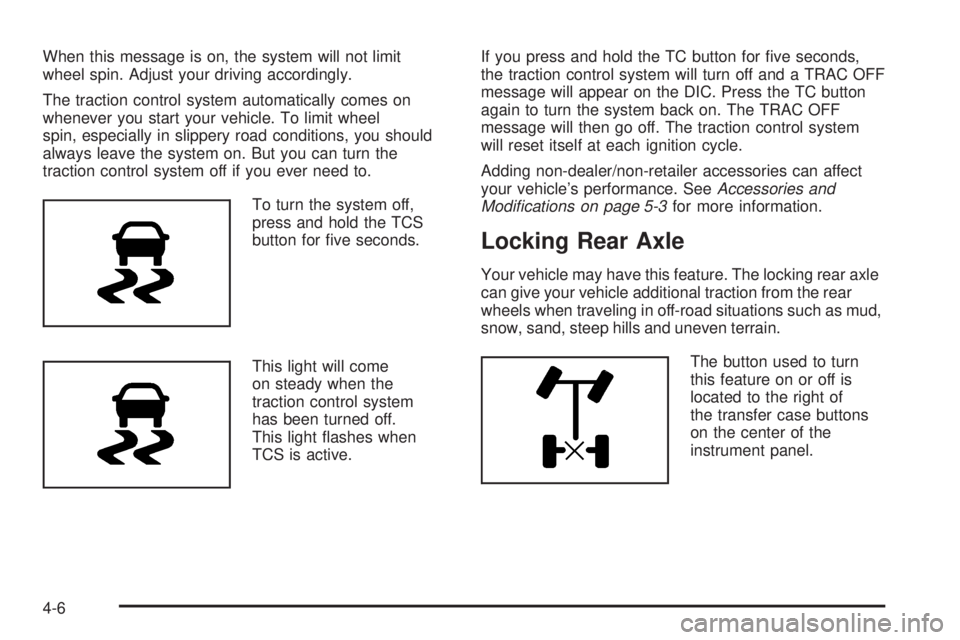
To turn the system off,
press and hold the TCS
button for ve seconds.
This light will come
on steady when the
traction control system
has been turned off.
This light ashes when
TCS is active.If you press and hold the TC button for ve seconds,
the traction control system will turn off and a TRAC OFF
message will appear on the DIC. Press the TC button
again to turn the system back on. The TRAC OFF
message will then go off. The traction control system
will reset itself at each ignition cycle.
Adding non-dealer/non-retailer accessories can affect
your vehicle’s performance. SeeAccessories and
Modifications on page 5-3for more information.
Locking Rear Axle
Your vehicle may have this feature. The locking rear axle
can give your vehicle additional traction from the rear
wheels when traveling in off-road situations such as mud,
snow, sand, steep hills and uneven terrain.
The button used to turn
this feature on or off is
located to the right of
the transfer case buttons
on the center of the
instrument panel.
4-6
Page 203 of 416
To lock the rear axle, do the following:
1. Place the transfer case in the 4LO Lock mode. This
is the only mode which will allow the rear axle to
lock. SeeFull-Time Four-Wheel Drive on page 2-27
for more information regarding the transfer case
and 4LO Lock mode.
2. Press the button with the vehicle stopped or moving
less than 2 mph (3 km/h).
You must wait for the light in the button to stop ashing
and remain illuminated before the rear axle is locked.
Notice:If you try to lock the rear axle while your
vehicle is stuck and the tires are spinning, you
could damage your vehicle’s drivetrain. The repairs
would not be covered by your warranty. Always lock
the rear axle before attempting situations and/or
navigating terrain which could possibly cause the
vehicle to become stuck.
The locking rear axle will be disengaged when the
wheel speed is greater than 20 mph (32 km/h), if the
vehicle’s battery is low and/or the transfer case is
shifted out of 4LO Lock mode.
Notice:If you lock the rear axle while driving on
pavement, you could damage your vehicle’s
drivetrain. The repairs would not be covered by
your warranty. Do not use the locking rear axle
on pavement. If you need four-wheel drive when
traveling on pavement, use only 4HI.StabiliTrak®System
Your vehicle has a vehicle stability enhancement
system called StabiliTrak®. It is an advanced computer
controlled system that assists you with directional
control of the vehicle in difficult driving conditions.
StabiliTrak
®activates when the computer senses a
discrepancy between your intended path and the
direction the vehicle is actually traveling. StabiliTrak
®
selectively applies braking pressure at any one of
the vehicle’s brakes to assist the driver with keeping
the vehicle on the intended path.
When you rst start your vehicle and begin to drive
away, the system performs several diagnostic checks to
insure there are no problems. You may hear or feel
the system working. This is normal and does not mean
there is a problem with your vehicle.
If there is a problem detected with StabiliTrak
®,a
SERVICE STAB SYS message will be displayed on the
Driver Information Center (DIC). SeeDIC Warnings
and Messages on page 3-43for more information. When
this message is displayed, the system is not operational.
Adjust your driving accordingly.
4-7
Page 206 of 416
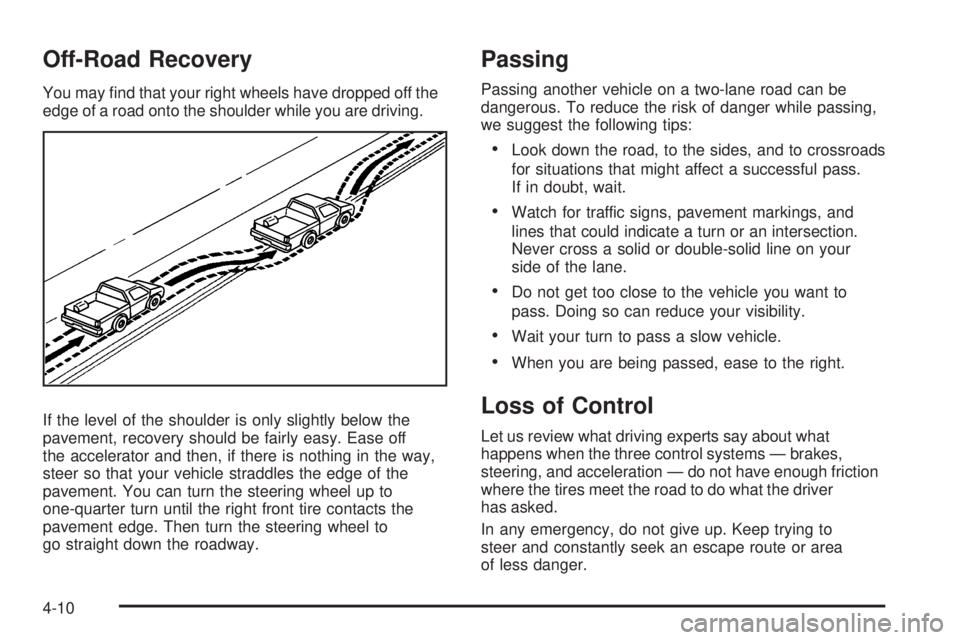
Off-Road Recovery
You may nd that your right wheels have dropped off the
edge of a road onto the shoulder while you are driving.
If the level of the shoulder is only slightly below the
pavement, recovery should be fairly easy. Ease off
the accelerator and then, if there is nothing in the way,
steer so that your vehicle straddles the edge of the
pavement. You can turn the steering wheel up to
one-quarter turn until the right front tire contacts the
pavement edge. Then turn the steering wheel to
go straight down the roadway.
Passing
Passing another vehicle on a two-lane road can be
dangerous. To reduce the risk of danger while passing,
we suggest the following tips:
Look down the road, to the sides, and to crossroads
for situations that might affect a successful pass.
If in doubt, wait.
Watch for traffic signs, pavement markings, and
lines that could indicate a turn or an intersection.
Never cross a solid or double-solid line on your
side of the lane.
Do not get too close to the vehicle you want to
pass. Doing so can reduce your visibility.
Wait your turn to pass a slow vehicle.
When you are being passed, ease to the right.
Loss of Control
Let us review what driving experts say about what
happens when the three control systems — brakes,
steering, and acceleration — do not have enough friction
where the tires meet the road to do what the driver
has asked.
In any emergency, do not give up. Keep trying to
steer and constantly seek an escape route or area
of less danger.
4-10
Page 208 of 416
Off-Road Driving
This off-road guide is meant to provide advice for
when you drive your vehicle off paved roads. Also,
seeBraking on page 4-3.
Off-road driving can be great fun. But it does have
some denite hazards. The greatest of these is
the terrain itself.
The airbag system is designed to work properly
under a wide range of conditions, including off-road
usage. Observe safe driving speeds, especially on
rough terrain. As always, wear your safety belt.
“Off-roading” means you have left the great North
American road system behind. Traffic lanes are
not marked. Curves are not banked. There are no
road signs. Surfaces can be slippery, rough, uphill or
downhill. In short, you have gone right back to nature.
Off-road driving involves some new skills. And that
is why it is very important that you read this guide.
You will nd many driving tips and suggestions.
These will help make your off-road driving safer
and more enjoyable.
Before You Go Off-Roading
There are some things to do before you go out.
For example, be sure to have all necessary maintenance
and service work done. Check to make sure all
underbody shields are properly attached. Make sure
any equipment you may need — rst aid kit, cell phone,
ashlight, etc. — is securely stored in the vehicle. Be sure
you read all the information about your four-wheel-drive
vehicle in this manual. Is there enough fuel? Is the spare
tire fully inated? Are the uid levels up where they
should be? What are the local laws that apply to
off-roading where you will be driving? If you do not
know, you should check with law enforcement people
in the area. Will you be on someone’s private land?
If so, be sure to get the necessary permission.
4-12
Page 214 of 416
For mounds, washouts, loose up-hill
slopes, ditches, etc.
When wheel spin occurs as the vehicle is moving, the
driver may notice a slight shaking or shuddering of
the vehicle. This should be stopped as soon as possible
to prevent damage to vehicle components. This is the
indication that a loss of traction is occurring on this
terrain. The operator should:
1. Reduce speed and apply the brakes.
2. Assess the terrain properly and adjust
vehicle speed and gear ranges accordingly:
Four-Wheel High position for higher speeds and
Four-Wheel-Low Lock for more torque and
lower speeds. Transmission FIRST (1) gear is
generally recommended.
3. Apply slight pressure to the brake when the
shaking or shuddering sensation is felt, keeping
the vehicle moving in a controlled manner.
4. Be prepared to alternate between braking and
accelerating through the adverse terrain.
Getting Familiar with Off-Road Driving
It is a good idea to practice in an area that is safe
and close to home before you go into the wilderness.
Off-road driving does require some new and different
skills. Here is what we mean.
Tune your senses to different kinds of signals. Your
eyes, for example, need to constantly sweep the terrain
for unexpected obstacles. Your ears need to listen
for unusual tire or engine sounds. With your arms,
hands, feet, and body, you will need to respond to
vibrations and vehicle bounce.
Controlling your vehicle is the key to successful off-road
driving. One of the best ways to control your vehicle
is to control your speed. Here are some things to keep
in mind. At higher speeds:
You approach things faster and you have less time
to scan the terrain for obstacles.
You have less time to react.
You have more vehicle bounce when you drive
over obstacles.
You will need more distance for braking, especially
since you are on an unpaved surface.
4-18
Page 216 of 416
Because you will be on an unpaved surface, it is
especially important to avoid sudden acceleration,
sudden turns, or sudden braking.
In a way, off-road driving requires a different kind of
alertness from driving on paved roads and highways.
There are no road signs, posted speed limits, or signal
lights. You have to use your own good judgment
about what is safe and what is not.
Drinking and driving can be very dangerous on any
road. And this is certainly true for off-road driving.
At the very time you need special alertness and
driving skills, your reexes, perceptions, and judgment
can be affected by even a small amount of alcohol.
You could have a serious — or even fatal — accident
if you drink and drive or ride with a driver who has
been drinking. SeeDrunk Driving on page 4-2.Crossing Obstacles
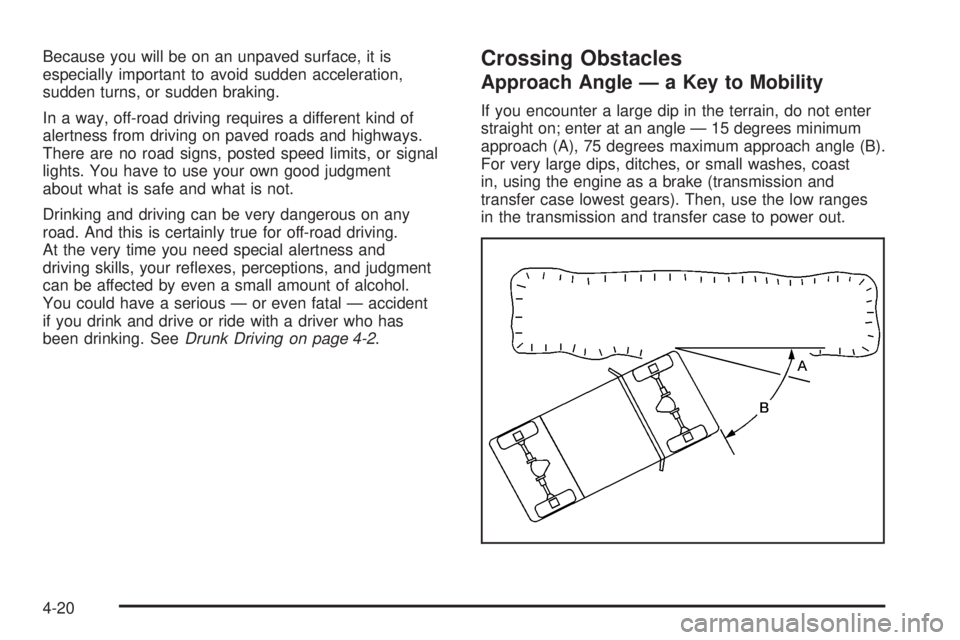
Approach Angle — a Key to Mobility
If you encounter a large dip in the terrain, do not enter
straight on; enter at an angle — 15 degrees minimum
approach (A), 75 degrees maximum approach angle (B).
For very large dips, ditches, or small washes, coast
in, using the engine as a brake (transmission and
transfer case lowest gears). Then, use the low ranges
in the transmission and transfer case to power out.
4-20
Page 222 of 416
Driving Downhill
When off-roading takes you downhill, you will want to
consider a number of things:
How steep is the downhill? Will I be able to maintain
vehicle control?
What is the surface like? Smooth? Rough?
Slippery? Hard-packed dirt? Gravel?
Are there hidden surface obstacles? Ruts? Logs?
Boulders?
What is at the bottom of the hill? Is there a hidden
creek bank or even a river bottom with large rocks?If you decide you can go down a hill safely, then try to
keep your vehicle headed straight down, and use a
low gear. This way, engine drag can help your brakes
and they will not have to do all the work. Descend
slowly, keeping your vehicle under control at all times.
{CAUTION:
Heavy braking when going down a hill can
cause your brakes to overheat and fade.
This could cause loss of control and a serious
accident. Apply the brakes lightly when
descending a hill and use a low gear to
keep vehicle speed under control.
4-26
Page 228 of 416
Driving at Night
Night driving is more dangerous than day driving
because some drivers are likely to be impaired — by
alcohol or drugs, with night vision problems, or by
fatigue.
Night driving tips include:
Drive defensively.
Do not drink and drive.
Reduce headlamp glare by adjusting the inside
rearview mirror.
Slow down and keep more space between you and
other vehicles because your headlamps can only
light up so much road ahead.
Watch for animals.
When tired, pull off the road.
Do not wear sunglasses.
Avoid staring directly into approaching headlamps.
Keep the windshield and all glass on your vehicle
clean — inside and out.
Keep your eyes moving, especially during turns or
curves.
No one can see as well at night as in the daytime.
But, as we get older, these differences increase.
A 50-year-old driver might need at least twice as much
light to see the same thing at night as a 20-year-old.
4-32