ECO mode HUMMER H3 2009 User Guide
[x] Cancel search | Manufacturer: HUMMER, Model Year: 2009, Model line: H3, Model: HUMMER H3 2009Pages: 382, PDF Size: 1.99 MB
Page 161 of 382
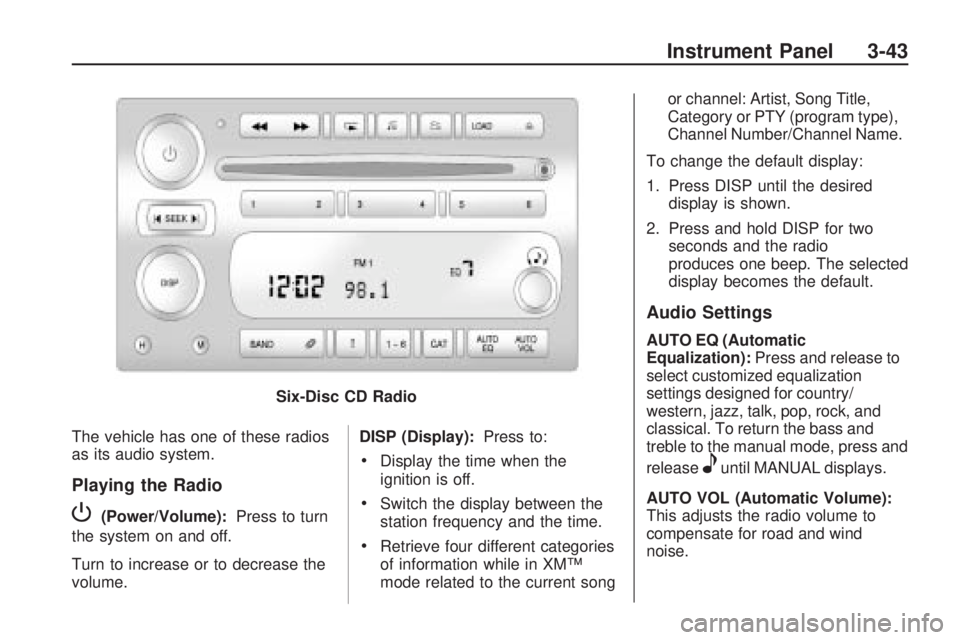
The vehicle has one of these radios
as its audio system.
Playing the Radio
P(Power/Volume):Press to turn
the system on and off.
Turn to increase or to decrease the
volume. DISP (Display):
Press to:
Display the time when the
ignition is off.
Switch the display between the
station frequency and the time.
Retrieve four different categories
of information while in XM™
mode related to the current song or channel: Artist, Song Title,
Category or PTY (program type),
Channel Number/Channel Name.
To change the default display:
1. Press DISP until the desired display is shown.
2. Press and hold DISP for two seconds and the radio
produces one beep. The selected
display becomes the default.
Audio Settings
AUTO EQ (Automatic
Equalization): Press and release to
select customized equalization
settings designed for country/
western, jazz, talk, pop, rock, and
classical. To return the bass and
treble to the manual mode, press and
release
euntil MANUAL displays.
AUTO VOL (Automatic Volume):
This adjusts the radio volume to
compensate for road and wind
noise.
Six-Disc CD Radio
Instrument Panel 3-43
Page 168 of 382
To delete tracks:
1. Press
Rto turn song list on.
S-LIST displays.
2. Press either SEEK arrow to
select the desired track to
be deleted.
3. Press and hold
Rfor
two seconds. Two beeps
sound to conrm that the track
has been deleted.
After a track has been deleted, the
remaining tracks are moved up
the list. When another track is added
to the song list, the track is added
to the end of the list.
To delete the entire song list:
1. Press
Rto turn song list on.
S-LIST displays.
2. Press and hold
Rfor more than
four seconds. One beep sounds
and S-LIST EMPTY displays
to conrm that the song list has
been deleted.If a CD is ejected, and the song list
contains saved tracks from that
CD, those tracks are automatically
deleted from the song list. Any
tracks saved to the song list again
are added to the bottom of the list.
To end song list mode, press
the
Rbutton. One beep sounds
and S-LIST is removed from
the display.
Care of CDs and the CD
Player
Care of CDs
Store CD(s) in their original cases
or other protective cases and
away from direct sunlight and dust.
The CD player scans the bottom
of the disc. If the bottom of a CD is
damaged it may not play properly
or at all. Do not touch the bottom of
a CD while handling it. Pick up
CDs by grasping the outer edges or
the edge of the hole and the
outer edge.If the surface of a CD is dirty, take a
soft, lint free cloth or dampen a
clean, soft cloth in a mild, neutral
detergent solution mixed with water,
and clean it. Make sure the wiping
process starts from the center to
the edge.
Care of the CD Player
Do not add labels to a CD, it could
get caught in the CD player.
Use a marking pen to write on the
top of the CD if a description is
needed.
Do not use CD lens cleaners, they
could damage the CD player.
Notice:If a label is added to a
CD, or more than one CD is
inserted into the slot at a time, or
an attempt is made to play
scratched or damaged CDs, the
CD player could be damaged.
While using the CD player,
use only CDs in good condition
without any label, load one
CD at a time, and keep the CD
3-50 Instrument Panel
Page 190 of 382
Adjust your driving accordingly. See
DIC Warnings and Messages on
page 3-37for more information.
It is recommended to leave
the system on for normal driving
conditions, but it may be necessary
to turn the system off if the
vehicle is stuck in sand, mud, ice, or
snow, and it is necessary to
“rock” the vehicle to attempt to free
it. SeeIf Your Vehicle is Stuck
in Sand, Mud, Ice, or Snow
on page 4-33for more information.
To turn the system off, press and
release the TCS/StabiliTrak
®button.When TCS has been turned off, this
light comes on steady and TRAC
OFF appears on the DIC. This light
ashes when TCS is active.
Press and release the
TCS/StabiliTrak button again to turn
the system back on. The TRAC
OFF message then goes off. TCS
automatically comes on whenever
the vehicle is started and resets
itself at each ignition cycle.
Adding non-dealer/non-retailer
accessories can affect the vehicle’s
performance. SeeAccessories
and Modifications on page 5-3.
Locking Rear Axle
For vehicles with this feature,
additional traction can be obtained
from the rear wheels when
traveling in off-road situations such
as mud, snow, sand, steep hills
and uneven terrain.
The button used to turn this feature
on or off is located on the
instrument panel.
To lock the rear axle, do the
following:
1. Place the transfer case in the
4LO Lock mode. This is the
only mode which will allow
the rear axle to lock. See
Full-Time Four-Wheel Drive on
page 2-24for more information
regarding the transfer case
and 4LO Lock mode.
4-8 Driving Your Vehicle
Page 191 of 382
2. Press the rear axle locking
button with the vehicle moving
less than 16 mph (26 km/h).
The light in the button stops ashing
and remains illuminated when the
rear axle is locked.
Notice:If you try to lock the axle
while the vehicle is stuck and
the tires are spinning, the
vehicle’s drivetrain could be
damaged. The repairs would not
be covered by the vehicle
warranty. Always lock the axle
before attempting situations
and/or navigating terrain which
could possibly cause the vehicle
to become stuck.
The locking rear axle will be
disengaged when the wheel speed
is greater than 40 mph (64 km/h),
if the vehicle’s battery is low and/or
the transfer case is shifted out of
4LO Lock mode.Notice:If the vehicle’s axle is
locked while driving on pavement,
the drivetrain could be damaged.
Repairs would not be covered
by the vehicle warranty. Do
not use the locking axle on
pavement. If four-wheel drive is
needed when traveling on
pavement, use only 4HI.
Locking Front Axle
For vehicles with this feature, the
locking front axle, used with
the locking rear axle, can give the
vehicle additional traction when
traveling in off-road situations such
as mud, snow, sand, steep hills
and uneven terrain.
The button used to turn the locking
front axle on or off is located on
the instrument panel.Before the front axle can be locked,
the rear axle must be locked.
To lock the front and rear axles:
1. Place the transfer case in
the 4LO Lock mode. This is the
only mode which allows the
front and rear axles to lock. See
Full-Time Four-Wheel Drive
on page 2-24for more
information regarding the transfer
case and 4LO Lock mode.
2. Press the rear axle locking
button with the vehicle moving
less than 16 mph (26 km/h).
3. Wait for the light in the button
to stop ashing and remain
illuminated to show that the rear
axle is locked.
4. Press the front axle locking
button with the vehicle stopped
or moving less than 16 mph
(26 km/h).
Driving Your Vehicle 4-9
Page 192 of 382
5. Wait for the light in the button
to stop ashing and remain
illuminated to show that the front
axle is locked.
Notice:If you try to lock the axle
while the vehicle is stuck and
the tires are spinning, the
vehicle’s drivetrain could be
damaged. The repairs would not
be covered by the vehicle
warranty. Always lock the axle
before attempting situations
and/or navigating terrain which
could possibly cause the vehicle
to become stuck.
Locking axles will be disengaged
when the wheel speed is greater
than 40 mph (64 km/h), if the
vehicle’s battery is low and/or the
transfer case is shifted out of
4LO Lock mode.Notice:If the vehicle’s axle is
locked while driving on pavement,
the drivetrain could be damaged.
Repairs would not be covered
by the vehicle warranty. Do
not use the locking axle on
pavement. If four-wheel drive is
needed when traveling on
pavement, use only 4HI.
Steering
Power Steering
If power steering assist is lost
because the engine stops or the
system is not functioning, the vehicle
can be steered but it will take
more effort.
Steering Tips
It is important to take curves at a
reasonable speed.
Traction in a curve depends on the
condition of the tires and the
road surface, the angle at which the
curve is banked, and vehicle
speed. While in a curve, speed is
the one factor that can be controlled.
If there is a need to reduce speed,
do it before entering the curve,
while the front wheels are straight.
Try to adjust the speed so you
can drive through the curve.
Maintain a reasonable, steady
speed. Wait to accelerate until out
of the curve, and then accelerate
gently into the straightaway.
4-10 Driving Your Vehicle
Page 365 of 382
Gather the important information
you will need from the other
driver. Things like name, address,
phone number, driver’s license
number, vehicle license plate,
vehicle make, model and model
year, Vehicle Identication
Number (VIN), insurance
company and policy number, and
a general description of the
damage to the other vehicle.
If possible, call your insurance
company from the scene of the
crash. They will walk you through
the information they will need. If
they ask for a police report, phone
or go to the police department
headquarters the next day and
you can get a copy of the report
for a nominal fee. In some
states/provinces with “no fault”
insurance laws, a report may not
be necessary. This is especially
true if there are no injuries and
both vehicles are driveable.
Choose a reputable collision
repair facility for your vehicle.
Whether you select a GM dealer/
retailer or a private collision repair
facility to x the damage, make
sure you are comfortable with
them. Remember, you will have to
feel comfortable with their work for
a long time.
Once you have an estimate, read
it carefully and make sure you
understand what work will be
performed on your vehicle. If you
have a question, ask for an
explanation. Reputable shops
welcome this opportunity.
Managing the Vehicle Damage
Repair Process
In the event that your vehicle
requires damage repairs, GM
recommends that you take an active
role in its repair. If you have a
pre-determined repair facility of
choice, take your vehicle there, or
have it towed there. Specify to the
facility that any required replacement
collision parts be original equipmentparts, either new Genuine GM parts
or recycled original GM parts.
Remember, recycled parts will not
be covered by your GM vehicle
warranty.
Insurance pays the bill for the repair,
but you must live with the repair.
Depending on your policy limits, your
insurance company may initially
value the repair using aftermarket
parts. Discuss this with your repair
professional, and insist on Genuine
GM parts. Remember if your vehicle
is leased you may be obligated to
have the vehicle repaired with
Genuine GM parts, even if your
insurance coverage does not pay the
full cost.
If another party’s insurance company
is paying for the repairs, you are not
obligated to accept a repair valuation
based on that insurance company’s
collision policy repair limits, as you
have no contractual limits with that
company. In such cases, you can
have control of the repair and parts
choices as long as cost stays within
reasonable limits.
Customer Assistance Information 7-13